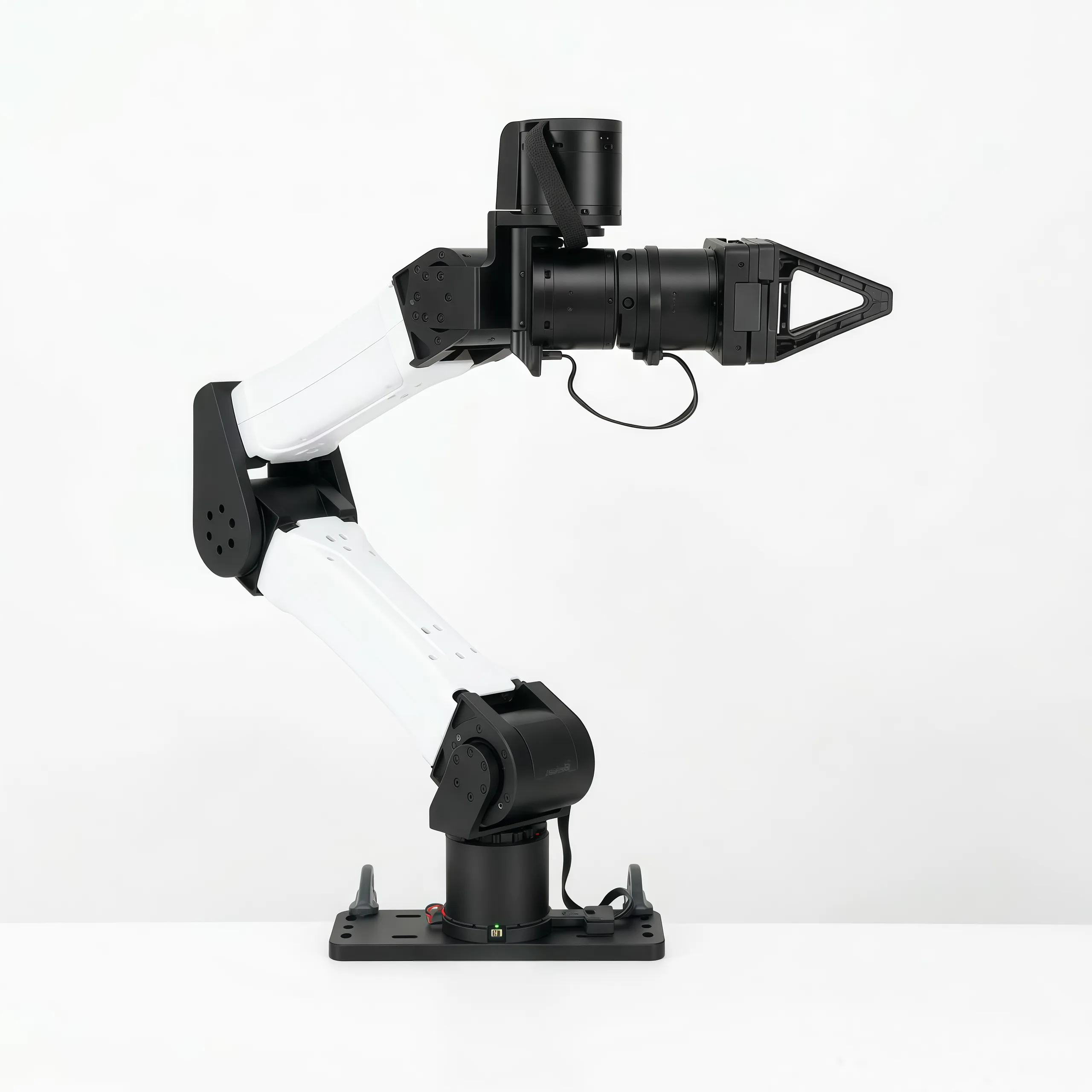
# YAM

[YAM](https://doc.i2rt.com/products/yam) is a 6-DOF arm from [I2RT Robotics](https://i2rt.com/) for imitation learning and embodied AI. In LeRobot, `yam_follower` drives one standard YAM v1 arm with the linear DM4310 gripper, and `bi_yam_follower` drives two. Use them with `lerobot-calibrate`, `lerobot-rollout` and `lerobot-replay`. LeRobot has no YAM leader arm yet, so a YAM is driven by a policy or by replaying a dataset.

Assemble and wire the arms with I2RT's guides; this page covers the LeRobot side.

| Guide                                                           | What it covers                                  |
| --------------------------------------------------------------- | ----------------------------------------------- |
| [YAM Arm Series](https://doc.i2rt.com/products/yam)             | Unboxing, mounting, wiring, motors and grippers |
| [Software setup](https://doc.i2rt.com/getting-started/sw-setup) | CAN adapters, bitrate and fixed interface names |
| [YAM Cell](https://doc.i2rt.com/products/yam-cell)              | Bimanual station with two followers and leaders |

  <img
    src="https://doc.i2rt.com/images/yam-standard/YAM-ST-GP-1.webp"
    alt="YAM follower arm with the linear gripper"
    width="48%"
  />
  <img
    src="https://doc.i2rt.com/images/yam-station/DS-ST-1.webp"
    alt="YAM Cell bimanual station"
    width="48%"
  />

_YAM follower (left) and YAM Cell bimanual station (right). LeRobot drives the followers. Images courtesy of I2RT Robotics._

## Hardware and safety

Each arm has seven motors with IDs 1 to 7: DM4340 for joints 1 to 3, and DM4310 for joints 4 to 6 and the gripper. YAM Pro, Ultra, BIG YAM and the other grippers are not supported yet.

You need:

- Linux, and one USB-to-CAN adapter per arm (SocketCAN, classic CAN at 1 Mbit/s).
- Every motor's CAN timeout set to at most 400 ms (`8000` ticks, I2RT's value), for example with `set_timeout.py --timeout` from the [I2RT SDK](https://github.com/i2rt-robotics/i2rt). The timeout is the last safeguard if LeRobot stops sending commands, so LeRobot won't enable torque without it.
- Internet access the first time you connect: gravity compensation downloads the YAM model from the [`lerobot/robot-urdfs`](https://huggingface.co/buckets/lerobot/robot-urdfs/tree/yam/v1) bucket and caches it under `HF_LEROBOT_HOME/robot-urdfs/yam/v1`.

> [!WARNING]
> Bolt the arm to a stable surface and keep its workspace clear. Disconnecting disables torque, and the arm falls under gravity: support it first. If power or a CAN adapter disconnects while it runs, stop the program, support the arm, then reconnect.

## Install LeRobot 🤗

Follow the [Installation Guide](./installation), then install YAM support:

```bash
pip install -e ".[yam]"
```

This installs `motorbridge` and `python-can` for the arm, and `placo` for gravity compensation.

## Connect the hardware

Each arm needs its own CAN interface, because both arms use the same motor IDs.

```bash
lerobot-setup-can --mode=setup --interfaces=can0 --use_fd=false
```

Use `--interfaces=can0,can1` for two arms. The command configures the Linux interfaces with `sudo ip link` and sends no motor commands. With two arms, `can0` and `can1` can swap after a reboot: check which arm each interface drives, or give them fixed names such as `can_follower_l` with I2RT's [software setup](https://doc.i2rt.com/getting-started/sw-setup), and use those names as the port.

## Device types

| Type              | Device            |
| ----------------- | ----------------- |
| `yam_follower`    | Single follower   |
| `bi_yam_follower` | Bimanual follower |

With two arms, set each arm's options with `--robot.left_arm_config.<option>` and `--robot.right_arm_config.<option>`.

## Calibration

Calibration measures only the gripper limits, fully closed and fully open: the joints keep their factory zeros. Fold the arm first, as shown below. Torque is off while you measure: support the arm, move only the gripper by hand, and press Enter at each prompt. If a calibration already exists, connecting starts control: press Enter to reuse it, or type `c` to measure again, and LeRobot asks you to support the arm before turning torque off.

  <img
    src="https://doc.i2rt.com/images/yam-standard/YAM-ST-GP-2.webp"
    alt="YAM arm in its folded position"
    width="48%"
  />
  <img
    src="https://doc.i2rt.com/images/linear-gripper-4310/GP-4310-CTR-1.webp"
    alt="Linear DM4310 gripper"
    width="48%"
  />

_Folded position, with every joint at zero (left), and the linear DM4310 gripper (right). Images courtesy of I2RT Robotics._

```bash
lerobot-calibrate --robot.type=yam_follower --robot.port=can0 --robot.id=yam
```

The left gripper is measured first, then the right one, into `<id>_left` and `<id>_right` files.

```bash
lerobot-calibrate --robot.type=bi_yam_follower --robot.id=bimanual_yam \
  --robot.left_arm_config.port=can0 --robot.right_arm_config.port=can1
```

Use the same `--robot.id` in later commands, so LeRobot loads the saved file.

## Observations and actions

One arm has `joint_1.pos` to `joint_6.pos`, then `gripper.pos`, for both observations and actions. Joints are absolute angles in degrees, and the gripper goes from 0 (closed) to 100 (open). `use_degrees=false` switches to radians and 0 to 1, as I2RT and MolmoAct2 data use. `use_velocity_and_torque=true` adds `.vel` and `.torque` observations. Actions are absolute joint targets, clipped to the joint limits.

Two arms use the same names with `left_` and `right_` prefixes. Cameras set on an arm are prefixed too, while top-level `--robot.cameras` keep their names.

## Run a policy

Put the arm in its folded position, with every joint at zero, before connecting: LeRobot checks that every joint is within 11.5° of it, then starts control from the measured position. Nothing moves until the policy sends an action.

```bash
lerobot-rollout \
  --robot.type=yam_follower --robot.port=can0 --robot.id=yam \
  --robot.cameras='{"wrist": {"type": "opencv", "index_or_path": 0, "width": 640, "height": 480, "fps": 30}}' \
  --policy.path=<user>/<policy> \
  --task="Pick up the cube"
```

For two arms, use `--robot.type=bi_yam_follower --robot.id=bimanual_yam --robot.left_arm_config.port=can0 --robot.right_arm_config.port=can1`. Add `--dataset.repo_id=<user>/rollout_<name>` to record the rollout; see [Run inference and evaluate your policy](./il_robots#run-inference-and-evaluate-your-policy). `lerobot-replay` replays a recorded episode with the same `--robot.*` options.

Before the first action, and when no action arrives for `command_timeout_s` (1 s), the arm holds its position. With `idle_mode=float`, the joints are instead gravity-compensated and lightly damped so you can move the arm by hand, while the gripper keeps its opening; tracking resumes from wherever you moved it.

## Safety

- A motor fault or missing feedback stops all commands. With two arms, a fault on either stops both. Disconnect and reconnect to continue.
- The gravity model covers the standard arm without cameras or payloads. After adding either, check that the arm doesn't drift in float mode, and adjust `gravity_factors` if it does.

## Configuration options

| Option                    | Default                          | Description                                                |
| ------------------------- | -------------------------------- | ---------------------------------------------------------- |
| `port`                    | required                         | SocketCAN interface, for example `can0`                    |
| `use_degrees`             | `true`                           | Degrees and a 0–100 gripper; `false` gives radians and 0–1 |
| `use_velocity_and_torque` | `false`                          | Add `.vel` and `.torque` observations                      |
| `idle_mode`               | `hold`                           | `hold` the position or `float` when no action arrives      |
| `command_timeout_s`       | `1.0`                            | Seconds without an action before the idle mode             |
| `initial_position_deg`    | all zeros                        | Required initial position; `None` skips the check          |
| `initial_tolerance_deg`   | `11.5`                           | Allowed distance from the initial position                 |
| `gripper_force_limit_n`   | `50.0`                           | Finger force once the gripper is blocked on an object      |
| `gravity_factors`         | `[1.0, 1.1, 1.1, 1.2, 1.0, 1.0]` | Per-joint multipliers of the gravity compensation          |
| `cameras`                 | `{}`                             | Cameras attached to the arm                                |

## Example: MolmoAct2

[`lerobot/MolmoAct2-BimanualYAM-LeRobot`](https://huggingface.co/lerobot/MolmoAct2-BimanualYAM-LeRobot) is `allenai/MolmoAct2-BimanualYAM` in LeRobot format, with its released normalization statistics. It was trained on two YAM arms with radians and a 0–1 gripper, and with three cameras in the order top, left, right; see [MolmoAct2](./molmoact2).

```bash
pip install -e ".[yam,molmoact2,dataset]"

lerobot-rollout \
  --robot.type=bi_yam_follower --robot.id=bimanual_yam \
  --robot.left_arm_config.port=can0 --robot.right_arm_config.port=can1 \
  --robot.left_arm_config.use_degrees=false --robot.right_arm_config.use_degrees=false \
  --robot.cameras='{
    "top": {"type": "opencv", "index_or_path": "/dev/v4l/by-id/TOP_CAMERA", "width": 640, "height": 480, "fps": 30},
    "left": {"type": "opencv", "index_or_path": "/dev/v4l/by-id/LEFT_CAMERA", "width": 640, "height": 480, "fps": 30, "fourcc": "MJPG"},
    "right": {"type": "opencv", "index_or_path": "/dev/v4l/by-id/RIGHT_CAMERA", "width": 640, "height": 480, "fps": 30, "fourcc": "MJPG"}
  }' \
  --policy.path=lerobot/MolmoAct2-BimanualYAM-LeRobot \
  --inference.type=rtc --inference.rtc.execution_horizon=20 --inference.queue_threshold=20 \
  --device=cuda --interpolation_multiplier=2 \
  --interactive=true --play_sounds=false \
  --task="Pick up the red block and place it in the green bin"
```

Type `/start` to run the policy, `/subtask <text>` to change the instruction, `/reset` to return to the initial position, and `/stop` to quit. The return lasts a fixed time and YAM's speed limit still applies, so an arm far from its initial position may stop short.

Float mode lets you start the policy from any position: add `--robot.left_arm_config.idle_mode=float --robot.right_arm_config.idle_mode=float`. Before the first `/start`, and 1 s after a `/reset` finishes, move the arms where you want by hand, then type `/start` to run the policy from there. Don't use `/stop` for this: it ends the session and disables torque.

## Troubleshooting

| Problem                                         | Check                                                                                                        |
| ----------------------------------------------- | ------------------------------------------------------------------------------------------------------------ |
| The CAN interface is missing or down            | Check the adapter's power and USB cable, and `ip link show`. Run `lerobot-setup-can` again.                  |
| `missing or stale motor feedback`               | Check the 24 V power, CAN wiring and termination, motor IDs 1 to 7, and that `port` is this arm's interface. |
| The wrong arm moves                             | Check which arm each interface drives, or give the interfaces fixed names.                                   |
| `unsafe motor CAN timeout`                      | Set every motor's CAN timeout to at most 400 ms with the I2RT SDK.                                           |
| `not within initial_tolerance_deg`              | Fold the arm, with every joint at zero, before connecting.                                                   |
| Connecting asks you to calibrate again          | Use the same `--robot.id` as during calibration.                                                             |
| The arm drifts in float mode                    | Adjust `gravity_factors` for the cameras or payload on the arm.                                              |
| MolmoAct2 moves the arms to the wrong positions | Set `use_degrees=false` on both arms: the model uses radians and a 0–1 gripper.                              |

## References

- [YAM Arm Series](https://doc.i2rt.com/products/yam): hardware, motors and grippers
- [Software setup](https://doc.i2rt.com/getting-started/sw-setup): CAN bitrate and fixed interface names
- [YAM Cell](https://doc.i2rt.com/products/yam-cell): bimanual station
- [I2RT SDK](https://github.com/i2rt-robotics/i2rt): motor tools, URDF and MuJoCo model
- [YAM product page](https://i2rt.com/products/yam-6-dof-arm)
- [MolmoAct2](./molmoact2): policy loading in LeRobot