# Grounding DINO
## 概要
Grounding DINO モデルは、Shilong Liu、Zhaoyang Zeng、Tianhe Ren、Feng Li、Hao Zhang、Jie Yang、Chunyuan Li、Jianwei Yang、Hang Su、Jun Zhu、Lei Zhang によって提案された [Grounding DINO: Marrying DINO with Grounded Pre-Training for Open-Set Object Detection](https://huggingface.co/papers/2303.05499) に記載されています。Grounding DINO は、テキストエンコーダーを閉集合オブジェクト検出モデルに拡張することで、オープンセットオブジェクト検出を可能にします。このモデルは、COCO のゼロショットで 52.5 AP を達成するなど、優れた結果を示しています。
論文の抄録は以下の通りです。
*本論文では、Transformerベースの検出器DINOとグラウンデッド事前学習を組み合わせることで、カテゴリ名や参照表現などの人間による入力を用いて任意のオブジェクトを検出できるオープンセットオブジェクト検出器Grounding DINOを提案します。オープンセットオブジェクト検出の鍵となる解決策は、オープンセット概念の汎化のためにクローズドセット検出器に言語を導入することです。言語とビジョンのモダリティを効果的に融合するために、クローズドセット検出器を概念的に3つのフェーズに分割し、特徴量エンハンサー、言語ガイドクエリ選択、およびクロスモダリティ融合のためのクロスモダリティデコーダーを含む緊密な融合ソリューションを提案します。従来の研究は主に新規カテゴリでオープンセットオブジェクト検出を評価していましたが、属性で指定されたオブジェクトに対する参照表現理解についても評価を行うことを提案します。Grounding DINOは、COCO、LVIS、ODinW、RefCOCO/+/gのベンチマークを含むすべての3つの設定で非常に優れた性能を発揮します。Grounding DINOは、COCOからの訓練データを使用しないゼロショット転送ベンチマークにおいて52.5 APを達成しました。また、ODinWゼロショットベンチマークで平均26.1 APという新記録を樹立しています。*
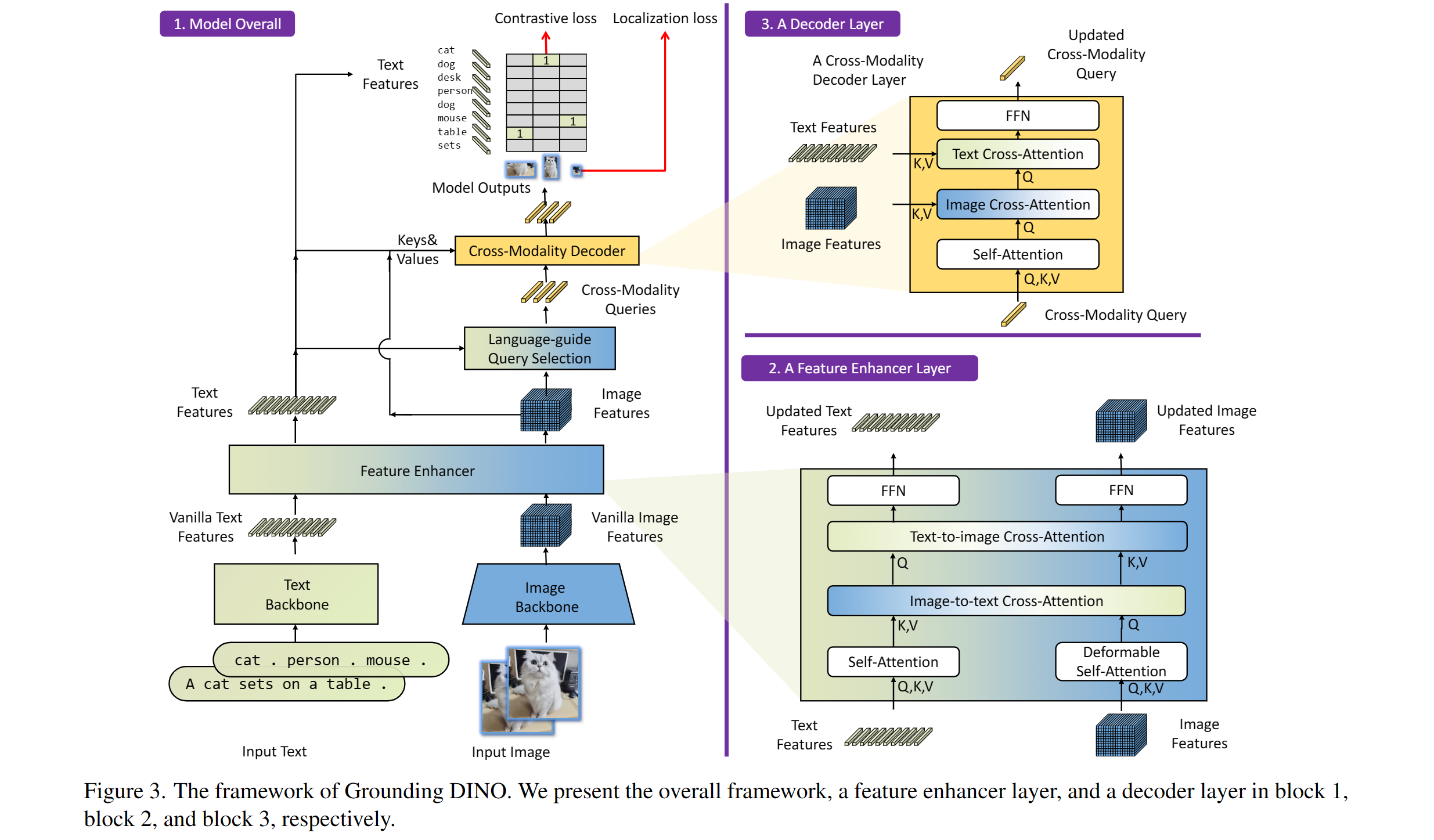 Grounding DINOの概要。元の論文より引用。
このモデルは[EduardoPacheco](https://huggingface.co/EduardoPacheco)氏と[nielsr](https://huggingface.co/nielsr)氏によって提供されました。元のコードは[こちら](https://github.com/IDEA-Research/GroundingDINO)で確認できます。
## 使用のコツ
- [GroundingDinoProcessor](/docs/transformers/main/ja/model_doc/grounding-dino#transformers.GroundingDinoProcessor)を使用して、モデル用の画像とテキストのペアを準備できます。
- テキスト内でクラスを区切るには、ピリオドを使用します。例: "a cat. a dog."
- 複数のクラスを使用する場合(例: `"a cat. a dog."`)、出力の後処理には [GroundingDinoProcessor](/docs/transformers/main/ja/model_doc/grounding-dino#transformers.GroundingDinoProcessor) の `post_process_grounded_object_detection` を使用してください。これは、`post_process_object_detection` が返すラベルが、prob > threshold を満たすモデル次元のインデックスを表すためです。
ゼロショットオブジェクト検出でモデルを使用するには、次の手順に従います。
```python
import requests
import torch
from PIL import Image
from transformers import AutoProcessor, AutoModelForZeroShotObjectDetection
model_id = "IDEA-Research/grounding-dino-tiny"
processor = AutoProcessor.from_pretrained(model_id)
model = AutoModelForZeroShotObjectDetection.from_pretrained(model_id, device_map="auto")
image_url = "http://images.cocodataset.org/val2017/000000039769.jpg"
image = Image.open(requests.get(image_url, stream=True).raw)
# Check for cats and remote controls
text_labels = [["a cat", "a remote control"]]
inputs = processor(images=image, text=text_labels, return_tensors="pt").to(model.device)
with torch.no_grad():
outputs = model(**inputs)
results = processor.post_process_grounded_object_detection(
outputs,
inputs.input_ids,
threshold=0.4,
text_threshold=0.3,
target_sizes=[image.size[::-1]]
)
# Retrieve the first image result
result = results[0]
for box, score, labels in zip(result["boxes"], result["scores"], result["labels"]):
box = [round(x, 2) for x in box.tolist()]
print(f"Detected {labels} with confidence {round(score.item(), 3)} at location {box}")
Detected a cat with confidence 0.468 at location [344.78, 22.9, 637.3, 373.62]
Detected a cat with confidence 0.426 at location [11.74, 51.55, 316.51, 473.22]
```
## Grounded SAM
Grounding DINO と [Segment Anything](sam) モデルを組み合わせることで、[Grounded SAM: Assembling Open-World Models for Diverse Visual Tasks](https://huggingface.co/papers/2401.14159) で紹介されているテキストベースのマスク生成を行うことができます。詳細については、この [デモノートブック](https://github.com/NielsRogge/Transformers-Tutorials/blob/master/Grounding%20DINO/GroundingDINO_with_Segment_Anything.ipynb) 🌍 を参照してください。
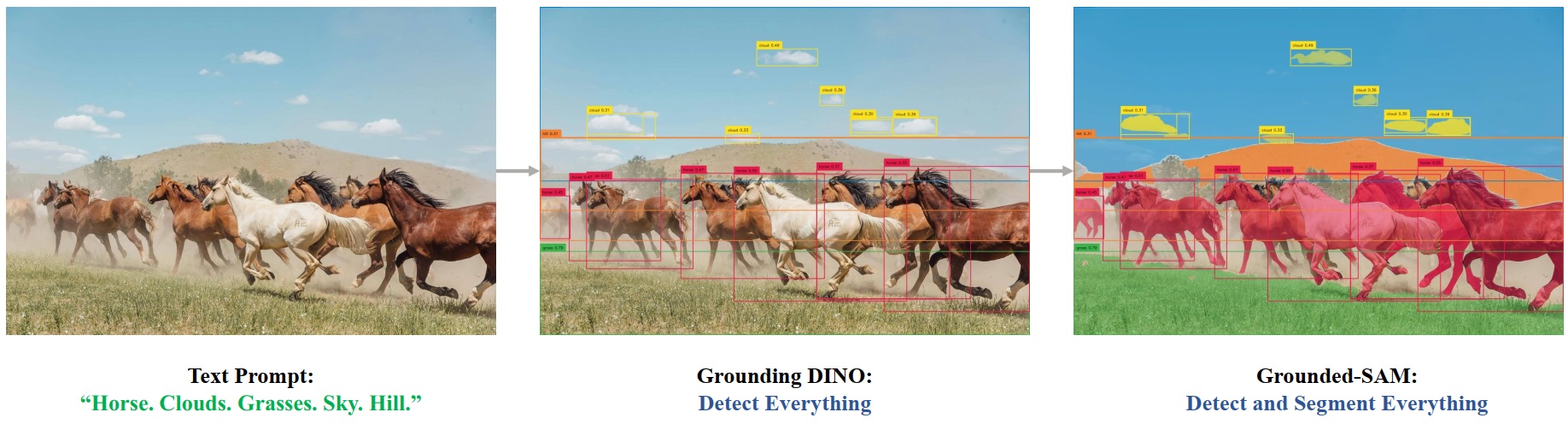 Grounded SAMの概要。元のリポジトリから引用。
## リソース
Grounding DINO の入門を支援するための、Hugging Face 公式およびコミュニティ(🌎 で示されています)のリソースのリストです。ここにリソースを掲載していただくことを希望される場合は、Pull Request を開いてください。レビューいたします。リソースは、既存のリソースと重複するのではなく、新しいことを示すものであることが望ましいです。
- Grounding DINO による推論、および [SAM](sam) との組み合わせに関するデモノートブックは、[こちら](https://github.com/NielsRogge/Transformers-Tutorials/tree/master/Grounding%20DINO)で確認できます。🌎
## GroundingDinoImageProcessor[[transformers.GroundingDinoImageProcessor]]
#### transformers.GroundingDinoImageProcessor[[transformers.GroundingDinoImageProcessor]]
```python
transformers.GroundingDinoImageProcessor(**kwargs: *)
```
[ソース](https://github.com/huggingface/transformers/blob/main/src/transformers/models/grounding_dino/image_processing_grounding_dino.py#L308)
**パラメータ:**
do_convert_rgb (`bool`, *kwargs*, *optional*) : 画像を RGB に変換するかどうか。
do_resize (`bool`, *kwargs*, *任意*, デフォルトは `True`) : 画像をリサイズするかどうか。
size (`Annotated[int | list[int] | tuple[int, ...] | dict[str, int] | None, None]`, *kwargs*、デフォルトは `{'shortest_edge' : 800, 'longest_edge': 1333}`): モデルへの最大入力次元を記述します。
default_to_square (`bool`, *kwargs*, *optional*, デフォルトは `False`) : size が int の場合、リサイズ時に正方形の画像をデフォルトとするかどうか。
crop_size (`Annotated[int | list[int] | tuple[int, ...] | dict[str, int] | None, None]`, *kwargs*) : `center_crop` を適用した後の出力画像のサイズ。
resample (`Annotated[Union[int, PILImageResampling, NoneType], None]`, *kwargs*、デフォルト値は`2`) : 画像のリサイズ時に使用するリサンプリングフィルタです。これは列挙型`PILImageResampling`のいずれかになります。`do_resize`が`True`に設定されている場合のみ、効果が現れます。
do_rescale (`bool`, *kwargs*, *optional*, デフォルトは `True`) : 画像をリスケールするかどうか。
rescale_factor (`float`, *kwargs*, *optional*, デフォルトは `0.00392156862745098`) : `do_rescale` が `True` に設定されている場合、画像をリスケールするための係数。
do_normalize (`bool`, *kwargs*, *optional*, デフォルトは `True`) : 画像を正規化するかどうかを指定します。
image_mean (`Union[float, list[float], tuple[float, ...]]`, *kwargs*, *optional*, デフォルトは `[0.485, 0.456, 0.406]`) : 正規化に使用する画像の平均値です。`do_normalize` が `True` に設定されている場合のみ有効です。
image_std (`Union[float, list[float], tuple[float, ...]]`, *kwargs*, *optional*, デフォルトは `[0.229, 0.224, 0.225]`) : 正規化に使用する画像の標準偏差。`do_normalize` が `True` に設定されている場合のみ有効です。
do_pad (`bool`, *kwargs*, *optional*, デフォルトは `True`) : 画像にパディングを適用するかどうか。パディングは、バッチ内の最大サイズに合わせるか、画像ごとに固定の正方形サイズに合わせるかのいずれかで行われます。正確なパディング戦略はモデルによって異なります。
pad_size (`Annotated[int | list[int] | tuple[int, ...] | dict[str, int] | None, None]`, *kwargs*) : 画像をパディングするサイズを`{"height": int, "width" int}`で指定します。前処理に提供されたすべての画像サイズより大きい必要があります。`pad_size`が指定されない場合、バッチ内の最大の幅と高さにパディングされます。`do_pad=True.`の場合にのみ適用されます。
do_center_crop (`bool`, *kwargs*, *optional*) : 画像を中央クロップするかどうか。
data_format (`Union[str, ~image_utils.ChannelDimension]`、*kwargs*、*optional*) : 対応するのは `ChannelDimension.FIRST` のみです。slow processors との互換性のために追加されました。
input_data_format (`Union[str, ~image_utils.ChannelDimension]`, *kwargs*, *任意*) : 入力画像のチャネル次元の形式です。設定されていない場合、入力画像からチャネル次元の形式が推論されます。以下のいずれかになります: - `"channels_first"` または `ChannelDimension.FIRST`: (num_channels, height, width) 形式の画像。 - `"channels_last"` または `ChannelDimension.LAST`: (height, width, num_channels) 形式の画像。 - `"none"` または `ChannelDimension.NONE`: (height, width) 形式の画像。
device (`Annotated[Union[str, torch.device, NoneType], None]`, *kwargs*) : 動画を処理するデバイスです。未設定の場合、入力動画からデバイスが推論されます。
return_tensors (`Annotated[str | ~utils.generic.TensorType | None, None]`, *kwargs*) : `'pt'`に設定されている場合はスタックされたテンソルを返し、それ以外の場合はテンソルのリストを返します。
disable_grouping (`bool`, *kwargs*, *optional*) : 画像をサイズごとにグループ化してバッチ処理するのではなく、個別に処理するためにグループ化を無効にするかどうかを指定します。None の場合、画像が CPU にある場合は True、それ以外の場合は False に設定されます。この選択は、https://github.com/huggingface/transformers/pull/38157 に詳しく記載されている実証的な観察に基づいています。
image_seq_length (`int`, *kwargs*, *任意*) : 入力内の各画像に使用される画像トークンの数です。後方互換性のために追加されましたが、将来のモデルではプロセッサの属性として設定されるべきです。
format (`str`、*kwargs*、*任意*、デフォルトは`AnnotationFormat.COCO_DETECTION`) : アノテーションのデータ形式。"coco_detection"または"coco_panoptic"のいずれかです。
do_convert_annotations (`bool`, *kwargs*, *optional*, デフォルトは `True`) : アノテーションを GROUNDING_DINO モデルが期待する形式に変換するかどうかを制御します。バウンディングボックスを `(center_x, center_y, width, height)` の形式に変換し、値の範囲を `[0, 1]` にします。`preprocess` メソッドの `do_convert_annotations` パラメータによって上書きできます。
GroundingDinoImageProcessor 画像プロセッサを構築します。
#### preprocess[[transformers.GroundingDinoImageProcessor.preprocess]]
```python
preprocess(images: typing.Union[ForwardRef('PIL.Image.Image'), numpy.ndarray, ForwardRef('torch.Tensor'), list['PIL.Image.Image'], list[numpy.ndarray], list['torch.Tensor']], annotations: dict[str, int | str | list[dict]] | list[dict[str, int | str | list[dict]]] | None = None, return_segmentation_masks: bool | None = None, masks_path: str | pathlib.Path | None = None, **kwargs: *)
```
[ソース](https://github.com/huggingface/transformers/blob/main/src/transformers/models/grounding_dino/image_processing_grounding_dino.py#L563)
**パラメータ:**
images (`Union[PIL.Image.Image, numpy.ndarray, torch.Tensor, list[PIL.Image.Image], list[numpy.ndarray], list[torch.Tensor]]`) : 前処理対象の画像。ピクセル値が 0 から 255 の範囲にある単一の画像またはバッチの画像を想定しています。ピクセル値が 0 から 1 の範囲にある画像を渡す場合は、`do_rescale=False` を設定してください。
annotations (`AnnotationType` または `list[AnnotationType]`、*任意*) : 画像に適用されるパディングに従って変換するアノテーション。
return_segmentation_masks (`bool`、*任意*、デフォルトは `self.return_segmentation_masks`) : セグメンテーションマスクを返すかどうか。
masks_path (`str` または `pathlib.Path`、*省略可能*) : セグメンテーションマスクを含むディレクトリへのパス。
do_convert_rgb (`bool`, *kwargs*, *optional*) : 画像を RGB に変換するかどうか。
do_resize (`bool`, *kwargs*, *optional*) : 画像をリサイズするかどうか。
size (`Annotated[int | list[int] | tuple[int, ...] | dict[str, int] | None, None]`, *kwargs*) : モデルへの最大入力次元を記述します。
default_to_square (`bool`, *kwargs*, *optional*) : size が int の場合、リサイズ時に正方形の画像をデフォルトとするかどうか。
crop_size (`Annotated[int | list[int] | tuple[int, ...] | dict[str, int] | None, None]`, *kwargs*) : `center_crop` を適用した後の出力画像のサイズ。
resample (`Annotated[Union[int, PILImageResampling, NoneType], None]`, *kwargs*) : 画像をリサイズする場合に使用するリサンプリングフィルタ。`PILImageResampling` の列挙型のいずれかです。`do_resize` が `True` に設定されている場合のみ有効です。
do_rescale (`bool`, *kwargs*, *任意*) : 画像をリスケールするかどうか。
rescale_factor (`float`, *kwargs*, *optional*) : `do_rescale` が `True` に設定されている場合、画像をリサイズするためのリスケール係数。
do_normalize (`bool`, *kwargs*, *optional*) : 画像を正規化するかどうかを指定します。
image_mean (`Union[float, list[float], tuple[float, ...]]`, *kwargs*, *optional*) : 正規化に使用する画像の平均値。`do_normalize` が `True` に設定されている場合のみ有効です。
image_std (`Union[float, list[float], tuple[float, ...]]`, *kwargs*, *optional*) : 正規化に使用する画像の標準偏差。`do_normalize` が `True` に設定されている場合のみ有効です。
do_pad (`bool`, *kwargs*, *任意*) : 画像にパディングを適用するかどうか。パディングは、バッチ内の最大サイズに合わせるか、画像ごとに固定の正方形サイズに合わせるかのいずれかで行われます。正確なパディング戦略はモデルによって異なります。
pad_size (`Annotated[int | list[int] | tuple[int, ...] | dict[str, int] | None, None]`, *kwargs*) : 画像をパディングするサイズを`{"height": int, "width" int}`で指定します。前処理に提供されたすべての画像サイズより大きい必要があります。`pad_size`が指定されない場合、バッチ内の最大の幅と高さにパディングされます。`do_pad=True.`の場合にのみ適用されます。
do_center_crop (`bool`, *kwargs*, *optional*) : 画像を中央クロップするかどうか。
data_format (`Union[str, ~image_utils.ChannelDimension]`、*kwargs*、*optional*) : 対応するのは `ChannelDimension.FIRST` のみです。slow processors との互換性のために追加されました。
input_data_format (`Union[str, ~image_utils.ChannelDimension]`, *kwargs*, *任意*) : 入力画像のチャネル次元の形式です。設定されていない場合、入力画像からチャネル次元の形式が推論されます。以下のいずれかになります: - `"channels_first"` または `ChannelDimension.FIRST`: (num_channels, height, width) 形式の画像。 - `"channels_last"` または `ChannelDimension.LAST`: (height, width, num_channels) 形式の画像。 - `"none"` または `ChannelDimension.NONE`: (height, width) 形式の画像。
device (`Annotated[Union[str, torch.device, NoneType], None]`, *kwargs*) : 動画を処理するデバイスです。未設定の場合、入力動画からデバイスが推論されます。
return_tensors (`Annotated[str | ~utils.generic.TensorType | None, None]`, *kwargs*) : `'pt'`に設定されている場合はスタックされたテンソルを返し、それ以外の場合はテンソルのリストを返します。
disable_grouping (`bool`, *kwargs*, *optional*) : 画像をサイズごとにグループ化してバッチ処理するのではなく、個別に処理するためにグループ化を無効にするかどうかを指定します。None の場合、画像が CPU にある場合は True、それ以外の場合は False に設定されます。この選択は、https://github.com/huggingface/transformers/pull/38157 に詳しく記載されている実証的な観察に基づいています。
image_seq_length (`int`, *kwargs*, *任意*) : 入力内の各画像に使用される画像トークンの数です。後方互換性のために追加されましたが、将来のモデルではプロセッサの属性として設定されるべきです。
format (`str`、*kwargs*、*任意*、デフォルトは`AnnotationFormat.COCO_DETECTION`) : アノテーションのデータ形式。"coco_detection"または"coco_panoptic"のいずれかです。
do_convert_annotations (`bool`, *kwargs*, *optional*, デフォルトは `True`) : アノテーションを GROUNDING_DINO モデルが期待する形式に変換するかどうかを制御します。バウンディングボックスを `(center_x, center_y, width, height)` の形式に変換し、値の範囲を `[0, 1]` にします。`preprocess` メソッドの `do_convert_annotations` パラメータによって上書きできます。
**戻り値:** `~image_processing_base.BatchFeature`
- **data** (`dict`) -- __call__ メソッドによって返されるリスト/配列/テンソルの辞書('pixel_values' など)。
- **tensor_type** (`Union[None, str, TensorType]`、*省略可*) -- 初期化時に PyTorch/Numpy の Tensor 内の整数リストを変換するために、ここで tensor_type を指定できます。
## GroundingDinoImageProcessorPil[[transformers.GroundingDinoImageProcessorPil]]
#### transformers.GroundingDinoImageProcessorPil[[transformers.GroundingDinoImageProcessorPil]]
```python
transformers.GroundingDinoImageProcessorPil(**kwargs: *)
```
[ソース](https://github.com/huggingface/transformers/blob/main/src/transformers/models/grounding_dino/image_processing_pil_grounding_dino.py#L300)
**パラメータ:**
do_convert_rgb (`bool`, *kwargs*, *optional*) : 画像を RGB に変換するかどうか。
do_resize (`bool`, *kwargs*, *任意*, デフォルトは `True`) : 画像をリサイズするかどうか。
size (`Annotated[int | list[int] | tuple[int, ...] | dict[str, int] | None, None]`, *kwargs*、デフォルトは `{'shortest_edge' : 800, 'longest_edge': 1333}`): モデルへの最大入力次元を記述します。
default_to_square (`bool`, *kwargs*, *optional*, デフォルトは `False`) : size が int の場合、リサイズ時に正方形の画像をデフォルトとするかどうか。
crop_size (`Annotated[int | list[int] | tuple[int, ...] | dict[str, int] | None, None]`, *kwargs*) : `center_crop` を適用した後の出力画像のサイズ。
resample (`Annotated[Union[int, PILImageResampling, NoneType], None]`, *kwargs*、デフォルト値は`2`) : 画像のリサイズ時に使用するリサンプリングフィルタです。これは列挙型`PILImageResampling`のいずれかになります。`do_resize`が`True`に設定されている場合のみ、効果が現れます。
do_rescale (`bool`, *kwargs*, *optional*, デフォルトは `True`) : 画像をリスケールするかどうか。
rescale_factor (`float`, *kwargs*, *optional*, デフォルトは `0.00392156862745098`) : `do_rescale` が `True` に設定されている場合、画像をリスケールするための係数。
do_normalize (`bool`, *kwargs*, *optional*, デフォルトは `True`) : 画像を正規化するかどうかを指定します。
image_mean (`Union[float, list[float], tuple[float, ...]]`, *kwargs*, *optional*, デフォルトは `[0.485, 0.456, 0.406]`) : 正規化に使用する画像の平均値です。`do_normalize` が `True` に設定されている場合のみ有効です。
image_std (`Union[float, list[float], tuple[float, ...]]`, *kwargs*, *optional*, デフォルトは `[0.229, 0.224, 0.225]`) : 正規化に使用する画像の標準偏差。`do_normalize` が `True` に設定されている場合のみ有効です。
do_pad (`bool`, *kwargs*, *optional*, デフォルトは `True`) : 画像にパディングを適用するかどうか。パディングは、バッチ内の最大サイズに合わせるか、画像ごとに固定の正方形サイズに合わせるかのいずれかで行われます。正確なパディング戦略はモデルによって異なります。
pad_size (`Annotated[int | list[int] | tuple[int, ...] | dict[str, int] | None, None]`, *kwargs*) : 画像をパディングするサイズを`{"height": int, "width" int}`で指定します。前処理に提供されたすべての画像サイズより大きい必要があります。`pad_size`が指定されない場合、バッチ内の最大の幅と高さにパディングされます。`do_pad=True.`の場合にのみ適用されます。
do_center_crop (`bool`, *kwargs*, *optional*) : 画像を中央クロップするかどうか。
data_format (`Union[str, ~image_utils.ChannelDimension]`、*kwargs*、*optional*) : 対応するのは `ChannelDimension.FIRST` のみです。slow processors との互換性のために追加されました。
input_data_format (`Union[str, ~image_utils.ChannelDimension]`, *kwargs*, *任意*) : 入力画像のチャネル次元の形式です。設定されていない場合、入力画像からチャネル次元の形式が推論されます。以下のいずれかになります: - `"channels_first"` または `ChannelDimension.FIRST`: (num_channels, height, width) 形式の画像。 - `"channels_last"` または `ChannelDimension.LAST`: (height, width, num_channels) 形式の画像。 - `"none"` または `ChannelDimension.NONE`: (height, width) 形式の画像。
device (`Annotated[Union[str, torch.device, NoneType], None]`, *kwargs*) : 動画を処理するデバイスです。未設定の場合、入力動画からデバイスが推論されます。
return_tensors (`Annotated[str | ~utils.generic.TensorType | None, None]`, *kwargs*) : `'pt'`に設定されている場合はスタックされたテンソルを返し、それ以外の場合はテンソルのリストを返します。
disable_grouping (`bool`, *kwargs*, *optional*) : 画像をサイズごとにグループ化してバッチ処理するのではなく、個別に処理するためにグループ化を無効にするかどうかを指定します。None の場合、画像が CPU にある場合は True、それ以外の場合は False に設定されます。この選択は、https://github.com/huggingface/transformers/pull/38157 に詳しく記載されている実証的な観察に基づいています。
image_seq_length (`int`, *kwargs*, *任意*) : 入力内の各画像に使用される画像トークンの数です。後方互換性のために追加されましたが、将来のモデルではプロセッサの属性として設定されるべきです。
format (`str`、*kwargs*、*任意*、デフォルトは`AnnotationFormat.COCO_DETECTION`) : アノテーションのデータ形式。"coco_detection"または"coco_panoptic"のいずれかです。
do_convert_annotations (`bool`, *kwargs*, *optional*, デフォルトは `True`) : アノテーションを GROUNDING_DINO モデルが期待する形式に変換するかどうかを制御します。バウンディングボックスを `(center_x, center_y, width, height)` の形式に変換し、値の範囲を `[0, 1]` にします。`preprocess` メソッドの `do_convert_annotations` パラメータによって上書きできます。
GroundingDinoImageProcessor 画像プロセッサを構築します。
#### preprocess[[transformers.GroundingDinoImageProcessorPil.preprocess]]
```python
preprocess(images: typing.Union[ForwardRef('PIL.Image.Image'), numpy.ndarray, ForwardRef('torch.Tensor'), list['PIL.Image.Image'], list[numpy.ndarray], list['torch.Tensor']], annotations: dict[str, int | str | list[dict]] | list[dict[str, int | str | list[dict]]] | None = None, return_segmentation_masks: bool | None = None, masks_path: str | pathlib.Path | None = None, **kwargs: *)
```
[ソース](https://github.com/huggingface/transformers/blob/main/src/transformers/models/grounding_dino/image_processing_pil_grounding_dino.py#L568)
**パラメータ:**
images (`Union[PIL.Image.Image, numpy.ndarray, torch.Tensor, list[PIL.Image.Image], list[numpy.ndarray], list[torch.Tensor]]`) : 前処理対象の画像。ピクセル値が 0 から 255 の範囲にある単一の画像またはバッチの画像を想定しています。ピクセル値が 0 から 1 の範囲にある画像を渡す場合は、`do_rescale=False` を設定してください。
annotations (`AnnotationType` または `list[AnnotationType]`、*任意*) : 画像に適用されるパディングに従って変換するアノテーション。
return_segmentation_masks (`bool`、*任意*、デフォルトは `self.return_segmentation_masks`) : セグメンテーションマスクを返すかどうか。
masks_path (`str` または `pathlib.Path`、*省略可能*) : セグメンテーションマスクを含むディレクトリへのパス。
do_convert_rgb (`bool`, *kwargs*, *optional*) : 画像を RGB に変換するかどうか。
do_resize (`bool`, *kwargs*, *optional*) : 画像をリサイズするかどうか。
size (`Annotated[int | list[int] | tuple[int, ...] | dict[str, int] | None, None]`, *kwargs*) : モデルへの最大入力次元を記述します。
default_to_square (`bool`, *kwargs*, *optional*) : size が int の場合、リサイズ時に正方形の画像をデフォルトとするかどうか。
crop_size (`Annotated[int | list[int] | tuple[int, ...] | dict[str, int] | None, None]`, *kwargs*) : `center_crop` を適用した後の出力画像のサイズ。
resample (`Annotated[Union[int, PILImageResampling, NoneType], None]`, *kwargs*) : 画像をリサイズする場合に使用するリサンプリングフィルタ。`PILImageResampling` の列挙型のいずれかです。`do_resize` が `True` に設定されている場合のみ有効です。
do_rescale (`bool`, *kwargs*, *任意*) : 画像をリスケールするかどうか。
rescale_factor (`float`, *kwargs*, *optional*) : `do_rescale` が `True` に設定されている場合、画像をリサイズするためのリスケール係数。
do_normalize (`bool`, *kwargs*, *optional*) : 画像を正規化するかどうかを指定します。
image_mean (`Union[float, list[float], tuple[float, ...]]`, *kwargs*, *optional*) : 正規化に使用する画像の平均値。`do_normalize` が `True` に設定されている場合のみ有効です。
image_std (`Union[float, list[float], tuple[float, ...]]`, *kwargs*, *optional*) : 正規化に使用する画像の標準偏差。`do_normalize` が `True` に設定されている場合のみ有効です。
do_pad (`bool`, *kwargs*, *任意*) : 画像にパディングを適用するかどうか。パディングは、バッチ内の最大サイズに合わせるか、画像ごとに固定の正方形サイズに合わせるかのいずれかで行われます。正確なパディング戦略はモデルによって異なります。
pad_size (`Annotated[int | list[int] | tuple[int, ...] | dict[str, int] | None, None]`, *kwargs*) : 画像をパディングするサイズを`{"height": int, "width" int}`で指定します。前処理に提供されたすべての画像サイズより大きい必要があります。`pad_size`が指定されない場合、バッチ内の最大の幅と高さにパディングされます。`do_pad=True.`の場合にのみ適用されます。
do_center_crop (`bool`, *kwargs*, *optional*) : 画像を中央クロップするかどうか。
data_format (`Union[str, ~image_utils.ChannelDimension]`、*kwargs*、*optional*) : 対応するのは `ChannelDimension.FIRST` のみです。slow processors との互換性のために追加されました。
input_data_format (`Union[str, ~image_utils.ChannelDimension]`, *kwargs*, *任意*) : 入力画像のチャネル次元の形式です。設定されていない場合、入力画像からチャネル次元の形式が推論されます。以下のいずれかになります: - `"channels_first"` または `ChannelDimension.FIRST`: (num_channels, height, width) 形式の画像。 - `"channels_last"` または `ChannelDimension.LAST`: (height, width, num_channels) 形式の画像。 - `"none"` または `ChannelDimension.NONE`: (height, width) 形式の画像。
device (`Annotated[Union[str, torch.device, NoneType], None]`, *kwargs*) : 動画を処理するデバイスです。未設定の場合、入力動画からデバイスが推論されます。
return_tensors (`Annotated[str | ~utils.generic.TensorType | None, None]`, *kwargs*) : `'pt'`に設定されている場合はスタックされたテンソルを返し、それ以外の場合はテンソルのリストを返します。
disable_grouping (`bool`, *kwargs*, *optional*) : 画像をサイズごとにグループ化してバッチ処理するのではなく、個別に処理するためにグループ化を無効にするかどうかを指定します。None の場合、画像が CPU にある場合は True、それ以外の場合は False に設定されます。この選択は、https://github.com/huggingface/transformers/pull/38157 に詳しく記載されている実証的な観察に基づいています。
image_seq_length (`int`, *kwargs*, *任意*) : 入力内の各画像に使用される画像トークンの数です。後方互換性のために追加されましたが、将来のモデルではプロセッサの属性として設定されるべきです。
format (`str`、*kwargs*、*任意*、デフォルトは`AnnotationFormat.COCO_DETECTION`) : アノテーションのデータ形式。"coco_detection"または"coco_panoptic"のいずれかです。
do_convert_annotations (`bool`, *kwargs*, *optional*, デフォルトは `True`) : アノテーションを GROUNDING_DINO モデルが期待する形式に変換するかどうかを制御します。バウンディングボックスを `(center_x, center_y, width, height)` の形式に変換し、値の範囲を `[0, 1]` にします。`preprocess` メソッドの `do_convert_annotations` パラメータによって上書きできます。
**戻り値:** `~image_processing_base.BatchFeature`
- **data** (`dict`) -- __call__ メソッドによって返されるリスト/配列/テンソルの辞書('pixel_values' など)。
- **tensor_type** (`Union[None, str, TensorType]`、*省略可*) -- 初期化時に PyTorch/Numpy の Tensor 内の整数リストを変換するために、ここで tensor_type を指定できます。
#### post_process_object_detection[[transformers.GroundingDinoImageProcessorPil.post_process_object_detection]]
```python
post_process_object_detection(outputs: GroundingDinoObjectDetectionOutput, threshold: float = 0.1, target_sizes: transformers.utils.generic.TensorType | list[tuple] | None = None)
```
[ソース](https://github.com/huggingface/transformers/blob/main/src/transformers/models/grounding_dino/image_processing_pil_grounding_dino.py#L713)
**パラメータ:**
outputs (`GroundingDinoObjectDetectionOutput`) : モデルの生出力。
threshold (`float`、*任意*、デフォルト値は 0.1) : オブジェクト検出の予測を保持するためのスコアしきい値。
target_sizes (`torch.Tensor` または `list[tuple[int, int]]`、*任意*) : 形状が `(batch_size, 2)` の Tensor、またはバッチ内の各画像のターゲットサイズ `(height, width)` を含むタプルのリスト (`tuple[int, int]`)。未設定の場合、予測結果はリサイズされません。
**戻り値:** `list[Dict]`
各辞書に以下のキーが含まれる辞書のリスト:
- "scores": 画像上の各予測ボックスに対する信頼度スコア。
- "labels": モデルが画像に対して予測したクラスのインデックス。
- "boxes": (top_left_x, top_left_y, bottom_right_x, bottom_right_y) 形式の画像のバウンディングボックス。
[GroundingDinoForObjectDetection](/docs/transformers/main/ja/model_doc/grounding-dino#transformers.GroundingDinoForObjectDetection)の生出力を、(top_left_x, top_left_y, bottom_right_x, bottom_right_y)形式の最終的なバウンディングボックスに変換します。
## GroundingDinoProcessor[[transformers.GroundingDinoProcessor]]
#### transformers.GroundingDinoProcessor[[transformers.GroundingDinoProcessor]]
```python
transformers.GroundingDinoProcessor(image_processor, tokenizer)
```
[ソース](https://github.com/huggingface/transformers/blob/main/src/transformers/models/grounding_dino/processing_grounding_dino.py#L115)
**パラメータ:**
image_processor (`GroundingDinoImageProcessor`) : 画像プロセッサは必須の入力です。
tokenizer (`BertTokenizer`) : トークナイザーは必須の入力です。
画像プロセッサとトークナイザーを単一のプロセッサにラップするGroundingDinoProcessorを構築します。
[GroundingDinoProcessor](/docs/transformers/main/ja/model_doc/grounding-dino#transformers.GroundingDinoProcessor) は、[GroundingDinoImageProcessor](/docs/transformers/main/ja/model_doc/grounding-dino#transformers.GroundingDinoImageProcessor) と [BertTokenizer](/docs/transformers/main/ja/model_doc/lxmert#transformers.BertTokenizer) のすべての機能を提供します。詳細については、[~GroundingDinoImageProcessor](/docs/transformers/main/ja/model_doc/grounding-dino#transformers.GroundingDinoImageProcessor) および [~BertTokenizer](/docs/transformers/main/ja/model_doc/lxmert#transformers.BertTokenizer) を参照してください。
#### __call__[[transformers.GroundingDinoProcessor.__call__]]
```python
__call__(images: typing.Union[ForwardRef('PIL.Image.Image'), numpy.ndarray, ForwardRef('torch.Tensor'), list['PIL.Image.Image'], list[numpy.ndarray], list['torch.Tensor'], NoneType] = None, text: str | list[str] | list[list[str]] | None = None, videos: typing.Union[list['PIL.Image.Image'], numpy.ndarray, ForwardRef('torch.Tensor'), list[numpy.ndarray], list['torch.Tensor'], list[list['PIL.Image.Image']], list[list[numpy.ndarray]], list[list['torch.Tensor']], transformers.video_utils.URL, list[transformers.video_utils.URL], list[list[transformers.video_utils.URL]], transformers.video_utils.Path, list[transformers.video_utils.Path], list[list[transformers.video_utils.Path]], NoneType] = None, audio: typing.Union[numpy.ndarray, ForwardRef('torch.Tensor'), collections.abc.Sequence[numpy.ndarray], collections.abc.Sequence['torch.Tensor'], NoneType] = None, **kwargs: *)
```
[ソース](https://github.com/huggingface/transformers/blob/main/src/transformers/processing_utils.py#L653)
**パラメータ:**
images (`Union[PIL.Image.Image, numpy.ndarray, torch.Tensor, list[PIL.Image.Image], list[numpy.ndarray], list[torch.Tensor]]`, *任意*) : 前処理を行う画像。ピクセル値が 0 から 255 の範囲にある単一の画像またはバッチの画像を想定しています。ピクセル値が 0 から 1 の範囲にある画像を渡す場合は、`do_rescale=False` を設定してください。
text (`Union[str, list[str], list[list[str]]]`、*任意*) : エンコード対象のシーケンスまたはシーケンスのバッチです。各シーケンスは文字列、または文字列のリスト(プレトークナイズ済み文字列)であることができます。プレトークナイズ済み入力を渡す場合は、バッチ入力との曖昧さを避けるために `is_split_into_words=True` を設定してください。
videos (`Union[list[PIL.Image.Image], numpy.ndarray, torch.Tensor, list[numpy.ndarray], list[torch.Tensor], list[list[PIL.Image.Image]], list[list[numpy.ndarray]], list[list[torch.Tensor]], ~video_utils.URL, list[~video_utils.URL], list[list[~video_utils.URL]], ~video_utils.Path, list[~video_utils.Path], list[list[~video_utils.Path]]]`, *任意*) : 前処理対象の動画。ピクセル値が 0 から 255 の範囲にある単一の動画またはバッチを想定しています。ピクセル値が 0 から 1 の範囲にある動画を渡す場合は、`do_rescale=False` を設定してください。
audio (`Union[numpy.ndarray, torch.Tensor, collections.abc.Sequence[numpy.ndarray], collections.abc.Sequence[torch.Tensor]]`, *任意*) : 準備対象のオーディオまたはオーディオのバッチです。各オーディオは NumPy 配列または PyTorch テンソルであることができます。NumPy 配列/PyTorch テンソルの場合、各オーディオの形状は (C, T) である必要があります。ここで C はチャネル数、T はオーディオのサンプル長を表します。
return_tensors (`str` または [TensorType](/docs/transformers/main/ja/internal/file_utils#transformers.TensorType)、*optional*) : 設定されている場合、特定のフレームワークのテンソルを返します。受け入れ可能な値は以下の通りです: - `'pt'`: PyTorch の `torch.Tensor` オブジェクトを返します。 - `'np'`: NumPy の `np.ndarray` オブジェクトを返します。
- ****kwargs** ([ProcessingKwargs](/docs/transformers/main/ja/main_classes/processors#transformers.ProcessingKwargs), *optional*) : 各モダリティ(テキスト、画像、動画、音声)の追加処理オプション。モデル固有のパラメータは上記にリストされています。サポートされている引数の完全なリストについては、TypedDict クラスを参照してください。
#### post_process_grounded_object_detection[[transformers.GroundingDinoProcessor.post_process_grounded_object_detection]]
```python
post_process_grounded_object_detection(outputs: GroundingDinoObjectDetectionOutput, input_ids: transformers.utils.generic.TensorType | None = None, threshold: float = 0.25, text_threshold: float = 0.25, target_sizes: transformers.utils.generic.TensorType | list[tuple] | None = None, text_labels: list[list[str]] | None = None)
```
[ソース](https://github.com/huggingface/transformers/blob/main/src/transformers/models/grounding_dino/processing_grounding_dino.py#L143)
**パラメータ:**
outputs (`GroundingDinoObjectDetectionOutput`) : モデルの生出力。
input_ids (`torch.LongTensor`、shape `(batch_size, sequence_length)`、*任意*) : 入力テキストのトークン ID です。指定されない場合、モデルの出力から取得されます。
threshold (`float`、*任意*、デフォルト値は 0.25) : 信頼度スコアに基づいて物体検出の予測を保持するための閾値。
text_threshold (`float`、*任意*、デフォルト値は 0.25) : テキスト検出の予測を保持するためのスコアしきい値。
target_sizes (`torch.Tensor` または `list[tuple[int, int]]`、*任意*) : 形状が `(batch_size, 2)` の Tensor、またはバッチ内の各画像のターゲットサイズ `(height, width)` を含むタプルのリスト (`tuple[int, int]`)。未設定の場合、予測結果はリサイズされません。
text_labels (`list[list[str]]`、*任意*) : 各画像で検出される候補ラベルのリスト。現時点では*使用されていません*が、zero-shot object detection pipeline のシグネチャに必要です。テキストラベルは代わりに、`outputs` に提供される `input_ids` テンソルから抽出されます。
**戻り値:** `list[Dict]`
各辞書に以下を含む辞書のリスト
- **scores**: 検出されたオブジェクトの信頼度スコアのテンソル
- **boxes**: [x0, y0, x1, y1] 形式のバウンディングボックスのテンソル
- **labels**: 検出された各オブジェクトのテキストラベルのリスト(v4.51.0 で整数 ID に置き換えられます)
- **text_labels**: 検出されたオブジェクトのテキストラベルのリスト
[GroundingDinoForObjectDetection](/docs/transformers/main/ja/model_doc/grounding-dino#transformers.GroundingDinoForObjectDetection)の生出力を、(top_left_x, top_left_y, bottom_right_x, bottom_right_y)形式の最終的なバウンディングボックスに変換し、関連するテキストラベルを取得します。
## GroundingDinoConfig[[transformers.GroundingDinoConfig]]
#### transformers.GroundingDinoConfig[[transformers.GroundingDinoConfig]]
```python
transformers.GroundingDinoConfig(transformers_version: str | None = None, architectures: list[str] | None = None, output_hidden_states: bool | None = False, return_dict: bool | None = True, dtype: str | torch.dtype | None = None, chunk_size_feed_forward: int = 0, id2label: dict[int, str] | dict[str, str] | None = None, label2id: dict[str, int] | dict[str, str] | None = None, problem_type: Literal['regression', 'single_label_classification', 'multi_label_classification'] | None = None, is_encoder_decoder: bool = True, backbone_config: dict | transformers.configuration_utils.PreTrainedConfig | None = None, text_config: dict | transformers.configuration_utils.PreTrainedConfig | None = None, num_queries: int = 900, encoder_layers: int = 6, encoder_ffn_dim: int = 2048, encoder_attention_heads: int = 8, decoder_layers: int = 6, decoder_ffn_dim: int = 2048, decoder_attention_heads: int = 8, activation_function: str = 'relu', d_model: int = 256, dropout: float | int = 0.1, attention_dropout: float | int = 0.0, activation_dropout: float | int = 0.0, auxiliary_loss: bool = False, position_embedding_type: str = 'sine', num_feature_levels: int = 4, encoder_n_points: int = 4, decoder_n_points: int = 4, two_stage: bool = True, class_cost: float = 1.0, bbox_cost: float = 5.0, giou_cost: float = 2.0, bbox_loss_coefficient: float = 5.0, giou_loss_coefficient: float = 2.0, focal_alpha: float = 0.25, disable_custom_kernels: bool = False, max_text_len: int = 256, text_enhancer_dropout: float | int = 0.0, fusion_droppath: float | int = 0.1, fusion_dropout: float | int = 0.0, embedding_init_target: bool = True, query_dim: int = 4, decoder_bbox_embed_share: bool = True, two_stage_bbox_embed_share: bool = False, positional_embedding_temperature: int = 20, init_std: float = 0.02, layer_norm_eps: float = 1e-05, tie_word_embeddings: bool = True)
```
[ソース](https://github.com/huggingface/transformers/blob/main/src/transformers/models/grounding_dino/configuration_grounding_dino.py#L28)
**パラメータ:**
is_encoder_decoder (`bool`、*任意*、デフォルトは`True`) : モデルがエンコーダー/デコーダーとして使用されるかどうかを示します。
backbone_config (`Union[dict, ~configuration_utils.PreTrainedConfig]`、*optional*) : バックボーンモデルの設定です。
text_config (`Union[dict, ~configuration_utils.PreTrainedConfig]`, *任意*) : テキストバックボーンの config オブジェクトまたは辞書。
num_queries (`int`、*optional*、デフォルト値は 900) : オブジェクトクエリ数、すなわち検出スロットの数。[GroundingDinoModel](/docs/transformers/main/ja/model_doc/grounding-dino#transformers.GroundingDinoModel) が 1 枚の画像で検出できるオブジェクトの最大数を示します。
encoder_layers (`int`、*任意*、デフォルトは`6`) : Transformerエンコーダーの隠れ層の数。設定されていない場合は、`num_layers`と同じ値が使用されます。
encoder_ffn_dim (`int`、*optional*、デフォルトは`2048`) : エンコーダー内の「intermediate」(feed-forward とも呼ばれる)層の次元数。
encoder_attention_heads (`int`、*optional*、デフォルトは`8`) : Transformer エンコーダーの各アテンション層におけるアテンションヘッドの数。
decoder_layers (`int`、*任意*、デフォルトは`6`) : Transformer デコーダーの隠れ層の数。設定されていない場合は、`num_layers` と同じ値が使用されます。
decoder_ffn_dim (`int`、*任意*、デフォルトは `2048`) : デコーダー内の「intermediate」(feed-forward と呼ばれることが多い)層の次元数。
decoder_attention_heads (`int`、*任意*、デフォルトは `8`) : Transformer デコーダーの各アテンション層におけるアテンションヘッドの数。
activation_function (`str`、*任意*、デフォルトは `relu`) : デコーダーで使用する非線形活性化関数(関数または文字列)。例えば、`"gelu"`、`"relu"`、`"silu"` など。
d_model (`int`、*任意*、デフォルトは`256`) : エンコーダ層とプーラー層のサイズ。
dropout (`Union[float, int]`、*任意*、デフォルトは`0.1`) : すべての dropout 層の比率。
attention_dropout (`Union[float, int]`、*任意*、デフォルトは`0.0`) : 注意確率のドロップアウト率。
activation_dropout (`Union[float, int]`、*任意*、デフォルトは`0.0`) : 全結合層内の活性化に対する dropout 率。
auxiliary_loss (`bool`、*任意*、デフォルトは`False`) : 補助的なデコーディング損失(各デコーダ層での損失)を使用するかどうかを指定します。
position_embedding_type (`str`、*任意*、デフォルトは`"sine"`) : 画像特徴の上に適用する位置埋め込みの種類。`"sine"`または`"learned"`のいずれかです。
num_feature_levels (`int`、*任意*、デフォルトは 4) : 入力特徴量のレベル数。
encoder_n_points (`int`、*optional*、デフォルトは 4) : エンコーダーの各アテンションヘッドにおける、各特徴レベルでサンプリングされるキーの数。
decoder_n_points (`int`、*optional*、デフォルトは 4) : デコーダーの各アテンションヘッドにおける、各特徴レベルでサンプリングされるキーの数。
two_stage (`bool`、*任意*、デフォルトは `True`) : 2段階の deformable DETR を適用するかどうか。この場合、Grounding DINO のバリアントによってリージョン提案も生成され、それらがデコーダーにさらに渡されてバウンディングボックスの反復的な精緻化が行われます。
class_cost (`float`, *任意*, デフォルトは `1.0`) : ハンガリアンマッチングのコストにおける分類誤差の相対的な重み。
bbox_cost (`float`、*任意*、デフォルトは `5.0`) : ハンガリアンマッチングのコストにおける L1 バウンディングボックス誤差の相対的な重み。
giou_cost (`float`、*任意*、デフォルトは `2.0`) : ハンガリアンマッチングのコストにおける汎化 IoU ロスの相対重み。
bbox_loss_coefficient (`float`、*任意*、デフォルトは `5.0`) : パノプティックセグメンテーション損失における L1 バウンディングボックス損失の相対的な重み。
giou_loss_coefficient (`float`、*任意*、デフォルトは `2.0`) : パノプティックセグメンテーション損失における汎化 IoU 損失の相対的な重み。
focal_alpha (`float`、*任意*、デフォルトは `0.25`) : focal loss の Alpha パラメータです。
disable_custom_kernels (`bool`、*任意*、デフォルトは`False`) : カスタム CUDA カーネルおよび CPU カーネルの使用を無効にします。PyTorch の ONNX エクスポートではカスタムカーネルがサポートされていないため、ONNX エクスポートを行うにはこのオプションが必要です。
max_text_len (`int`、*任意*、デフォルトは 256) : テキスト入力の最大長です。
text_enhancer_dropout (`float`、*任意*、デフォルトは 0.0) : テキストエンハンサーの dropout 率です。
fusion_droppath (`float`、*任意*、デフォルトは 0.1) : 融合モジュールの droppath 比率です。
fusion_dropout (`float`, *optional*, デフォルトは 0.0) : 融合モジュールの dropout 率です。
embedding_init_target (`bool`、*任意*、デフォルトは`True`) : Embedding の重みでターゲットを初期化するかを指定します。
query_dim (`int`、*optional*、デフォルトは 4) : クエリベクトルの次元数。
decoder_bbox_embed_share (`bool`、*任意*、デフォルトは`True`) : すべてのデコーダー層でbbox回帰ヘッドを共有するかどうか。
two_stage_bbox_embed_share (`bool`、*任意*、デフォルトは`False`) : 2段階のbboxジェネレーターとregion proposal生成の間でbbox埋め込みを共有するかどうか。
positional_embedding_temperature (`float`、*任意*、デフォルト値は 20) : ビジョンバックボーンと併せて使用される Sine Positional Embedding の温度です。
init_std (`float`、*任意*、デフォルトは`0.02`) : すべての重み行列を初期化するためのtruncated_normal_initializerの標準偏差です。
layer_norm_eps (`float`、*任意*、デフォルトは`1e-05`) : Layer Normalization 層で使用する epsilon。
tie_word_embeddings (`bool`、*任意*、デフォルトは`True`) : モデルの`tied_weights_keys`マッピングに従って重み埋め込みを共有するかどうか。
これは、Grounding DinoModel の設定を保存するための設定クラスです。指定された引数に基づいて Grounding Dino モデルをインスタンス化し、モデルのアーキテクチャを定義するために使用されます。デフォルト値で設定をインスタンス化すると、[IDEA-Research/grounding-dino-tiny](https://huggingface.co/IDEA-Research/grounding-dino-tiny) と同様の設定が得られます。
設定オブジェクトは [PreTrainedConfig](/docs/transformers/main/ja/main_classes/configuration#transformers.PreTrainedConfig) を継承し、モデルの出力を制御するために使用できます。詳細については、[PreTrainedConfig](/docs/transformers/main/ja/main_classes/configuration#transformers.PreTrainedConfig) のドキュメントを参照してください。
例:
```python
>>> from transformers import GroundingDinoConfig, GroundingDinoModel
>>> # Initializing a Grounding DINO IDEA-Research/grounding-dino-tiny style configuration
>>> configuration = GroundingDinoConfig()
>>> # Initializing a model (with random weights) from the IDEA-Research/grounding-dino-tiny style configuration
>>> model = GroundingDinoModel(configuration)
>>> # Accessing the model configuration
>>> configuration = model.config
```
## GroundingDinoModel[[transformers.GroundingDinoModel]]
#### transformers.GroundingDinoModel[[transformers.GroundingDinoModel]]
```python
transformers.GroundingDinoModel(config: GroundingDinoConfig)
```
[ソース](https://github.com/huggingface/transformers/blob/main/src/transformers/models/grounding_dino/modeling_grounding_dino.py#L1866)
**パラメータ:**
config ([GroundingDinoConfig](/docs/transformers/main/ja/model_doc/grounding-dino#transformers.GroundingDinoConfig)) : モデルのパラメータをすべて含むモデル設定クラスです。設定ファイルで初期化しても、モデルに関連する重みは読み込まれず、設定のみが読み込まれます。モデルの重みをロードするには、[from_pretrained()](/docs/transformers/main/ja/main_classes/model#transformers.PreTrainedModel.from_pretrained) メソッドを確認してください。
Grounding DINOのベースモデル(バックボーンとエンコーダー・デコーダーのTransformerで構成され、特定のヘッドが上に付いておらず、生の隠れ状態を出力するもの)。
このモデルは [PreTrainedModel](/docs/transformers/main/ja/main_classes/model#transformers.PreTrainedModel) を継承しています。ライブラリがすべてのモデルに対して実装している汎用的なメソッド(ダウンロードや保存、入力埋め込みのリサイズ、ヘッドのプルーニングなど)については、スーパークラスのドキュメントを参照してください。
このモデルは、PyTorchの[torch.nn.Module](https://pytorch.org/docs/stable/nn.html#torch.nn.Module)のサブクラスでもあります。通常のPyTorch Moduleとして使用し、一般的な使用方法や動作に関する詳細については、PyTorchのドキュメントを参照してください。
#### forward[[transformers.GroundingDinoModel.forward]]
```python
forward(pixel_values: Tensor, input_ids: Tensor, token_type_ids: typing.Optional[torch.Tensor] = None, attention_mask: typing.Optional[torch.Tensor] = None, pixel_mask: typing.Optional[torch.Tensor] = None, encoder_outputs = None, output_attentions = None, output_hidden_states = None, return_dict = None, **kwargs)
```
[ソース](https://github.com/huggingface/transformers/blob/main/src/transformers/models/grounding_dino/modeling_grounding_dino.py#L2008)
**パラメータ:**
pixel_values (`torch.Tensor`、shape `(batch_size, num_channels, image_size, image_size)`) : 入力画像に対応するテンソルです。ピクセル値は [GroundingDinoImageProcessor](/docs/transformers/main/ja/model_doc/grounding-dino#transformers.GroundingDinoImageProcessor) を使用して取得できます。詳細は [GroundingDinoImageProcessor.__call__()](/docs/transformers/main/ja/model_doc/molmo2#transformers.Molmo2ImageProcessor.__call__) を参照してください([GroundingDinoProcessor](/docs/transformers/main/ja/model_doc/grounding-dino#transformers.GroundingDinoProcessor) は画像の処理に [GroundingDinoImageProcessor](/docs/transformers/main/ja/model_doc/grounding-dino#transformers.GroundingDinoImageProcessor) を使用します)。
input_ids (`torch.LongTensor`、shape `(batch_size, text_sequence_length)`) : 語彙における入力シーケンスのトークンインデックスです。パディングを指定した場合、デフォルトでは無視されます。インデックスは [AutoTokenizer](/docs/transformers/main/ja/model_doc/auto#transformers.AutoTokenizer) を使用して取得できます。詳細は [BertTokenizer.__call__()](/docs/transformers/main/ja/internal/tokenization_utils#transformers.PreTrainedTokenizerBase.__call__) を参照してください。
token_type_ids (`torch.LongTensor`、shape `(batch_size, text_sequence_length)`、*任意*) : 入力の前半と後半を示すセグメントトークンインデックス。インデックスは`[0, 1]`から選択されます: 0 は`sentence A`トークンに対応し、1 は`sentence B`トークンに対応します [トークンタイプIDとは何ですか?](../glossary#token-type-ids)
attention_mask (`torch.Tensor`、shape `(batch_size, sequence_length)`、*任意*) : padding トークンのインデックスに対する attention を回避するためのマスクです。マスクの値は `[0, 1]` から選択されます: - **マスクされない**トークンは 1、- **マスクされる**トークンは 0。 [attention マスクとは?](../glossary#attention-mask)
pixel_mask (`torch.Tensor`、shape `(batch_size, height, width)`、*任意*) : パディングピクセル値に対してアテンションを実行しないためのマスク。`[0, 1]` から選択されるマスク値: - 実ピクセル(つまり **マスクされていない**)は 1、 - パディングピクセル(つまり **マスクされている**)は 0。 [アテンションマスクとは何ですか?](../glossary#attention-mask)
encoder_outputs (``) : Tuple consists of (`last_hidden_state`, *optional*: `hidden_states`, *optional*: `attentions`) `last_hidden_state` of shape `(batch_size, sequence_length, hidden_size)`, *optional*) is a sequence of hidden-states at the output of the last layer of the encoder. Used in the cross-attention of the decoder.
output_attentions (``) : Whether or not to return the attentions tensors of all attention layers. See `attentions` under returned tensors for more detail.
output_hidden_states (``) : Whether or not to return the hidden states of all layers. See `hidden_states` under returned tensors for more detail.
return_dict (``) : プレーンなタプルではなく [ModelOutput](/docs/transformers/main/ja/main_classes/output#transformers.utils.ModelOutput) を返すかどうか。
**戻り値:** `GroundingDinoModelOutput` または `tuple(torch.Tensor)`
`GroundingDinoModelOutput`、または`torch.Tensor`のタプル(`return_dict=False`が渡された場合、または`config.return_dict=False`の場合)。設定([GroundingDinoConfig](/docs/transformers/main/ja/model_doc/grounding-dino#transformers.GroundingDinoConfig))や入力に応じて、さまざまな要素で構成されます。
[GroundingDinoModel](/docs/transformers/main/ja/model_doc/grounding-dino#transformers.GroundingDinoModel)のforwardメソッドは、`__call__`特殊メソッドをオーバーライドします。
この関数内でフォワードパスの手順を定義する必要がありますが、その後、この関数ではなく`Module`インスタンスを呼び出すべきです。前者は前処理と後処理の実行を適切に処理するのに対し、後者はそれらを無視してしまいます。
- **last_hidden_state** (`torch.Tensor`、形状 `(batch_size, num_queries, hidden_size)`) -- モデルのデコーダーの最終層の出力における、隠れ状態のシーケンスです。
- **init_reference_points** (`torch.Tensor`、形状 `(batch_size, num_queries, 4)`) -- Transformerデコーダーに渡される初期の参照点。
- **intermediate_hidden_states** (`torch.Tensor`、形状 `(batch_size, config.decoder_layers, num_queries, hidden_size)`) -- 中間隠れ状態のスタック(デコーダーの各層の出力)。
- **intermediate_reference_points** (`torch.Tensor`、形状 `(batch_size, config.decoder_layers, num_queries, 4)`) -- 中間参照点のスタック(デコーダーの各層の参照点)。
- **decoder_hidden_states** (`tuple[torch.Tensor]`、*optional*、`output_hidden_states=True` が渡された場合または `config.output_hidden_states=True` の場合に返されます) -- `torch.Tensor` のタプル(埋め込み層を持つモデルの場合、埋め込みの出力用 1 つ + 各層の出力用 1 つ)で、形状は `(batch_size, sequence_length, hidden_size)` です。
各層の出力および初期埋め込み出力における、デコーダーの隠れ状態。
- **decoder_attentions** (`tuple[tuple[torch.Tensor]]`、*任意*、`output_attentions=True` が渡された場合または `config.output_attentions=True` の場合に返されます) -- `torch.Tensor` のタプル(各レイヤーごとに1つ)、形状は `(batch_size, num_heads, sequence_length, sequence_length)`。
自己アテンションヘッドにおける加重平均を計算するために使用される、アテンションのsoftmax後のデコーダーのアテンション重み。
- **encoder_last_hidden_state_vision** (`torch.Tensor`、形状 `(batch_size, sequence_length, hidden_size)`、*任意*) -- モデルのエンコーダーの最終層の出力における隠れ状態のシーケンス。
- **encoder_last_hidden_state_text** (`torch.Tensor`、形状 `(batch_size, sequence_length, hidden_size)`、*任意*) -- モデルのエンコーダーの最終層の出力における隠れ状態のシーケンス。
- **encoder_vision_hidden_states** (`tuple(torch.Tensor)`、*optional*、`output_hidden_states=True` が渡された場合または `config.output_hidden_states=True` の場合に返されます) -- `torch.Tensor` のタプル(ビジョン埋め込みの出力用 1 つ + 各層の出力用 1 つ)、形状は `(batch_size, sequence_length, hidden_size)`。各層の出力および初期埋め込み出力におけるビジョンエンコーダーの隠れ状態。
- **encoder_text_hidden_states** (`tuple(torch.Tensor)`、*optional*、`output_hidden_states=True` が渡された場合または `config.output_hidden_states=True` の場合に返されます) -- `torch.Tensor` のタプル(テキスト埋め込みの出力用 1 つ + 各層の出力用 1 つ)、形状は `(batch_size, sequence_length, hidden_size)`。テキストエンコーダーの各層の出力および初期埋め込み出力における隠れ状態。
- **encoder_attentions** (`tuple(tuple(torch.Tensor))`、*optional*、`output_attentions=True` が渡された場合または `config.output_attentions=True` の場合に返されます) -- `torch.Tensor` のタプルのタプル(各レイヤーの注意機構用)で、形状は `(batch_size, num_heads, sequence_length, sequence_length)` です。テキスト-ビジョン注意機構、ビジョン-テキスト注意機構、テキストエンハンサー(自己注意機構)、マルチスケール変形注意機構のヘッドにおいて、重み付き平均を計算するために使用される、注意機構の softmax 後の注意重みです。双方向注意機構のヘッドにおいて、重み付き平均を計算するために使用される注意機構の softmax です。
- **enc_outputs_class** (`torch.Tensor`、形状 `(batch_size, sequence_length, config.num_labels)`、*任意*、`config.two_stage=True` の場合に返されます) -- 第1段階でスコア上位の `config.num_queries` 個のバウンディングボックスがリージョンプロポーザルとして選択される、予測されたバウンディングボックスのスコアです。バウンディングボックスの二値分類(すなわちフォアグラウンドとバックグラウンド)の出力です。
- **enc_outputs_coord_logits** (`torch.Tensor`、形状 `(batch_size, sequence_length, 4)`、*任意*、`config.two_stage=True` の場合に返されます) -- 第1段階で予測されるバウンディングボックス座標のロジット。
- **encoder_logits** (`torch.Tensor`、形状 `(batch_size, sequence_length, config.num_labels)`、*任意*、`config.two_stage=True` の場合に返されます) -- 第1段階でスコアが上位の `config.num_queries` 個のバウンディングボックスのロジット。
- **encoder_pred_boxes** (`torch.Tensor`、形状 `(batch_size, sequence_length, 4)`、*任意*、`config.two_stage=True` の場合に返されます) -- 第1段階でスコアが上位の `config.num_queries` 個のバウンディングボックスの座標。
例:
```python
>>> from transformers import AutoProcessor, AutoModel
>>> from PIL import Image
>>> from huggingface_hub.utils import httpx
>>> from io import BytesIO
>>> url = "http://images.cocodataset.org/val2017/000000039769.jpg"
>>> with httpx.stream("GET", url) as response:
... image = Image.open(BytesIO(response.read()))
>>> text = "a cat."
>>> processor = AutoProcessor.from_pretrained("IDEA-Research/grounding-dino-tiny")
>>> model = AutoModel.from_pretrained("IDEA-Research/grounding-dino-tiny")
>>> inputs = processor(images=image, text=text, return_tensors="pt")
>>> outputs = model(**inputs)
>>> last_hidden_states = outputs.last_hidden_state
>>> list(last_hidden_states.shape)
[1, 900, 256]
```
## GroundingDinoForObjectDetection[[transformers.GroundingDinoForObjectDetection]]
#### transformers.GroundingDinoForObjectDetection[[transformers.GroundingDinoForObjectDetection]]
```python
transformers.GroundingDinoForObjectDetection(config: GroundingDinoConfig)
```
[ソース](https://github.com/huggingface/transformers/blob/main/src/transformers/models/grounding_dino/modeling_grounding_dino.py#L2376)
**パラメータ:**
config ([GroundingDinoConfig](/docs/transformers/main/ja/model_doc/grounding-dino#transformers.GroundingDinoConfig)) : モデルのパラメータをすべて含むモデル設定クラスです。設定ファイルで初期化しても、モデルに関連する重みは読み込まれず、設定のみが読み込まれます。モデルの重みをロードするには、[from_pretrained()](/docs/transformers/main/ja/main_classes/model#transformers.PreTrainedModel.from_pretrained) メソッドを確認してください。
Grounding DINO モデル(バックボーンとエンコーダー・デコーダー型 Transformer で構成)の上部にオブジェクト検出ヘッドを備え、COCO 検出などのタスクに対応します。
このモデルは [PreTrainedModel](/docs/transformers/main/ja/main_classes/model#transformers.PreTrainedModel) を継承しています。ライブラリがすべてのモデルに対して実装している汎用的なメソッド(ダウンロードや保存、入力埋め込みのリサイズ、ヘッドのプルーニングなど)については、スーパークラスのドキュメントを参照してください。
このモデルは、PyTorchの[torch.nn.Module](https://pytorch.org/docs/stable/nn.html#torch.nn.Module)のサブクラスでもあります。通常のPyTorch Moduleとして使用し、一般的な使用方法や動作に関する詳細については、PyTorchのドキュメントを参照してください。
#### forward[[transformers.GroundingDinoForObjectDetection.forward]]
```python
forward(pixel_values: Tensor, input_ids: LongTensor, token_type_ids: typing.Optional[torch.LongTensor] = None, attention_mask: typing.Optional[torch.LongTensor] = None, pixel_mask: typing.Optional[torch.BoolTensor] = None, encoder_outputs: transformers.models.grounding_dino.modeling_grounding_dino.GroundingDinoEncoderOutput | tuple | None = None, output_attentions: bool | None = None, output_hidden_states: bool | None = None, return_dict: bool | None = None, labels: list[dict[str, typing.Union[torch.LongTensor, torch.Tensor]]] | None = None, **kwargs)
```
[ソース](https://github.com/huggingface/transformers/blob/main/src/transformers/models/grounding_dino/modeling_grounding_dino.py#L2417)
**パラメータ:**
pixel_values (`torch.Tensor`、shape `(batch_size, num_channels, image_size, image_size)`) : 入力画像に対応するテンソルです。ピクセル値は [GroundingDinoImageProcessor](/docs/transformers/main/ja/model_doc/grounding-dino#transformers.GroundingDinoImageProcessor) を使用して取得できます。詳細は [GroundingDinoImageProcessor.__call__()](/docs/transformers/main/ja/model_doc/molmo2#transformers.Molmo2ImageProcessor.__call__) を参照してください([GroundingDinoProcessor](/docs/transformers/main/ja/model_doc/grounding-dino#transformers.GroundingDinoProcessor) は画像の処理に [GroundingDinoImageProcessor](/docs/transformers/main/ja/model_doc/grounding-dino#transformers.GroundingDinoImageProcessor) を使用します)。
input_ids (`torch.LongTensor`、shape `(batch_size, text_sequence_length)`) : 語彙における入力シーケンスのトークンインデックスです。パディングを指定した場合、デフォルトでは無視されます。インデックスは [AutoTokenizer](/docs/transformers/main/ja/model_doc/auto#transformers.AutoTokenizer) を使用して取得できます。詳細は [BertTokenizer.__call__()](/docs/transformers/main/ja/internal/tokenization_utils#transformers.PreTrainedTokenizerBase.__call__) を参照してください。
token_type_ids (`torch.LongTensor`、shape `(batch_size, text_sequence_length)`、*任意*) : 入力の前半と後半を示すセグメントトークンインデックス。インデックスは`[0, 1]`から選択されます: 0 は`sentence A`トークンに対応し、1 は`sentence B`トークンに対応します [トークンタイプIDとは何ですか?](../glossary#token-type-ids)
attention_mask (`torch.LongTensor`、shape `(batch_size, sequence_length)`、*任意*) : padding トークンインデックスに対する attention を行わないためのマスク。`[0, 1]` から選択されるマスク値: - **マスクされない**トークンは 1、- **マスクされる**トークンは 0。 [attention マスクとは?](../glossary#attention-mask)
pixel_mask (`torch.BoolTensor`、shape `(batch_size, height, width)`、*任意*) : パディングピクセル値に対するアテンションの実行を回避するためのマスク。`[0, 1]` から選択されるマスク値: - 実ピクセル(つまり **マスクされていない**)は 1、 - パディングピクセル(つまり **マスクされている**)は 0。 [アテンションマスクとは何ですか?](../glossary#attention-mask)
encoder_outputs (`Union[~models.grounding_dino.modeling_grounding_dino.GroundingDinoEncoderOutput, tuple]`, *任意*) : (`last_hidden_state`, *任意*: `hidden_states`, *任意*: `attentions`) のタプルです。`last_hidden_state` の形状は `(batch_size, sequence_length, hidden_size)` で、*任意* です。エンコーダの最終層の出力における隠れ状態のシーケンスです。デコーダのクロスアテンションで使用されます。
output_attentions (`bool`, *任意*) : すべてのアテンション層のアテンションテンソルを返すかどうか。詳細は、返されるテンソルの `attentions` を参照してください。
output_hidden_states (`bool`, *任意*) : 全レイヤーの hidden states を返すかどうかを指定します。詳細は、返されるテンソルの `hidden_states` を参照してください。
return_dict (`bool`, *任意*) : プレーンなタプルではなく [ModelOutput](/docs/transformers/main/ja/main_classes/output#transformers.utils.ModelOutput) を返すかどうか。
labels (`list[Dict]`、長さ `(batch_size,)`、*任意*) : 二部マッチング損失を計算するためのラベル。辞書のリストで、各辞書には少なくとも以下の 2 つのキーが含まれます: 'class_labels' と 'boxes' (それぞれバッチ内の画像のクラスラベルとバウンディングボックス)。クラスラベル自体は長さ `(number of bounding boxes in the image,)` の `torch.LongTensor` であり、ボックスは形状 `(number of bounding boxes in the image, 4)` の `torch.Tensor` である必要があります。
[GroundingDinoForObjectDetection](/docs/transformers/main/ja/model_doc/grounding-dino#transformers.GroundingDinoForObjectDetection)のforwardメソッドは、`__call__`特殊メソッドをオーバーライドします。
この関数内でフォワードパスの手順を定義する必要がありますが、その後、この関数ではなく`Module`インスタンスを呼び出すべきです。前者は前処理と後処理の実行を適切に処理するのに対し、後者はそれらを無視してしまいます。
例:
```python
>>> from huggingface_hub.utils import httpx
>>> from io import BytesIO
>>> import torch
>>> from PIL import Image
>>> from transformers import AutoProcessor, AutoModelForZeroShotObjectDetection
>>> model_id = "IDEA-Research/grounding-dino-tiny"
>>> device = "cuda"
>>> processor = AutoProcessor.from_pretrained(model_id)
>>> model = AutoModelForZeroShotObjectDetection.from_pretrained(model_id).to(device)
>>> url = "http://images.cocodataset.org/val2017/000000039769.jpg"
>>> with httpx.stream("GET", url) as response:
... image = Image.open(BytesIO(response.read()))
>>> # Check for cats and remote controls
>>> text_labels = [["a cat", "a remote control"]]
>>> inputs = processor(images=image, text=text_labels, return_tensors="pt").to(device)
>>> with torch.no_grad():
... outputs = model(**inputs)
>>> results = processor.post_process_grounded_object_detection(
... outputs,
... threshold=0.4,
... text_threshold=0.3,
... target_sizes=[(image.height, image.width)]
... )
>>> # Retrieve the first image result
>>> result = results[0]
>>> for box, score, text_label in zip(result["boxes"], result["scores"], result["text_labels"]):
... box = [round(x, 2) for x in box.tolist()]
... print(f"Detected {text_label} with confidence {round(score.item(), 3)} at location {box}")
Detected a cat with confidence 0.479 at location [344.7, 23.11, 637.18, 374.28]
Detected a cat with confidence 0.438 at location [12.27, 51.91, 316.86, 472.44]
Detected a remote control with confidence 0.478 at location [38.57, 70.0, 176.78, 118.18]
```