# InstructBlipVideo
## 概要
InstructBLIPVideo は、Wenliang Dai、Junnan Li、Dongxu Li、Anthony Meng Huat Tiong、Junqi Zhao、Weisheng Wang、Boyang Li、Pascale Fung、Steven Hoi によって提案された [InstructBLIP: Towards General-purpose Vision-Language Models with Instruction Tuning](https://huggingface.co/papers/2305.06500) のモデルを拡張したものです。InstructBLIPVideo は [InstructBLIP](instructblip) と同じアーキテクチャを使用し、[InstructBLIP](instructblip) と同じチェックポイントで動作します。唯一の違いは、動画を処理できる点です。
論文の抄録は以下の通りです。
*事前学習と指示チューニングのパイプラインを駆動力として、多様な言語ドメインのタスクを解決できる汎用言語モデルが登場しました。しかし、追加の視覚入力によって生じるタスク間の乖離が大きくなるため、汎用のビジョン・言語モデルを構築することは困難です。ビジョン・言語事前学習は広く研究されてきましたが、ビジョン・言語指示チューニングはまだ比較的未開拓な領域です。本論文では、事前学習済みBLIP-2モデルを基盤としたビジョン・言語指示チューニングについて、体系的かつ包括的な研究を行います。26の公開データセットを幅広く収集し、指示チューニングの形式に変換した上で、保持内(held-in)指示チューニングと保持外(held-out)ゼロショット評価の2つのクラスターに分類しました。さらに、与えられた指示に合わせて有益な特徴を抽出できるようにする重要な手法である、指示認識型視覚特徴抽出を導入します。その結果得られたInstructBLIPモデルは、すべての13の保持外データセットで最先端(state-of-the-art)のゼロショット性能を達成し、BLIP-2やより大きなFlamingoを大幅に上回りました。また、個々の下流タスクでファインチューニングした場合にも、最先端の性能(例:ScienceQA IMGでの90.7%の精度)を実現します。さらに、InstructBLIPが同時期に発表されたマルチモーダルモデルに対して持つ優位性を定性的に示します。*
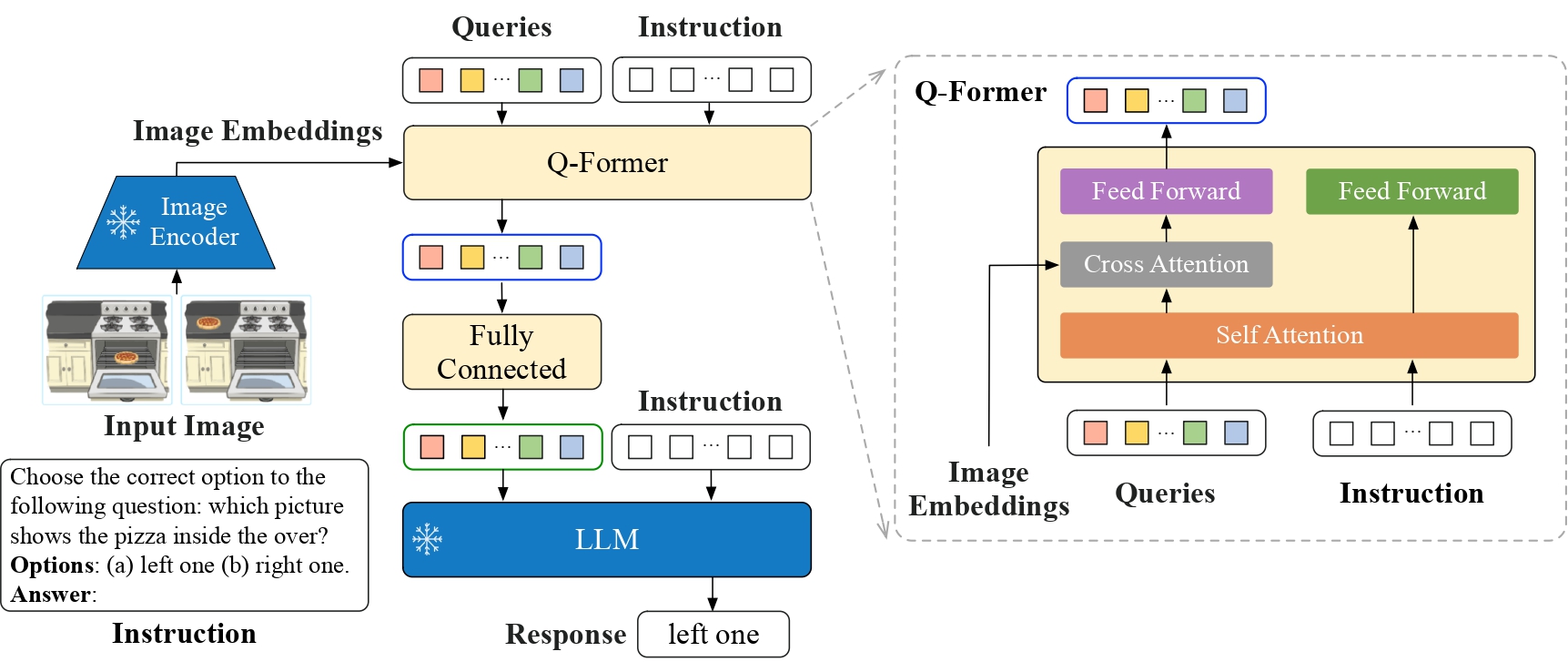 InstructBLIPVideo のアーキテクチャ。元の論文より引用。
このモデルは [RaushanTurganbay](https://huggingface.co/RaushanTurganbay) によって提供されました。元のコードは [こちら](https://github.com/salesforce/LAVIS/tree/main/projects/instructblip) で確認できます。
## 使用のコツ
- モデルは1つの動画から4フレームをサンプリングして学習されているため、4フレームをサンプリングすることをお勧めします
> [!NOTE]
> v4.46 以降の BLIP モデルでは、`processor.num_query_tokens = {{num_query_tokens}}` を追加すること、およびモデルの埋め込み層を拡張して特殊な `` トークンを追加することについて、警告が発生します。モデルのチェックポイントを所有している場合は、プロセッサーにこれらの属性を追加することを強く推奨します。所有していない場合は、プルリクエストを開いてください。これらの属性を追加すると、BLIP は画像ごとに必要なクエリトークンの数を追加し、クエリトークンと同じ数の `` プレースホルダーでテキストを拡張します。通常、画像あたり約 500 トークン必要となるため、テキストが切り捨てられないようご注意ください。切り捨てが発生すると、埋め込みのマージ時に失敗します。
これらの属性は、`model.config.num_query_tokens` などのようにモデルの config から取得でき、モデルの embeddings の拡張は [このリンク](https://gist.github.com/zucchini-nlp/e9f20b054fa322f84ac9311d9ab67042) に従って行えます。
## InstructBlipVideoConfig[[transformers.InstructBlipVideoConfig]]
#### transformers.InstructBlipVideoConfig[[transformers.InstructBlipVideoConfig]]
```python
transformers.InstructBlipVideoConfig(transformers_version: str | None = None, architectures: list[str] | None = None, output_hidden_states: bool | None = False, return_dict: bool | None = True, dtype: str | torch.dtype | None = None, chunk_size_feed_forward: int = 0, is_encoder_decoder: bool = False, id2label: dict[int, str] | dict[str, str] | None = None, label2id: dict[str, int] | dict[str, str] | None = None, problem_type: Literal['regression', 'single_label_classification', 'multi_label_classification'] | None = None, vision_config: dict | transformers.configuration_utils.PreTrainedConfig | None = None, qformer_config: dict | transformers.configuration_utils.PreTrainedConfig | None = None, text_config: dict | transformers.configuration_utils.PreTrainedConfig | None = None, num_query_tokens: int = 32, initializer_factor: float = 1.0, initializer_range: float = 0.02, video_token_index: int | None = None)
```
[ソース](https://github.com/huggingface/transformers/blob/main/src/transformers/models/instructblipvideo/configuration_instructblipvideo.py#L109)
**パラメータ:**
vision_config (`Union[dict, ~configuration_utils.PreTrainedConfig]`, *任意*) : ビジョンバックボーンの config オブジェクトまたは辞書。
qformer_config (`dict`, *任意*) : [InstructBlipVideoQFormerConfig](/docs/transformers/main/ja/model_doc/instructblipvideo#transformers.InstructBlipVideoQFormerConfig) を初期化するために使用される設定オプションの辞書。
text_config (`Union[dict, ~configuration_utils.PreTrainedConfig]`, *任意*) : テキストバックボーンの config オブジェクトまたは辞書。
num_query_tokens (`int`、*optional*、デフォルトは 32) : Transformer に渡されるクエリトークンの数です。
initializer_factor (`float`、*任意*、デフォルトは`1.0`) : すべての重み行列を初期化する係数です(1に保つ必要があります。初期化テスト用に内部で使用されます)。
initializer_range (`float`、*任意*、デフォルトは`0.02`) : すべての重み行列を初期化するためのtruncated_normal_initializerの標準偏差です。
video_token_index (`int`, *optional*) : 入力動画のプレースホルダーとして使用される動画トークンのインデックス。
This is the configuration class to store the configuration of a InstructBlipVideoModel. It is used to instantiate a Instructblipvideo model according to the specified arguments, defining the model architecture. Instantiating a configuration with the defaults will yield a similar configuration to that of the [Salesforce/instructblip-flan-t5-xl](https://huggingface.co/Salesforce/instructblip-flan-t5-xl)
設定オブジェクトは [PreTrainedConfig](/docs/transformers/main/ja/main_classes/configuration#transformers.PreTrainedConfig) を継承し、モデルの出力を制御するために使用できます。詳細については、[PreTrainedConfig](/docs/transformers/main/ja/main_classes/configuration#transformers.PreTrainedConfig) のドキュメントを参照してください。
例:
```python
>>> from transformers import (
... InstructBlipVideoVisionConfig,
... InstructBlipVideoQFormerConfig,
... OPTConfig,
... InstructBlipVideoConfig,
... InstructBlipVideoForConditionalGeneration,
... )
>>> # Initializing a InstructBlipVideoConfig with Salesforce/instructblip-flan-t5-xl style configuration
>>> configuration = InstructBlipVideoConfig()
>>> # Initializing a InstructBlipVideoForConditionalGeneration (with random weights) from the Salesforce/instructblip-flan-t5-xl style configuration
>>> model = InstructBlipVideoForConditionalGeneration(configuration)
>>> # Accessing the model configuration
>>> configuration = model.config
>>> # We can also initialize a InstructBlipVideoConfig from a InstructBlipVideoVisionConfig, InstructBlipVideoQFormerConfig and any PreTrainedConfig
>>> # Initializing Instructblipvideo vision, Instructblipvideo Q-Former and language model configurations
>>> vision_config = InstructBlipVideoVisionConfig()
>>> qformer_config = InstructBlipVideoQFormerConfig()
>>> text_config = OPTConfig()
>>> config = InstructBlipVideoConfig(vision_config=vision_config, qformer_config=qformer_config, text_config=text_config)
```
## InstructBlipVideoVisionConfig[[transformers.InstructBlipVideoVisionConfig]]
#### transformers.InstructBlipVideoVisionConfig[[transformers.InstructBlipVideoVisionConfig]]
```python
transformers.InstructBlipVideoVisionConfig(transformers_version: str | None = None, architectures: list[str] | None = None, output_hidden_states: bool | None = False, return_dict: bool | None = True, dtype: str | torch.dtype | None = None, chunk_size_feed_forward: int = 0, is_encoder_decoder: bool = False, id2label: dict[int, str] | dict[str, str] | None = None, label2id: dict[str, int] | dict[str, str] | None = None, problem_type: Literal['regression', 'single_label_classification', 'multi_label_classification'] | None = None, hidden_size: int = 1408, intermediate_size: int = 6144, num_hidden_layers: int = 39, num_attention_heads: int = 16, image_size: int | list[int] | tuple[int, int] = 224, patch_size: int | list[int] | tuple[int, int] = 14, hidden_act: str = 'gelu', layer_norm_eps: float = 1e-06, attention_dropout: float | int = 0.0, initializer_range: float = 1e-10, qkv_bias: bool = True)
```
[ソース](https://github.com/huggingface/transformers/blob/main/src/transformers/models/instructblipvideo/configuration_instructblipvideo.py#L32)
**パラメータ:**
hidden_size (`int`、*optional*、デフォルトは`1408`) : 隠れ表現の次元数。
intermediate_size (`int`, *任意*, デフォルトは `6144`) : MLP 表現の次元数。
num_hidden_layers (`int`、*任意*、デフォルトは `39`) : Transformer デコーダーの隠れ層の数。
num_attention_heads (`int`、*任意*、デフォルトは`16`) : Transformerデコーダーの各アテンション層におけるアテンションヘッドの数。
image_size (`Union[int, list[int], tuple[int, int]]`、*任意*、デフォルトは`224`) : 各画像のサイズ(解像度)。
patch_size (`Union[int, list[int], tuple[int, int]]`、*任意*、デフォルトは`14`) : 各パッチのサイズ(解像度)。
hidden_act (`str`、*任意*、デフォルトは`gelu`) : デコーダーで使用する非線形活性化関数(関数または文字列)。例えば、`"gelu"`、`"relu"`、`"silu"`など。
layer_norm_eps (`float`、*任意*、デフォルトは`1e-06`) : Layer Normalization 層で使用する epsilon です。
attention_dropout (`Union[float, int]`、*任意*、デフォルトは`0.0`) : 注意確率のドロップアウト率。
initializer_range (`float`、*任意*、デフォルトは `1e-10`) : 全重み行列の初期化に使用される truncated_normal_initializer の標準偏差です。
qkv_bias (`bool`, *任意*, デフォルトは `True`) : クエリ、キー、バリューにバイアスを追加するかどうか。
This is the configuration class to store the configuration of a InstructBlipVideoModel. It is used to instantiate a Instructblipvideo model according to the specified arguments, defining the model architecture. Instantiating a configuration with the defaults will yield a similar configuration to that of the [Salesforce/instructblip-flan-t5-xl](https://huggingface.co/Salesforce/instructblip-flan-t5-xl)
設定オブジェクトは [PreTrainedConfig](/docs/transformers/main/ja/main_classes/configuration#transformers.PreTrainedConfig) を継承し、モデルの出力を制御するために使用できます。詳細については、[PreTrainedConfig](/docs/transformers/main/ja/main_classes/configuration#transformers.PreTrainedConfig) のドキュメントを参照してください。
例:
```python
>>> from transformers import InstructBlipVideoVisionConfig, InstructBlipVideoVisionModel
>>> # Initializing a InstructBlipVideoVisionConfig with Salesforce/instructblip-flan-t5-xl style configuration
>>> configuration = InstructBlipVideoVisionConfig()
>>> # Initializing a InstructBlipVideoVisionModel (with random weights) from the Salesforce/instructblip-flan-t5-xl style configuration
>>> model = InstructBlipVideoVisionModel(configuration)
>>> # Accessing the model configuration
>>> configuration = model.config
```
## InstructBlipVideoQFormerConfig[[transformers.InstructBlipVideoQFormerConfig]]
#### transformers.InstructBlipVideoQFormerConfig[[transformers.InstructBlipVideoQFormerConfig]]
```python
transformers.InstructBlipVideoQFormerConfig(transformers_version: str | None = None, architectures: list[str] | None = None, output_hidden_states: bool | None = False, return_dict: bool | None = True, dtype: str | torch.dtype | None = None, chunk_size_feed_forward: int = 0, is_encoder_decoder: bool = False, id2label: dict[int, str] | dict[str, str] | None = None, label2id: dict[str, int] | dict[str, str] | None = None, problem_type: Literal['regression', 'single_label_classification', 'multi_label_classification'] | None = None, vocab_size: int = 30522, hidden_size: int = 768, num_hidden_layers: int = 12, num_attention_heads: int = 12, intermediate_size: int = 3072, hidden_act: str = 'gelu', hidden_dropout_prob: float | int = 0.1, attention_probs_dropout_prob: float | int = 0.1, max_position_embeddings: int = 512, initializer_range: float = 0.02, layer_norm_eps: float = 1e-12, pad_token_id: int | None = 0, cross_attention_frequency: int = 2, encoder_hidden_size: int = 1408)
```
[ソース](https://github.com/huggingface/transformers/blob/main/src/transformers/models/instructblipvideo/configuration_instructblipvideo.py#L67)
**パラメータ:**
vocab_size (`int`、*任意*、デフォルトは`30522`) : モデルの語彙サイズ。`input_ids`で表現できるトークンの種類数を定義します。
hidden_size (`int`、*任意*、デフォルトは`768`) : 隠れ表現の次元数。
num_hidden_layers (`int`, *任意*, デフォルトは `12`) : Transformer デコーダーの隠れ層の数。
num_attention_heads (`int`、*任意*、デフォルトは `12`) : Transformer デコーダーの各アテンション層におけるアテンションヘッドの数。
intermediate_size (`int`、*任意*、デフォルトは `3072`) : MLP 表現の次元数。
hidden_act (`str`、*任意*、デフォルトは`gelu`) : デコーダーで使用する非線形活性化関数(関数または文字列)。例えば、`"gelu"`、`"relu"`、`"silu"`など。
hidden_dropout_prob (`Union[float, int]`、*任意*、デフォルト値は`0.1`) : embeddings、encoder、pooler 内のすべての全結合層における dropout 確率。
attention_probs_dropout_prob (`Union[float, int]`、*任意*、デフォルトは`0.1`) : 注意確率のドロップアウト率。
max_position_embeddings (`int`、*任意*、デフォルトは`512`) : このモデルが使用される可能性のある最大シーケンス長。
initializer_range (`float`、*任意*、デフォルトは`0.02`) : すべての重み行列を初期化するためのtruncated_normal_initializerの標準偏差です。
layer_norm_eps (`float`、*任意*、デフォルトは `1e-12`) : layer normalization レイヤーで使用する epsilon。
pad_token_id (`int`, *任意*, デフォルトは `0`) : 語彙内でパディングに使用されるトークン ID。
cross_attention_frequency (`int`、*optional*、デフォルトは 2) : Transformer 層にクロスアテンションを追加する頻度。
encoder_hidden_size (`int`、*optional*、デフォルトは 1408) : クロスアテンションにおける隠れ状態の隠れサイズです。
This is the configuration class to store the configuration of a InstructBlipVideoModel. It is used to instantiate a Instructblipvideo model according to the specified arguments, defining the model architecture. Instantiating a configuration with the defaults will yield a similar configuration to that of the [Salesforce/instructblip-flan-t5-xl](https://huggingface.co/Salesforce/instructblip-flan-t5-xl)
設定オブジェクトは [PreTrainedConfig](/docs/transformers/main/ja/main_classes/configuration#transformers.PreTrainedConfig) を継承し、モデルの出力を制御するために使用できます。詳細については、[PreTrainedConfig](/docs/transformers/main/ja/main_classes/configuration#transformers.PreTrainedConfig) のドキュメントを参照してください。
例:
```python
>>> from transformers import InstructBlipVideoQFormerConfig, InstructBlipVideoQFormerModel
>>> # Initializing a InstructBlipVideo Salesforce/instructblip-flan-t5-xl style configuration
>>> configuration = InstructBlipVideoQFormerConfig()
>>> # Initializing a model (with random weights) from the Salesforce/instructblip-flan-t5-xl style configuration
>>> model = InstructBlipVideoQFormerModel(configuration)
>>> # Accessing the model configuration
>>> configuration = model.config
```
## InstructBlipVideoProcessor[[transformers.InstructBlipVideoProcessor]]
#### transformers.InstructBlipVideoProcessor[[transformers.InstructBlipVideoProcessor]]
```python
transformers.InstructBlipVideoProcessor(video_processor, tokenizer, qformer_tokenizer, num_query_tokens = None, **kwargs)
```
[ソース](https://github.com/huggingface/transformers/blob/main/src/transformers/models/instructblipvideo/processing_instructblipvideo.py#L35)
**パラメータ:**
video_processor (`InstructBlipVideoVideoProcessor`) : 動画プロセッサは必須の入力です。
tokenizer (`GPT2Tokenizer`) : トークナイザーは必須の入力です。
qformer_tokenizer (`AutoTokenizer`) : ['PreTrainedTokenizer`'] のインスタンスです。Q-Former トークナイザーは必須の入力です。
num_query_tokens (`int`, *任意*) : Qformer がクエリとして使用するトークン数。モデルの config と同じである必要があります。
を構築します。このクラスは、動画プロセッサ、トークナイザー、qformer トークナイザーを単一のプロセッサにラップします。
[InstructBlipVideoProcessor](/docs/transformers/main/ja/model_doc/instructblipvideo#transformers.InstructBlipVideoProcessor) は、[InstructBlipVideoVideoProcessor](/docs/transformers/main/ja/model_doc/instructblipvideo#transformers.InstructBlipVideoVideoProcessor)、[GPT2Tokenizer](/docs/transformers/main/ja/model_doc/gpt2#transformers.GPT2Tokenizer)、および `{qformer_tokenizer_class}` のすべての機能を提供します。詳細については、[~InstructBlipVideoVideoProcessor](/docs/transformers/main/ja/model_doc/instructblipvideo#transformers.InstructBlipVideoVideoProcessor)、[~GPT2Tokenizer](/docs/transformers/main/ja/model_doc/gpt2#transformers.GPT2Tokenizer)、および `~{qformer_tokenizer_class}` を参照してください。
## InstructBlipVideoVideoProcessor[[transformers.InstructBlipVideoVideoProcessor]]
#### transformers.InstructBlipVideoVideoProcessor[[transformers.InstructBlipVideoVideoProcessor]]
```python
transformers.InstructBlipVideoVideoProcessor(**kwargs: *)
```
[ソース](https://github.com/huggingface/transformers/blob/main/src/transformers/models/instructblipvideo/video_processing_instructblipvideo.py#L30)
**パラメータ:**
do_convert_rgb (`bool`, *kwargs*, *optional*, デフォルトは `True`) : 画像を RGB に変換するかどうか。
do_resize (`bool`, *kwargs*, *任意*, デフォルトは `True`) : 画像をリサイズするかどうか。
size (`Annotated[int | list[int] | tuple[int, ...] | dict[str, int] | None, None]`, *kwargs*、デフォルト値は`{'height' : 384, 'width': 384}`): モデルへの最大入力サイズを指定します。
default_to_square (`bool`, *kwargs*, *任意*、デフォルトは `True`) : size が整数の場合、リサイズ時に正方形の画像をデフォルトとするかどうか。
resample (`Annotated[Union[int, PILImageResampling, NoneType], None]`, *kwargs*、デフォルトは `3`) : 画像をリサイズする場合に使用するリサンプリングフィルター。`PILImageResampling` の列挙型のいずれかになります。`do_resize` が `True` に設定されている場合のみ有効です。
do_rescale (`bool`, *kwargs*, *optional*, デフォルトは `True`) : 画像をリスケールするかどうか。
rescale_factor (`float`, *kwargs*, *optional*, デフォルトは `0.00392156862745098`) : `do_rescale` が `True` に設定されている場合、画像をリスケールするための係数。
do_normalize (`bool`, *kwargs*, *optional*, デフォルトは `True`) : 画像を正規化するかどうかを指定します。
image_mean (`Union[float, list[float], tuple[float, ...]]`, *kwargs*, *optional*, デフォルトは `[0.48145466, 0.4578275, 0.40821073]`) : 正規化に使用する画像の平均値。`do_normalize` が `True` に設定されている場合のみ有効です。
image_std (`Union[float, list[float], tuple[float, ...]]`, *kwargs*, *optional*, デフォルトは `[0.26862954, 0.26130258, 0.27577711]`) : 正規化に使用する画像の標準偏差。`do_normalize` が `True` に設定されている場合のみ有効です。
do_center_crop (`bool`, *kwargs*, *optional*) : 画像を中央クロップするかどうか。
do_pad (`bool`, *kwargs*, *任意*) : 画像にパディングを適用するかどうか。パディングは、バッチ内の最大サイズに合わせるか、画像ごとに固定の正方形サイズに合わせるかのいずれかで行われます。正確なパディング戦略はモデルによって異なります。
crop_size (`Annotated[int | list[int] | tuple[int, ...] | dict[str, int] | None, None]`, *kwargs*) : `center_crop` を適用した後の出力画像のサイズ。
data_format (`Union[str, ~image_utils.ChannelDimension]`、*kwargs*、*optional*) : 対応するのは `ChannelDimension.FIRST` のみです。slow processors との互換性のために追加されました。
input_data_format (`Union[str, ~image_utils.ChannelDimension]`, *kwargs*, *任意*) : 入力画像のチャネル次元の形式です。設定されていない場合、入力画像からチャネル次元の形式が推論されます。以下のいずれかになります: - `"channels_first"` または `ChannelDimension.FIRST`: (num_channels, height, width) 形式の画像。 - `"channels_last"` または `ChannelDimension.LAST`: (height, width, num_channels) 形式の画像。 - `"none"` または `ChannelDimension.NONE`: (height, width) 形式の画像。
device (`Annotated[Union[str, torch.device, NoneType], None]`, *kwargs*) : 動画を処理するデバイスです。未設定の場合、入力動画からデバイスが推論されます。
do_sample_frames (`bool`, *kwargs*, *optional*, デフォルトは `False`) : 処理前に動画からフレームをサンプリングするか、動画全体を処理するかを指定します。
video_metadata (`Annotated[~video_utils.VideoMetadata | dict | list[dict | ~video_utils.VideoMetadata] | list[list[dict | ~video_utils.VideoMetadata]] | None, None]`, *kwargs*) : 動画のメタデータ。総再生時間、fps、総フレーム数などの情報を含みます。動画からのフレームサンプリングやタイムスタンプの計算に使用されます。動画を処理する前に手動でデコードしようとしている場合を除き、メタデータは渡さないでください。
fps (`Annotated[int | float | None, None]`, *kwargs*) : `do_sample_frames=True` の場合、1 秒あたりにサンプリングするターゲットフレーム数。
num_frames (`Annotated[int | None, None]`, *kwargs*) : `do_sample_frames=True` の場合、サンプリングするフレームの最大数。
return_metadata (`bool`, *kwargs*, *任意*、デフォルトは `False`) : ビデオメタデータを返すかどうかを指定します。ビデオメタデータは、ビデオの長さ、fps、デコードバックエンドなどの情報を含むオブジェクトです。
return_tensors (`Annotated[str | ~utils.generic.TensorType | None, None]`, *kwargs*) : 設定されている場合、特定のフレームワークのテンソルを返します。許可される値は以下の通りです。 - `'pt'`: PyTorch の `torch.Tensor` オブジェクトを返します。 - `'np'`: NumPy の `np.ndarray` オブジェクトを返します。
- ****kwargs** ([VideosKwargs](/docs/transformers/main/ja/main_classes/processors#transformers.VideosKwargs)、*optional*) : 各モダリティ(テキスト、画像、動画、音声)の追加処理オプションです。モデル固有のパラメータは上記に記載されています。サポートされている引数の完全なリストについては、TypedDict クラスを参照してください。
InstructBlipVideoVideoProcessor ビデオプロセッサを構築します。
#### preprocess[[transformers.InstructBlipVideoVideoProcessor.preprocess]]
```python
preprocess(videos: typing.Union[list['PIL.Image.Image'], numpy.ndarray, ForwardRef('torch.Tensor'), list[numpy.ndarray], list['torch.Tensor'], list[list['PIL.Image.Image']], list[list[numpy.ndarray]], list[list['torch.Tensor']], transformers.video_utils.URL, list[transformers.video_utils.URL], list[list[transformers.video_utils.URL]], transformers.video_utils.Path, list[transformers.video_utils.Path], list[list[transformers.video_utils.Path]]], **kwargs: *)
```
[ソース](https://github.com/huggingface/transformers/blob/main/src/transformers/video_processing_utils.py#L98)
**パラメータ:**
videos (`Union[list[PIL.Image.Image], numpy.ndarray, torch.Tensor, list[numpy.ndarray], list[torch.Tensor], list[list[PIL.Image.Image]], list[list[numpy.ndarray]], list[list[torch.Tensor]], ~video_utils.URL, list[~video_utils.URL], list[list[~video_utils.URL]], ~video_utils.Path, list[~video_utils.Path], list[list[~video_utils.Path]]]`) : 前処理対象の動画。ピクセル値が 0 から 255 の範囲にある、単一の動画またはバッチの動画を想定しています。ピクセル値が 0 から 1 の範囲にある動画を渡す場合は、`do_rescale=False` を設定してください。
do_convert_rgb (`bool`, *kwargs*, *optional*) : 画像を RGB に変換するかどうか。
do_resize (`bool`, *kwargs*, *optional*) : 画像をリサイズするかどうか。
size (`Annotated[int | list[int] | tuple[int, ...] | dict[str, int] | None, None]`, *kwargs*) : モデルへの最大入力次元を記述します。
default_to_square (`bool`, *kwargs*, *optional*) : size が int の場合、リサイズ時に正方形の画像をデフォルトとするかどうか。
resample (`Annotated[Union[int, PILImageResampling, NoneType], None]`, *kwargs*) : 画像をリサイズする場合に使用するリサンプリングフィルタ。`PILImageResampling` の列挙型のいずれかです。`do_resize` が `True` に設定されている場合のみ有効です。
do_rescale (`bool`, *kwargs*, *任意*) : 画像をリスケールするかどうか。
rescale_factor (`float`, *kwargs*, *optional*) : `do_rescale` が `True` に設定されている場合、画像をリサイズするためのリスケール係数。
do_normalize (`bool`, *kwargs*, *optional*) : 画像を正規化するかどうかを指定します。
image_mean (`Union[float, list[float], tuple[float, ...]]`, *kwargs*, *optional*) : 正規化に使用する画像の平均値。`do_normalize` が `True` に設定されている場合のみ有効です。
image_std (`Union[float, list[float], tuple[float, ...]]`, *kwargs*, *optional*) : 正規化に使用する画像の標準偏差。`do_normalize` が `True` に設定されている場合のみ有効です。
do_center_crop (`bool`, *kwargs*, *optional*) : 画像を中央クロップするかどうか。
do_pad (`bool`, *kwargs*, *任意*) : 画像にパディングを適用するかどうか。パディングは、バッチ内の最大サイズに合わせるか、画像ごとに固定の正方形サイズに合わせるかのいずれかで行われます。正確なパディング戦略はモデルによって異なります。
crop_size (`Annotated[int | list[int] | tuple[int, ...] | dict[str, int] | None, None]`, *kwargs*) : `center_crop` を適用した後の出力画像のサイズ。
data_format (`Union[str, ~image_utils.ChannelDimension]`、*kwargs*、*optional*) : 対応するのは `ChannelDimension.FIRST` のみです。slow processors との互換性のために追加されました。
input_data_format (`Union[str, ~image_utils.ChannelDimension]`, *kwargs*, *任意*) : 入力画像のチャネル次元の形式です。設定されていない場合、入力画像からチャネル次元の形式が推論されます。以下のいずれかになります: - `"channels_first"` または `ChannelDimension.FIRST`: (num_channels, height, width) 形式の画像。 - `"channels_last"` または `ChannelDimension.LAST`: (height, width, num_channels) 形式の画像。 - `"none"` または `ChannelDimension.NONE`: (height, width) 形式の画像。
device (`Annotated[Union[str, torch.device, NoneType], None]`, *kwargs*) : 動画を処理するデバイスです。未設定の場合、入力動画からデバイスが推論されます。
do_sample_frames (`bool`, *kwargs*, *optional*) : 処理前に動画からフレームをサンプリングするか、動画全体を処理するかを指定します。
video_metadata (`Annotated[~video_utils.VideoMetadata | dict | list[dict | ~video_utils.VideoMetadata] | list[list[dict | ~video_utils.VideoMetadata]] | None, None]`, *kwargs*) : 動画のメタデータ。総再生時間、fps、総フレーム数などの情報を含みます。動画からのフレームサンプリングやタイムスタンプの計算に使用されます。動画を処理する前に手動でデコードしようとしている場合を除き、メタデータは渡さないでください。
fps (`Annotated[int | float | None, None]`, *kwargs*) : `do_sample_frames=True` の場合、1 秒あたりにサンプリングするターゲットフレーム数。
num_frames (`Annotated[int | None, None]`, *kwargs*) : `do_sample_frames=True` の場合、サンプリングするフレームの最大数。
return_metadata (`bool`, *kwargs*, *任意*) : ビデオメタデータを返すかどうかを指定します。ビデオメタデータは、ビデオの再生時間、fps、デコードバックエンドなどの情報を含むオブジェクトです。
return_tensors (`Annotated[str | ~utils.generic.TensorType | None, None]`, *kwargs*) : `'pt'`に設定されている場合はスタックされたテンソルを返し、それ以外の場合はテンソルのリストを返します。
**戻り値:** `~image_processing_base.BatchFeature`
- **data** (`dict`) -- __call__ メソッドによって返されるリスト/配列/テンソルの辞書('pixel_values' など)。
- **tensor_type** (`Union[None, str, TensorType]`、*省略可*) -- 初期化時に PyTorch/Numpy の Tensor 内の整数リストを変換するために、ここで tensor_type を指定できます。
## InstructBlipVideoVisionModel[[transformers.InstructBlipVideoVisionModel]]
#### transformers.InstructBlipVideoVisionModel[[transformers.InstructBlipVideoVisionModel]]
```python
transformers.InstructBlipVideoVisionModel(config: InstructBlipVideoVisionConfig)
```
[ソース](https://github.com/huggingface/transformers/blob/main/src/transformers/models/instructblipvideo/modeling_instructblipvideo.py#L394)
#### forward[[transformers.InstructBlipVideoVisionModel.forward]]
```python
forward(pixel_values: typing.Optional[torch.FloatTensor] = None, interpolate_pos_encoding: bool = False, **kwargs: *)
```
[ソース](https://github.com/huggingface/transformers/blob/main/src/transformers/models/instructblipvideo/modeling_instructblipvideo.py#L414)
**パラメータ:**
pixel_values (`torch.FloatTensor`、shape `(batch_size, num_channels, image_size, image_size)`、*任意*) : 入力画像に対応するテンソルです。ピクセル値は `image_processor_class` を使用して取得できます。詳細は `image_processor_class.__call__` を参照してください([InstructBlipVideoProcessor](/docs/transformers/main/ja/model_doc/instructblipvideo#transformers.InstructBlipVideoProcessor) は画像の処理に `image_processor_class` を使用します)。
interpolate_pos_encoding (`bool`、*任意*、デフォルトは`False`) : 事前学習済みの位置エンコーディングを補間するかどうかを指定します。
**戻り値:** [BaseModelOutputWithPooling](/docs/transformers/main/ja/main_classes/output#transformers.modeling_outputs.BaseModelOutputWithPooling) または `tuple(torch.FloatTensor)`
`torch.FloatTensor` のタプル(`return_dict=False` が渡された場合、または `config.return_dict=False` の場合)、または [BaseModelOutputWithPooling](/docs/transformers/main/ja/main_classes/output#transformers.modeling_outputs.BaseModelOutputWithPooling) を返します。構成([InstructBlipVideoConfig](/docs/transformers/main/ja/model_doc/instructblipvideo#transformers.InstructBlipVideoConfig))や入力に応じて、さまざまな要素が含まれます。
[InstructBlipVideoVisionModel](/docs/transformers/main/ja/model_doc/instructblipvideo#transformers.InstructBlipVideoVisionModel)のforwardメソッドは、`__call__`特殊メソッドをオーバーライドします。
この関数内でフォワードパスの手順を定義する必要がありますが、その後、この関数ではなく`Module`インスタンスを呼び出すべきです。前者は前処理と後処理の実行を適切に処理するのに対し、後者はそれらを無視してしまいます。
- **last_hidden_state** (`torch.FloatTensor`、shape `(batch_size, sequence_length, hidden_size)`) -- モデルの最終層の出力における隠れ状態のシーケンス。
- **pooler_output** (`torch.FloatTensor`、shape `(batch_size, hidden_size)`) -- 補助事前学習タスクに使用される層をさらに通して処理された後、シーケンスの最初のトークン(分類トークン)の最終層の隠れ状態です。例えば、BERT 系のモデルでは、線形層と tanh 活性化関数を経て処理された後の分類トークンを返します。この線形層の重みは、事前学習中の次文予測(分類)目的から学習されます。
- **hidden_states** (`tuple(torch.FloatTensor)`、*optional*、`output_hidden_states=True` が渡された場合または `config.output_hidden_states=True` の場合に返されます) -- `torch.FloatTensor` のタプル(埋め込み層を持つモデルの場合、埋め込みの出力用が 1 つ、各層の出力用が 1 つずつ)で、形状は `(batch_size, sequence_length, hidden_size)` です。
各層の出力におけるモデルのHidden-states、および任意の初期埋め込み出力。
- **attentions** (`tuple(torch.FloatTensor)`、*optional*、`output_attentions=True` が渡された場合または `config.output_attentions=True` の場合に返されます) -- `torch.FloatTensor` のタプル(各レイヤーごとに1つ)で、形状は `(batch_size, num_heads, sequence_length, sequence_length)` です。
アテンションのsoftmax後のアテンション重み。自己アテンションヘッド内で加重平均を計算するために使用されます。
## InstructBlipVideoQFormerModel[[transformers.InstructBlipVideoQFormerModel]]
#### transformers.InstructBlipVideoQFormerModel[[transformers.InstructBlipVideoQFormerModel]]
```python
transformers.InstructBlipVideoQFormerModel(config: InstructBlipVideoQFormerConfig)
```
[ソース](https://github.com/huggingface/transformers/blob/main/src/transformers/models/instructblipvideo/modeling_instructblipvideo.py#L709)
InstructBlipVideoで使用されるQuerying Transformer (Q-Former)。指示も入力として受け取るため、BLIP-2からわずかに変更されています。
#### forward[[transformers.InstructBlipVideoQFormerModel.forward]]
```python
forward(input_ids: LongTensor, attention_mask: typing.Optional[torch.FloatTensor] = None, position_ids: typing.Optional[torch.LongTensor] = None, query_embeds: typing.Optional[torch.Tensor] = None, encoder_hidden_states: typing.Optional[torch.FloatTensor] = None, encoder_attention_mask: typing.Optional[torch.FloatTensor] = None, **kwargs: *)
```
[ソース](https://github.com/huggingface/transformers/blob/main/src/transformers/models/instructblipvideo/modeling_instructblipvideo.py#L747)
**パラメータ:**
input_ids (`torch.LongTensor`、shape `(batch_size, sequence_length)`) : 語彙における入力シーケンスのトークンインデックスです。デフォルトでは、パディングは無視されます。インデックスは [AutoTokenizer](/docs/transformers/main/ja/model_doc/auto#transformers.AutoTokenizer) を使用して取得できます。詳細は [PreTrainedTokenizer.encode()](/docs/transformers/main/ja/internal/tokenization_utils#transformers.PreTrainedTokenizerBase.encode) および [PreTrainedTokenizer.__call__()](/docs/transformers/main/ja/internal/tokenization_utils#transformers.PreTrainedTokenizerBase.__call__) を参照してください。 [入力IDとは何ですか?](../glossary#input-ids)
attention_mask (`torch.FloatTensor`、形状 `(batch_size, sequence_length)`、*任意*) : パディングトークンのインデックスに対してアテンションを実行しないためのマスク。`[0, 1]` から選択されるマスクの値: - **マスクされない**トークンは 1、**マスクされる**トークンは 0。 [アテンションマスクとは?](../glossary#attention-mask)
position_ids (`torch.LongTensor`、shape `(batch_size, sequence_length)`、*任意*) : 各入力シーケンスのトークンが位置埋め込み内で占める位置のインデックスです。`[0, config.n_positions - 1]` の範囲から選択されます。 [位置 ID とは何か?](../glossary#position-ids)
query_embeds (`torch.FloatTensor`、shape は `(batch_size, sequence_length, hidden_size)`) : 注意機構の計算で使用される隠れ状態。クロスアテンションの場合、クエリとして使用されます(つまり、キーとバリューは encoder_hidden_states を使用します)。
encoder_hidden_states (`torch.FloatTensor`、形状 `(batch_size, sequence_length, hidden_size)`、*任意*) : エンコーダーの最終層の出力における隠れ状態のシーケンス。モデルがデコーダーとして設定されている場合、クロスアテンションで使用されます。
encoder_attention_mask (`torch.FloatTensor`、形状 `(batch_size, sequence_length)`、*任意*) : エンコーダー入力の padding トークンインデックスに対する attention を回避するためのマスクです。モデルがデコーダーとして設定されている場合、このマスクは cross-attention に使用されます。`[0, 1]` から選択されるマスクの値: - **マスクされない**トークンは 1、 - **マスクされる**トークンは 0。
**戻り値:** [BaseModelOutputWithPoolingAndCrossAttentions](/docs/transformers/main/ja/main_classes/output#transformers.modeling_outputs.BaseModelOutputWithPoolingAndCrossAttentions) または `tuple(torch.FloatTensor)`
`torch.FloatTensor` のタプル(`return_dict=False` が渡された場合、または `config.return_dict=False` の場合)、または [BaseModelOutputWithPoolingAndCrossAttentions](/docs/transformers/main/ja/main_classes/output#transformers.modeling_outputs.BaseModelOutputWithPoolingAndCrossAttentions)。設定([InstructBlipVideoConfig](/docs/transformers/main/ja/model_doc/instructblipvideo#transformers.InstructBlipVideoConfig))や入力に応じて、さまざまな要素で構成されます。
[InstructBlipVideoQFormerModel](/docs/transformers/main/ja/model_doc/instructblipvideo#transformers.InstructBlipVideoQFormerModel)のforwardメソッドは、`__call__`特殊メソッドをオーバーライドします。
この関数内でフォワードパスの手順を定義する必要がありますが、その後、この関数ではなく`Module`インスタンスを呼び出すべきです。前者は前処理と後処理の実行を適切に処理するのに対し、後者はそれらを無視してしまいます。
- **last_hidden_state** (`torch.FloatTensor`、shape `(batch_size, sequence_length, hidden_size)`) -- モデルの最終層の出力における隠れ状態のシーケンス。
- **pooler_output** (`torch.FloatTensor`、shape `(batch_size, hidden_size)`) -- 補助事前学習タスクに使用される層をさらに通して処理された後、シーケンスの最初のトークン(分類トークン)の最終層の隠れ状態です。例えば、BERT 系のモデルでは、線形層と tanh 活性化関数を経て処理された後の分類トークンを返します。この線形層の重みは、事前学習中の次文予測(分類)目的から学習されます。
- **hidden_states** (`tuple(torch.FloatTensor)`、*optional*、`output_hidden_states=True` が渡された場合または `config.output_hidden_states=True` の場合に返されます) -- `torch.FloatTensor` のタプル(埋め込み層を持つモデルの場合、埋め込みの出力用が 1 つ、各層の出力用が 1 つずつ)で、形状は `(batch_size, sequence_length, hidden_size)` です。
各層の出力におけるモデルのHidden-states、および任意の初期埋め込み出力。
- **attentions** (`tuple(torch.FloatTensor)`、*optional*、`output_attentions=True` が渡された場合または `config.output_attentions=True` の場合に返されます) -- `torch.FloatTensor` のタプル(各レイヤーごとに1つ)で、形状は `(batch_size, num_heads, sequence_length, sequence_length)` です。
アテンションのsoftmax後のアテンション重み。自己アテンションヘッド内で加重平均を計算するために使用されます。
- **cross_attentions** (`tuple(torch.FloatTensor)`、*optional*、`output_attentions=True` が渡された場合、または `config.add_cross_attention=True` が渡された場合、または `config.output_attentions=True` の場合に返されます) -- `torch.FloatTensor` のタプル(各レイヤーごとに1つ)、形状は `(batch_size, num_heads, sequence_length, sequence_length)`。
クロスアテンション層のアテンション重みは、アテンションのsoftmax適用後に計算され、クロスアテンションヘッドにおける加重平均の計算に使用されます。
- **past_key_values** (`Cache`、*任意*、`use_cache=True` が渡された場合または `config.use_cache=True` の場合に返されます) -- [Cache](/docs/transformers/main/ja/internal/generation_utils#transformers.Cache) のインスタンスです。詳細については、[kv cache ガイド](https://huggingface.co/docs/transformers/en/kv_cache)を参照してください。
自己アテンションブロック(および `config.is_encoder_decoder=True` の場合、クロスカレンションブロック)の事前計算済みヒドゥンステート(キーとバリュー)を保持します。これらは逐次デコーディングを高速化するために使用できます(`past_key_values` 入力参照)。
## InstructBlipVideoModel[[transformers.InstructBlipVideoModel]]
#### transformers.InstructBlipVideoModel[[transformers.InstructBlipVideoModel]]
```python
transformers.InstructBlipVideoModel(config: InstructBlipVideoConfig)
```
[ソース](https://github.com/huggingface/transformers/blob/main/src/transformers/models/instructblipvideo/modeling_instructblipvideo.py#L850)
**パラメータ:**
config ([InstructBlipVideoConfig](/docs/transformers/main/ja/model_doc/instructblipvideo#transformers.InstructBlipVideoConfig)) : モデルのパラメータをすべて含むモデル設定クラスです。設定ファイルで初期化しても、モデルに関連する重みは読み込まれず、設定のみが読み込まれます。モデルの重みをロードするには、[from_pretrained()](/docs/transformers/main/ja/main_classes/model#transformers.PreTrainedModel.from_pretrained) メソッドを参照してください。
InstructBlipVideo base モデルは、言語モデル、qformer、ビジュアルエンコーダーで構成されています。
このモデルは [PreTrainedModel](/docs/transformers/main/ja/main_classes/model#transformers.PreTrainedModel) を継承しています。ライブラリがすべてのモデルに対して実装している汎用的なメソッド(ダウンロードや保存、入力埋め込みのリサイズ、ヘッドのプルーニングなど)については、スーパークラスのドキュメントを参照してください。
このモデルは、PyTorchの[torch.nn.Module](https://pytorch.org/docs/stable/nn.html#torch.nn.Module)のサブクラスでもあります。通常のPyTorch Moduleとして使用し、一般的な使用方法や動作に関する詳細については、PyTorchのドキュメントを参照してください。
#### forward[[transformers.InstructBlipVideoModel.forward]]
```python
forward(pixel_values: FloatTensor, qformer_input_ids: FloatTensor, qformer_attention_mask: typing.Optional[torch.LongTensor] = None, input_ids: typing.Optional[torch.FloatTensor] = None, attention_mask: typing.Optional[torch.LongTensor] = None, decoder_input_ids: typing.Optional[torch.LongTensor] = None, decoder_attention_mask: typing.Optional[torch.LongTensor] = None, inputs_embeds: typing.Optional[torch.Tensor] = None, interpolate_pos_encoding: bool = False, use_cache: bool | None = None, **kwargs: *)
```
[ソース](https://github.com/huggingface/transformers/blob/main/src/transformers/models/instructblipvideo/modeling_instructblipvideo.py#L902)
**パラメータ:**
pixel_values (`torch.FloatTensor`、shape `(batch_size, num_channels, image_size, image_size)`) : 入力画像に対応するテンソルです。ピクセル値は `image_processor_class` を使用して取得できます。詳細は `image_processor_class.__call__` を参照してください([InstructBlipVideoProcessor](/docs/transformers/main/ja/model_doc/instructblipvideo#transformers.InstructBlipVideoProcessor) は画像の処理に `image_processor_class` を使用します)。
qformer_input_ids (`torch.LongTensor`、shape `(batch_size, sequence_length)`、*任意*) : Q-Former の語彙における入力シーケンスのトークンインデックスです。入力トークンは任意で指定でき、テキストプロンプトとして機能し、Q-Former モデルによってエンコードされます。インデックスは [InstructBlipVideoProcessor](/docs/transformers/main/ja/model_doc/instructblipvideo#transformers.InstructBlipVideoProcessor) を使用して取得できます。詳細は `InstructBlipVideoProcessor.__call__()` を参照してください。 [入力 ID とは何か?](../glossary#input-ids)
qformer_attention_mask (`torch.Tensor`、shape `(batch_size, sequence_length)`、*任意*) : padding トークンのインデックスに対する attention を回避するためのマスクです。マスクの値は `[0, 1]` から選択されます: - **マスクされない**トークンは 1、- **マスクされる**トークンは 0。 [attention マスクとは?](../glossary#attention-mask)
input_ids (`torch.FloatTensor`、形状 `(batch_size, sequence_length)`、*任意*) : 語彙における入力シーケンスのトークンインデックスです。デフォルトでは、パディングは無視されます。インデックスは [AutoTokenizer](/docs/transformers/main/ja/model_doc/auto#transformers.AutoTokenizer) を使用して取得できます。詳細については、[PreTrainedTokenizer.encode()](/docs/transformers/main/ja/internal/tokenization_utils#transformers.PreTrainedTokenizerBase.encode) および [PreTrainedTokenizer.__call__()](/docs/transformers/main/ja/internal/tokenization_utils#transformers.PreTrainedTokenizerBase.__call__) を参照してください。 [入力IDとは何ですか?](../glossary#input-ids)
attention_mask (`torch.LongTensor`、shape `(batch_size, sequence_length)`、*任意*) : padding トークンインデックスに対する attention を行わないためのマスク。`[0, 1]` から選択されるマスク値: - **マスクされない**トークンは 1、- **マスクされる**トークンは 0。 [attention マスクとは?](../glossary#attention-mask)
decoder_input_ids (`torch.LongTensor`、shape `(batch_size, target_sequence_length)`、*任意*) : 語彙におけるデコーダー入力シーケンスのトークンインデックス。[AutoTokenizer](/docs/transformers/main/ja/model_doc/auto#transformers.AutoTokenizer) を使用してインデックスを取得できます。詳細は [PreTrainedTokenizer.encode()](/docs/transformers/main/ja/internal/tokenization_utils#transformers.PreTrainedTokenizerBase.encode) および [PreTrainedTokenizer.__call__()](/docs/transformers/main/ja/internal/tokenization_utils#transformers.PreTrainedTokenizerBase.__call__) を参照してください。[デコーダー入力 ID とは?](../glossary#decoder-input-ids)
decoder_attention_mask (`torch.BoolTensor`、shape `(batch_size, target_sequence_length)`、*任意*) : デフォルトの動作: `decoder_input_ids`内の pad トークンを無視するテンソルを生成します。デフォルトでは、causal mask も使用されます。エンコーダー・デコーダー型言語モデル (T5 など) を使用する場合にのみ関連します。
inputs_embeds (`torch.Tensor`、shape `(batch_size, sequence_length, hidden_size)`、*任意*) : `input_ids` を渡す代わりに、埋め込み表現を直接渡すこともできます。これは、モデル内部の埋め込み参照行列よりも、`input_ids` のインデックスを対応するベクトルに変換する方法をより細かく制御したい場合に有用です。
interpolate_pos_encoding (`bool`、*任意*、デフォルトは`False`) : 事前学習済みの位置エンコーディングを補間するかどうかを指定します。
use_cache (`bool`, *任意*) : `True`に設定すると、`past_key_values`のキーバリュー状態が返され、デコーディングの高速化に利用できます(`past_key_values`を参照)。
**戻り値:** `InstructBlipVideoForConditionalGenerationModelOutput` または `tuple(torch.FloatTensor)`
`InstructBlipVideoForConditionalGenerationModelOutput`、または `torch.FloatTensor` のタプル(`return_dict=False` が渡された場合、または `config.return_dict=False` の場合)。設定([InstructBlipVideoConfig](/docs/transformers/main/ja/model_doc/instructblipvideo#transformers.InstructBlipVideoConfig))や入力に応じて、さまざまな要素で構成されます。
[InstructBlipVideoModel](/docs/transformers/main/ja/model_doc/instructblipvideo#transformers.InstructBlipVideoModel)のforwardメソッドは、`__call__`特殊メソッドをオーバーライドします。
この関数内でフォワードパスの手順を定義する必要がありますが、その後、この関数ではなく`Module`インスタンスを呼び出すべきです。前者は前処理と後処理の実行を適切に処理するのに対し、後者はそれらを無視してしまいます。
- **loss** (`torch.FloatTensor`、*optional*、`labels` が指定された場合のみ返されます、`torch.FloatTensor`、形状 `(1,)`) -- 言語モデルからの言語モデリング損失。
- **logits** (`torch.FloatTensor`、形状 `(batch_size, sequence_length, config.vocab_size)`) -- 言語モデルの言語モデリングヘッドの予測スコア。
- **vision_outputs** (`~modeling_outputs.BaseModelOutputWithPooling`、*任意*) -- ビジョンエンコーダーの出力。
- **qformer_outputs** (`~modeling_outputs.BaseModelOutputWithPoolingAndCrossAttentions`、*任意*) -- Q-Former (Querying Transformer) の出力。
- **language_model_outputs** (`CausalLMOutputWithPast` または `Seq2SeqLMOutput`) -- 言語モデルの出力です。
## InstructBlipVideoForConditionalGeneration[[transformers.InstructBlipVideoForConditionalGeneration]]
#### transformers.InstructBlipVideoForConditionalGeneration[[transformers.InstructBlipVideoForConditionalGeneration]]
```python
transformers.InstructBlipVideoForConditionalGeneration(config: InstructBlipVideoConfig)
```
[ソース](https://github.com/huggingface/transformers/blob/main/src/transformers/models/instructblipvideo/modeling_instructblipvideo.py#L1043)
**パラメータ:**
config ([InstructBlipVideoConfig](/docs/transformers/main/ja/model_doc/instructblipvideo#transformers.InstructBlipVideoConfig)) : モデルのパラメータをすべて含むモデル設定クラスです。設定ファイルで初期化しても、モデルに関連する重みは読み込まれず、設定のみが読み込まれます。モデルの重みをロードするには、[from_pretrained()](/docs/transformers/main/ja/main_classes/model#transformers.PreTrainedModel.from_pretrained) メソッドを参照してください。
画像と任意のテキストプロンプトを指定してテキストを生成するためのInstructBlipVideoモデル。このモデルは、ビジョンエンコーダー、Querying Transformer (Q-Former)、および言語モデルで構成されています。
モデルに`input_ids`を任意で渡すことができます。これはテキストのプロンプトとして機能し、言語モデルがそのプロンプトを継続するようにします。渡さない場合、言語モデルは[BOS](シーケンスの開始)トークンからテキストの生成を開始します。
このモデルは [PreTrainedModel](/docs/transformers/main/ja/main_classes/model#transformers.PreTrainedModel) を継承しています。ライブラリがすべてのモデルに対して実装している汎用的なメソッド(ダウンロードや保存、入力埋め込みのリサイズ、ヘッドのプルーニングなど)については、スーパークラスのドキュメントを参照してください。
このモデルは、PyTorchの[torch.nn.Module](https://pytorch.org/docs/stable/nn.html#torch.nn.Module)のサブクラスでもあります。通常のPyTorch Moduleとして使用し、一般的な使用方法や動作に関する詳細については、PyTorchのドキュメントを参照してください。
#### forward[[transformers.InstructBlipVideoForConditionalGeneration.forward]]
```python
forward(pixel_values: FloatTensor, qformer_input_ids: FloatTensor, qformer_attention_mask: typing.Optional[torch.LongTensor] = None, input_ids: typing.Optional[torch.FloatTensor] = None, attention_mask: typing.Optional[torch.LongTensor] = None, decoder_input_ids: typing.Optional[torch.LongTensor] = None, decoder_attention_mask: typing.Optional[torch.LongTensor] = None, inputs_embeds: typing.Optional[torch.FloatTensor] = None, labels: typing.Optional[torch.LongTensor] = None, interpolate_pos_encoding: bool = False, use_cache: bool | None = None, mm_encoder_outputs: transformers.modeling_outputs.BaseModelOutputWithPooling | None = None, **kwargs: *)
```
[ソース](https://github.com/huggingface/transformers/blob/main/src/transformers/models/instructblipvideo/modeling_instructblipvideo.py#L1120)
**パラメータ:**
pixel_values (`torch.FloatTensor`、shape `(batch_size, num_channels, image_size, image_size)`) : 入力画像に対応するテンソルです。ピクセル値は `image_processor_class` を使用して取得できます。詳細は `image_processor_class.__call__` を参照してください([InstructBlipVideoProcessor](/docs/transformers/main/ja/model_doc/instructblipvideo#transformers.InstructBlipVideoProcessor) は画像の処理に `image_processor_class` を使用します)。
qformer_input_ids (`torch.LongTensor`、shape: (batch_size, sequence_length)) : Q-Former モジュールに入力されるプロンプトとして使用されるシーケンス。
qformer_attention_mask (`torch.LongTensor`、shape (batch_size, sequence_length)、*任意*) : padding トークンのインデックスに対する attention を行わないようにするためのマスク。
input_ids (`torch.FloatTensor`、形状 `(batch_size, sequence_length)`、*任意*) : 語彙における入力シーケンスのトークンインデックスです。デフォルトでは、パディングは無視されます。インデックスは [AutoTokenizer](/docs/transformers/main/ja/model_doc/auto#transformers.AutoTokenizer) を使用して取得できます。詳細については、[PreTrainedTokenizer.encode()](/docs/transformers/main/ja/internal/tokenization_utils#transformers.PreTrainedTokenizerBase.encode) および [PreTrainedTokenizer.__call__()](/docs/transformers/main/ja/internal/tokenization_utils#transformers.PreTrainedTokenizerBase.__call__) を参照してください。 [入力IDとは何ですか?](../glossary#input-ids)
attention_mask (`torch.LongTensor`、shape `(batch_size, sequence_length)`、*任意*) : padding トークンインデックスに対する attention を行わないためのマスク。`[0, 1]` から選択されるマスク値: - **マスクされない**トークンは 1、- **マスクされる**トークンは 0。 [attention マスクとは?](../glossary#attention-mask)
decoder_input_ids (`torch.LongTensor`、shape `(batch_size, target_sequence_length)`、*任意*) : 語彙におけるデコーダー入力シーケンスのトークンインデックス。[AutoTokenizer](/docs/transformers/main/ja/model_doc/auto#transformers.AutoTokenizer) を使用してインデックスを取得できます。詳細は [PreTrainedTokenizer.encode()](/docs/transformers/main/ja/internal/tokenization_utils#transformers.PreTrainedTokenizerBase.encode) および [PreTrainedTokenizer.__call__()](/docs/transformers/main/ja/internal/tokenization_utils#transformers.PreTrainedTokenizerBase.__call__) を参照してください。[デコーダー入力 ID とは?](../glossary#decoder-input-ids)
decoder_attention_mask (`torch.LongTensor`、shape `(batch_size, target_sequence_length)`、*optional*) : 特定のトークンインデックスに対するアテンションの実行を回避するためのマスク。デフォルトでは、モデルが未来を予測する際に過去の入力のみを参照できるようにするため、causal mask が使用されます。
inputs_embeds (`torch.FloatTensor`、shape `(batch_size, sequence_length, hidden_size)`、*任意*) : `input_ids` を渡す代わりに、埋め込み表現を直接渡すこともできます。これは、モデル内部の埋め込み参照行列よりも、`input_ids` のインデックスを対応するベクトルに変換する方法をより細かく制御したい場合に有用です。
labels (`torch.LongTensor`、形状 `(batch_size, sequence_length)`、*任意*) : マスク言語モデリング損失を計算するためのラベル。インデックスは `[0, ..., config.vocab_size]` の範囲内であるか、-100 である必要があります(`input_ids` のドキュメント文字列を参照)。インデックスが `-100` に設定されたトークンは無視(マスク)され、損失は `[0, ..., config.vocab_size]` の範囲内のラベルを持つトークンに対してのみ計算されます。
interpolate_pos_encoding (`bool`、*任意*、デフォルトは`False`) : 事前学習済みの位置エンコーディングを補間するかどうかを指定します。
use_cache (`bool`, *任意*) : `True`に設定すると、`past_key_values`のキーバリュー状態が返され、デコーディングの高速化に利用できます(`past_key_values`を参照)。
mm_encoder_outputs (`~modeling_outputs.BaseModelOutputWithPooling`、*任意*) : キーがサポートされているモダリティ、値がそのモダリティのエンコード済み出力である Dict。各エンコード済み出力は、(`pooler_output`、*任意*: `last_hidden_states`、*任意*: `hidden_states`、*任意*: `attentions`) というタプルで構成されます。`pooler_output` は形状 `(batch_size, sequence_length, hidden_size)`、*任意*) で、エンコーダーのマルチモーダル特徴量をテキスト埋め込みにマージしたシーケンスです。
**戻り値:** `InstructBlipVideoForConditionalGenerationModelOutput` または `tuple(torch.FloatTensor)`
`InstructBlipVideoForConditionalGenerationModelOutput`、または `torch.FloatTensor` のタプル(`return_dict=False` が渡された場合、または `config.return_dict=False` の場合)。設定([InstructBlipVideoConfig](/docs/transformers/main/ja/model_doc/instructblipvideo#transformers.InstructBlipVideoConfig))や入力に応じて、さまざまな要素で構成されます。
[InstructBlipVideoForConditionalGeneration](/docs/transformers/main/ja/model_doc/instructblipvideo#transformers.InstructBlipVideoForConditionalGeneration) の forward メソッドは、`__call__` という特殊メソッドをオーバーライドします。
この関数内でフォワードパスの手順を定義する必要がありますが、その後、この関数ではなく`Module`インスタンスを呼び出すべきです。前者は前処理と後処理の実行を適切に処理するのに対し、後者はそれらを無視してしまいます。
- **loss** (`torch.FloatTensor`、*optional*、`labels` が指定された場合のみ返されます、`torch.FloatTensor`、形状 `(1,)`) -- 言語モデルからの言語モデリング損失。
- **logits** (`torch.FloatTensor`、形状 `(batch_size, sequence_length, config.vocab_size)`) -- 言語モデルの言語モデリングヘッドの予測スコア。
- **vision_outputs** (`~modeling_outputs.BaseModelOutputWithPooling`、*任意*) -- ビジョンエンコーダーの出力。
- **qformer_outputs** (`~modeling_outputs.BaseModelOutputWithPoolingAndCrossAttentions`、*任意*) -- Q-Former (Querying Transformer) の出力。
- **language_model_outputs** (`CausalLMOutputWithPast` または `Seq2SeqLMOutput`) -- 言語モデルの出力です。
例:
```python
>>> from transformers import InstructBlipVideoProcessor, InstructBlipVideoForConditionalGeneration
>>> import torch
>>> from huggingface_hub import hf_hub_download
>>> import av
>>> import numpy as np
>>> def read_video_pyav(container, indices):
... '''
... Decode the video with PyAV decoder.
... Args:
... container (`av.container.input.InputContainer`): PyAV container.
... indices (`list[int]`): List of frame indices to decode.
... Returns:
... result (np.ndarray): np array of decoded frames of shape (num_frames, height, width, 3).
... '''
... frames = []
... container.seek(0)
... start_index = indices[0]
... end_index = indices[-1]
... for i, frame in enumerate(container.decode(video=0)):
... if i > end_index:
... break
... if i >= start_index and i in indices:
... frames.append(frame)
... return np.stack([x.to_ndarray(format="rgb24") for x in frames])
>>> model = InstructBlipVideoForConditionalGeneration.from_pretrained("Salesforce/instructblip-vicuna-7b", device_map="auto")
>>> processor = InstructBlipVideoProcessor.from_pretrained("Salesforce/instructblip-vicuna-7b")
>>> file_path = hf_hub_download(
... repo_id="nielsr/video-demo", filename="eating_spaghetti.mp4", repo_type="dataset"
... )
>>> container = av.open(file_path)
>>> # sample uniformly 4 frames from the video
>>> total_frames = container.streams.video[0].frames
>>> indices = np.arange(0, total_frames, total_frames / 4).astype(int)
>>> clip = read_video_pyav(container, indices)
>>> prompt = "What is happening in the video?"
>>> inputs = processor(text=prompt, images=clip, return_tensors="pt").to(model.device)
>>> outputs = model.generate(
... **inputs,
... do_sample=False,
... num_beams=5,
... max_length=256,
... repetition_penalty=1.5,
... length_penalty=1.0,
... )
>>> generated_text = processor.batch_decode(outputs, skip_special_tokens=True)[0].strip()
>>> print(generated_text)
"A person is eating a bowl of pasta, and they are using a fork to eat it. The person is sitting at a table, and the plate of pasta is on the table in front"
```
#### generate[[transformers.InstructBlipVideoForConditionalGeneration.generate]]
```python
generate(pixel_values: FloatTensor, qformer_input_ids: typing.Optional[torch.LongTensor] = None, qformer_attention_mask: typing.Optional[torch.LongTensor] = None, input_ids: typing.Optional[torch.LongTensor] = None, attention_mask: typing.Optional[torch.LongTensor] = None, inputs_embeds: typing.Optional[torch.FloatTensor] = None, interpolate_pos_encoding: bool = False, **generate_kwargs)
```
[ソース](https://github.com/huggingface/transformers/blob/main/src/transformers/models/instructblipvideo/modeling_instructblipvideo.py#L1262)
**パラメータ:**
pixel_values (`torch.FloatTensor`、shape (batch_size, num_channels, height, width) または : (batch_size, num_frames, num_channels, height, width)): 処理対象の画像または動画。
qformer_input_ids (`torch.LongTensor`、shape (batch_size, sequence_length)、*optional*) : Q-Former モジュールに投入されるプロンプトとして使用されるシーケンス。
qformer_attention_mask (`torch.LongTensor`、shape (batch_size, sequence_length)、*任意*) : padding トークンのインデックスに対する attention を行わないようにするためのマスク。
input_ids (`torch.LongTensor`、shape (batch_size, sequence_length)、*任意*) : 生成のプロンプトとして使用されるシーケンス。
attention_mask (`torch.LongTensor`、shape (batch_size, sequence_length)、*任意*) : padding トークンのインデックスに対する attention を行わないようにするためのマスク。
inputs_embeds (`torch.FloatTensor`、形状 `(batch_size, sequence_length, hidden_size)`) : 入力埋め込み表現。int トークンではなく float である必要があります。
interpolate_pos_encoding (`bool`、*任意*、デフォルトは`False`) : 画像埋め込みの位置エンコーディングを補間するかどうかを指定します。
**戻り値:** `captions (list)`
長さ batch_size * num_captions の文字列のリスト。
`generate`関数をオーバーライドし、モデルを条件付きジェネレーターとして使用できるようにします。
#### get_video_features[[transformers.InstructBlipVideoForConditionalGeneration.get_video_features]]
```python
get_video_features(pixel_values: FloatTensor, qformer_input_ids: LongTensor, qformer_attention_mask: typing.Optional[torch.LongTensor] = None, interpolate_pos_encoding: bool | None = False, **kwargs: *)
```
[ソース](https://github.com/huggingface/transformers/blob/main/src/transformers/models/instructblipvideo/modeling_instructblipvideo.py#L1332)
**パラメータ:**
pixel_values (`torch.FloatTensor`、shape `(batch_size, num_channels, image_size, image_size)`) : 入力画像に対応するテンソル。
qformer_input_ids (`torch.LongTensor`、shape: (batch_size, sequence_length)) : Q-Former モジュールに入力されるプロンプトとして使用されるシーケンス。
qformer_attention_mask (`torch.LongTensor`、shape (batch_size, sequence_length)、*任意*) : padding トークンのインデックスに対する attention を行わないようにするためのマスク。
interpolate_pos_encoding (`bool`、*任意*、デフォルトは`False`) : 事前学習済みの位置エンコーディングを補間するかどうかを指定します。
**戻り値:** `BaseModelOutputWithVisionQformerOutputs` または `tuple(torch.FloatTensor)`
`BaseModelOutputWithVisionQformerOutputs` または `torch.FloatTensor` のタプル(`return_dict=False` が渡された場合、または `config.return_dict=False` の場合)。[InstructBlipVideoConfig](/docs/transformers/main/ja/model_doc/instructblipvideo#transformers.InstructBlipVideoConfig) および入力に応じて、さまざまな要素で構成されます。
- **last_hidden_state** (`torch.FloatTensor`、shape `(batch_size, sequence_length, hidden_size)`) -- モデルの最終層の出力における隠れ状態のシーケンス。
- **pooler_output** (`torch.FloatTensor`、shape `(batch_size, hidden_size)`) -- 補助事前学習タスクに使用される層をさらに通して処理された後、シーケンスの最初のトークン(分類トークン)の最終層の隠れ状態です。例えば、BERT 系のモデルでは、線形層と tanh 活性化関数を経て処理された後の分類トークンを返します。この線形層の重みは、事前学習中の次文予測(分類)目的から学習されます。
- **hidden_states** (`tuple(torch.FloatTensor)`、*optional*、`output_hidden_states=True` が渡された場合または `config.output_hidden_states=True` の場合に返されます) -- `torch.FloatTensor` のタプル(埋め込み層を持つモデルの場合、埋め込みの出力用が 1 つ、各層の出力用が 1 つずつ)で、形状は `(batch_size, sequence_length, hidden_size)` です。
各層の出力におけるモデルのHidden-states、および任意の初期埋め込み出力。
- **attentions** (`tuple(torch.FloatTensor)`、*optional*、`output_attentions=True` が渡された場合または `config.output_attentions=True` の場合に返されます) -- `torch.FloatTensor` のタプル(各レイヤーごとに1つ)で、形状は `(batch_size, num_heads, sequence_length, sequence_length)` です。
アテンションのsoftmax後のアテンション重み。自己アテンションヘッド内で加重平均を計算するために使用されます。
- **vision_outputs** (`~modeling_outputs.BaseModelOutputWithPooling`、*任意*) -- ビジョンエンコーダーの出力。
- **qformer_outputs** (`~modeling_outputs.BaseModelOutputWithPoolingAndCrossAttentions`、*任意*) -- Q-Former (Querying Transformer) の出力。
例:
```python
>>> from PIL import Image
>>> from transformers import AutoProcessor, InstructBlipVideoForConditionalGeneration
>>> model = InstructBlipVideoForConditionalGeneration.from_pretrained("Salesforce/instructblip-flan-t5-xl")
>>> processor = AutoProcessor.from_pretrained("Salesforce/instructblip-flan-t5-xl")
>>> messages = [
... {
... "role": "user", "content": [
... {"type": "image", "url": "https://huggingface.co/datasets/huggingface/documentation-images/resolve/main/pipeline-cat-chonk.jpeg"},
... {"type": "text", "text": "Where is the cat standing?"},
... ]
... },
... ]
>>> inputs = processor.apply_chat_template(
... messages,
... tokenize=True,
... return_dict=True,
... return_tensors="pt",
... add_generation_prompt=True
... )
>>> # Generate
>>> generate_ids = model.generate(**inputs)
>>> processor.batch_decode(generate_ids, skip_special_tokens=True)[0]
```