# OWLv2
## 概要
OWLv2 は、Matthias Minderer、Alexey Gritsenko、Neil Houlsby による [Scaling Open-Vocabulary Object Detection](https://huggingface.co/papers/2306.09683) で提案されました。OWLv2 は、既存の検出器を用いて画像とテキストのペアに対して疑似ボックスアノテーションを生成するセルフトレーニングにより、[OWL-ViT](owlvit) をスケールアップしています。これにより、ゼロショット物体検出において従来の最良の結果を大きく上回る性能が得られました。
論文の抄録は以下の通りです。
*オープンボキャブラリーの物体検出は、事前学習されたビジョン・言語モデルから大きな恩恵を受けていますが、利用可能な検出訓練データの量によって依然として制約されています。Web上の画像とテキストのペアを弱教師信号として利用することで検出訓練データを拡張できますが、画像レベルの事前学習と同等の規模での実施はこれまで行われていませんでした。本稿では、既存の検出器を用いて画像とテキストのペアに疑似ボックスアノテーションを生成するセルフトレーニングにより、検出データをスケーリングします。セルフトレーニングのスケーリングにおける主要な課題は、ラベル空間の選択、疑似アノテーションのフィルタリング、および訓練効率です。これらの課題に対処するOWLv2モデルとOWL-STセルフトレーニングレシピを提案します。OWLv2は、同等の訓練規模(約1000万サンプル)において、従来の最先端のオープンボキャブラリー検出器の性能を上回ります。さらに、OWL-STを用いることで10億サンプル以上にスケーリングでき、さらなる大幅な性能向上を実現します。L/14アーキテクチャを用いたOWL-STでは、モデルが人間のボックスアノテーションを一度も見ていないLVISのレアクラスにおけるAPが、31.2%から44.6%(相対的に43%の改善)に向上しました。OWL-STは、画像分類や言語モデリングで確認されたのと同様に、オープンワールドのローカライゼーションにおけるWeb規模の訓練を可能にします。*
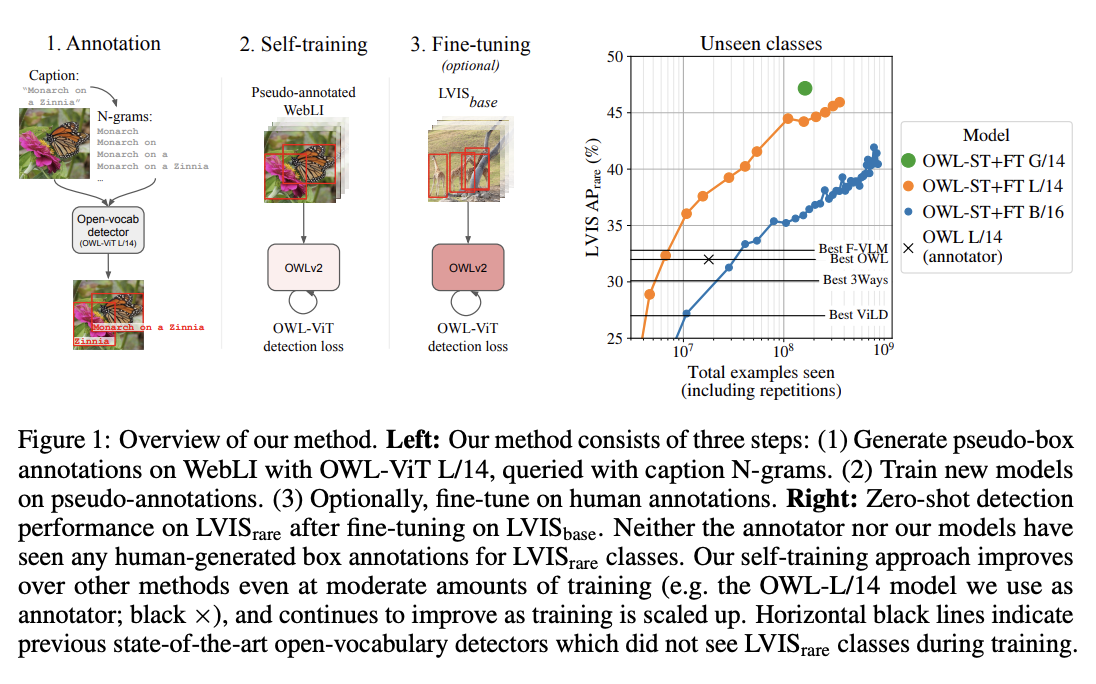 OWLv2の概要。元の論文から引用。
このモデルは [nielsr](https://huggingface.co/nielsr) によって提供されました。元のコードは [こちら](https://github.com/google-research/scenic/tree/main/scenic/projects/owl_vit) で確認できます。
## 使用例
OWLv2 は、その前身である [OWL-ViT](owlvit) と同様に、ゼロショットのテキスト条件付き物体検出モデルです。OWL-ViT は [CLIP](clip) をマルチモーダルバックボーンとして使用しており、ViT 風の Transformer で視覚特徴を、因果言語モデルでテキスト特徴を取得します。CLIP を検出に用いるために、OWL-ViT はビジョンモデルの最終トークンプーリング層を削除し、各 Transformer 出力トークンに軽量な分類ヘッドとボックスヘッドを接続します。固定された分類層の重みを、テキストモデルから得られるクラス名埋め込みで置き換えることで、オープンボキャブラリ分類が実現されます。著者らはまず CLIP をゼロから学習し、その後、標準的な検出データセット上で、分類ヘッドとボックスヘッドをバイパルティートマッチング損失を用いてエンドツーエンドでファインチューニングします。1 枚の画像に対して 1 つ以上のテキストクエリを使用することで、ゼロショットのテキスト条件付き物体検出を実行できます。
[Owlv2ImageProcessor](/docs/transformers/main/ja/model_doc/owlv2#transformers.Owlv2ImageProcessor) はモデル用の画像のリサイズ(またはリスケール)と正規化に使用でき、[CLIPTokenizer](/docs/transformers/main/ja/model_doc/clip#transformers.CLIPTokenizer) はテキストのエンコードに使用されます。[Owlv2Processor](/docs/transformers/main/ja/model_doc/owlv2#transformers.Owlv2Processor) は [Owlv2ImageProcessor](/docs/transformers/main/ja/model_doc/owlv2#transformers.Owlv2ImageProcessor) と [CLIPTokenizer](/docs/transformers/main/ja/model_doc/clip#transformers.CLIPTokenizer) を単一のインスタンスにまとめ、テキストのエンコードと画像の準備を両方行います。次の例では、[Owlv2Processor](/docs/transformers/main/ja/model_doc/owlv2#transformers.Owlv2Processor) と [Owlv2ForObjectDetection](/docs/transformers/main/ja/model_doc/owlv2#transformers.Owlv2ForObjectDetection) を使用してオブジェクト検出を行う方法を示します。
```python
import requests
from PIL import Image
import torch
from transformers import Owlv2Processor, Owlv2ForObjectDetection
processor = Owlv2Processor.from_pretrained("google/owlv2-base-patch16-ensemble")
model = Owlv2ForObjectDetection.from_pretrained("google/owlv2-base-patch16-ensemble", device_map="auto")
url = "http://images.cocodataset.org/val2017/000000039769.jpg"
image = Image.open(requests.get(url, stream=True).raw)
text_labels = [["a photo of a cat", "a photo of a dog"]]
inputs = processor(text=text_labels, images=image, return_tensors="pt").to(model.device)
outputs = model(**inputs)
# Target image sizes (height, width) to rescale box predictions [batch_size, 2]
target_sizes = torch.tensor([(image.height, image.width)])
# Convert outputs (bounding boxes and class logits) to Pascal VOC format (xmin, ymin, xmax, ymax)
results = processor.post_process_grounded_object_detection(
outputs=outputs, target_sizes=target_sizes, threshold=0.1, text_labels=text_labels
)
# Retrieve predictions for the first image for the corresponding text queries
result = results[0]
boxes, scores, text_labels = result["boxes"], result["scores"], result["text_labels"]
for box, score, text_label in zip(boxes, scores, text_labels):
box = [round(i, 2) for i in box.tolist()]
print(f"Detected {text_label} with confidence {round(score.item(), 3)} at location {box}")
Detected a photo of a cat with confidence 0.614 at location [341.67, 23.39, 642.32, 371.35]
Detected a photo of a cat with confidence 0.665 at location [6.75, 51.96, 326.62, 473.13]
```
## リソース
- OWLv2を用いたゼロショットおよびワンショット(画像ガイド)オブジェクト検出のデモノートブックは、[こちら](https://github.com/NielsRogge/Transformers-Tutorials/tree/master/OWLv2)で確認できます。
- [ゼロショット物体検出タスクガイド](../tasks/zero_shot_object_detection)
OWLv2のアーキテクチャは[OWL-ViT](owlvit)と同一ですが、オブジェクト検出ヘッドにはオブジェクトネス分類器が追加され、予測されたボックスがオブジェクト(背景ではなく)を含む可能性(クエリ非依存)を予測します。オブジェクトネススコアは、テキストクエリに依存せずに予測結果をランキングしたりフィルタリングしたりするために使用できます。OWLv2の使用方法は[OWL-ViT](owlvit)と同一ですが、新しい更新された画像プロセッサ([Owlv2ImageProcessor](/docs/transformers/main/ja/model_doc/owlv2#transformers.Owlv2ImageProcessor))が使用されます。
## Owlv2Config[[transformers.Owlv2Config]]
#### transformers.Owlv2Config[[transformers.Owlv2Config]]
```python
transformers.Owlv2Config(transformers_version: str | None = None, architectures: list[str] | None = None, output_hidden_states: bool | None = False, dtype: str | torch.dtype | None = None, chunk_size_feed_forward: int = 0, is_encoder_decoder: bool = False, id2label: dict[int, str] | dict[str, str] | None = None, label2id: dict[str, int] | dict[str, str] | None = None, problem_type: Literal['regression', 'single_label_classification', 'multi_label_classification'] | None = None, return_dict: bool = True, text_config: dict | transformers.configuration_utils.PreTrainedConfig | None = None, vision_config: dict | transformers.configuration_utils.PreTrainedConfig | None = None, projection_dim: int = 512, logit_scale_init_value: float = 2.6592, initializer_factor: float = 1.0)
```
[ソース](https://github.com/huggingface/transformers/blob/main/src/transformers/models/owlv2/configuration_owlv2.py#L104)
**パラメータ:**
return_dict (`bool`、*任意*、デフォルトは`True`) : プレーンなタプルではなく`ModelOutput`(dataclass)を返すかどうか。
text_config (`Union[dict, ~configuration_utils.PreTrainedConfig]`, *任意*) : テキストバックボーンの config オブジェクトまたは辞書。
vision_config (`Union[dict, ~configuration_utils.PreTrainedConfig]`, *任意*) : ビジョンバックボーンの config オブジェクトまたは辞書。
projection_dim (`int`、*任意*、デフォルトは`512`) : テキストおよびビジョンの投影層の次元数。
logit_scale_init_value (`float`、*任意*、デフォルトは `2.6592`) : *logit_scale* パラメータの初期値です。
initializer_factor (`float`、*任意*、デフォルトは`1.0`) : すべての重み行列を初期化する係数です(1に保つ必要があります。初期化テスト用に内部で使用されます)。
これはOwlv2Modelの設定を保存するための設定クラスです。指定された引数に基づいてOwlv2モデルをインスタンス化し、モデルのアーキテクチャを定義するために使用されます。デフォルト値で設定をインスタンス化すると、[google/owlv2-base-patch16](https://huggingface.co/google/owlv2-base-patch16)と類似した設定が得られます。
設定オブジェクトは [PreTrainedConfig](/docs/transformers/main/ja/main_classes/configuration#transformers.PreTrainedConfig) を継承し、モデルの出力を制御するために使用できます。詳細については、[PreTrainedConfig](/docs/transformers/main/ja/main_classes/configuration#transformers.PreTrainedConfig) のドキュメントを参照してください。
## Owlv2TextConfig[[transformers.Owlv2TextConfig]]
#### transformers.Owlv2TextConfig[[transformers.Owlv2TextConfig]]
```python
transformers.Owlv2TextConfig(transformers_version: str | None = None, architectures: list[str] | None = None, output_hidden_states: bool | None = False, return_dict: bool | None = True, dtype: str | torch.dtype | None = None, chunk_size_feed_forward: int = 0, is_encoder_decoder: bool = False, id2label: dict[int, str] | dict[str, str] | None = None, label2id: dict[str, int] | dict[str, str] | None = None, problem_type: Literal['regression', 'single_label_classification', 'multi_label_classification'] | None = None, vocab_size: int = 49408, hidden_size: int = 512, intermediate_size: int = 2048, num_hidden_layers: int = 12, num_attention_heads: int = 8, max_position_embeddings: int = 16, hidden_act: str = 'quick_gelu', layer_norm_eps: float = 1e-05, attention_dropout: float | int = 0.0, initializer_range: float = 0.02, initializer_factor: float = 1.0, pad_token_id: int | None = 0, bos_token_id: int | None = 49406, eos_token_id: int | list[int] | None = 49407)
```
[ソース](https://github.com/huggingface/transformers/blob/main/src/transformers/models/owlv2/configuration_owlv2.py#L28)
**パラメータ:**
vocab_size (`int`、*任意*、デフォルトは`49408`) : モデルの語彙サイズ。`input_ids`で表現できるトークンの種類数を定義します。
hidden_size (`int`、*任意*、デフォルトは`512`) : 隠れ表現の次元数。
intermediate_size (`int`、*任意*、デフォルトは`2048`) : MLP 表現の次元数。
num_hidden_layers (`int`, *任意*, デフォルトは `12`) : Transformer デコーダーの隠れ層の数。
num_attention_heads (`int`、*任意*、デフォルトは `8`) : Transformer デコーダーの各アテンション層におけるアテンションヘッドの数。
max_position_embeddings (`int`、*optional*、デフォルトは`16`) : このモデルが使用される可能性のある最大シーケンス長。
hidden_act (`str`、*任意*、デフォルトは `quick_gelu`) : デコーダーで使用する非線形活性化関数(関数または文字列)。例えば、`"gelu"`、`"relu"`、`"silu"` など。
layer_norm_eps (`float`、*任意*、デフォルトは`1e-05`) : Layer Normalization 層で使用する epsilon。
attention_dropout (`Union[float, int]`、*任意*、デフォルトは`0.0`) : 注意確率のドロップアウト率。
initializer_range (`float`、*任意*、デフォルトは`0.02`) : すべての重み行列を初期化するためのtruncated_normal_initializerの標準偏差です。
initializer_factor (`float`、*任意*、デフォルトは`1.0`) : すべての重み行列を初期化する係数です(1に保つ必要があります。初期化テスト用に内部で使用されます)。
pad_token_id (`int`, *任意*, デフォルトは `0`) : 語彙内でパディングに使用されるトークン ID。
bos_token_id (`int`、*任意*、デフォルトは `49406`) : 語彙内でストリームの開始に使用されるトークン ID。
eos_token_id (`Union[int, list[int]]`、*任意*、デフォルトは `49407`) : 語彙内でストリーム終了に使用されるトークン ID。
これはOwlv2Modelの設定を保存するための設定クラスです。指定された引数に基づいてOwlv2モデルをインスタンス化し、モデルのアーキテクチャを定義するために使用されます。デフォルト値で設定をインスタンス化すると、[google/owlv2-base-patch16](https://huggingface.co/google/owlv2-base-patch16)と類似した設定が得られます。
設定オブジェクトは [PreTrainedConfig](/docs/transformers/main/ja/main_classes/configuration#transformers.PreTrainedConfig) を継承し、モデルの出力を制御するために使用できます。詳細については、[PreTrainedConfig](/docs/transformers/main/ja/main_classes/configuration#transformers.PreTrainedConfig) のドキュメントを参照してください。
例:
```python
>>> from transformers import Owlv2TextConfig, Owlv2TextModel
>>> # Initializing a Owlv2TextModel with google/owlv2-base-patch16 style configuration
>>> configuration = Owlv2TextConfig()
>>> # Initializing a Owlv2TextConfig from the google/owlv2-base-patch16 style configuration
>>> model = Owlv2TextModel(configuration)
>>> # Accessing the model configuration
>>> configuration = model.config
```
## Owlv2VisionConfig[[transformers.Owlv2VisionConfig]]
#### transformers.Owlv2VisionConfig[[transformers.Owlv2VisionConfig]]
```python
transformers.Owlv2VisionConfig(transformers_version: str | None = None, architectures: list[str] | None = None, output_hidden_states: bool | None = False, return_dict: bool | None = True, dtype: str | torch.dtype | None = None, chunk_size_feed_forward: int = 0, is_encoder_decoder: bool = False, id2label: dict[int, str] | dict[str, str] | None = None, label2id: dict[str, int] | dict[str, str] | None = None, problem_type: Literal['regression', 'single_label_classification', 'multi_label_classification'] | None = None, hidden_size: int = 768, intermediate_size: int = 3072, num_hidden_layers: int = 12, num_attention_heads: int = 12, num_channels: int = 3, image_size: int | list[int] | tuple[int, int] = 768, patch_size: int | list[int] | tuple[int, int] = 16, hidden_act: str = 'quick_gelu', layer_norm_eps: float = 1e-05, attention_dropout: float | int = 0.0, initializer_range: float = 0.02, initializer_factor: float = 1.0)
```
[ソース](https://github.com/huggingface/transformers/blob/main/src/transformers/models/owlv2/configuration_owlv2.py#L67)
**パラメータ:**
hidden_size (`int`、*任意*、デフォルトは`768`) : 隠れ表現の次元数。
intermediate_size (`int`、*任意*、デフォルトは `3072`) : MLP 表現の次元数。
num_hidden_layers (`int`, *任意*, デフォルトは `12`) : Transformer デコーダーの隠れ層の数。
num_attention_heads (`int`、*任意*、デフォルトは `12`) : Transformer デコーダーの各アテンション層におけるアテンションヘッドの数。
num_channels (`int`、*任意*、デフォルトは`3`) : 入力チャネル数。
image_size (`Union[int, list[int], tuple[int, int]]`、*任意*、デフォルトは`768`) : 各画像のサイズ(解像度)。
patch_size (`Union[int, list[int], tuple[int, int]]`、*任意*、デフォルトは`16`) : 各パッチのサイズ(解像度)。
hidden_act (`str`、*任意*、デフォルトは `quick_gelu`) : デコーダーで使用する非線形活性化関数(関数または文字列)。例えば、`"gelu"`、`"relu"`、`"silu"` など。
layer_norm_eps (`float`、*任意*、デフォルトは`1e-05`) : Layer Normalization 層で使用する epsilon。
attention_dropout (`Union[float, int]`、*任意*、デフォルトは`0.0`) : 注意確率のドロップアウト率。
initializer_range (`float`、*任意*、デフォルトは`0.02`) : すべての重み行列を初期化するためのtruncated_normal_initializerの標準偏差です。
initializer_factor (`float`、*任意*、デフォルトは`1.0`) : すべての重み行列を初期化する係数です(1に保つ必要があります。初期化テスト用に内部で使用されます)。
これはOwlv2Modelの設定を保存するための設定クラスです。指定された引数に基づいてOwlv2モデルをインスタンス化し、モデルのアーキテクチャを定義するために使用されます。デフォルト値で設定をインスタンス化すると、[google/owlv2-base-patch16](https://huggingface.co/google/owlv2-base-patch16)と類似した設定が得られます。
設定オブジェクトは [PreTrainedConfig](/docs/transformers/main/ja/main_classes/configuration#transformers.PreTrainedConfig) を継承し、モデルの出力を制御するために使用できます。詳細については、[PreTrainedConfig](/docs/transformers/main/ja/main_classes/configuration#transformers.PreTrainedConfig) のドキュメントを参照してください。
例:
```python
>>> from transformers import Owlv2VisionConfig, Owlv2VisionModel
>>> # Initializing a Owlv2VisionModel with google/owlv2-base-patch16 style configuration
>>> configuration = Owlv2VisionConfig()
>>> # Initializing a Owlv2VisionModel model from the google/owlv2-base-patch16 style configuration
>>> model = Owlv2VisionModel(configuration)
>>> # Accessing the model configuration
>>> configuration = model.config
```
## Owlv2ImageProcessor[[transformers.Owlv2ImageProcessor]]
#### transformers.Owlv2ImageProcessor[[transformers.Owlv2ImageProcessor]]
```python
transformers.Owlv2ImageProcessor(**kwargs: *)
```
[ソース](https://github.com/huggingface/transformers/blob/main/src/transformers/models/owlv2/image_processing_owlv2.py#L110)
**パラメータ:**
do_convert_rgb (`bool`, *kwargs*, *optional*, デフォルトは `True`) : 画像を RGB に変換するかどうか。
do_resize (`bool`, *kwargs*, *任意*, デフォルトは `True`) : 画像をリサイズするかどうか。
size (`Annotated[int | list[int] | tuple[int, ...] | dict[str, int] | None, None]`, *kwargs*、デフォルト値は`{'height' : 960, 'width': 960}`): モデルへの最大入力次元を記述します。
default_to_square (`bool`, *kwargs*, *任意*、デフォルトは `True`) : size が整数の場合、リサイズ時に正方形の画像をデフォルトとするかどうか。
crop_size (`Annotated[int | list[int] | tuple[int, ...] | dict[str, int] | None, None]`, *kwargs*、デフォルトは `None`) : `center_crop` を適用した後の出力画像のサイズ。
resample (`Annotated[Union[int, PILImageResampling, NoneType], None]`, *kwargs*、デフォルト値は`2`) : 画像のリサイズ時に使用するリサンプリングフィルタです。これは列挙型`PILImageResampling`のいずれかになります。`do_resize`が`True`に設定されている場合のみ、効果が現れます。
do_rescale (`bool`, *kwargs*, *optional*, デフォルトは `True`) : 画像をリスケールするかどうか。
rescale_factor (`float`, *kwargs*, *optional*, デフォルトは `0.00392156862745098`) : `do_rescale` が `True` に設定されている場合、画像をリスケールするための係数。
do_normalize (`bool`, *kwargs*, *optional*, デフォルトは `True`) : 画像を正規化するかどうかを指定します。
image_mean (`Union[float, list[float], tuple[float, ...]]`, *kwargs*, *optional*, デフォルトは `[0.48145466, 0.4578275, 0.40821073]`) : 正規化に使用する画像の平均値。`do_normalize` が `True` に設定されている場合のみ有効です。
image_std (`Union[float, list[float], tuple[float, ...]]`, *kwargs*, *optional*, デフォルトは `[0.26862954, 0.26130258, 0.27577711]`) : 正規化に使用する画像の標準偏差。`do_normalize` が `True` に設定されている場合のみ有効です。
do_pad (`bool`, *kwargs*, *optional*, デフォルトは `True`) : 画像にパディングを適用するかどうか。パディングは、バッチ内の最大サイズに合わせるか、画像ごとに固定の正方形サイズに合わせるかのいずれかで行われます。正確なパディング戦略はモデルによって異なります。
pad_size (`Annotated[int | list[int] | tuple[int, ...] | dict[str, int] | None, None]`, *kwargs*) : 画像をパディングするサイズを`{"height": int, "width" int}`で指定します。前処理に提供されたすべての画像サイズより大きい必要があります。`pad_size`が指定されない場合、バッチ内の最大の幅と高さにパディングされます。`do_pad=True.`の場合にのみ適用されます。
do_center_crop (`bool`, *kwargs*, *optional*, デフォルトは `None`) : 画像を中央クロップするかどうか。
data_format (`Union[str, ~image_utils.ChannelDimension]`、*kwargs*、*optional*) : 対応するのは `ChannelDimension.FIRST` のみです。slow processors との互換性のために追加されました。
input_data_format (`Union[str, ~image_utils.ChannelDimension]`, *kwargs*, *任意*) : 入力画像のチャネル次元の形式です。設定されていない場合、入力画像からチャネル次元の形式が推論されます。以下のいずれかになります: - `"channels_first"` または `ChannelDimension.FIRST`: (num_channels, height, width) 形式の画像。 - `"channels_last"` または `ChannelDimension.LAST`: (height, width, num_channels) 形式の画像。 - `"none"` または `ChannelDimension.NONE`: (height, width) 形式の画像。
device (`Annotated[Union[str, torch.device, NoneType], None]`, *kwargs*) : 動画を処理するデバイスです。未設定の場合、入力動画からデバイスが推論されます。
return_tensors (`Annotated[str | ~utils.generic.TensorType | None, None]`, *kwargs*) : `'pt'`に設定されている場合はスタックされたテンソルを返し、それ以外の場合はテンソルのリストを返します。
disable_grouping (`bool`, *kwargs*, *optional*) : 画像をサイズごとにグループ化してバッチ処理するのではなく、個別に処理するためにグループ化を無効にするかどうかを指定します。None の場合、画像が CPU にある場合は True、それ以外の場合は False に設定されます。この選択は、https://github.com/huggingface/transformers/pull/38157 に詳しく記載されている実証的な観察に基づいています。
image_seq_length (`int`, *kwargs*, *任意*) : 入力内の各画像に使用される画像トークンの数です。後方互換性のために追加されましたが、将来のモデルではプロセッサの属性として設定されるべきです。
Owlv2ImageProcessor 画像プロセッサを構築します。
#### preprocess[[transformers.Owlv2ImageProcessor.preprocess]]
```python
preprocess(images: typing.Union[ForwardRef('PIL.Image.Image'), numpy.ndarray, ForwardRef('torch.Tensor'), list['PIL.Image.Image'], list[numpy.ndarray], list['torch.Tensor']], *args, image_like_kwargs: dict[str, typing.Any] | None = None, **kwargs: *)
```
[ソース](https://github.com/huggingface/transformers/blob/main/src/transformers/image_processing_utils.py#L382)
**パラメータ:**
images (`Union[PIL.Image.Image, numpy.ndarray, torch.Tensor, list[PIL.Image.Image], list[numpy.ndarray], list[torch.Tensor]]`) : 前処理対象の画像。ピクセル値が 0 から 255 の範囲にある単一の画像またはバッチの画像を想定しています。ピクセル値が 0 から 1 の範囲にある画像を渡す場合は、`do_rescale=False` を設定してください。
image_like_kwargs (`dict[str, Any]`、*省略可*) : 追加の画像類似の入力も前処理対象にするための開発者向けフラグです。引数として kwarg を渡す方法が機能しない場合のみ使用してください。例えば、`preprocess(images, masks=masks)` が推奨される方法ですが、一部のモデルでは引数の優先順位の問題が発生します。そのような場合は、代わりに `preprocess(images, image_like_inputs={"masks": masks})` を使用できます。
do_convert_rgb (`bool`, *kwargs*, *optional*) : 画像を RGB に変換するかどうか。
do_resize (`bool`, *kwargs*, *optional*) : 画像をリサイズするかどうか。
size (`Annotated[int | list[int] | tuple[int, ...] | dict[str, int] | None, None]`, *kwargs*) : モデルへの最大入力次元を記述します。
default_to_square (`bool`, *kwargs*, *optional*) : size が int の場合、リサイズ時に正方形の画像をデフォルトとするかどうか。
crop_size (`Annotated[int | list[int] | tuple[int, ...] | dict[str, int] | None, None]`, *kwargs*) : `center_crop` を適用した後の出力画像のサイズ。
resample (`Annotated[Union[int, PILImageResampling, NoneType], None]`, *kwargs*) : 画像をリサイズする場合に使用するリサンプリングフィルタ。`PILImageResampling` の列挙型のいずれかです。`do_resize` が `True` に設定されている場合のみ有効です。
do_rescale (`bool`, *kwargs*, *任意*) : 画像をリスケールするかどうか。
rescale_factor (`float`, *kwargs*, *optional*) : `do_rescale` が `True` に設定されている場合、画像をリサイズするためのリスケール係数。
do_normalize (`bool`, *kwargs*, *optional*) : 画像を正規化するかどうかを指定します。
image_mean (`Union[float, list[float], tuple[float, ...]]`, *kwargs*, *optional*) : 正規化に使用する画像の平均値。`do_normalize` が `True` に設定されている場合のみ有効です。
image_std (`Union[float, list[float], tuple[float, ...]]`, *kwargs*, *optional*) : 正規化に使用する画像の標準偏差。`do_normalize` が `True` に設定されている場合のみ有効です。
do_pad (`bool`, *kwargs*, *任意*) : 画像にパディングを適用するかどうか。パディングは、バッチ内の最大サイズに合わせるか、画像ごとに固定の正方形サイズに合わせるかのいずれかで行われます。正確なパディング戦略はモデルによって異なります。
pad_size (`Annotated[int | list[int] | tuple[int, ...] | dict[str, int] | None, None]`, *kwargs*) : 画像をパディングするサイズを`{"height": int, "width" int}`で指定します。前処理に提供されたすべての画像サイズより大きい必要があります。`pad_size`が指定されない場合、バッチ内の最大の幅と高さにパディングされます。`do_pad=True.`の場合にのみ適用されます。
do_center_crop (`bool`, *kwargs*, *optional*) : 画像を中央クロップするかどうか。
data_format (`Union[str, ~image_utils.ChannelDimension]`、*kwargs*、*optional*) : 対応するのは `ChannelDimension.FIRST` のみです。slow processors との互換性のために追加されました。
input_data_format (`Union[str, ~image_utils.ChannelDimension]`, *kwargs*, *任意*) : 入力画像のチャネル次元の形式です。設定されていない場合、入力画像からチャネル次元の形式が推論されます。以下のいずれかになります: - `"channels_first"` または `ChannelDimension.FIRST`: (num_channels, height, width) 形式の画像。 - `"channels_last"` または `ChannelDimension.LAST`: (height, width, num_channels) 形式の画像。 - `"none"` または `ChannelDimension.NONE`: (height, width) 形式の画像。
device (`Annotated[Union[str, torch.device, NoneType], None]`, *kwargs*) : 動画を処理するデバイスです。未設定の場合、入力動画からデバイスが推論されます。
return_tensors (`Annotated[str | ~utils.generic.TensorType | None, None]`, *kwargs*) : `'pt'`に設定されている場合はスタックされたテンソルを返し、それ以外の場合はテンソルのリストを返します。
disable_grouping (`bool`, *kwargs*, *optional*) : 画像をサイズごとにグループ化してバッチ処理するのではなく、個別に処理するためにグループ化を無効にするかどうかを指定します。None の場合、画像が CPU にある場合は True、それ以外の場合は False に設定されます。この選択は、https://github.com/huggingface/transformers/pull/38157 に詳しく記載されている実証的な観察に基づいています。
image_seq_length (`int`, *kwargs*, *任意*) : 入力内の各画像に使用される画像トークンの数です。後方互換性のために追加されましたが、将来のモデルではプロセッサの属性として設定されるべきです。
**戻り値:** `~image_processing_base.BatchFeature`
- **data** (`dict`) -- __call__ メソッドによって返されるリスト/配列/テンソルの辞書('pixel_values' など)。
- **tensor_type** (`Union[None, str, TensorType]`、*省略可*) -- 初期化時に PyTorch/Numpy の Tensor 内の整数リストを変換するために、ここで tensor_type を指定できます。
画像または画像のバッチを前処理します。
#### post_process_object_detection[[transformers.Owlv2ImageProcessor.post_process_object_detection]]
```python
post_process_object_detection(outputs: Owlv2ObjectDetectionOutput, threshold: float = 0.1, target_sizes: transformers.utils.generic.TensorType | list[tuple] | None = None)
```
[ソース](https://github.com/huggingface/transformers/blob/main/src/transformers/models/owlv2/image_processing_owlv2.py#L136)
**パラメータ:**
outputs (`Owlv2ObjectDetectionOutput`) : モデルの生出力。
threshold (`float`、*任意*、デフォルト値は 0.1) : オブジェクト検出の予測を保持するためのスコアしきい値。
target_sizes (`torch.Tensor` または `list[tuple[int, int]]`、*任意*) : 形状が `(batch_size, 2)` の Tensor、またはバッチ内の各画像のターゲットサイズ `(height, width)` を含むタプルのリスト (`tuple[int, int]`)。未設定の場合、予測結果はリサイズされません。
**戻り値:** `list[Dict]`
各辞書に以下のキーが含まれる辞書のリスト:
- "scores": 画像上の各予測ボックスに対する信頼度スコア。
- "labels": モデルが画像に対して予測したクラスのインデックス。
- "boxes": (top_left_x, top_left_y, bottom_right_x, bottom_right_y) 形式の画像のバウンディングボックス。
[Owlv2ForObjectDetection](/docs/transformers/main/ja/model_doc/owlv2#transformers.Owlv2ForObjectDetection)の生出力を、(top_left_x, top_left_y, bottom_right_x, bottom_right_y)形式の最終的なバウンディングボックスに変換します。
#### post_process_image_guided_detection[[transformers.Owlv2ImageProcessor.post_process_image_guided_detection]]
```python
post_process_image_guided_detection(outputs, threshold = 0.0, nms_threshold = 0.3, target_sizes = None)
```
[ソース](https://github.com/huggingface/transformers/blob/main/src/transformers/models/owlv2/image_processing_owlv2.py#L189)
**パラメータ:**
outputs (`Owlv2ImageGuidedObjectDetectionOutput`) : モデルの生出力。
threshold (`float`、*optional*、デフォルト値は 0.0) : 予測されたボックスをフィルタリングするために使用する最小の信頼度閾値。
nms_threshold (`float`, *optional*, デフォルトは 0.3) : 重複するボックスの非最大値抑制 (NMS) における IoU しきい値。
target_sizes (`torch.Tensor`, *任意*) : 形状が (batch_size, 2) の Tensor で、各エントリはバッチ内の対応する画像の (height, width) です。設定されている場合、予測された正規化バウンディングボックスはターゲットサイズにリスケールされます。None の場合、予測値は正規化解除されません。
**戻り値:** `list[Dict]`
辞書のリストです。各辞書には、モデルが予測したバッチ内の各画像のスコア、ラベル、ボックスが含まれます。`Owlv2ForObjectDetection.image_guided_detection` はワンショットオブジェクト検出を実行するため、すべてのラベルは None に設定されます。
[Owlv2ForObjectDetection.image_guided_detection()](/docs/transformers/main/ja/model_doc/owlv2#transformers.Owlv2ForObjectDetection.image_guided_detection) の出力を、COCO api が期待する形式に変換します。
## Owlv2ImageProcessorPil[[transformers.Owlv2ImageProcessorPil]]
#### transformers.Owlv2ImageProcessorPil[[transformers.Owlv2ImageProcessorPil]]
```python
transformers.Owlv2ImageProcessorPil(**kwargs: *)
```
[ソース](https://github.com/huggingface/transformers/blob/main/src/transformers/models/owlv2/image_processing_pil_owlv2.py#L190)
**パラメータ:**
do_convert_rgb (`bool`, *kwargs*, *optional*, デフォルトは `True`) : 画像を RGB に変換するかどうか。
do_resize (`bool`, *kwargs*, *任意*, デフォルトは `True`) : 画像をリサイズするかどうか。
size (`Annotated[int | list[int] | tuple[int, ...] | dict[str, int] | None, None]`, *kwargs*、デフォルト値は`{'height' : 960, 'width': 960}`): モデルへの最大入力次元を記述します。
default_to_square (`bool`, *kwargs*, *任意*、デフォルトは `True`) : size が整数の場合、リサイズ時に正方形の画像をデフォルトとするかどうか。
crop_size (`Annotated[int | list[int] | tuple[int, ...] | dict[str, int] | None, None]`, *kwargs*、デフォルトは `None`) : `center_crop` を適用した後の出力画像のサイズ。
resample (`Annotated[Union[int, PILImageResampling, NoneType], None]`, *kwargs*、デフォルト値は`2`) : 画像のリサイズ時に使用するリサンプリングフィルタです。これは列挙型`PILImageResampling`のいずれかになります。`do_resize`が`True`に設定されている場合のみ、効果が現れます。
do_rescale (`bool`, *kwargs*, *optional*, デフォルトは `True`) : 画像をリスケールするかどうか。
rescale_factor (`float`, *kwargs*, *optional*, デフォルトは `0.00392156862745098`) : `do_rescale` が `True` に設定されている場合、画像をリスケールするための係数。
do_normalize (`bool`, *kwargs*, *optional*, デフォルトは `True`) : 画像を正規化するかどうかを指定します。
image_mean (`Union[float, list[float], tuple[float, ...]]`, *kwargs*, *optional*, デフォルトは `[0.48145466, 0.4578275, 0.40821073]`) : 正規化に使用する画像の平均値。`do_normalize` が `True` に設定されている場合のみ有効です。
image_std (`Union[float, list[float], tuple[float, ...]]`, *kwargs*, *optional*, デフォルトは `[0.26862954, 0.26130258, 0.27577711]`) : 正規化に使用する画像の標準偏差。`do_normalize` が `True` に設定されている場合のみ有効です。
do_pad (`bool`, *kwargs*, *optional*, デフォルトは `True`) : 画像にパディングを適用するかどうか。パディングは、バッチ内の最大サイズに合わせるか、画像ごとに固定の正方形サイズに合わせるかのいずれかで行われます。正確なパディング戦略はモデルによって異なります。
pad_size (`Annotated[int | list[int] | tuple[int, ...] | dict[str, int] | None, None]`, *kwargs*) : 画像をパディングするサイズを`{"height": int, "width" int}`で指定します。前処理に提供されたすべての画像サイズより大きい必要があります。`pad_size`が指定されない場合、バッチ内の最大の幅と高さにパディングされます。`do_pad=True.`の場合にのみ適用されます。
do_center_crop (`bool`, *kwargs*, *optional*, デフォルトは `None`) : 画像を中央クロップするかどうか。
data_format (`Union[str, ~image_utils.ChannelDimension]`、*kwargs*、*optional*) : 対応するのは `ChannelDimension.FIRST` のみです。slow processors との互換性のために追加されました。
input_data_format (`Union[str, ~image_utils.ChannelDimension]`, *kwargs*, *任意*) : 入力画像のチャネル次元の形式です。設定されていない場合、入力画像からチャネル次元の形式が推論されます。以下のいずれかになります: - `"channels_first"` または `ChannelDimension.FIRST`: (num_channels, height, width) 形式の画像。 - `"channels_last"` または `ChannelDimension.LAST`: (height, width, num_channels) 形式の画像。 - `"none"` または `ChannelDimension.NONE`: (height, width) 形式の画像。
device (`Annotated[Union[str, torch.device, NoneType], None]`, *kwargs*) : 動画を処理するデバイスです。未設定の場合、入力動画からデバイスが推論されます。
return_tensors (`Annotated[str | ~utils.generic.TensorType | None, None]`, *kwargs*) : `'pt'`に設定されている場合はスタックされたテンソルを返し、それ以外の場合はテンソルのリストを返します。
disable_grouping (`bool`, *kwargs*, *optional*) : 画像をサイズごとにグループ化してバッチ処理するのではなく、個別に処理するためにグループ化を無効にするかどうかを指定します。None の場合、画像が CPU にある場合は True、それ以外の場合は False に設定されます。この選択は、https://github.com/huggingface/transformers/pull/38157 に詳しく記載されている実証的な観察に基づいています。
image_seq_length (`int`, *kwargs*, *任意*) : 入力内の各画像に使用される画像トークンの数です。後方互換性のために追加されましたが、将来のモデルではプロセッサの属性として設定されるべきです。
Owlv2ImageProcessor 画像プロセッサを構築します。
#### preprocess[[transformers.Owlv2ImageProcessorPil.preprocess]]
```python
preprocess(images: typing.Union[ForwardRef('PIL.Image.Image'), numpy.ndarray, ForwardRef('torch.Tensor'), list['PIL.Image.Image'], list[numpy.ndarray], list['torch.Tensor']], *args, image_like_kwargs: dict[str, typing.Any] | None = None, **kwargs: *)
```
[ソース](https://github.com/huggingface/transformers/blob/main/src/transformers/image_processing_utils.py#L382)
**パラメータ:**
images (`Union[PIL.Image.Image, numpy.ndarray, torch.Tensor, list[PIL.Image.Image], list[numpy.ndarray], list[torch.Tensor]]`) : 前処理対象の画像。ピクセル値が 0 から 255 の範囲にある単一の画像またはバッチの画像を想定しています。ピクセル値が 0 から 1 の範囲にある画像を渡す場合は、`do_rescale=False` を設定してください。
image_like_kwargs (`dict[str, Any]`、*省略可*) : 追加の画像類似の入力も前処理対象にするための開発者向けフラグです。引数として kwarg を渡す方法が機能しない場合のみ使用してください。例えば、`preprocess(images, masks=masks)` が推奨される方法ですが、一部のモデルでは引数の優先順位の問題が発生します。そのような場合は、代わりに `preprocess(images, image_like_inputs={"masks": masks})` を使用できます。
do_convert_rgb (`bool`, *kwargs*, *optional*) : 画像を RGB に変換するかどうか。
do_resize (`bool`, *kwargs*, *optional*) : 画像をリサイズするかどうか。
size (`Annotated[int | list[int] | tuple[int, ...] | dict[str, int] | None, None]`, *kwargs*) : モデルへの最大入力次元を記述します。
default_to_square (`bool`, *kwargs*, *optional*) : size が int の場合、リサイズ時に正方形の画像をデフォルトとするかどうか。
crop_size (`Annotated[int | list[int] | tuple[int, ...] | dict[str, int] | None, None]`, *kwargs*) : `center_crop` を適用した後の出力画像のサイズ。
resample (`Annotated[Union[int, PILImageResampling, NoneType], None]`, *kwargs*) : 画像をリサイズする場合に使用するリサンプリングフィルタ。`PILImageResampling` の列挙型のいずれかです。`do_resize` が `True` に設定されている場合のみ有効です。
do_rescale (`bool`, *kwargs*, *任意*) : 画像をリスケールするかどうか。
rescale_factor (`float`, *kwargs*, *optional*) : `do_rescale` が `True` に設定されている場合、画像をリサイズするためのリスケール係数。
do_normalize (`bool`, *kwargs*, *optional*) : 画像を正規化するかどうかを指定します。
image_mean (`Union[float, list[float], tuple[float, ...]]`, *kwargs*, *optional*) : 正規化に使用する画像の平均値。`do_normalize` が `True` に設定されている場合のみ有効です。
image_std (`Union[float, list[float], tuple[float, ...]]`, *kwargs*, *optional*) : 正規化に使用する画像の標準偏差。`do_normalize` が `True` に設定されている場合のみ有効です。
do_pad (`bool`, *kwargs*, *任意*) : 画像にパディングを適用するかどうか。パディングは、バッチ内の最大サイズに合わせるか、画像ごとに固定の正方形サイズに合わせるかのいずれかで行われます。正確なパディング戦略はモデルによって異なります。
pad_size (`Annotated[int | list[int] | tuple[int, ...] | dict[str, int] | None, None]`, *kwargs*) : 画像をパディングするサイズを`{"height": int, "width" int}`で指定します。前処理に提供されたすべての画像サイズより大きい必要があります。`pad_size`が指定されない場合、バッチ内の最大の幅と高さにパディングされます。`do_pad=True.`の場合にのみ適用されます。
do_center_crop (`bool`, *kwargs*, *optional*) : 画像を中央クロップするかどうか。
data_format (`Union[str, ~image_utils.ChannelDimension]`、*kwargs*、*optional*) : 対応するのは `ChannelDimension.FIRST` のみです。slow processors との互換性のために追加されました。
input_data_format (`Union[str, ~image_utils.ChannelDimension]`, *kwargs*, *任意*) : 入力画像のチャネル次元の形式です。設定されていない場合、入力画像からチャネル次元の形式が推論されます。以下のいずれかになります: - `"channels_first"` または `ChannelDimension.FIRST`: (num_channels, height, width) 形式の画像。 - `"channels_last"` または `ChannelDimension.LAST`: (height, width, num_channels) 形式の画像。 - `"none"` または `ChannelDimension.NONE`: (height, width) 形式の画像。
device (`Annotated[Union[str, torch.device, NoneType], None]`, *kwargs*) : 動画を処理するデバイスです。未設定の場合、入力動画からデバイスが推論されます。
return_tensors (`Annotated[str | ~utils.generic.TensorType | None, None]`, *kwargs*) : `'pt'`に設定されている場合はスタックされたテンソルを返し、それ以外の場合はテンソルのリストを返します。
disable_grouping (`bool`, *kwargs*, *optional*) : 画像をサイズごとにグループ化してバッチ処理するのではなく、個別に処理するためにグループ化を無効にするかどうかを指定します。None の場合、画像が CPU にある場合は True、それ以外の場合は False に設定されます。この選択は、https://github.com/huggingface/transformers/pull/38157 に詳しく記載されている実証的な観察に基づいています。
image_seq_length (`int`, *kwargs*, *任意*) : 入力内の各画像に使用される画像トークンの数です。後方互換性のために追加されましたが、将来のモデルではプロセッサの属性として設定されるべきです。
**戻り値:** `~image_processing_base.BatchFeature`
- **data** (`dict`) -- __call__ メソッドによって返されるリスト/配列/テンソルの辞書('pixel_values' など)。
- **tensor_type** (`Union[None, str, TensorType]`、*省略可*) -- 初期化時に PyTorch/Numpy の Tensor 内の整数リストを変換するために、ここで tensor_type を指定できます。
画像または画像のバッチを前処理します。
#### post_process_object_detection[[transformers.Owlv2ImageProcessorPil.post_process_object_detection]]
```python
post_process_object_detection(outputs: Owlv2ObjectDetectionOutput, threshold: float = 0.1, target_sizes: transformers.utils.generic.TensorType | list[tuple] | None = None)
```
[ソース](https://github.com/huggingface/transformers/blob/main/src/transformers/models/owlv2/image_processing_pil_owlv2.py#L216)
**パラメータ:**
outputs (`Owlv2ObjectDetectionOutput`) : モデルの生出力。
threshold (`float`、*任意*、デフォルト値は 0.1) : オブジェクト検出の予測を保持するためのスコアしきい値。
target_sizes (`torch.Tensor` または `list[tuple[int, int]]`、*任意*) : 形状が `(batch_size, 2)` の Tensor、またはバッチ内の各画像のターゲットサイズ `(height, width)` を含むタプルのリスト (`tuple[int, int]`)。未設定の場合、予測結果はリサイズされません。
**戻り値:** `list[Dict]`
各辞書に以下のキーが含まれる辞書のリスト:
- "scores": 画像上の各予測ボックスに対する信頼度スコア。
- "labels": モデルが画像に対して予測したクラスのインデックス。
- "boxes": (top_left_x, top_left_y, bottom_right_x, bottom_right_y) 形式の画像のバウンディングボックス。
[Owlv2ForObjectDetection](/docs/transformers/main/ja/model_doc/owlv2#transformers.Owlv2ForObjectDetection)の生出力を、(top_left_x, top_left_y, bottom_right_x, bottom_right_y)形式の最終的なバウンディングボックスに変換します。
#### post_process_image_guided_detection[[transformers.Owlv2ImageProcessorPil.post_process_image_guided_detection]]
```python
post_process_image_guided_detection(outputs, threshold = 0.0, nms_threshold = 0.3, target_sizes = None)
```
[ソース](https://github.com/huggingface/transformers/blob/main/src/transformers/models/owlv2/image_processing_pil_owlv2.py#L272)
**パラメータ:**
outputs (`Owlv2ImageGuidedObjectDetectionOutput`) : モデルの生出力。
threshold (`float`、*optional*、デフォルト値は 0.0) : 予測されたボックスをフィルタリングするために使用する最小の信頼度閾値。
nms_threshold (`float`, *optional*, デフォルトは 0.3) : 重複するボックスの非最大値抑制 (NMS) における IoU しきい値。
target_sizes (`torch.Tensor`, *任意*) : 形状が (batch_size, 2) の Tensor で、各エントリはバッチ内の対応する画像の (height, width) です。設定されている場合、予測された正規化バウンディングボックスはターゲットサイズにリスケールされます。None の場合、予測値は正規化解除されません。
**戻り値:** `list[Dict]`
辞書のリストです。各辞書には、モデルが予測したバッチ内の各画像のスコア、ラベル、ボックスが含まれます。`Owlv2ForObjectDetection.image_guided_detection` はワンショットオブジェクト検出を実行するため、すべてのラベルは None に設定されます。
[Owlv2ForObjectDetection.image_guided_detection()](/docs/transformers/main/ja/model_doc/owlv2#transformers.Owlv2ForObjectDetection.image_guided_detection) の出力を、COCO api が期待する形式に変換します。
## Owlv2Processor[[transformers.Owlv2Processor]]
#### transformers.Owlv2Processor[[transformers.Owlv2Processor]]
```python
transformers.Owlv2Processor(image_processor, tokenizer, **kwargs)
```
[ソース](https://github.com/huggingface/transformers/blob/main/src/transformers/models/owlv2/processing_owlv2.py#L62)
**パラメータ:**
image_processor (`Owlv2ImageProcessor`) : 画像プロセッサは必須の入力です。
tokenizer (`CLIPTokenizer`) : トークナイザーは必須の入力です。
画像プロセッサとトークナイザーを単一のプロセッサにラップするOwlv2Processorを構築します。
[Owlv2Processor](/docs/transformers/main/ja/model_doc/owlv2#transformers.Owlv2Processor) は、[Owlv2ImageProcessor](/docs/transformers/main/ja/model_doc/owlv2#transformers.Owlv2ImageProcessor) と [CLIPTokenizer](/docs/transformers/main/ja/model_doc/clip#transformers.CLIPTokenizer) のすべての機能を提供します。詳細については、[~Owlv2ImageProcessor](/docs/transformers/main/ja/model_doc/owlv2#transformers.Owlv2ImageProcessor) および [~CLIPTokenizer](/docs/transformers/main/ja/model_doc/clip#transformers.CLIPTokenizer) を参照してください。
#### __call__[[transformers.Owlv2Processor.__call__]]
```python
__call__(images: typing.Union[ForwardRef('PIL.Image.Image'), numpy.ndarray, ForwardRef('torch.Tensor'), list['PIL.Image.Image'], list[numpy.ndarray], list['torch.Tensor'], NoneType] = None, text: str | list[str] | list[list[str]] = None, **kwargs: *)
```
[ソース](https://github.com/huggingface/transformers/blob/main/src/transformers/models/owlv2/processing_owlv2.py#L68)
**パラメータ:**
images (`Union[PIL.Image.Image, numpy.ndarray, torch.Tensor, list[PIL.Image.Image], list[numpy.ndarray], list[torch.Tensor]]`, *任意*) : 前処理を行う画像。ピクセル値が 0 から 255 の範囲にある単一の画像またはバッチの画像を想定しています。ピクセル値が 0 から 1 の範囲にある画像を渡す場合は、`do_rescale=False` を設定してください。
text (`Union[str, list[str], list[list[str]]]`、*任意*) : エンコード対象のシーケンスまたはシーケンスのバッチです。各シーケンスは文字列、または文字列のリスト(プレトークナイズ済み文字列)であることができます。プレトークナイズ済み入力を渡す場合は、バッチ入力との曖昧さを避けるために `is_split_into_words=True` を設定してください。
query_images (`ImageInput`, *kwargs*, *任意*) : 画像ガイド型オブジェクト検出に使用するクエリ画像を指定します。指定された場合、これらの画像は、メインの`images`内で類似したオブジェクトを検出するための視覚的クエリとして機能します。クエリ画像はテキストプロンプトをオーバーライドし、モデルはテキストから画像へのマッチングではなく、画像から画像へのマッチングを実行します。
return_tensors (`str` または [TensorType](/docs/transformers/main/ja/internal/file_utils#transformers.TensorType)、*optional*) : 設定されている場合、特定のフレームワークのテンソルを返します。受け入れ可能な値は以下の通りです: - `'pt'`: PyTorch の `torch.Tensor` オブジェクトを返します。 - `'np'`: NumPy の `np.ndarray` オブジェクトを返します。
- ****kwargs** ([ProcessingKwargs](/docs/transformers/main/ja/main_classes/processors#transformers.ProcessingKwargs), *optional*) : 各モダリティ(テキスト、画像、動画、音声)の追加処理オプション。モデル固有のパラメータは上記にリストされています。サポートされている引数の完全なリストについては、TypedDict クラスを参照してください。
**戻り値:** [BatchFeature](/docs/transformers/main/ja/main_classes/feature_extractor#transformers.BatchFeature)
以下のフィールドを持つ[BatchFeature](/docs/transformers/main/ja/main_classes/feature_extractor#transformers.BatchFeature):
- **input_ids** -- モデルに与えるトークンIDのリスト。`text`が`None`でない場合に返されます。
- **attention_mask** -- モデルが注意すべきトークンを指定するインデックスのリスト(`return_attention_mask=True`の場合、または`self.model_input_names`に*"attention_mask"*が含まれており`text`が`None`でない場合)。
- **pixel_values** -- モデルに渡すピクセル値。`images` が `None` でない場合に返されます。
- **query_pixel_values** -- モデルに与えるクエリ画像のピクセル値。`query_images`が`None`でない場合に返されます。
#### post_process_grounded_object_detection[[transformers.Owlv2Processor.post_process_grounded_object_detection]]
```python
post_process_grounded_object_detection(outputs: Owlv2ObjectDetectionOutput, threshold: float = 0.1, target_sizes: transformers.utils.generic.TensorType | list[tuple] | None = None, text_labels: list[list[str]] | None = None)
```
[ソース](https://github.com/huggingface/transformers/blob/main/src/transformers/models/owlv2/processing_owlv2.py#L146)
**パラメータ:**
outputs (`Owlv2ObjectDetectionOutput`) : モデルの生出力。
threshold (`float`、*任意*、デフォルト値は 0.1) : オブジェクト検出の予測を保持するためのスコアしきい値。
target_sizes (`torch.Tensor` または `list[tuple[int, int]]`、*任意*) : 形状が `(batch_size, 2)` の Tensor、またはバッチ内の各画像のターゲットサイズ `(height, width)` を含むタプルのリスト (`tuple[int, int]`)。未設定の場合、予測結果はリサイズされません。
text_labels (`list[list[str]]`、*任意*) : バッチ内の各画像に対するテキストラベルのリストのリスト。未設定の場合、出力の"text_labels"は`None`に設定されます。
**戻り値:** `list[Dict]`
各辞書に以下のキーが含まれる辞書のリスト:
- "scores": 画像上の各予測ボックスに対する信頼度スコア。
- "labels": モデルが画像に対して予測したクラスのインデックス。
- "boxes": (top_left_x, top_left_y, bottom_right_x, bottom_right_y) 形式の画像のバウンディングボックス。
- "text_labels": 画像上の各予測バウンディングボックスのテキストラベル。
[Owlv2ForObjectDetection](/docs/transformers/main/ja/model_doc/owlv2#transformers.Owlv2ForObjectDetection)の生出力を、(top_left_x, top_left_y, bottom_right_x, bottom_right_y)形式の最終的なバウンディングボックスに変換します。
#### post_process_image_guided_detection[[transformers.Owlv2Processor.post_process_image_guided_detection]]
```python
post_process_image_guided_detection(outputs: Owlv2ImageGuidedObjectDetectionOutput, threshold: float = 0.0, nms_threshold: float = 0.3, target_sizes: transformers.utils.generic.TensorType | list[tuple] | None = None)
```
[ソース](https://github.com/huggingface/transformers/blob/main/src/transformers/models/owlv2/processing_owlv2.py#L195)
**パラメータ:**
outputs (`Owlv2ImageGuidedObjectDetectionOutput`) : モデルの生出力。
threshold (`float`、*optional*、デフォルト値は 0.0) : 予測されたボックスをフィルタリングするために使用する最小の信頼度閾値。
nms_threshold (`float`, *optional*, デフォルトは 0.3) : 重複するボックスの非最大値抑制 (NMS) における IoU しきい値。
target_sizes (`torch.Tensor`, *任意*) : 形状が (batch_size, 2) の Tensor で、各エントリはバッチ内の対応する画像の (height, width) です。設定されている場合、予測された正規化バウンディングボックスはターゲットサイズにリスケールされます。None の場合、予測値は正規化解除されません。
**戻り値:** `list[Dict]`
各辞書に以下のキーが含まれる辞書のリスト:
- "scores": 画像上の各予測ボックスに対する信頼度スコア。
- "boxes": (top_left_x, top_left_y, bottom_right_x, bottom_right_y) 形式の画像のバウンディングボックス。
- "labels": `None`に設定します。
[Owlv2ForObjectDetection.image_guided_detection()](/docs/transformers/main/ja/model_doc/owlv2#transformers.Owlv2ForObjectDetection.image_guided_detection) の出力を、COCO api が期待する形式に変換します。
## Owlv2Model[[transformers.Owlv2Model]]
#### transformers.Owlv2Model[[transformers.Owlv2Model]]
```python
transformers.Owlv2Model(config: Owlv2Config)
```
[ソース](https://github.com/huggingface/transformers/blob/main/src/transformers/models/owlv2/modeling_owlv2.py#L758)
**パラメータ:**
config ([Owlv2Config](/docs/transformers/main/ja/model_doc/owlv2#transformers.Owlv2Config)) : モデルのパラメータをすべて含むモデル設定クラスです。設定ファイルで初期化しても、モデルに関連する重みは読み込まれず、設定のみが読み込まれます。モデルの重みをロードするには、[from_pretrained()](/docs/transformers/main/ja/main_classes/model#transformers.PreTrainedModel.from_pretrained) メソッドを確認してください。
特定のヘッドを付加せず、生のhidden-statesを出力する素のOwlv2モデル。
このモデルは [PreTrainedModel](/docs/transformers/main/ja/main_classes/model#transformers.PreTrainedModel) を継承しています。ライブラリがすべてのモデルに対して実装している汎用的なメソッド(ダウンロードや保存、入力埋め込みのリサイズ、ヘッドのプルーニングなど)については、スーパークラスのドキュメントを参照してください。
このモデルは、PyTorchの[torch.nn.Module](https://pytorch.org/docs/stable/nn.html#torch.nn.Module)のサブクラスでもあります。通常のPyTorch Moduleとして使用し、一般的な使用方法や動作に関する詳細については、PyTorchのドキュメントを参照してください。
#### forward[[transformers.Owlv2Model.forward]]
```python
forward(input_ids: typing.Optional[torch.LongTensor] = None, pixel_values: typing.Optional[torch.FloatTensor] = None, attention_mask: typing.Optional[torch.Tensor] = None, return_loss: bool | None = None, interpolate_pos_encoding: bool = False, return_base_image_embeds: bool | None = None, **kwargs: *)
```
[ソース](https://github.com/huggingface/transformers/blob/main/src/transformers/models/owlv2/modeling_owlv2.py#L852)
**パラメータ:**
input_ids (`torch.LongTensor`、shape `(batch_size, sequence_length)`、*任意*) : 語彙における入力シーケンスのトークンインデックスです。デフォルトでは、パディングは無視されます。インデックスは [AutoTokenizer](/docs/transformers/main/ja/model_doc/auto#transformers.AutoTokenizer) を使用して取得できます。詳細については、[PreTrainedTokenizer.encode()](/docs/transformers/main/ja/internal/tokenization_utils#transformers.PreTrainedTokenizerBase.encode) および [PreTrainedTokenizer.__call__()](/docs/transformers/main/ja/internal/tokenization_utils#transformers.PreTrainedTokenizerBase.__call__) を参照してください。 [入力IDとは何ですか?](../glossary#input-ids)
pixel_values (`torch.FloatTensor`、形状 `(batch_size, num_channels, image_size, image_size)`、*任意*) : 入力画像に対応するテンソルです。ピクセル値は [Owlv2ImageProcessor](/docs/transformers/main/ja/model_doc/owlv2#transformers.Owlv2ImageProcessor) を使用して取得できます。詳細は [Owlv2ImageProcessor.__call__()](/docs/transformers/main/ja/model_doc/molmo2#transformers.Molmo2ImageProcessor.__call__) を参照してください([Owlv2Processor](/docs/transformers/main/ja/model_doc/owlv2#transformers.Owlv2Processor) は画像の処理に [Owlv2ImageProcessor](/docs/transformers/main/ja/model_doc/owlv2#transformers.Owlv2ImageProcessor) を使用します)。
attention_mask (`torch.Tensor`、shape `(batch_size, sequence_length)`、*任意*) : padding トークンのインデックスに対する attention を回避するためのマスクです。マスクの値は `[0, 1]` から選択されます: - **マスクされない**トークンは 1、- **マスクされる**トークンは 0。 [attention マスクとは?](../glossary#attention-mask)
return_loss (`bool`, *任意*) : 対比損失を返すかどうか。
interpolate_pos_encoding (`bool`、*任意*、デフォルトは`False`) : 事前学習済みの位置エンコーディングを補間するかどうかを指定します。
return_base_image_embeds (`bool`, *任意*) : ベース画像の埋め込みを返すかどうか。
**戻り値:** `Owlv2Output` または `tuple(torch.FloatTensor)`
`Owlv2Output`または`torch.FloatTensor`のタプル(`return_dict=False`が渡された場合、または`config.return_dict=False`の場合)で、[Owlv2Config](/docs/transformers/main/ja/model_doc/owlv2#transformers.Owlv2Config)および入力に応じて、さまざまな要素で構成されます。
[Owlv2Model](/docs/transformers/main/ja/model_doc/owlv2#transformers.Owlv2Model)のforwardメソッドは、`__call__`特殊メソッドをオーバーライドします。
この関数内でフォワードパスの手順を定義する必要がありますが、その後、この関数ではなく`Module`インスタンスを呼び出すべきです。前者は前処理と後処理の実行を適切に処理するのに対し、後者はそれらを無視してしまいます。
- **loss** (`torch.FloatTensor`、shape `(1,)`、*optional*、`return_loss` が `True` の場合のみ返されます) -- 画像とテキストの類似度に対する対比損失。
- **logits_per_image** (`torch.FloatTensor`、shape `(image_batch_size, text_batch_size)`) -- `image_embeds` と `text_embeds` 間のスケーリング済みドット積スコアです。これは画像とテキストの類似度スコアを表します。
- **logits_per_text** (`torch.FloatTensor`、shape `(text_batch_size, image_batch_size)`) -- `text_embeds` と `image_embeds` 間のスケーリング済みドット積スコアです。これはテキストと画像の類似度スコアを表します。
- **text_embeds** (`torch.FloatTensor`、shape `(batch_size * num_max_text_queries, output_dim`) -- [Owlv2TextModel](/docs/transformers/main/ja/model_doc/owlv2#transformers.Owlv2TextModel)のプーリング済み出力に投影層を適用して得られたテキスト埋め込み。
- **image_embeds** (`torch.FloatTensor`、shape `(batch_size, output_dim`) -- [Owlv2VisionModel](/docs/transformers/main/ja/model_doc/owlv2#transformers.Owlv2VisionModel)のプーリング済み出力に投影層を適用して得られた画像埋め込み。
- **text_model_output** (`~modeling_outputs.BaseModelOutputWithPooling`、*任意*) -- [Owlv2TextModel](/docs/transformers/main/ja/model_doc/owlv2#transformers.Owlv2TextModel)の出力です。
- **vision_model_output** (`~modeling_outputs.BaseModelOutputWithPooling`、*任意*) -- [Owlv2VisionModel](/docs/transformers/main/ja/model_doc/owlv2#transformers.Owlv2VisionModel)の出力です。
例:
```python
>>> from PIL import Image
>>> from huggingface_hub.utils import httpx
>>> from io import BytesIO
>>> from transformers import AutoProcessor, Owlv2Model
>>> model = Owlv2Model.from_pretrained("google/owlv2-base-patch16-ensemble")
>>> processor = AutoProcessor.from_pretrained("google/owlv2-base-patch16-ensemble")
>>> url = "http://images.cocodataset.org/val2017/000000039769.jpg"
>>> with httpx.stream("GET", url) as response:
... image = Image.open(BytesIO(response.read()))
>>> inputs = processor(text=[["a photo of a cat", "a photo of a dog"]], images=image, return_tensors="pt")
>>> outputs = model(**inputs)
>>> logits_per_image = outputs.logits_per_image # this is the image-text similarity score
>>> probs = logits_per_image.softmax(dim=1) # we can take the softmax to get the label probabilities
```
#### get_text_features[[transformers.Owlv2Model.get_text_features]]
```python
get_text_features(input_ids: Tensor, attention_mask: typing.Optional[torch.Tensor] = None, **kwargs: *)
```
[ソース](https://github.com/huggingface/transformers/blob/main/src/transformers/models/owlv2/modeling_owlv2.py#L781)
**パラメータ:**
input_ids (`torch.LongTensor`、形状 `(batch_size * num_max_text_queries, sequence_length)`) : 語彙における入力シーケンスのトークンインデックス。[AutoTokenizer](/docs/transformers/main/ja/model_doc/auto#transformers.AutoTokenizer) を使用してインデックスを取得できます。詳細は [PreTrainedTokenizer.encode()](/docs/transformers/main/ja/internal/tokenization_utils#transformers.PreTrainedTokenizerBase.encode) および [PreTrainedTokenizer.__call__()](/docs/transformers/main/ja/internal/tokenization_utils#transformers.PreTrainedTokenizerBase.__call__) を参照してください。[入力IDとは何ですか?](../glossary#input-ids)
attention_mask (`torch.Tensor`、shape `(batch_size, sequence_length)`、*任意*) : padding トークンのインデックスに対する attention を回避するためのマスクです。マスクの値は `[0, 1]` から選択されます: - **マスクされない**トークンは 1、- **マスクされる**トークンは 0。 [attention マスクとは?](../glossary#attention-mask)
**戻り値:** [BaseModelOutputWithPooling](/docs/transformers/main/ja/main_classes/output#transformers.modeling_outputs.BaseModelOutputWithPooling) または `tuple(torch.FloatTensor)`
設定([Owlv2Config](/docs/transformers/main/ja/model_doc/owlv2#transformers.Owlv2Config))と入力に応じて、さまざまな要素で構成される [BaseModelOutputWithPooling](/docs/transformers/main/ja/main_classes/output#transformers.modeling_outputs.BaseModelOutputWithPooling) または `torch.FloatTensor` のタプル(`return_dict=False` が渡された場合、または `config.return_dict=False` の場合)。
- **last_hidden_state** (`torch.FloatTensor`、shape `(batch_size, sequence_length, hidden_size)`) -- モデルの最終層の出力における隠れ状態のシーケンス。
- **pooler_output** (`torch.FloatTensor`、shape `(batch_size, hidden_size)`) -- 補助事前学習タスクに使用される層をさらに通して処理された後、シーケンスの最初のトークン(分類トークン)の最終層の隠れ状態です。例えば、BERT 系のモデルでは、線形層と tanh 活性化関数を経て処理された後の分類トークンを返します。この線形層の重みは、事前学習中の次文予測(分類)目的から学習されます。
- **hidden_states** (`tuple(torch.FloatTensor)`、*optional*、`output_hidden_states=True` が渡された場合または `config.output_hidden_states=True` の場合に返されます) -- `torch.FloatTensor` のタプル(埋め込み層を持つモデルの場合、埋め込みの出力用が 1 つ、各層の出力用が 1 つずつ)で、形状は `(batch_size, sequence_length, hidden_size)` です。
各層の出力におけるモデルのHidden-states、および任意の初期埋め込み出力。
- **attentions** (`tuple(torch.FloatTensor)`、*optional*、`output_attentions=True` が渡された場合または `config.output_attentions=True` の場合に返されます) -- `torch.FloatTensor` のタプル(各レイヤーごとに1つ)で、形状は `(batch_size, num_heads, sequence_length, sequence_length)` です。
アテンションのsoftmax後のアテンション重み。自己アテンションヘッド内で加重平均を計算するために使用されます。
例:
```python
>>> import torch
>>> from transformers import AutoProcessor, Owlv2Model
>>> model = Owlv2Model.from_pretrained("google/owlv2-base-patch16-ensemble")
>>> processor = AutoProcessor.from_pretrained("google/owlv2-base-patch16-ensemble")
>>> inputs = processor(
... text=[["a photo of a cat", "a photo of a dog"], ["photo of a astranaut"]], return_tensors="pt"
... )
>>> with torch.inference_mode():
... text_features = model.get_text_features(**inputs)
```
#### get_image_features[[transformers.Owlv2Model.get_image_features]]
```python
get_image_features(pixel_values: Tensor, interpolate_pos_encoding: bool = False, **kwargs: *)
```
[ソース](https://github.com/huggingface/transformers/blob/main/src/transformers/models/owlv2/modeling_owlv2.py#L818)
**パラメータ:**
pixel_values (`torch.Tensor`、形状 `(batch_size, num_channels, image_size, image_size)`) : 入力画像に対応するテンソルです。ピクセル値は [Owlv2ImageProcessor](/docs/transformers/main/ja/model_doc/owlv2#transformers.Owlv2ImageProcessor) を使用して取得できます。詳細は [Owlv2ImageProcessor.__call__()](/docs/transformers/main/ja/model_doc/molmo2#transformers.Molmo2ImageProcessor.__call__) を参照してください([Owlv2Processor](/docs/transformers/main/ja/model_doc/owlv2#transformers.Owlv2Processor) は画像の処理に [Owlv2ImageProcessor](/docs/transformers/main/ja/model_doc/owlv2#transformers.Owlv2ImageProcessor) を使用します)。
interpolate_pos_encoding (`bool`、*任意*、デフォルトは`False`) : 事前学習済みの位置エンコーディングを補間するかどうかを指定します。
**戻り値:** [BaseModelOutputWithPooling](/docs/transformers/main/ja/main_classes/output#transformers.modeling_outputs.BaseModelOutputWithPooling) または `tuple(torch.FloatTensor)`
設定([Owlv2Config](/docs/transformers/main/ja/model_doc/owlv2#transformers.Owlv2Config))と入力に応じて、さまざまな要素で構成される [BaseModelOutputWithPooling](/docs/transformers/main/ja/main_classes/output#transformers.modeling_outputs.BaseModelOutputWithPooling) または `torch.FloatTensor` のタプル(`return_dict=False` が渡された場合、または `config.return_dict=False` の場合)。
- **last_hidden_state** (`torch.FloatTensor`、shape `(batch_size, sequence_length, hidden_size)`) -- モデルの最終層の出力における隠れ状態のシーケンス。
- **pooler_output** (`torch.FloatTensor`、shape `(batch_size, hidden_size)`) -- 補助事前学習タスクに使用される層をさらに通して処理された後、シーケンスの最初のトークン(分類トークン)の最終層の隠れ状態です。例えば、BERT 系のモデルでは、線形層と tanh 活性化関数を経て処理された後の分類トークンを返します。この線形層の重みは、事前学習中の次文予測(分類)目的から学習されます。
- **hidden_states** (`tuple(torch.FloatTensor)`、*optional*、`output_hidden_states=True` が渡された場合または `config.output_hidden_states=True` の場合に返されます) -- `torch.FloatTensor` のタプル(埋め込み層を持つモデルの場合、埋め込みの出力用が 1 つ、各層の出力用が 1 つずつ)で、形状は `(batch_size, sequence_length, hidden_size)` です。
各層の出力におけるモデルのHidden-states、および任意の初期埋め込み出力。
- **attentions** (`tuple(torch.FloatTensor)`、*optional*、`output_attentions=True` が渡された場合または `config.output_attentions=True` の場合に返されます) -- `torch.FloatTensor` のタプル(各レイヤーごとに1つ)で、形状は `(batch_size, num_heads, sequence_length, sequence_length)` です。
アテンションのsoftmax後のアテンション重み。自己アテンションヘッド内で加重平均を計算するために使用されます。
例:
```python
>>> import torch
>>> from transformers.image_utils import load_image
>>> from transformers import AutoProcessor, Owlv2Model
>>> model = Owlv2Model.from_pretrained("google/owlv2-base-patch16-ensemble")
>>> processor = AutoProcessor.from_pretrained("google/owlv2-base-patch16-ensemble")
>>> url = "http://images.cocodataset.org/val2017/000000039769.jpg"
>>> image = load_image(url)
>>> inputs = processor(images=image, return_tensors="pt")
>>> with torch.inference_mode():
... image_features = model.get_image_features(**inputs)
```
## Owlv2TextModel[[transformers.Owlv2TextModel]]
#### transformers.Owlv2TextModel[[transformers.Owlv2TextModel]]
```python
transformers.Owlv2TextModel(config: Owlv2TextConfig)
```
[ソース](https://github.com/huggingface/transformers/blob/main/src/transformers/models/owlv2/modeling_owlv2.py#L610)
#### forward[[transformers.Owlv2TextModel.forward]]
```python
forward(input_ids: typing.Optional[torch.Tensor] = None, attention_mask: typing.Optional[torch.Tensor] = None, **kwargs: *)
```
[ソース](https://github.com/huggingface/transformers/blob/main/src/transformers/models/owlv2/modeling_owlv2.py#L626)
**パラメータ:**
input_ids (`torch.LongTensor`、形状 `(batch_size * num_max_text_queries, sequence_length)`) : 語彙における入力シーケンスのトークンインデックス。[AutoTokenizer](/docs/transformers/main/ja/model_doc/auto#transformers.AutoTokenizer) を使用してインデックスを取得できます。詳細は [PreTrainedTokenizer.encode()](/docs/transformers/main/ja/internal/tokenization_utils#transformers.PreTrainedTokenizerBase.encode) および [PreTrainedTokenizer.__call__()](/docs/transformers/main/ja/internal/tokenization_utils#transformers.PreTrainedTokenizerBase.__call__) を参照してください。[入力IDとは何ですか?](../glossary#input-ids)
attention_mask (`torch.Tensor`、shape `(batch_size, sequence_length)`、*任意*) : padding トークンのインデックスに対する attention を回避するためのマスクです。マスクの値は `[0, 1]` から選択されます: - **マスクされない**トークンは 1、- **マスクされる**トークンは 0。 [attention マスクとは?](../glossary#attention-mask)
**戻り値:** [BaseModelOutputWithPooling](/docs/transformers/main/ja/main_classes/output#transformers.modeling_outputs.BaseModelOutputWithPooling) または `tuple(torch.FloatTensor)`
設定([Owlv2Config](/docs/transformers/main/ja/model_doc/owlv2#transformers.Owlv2Config))と入力に応じて、さまざまな要素で構成される [BaseModelOutputWithPooling](/docs/transformers/main/ja/main_classes/output#transformers.modeling_outputs.BaseModelOutputWithPooling) または `torch.FloatTensor` のタプル(`return_dict=False` が渡された場合、または `config.return_dict=False` の場合)。
[Owlv2TextModel](/docs/transformers/main/ja/model_doc/owlv2#transformers.Owlv2TextModel) の forward メソッドは、`__call__` という特殊メソッドをオーバーライドします。
この関数内でフォワードパスの手順を定義する必要がありますが、その後、この関数ではなく`Module`インスタンスを呼び出すべきです。前者は前処理と後処理の実行を適切に処理するのに対し、後者はそれらを無視してしまいます。
- **last_hidden_state** (`torch.FloatTensor`、shape `(batch_size, sequence_length, hidden_size)`) -- モデルの最終層の出力における隠れ状態のシーケンス。
- **pooler_output** (`torch.FloatTensor`、shape `(batch_size, hidden_size)`) -- 補助事前学習タスクに使用される層をさらに通して処理された後、シーケンスの最初のトークン(分類トークン)の最終層の隠れ状態です。例えば、BERT 系のモデルでは、線形層と tanh 活性化関数を経て処理された後の分類トークンを返します。この線形層の重みは、事前学習中の次文予測(分類)目的から学習されます。
- **hidden_states** (`tuple(torch.FloatTensor)`、*optional*、`output_hidden_states=True` が渡された場合または `config.output_hidden_states=True` の場合に返されます) -- `torch.FloatTensor` のタプル(埋め込み層を持つモデルの場合、埋め込みの出力用が 1 つ、各層の出力用が 1 つずつ)で、形状は `(batch_size, sequence_length, hidden_size)` です。
各層の出力におけるモデルのHidden-states、および任意の初期埋め込み出力。
- **attentions** (`tuple(torch.FloatTensor)`、*optional*、`output_attentions=True` が渡された場合または `config.output_attentions=True` の場合に返されます) -- `torch.FloatTensor` のタプル(各レイヤーごとに1つ)で、形状は `(batch_size, num_heads, sequence_length, sequence_length)` です。
アテンションのsoftmax後のアテンション重み。自己アテンションヘッド内で加重平均を計算するために使用されます。
例:
```python
>>> from transformers import AutoProcessor, Owlv2TextModel
>>> model = Owlv2TextModel.from_pretrained("google/owlv2-base-patch16")
>>> processor = AutoProcessor.from_pretrained("google/owlv2-base-patch16")
>>> inputs = processor(
... text=[["a photo of a cat", "a photo of a dog"], ["photo of a astranaut"]], return_tensors="pt"
... )
>>> outputs = model(**inputs)
>>> last_hidden_state = outputs.last_hidden_state
>>> pooled_output = outputs.pooler_output # pooled (EOS token) states
```
## Owlv2VisionModel[[transformers.Owlv2VisionModel]]
#### transformers.Owlv2VisionModel[[transformers.Owlv2VisionModel]]
```python
transformers.Owlv2VisionModel(config: Owlv2VisionConfig)
```
[ソース](https://github.com/huggingface/transformers/blob/main/src/transformers/models/owlv2/modeling_owlv2.py#L707)
#### forward[[transformers.Owlv2VisionModel.forward]]
```python
forward(pixel_values: typing.Optional[torch.FloatTensor] = None, interpolate_pos_encoding: bool = False, **kwargs: *)
```
[ソース](https://github.com/huggingface/transformers/blob/main/src/transformers/models/owlv2/modeling_owlv2.py#L721)
**パラメータ:**
pixel_values (`torch.FloatTensor`、形状 `(batch_size, num_channels, image_size, image_size)`、*任意*) : 入力画像に対応するテンソルです。ピクセル値は [Owlv2ImageProcessor](/docs/transformers/main/ja/model_doc/owlv2#transformers.Owlv2ImageProcessor) を使用して取得できます。詳細は [Owlv2ImageProcessor.__call__()](/docs/transformers/main/ja/model_doc/molmo2#transformers.Molmo2ImageProcessor.__call__) を参照してください([Owlv2Processor](/docs/transformers/main/ja/model_doc/owlv2#transformers.Owlv2Processor) は画像の処理に [Owlv2ImageProcessor](/docs/transformers/main/ja/model_doc/owlv2#transformers.Owlv2ImageProcessor) を使用します)。
interpolate_pos_encoding (`bool`、*任意*、デフォルトは`False`) : 事前学習済みの位置エンコーディングを補間するかどうかを指定します。
**戻り値:** [BaseModelOutputWithPooling](/docs/transformers/main/ja/main_classes/output#transformers.modeling_outputs.BaseModelOutputWithPooling) または `tuple(torch.FloatTensor)`
設定([Owlv2Config](/docs/transformers/main/ja/model_doc/owlv2#transformers.Owlv2Config))と入力に応じて、さまざまな要素で構成される [BaseModelOutputWithPooling](/docs/transformers/main/ja/main_classes/output#transformers.modeling_outputs.BaseModelOutputWithPooling) または `torch.FloatTensor` のタプル(`return_dict=False` が渡された場合、または `config.return_dict=False` の場合)。
[Owlv2VisionModel](/docs/transformers/main/ja/model_doc/owlv2#transformers.Owlv2VisionModel) の forward メソッドは、`__call__` という特殊メソッドをオーバーライドします。
この関数内でフォワードパスの手順を定義する必要がありますが、その後、この関数ではなく`Module`インスタンスを呼び出すべきです。前者は前処理と後処理の実行を適切に処理するのに対し、後者はそれらを無視してしまいます。
- **last_hidden_state** (`torch.FloatTensor`、shape `(batch_size, sequence_length, hidden_size)`) -- モデルの最終層の出力における隠れ状態のシーケンス。
- **pooler_output** (`torch.FloatTensor`、shape `(batch_size, hidden_size)`) -- 補助事前学習タスクに使用される層をさらに通して処理された後、シーケンスの最初のトークン(分類トークン)の最終層の隠れ状態です。例えば、BERT 系のモデルでは、線形層と tanh 活性化関数を経て処理された後の分類トークンを返します。この線形層の重みは、事前学習中の次文予測(分類)目的から学習されます。
- **hidden_states** (`tuple(torch.FloatTensor)`、*optional*、`output_hidden_states=True` が渡された場合または `config.output_hidden_states=True` の場合に返されます) -- `torch.FloatTensor` のタプル(埋め込み層を持つモデルの場合、埋め込みの出力用が 1 つ、各層の出力用が 1 つずつ)で、形状は `(batch_size, sequence_length, hidden_size)` です。
各層の出力におけるモデルのHidden-states、および任意の初期埋め込み出力。
- **attentions** (`tuple(torch.FloatTensor)`、*optional*、`output_attentions=True` が渡された場合または `config.output_attentions=True` の場合に返されます) -- `torch.FloatTensor` のタプル(各レイヤーごとに1つ)で、形状は `(batch_size, num_heads, sequence_length, sequence_length)` です。
アテンションのsoftmax後のアテンション重み。自己アテンションヘッド内で加重平均を計算するために使用されます。
例:
```python
>>> from PIL import Image
>>> from huggingface_hub.utils import httpx
>>> from io import BytesIO
>>> from transformers import AutoProcessor, Owlv2VisionModel
>>> model = Owlv2VisionModel.from_pretrained("google/owlv2-base-patch16")
>>> processor = AutoProcessor.from_pretrained("google/owlv2-base-patch16")
>>> url = "http://images.cocodataset.org/val2017/000000039769.jpg"
>>> with httpx.stream("GET", url) as response:
... image = Image.open(BytesIO(response.read()))
>>> inputs = processor(images=image, return_tensors="pt")
>>> outputs = model(**inputs)
>>> last_hidden_state = outputs.last_hidden_state
>>> pooled_output = outputs.pooler_output # pooled CLS states
```
## Owlv2ForObjectDetection[[transformers.Owlv2ForObjectDetection]]
#### transformers.Owlv2ForObjectDetection[[transformers.Owlv2ForObjectDetection]]
```python
transformers.Owlv2ForObjectDetection(config: Owlv2Config)
```
[ソース](https://github.com/huggingface/transformers/blob/main/src/transformers/models/owlv2/modeling_owlv2.py#L1001)
#### forward[[transformers.Owlv2ForObjectDetection.forward]]
```python
forward(input_ids: Tensor, pixel_values: FloatTensor, attention_mask: typing.Optional[torch.Tensor] = None, interpolate_pos_encoding: bool = False, **kwargs: *)
```
[ソース](https://github.com/huggingface/transformers/blob/main/src/transformers/models/owlv2/modeling_owlv2.py#L1324)
**パラメータ:**
input_ids (`torch.LongTensor`、形状 `(batch_size * num_max_text_queries, sequence_length)`、*任意*) : 語彙における入力シーケンスのトークンインデックス。[AutoTokenizer](/docs/transformers/main/ja/model_doc/auto#transformers.AutoTokenizer) を使用してインデックスを取得できます。詳細については、[PreTrainedTokenizer.encode()](/docs/transformers/main/ja/internal/tokenization_utils#transformers.PreTrainedTokenizerBase.encode) および [PreTrainedTokenizer.__call__()](/docs/transformers/main/ja/internal/tokenization_utils#transformers.PreTrainedTokenizerBase.__call__) を参照してください。[入力IDとは何ですか?](../glossary#input-ids)
pixel_values (`torch.FloatTensor`、shape `(batch_size, num_channels, image_size, image_size)`) : 入力画像に対応するテンソルです。ピクセル値は [Owlv2ImageProcessor](/docs/transformers/main/ja/model_doc/owlv2#transformers.Owlv2ImageProcessor) を使用して取得できます。詳細は [Owlv2ImageProcessor.__call__()](/docs/transformers/main/ja/model_doc/molmo2#transformers.Molmo2ImageProcessor.__call__) を参照してください([Owlv2Processor](/docs/transformers/main/ja/model_doc/owlv2#transformers.Owlv2Processor) は画像の処理に [Owlv2ImageProcessor](/docs/transformers/main/ja/model_doc/owlv2#transformers.Owlv2ImageProcessor) を使用します)。
attention_mask (`torch.Tensor`、shape `(batch_size, sequence_length)`、*任意*) : padding トークンのインデックスに対する attention を回避するためのマスクです。マスクの値は `[0, 1]` から選択されます: - **マスクされない**トークンは 1、- **マスクされる**トークンは 0。 [attention マスクとは?](../glossary#attention-mask)
interpolate_pos_encoding (`bool`、*任意*、デフォルトは`False`) : 事前学習済みの位置エンコーディングを補間するかどうかを指定します。
**戻り値:** `Owlv2ObjectDetectionOutput` または `tuple(torch.FloatTensor)`
`Owlv2ObjectDetectionOutput`、または`torch.FloatTensor`のタプル(`return_dict=False`が渡された場合、または`config.return_dict=False`の場合)。設定([Owlv2Config](/docs/transformers/main/ja/model_doc/owlv2#transformers.Owlv2Config))や入力に応じて、さまざまな要素で構成されます。
[Owlv2ForObjectDetection](/docs/transformers/main/ja/model_doc/owlv2#transformers.Owlv2ForObjectDetection)のforwardメソッドは、`__call__`特殊メソッドをオーバーライドします。
この関数内でフォワードパスの手順を定義する必要がありますが、その後、この関数ではなく`Module`インスタンスを呼び出すべきです。前者は前処理と後処理の実行を適切に処理するのに対し、後者はそれらを無視してしまいます。
- **loss** (`torch.FloatTensor`、shape `(1,)`、*optional*、`labels` が提供された場合に返されます) -- クラス予測の負の対数尤度(クロスエントロピー)とバウンディングボックス損失の線形結合による総損失。後者は、L1損失と汎用スケール不変IoU損失の線形結合として定義されます。
- **loss_dict** (`Dict`, *任意*) -- 個別の損失を含む辞書です。ログ出力に便利です。
- **logits** (`torch.FloatTensor`、形状 `(batch_size, num_patches, num_queries)`) -- すべてのクエリに対する分類 logits(no-object を含む)。
- **objectness_logits** (`torch.FloatTensor`、形状 `(batch_size, num_patches, 1)`) -- 画像パッチ全体のオブジェクトネスロジットです。OWL-ViT は画像を画像パッチの集合として表現し、パッチの総数は (image_size / patch_size)**2 となります。
- **pred_boxes** (`torch.FloatTensor`、shape `(batch_size, num_patches, 4)`) -- すべてのクエリに対する正規化されたボックス座標。(center_x, center_y, width, height) で表されます。これらの値は、バッチ内の各画像のサイズに対して [0, 1] の範囲で正規化されています(パディングは考慮されません)。正規化されていないバウンディングボックスを取得するには、[post_process_object_detection()](/docs/transformers/main/ja/model_doc/owlv2#transformers.Owlv2ImageProcessor.post_process_object_detection) を使用できます。
- **text_embeds** (`torch.FloatTensor`、shape `(batch_size, num_max_text_queries, output_dim`) -- [Owlv2TextModel](/docs/transformers/main/ja/model_doc/owlv2#transformers.Owlv2TextModel)のプーリング済み出力に投影層を適用して得られたテキスト埋め込み。
- **image_embeds** (`torch.FloatTensor`、形状 `(batch_size, patch_size, patch_size, output_dim`) -- [Owlv2VisionModel](/docs/transformers/main/ja/model_doc/owlv2#transformers.Owlv2VisionModel)のプーリング済み出力。OWLv2は画像を画像パッチの集合として表現し、各パッチについて画像埋め込みを計算します。
- **class_embeds** (`torch.FloatTensor`、形状 `(batch_size, num_patches, hidden_size)`) -- 画像パッチ全体のクラス埋め込み。OWLv2 は、画像を画像パッチの集合として表現します。パッチの総数は (image_size / patch_size)**2 です。
- **text_model_output** (`~modeling_outputs.BaseModelOutputWithPooling`、*任意*) -- [Owlv2TextModel](/docs/transformers/main/ja/model_doc/owlv2#transformers.Owlv2TextModel)の出力です。
- **vision_model_output** (`~modeling_outputs.BaseModelOutputWithPooling`、*任意*) -- [Owlv2VisionModel](/docs/transformers/main/ja/model_doc/owlv2#transformers.Owlv2VisionModel)の出力です。
例:
```python
>>> from huggingface_hub.utils import httpx
>>> from io import BytesIO
>>> from PIL import Image
>>> import torch
>>> from transformers import Owlv2Processor, Owlv2ForObjectDetection
>>> processor = Owlv2Processor.from_pretrained("google/owlv2-base-patch16-ensemble")
>>> model = Owlv2ForObjectDetection.from_pretrained("google/owlv2-base-patch16-ensemble")
>>> url = "http://images.cocodataset.org/val2017/000000039769.jpg"
>>> with httpx.stream("GET", url) as response:
... image = Image.open(BytesIO(response.read()))
>>> text_labels = [["a photo of a cat", "a photo of a dog"]]
>>> inputs = processor(text=text_labels, images=image, return_tensors="pt")
>>> outputs = model(**inputs)
>>> # Target image sizes (height, width) to rescale box predictions [batch_size, 2]
>>> target_sizes = torch.tensor([(image.height, image.width)])
>>> # Convert outputs (bounding boxes and class logits) to Pascal VOC format (xmin, ymin, xmax, ymax)
>>> results = processor.post_process_grounded_object_detection(
... outputs=outputs, target_sizes=target_sizes, threshold=0.1, text_labels=text_labels
... )
>>> # Retrieve predictions for the first image for the corresponding text queries
>>> result = results[0]
>>> boxes, scores, text_labels = result["boxes"], result["scores"], result["text_labels"]
>>> for box, score, text_label in zip(boxes, scores, text_labels):
... box = [round(i, 2) for i in box.tolist()]
... print(f"Detected {text_label} with confidence {round(score.item(), 3)} at location {box}")
Detected a photo of a cat with confidence 0.614 at location [341.67, 23.39, 642.32, 371.35]
Detected a photo of a cat with confidence 0.665 at location [6.75, 51.96, 326.62, 473.13]
```
#### image_guided_detection[[transformers.Owlv2ForObjectDetection.image_guided_detection]]
```python
image_guided_detection(pixel_values: FloatTensor, query_pixel_values: typing.Optional[torch.FloatTensor] = None, interpolate_pos_encoding: bool = False, **kwargs: *)
```
[ソース](https://github.com/huggingface/transformers/blob/main/src/transformers/models/owlv2/modeling_owlv2.py#L1235)
**パラメータ:**
pixel_values (`torch.FloatTensor`、shape `(batch_size, num_channels, image_size, image_size)`) : 入力画像に対応するテンソルです。ピクセル値は [Owlv2ImageProcessor](/docs/transformers/main/ja/model_doc/owlv2#transformers.Owlv2ImageProcessor) を使用して取得できます。詳細は [Owlv2ImageProcessor.__call__()](/docs/transformers/main/ja/model_doc/molmo2#transformers.Molmo2ImageProcessor.__call__) を参照してください([Owlv2Processor](/docs/transformers/main/ja/model_doc/owlv2#transformers.Owlv2Processor) は画像の処理に [Owlv2ImageProcessor](/docs/transformers/main/ja/model_doc/owlv2#transformers.Owlv2ImageProcessor) を使用します)。
query_pixel_values (`torch.FloatTensor`、shape `(batch_size, num_channels, height, width)`) : 検出対象のクエリ画像のピクセル値。ターゲット画像ごとに1枚のクエリ画像を渡します。
interpolate_pos_encoding (`bool`、*任意*、デフォルトは`False`) : 事前学習済みの位置エンコーディングを補間するかどうかを指定します。
**戻り値:** `Owlv2ImageGuidedObjectDetectionOutput` または `tuple(torch.FloatTensor)`
`Owlv2ImageGuidedObjectDetectionOutput`、または`torch.FloatTensor`のタプル(`return_dict=False`が渡された場合、または`config.return_dict=False`の場合)。設定([Owlv2Config](/docs/transformers/main/ja/model_doc/owlv2#transformers.Owlv2Config))や入力に応じて、さまざまな要素で構成されます。
- **logits** (`torch.FloatTensor`、形状 `(batch_size, num_patches, num_queries)`) -- すべてのクエリに対する分類 logits(no-object を含む)。
- **image_embeds** (`torch.FloatTensor`、形状 `(batch_size, patch_size, patch_size, output_dim`) -- [Owlv2VisionModel](/docs/transformers/main/ja/model_doc/owlv2#transformers.Owlv2VisionModel)のプーリング済み出力。OWLv2は画像を画像パッチの集合として表現し、各パッチについて画像埋め込みを計算します。
- **query_image_embeds** (`torch.FloatTensor`、形状 `(batch_size, patch_size, patch_size, output_dim`) -- [Owlv2VisionModel](/docs/transformers/main/ja/model_doc/owlv2#transformers.Owlv2VisionModel) のプーリング済み出力。OWLv2 は画像を画像パッチの集合として表現し、各パッチについて画像埋め込みを計算します。
- **target_pred_boxes** (`torch.FloatTensor`、形状 `(batch_size, num_patches, 4)`) -- すべてのクエリに対する正規化されたボックス座標です。(center_x, center_y, width, height) で表されます。これらの値は、バッチ内の各ターゲット画像のサイズに対して [0, 1] の範囲で正規化されています(パディングは考慮されません)。正規化されていないバウンディングボックスを取得するには、[post_process_object_detection()](/docs/transformers/main/ja/model_doc/owlv2#transformers.Owlv2ImageProcessor.post_process_object_detection) を使用できます。
- **query_pred_boxes** (`torch.FloatTensor`、shape `(batch_size, num_patches, 4)`) -- すべてのクエリに対する正規化されたボックス座標です。(center_x, center_y, width, height) で表されます。これらの値は、バッチ内の各クエリ画像のサイズに対して [0, 1] の範囲で正規化されています(パディングは考慮されません)。正規化されていないバウンディングボックスを取得するには、[post_process_object_detection()](/docs/transformers/main/ja/model_doc/owlv2#transformers.Owlv2ImageProcessor.post_process_object_detection) を使用できます。
- **class_embeds** (`torch.FloatTensor`、形状 `(batch_size, num_patches, hidden_size)`) -- 画像パッチ全体のクラス埋め込み。OWLv2 は、画像を画像パッチの集合として表現します。パッチの総数は (image_size / patch_size)**2 です。
- **text_model_output** (`~modeling_outputs.BaseModelOutputWithPooling`、*任意*) -- [Owlv2TextModel](/docs/transformers/main/ja/model_doc/owlv2#transformers.Owlv2TextModel)の出力です。
- **vision_model_output** (`~modeling_outputs.BaseModelOutputWithPooling`、*任意*) -- [Owlv2VisionModel](/docs/transformers/main/ja/model_doc/owlv2#transformers.Owlv2VisionModel)の出力です。
例:
```python
>>> from huggingface_hub.utils import httpx
>>> from io import BytesIO
>>> from PIL import Image
>>> import torch
>>> from transformers import AutoProcessor, Owlv2ForObjectDetection
>>> processor = AutoProcessor.from_pretrained("google/owlv2-base-patch16-ensemble")
>>> model = Owlv2ForObjectDetection.from_pretrained("google/owlv2-base-patch16-ensemble")
>>> url = "http://images.cocodataset.org/val2017/000000039769.jpg"
>>> with httpx.stream("GET", url) as response:
... image = Image.open(BytesIO(response.read()))
>>> query_url = "http://images.cocodataset.org/val2017/000000001675.jpg"
>>> with httpx.stream("GET", query_url) as response:
... query_image = Image.open(BytesIO(response.read()))
>>> inputs = processor(images=image, query_images=query_image, return_tensors="pt")
>>> # forward pass
>>> with torch.no_grad():
... outputs = model.image_guided_detection(**inputs)
>>> target_sizes = torch.Tensor([image.size[::-1]])
>>> # Convert outputs (bounding boxes and class logits) to Pascal VOC format (xmin, ymin, xmax, ymax)
>>> results = processor.post_process_image_guided_detection(
... outputs=outputs, threshold=0.9, nms_threshold=0.3, target_sizes=target_sizes
... )
>>> i = 0 # Retrieve predictions for the first image
>>> boxes, scores = results[i]["boxes"], results[i]["scores"]
>>> for box, score in zip(boxes, scores):
... box = [round(i, 2) for i in box.tolist()]
... print(f"Detected similar object with confidence {round(score.item(), 3)} at location {box}")
Detected similar object with confidence 1.0 at location [341.76, 22.77, 640.65, 370.25]
Detected similar object with confidence 1.0 at location [6.59, 51.43, 329.05, 476.77]
```