# VideoMAE
## 概要
VideoMAEモデルは、Zhan Tong、Yibing Song、Jue Wang、Limin Wang によって [VideoMAE: Masked Autoencoders are Data-Efficient Learners for Self-Supervised Video Pre-Training](https://huggingface.co/papers/2203.12602) で提案されました。VideoMAE はマスクオートエンコーダー ([MAE](vit_mae)) を動画に拡張し、複数の動画分類ベンチマークにおいて最先端の性能を主張しています。
論文の抄録は以下の通りです。
*比較的規模の小さいデータセットで優れた性能を得るためには、通常、超大规模なデータセットでの事前学習が必要です。本論文では、VideoMAE(Video Masked Autoencoders)が自己教師あり動画事前学習(SSVP)においてデータ効率の高い学習者であることを示します。最近のImageMAEに着想を得て、カスタマイズされた動画チューブマスキングと再構成を提案します。これらのシンプルな設計は、動画再構成時の時間的相関によって引き起こされる情報漏れを克服するうえで有効であることが判明しました。SSVPに関する3つの重要な知見が得られました。(1) 極めて高いマスキング比率(すなわち90%から95%)であっても、VideoMAEは良好な性能を発揮します。時間的に冗長な動画コンテンツにより、画像よりも高いマスキング比率が可能になります。(2) VideoMAEは、追加データを使用せずに、非常に小さいデータセット(すなわち約3k〜4k本の動画)で印象的な結果を達成します。これは部分的に、動画再構成という困難なタスクが高次構造の学習を強制するためです。(3) VideoMAEは、SSVPにおいてデータ品質がデータ量よりも重要であることを示しています。事前学習データセットとターゲットデータセット間のドメインシフトは、SSVPにおける重要な問題です。特筆すべきことに、バニラViTバックボーンを持つ私たちのVideoMAEは、追加データを使用せずに、Kinects-400で83.9%、Something-Something V2で75.3%、UCF101で90.8%、HMDB51で61.1%を達成できます。*
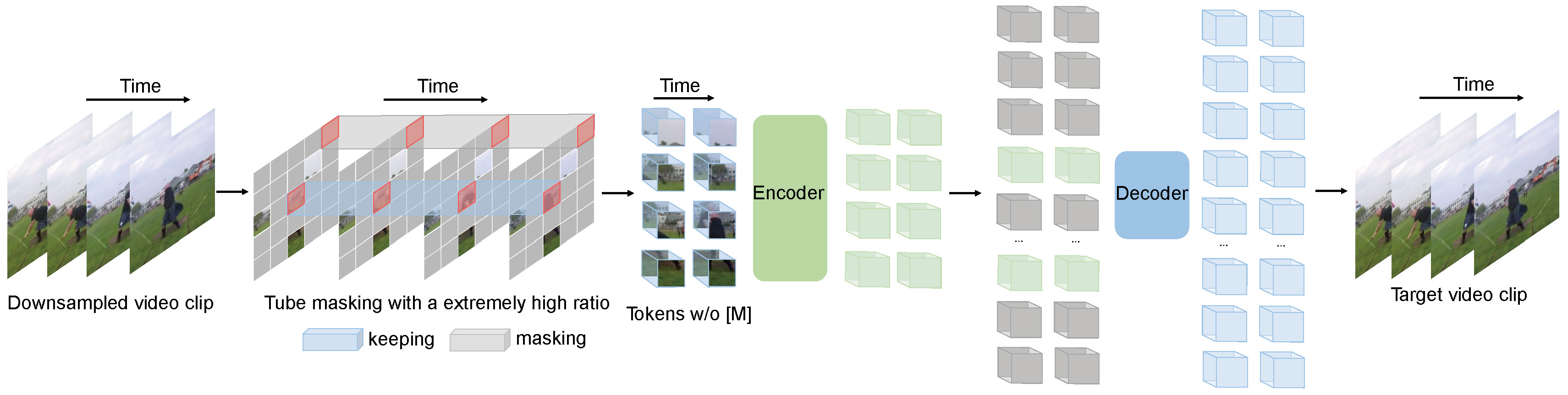 VideoMAEの事前学習。元の論文から引用。
このモデルは [nielsr](https://huggingface.co/nielsr) によって提供されました。元のコードは [こちら](https://github.com/MCG-NJU/VideoMAE) で確認できます。
## Scaled Dot Product Attention (SDPA) の使用
PyTorchには、`torch.nn.functional`の一部として、ネイティブなスケーリングドットプロダクトアテンション(SDPA)オペレーターが含まれています。この関数は、入力や使用しているハードウェアに応じて適用できる複数の実装を備えています。詳細については、[公式ドキュメント](https://pytorch.org/docs/stable/generated/torch.nn.functional.scaled_dot_product_attention.html)または[GPU推論](https://huggingface.co/docs/transformers/main/en/perf_infer_gpu_one#pytorch-scaled-dot-product-attention)ページを参照してください。
`torch>=2.1.1` の場合、実装が利用可能な場合はデフォルトで SDPA が使用されますが、`from_pretrained()` で `attn_implementation="sdpa"` を設定することで、SDPA の使用を明示的に指定することもできます。
```python
from transformers import VideoMAEForVideoClassification
model = VideoMAEForVideoClassification.from_pretrained("MCG-NJU/videomae-base-finetuned-kinetics", attn_implementation="sdpa", device_map="auto")
...
```
最大限の高速化を実現するには、モデルを半精度(例: `torch.float16` または `torch.bfloat16`)で読み込むことをお勧めします。
ローカルベンチマーク(A100-40GB、PyTorch 2.3.0、OS Ubuntu 22.04)において、`float32` と `MCG-NJU/videomae-base-finetuned-kinetics` モデルを使用した場合、推論時に以下の高速化を確認しました。
| バッチサイズ | 平均推論時間 (ms)、eager モード | 平均推論時間 (ms)、sdpa モデル | Speed up, Sdpa / Eager (x) |
|--------------|-------------------------------------------|-------------------------------------------|------------------------------|
| 1 | 37 | 10 | 3.7 |
| 2 | 24 | 18 | 1.33 |
| 4 | 43 | 32 | 1.34 |
| 8 | 84 | 60 | 1.4 |
## リソース
VideoMAEの入門を支援するための、Hugging Face公式およびコミュニティ(🌎で示されています)のリソースのリストです。ここにリソースを掲載していただくことを希望される場合は、Pull Requestをオープンしていただければ、レビューいたします。リソースは、既存のリソースと重複するのではなく、新しいことを示すものであることが望ましいです。
**動画分類**
- [ノートブック](https://github.com/huggingface/notebooks/blob/main/examples/video_classification.ipynb)で、その方法を示します
カスタムデータセットでVideoMAEモデルをファインチューニングするために
- [動画分類タスクガイド](../tasks/video_classification)
- [A 🤗 Space](https://huggingface.co/spaces/sayakpaul/video-classification-ucf101-subset)は、動画分類モデルで推論を実行する方法を示しています。
## VideoMAEConfig[[transformers.VideoMAEConfig]]
#### transformers.VideoMAEConfig[[transformers.VideoMAEConfig]]
```python
transformers.VideoMAEConfig(transformers_version: str | None = None, architectures: list[str] | None = None, output_hidden_states: bool | None = False, return_dict: bool | None = True, dtype: str | torch.dtype | None = None, chunk_size_feed_forward: int = 0, is_encoder_decoder: bool = False, id2label: dict[int, str] | dict[str, str] | None = None, label2id: dict[str, int] | dict[str, str] | None = None, problem_type: Literal['regression', 'single_label_classification', 'multi_label_classification'] | None = None, image_size: int | list[int] | tuple[int, int] = 224, patch_size: int | list[int] | tuple[int, int] = 16, num_channels: int = 3, num_frames: int = 16, tubelet_size: int = 2, hidden_size: int = 768, num_hidden_layers: int = 12, num_attention_heads: int = 12, intermediate_size: int = 3072, hidden_act: str = 'gelu', hidden_dropout_prob: float | int = 0.0, attention_probs_dropout_prob: float | int = 0.0, initializer_range: float = 0.02, layer_norm_eps: float = 1e-12, qv_bias: bool = True, use_mean_pooling: bool = True, decoder_num_attention_heads: int = 6, decoder_hidden_size: int = 384, decoder_num_hidden_layers: int = 4, decoder_intermediate_size: int = 1536, norm_pix_loss: bool = True)
```
[ソース](https://github.com/huggingface/transformers/blob/main/src/transformers/models/videomae/configuration_videomae.py#L24)
**パラメータ:**
image_size (`Union[int, list[int], tuple[int, int]]`、*任意*、デフォルトは`224`) : 各画像のサイズ(解像度)。
patch_size (`Union[int, list[int], tuple[int, int]]`、*任意*、デフォルトは`16`) : 各パッチのサイズ(解像度)。
num_channels (`int`、*任意*、デフォルトは`3`) : 入力チャネル数。
num_frames (`int`, *optional*, デフォルトは 16) : 各動画のフレーム数。
tubelet_size (`int`、*任意*、デフォルトは 2) : チューブレットの数。
hidden_size (`int`、*任意*、デフォルトは`768`) : 隠れ表現の次元数。
num_hidden_layers (`int`, *任意*, デフォルトは `12`) : Transformer デコーダーの隠れ層の数。
num_attention_heads (`int`、*任意*、デフォルトは `12`) : Transformer デコーダーの各アテンション層におけるアテンションヘッドの数。
intermediate_size (`int`、*任意*、デフォルトは `3072`) : MLP 表現の次元数。
hidden_act (`str`、*任意*、デフォルトは`gelu`) : デコーダーで使用する非線形活性化関数(関数または文字列)。例えば、`"gelu"`、`"relu"`、`"silu"`など。
hidden_dropout_prob (`Union[float, int]`、*任意*、デフォルトは`0.0`) : embeddings、encoder、pooler 内のすべての全結合層における dropout 確率。
attention_probs_dropout_prob (`Union[float, int]`、*任意*、デフォルトは`0.0`) : 注意確率のドロップアウト率。
initializer_range (`float`、*任意*、デフォルトは`0.02`) : すべての重み行列を初期化するためのtruncated_normal_initializerの標準偏差です。
layer_norm_eps (`float`、*任意*、デフォルトは `1e-12`) : layer normalization レイヤーで使用する epsilon。
qv_bias (`bool`、*任意*、デフォルトは`True`) : セルフアテンション層のクエリとバリューにバイアスを追加するかどうか。
use_mean_pooling (`bool`、*任意*、デフォルトは`True`) : [CLS] トークンの最終隠れ状態を使用する代わりに、最終隠れ状態の平均プーリングを行うかどうか。
decoder_num_attention_heads (`int`, *任意*, デフォルトは 6) : デコーダーの各アテンション層におけるアテンションヘッドの数。
decoder_hidden_size (`int`、*任意*、デフォルトは 384) : デコーダーの次元数。
decoder_num_hidden_layers (`int`、*任意*、デフォルトは 4) : デコーダーの隠れ層の数。
decoder_intermediate_size (`int`、*optional*、デフォルトは 1536) : デコーダー内の「intermediate」(すなわち、feed-forward)層の次元数。
norm_pix_loss (`bool`, *任意*, デフォルトは `True`) : ターゲットのパッチピクセルを正規化するか否かを指定します。
これはVideoMAEModelの設定を保存するための設定クラスです。指定された引数に基づいてVideomaeモデルをインスタンス化し、モデルのアーキテクチャを定義するために使用されます。デフォルト値で設定をインスタンス化すると、[MCG-NJU/videomae-base](https://huggingface.co/MCG-NJU/videomae-base)と類似した設定が得られます。
設定オブジェクトは [PreTrainedConfig](/docs/transformers/main/ja/main_classes/configuration#transformers.PreTrainedConfig) を継承し、モデルの出力を制御するために使用できます。詳細については、[PreTrainedConfig](/docs/transformers/main/ja/main_classes/configuration#transformers.PreTrainedConfig) のドキュメントを参照してください。
例:
```python
>>> from transformers import VideoMAEConfig, VideoMAEModel
>>> # Initializing a VideoMAE videomae-base style configuration
>>> configuration = VideoMAEConfig()
>>> # Randomly initializing a model from the configuration
>>> model = VideoMAEModel(configuration)
>>> # Accessing the model configuration
>>> configuration = model.config
```
## VideoMAEImageProcessor[[transformers.VideoMAEImageProcessor]]
#### transformers.VideoMAEImageProcessor[[transformers.VideoMAEImageProcessor]]
```python
transformers.VideoMAEImageProcessor(**kwargs: *)
```
[ソース](https://github.com/huggingface/transformers/blob/main/src/transformers/models/videomae/image_processing_videomae.py#L35)
**パラメータ:**
do_convert_rgb (`bool`, *kwargs*, *optional*) : 画像を RGB に変換するかどうか。
do_resize (`bool`, *kwargs*, *任意*, デフォルトは `True`) : 画像をリサイズするかどうか。
size (`Annotated[int | list[int] | tuple[int, ...] | dict[str, int] | None, None]`, *kwargs*、デフォルト値は `{'shortest_edge' : 224}`): モデルへの最大入力次元を記述します。
default_to_square (`bool`, *kwargs*, *optional*, デフォルトは `False`) : size が int の場合、リサイズ時に正方形の画像をデフォルトとするかどうか。
crop_size (`Annotated[int | list[int] | tuple[int, ...] | dict[str, int] | None, None]`, *kwargs*、デフォルト値は `{'height' : 224, 'width': 224}`): `center_crop` を適用した後の出力画像のサイズ。
resample (`Annotated[Union[int, PILImageResampling, NoneType], None]`, *kwargs*、デフォルト値は`2`) : 画像のリサイズ時に使用するリサンプリングフィルタです。これは列挙型`PILImageResampling`のいずれかになります。`do_resize`が`True`に設定されている場合のみ、効果が現れます。
do_rescale (`bool`, *kwargs*, *optional*, デフォルトは `True`) : 画像をリスケールするかどうか。
rescale_factor (`float`, *kwargs*, *optional*, デフォルトは `0.00392156862745098`) : `do_rescale` が `True` に設定されている場合、画像をリスケールするための係数。
do_normalize (`bool`, *kwargs*, *optional*, デフォルトは `True`) : 画像を正規化するかどうかを指定します。
image_mean (`Union[float, list[float], tuple[float, ...]]`, *kwargs*, *optional*, デフォルトは `[0.5, 0.5, 0.5]`) : 正規化に使用する画像の平均値。`do_normalize` が `True` に設定されている場合のみ有効です。
image_std (`Union[float, list[float], tuple[float, ...]]`, *kwargs*, *optional*, デフォルトは `[0.5, 0.5, 0.5]`) : 正規化に使用する画像の標準偏差。`do_normalize` が `True` に設定されている場合のみ有効です。
do_pad (`bool`, *kwargs*, *任意*) : 画像にパディングを適用するかどうか。パディングは、バッチ内の最大サイズに合わせるか、画像ごとに固定の正方形サイズに合わせるかのいずれかで行われます。正確なパディング戦略はモデルによって異なります。
pad_size (`Annotated[int | list[int] | tuple[int, ...] | dict[str, int] | None, None]`, *kwargs*) : 画像をパディングするサイズを`{"height": int, "width" int}`で指定します。前処理に提供されたすべての画像サイズより大きい必要があります。`pad_size`が指定されない場合、バッチ内の最大の幅と高さにパディングされます。`do_pad=True.`の場合にのみ適用されます。
do_center_crop (`bool`, *kwargs*, *optional*, デフォルトは `True`) : 画像を中央クロップするかどうか。
data_format (`Union[str, ~image_utils.ChannelDimension]`、*kwargs*、*optional*) : 対応するのは `ChannelDimension.FIRST` のみです。slow processors との互換性のために追加されました。
input_data_format (`Union[str, ~image_utils.ChannelDimension]`, *kwargs*, *任意*) : 入力画像のチャネル次元の形式です。設定されていない場合、入力画像からチャネル次元の形式が推論されます。以下のいずれかになります: - `"channels_first"` または `ChannelDimension.FIRST`: (num_channels, height, width) 形式の画像。 - `"channels_last"` または `ChannelDimension.LAST`: (height, width, num_channels) 形式の画像。 - `"none"` または `ChannelDimension.NONE`: (height, width) 形式の画像。
device (`Annotated[Union[str, torch.device, NoneType], None]`, *kwargs*) : 動画を処理するデバイスです。未設定の場合、入力動画からデバイスが推論されます。
return_tensors (`Annotated[str | ~utils.generic.TensorType | None, None]`, *kwargs*) : `'pt'`に設定されている場合はスタックされたテンソルを返し、それ以外の場合はテンソルのリストを返します。
disable_grouping (`bool`, *kwargs*, *optional*) : 画像をサイズごとにグループ化してバッチ処理するのではなく、個別に処理するためにグループ化を無効にするかどうかを指定します。None の場合、画像が CPU にある場合は True、それ以外の場合は False に設定されます。この選択は、https://github.com/huggingface/transformers/pull/38157 に詳しく記載されている実証的な観察に基づいています。
image_seq_length (`int`, *kwargs*, *任意*) : 入力内の各画像に使用される画像トークンの数です。後方互換性のために追加されましたが、将来のモデルではプロセッサの属性として設定されるべきです。
VideoMAEImageProcessor 画像プロセッサを構築します。
#### preprocess[[transformers.VideoMAEImageProcessor.preprocess]]
```python
preprocess(videos: typing.Union[ForwardRef('PIL.Image.Image'), numpy.ndarray, ForwardRef('torch.Tensor'), list['PIL.Image.Image'], list[numpy.ndarray], list['torch.Tensor']], **kwargs: *)
```
[ソース](https://github.com/huggingface/transformers/blob/main/src/transformers/models/videomae/image_processing_videomae.py#L53)
**パラメータ:**
videos (`Union[PIL.Image.Image, numpy.ndarray, torch.Tensor, list[PIL.Image.Image], list[numpy.ndarray], list[torch.Tensor]]`) : 前処理対象の動画または動画のバッチです。単一の動画(フレームのリスト)または動画のバッチ(フレームのリストのリスト)を想定しています。各フレームは、ピクセル値が0から255の範囲であるPIL画像、numpy配列、またはtorchテンソルです。ピクセル値が0から1の範囲のフレームを渡す場合は、`do_rescale=False`を設定してください。
do_convert_rgb (`bool`, *kwargs*, *optional*) : 画像を RGB に変換するかどうか。
do_resize (`bool`, *kwargs*, *optional*) : 画像をリサイズするかどうか。
size (`Annotated[int | list[int] | tuple[int, ...] | dict[str, int] | None, None]`, *kwargs*) : モデルへの最大入力次元を記述します。
default_to_square (`bool`, *kwargs*, *optional*) : size が int の場合、リサイズ時に正方形の画像をデフォルトとするかどうか。
crop_size (`Annotated[int | list[int] | tuple[int, ...] | dict[str, int] | None, None]`, *kwargs*) : `center_crop` を適用した後の出力画像のサイズ。
resample (`Annotated[Union[int, PILImageResampling, NoneType], None]`, *kwargs*) : 画像をリサイズする場合に使用するリサンプリングフィルタ。`PILImageResampling` の列挙型のいずれかです。`do_resize` が `True` に設定されている場合のみ有効です。
do_rescale (`bool`, *kwargs*, *任意*) : 画像をリスケールするかどうか。
rescale_factor (`float`, *kwargs*, *optional*) : `do_rescale` が `True` に設定されている場合、画像をリサイズするためのリスケール係数。
do_normalize (`bool`, *kwargs*, *optional*) : 画像を正規化するかどうかを指定します。
image_mean (`Union[float, list[float], tuple[float, ...]]`, *kwargs*, *optional*) : 正規化に使用する画像の平均値。`do_normalize` が `True` に設定されている場合のみ有効です。
image_std (`Union[float, list[float], tuple[float, ...]]`, *kwargs*, *optional*) : 正規化に使用する画像の標準偏差。`do_normalize` が `True` に設定されている場合のみ有効です。
do_pad (`bool`, *kwargs*, *任意*) : 画像にパディングを適用するかどうか。パディングは、バッチ内の最大サイズに合わせるか、画像ごとに固定の正方形サイズに合わせるかのいずれかで行われます。正確なパディング戦略はモデルによって異なります。
pad_size (`Annotated[int | list[int] | tuple[int, ...] | dict[str, int] | None, None]`, *kwargs*) : 画像をパディングするサイズを`{"height": int, "width" int}`で指定します。前処理に提供されたすべての画像サイズより大きい必要があります。`pad_size`が指定されない場合、バッチ内の最大の幅と高さにパディングされます。`do_pad=True.`の場合にのみ適用されます。
do_center_crop (`bool`, *kwargs*, *optional*) : 画像を中央クロップするかどうか。
data_format (`Union[str, ~image_utils.ChannelDimension]`、*kwargs*、*optional*) : 対応するのは `ChannelDimension.FIRST` のみです。slow processors との互換性のために追加されました。
input_data_format (`Union[str, ~image_utils.ChannelDimension]`, *kwargs*, *任意*) : 入力画像のチャネル次元の形式です。設定されていない場合、入力画像からチャネル次元の形式が推論されます。以下のいずれかになります: - `"channels_first"` または `ChannelDimension.FIRST`: (num_channels, height, width) 形式の画像。 - `"channels_last"` または `ChannelDimension.LAST`: (height, width, num_channels) 形式の画像。 - `"none"` または `ChannelDimension.NONE`: (height, width) 形式の画像。
device (`Annotated[Union[str, torch.device, NoneType], None]`, *kwargs*) : 動画を処理するデバイスです。未設定の場合、入力動画からデバイスが推論されます。
return_tensors (`Annotated[str | ~utils.generic.TensorType | None, None]`, *kwargs*) : `'pt'`に設定されている場合はスタックされたテンソルを返し、それ以外の場合はテンソルのリストを返します。
disable_grouping (`bool`, *kwargs*, *optional*) : 画像をサイズごとにグループ化してバッチ処理するのではなく、個別に処理するためにグループ化を無効にするかどうかを指定します。None の場合、画像が CPU にある場合は True、それ以外の場合は False に設定されます。この選択は、https://github.com/huggingface/transformers/pull/38157 に詳しく記載されている実証的な観察に基づいています。
image_seq_length (`int`, *kwargs*, *任意*) : 入力内の各画像に使用される画像トークンの数です。後方互換性のために追加されましたが、将来のモデルではプロセッサの属性として設定されるべきです。
**戻り値:** `~image_processing_base.BatchFeature`
- **data** (`dict`) -- __call__ メソッドによって返されるリスト/配列/テンソルの辞書('pixel_values' など)。
- **tensor_type** (`Union[None, str, TensorType]`、*省略可*) -- 初期化時に PyTorch/Numpy の Tensor 内の整数リストを変換するために、ここで tensor_type を指定できます。
## VideoMAEImageProcessorPil[[transformers.VideoMAEImageProcessorPil]]
#### transformers.VideoMAEImageProcessorPil[[transformers.VideoMAEImageProcessorPil]]
```python
transformers.VideoMAEImageProcessorPil(**kwargs: *)
```
[ソース](https://github.com/huggingface/transformers/blob/main/src/transformers/models/videomae/image_processing_pil_videomae.py#L33)
**パラメータ:**
do_convert_rgb (`bool`, *kwargs*, *optional*) : 画像を RGB に変換するかどうか。
do_resize (`bool`, *kwargs*, *任意*, デフォルトは `True`) : 画像をリサイズするかどうか。
size (`Annotated[int | list[int] | tuple[int, ...] | dict[str, int] | None, None]`, *kwargs*、デフォルト値は `{'shortest_edge' : 224}`): モデルへの最大入力次元を記述します。
default_to_square (`bool`, *kwargs*, *optional*, デフォルトは `False`) : size が int の場合、リサイズ時に正方形の画像をデフォルトとするかどうか。
crop_size (`Annotated[int | list[int] | tuple[int, ...] | dict[str, int] | None, None]`, *kwargs*、デフォルト値は `{'height' : 224, 'width': 224}`): `center_crop` を適用した後の出力画像のサイズ。
resample (`Annotated[Union[int, PILImageResampling, NoneType], None]`, *kwargs*、デフォルト値は`2`) : 画像のリサイズ時に使用するリサンプリングフィルタです。これは列挙型`PILImageResampling`のいずれかになります。`do_resize`が`True`に設定されている場合のみ、効果が現れます。
do_rescale (`bool`, *kwargs*, *optional*, デフォルトは `True`) : 画像をリスケールするかどうか。
rescale_factor (`float`, *kwargs*, *optional*, デフォルトは `0.00392156862745098`) : `do_rescale` が `True` に設定されている場合、画像をリスケールするための係数。
do_normalize (`bool`, *kwargs*, *optional*, デフォルトは `True`) : 画像を正規化するかどうかを指定します。
image_mean (`Union[float, list[float], tuple[float, ...]]`, *kwargs*, *optional*, デフォルトは `[0.5, 0.5, 0.5]`) : 正規化に使用する画像の平均値。`do_normalize` が `True` に設定されている場合のみ有効です。
image_std (`Union[float, list[float], tuple[float, ...]]`, *kwargs*, *optional*, デフォルトは `[0.5, 0.5, 0.5]`) : 正規化に使用する画像の標準偏差。`do_normalize` が `True` に設定されている場合のみ有効です。
do_pad (`bool`, *kwargs*, *任意*) : 画像にパディングを適用するかどうか。パディングは、バッチ内の最大サイズに合わせるか、画像ごとに固定の正方形サイズに合わせるかのいずれかで行われます。正確なパディング戦略はモデルによって異なります。
pad_size (`Annotated[int | list[int] | tuple[int, ...] | dict[str, int] | None, None]`, *kwargs*) : 画像をパディングするサイズを`{"height": int, "width" int}`で指定します。前処理に提供されたすべての画像サイズより大きい必要があります。`pad_size`が指定されない場合、バッチ内の最大の幅と高さにパディングされます。`do_pad=True.`の場合にのみ適用されます。
do_center_crop (`bool`, *kwargs*, *optional*, デフォルトは `True`) : 画像を中央クロップするかどうか。
data_format (`Union[str, ~image_utils.ChannelDimension]`、*kwargs*、*optional*) : 対応するのは `ChannelDimension.FIRST` のみです。slow processors との互換性のために追加されました。
input_data_format (`Union[str, ~image_utils.ChannelDimension]`, *kwargs*, *任意*) : 入力画像のチャネル次元の形式です。設定されていない場合、入力画像からチャネル次元の形式が推論されます。以下のいずれかになります: - `"channels_first"` または `ChannelDimension.FIRST`: (num_channels, height, width) 形式の画像。 - `"channels_last"` または `ChannelDimension.LAST`: (height, width, num_channels) 形式の画像。 - `"none"` または `ChannelDimension.NONE`: (height, width) 形式の画像。
device (`Annotated[Union[str, torch.device, NoneType], None]`, *kwargs*) : 動画を処理するデバイスです。未設定の場合、入力動画からデバイスが推論されます。
return_tensors (`Annotated[str | ~utils.generic.TensorType | None, None]`, *kwargs*) : `'pt'`に設定されている場合はスタックされたテンソルを返し、それ以外の場合はテンソルのリストを返します。
disable_grouping (`bool`, *kwargs*, *optional*) : 画像をサイズごとにグループ化してバッチ処理するのではなく、個別に処理するためにグループ化を無効にするかどうかを指定します。None の場合、画像が CPU にある場合は True、それ以外の場合は False に設定されます。この選択は、https://github.com/huggingface/transformers/pull/38157 に詳しく記載されている実証的な観察に基づいています。
image_seq_length (`int`, *kwargs*, *任意*) : 入力内の各画像に使用される画像トークンの数です。後方互換性のために追加されましたが、将来のモデルではプロセッサの属性として設定されるべきです。
VideoMAEImageProcessor 画像プロセッサを構築します。
#### preprocess[[transformers.VideoMAEImageProcessorPil.preprocess]]
```python
preprocess(videos: typing.Union[ForwardRef('PIL.Image.Image'), numpy.ndarray, ForwardRef('torch.Tensor'), list['PIL.Image.Image'], list[numpy.ndarray], list['torch.Tensor']], **kwargs: *)
```
[ソース](https://github.com/huggingface/transformers/blob/main/src/transformers/models/videomae/image_processing_pil_videomae.py#L51)
**パラメータ:**
videos (`Union[PIL.Image.Image, numpy.ndarray, torch.Tensor, list[PIL.Image.Image], list[numpy.ndarray], list[torch.Tensor]]`) : 前処理対象の動画または動画のバッチです。単一の動画(フレームのリスト)または動画のバッチ(フレームのリストのリスト)を想定しています。各フレームは、ピクセル値が0から255の範囲であるPIL画像、numpy配列、またはtorchテンソルです。ピクセル値が0から1の範囲のフレームを渡す場合は、`do_rescale=False`を設定してください。
do_convert_rgb (`bool`, *kwargs*, *optional*) : 画像を RGB に変換するかどうか。
do_resize (`bool`, *kwargs*, *optional*) : 画像をリサイズするかどうか。
size (`Annotated[int | list[int] | tuple[int, ...] | dict[str, int] | None, None]`, *kwargs*) : モデルへの最大入力次元を記述します。
default_to_square (`bool`, *kwargs*, *optional*) : size が int の場合、リサイズ時に正方形の画像をデフォルトとするかどうか。
crop_size (`Annotated[int | list[int] | tuple[int, ...] | dict[str, int] | None, None]`, *kwargs*) : `center_crop` を適用した後の出力画像のサイズ。
resample (`Annotated[Union[int, PILImageResampling, NoneType], None]`, *kwargs*) : 画像をリサイズする場合に使用するリサンプリングフィルタ。`PILImageResampling` の列挙型のいずれかです。`do_resize` が `True` に設定されている場合のみ有効です。
do_rescale (`bool`, *kwargs*, *任意*) : 画像をリスケールするかどうか。
rescale_factor (`float`, *kwargs*, *optional*) : `do_rescale` が `True` に設定されている場合、画像をリサイズするためのリスケール係数。
do_normalize (`bool`, *kwargs*, *optional*) : 画像を正規化するかどうかを指定します。
image_mean (`Union[float, list[float], tuple[float, ...]]`, *kwargs*, *optional*) : 正規化に使用する画像の平均値。`do_normalize` が `True` に設定されている場合のみ有効です。
image_std (`Union[float, list[float], tuple[float, ...]]`, *kwargs*, *optional*) : 正規化に使用する画像の標準偏差。`do_normalize` が `True` に設定されている場合のみ有効です。
do_pad (`bool`, *kwargs*, *任意*) : 画像にパディングを適用するかどうか。パディングは、バッチ内の最大サイズに合わせるか、画像ごとに固定の正方形サイズに合わせるかのいずれかで行われます。正確なパディング戦略はモデルによって異なります。
pad_size (`Annotated[int | list[int] | tuple[int, ...] | dict[str, int] | None, None]`, *kwargs*) : 画像をパディングするサイズを`{"height": int, "width" int}`で指定します。前処理に提供されたすべての画像サイズより大きい必要があります。`pad_size`が指定されない場合、バッチ内の最大の幅と高さにパディングされます。`do_pad=True.`の場合にのみ適用されます。
do_center_crop (`bool`, *kwargs*, *optional*) : 画像を中央クロップするかどうか。
data_format (`Union[str, ~image_utils.ChannelDimension]`、*kwargs*、*optional*) : 対応するのは `ChannelDimension.FIRST` のみです。slow processors との互換性のために追加されました。
input_data_format (`Union[str, ~image_utils.ChannelDimension]`, *kwargs*, *任意*) : 入力画像のチャネル次元の形式です。設定されていない場合、入力画像からチャネル次元の形式が推論されます。以下のいずれかになります: - `"channels_first"` または `ChannelDimension.FIRST`: (num_channels, height, width) 形式の画像。 - `"channels_last"` または `ChannelDimension.LAST`: (height, width, num_channels) 形式の画像。 - `"none"` または `ChannelDimension.NONE`: (height, width) 形式の画像。
device (`Annotated[Union[str, torch.device, NoneType], None]`, *kwargs*) : 動画を処理するデバイスです。未設定の場合、入力動画からデバイスが推論されます。
return_tensors (`Annotated[str | ~utils.generic.TensorType | None, None]`, *kwargs*) : `'pt'`に設定されている場合はスタックされたテンソルを返し、それ以外の場合はテンソルのリストを返します。
disable_grouping (`bool`, *kwargs*, *optional*) : 画像をサイズごとにグループ化してバッチ処理するのではなく、個別に処理するためにグループ化を無効にするかどうかを指定します。None の場合、画像が CPU にある場合は True、それ以外の場合は False に設定されます。この選択は、https://github.com/huggingface/transformers/pull/38157 に詳しく記載されている実証的な観察に基づいています。
image_seq_length (`int`, *kwargs*, *任意*) : 入力内の各画像に使用される画像トークンの数です。後方互換性のために追加されましたが、将来のモデルではプロセッサの属性として設定されるべきです。
**戻り値:** `~image_processing_base.BatchFeature`
- **data** (`dict`) -- __call__ メソッドによって返されるリスト/配列/テンソルの辞書('pixel_values' など)。
- **tensor_type** (`Union[None, str, TensorType]`、*省略可*) -- 初期化時に PyTorch/Numpy の Tensor 内の整数リストを変換するために、ここで tensor_type を指定できます。
## VideoMAEVideoProcessor[[transformers.VideoMAEVideoProcessor]]
#### transformers.VideoMAEVideoProcessor[[transformers.VideoMAEVideoProcessor]]
```python
transformers.VideoMAEVideoProcessor(**kwargs: *)
```
[ソース](https://github.com/huggingface/transformers/blob/main/src/transformers/models/videomae/video_processing_videomae.py#L25)
**パラメータ:**
do_convert_rgb (`bool`, *kwargs*, *optional*, デフォルトは `True`) : 画像を RGB に変換するかどうか。
do_resize (`bool`, *kwargs*, *任意*, デフォルトは `True`) : 画像をリサイズするかどうか。
size (`Annotated[int | list[int] | tuple[int, ...] | dict[str, int] | None, None]`, *kwargs*、デフォルト値は `{'shortest_edge' : 224}`): モデルへの最大入力次元を記述します。
default_to_square (`bool`, *kwargs*, *optional*, デフォルトは `False`) : size が int の場合、リサイズ時に正方形の画像をデフォルトとするかどうか。
resample (`Annotated[Union[int, PILImageResampling, NoneType], None]`, *kwargs*、デフォルト値は`2`) : 画像のリサイズ時に使用するリサンプリングフィルタです。これは列挙型`PILImageResampling`のいずれかになります。`do_resize`が`True`に設定されている場合のみ、効果が現れます。
do_rescale (`bool`, *kwargs*, *optional*, デフォルトは `True`) : 画像をリスケールするかどうか。
rescale_factor (`float`, *kwargs*, *optional*, デフォルトは `0.00392156862745098`) : `do_rescale` が `True` に設定されている場合、画像をリスケールするための係数。
do_normalize (`bool`, *kwargs*, *optional*, デフォルトは `True`) : 画像を正規化するかどうかを指定します。
image_mean (`Union[float, list[float], tuple[float, ...]]`, *kwargs*, *optional*, デフォルトは `[0.5, 0.5, 0.5]`) : 正規化に使用する画像の平均値。`do_normalize` が `True` に設定されている場合のみ有効です。
image_std (`Union[float, list[float], tuple[float, ...]]`, *kwargs*, *optional*, デフォルトは `[0.5, 0.5, 0.5]`) : 正規化に使用する画像の標準偏差。`do_normalize` が `True` に設定されている場合のみ有効です。
do_center_crop (`bool`, *kwargs*, *optional*, デフォルトは `True`) : 画像を中央クロップするかどうか。
do_pad (`bool`, *kwargs*, *任意*) : 画像にパディングを適用するかどうか。パディングは、バッチ内の最大サイズに合わせるか、画像ごとに固定の正方形サイズに合わせるかのいずれかで行われます。正確なパディング戦略はモデルによって異なります。
crop_size (`Annotated[int | list[int] | tuple[int, ...] | dict[str, int] | None, None]`, *kwargs*、デフォルト値は `{'height' : 224, 'width': 224}`): `center_crop` を適用した後の出力画像のサイズ。
data_format (`Union[str, ~image_utils.ChannelDimension]`、*kwargs*、*optional*) : 対応するのは `ChannelDimension.FIRST` のみです。slow processors との互換性のために追加されました。
input_data_format (`Union[str, ~image_utils.ChannelDimension]`, *kwargs*, *任意*) : 入力画像のチャネル次元の形式です。設定されていない場合、入力画像からチャネル次元の形式が推論されます。以下のいずれかになります: - `"channels_first"` または `ChannelDimension.FIRST`: (num_channels, height, width) 形式の画像。 - `"channels_last"` または `ChannelDimension.LAST`: (height, width, num_channels) 形式の画像。 - `"none"` または `ChannelDimension.NONE`: (height, width) 形式の画像。
device (`Annotated[Union[str, torch.device, NoneType], None]`, *kwargs*) : 動画を処理するデバイスです。未設定の場合、入力動画からデバイスが推論されます。
do_sample_frames (`bool`, *kwargs*, *optional*, デフォルトは `False`) : 処理前に動画からフレームをサンプリングするか、動画全体を処理するかを指定します。
video_metadata (`Annotated[~video_utils.VideoMetadata | dict | list[dict | ~video_utils.VideoMetadata] | list[list[dict | ~video_utils.VideoMetadata]] | None, None]`, *kwargs*) : 動画のメタデータ。総再生時間、fps、総フレーム数などの情報を含みます。動画からのフレームサンプリングやタイムスタンプの計算に使用されます。動画を処理する前に手動でデコードしようとしている場合を除き、メタデータは渡さないでください。
fps (`Annotated[int | float | None, None]`, *kwargs*) : `do_sample_frames=True` の場合、1 秒あたりにサンプリングするターゲットフレーム数。
num_frames (`Annotated[int | None, None]`, *kwargs*) : `do_sample_frames=True` の場合、サンプリングするフレームの最大数。
return_metadata (`bool`, *kwargs*, *任意*、デフォルトは `False`) : ビデオメタデータを返すかどうかを指定します。ビデオメタデータは、ビデオの長さ、fps、デコードバックエンドなどの情報を含むオブジェクトです。
return_tensors (`Annotated[str | ~utils.generic.TensorType | None, None]`, *kwargs*) : 設定されている場合、特定のフレームワークのテンソルを返します。許可される値は以下の通りです。 - `'pt'`: PyTorch の `torch.Tensor` オブジェクトを返します。 - `'np'`: NumPy の `np.ndarray` オブジェクトを返します。
- ****kwargs** ([VideosKwargs](/docs/transformers/main/ja/main_classes/processors#transformers.VideosKwargs)、*optional*) : 各モダリティ(テキスト、画像、動画、音声)の追加処理オプションです。モデル固有のパラメータは上記に記載されています。サポートされている引数の完全なリストについては、TypedDict クラスを参照してください。
VideoMAEVideoProcessor ビデオプロセッサを構築します。
#### preprocess[[transformers.VideoMAEVideoProcessor.preprocess]]
```python
preprocess(videos: typing.Union[list['PIL.Image.Image'], numpy.ndarray, ForwardRef('torch.Tensor'), list[numpy.ndarray], list['torch.Tensor'], list[list['PIL.Image.Image']], list[list[numpy.ndarray]], list[list['torch.Tensor']], transformers.video_utils.URL, list[transformers.video_utils.URL], list[list[transformers.video_utils.URL]], transformers.video_utils.Path, list[transformers.video_utils.Path], list[list[transformers.video_utils.Path]]], **kwargs: *)
```
[ソース](https://github.com/huggingface/transformers/blob/main/src/transformers/models/videomae/video_processing_videomae.py#L41)
**パラメータ:**
videos (`Union[list[PIL.Image.Image], numpy.ndarray, torch.Tensor, list[numpy.ndarray], list[torch.Tensor], list[list[PIL.Image.Image]], list[list[numpy.ndarray]], list[list[torch.Tensor]], ~video_utils.URL, list[~video_utils.URL], list[list[~video_utils.URL]], ~video_utils.Path, list[~video_utils.Path], list[list[~video_utils.Path]]]`) : 前処理対象の動画。ピクセル値が 0 から 255 の範囲にある、単一の動画またはバッチの動画を想定しています。ピクセル値が 0 から 1 の範囲にある動画を渡す場合は、`do_rescale=False` を設定してください。
do_convert_rgb (`bool`, *kwargs*, *optional*) : 画像を RGB に変換するかどうか。
do_resize (`bool`, *kwargs*, *optional*) : 画像をリサイズするかどうか。
size (`Annotated[int | list[int] | tuple[int, ...] | dict[str, int] | None, None]`, *kwargs*) : モデルへの最大入力次元を記述します。
default_to_square (`bool`, *kwargs*, *optional*) : size が int の場合、リサイズ時に正方形の画像をデフォルトとするかどうか。
resample (`Annotated[Union[int, PILImageResampling, NoneType], None]`, *kwargs*) : 画像をリサイズする場合に使用するリサンプリングフィルタ。`PILImageResampling` の列挙型のいずれかです。`do_resize` が `True` に設定されている場合のみ有効です。
do_rescale (`bool`, *kwargs*, *任意*) : 画像をリスケールするかどうか。
rescale_factor (`float`, *kwargs*, *optional*) : `do_rescale` が `True` に設定されている場合、画像をリサイズするためのリスケール係数。
do_normalize (`bool`, *kwargs*, *optional*) : 画像を正規化するかどうかを指定します。
image_mean (`Union[float, list[float], tuple[float, ...]]`, *kwargs*, *optional*) : 正規化に使用する画像の平均値。`do_normalize` が `True` に設定されている場合のみ有効です。
image_std (`Union[float, list[float], tuple[float, ...]]`, *kwargs*, *optional*) : 正規化に使用する画像の標準偏差。`do_normalize` が `True` に設定されている場合のみ有効です。
do_center_crop (`bool`, *kwargs*, *optional*) : 画像を中央クロップするかどうか。
do_pad (`bool`, *kwargs*, *任意*) : 画像にパディングを適用するかどうか。パディングは、バッチ内の最大サイズに合わせるか、画像ごとに固定の正方形サイズに合わせるかのいずれかで行われます。正確なパディング戦略はモデルによって異なります。
crop_size (`Annotated[int | list[int] | tuple[int, ...] | dict[str, int] | None, None]`, *kwargs*) : `center_crop` を適用した後の出力画像のサイズ。
data_format (`Union[str, ~image_utils.ChannelDimension]`、*kwargs*、*optional*) : 対応するのは `ChannelDimension.FIRST` のみです。slow processors との互換性のために追加されました。
input_data_format (`Union[str, ~image_utils.ChannelDimension]`, *kwargs*, *任意*) : 入力画像のチャネル次元の形式です。設定されていない場合、入力画像からチャネル次元の形式が推論されます。以下のいずれかになります: - `"channels_first"` または `ChannelDimension.FIRST`: (num_channels, height, width) 形式の画像。 - `"channels_last"` または `ChannelDimension.LAST`: (height, width, num_channels) 形式の画像。 - `"none"` または `ChannelDimension.NONE`: (height, width) 形式の画像。
device (`Annotated[Union[str, torch.device, NoneType], None]`, *kwargs*) : 動画を処理するデバイスです。未設定の場合、入力動画からデバイスが推論されます。
do_sample_frames (`bool`, *kwargs*, *optional*) : 処理前に動画からフレームをサンプリングするか、動画全体を処理するかを指定します。
video_metadata (`Annotated[~video_utils.VideoMetadata | dict | list[dict | ~video_utils.VideoMetadata] | list[list[dict | ~video_utils.VideoMetadata]] | None, None]`, *kwargs*) : 動画のメタデータ。総再生時間、fps、総フレーム数などの情報を含みます。動画からのフレームサンプリングやタイムスタンプの計算に使用されます。動画を処理する前に手動でデコードしようとしている場合を除き、メタデータは渡さないでください。
fps (`Annotated[int | float | None, None]`, *kwargs*) : `do_sample_frames=True` の場合、1 秒あたりにサンプリングするターゲットフレーム数。
num_frames (`Annotated[int | None, None]`, *kwargs*) : `do_sample_frames=True` の場合、サンプリングするフレームの最大数。
return_metadata (`bool`, *kwargs*, *任意*) : ビデオメタデータを返すかどうかを指定します。ビデオメタデータは、ビデオの再生時間、fps、デコードバックエンドなどの情報を含むオブジェクトです。
return_tensors (`Annotated[str | ~utils.generic.TensorType | None, None]`, *kwargs*) : `'pt'`に設定されている場合はスタックされたテンソルを返し、それ以外の場合はテンソルのリストを返します。
**戻り値:** `~image_processing_base.BatchFeature`
- **data** (`dict`) -- __call__ メソッドによって返されるリスト/配列/テンソルの辞書('pixel_values' など)。
- **tensor_type** (`Union[None, str, TensorType]`、*省略可*) -- 初期化時に PyTorch/Numpy の Tensor 内の整数リストを変換するために、ここで tensor_type を指定できます。
## VideoMAEModel[[transformers.VideoMAEModel]]
#### transformers.VideoMAEModel[[transformers.VideoMAEModel]]
```python
transformers.VideoMAEModel(config: VideoMAEConfig)
```
[ソース](https://github.com/huggingface/transformers/blob/main/src/transformers/models/videomae/modeling_videomae.py#L398)
**パラメータ:**
config ([VideoMAEConfig](/docs/transformers/main/ja/model_doc/videomae#transformers.VideoMAEConfig)) : モデルのパラメータをすべて含むモデル設定クラスです。設定ファイルで初期化しても、モデルに関連する重みは読み込まれず、設定のみが読み込まれます。モデルの重みをロードするには、[from_pretrained()](/docs/transformers/main/ja/main_classes/model#transformers.PreTrainedModel.from_pretrained) メソッドを参照してください。
特定のヘッドを上に載せずに、生のhidden-statesを出力する素のVideomaeモデル。
このモデルは [PreTrainedModel](/docs/transformers/main/ja/main_classes/model#transformers.PreTrainedModel) を継承しています。ライブラリがすべてのモデルに対して実装している汎用的なメソッド(ダウンロードや保存、入力埋め込みのリサイズ、ヘッドのプルーニングなど)については、スーパークラスのドキュメントを参照してください。
このモデルは、PyTorchの[torch.nn.Module](https://pytorch.org/docs/stable/nn.html#torch.nn.Module)のサブクラスでもあります。通常のPyTorch Moduleとして使用し、一般的な使用方法や動作に関する詳細については、PyTorchのドキュメントを参照してください。
#### forward[[transformers.VideoMAEModel.forward]]
```python
forward(pixel_values: FloatTensor, bool_masked_pos: typing.Optional[torch.BoolTensor] = None, **kwargs: *)
```
[ソース](https://github.com/huggingface/transformers/blob/main/src/transformers/models/videomae/modeling_videomae.py#L417)
**パラメータ:**
pixel_values (`torch.FloatTensor`、shape `(batch_size, num_channels, image_size, image_size)`) : 入力画像に対応するテンソルです。ピクセル値は [VideoMAEImageProcessor](/docs/transformers/main/ja/model_doc/videomae#transformers.VideoMAEImageProcessor) を使用して取得できます。詳細は [VideoMAEImageProcessor.__call__()](/docs/transformers/main/ja/model_doc/molmo2#transformers.Molmo2ImageProcessor.__call__) を参照してください(`processor_class` は画像の処理に [VideoMAEImageProcessor](/docs/transformers/main/ja/model_doc/videomae#transformers.VideoMAEImageProcessor) を使用します)。
bool_masked_pos (`torch.BoolTensor`、形状 `(batch_size, sequence_length)`、*任意*) : 真偽値のマスク位置。どのパッチがマスクされているか (1)、されていないか (0) を示します。バッチ内の各動画は、同じ数のマスクされたパッチを持つ必要があります。`None` の場合、すべてのパッチが対象とみなされます。シーケンス長は `(num_frames // tubelet_size) * (image_size // patch_size) ** 2` です。
**戻り値:** [BaseModelOutput](/docs/transformers/main/ja/main_classes/output#transformers.modeling_outputs.BaseModelOutput) または `tuple(torch.FloatTensor)`
設定([VideoMAEConfig](/docs/transformers/main/ja/model_doc/videomae#transformers.VideoMAEConfig))や入力に応じて、さまざまな要素で構成される [BaseModelOutput](/docs/transformers/main/ja/main_classes/output#transformers.modeling_outputs.BaseModelOutput) または `torch.FloatTensor` のタプル(`return_dict=False` が渡された場合、または `config.return_dict=False` の場合)。
[VideoMAEModel](/docs/transformers/main/ja/model_doc/videomae#transformers.VideoMAEModel)のforwardメソッドは、`__call__`特殊メソッドをオーバーライドします。
この関数内でフォワードパスの手順を定義する必要がありますが、その後、この関数ではなく`Module`インスタンスを呼び出すべきです。前者は前処理と後処理の実行を適切に処理するのに対し、後者はそれらを無視してしまいます。
- **last_hidden_state** (`torch.FloatTensor`、shape `(batch_size, sequence_length, hidden_size)`) -- モデルの最終層の出力における隠れ状態のシーケンス。
- **hidden_states** (`tuple(torch.FloatTensor)`、*optional*、`output_hidden_states=True` が渡された場合または `config.output_hidden_states=True` の場合に返されます) -- `torch.FloatTensor` のタプル(埋め込み層を持つモデルの場合、埋め込みの出力用が 1 つ、各層の出力用が 1 つずつ)で、形状は `(batch_size, sequence_length, hidden_size)` です。
各層の出力におけるモデルのHidden-states、および任意の初期埋め込み出力。
- **attentions** (`tuple(torch.FloatTensor)`、*optional*、`output_attentions=True` が渡された場合または `config.output_attentions=True` の場合に返されます) -- `torch.FloatTensor` のタプル(各レイヤーごとに1つ)で、形状は `(batch_size, num_heads, sequence_length, sequence_length)` です。
アテンションのsoftmax後のアテンション重み。自己アテンションヘッド内で加重平均を計算するために使用されます。
例:
```python
>>> import torch
>>> from transformers import VideoMAEVideoProcessor, VideoMAEModel
>>> from huggingface_hub import hf_hub_download
>>> # replace this with your own video file
>>> video_path = hf_hub_download(
... repo_id="nielsr/video-demo", filename="eating_spaghetti.mp4", repo_type="dataset"
... )
>>> video_processor = VideoMAEVideoProcessor.from_pretrained("MCG-NJU/videomae-base")
>>> model = VideoMAEModel.from_pretrained("MCG-NJU/videomae-base")
>>> # prepare video for the model
>>> inputs = video_processor(video_path, return_tensors="pt")
>>> # forward pass
>>> with torch.no_grad():
... outputs = model(**inputs)
>>> last_hidden_states = outputs.last_hidden_state
>>> list(last_hidden_states.shape)
[1, 1568, 768]
```
## VideoMAEForPreTraining[[transformers.VideoMAEForPreTraining]]
`VideoMAEForPreTraining`には、自己教師あり事前学習のためにデコーダーが上部に組み込まれています。
#### transformers.VideoMAEForPreTraining[[transformers.VideoMAEForPreTraining]]
```python
transformers.VideoMAEForPreTraining(config: VideoMAEConfig)
```
[ソース](https://github.com/huggingface/transformers/blob/main/src/transformers/models/videomae/modeling_videomae.py#L511)
**パラメータ:**
config ([VideoMAEConfig](/docs/transformers/main/ja/model_doc/videomae#transformers.VideoMAEConfig)) : モデルのパラメータをすべて含むモデル設定クラスです。設定ファイルで初期化しても、モデルに関連する重みは読み込まれず、設定のみが読み込まれます。モデルの重みをロードするには、[from_pretrained()](/docs/transformers/main/ja/main_classes/model#transformers.PreTrainedModel.from_pretrained) メソッドを参照してください。
自己教師あり事前学習のためにデコーダーを上に配置したVideoMAE Model transformer。
このモデルは [PreTrainedModel](/docs/transformers/main/ja/main_classes/model#transformers.PreTrainedModel) を継承しています。ライブラリがすべてのモデルに対して実装している汎用的なメソッド(ダウンロードや保存、入力埋め込みのリサイズ、ヘッドのプルーニングなど)については、スーパークラスのドキュメントを参照してください。
このモデルは、PyTorchの[torch.nn.Module](https://pytorch.org/docs/stable/nn.html#torch.nn.Module)のサブクラスでもあります。通常のPyTorch Moduleとして使用し、一般的な使用方法や動作に関する詳細については、PyTorchのドキュメントを参照してください。
#### forward[[transformers.VideoMAEForPreTraining.forward]]
```python
forward(pixel_values: FloatTensor, bool_masked_pos: BoolTensor, **kwargs: *)
```
[ソース](https://github.com/huggingface/transformers/blob/main/src/transformers/models/videomae/modeling_videomae.py#L529)
**パラメータ:**
pixel_values (`torch.FloatTensor`、shape `(batch_size, num_channels, image_size, image_size)`) : 入力画像に対応するテンソルです。ピクセル値は [VideoMAEImageProcessor](/docs/transformers/main/ja/model_doc/videomae#transformers.VideoMAEImageProcessor) を使用して取得できます。詳細は [VideoMAEImageProcessor.__call__()](/docs/transformers/main/ja/model_doc/molmo2#transformers.Molmo2ImageProcessor.__call__) を参照してください(`processor_class` は画像の処理に [VideoMAEImageProcessor](/docs/transformers/main/ja/model_doc/videomae#transformers.VideoMAEImageProcessor) を使用します)。
bool_masked_pos (`torch.BoolTensor`、形状 `(batch_size, sequence_length)`) : 真偽値のマスク位置。どのパッチがマスクされているか(1)、されていないか(0)を示します。バッチ内の各動画は、同じ数のマスクされたパッチを持つ必要があります。シーケンス長は `(num_frames // tubelet_size) * (image_size // patch_size) ** 2` です。
**戻り値:** `VideoMAEForPreTrainingOutput` または `tuple(torch.FloatTensor)`
`VideoMAEForPreTrainingOutput`、または`torch.FloatTensor`のタプル(`return_dict=False`が渡された場合、または`config.return_dict=False`の場合)。設定([VideoMAEConfig](/docs/transformers/main/ja/model_doc/videomae#transformers.VideoMAEConfig))と入力に応じて、さまざまな要素で構成されます。
[VideoMAEForPreTraining](/docs/transformers/main/ja/model_doc/videomae#transformers.VideoMAEForPreTraining)のforwardメソッドは、`__call__`特殊メソッドをオーバーライドします。
この関数内でフォワードパスの手順を定義する必要がありますが、その後、この関数ではなく`Module`インスタンスを呼び出すべきです。前者は前処理と後処理の実行を適切に処理するのに対し、後者はそれらを無視してしまいます。
- **loss** (`torch.FloatTensor`、形状 `(1,)`) -- ピクセル再構成損失。
- **logits** (`torch.FloatTensor`、形状 `(batch_size, patch_size ** 2 * num_channels)`) -- ピクセル再構成の logits。
- **hidden_states** (`tuple[torch.FloatTensor]`、*optional*、`output_hidden_states=True` が渡された場合または `config.output_hidden_states=True` の場合に返されます) -- `torch.FloatTensor` のタプル(モデルに埋め込み層がある場合はその出力用 + 各層の出力用)で、形状は `(batch_size, sequence_length, hidden_size)` です。
各層の出力におけるモデルのHidden-states、および任意の初期埋め込み出力。
- **attentions** (`tuple[torch.FloatTensor]`、*optional*、`output_attentions=True` が渡された場合または `config.output_attentions=True` の場合に返されます) -- `torch.FloatTensor` のタプル(各レイヤーごとに1つ)、形状は `(batch_size, num_heads, sequence_length, sequence_length)`。
アテンションのsoftmax後のアテンション重み。自己アテンションヘッド内で加重平均を計算するために使用されます。
例:
```python
>>> from transformers import AutoImageProcessor, VideoMAEForPreTraining
>>> import numpy as np
>>> import torch
>>> num_frames = 16
>>> video = list(np.random.randint(0, 256, (num_frames, 3, 224, 224)))
>>> image_processor = AutoImageProcessor.from_pretrained("MCG-NJU/videomae-base")
>>> model = VideoMAEForPreTraining.from_pretrained("MCG-NJU/videomae-base")
>>> pixel_values = image_processor(video, return_tensors="pt").pixel_values
>>> num_patches_per_frame = (model.config.image_size // model.config.patch_size) ** 2
>>> seq_length = (num_frames // model.config.tubelet_size) * num_patches_per_frame
>>> bool_masked_pos = torch.randint(0, 2, (1, seq_length)).bool()
>>> outputs = model(pixel_values, bool_masked_pos=bool_masked_pos)
>>> loss = outputs.loss
```
## VideoMAEForVideoClassification[[transformers.VideoMAEForVideoClassification]]
#### transformers.VideoMAEForVideoClassification[[transformers.VideoMAEForVideoClassification]]
```python
transformers.VideoMAEForVideoClassification(config: VideoMAEConfig)
```
[ソース](https://github.com/huggingface/transformers/blob/main/src/transformers/models/videomae/modeling_videomae.py#L684)
**パラメータ:**
config ([VideoMAEConfig](/docs/transformers/main/ja/model_doc/videomae#transformers.VideoMAEConfig)) : モデルのパラメータをすべて含むモデル設定クラスです。設定ファイルで初期化しても、モデルに関連する重みは読み込まれず、設定のみが読み込まれます。モデルの重みをロードするには、[from_pretrained()](/docs/transformers/main/ja/main_classes/model#transformers.PreTrainedModel.from_pretrained) メソッドを参照してください。
VideoMAE モデル。動画分類ヘッドを上部に備えた Transformer(すべてのトークンの平均プーリングされた隠れ状態の上に線形層を配置)で、ImageNet などに使用されます。
このモデルは [PreTrainedModel](/docs/transformers/main/ja/main_classes/model#transformers.PreTrainedModel) を継承しています。ライブラリがすべてのモデルに対して実装している汎用的なメソッド(ダウンロードや保存、入力埋め込みのリサイズ、ヘッドのプルーニングなど)については、スーパークラスのドキュメントを参照してください。
このモデルは、PyTorchの[torch.nn.Module](https://pytorch.org/docs/stable/nn.html#torch.nn.Module)のサブクラスでもあります。通常のPyTorch Moduleとして使用し、一般的な使用方法や動作に関する詳細については、PyTorchのドキュメントを参照してください。
#### forward[[transformers.VideoMAEForVideoClassification.forward]]
```python
forward(pixel_values: typing.Optional[torch.Tensor] = None, labels: typing.Optional[torch.Tensor] = None, **kwargs: *)
```
[ソース](https://github.com/huggingface/transformers/blob/main/src/transformers/models/videomae/modeling_videomae.py#L698)
**パラメータ:**
pixel_values (`torch.Tensor`、形状 `(batch_size, num_channels, image_size, image_size)`、*任意*) : 入力画像に対応するテンソルです。ピクセル値は [VideoMAEImageProcessor](/docs/transformers/main/ja/model_doc/videomae#transformers.VideoMAEImageProcessor) を使用して取得できます。詳細は [VideoMAEImageProcessor.__call__()](/docs/transformers/main/ja/model_doc/molmo2#transformers.Molmo2ImageProcessor.__call__) を参照してください(`processor_class` は画像の処理に [VideoMAEImageProcessor](/docs/transformers/main/ja/model_doc/videomae#transformers.VideoMAEImageProcessor) を使用します)。
labels (`torch.LongTensor`、shape `(batch_size,)`、*任意*) : 画像分類/回帰の損失を計算するためのラベル。インデックスは `[0, ..., config.num_labels - 1]` の範囲である必要があります。`config.num_labels == 1` の場合は回帰損失(Mean-Square loss)が計算され、`config.num_labels > 1` の場合は分類損失(Cross-Entropy)が計算されます。
**戻り値:** [ImageClassifierOutput](/docs/transformers/main/ja/main_classes/output#transformers.modeling_outputs.ImageClassifierOutput) または `tuple(torch.FloatTensor)`
設定([VideoMAEConfig](/docs/transformers/main/ja/model_doc/videomae#transformers.VideoMAEConfig))や入力に応じて、さまざまな要素で構成される、[ImageClassifierOutput](/docs/transformers/main/ja/main_classes/output#transformers.modeling_outputs.ImageClassifierOutput) または `torch.FloatTensor` のタプル(`return_dict=False` が渡された場合、または `config.return_dict=False` の場合)。
[VideoMAEForVideoClassification](/docs/transformers/main/ja/model_doc/videomae#transformers.VideoMAEForVideoClassification)のforwardメソッドは、`__call__`特殊メソッドをオーバーライドします。
この関数内でフォワードパスの手順を定義する必要がありますが、その後、この関数ではなく`Module`インスタンスを呼び出すべきです。前者は前処理と後処理の実行を適切に処理するのに対し、後者はそれらを無視してしまいます。
- **loss** (`torch.FloatTensor`、shape `(1,)`、*optional*、`labels` が指定された場合に返されます) -- 分類(または config.num_labels==1 の場合は回帰)の損失。
- **logits** (`torch.FloatTensor`、shape `(batch_size, config.num_labels)`) -- SoftMax 適用前の分類(または config.num_labels==1 の場合は回帰)スコア。
- **hidden_states** (`tuple(torch.FloatTensor)`、*optional*、`output_hidden_states=True` が渡された場合または `config.output_hidden_states=True` の場合に返される) -- `torch.FloatTensor` のタプル(モデルに埋め込み層がある場合はその出力用 1 つ、各ステージの出力用 1 つずつ)で、形状は `(batch_size, sequence_length, hidden_size)` です。各ステージの出力におけるモデルの隠れ状態(特徴マップとも呼ばれる)です。
- **attentions** (`tuple(torch.FloatTensor)`、*optional*、`output_attentions=True` が渡された場合または `config.output_attentions=True` の場合に返されます) -- `torch.FloatTensor` のタプル(各レイヤーごとに1つ)、形状は `(batch_size, num_heads, patch_size, sequence_length)`。
アテンションのsoftmax後のアテンション重み。自己アテンションヘッド内で加重平均を計算するために使用されます。
例:
```python
>>> import torch
>>> from transformers import VideoMAEVideoProcessor, VideoMAEForVideoClassification
>>> from huggingface_hub import hf_hub_download
>>> # replace this with your own video file
>>> video_path = hf_hub_download(
... repo_id="nielsr/video-demo", filename="eating_spaghetti.mp4", repo_type="dataset"
... )
>>> video_processor = VideoMAEVideoProcessor.from_pretrained("MCG-NJU/videomae-base-finetuned-kinetics")
>>> model = VideoMAEForVideoClassification.from_pretrained("MCG-NJU/videomae-base-finetuned-kinetics")
>>> inputs = video_processor(video_path, return_tensors="pt")
>>> with torch.no_grad():
... outputs = model(**inputs)
... logits = outputs.logits
>>> # model predicts one of the 400 Kinetics-400 classes
>>> predicted_label = logits.argmax(-1).item()
>>> print(model.config.id2label[predicted_label])
eating spaghetti
```