# X-CLIP
## 概要
X-CLIPモデルは、Bolin Ni、Houwen Peng、Minghao Chen、Songyang Zhang、Gaofeng Meng、Jianlong Fu、Shiming Xiang、Haibin Ling によって [Expanding Language-Image Pretrained Models for General Video Recognition](https://huggingface.co/papers/2208.02816) で提案されました。X-CLIPは、[CLIP](clip) のビデオ向け最小限の拡張です。このモデルは、テキストエンコーダー、クロスフレームビジョンエンコーダー、マルチフレーム統合Transformer、およびビデオ専用のプロンプトジェネレーターで構成されています。
論文の抄録は以下の通りです。
*対照的な言語-画像事前学習は、ウェブ規模のデータから視覚とテキストの統合表現を学習する上で大きな成功を収め、さまざまな画像タスクにおいて顕著な「ゼロショット」汎化能力を示しています。しかし、このような新しい言語-画像事前学習手法を効果的に動画ドメインに拡張する方法は、依然として未解決の問題です。本研究では、ゼロから新しいモデルを事前学習するのではなく、事前学習済みの言語-画像モデルを直接動画認識に適応させる、シンプルかつ効果的なアプローチを提案します。具体的には、時間軸に沿ったフレーム間の長距離依存性を捉えるために、フレーム間で情報を明示的に交換するクロスフレームアテンション機構を提案します。このモジュールは軽量であり、事前学習済みの言語-画像モデルにシームレスに組み込むことができます。さらに、動画の内容情報を利用して判別力のあるテキストプロンプトを生成する、動画専用のプロンプティングスキームを提案します。広範な実験により、私たちのアプローチが効果的であり、異なる動画認識シナリオに汎化できることが示されました。特に、完全教師あり設定では、私たちのアプローチはKinectics-400で87.1%のトップ1精度を達成し、Swin-LやViViT-Hと比較してFLOPsを12分の1に削減しています。ゼロショット実験では、私たちのアプローチは、2つの一般的なプロトコルにおいて、トップ1精度で+7.6%および+14.9%の向上により、現在の最先端手法を上回っています。フェューショットシナリオでは、ラベル付きデータが極めて限られている場合、私たちのアプローチは+32.1%および+23.1%の向上により、従来の最良手法を上回ります。*
ヒント:
- X-CLIPの使い方は[CLIP](clip)と同一です。
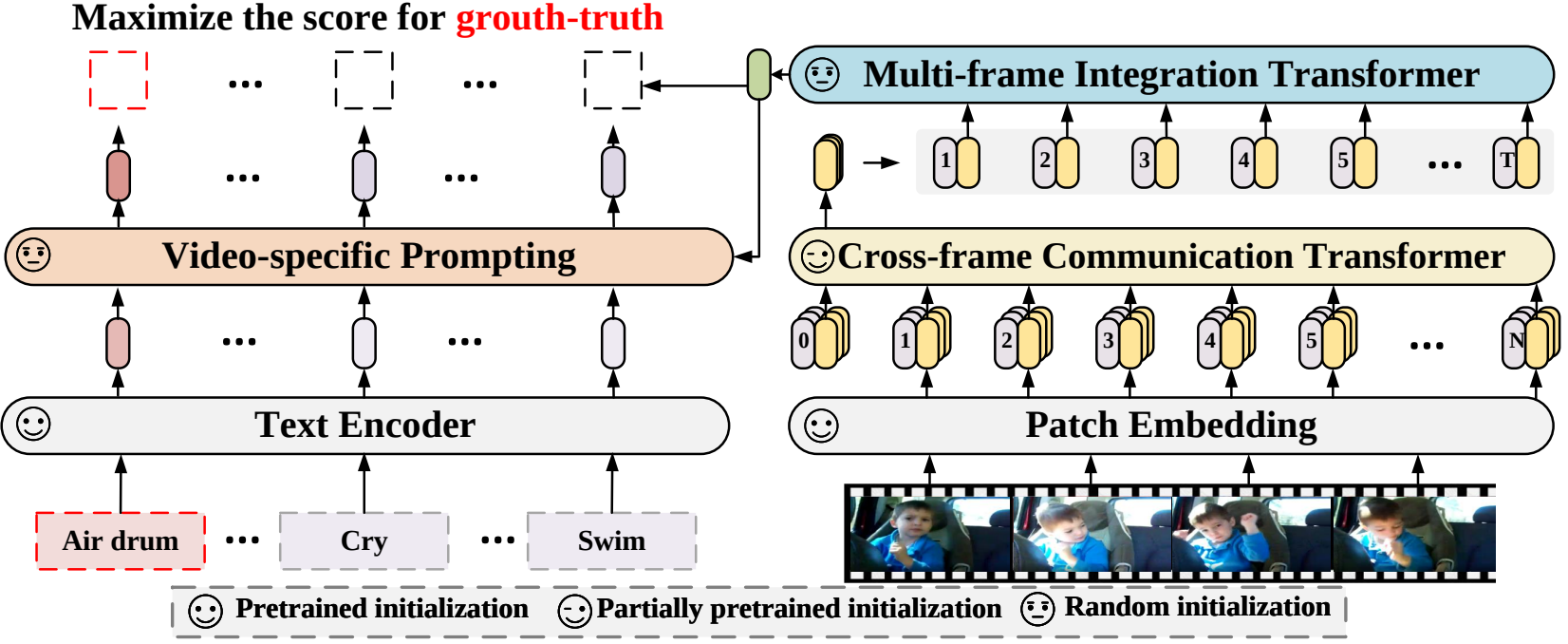 X-CLIPのアーキテクチャ。元の論文から引用。
このモデルは [nielsr](https://huggingface.co/nielsr) によって提供されました。元のコードは [こちら](https://github.com/microsoft/VideoX/tree/master/X-CLIP) で確認できます。
## リソース
X-CLIPの入門を支援するための、Hugging Face公式およびコミュニティ(🌎で示す)のリソースのリストです。
- X-CLIPのデモノートブックは[こちら](https://github.com/NielsRogge/Transformers-Tutorials/tree/master/X-CLIP)で確認できます。
ここにリソースを掲載していただくことを希望される場合は、Pull Request を開いてください。レビューいたします。リソースは、既存のリソースと重複するのではなく、新しいものを示すことが望ましいです。
## XCLIPProcessor[[transformers.XCLIPProcessor]]
#### transformers.XCLIPProcessor[[transformers.XCLIPProcessor]]
```python
transformers.XCLIPProcessor(image_processor = None, tokenizer = None, **kwargs)
```
[ソース](https://github.com/huggingface/transformers/blob/main/src/transformers/models/x_clip/processing_x_clip.py#L23)
**パラメータ:**
image_processor (`image_processor_class`) : 画像プロセッサは必須の入力です。
tokenizer (`tokenizer_class`) : トークナイザーは必須の入力です。
XCLIPProcessorを構築します。画像プロセッサとトークナイザーを単一のプロセッサにラップします。
[XCLIPProcessor](/docs/transformers/main/ja/model_doc/xclip#transformers.XCLIPProcessor) は、`image_processor_class` と `tokenizer_class` のすべての機能を提供します。詳細については、`~image_processor_class` および `~tokenizer_class` を参照してください。
#### __call__[[transformers.XCLIPProcessor.__call__]]
```python
__call__(images = None, text = None, videos = None, **kwargs)
```
[ソース](https://github.com/huggingface/transformers/blob/main/src/transformers/models/x_clip/processing_x_clip.py#L28)
## XCLIPConfig[[transformers.XCLIPConfig]]
#### transformers.XCLIPConfig[[transformers.XCLIPConfig]]
```python
transformers.XCLIPConfig(transformers_version: str | None = None, architectures: list[str] | None = None, output_hidden_states: bool | None = False, return_dict: bool | None = True, dtype: str | torch.dtype | None = None, chunk_size_feed_forward: int = 0, is_encoder_decoder: bool = False, id2label: dict[int, str] | dict[str, str] | None = None, label2id: dict[str, int] | dict[str, str] | None = None, problem_type: Literal['regression', 'single_label_classification', 'multi_label_classification'] | None = None, text_config: dict | transformers.configuration_utils.PreTrainedConfig | None = None, vision_config: dict | transformers.configuration_utils.PreTrainedConfig | None = None, projection_dim: int = 512, prompt_layers: int = 2, prompt_alpha: float = 0.1, prompt_hidden_act: str = 'quick_gelu', prompt_num_attention_heads: int = 8, prompt_attention_dropout: float | int = 0.0, prompt_projection_dropout: float | int = 0.0, logit_scale_init_value: float = 2.6592, initializer_factor: float = 1.0)
```
[ソース](https://github.com/huggingface/transformers/blob/main/src/transformers/models/x_clip/configuration_x_clip.py#L119)
**パラメータ:**
text_config (`Union[dict, ~configuration_utils.PreTrainedConfig]`, *任意*) : テキストバックボーンの config オブジェクトまたは辞書。
vision_config (`Union[dict, ~configuration_utils.PreTrainedConfig]`, *任意*) : ビジョンバックボーンの config オブジェクトまたは辞書。
projection_dim (`int`、*任意*、デフォルトは`512`) : テキストおよびビジョンの投影層の次元数。
prompt_layers (`int`、*optional*、デフォルトは 2) : ビデオ固有のプロンプトジェネレーターにおける層数。
prompt_alpha (`float`、*optional*、デフォルトは 0.1) : ビデオ固有のプロンプト生成器で使用する Alpha 値。
prompt_hidden_act (`str` または `function`、*任意*、デフォルトは `"quick_gelu"`) : ビデオ固有のプロンプトジェネレーター内で使用される非線形活性化関数(関数または文字列)です。文字列の場合、`"gelu"`、`"relu"`、`"selu"`、`"gelu_new"`、`"quick_gelu"` がサポートされています。
prompt_num_attention_heads (`int`、*optional*、デフォルトは 8) : ビデオ固有のプロンプトジェネレーターのクロスアテンションにおけるアテンションヘッドの数。
prompt_attention_dropout (`float`、*optional*、デフォルトは 0.0) : ビデオ固有のプロンプトジェネレーターにおけるアテンション層のドロップアウト確率です。
prompt_projection_dropout (`float`、*optional*、デフォルト値は 0.0) : ビデオ固有のプロンプトジェネレーターにおける投影層の dropout 確率です。
logit_scale_init_value (`float`、*任意*、デフォルトは `2.6592`) : *logit_scale* パラメータの初期値です。
initializer_factor (`float`、*任意*、デフォルトは`1.0`) : すべての重み行列を初期化する係数です(1に保つ必要があります。初期化テスト用に内部で使用されます)。
This is the configuration class to store the configuration of a X ClipModel. It is used to instantiate a X Clip model according to the specified arguments, defining the model architecture. Instantiating a configuration with the defaults will yield a similar configuration to that of the [microsoft/xclip-base-patch32](https://huggingface.co/microsoft/xclip-base-patch32)
設定オブジェクトは [PreTrainedConfig](/docs/transformers/main/ja/main_classes/configuration#transformers.PreTrainedConfig) を継承し、モデルの出力を制御するために使用できます。詳細については、[PreTrainedConfig](/docs/transformers/main/ja/main_classes/configuration#transformers.PreTrainedConfig) のドキュメントを参照してください。
## XCLIPTextConfig[[transformers.XCLIPTextConfig]]
#### transformers.XCLIPTextConfig[[transformers.XCLIPTextConfig]]
```python
transformers.XCLIPTextConfig(transformers_version: str | None = None, architectures: list[str] | None = None, output_hidden_states: bool | None = False, return_dict: bool | None = True, dtype: str | torch.dtype | None = None, chunk_size_feed_forward: int = 0, is_encoder_decoder: bool = False, id2label: dict[int, str] | dict[str, str] | None = None, label2id: dict[str, int] | dict[str, str] | None = None, problem_type: Literal['regression', 'single_label_classification', 'multi_label_classification'] | None = None, vocab_size: int = 49408, hidden_size: int = 512, intermediate_size: int = 2048, num_hidden_layers: int = 12, num_attention_heads: int = 8, max_position_embeddings: int = 77, hidden_act: str = 'quick_gelu', layer_norm_eps: float = 1e-05, attention_dropout: float | int = 0.0, initializer_range: float = 0.02, initializer_factor: float = 1.0, pad_token_id: int | None = 1, bos_token_id: int | None = 0, eos_token_id: int | list[int] | None = 2)
```
[ソース](https://github.com/huggingface/transformers/blob/main/src/transformers/models/x_clip/configuration_x_clip.py#L27)
**パラメータ:**
vocab_size (`int`、*任意*、デフォルトは`49408`) : モデルの語彙サイズ。`input_ids`で表現できるトークンの種類数を定義します。
hidden_size (`int`、*任意*、デフォルトは`512`) : 隠れ表現の次元数。
intermediate_size (`int`、*任意*、デフォルトは`2048`) : MLP 表現の次元数。
num_hidden_layers (`int`, *任意*, デフォルトは `12`) : Transformer デコーダーの隠れ層の数。
num_attention_heads (`int`、*任意*、デフォルトは `8`) : Transformer デコーダーの各アテンション層におけるアテンションヘッドの数。
max_position_embeddings (`int`、*任意*、デフォルトは`77`) : このモデルが使用される可能性のある最大シーケンス長です。
hidden_act (`str`、*任意*、デフォルトは `quick_gelu`) : デコーダーで使用する非線形活性化関数(関数または文字列)。例えば、`"gelu"`、`"relu"`、`"silu"` など。
layer_norm_eps (`float`、*任意*、デフォルトは`1e-05`) : Layer Normalization 層で使用する epsilon。
attention_dropout (`Union[float, int]`、*任意*、デフォルトは`0.0`) : 注意確率のドロップアウト率。
initializer_range (`float`、*任意*、デフォルトは`0.02`) : すべての重み行列を初期化するためのtruncated_normal_initializerの標準偏差です。
initializer_factor (`float`、*任意*、デフォルトは`1.0`) : すべての重み行列を初期化する係数です(1に保つ必要があります。初期化テスト用に内部で使用されます)。
pad_token_id (`int`, *任意*, デフォルトは `1`) : 語彙内でパディングに使用されるトークン ID。
bos_token_id (`int`, *optional*, デフォルトは `0`) : 語彙内でストリームの開始に使用されるトークン ID。
eos_token_id (`Union[int, list[int]]`、*任意*、デフォルトは`2`) : 語彙内でストリーム終了に使用されるトークン ID。
This is the configuration class to store the configuration of a X ClipModel. It is used to instantiate a X Clip model according to the specified arguments, defining the model architecture. Instantiating a configuration with the defaults will yield a similar configuration to that of the [microsoft/xclip-base-patch32](https://huggingface.co/microsoft/xclip-base-patch32)
設定オブジェクトは [PreTrainedConfig](/docs/transformers/main/ja/main_classes/configuration#transformers.PreTrainedConfig) を継承し、モデルの出力を制御するために使用できます。詳細については、[PreTrainedConfig](/docs/transformers/main/ja/main_classes/configuration#transformers.PreTrainedConfig) のドキュメントを参照してください。
例:
```python
>>> from transformers import XCLIPTextModel, XCLIPTextConfig
>>> # Initializing a XCLIPTextModel with microsoft/xclip-base-patch32 style configuration
>>> configuration = XCLIPTextConfig()
>>> # Initializing a XCLIPTextConfig from the microsoft/xclip-base-patch32 style configuration
>>> model = XCLIPTextModel(configuration)
>>> # Accessing the model configuration
>>> configuration = model.config
```
## XCLIPVisionConfig[[transformers.XCLIPVisionConfig]]
#### transformers.XCLIPVisionConfig[[transformers.XCLIPVisionConfig]]
```python
transformers.XCLIPVisionConfig(transformers_version: str | None = None, architectures: list[str] | None = None, output_hidden_states: bool | None = False, return_dict: bool | None = True, dtype: str | torch.dtype | None = None, chunk_size_feed_forward: int = 0, is_encoder_decoder: bool = False, id2label: dict[int, str] | dict[str, str] | None = None, label2id: dict[str, int] | dict[str, str] | None = None, problem_type: Literal['regression', 'single_label_classification', 'multi_label_classification'] | None = None, hidden_size: int = 768, intermediate_size: int = 3072, num_hidden_layers: int = 12, num_attention_heads: int = 12, mit_hidden_size: int = 512, mit_intermediate_size: int = 2048, mit_num_hidden_layers: int = 1, mit_num_attention_heads: int = 8, num_channels: int = 3, image_size: int | list[int] | tuple[int, int] = 224, patch_size: int | list[int] | tuple[int, int] = 32, num_frames: int = 8, hidden_act: str = 'quick_gelu', layer_norm_eps: float = 1e-05, attention_dropout: float | int = 0.0, initializer_range: float = 0.02, initializer_factor: float = 1.0, drop_path_rate: float | int = 0.0)
```
[ソース](https://github.com/huggingface/transformers/blob/main/src/transformers/models/x_clip/configuration_x_clip.py#L65)
**パラメータ:**
hidden_size (`int`、*任意*、デフォルトは`768`) : 隠れ表現の次元数。
intermediate_size (`int`、*任意*、デフォルトは `3072`) : MLP 表現の次元数。
num_hidden_layers (`int`, *任意*, デフォルトは `12`) : Transformer デコーダーの隠れ層の数。
num_attention_heads (`int`、*任意*、デフォルトは `12`) : Transformer デコーダーの各アテンション層におけるアテンションヘッドの数。
mit_hidden_size (`int`, *optional*, デフォルトは 512) : Multiframe Integration Transformer (MIT) のエンコーダー層の次元数。
mit_intermediate_size (`int`, *optional*, デフォルトは 2048) : Multiframe Integration Transformer (MIT) における「intermediate」(すなわち feed-forward)層の次元数。
mit_num_hidden_layers (`int`、*optional*、デフォルトは 1) : Multiframe Integration Transformer (MIT) の隠れ層の数。
mit_num_attention_heads (`int`, *optional*, デフォルトは 8) : Multiframe Integration Transformer (MIT) の各アテンション層におけるアテンションヘッドの数。
num_channels (`int`、*任意*、デフォルトは`3`) : 入力チャネル数。
image_size (`Union[int, list[int], tuple[int, int]]`、*任意*、デフォルトは`224`) : 各画像のサイズ(解像度)。
patch_size (`Union[int, list[int], tuple[int, int]]`、*任意*、デフォルトは`32`) : 各パッチのサイズ(解像度)。
num_frames (`int`、*optional*、デフォルトは 8) : 各動画のフレーム数。
hidden_act (`str`、*任意*、デフォルトは `quick_gelu`) : デコーダーで使用する非線形活性化関数(関数または文字列)。例えば、`"gelu"`、`"relu"`、`"silu"` など。
layer_norm_eps (`float`、*任意*、デフォルトは`1e-05`) : Layer Normalization 層で使用する epsilon。
attention_dropout (`Union[float, int]`、*任意*、デフォルトは`0.0`) : 注意確率のドロップアウト率。
initializer_range (`float`、*任意*、デフォルトは`0.02`) : すべての重み行列を初期化するためのtruncated_normal_initializerの標準偏差です。
initializer_factor (`float`、*任意*、デフォルトは`1.0`) : すべての重み行列を初期化する係数です(1に保つ必要があります。初期化テスト用に内部で使用されます)。
drop_path_rate (`Union[float, int]`、*任意*、デフォルトは`0.0`) : パッチ融合のドロップパス率。
This is the configuration class to store the configuration of a X ClipModel. It is used to instantiate a X Clip model according to the specified arguments, defining the model architecture. Instantiating a configuration with the defaults will yield a similar configuration to that of the [microsoft/xclip-base-patch32](https://huggingface.co/microsoft/xclip-base-patch32)
設定オブジェクトは [PreTrainedConfig](/docs/transformers/main/ja/main_classes/configuration#transformers.PreTrainedConfig) を継承し、モデルの出力を制御するために使用できます。詳細については、[PreTrainedConfig](/docs/transformers/main/ja/main_classes/configuration#transformers.PreTrainedConfig) のドキュメントを参照してください。
例:
```python
>>> from transformers import XCLIPVisionModel, XCLIPVisionConfig
>>> # Initializing a XCLIPVisionModel with microsoft/xclip-base-patch32 style configuration
>>> configuration = XCLIPVisionConfig()
>>> # Initializing a XCLIPVisionModel model from the microsoft/xclip-base-patch32 style configuration
>>> model = XCLIPVisionModel(configuration)
>>> # Accessing the model configuration
>>> configuration = model.config
```
## XCLIPModel[[transformers.XCLIPModel]]
#### transformers.XCLIPModel[[transformers.XCLIPModel]]
```python
transformers.XCLIPModel(config: XCLIPConfig)
```
[ソース](https://github.com/huggingface/transformers/blob/main/src/transformers/models/x_clip/modeling_x_clip.py#L914)
**パラメータ:**
config ([XCLIPConfig](/docs/transformers/main/ja/model_doc/xclip#transformers.XCLIPConfig)) : モデルのパラメータをすべて含むモデル設定クラスです。設定ファイルで初期化しても、モデルに関連する重みは読み込まれず、設定のみが読み込まれます。モデルの重みをロードするには、[from_pretrained()](/docs/transformers/main/ja/main_classes/model#transformers.PreTrainedModel.from_pretrained) メソッドを確認してください。
特定のヘッドを付加せず、生のhidden-statesを出力する素のX Clip Model。
このモデルは [PreTrainedModel](/docs/transformers/main/ja/main_classes/model#transformers.PreTrainedModel) を継承しています。ライブラリがすべてのモデルに対して実装している汎用的なメソッド(ダウンロードや保存、入力埋め込みのリサイズ、ヘッドのプルーニングなど)については、スーパークラスのドキュメントを参照してください。
このモデルは、PyTorchの[torch.nn.Module](https://pytorch.org/docs/stable/nn.html#torch.nn.Module)のサブクラスでもあります。通常のPyTorch Moduleとして使用し、一般的な使用方法や動作に関する詳細については、PyTorchのドキュメントを参照してください。
#### forward[[transformers.XCLIPModel.forward]]
```python
forward(input_ids: typing.Optional[torch.LongTensor] = None, pixel_values: typing.Optional[torch.FloatTensor] = None, attention_mask: typing.Optional[torch.Tensor] = None, position_ids: typing.Optional[torch.LongTensor] = None, return_loss: bool | None = None, interpolate_pos_encoding: bool = False, **kwargs: *)
```
[ソース](https://github.com/huggingface/transformers/blob/main/src/transformers/models/x_clip/modeling_x_clip.py#L981)
**パラメータ:**
input_ids (`torch.LongTensor`、shape `(batch_size, sequence_length)`、*任意*) : 語彙における入力シーケンスのトークンインデックスです。デフォルトでは、パディングは無視されます。インデックスは [AutoTokenizer](/docs/transformers/main/ja/model_doc/auto#transformers.AutoTokenizer) を使用して取得できます。詳細については、[PreTrainedTokenizer.encode()](/docs/transformers/main/ja/internal/tokenization_utils#transformers.PreTrainedTokenizerBase.encode) および [PreTrainedTokenizer.__call__()](/docs/transformers/main/ja/internal/tokenization_utils#transformers.PreTrainedTokenizerBase.__call__) を参照してください。 [入力IDとは何ですか?](../glossary#input-ids)
pixel_values (`torch.FloatTensor`、shape `(batch_size, num_channels, image_size, image_size)`、*optional*) : 入力画像に対応するテンソルです。ピクセル値は `image_processor_class` を使用して取得できます。詳細は `image_processor_class.__call__` を参照してください(`processor_class` は画像の処理に `image_processor_class` を使用します)。
attention_mask (`torch.Tensor`、shape `(batch_size, sequence_length)`、*任意*) : padding トークンのインデックスに対する attention を回避するためのマスクです。マスクの値は `[0, 1]` から選択されます: - **マスクされない**トークンは 1、- **マスクされる**トークンは 0。 [attention マスクとは?](../glossary#attention-mask)
position_ids (`torch.LongTensor`、shape `(batch_size, sequence_length)`、*任意*) : 各入力シーケンスのトークンが位置埋め込み内で占める位置のインデックスです。`[0, config.n_positions - 1]` の範囲から選択されます。 [位置 ID とは何か?](../glossary#position-ids)
return_loss (`bool`, *任意*) : 対比損失を返すかどうか。
interpolate_pos_encoding (`bool`、*任意*、デフォルトは`False`) : 事前学習済みの位置エンコーディングを補間するかどうかを指定します。
**戻り値:** `XCLIPOutput` または `tuple(torch.FloatTensor)`
設定([XCLIPConfig](/docs/transformers/main/ja/model_doc/xclip#transformers.XCLIPConfig))と入力に応じて、さまざまな要素で構成される`XCLIPOutput`または`torch.FloatTensor`のタプル(`return_dict=False`が渡された場合、または`config.return_dict=False`の場合)。
[XCLIPModel](/docs/transformers/main/ja/model_doc/xclip#transformers.XCLIPModel)のforwardメソッドは、`__call__`特殊メソッドをオーバーライドします。
この関数内でフォワードパスの手順を定義する必要がありますが、その後、この関数ではなく`Module`インスタンスを呼び出すべきです。前者は前処理と後処理の実行を適切に処理するのに対し、後者はそれらを無視してしまいます。
- **loss** (`torch.FloatTensor`、shape `(1,)`、*optional*、`return_loss` が `True` の場合のみ返されます) -- 動画とテキストの類似度に対する対比損失。
- **logits_per_text** (`torch.FloatTensor`、shape `(text_batch_size, video_batch_size)`) -- `text_embeds` と `video_embeds` 間のスケーリングされたドット積スコアです。これはテキストと動画の類似度スコアを表します。
- **text_embeds** (`torch.FloatTensor`、shape `(batch_size, output_dim`) -- [XCLIPTextModel](/docs/transformers/main/ja/model_doc/xclip#transformers.XCLIPTextModel)のプーリング済み出力に投影層を適用して得られたテキスト埋め込み。
- **text_model_output** (`~modeling_outputs.BaseModelOutputWithPooling`、*任意*) -- [XCLIPTextModel](/docs/transformers/main/ja/model_doc/xclip#transformers.XCLIPTextModel)の出力です。
- **vision_model_output** (`~modeling_outputs.BaseModelOutputWithPooling`、*任意*) -- [XCLIPVisionModel](/docs/transformers/main/ja/model_doc/xclip#transformers.XCLIPVisionModel)の出力です。
- **logits_per_video** (`torch.FloatTensor`、shape `(video_batch_size, text_batch_size)`) -- `video_embeds` と `text_embeds` 間のスケーリング済みドット積スコアです。これは動画とテキストの類似度スコアを表します。
- **video_embeds** (`torch.FloatTensor`、shape `(batch_size, output_dim`) -- [XCLIPVisionModel](/docs/transformers/main/ja/model_doc/xclip#transformers.XCLIPVisionModel)のプーリング済み出力に投影層を適用して得られた動画埋め込み。
- **mit_output** (`~modeling_outputs.BaseModelOutputWithPooling`、*任意*) -- `XCLIPMultiframeIntegrationTransformer`(略して MIT)の出力です。
例:
```python
>>> import av
>>> import torch
>>> import numpy as np
>>> from transformers import AutoProcessor, AutoModel
>>> from huggingface_hub import hf_hub_download
>>> np.random.seed(0)
>>> def read_video_pyav(container, indices):
... '''
... Decode the video with PyAV decoder.
... Args:
... container (`av.container.input.InputContainer`): PyAV container.
... indices (`list[int]`): List of frame indices to decode.
... Returns:
... result (np.ndarray): np array of decoded frames of shape (num_frames, height, width, 3).
... '''
... frames = []
... container.seek(0)
... start_index = indices[0]
... end_index = indices[-1]
... for i, frame in enumerate(container.decode(video=0)):
... if i > end_index:
... break
... if i >= start_index and i in indices:
... frames.append(frame)
... return np.stack([x.to_ndarray(format="rgb24") for x in frames])
>>> def sample_frame_indices(clip_len, frame_sample_rate, seg_len):
... '''
... Sample a given number of frame indices from the video.
... Args:
... clip_len (`int`): Total number of frames to sample.
... frame_sample_rate (`int`): Sample every n-th frame.
... seg_len (`int`): Maximum allowed index of sample's last frame.
... Returns:
... indices (`list[int]`): List of sampled frame indices
... '''
... converted_len = int(clip_len * frame_sample_rate)
... end_idx = np.random.randint(converted_len, seg_len)
... start_idx = end_idx - converted_len
... indices = np.linspace(start_idx, end_idx, num=clip_len)
... indices = np.clip(indices, start_idx, end_idx - 1).astype(np.int64)
... return indices
>>> # video clip consists of 300 frames (10 seconds at 30 FPS)
>>> file_path = hf_hub_download(
... repo_id="nielsr/video-demo", filename="eating_spaghetti.mp4", repo_type="dataset"
... )
>>> container = av.open(file_path)
>>> # sample 8 frames
>>> indices = sample_frame_indices(clip_len=8, frame_sample_rate=1, seg_len=container.streams.video[0].frames)
>>> video = read_video_pyav(container, indices)
>>> processor = AutoProcessor.from_pretrained("microsoft/xclip-base-patch32")
>>> model = AutoModel.from_pretrained("microsoft/xclip-base-patch32")
>>> inputs = processor(
... text=["playing sports", "eating spaghetti", "go shopping"],
... videos=list(video),
... return_tensors="pt",
... padding=True,
... )
>>> # forward pass
>>> with torch.no_grad():
... outputs = model(**inputs)
>>> logits_per_video = outputs.logits_per_video # this is the video-text similarity score
>>> probs = logits_per_video.softmax(dim=1) # we can take the softmax to get the label probabilities
>>> print(probs)
tensor([[1.9496e-04, 9.9960e-01, 2.0825e-04]])
```
#### get_text_features[[transformers.XCLIPModel.get_text_features]]
```python
get_text_features(input_ids: Tensor, attention_mask: typing.Optional[torch.Tensor] = None, position_ids: typing.Optional[torch.Tensor] = None, **kwargs: *)
```
[ソース](https://github.com/huggingface/transformers/blob/main/src/transformers/models/x_clip/modeling_x_clip.py#L946)
**パラメータ:**
input_ids (`torch.Tensor`、shape `(batch_size, sequence_length)`) : 語彙における入力シーケンスのトークンインデックスです。デフォルトでは、パディングは無視されます。インデックスは [AutoTokenizer](/docs/transformers/main/ja/model_doc/auto#transformers.AutoTokenizer) を使用して取得できます。詳細については、[PreTrainedTokenizer.encode()](/docs/transformers/main/ja/internal/tokenization_utils#transformers.PreTrainedTokenizerBase.encode) および [PreTrainedTokenizer.__call__()](/docs/transformers/main/ja/internal/tokenization_utils#transformers.PreTrainedTokenizerBase.__call__) を参照してください。 [入力IDとは何ですか?](../glossary#input-ids)
attention_mask (`torch.Tensor`、shape `(batch_size, sequence_length)`、*任意*) : padding トークンのインデックスに対する attention を回避するためのマスクです。マスクの値は `[0, 1]` から選択されます: - **マスクされない**トークンは 1、- **マスクされる**トークンは 0。 [attention マスクとは?](../glossary#attention-mask)
position_ids (`torch.Tensor`、shape `(batch_size, sequence_length)`、*任意*) : 各入力シーケンスのトークンが位置埋め込み内で占める位置のインデックス。`[0, config.n_positions - 1]` の範囲から選択されます。 [位置 ID とは何か?](../glossary#position-ids)
**戻り値:** [BaseModelOutputWithPooling](/docs/transformers/main/ja/main_classes/output#transformers.modeling_outputs.BaseModelOutputWithPooling) または `tuple(torch.FloatTensor)`
設定([XCLIPConfig](/docs/transformers/main/ja/model_doc/xclip#transformers.XCLIPConfig))と入力に応じて、さまざまな要素で構成される、[BaseModelOutputWithPooling](/docs/transformers/main/ja/main_classes/output#transformers.modeling_outputs.BaseModelOutputWithPooling) または `torch.FloatTensor` のタプル(`return_dict=False` が渡された場合、または `config.return_dict=False` の場合)。
- **last_hidden_state** (`torch.FloatTensor`、shape `(batch_size, sequence_length, hidden_size)`) -- モデルの最終層の出力における隠れ状態のシーケンス。
- **pooler_output** (`torch.FloatTensor`、shape `(batch_size, hidden_size)`) -- 補助事前学習タスクに使用される層をさらに通して処理された後、シーケンスの最初のトークン(分類トークン)の最終層の隠れ状態です。例えば、BERT 系のモデルでは、線形層と tanh 活性化関数を経て処理された後の分類トークンを返します。この線形層の重みは、事前学習中の次文予測(分類)目的から学習されます。
- **hidden_states** (`tuple(torch.FloatTensor)`、*optional*、`output_hidden_states=True` が渡された場合または `config.output_hidden_states=True` の場合に返されます) -- `torch.FloatTensor` のタプル(埋め込み層を持つモデルの場合、埋め込みの出力用が 1 つ、各層の出力用が 1 つずつ)で、形状は `(batch_size, sequence_length, hidden_size)` です。
各層の出力におけるモデルのHidden-states、および任意の初期埋め込み出力。
- **attentions** (`tuple(torch.FloatTensor)`、*optional*、`output_attentions=True` が渡された場合または `config.output_attentions=True` の場合に返されます) -- `torch.FloatTensor` のタプル(各レイヤーごとに1つ)で、形状は `(batch_size, num_heads, sequence_length, sequence_length)` です。
アテンションのsoftmax後のアテンション重み。自己アテンションヘッド内で加重平均を計算するために使用されます。
例:
```python
>>> import torch
>>> from transformers import AutoTokenizer, AutoModel
>>> tokenizer = AutoTokenizer.from_pretrained("microsoft/xclip-base-patch32")
>>> model = AutoModel.from_pretrained("microsoft/xclip-base-patch32")
>>> inputs = tokenizer(["a photo of a cat", "a photo of a dog"], padding=True, return_tensors="pt")
>>> with torch.inference_mode():
... text_features = model.get_text_features(**inputs)
```
#### get_video_features[[transformers.XCLIPModel.get_video_features]]
```python
get_video_features(pixel_values: Tensor, **kwargs: *)
```
[ソース](https://github.com/huggingface/transformers/blob/main/src/transformers/models/x_clip/modeling_x_clip.py#L1141)
**パラメータ:**
pixel_values (`torch.Tensor`、shape `(batch_size, num_channels, image_size, image_size)`) : 入力画像に対応するテンソルです。ピクセル値は `image_processor_class` を使用して取得できます。詳細は `image_processor_class.__call__` を参照してください(`processor_class` は画像の処理に `image_processor_class` を使用します)。
**戻り値:** [BaseModelOutputWithPooling](/docs/transformers/main/ja/main_classes/output#transformers.modeling_outputs.BaseModelOutputWithPooling) または `tuple(torch.FloatTensor)`
設定([XCLIPConfig](/docs/transformers/main/ja/model_doc/xclip#transformers.XCLIPConfig))と入力に応じて、さまざまな要素で構成される、[BaseModelOutputWithPooling](/docs/transformers/main/ja/main_classes/output#transformers.modeling_outputs.BaseModelOutputWithPooling) または `torch.FloatTensor` のタプル(`return_dict=False` が渡された場合、または `config.return_dict=False` の場合)。
- **last_hidden_state** (`torch.FloatTensor`、shape `(batch_size, sequence_length, hidden_size)`) -- モデルの最終層の出力における隠れ状態のシーケンス。
- **pooler_output** (`torch.FloatTensor`、shape `(batch_size, hidden_size)`) -- 補助事前学習タスクに使用される層をさらに通して処理された後、シーケンスの最初のトークン(分類トークン)の最終層の隠れ状態です。例えば、BERT 系のモデルでは、線形層と tanh 活性化関数を経て処理された後の分類トークンを返します。この線形層の重みは、事前学習中の次文予測(分類)目的から学習されます。
- **hidden_states** (`tuple(torch.FloatTensor)`、*optional*、`output_hidden_states=True` が渡された場合または `config.output_hidden_states=True` の場合に返されます) -- `torch.FloatTensor` のタプル(埋め込み層を持つモデルの場合、埋め込みの出力用が 1 つ、各層の出力用が 1 つずつ)で、形状は `(batch_size, sequence_length, hidden_size)` です。
各層の出力におけるモデルのHidden-states、および任意の初期埋め込み出力。
- **attentions** (`tuple(torch.FloatTensor)`、*optional*、`output_attentions=True` が渡された場合または `config.output_attentions=True` の場合に返されます) -- `torch.FloatTensor` のタプル(各レイヤーごとに1つ)で、形状は `(batch_size, num_heads, sequence_length, sequence_length)` です。
アテンションのsoftmax後のアテンション重み。自己アテンションヘッド内で加重平均を計算するために使用されます。
例:
```python
>>> import av
>>> import torch
>>> import numpy as np
>>> from transformers import AutoProcessor, AutoModel
>>> from huggingface_hub import hf_hub_download
>>> np.random.seed(0)
>>> def read_video_pyav(container, indices):
... '''
... Decode the video with PyAV decoder.
... Args:
... container (`av.container.input.InputContainer`): PyAV container.
... indices (`list[int]`): List of frame indices to decode.
... Returns:
... result (np.ndarray): np array of decoded frames of shape (num_frames, height, width, 3).
... '''
... frames = []
... container.seek(0)
... start_index = indices[0]
... end_index = indices[-1]
... for i, frame in enumerate(container.decode(video=0)):
... if i > end_index:
... break
... if i >= start_index and i in indices:
... frames.append(frame)
... return np.stack([x.to_ndarray(format="rgb24") for x in frames])
>>> def sample_frame_indices(clip_len, frame_sample_rate, seg_len):
... '''
... Sample a given number of frame indices from the video.
... Args:
... clip_len (`int`): Total number of frames to sample.
... frame_sample_rate (`int`): Sample every n-th frame.
... seg_len (`int`): Maximum allowed index of sample's last frame.
... Returns:
... indices (`list[int]`): List of sampled frame indices
... '''
... converted_len = int(clip_len * frame_sample_rate)
... end_idx = np.random.randint(converted_len, seg_len)
... start_idx = end_idx - converted_len
... indices = np.linspace(start_idx, end_idx, num=clip_len)
... indices = np.clip(indices, start_idx, end_idx - 1).astype(np.int64)
... return indices
>>> # video clip consists of 300 frames (10 seconds at 30 FPS)
>>> file_path = hf_hub_download(
... repo_id="nielsr/video-demo", filename="eating_spaghetti.mp4", repo_type="dataset"
... )
>>> container = av.open(file_path)
>>> # sample 8 frames
>>> indices = sample_frame_indices(clip_len=8, frame_sample_rate=1, seg_len=container.streams.video[0].frames)
>>> video = read_video_pyav(container, indices)
>>> processor = AutoProcessor.from_pretrained("microsoft/xclip-base-patch32")
>>> model = AutoModel.from_pretrained("microsoft/xclip-base-patch32")
>>> inputs = processor(videos=list(video), return_tensors="pt")
>>> video_features = model.get_video_features(**inputs)
```
## XCLIPTextModel[[transformers.XCLIPTextModel]]
#### transformers.XCLIPTextModel[[transformers.XCLIPTextModel]]
```python
transformers.XCLIPTextModel(config: XCLIPTextConfig)
```
[ソース](https://github.com/huggingface/transformers/blob/main/src/transformers/models/x_clip/modeling_x_clip.py#L549)
**パラメータ:**
config ([XCLIPTextConfig](/docs/transformers/main/ja/model_doc/xclip#transformers.XCLIPTextConfig)) : モデルのパラメータをすべて含むモデル設定クラスです。設定ファイルで初期化しても、モデルに関連する重みは読み込まれず、設定のみが読み込まれます。モデルの重みをロードするには、[from_pretrained()](/docs/transformers/main/ja/main_classes/model#transformers.PreTrainedModel.from_pretrained) メソッドを確認してください。
ヘッドや投影が上に乗せられていないXCLIPのテキストモデル。
このモデルは [PreTrainedModel](/docs/transformers/main/ja/main_classes/model#transformers.PreTrainedModel) を継承しています。ライブラリがすべてのモデルに対して実装している汎用的なメソッド(ダウンロードや保存、入力埋め込みのリサイズ、ヘッドのプルーニングなど)については、スーパークラスのドキュメントを参照してください。
このモデルは、PyTorchの[torch.nn.Module](https://pytorch.org/docs/stable/nn.html#torch.nn.Module)のサブクラスでもあります。通常のPyTorch Moduleとして使用し、一般的な使用方法や動作に関する詳細については、PyTorchのドキュメントを参照してください。
#### forward[[transformers.XCLIPTextModel.forward]]
```python
forward(input_ids: typing.Optional[torch.Tensor] = None, attention_mask: typing.Optional[torch.Tensor] = None, position_ids: typing.Optional[torch.Tensor] = None, **kwargs: *)
```
[ソース](https://github.com/huggingface/transformers/blob/main/src/transformers/models/x_clip/modeling_x_clip.py#L563)
**パラメータ:**
input_ids (`torch.Tensor`、shape `(batch_size, sequence_length)`、*任意*) : 語彙における入力シーケンスのトークンインデックスです。デフォルトでは、パディングは無視されます。インデックスは [AutoTokenizer](/docs/transformers/main/ja/model_doc/auto#transformers.AutoTokenizer) を使用して取得できます。詳細については、[PreTrainedTokenizer.encode()](/docs/transformers/main/ja/internal/tokenization_utils#transformers.PreTrainedTokenizerBase.encode) および [PreTrainedTokenizer.__call__()](/docs/transformers/main/ja/internal/tokenization_utils#transformers.PreTrainedTokenizerBase.__call__) を参照してください。 [入力IDとは何ですか?](../glossary#input-ids)
attention_mask (`torch.Tensor`、shape `(batch_size, sequence_length)`、*任意*) : padding トークンのインデックスに対する attention を回避するためのマスクです。マスクの値は `[0, 1]` から選択されます: - **マスクされない**トークンは 1、- **マスクされる**トークンは 0。 [attention マスクとは?](../glossary#attention-mask)
position_ids (`torch.Tensor`、shape `(batch_size, sequence_length)`、*任意*) : 各入力シーケンスのトークンが位置埋め込み内で占める位置のインデックス。`[0, config.n_positions - 1]` の範囲から選択されます。 [位置 ID とは何か?](../glossary#position-ids)
**戻り値:** [BaseModelOutputWithPooling](/docs/transformers/main/ja/main_classes/output#transformers.modeling_outputs.BaseModelOutputWithPooling) または `tuple(torch.FloatTensor)`
設定([XCLIPConfig](/docs/transformers/main/ja/model_doc/xclip#transformers.XCLIPConfig))と入力に応じて、さまざまな要素で構成される、[BaseModelOutputWithPooling](/docs/transformers/main/ja/main_classes/output#transformers.modeling_outputs.BaseModelOutputWithPooling) または `torch.FloatTensor` のタプル(`return_dict=False` が渡された場合、または `config.return_dict=False` の場合)。
[XCLIPTextModel](/docs/transformers/main/ja/model_doc/xclip#transformers.XCLIPTextModel)のforwardメソッドは、`__call__`特殊メソッドをオーバーライドします。
この関数内でフォワードパスの手順を定義する必要がありますが、その後、この関数ではなく`Module`インスタンスを呼び出すべきです。前者は前処理と後処理の実行を適切に処理するのに対し、後者はそれらを無視してしまいます。
- **last_hidden_state** (`torch.FloatTensor`、shape `(batch_size, sequence_length, hidden_size)`) -- モデルの最終層の出力における隠れ状態のシーケンス。
- **pooler_output** (`torch.FloatTensor`、shape `(batch_size, hidden_size)`) -- 補助事前学習タスクに使用される層をさらに通して処理された後、シーケンスの最初のトークン(分類トークン)の最終層の隠れ状態です。例えば、BERT 系のモデルでは、線形層と tanh 活性化関数を経て処理された後の分類トークンを返します。この線形層の重みは、事前学習中の次文予測(分類)目的から学習されます。
- **hidden_states** (`tuple(torch.FloatTensor)`、*optional*、`output_hidden_states=True` が渡された場合または `config.output_hidden_states=True` の場合に返されます) -- `torch.FloatTensor` のタプル(埋め込み層を持つモデルの場合、埋め込みの出力用が 1 つ、各層の出力用が 1 つずつ)で、形状は `(batch_size, sequence_length, hidden_size)` です。
各層の出力におけるモデルのHidden-states、および任意の初期埋め込み出力。
- **attentions** (`tuple(torch.FloatTensor)`、*optional*、`output_attentions=True` が渡された場合または `config.output_attentions=True` の場合に返されます) -- `torch.FloatTensor` のタプル(各レイヤーごとに1つ)で、形状は `(batch_size, num_heads, sequence_length, sequence_length)` です。
アテンションのsoftmax後のアテンション重み。自己アテンションヘッド内で加重平均を計算するために使用されます。
例:
```python
>>> from transformers import AutoTokenizer, XCLIPTextModel
>>> model = XCLIPTextModel.from_pretrained("microsoft/xclip-base-patch32")
>>> tokenizer = AutoTokenizer.from_pretrained("microsoft/xclip-base-patch32")
>>> inputs = tokenizer(["a photo of a cat", "a photo of a dog"], padding=True, return_tensors="pt")
>>> outputs = model(**inputs)
>>> last_hidden_state = outputs.last_hidden_state
>>> pooled_output = outputs.pooler_output # pooled (EOS token) states
```
## XCLIPVisionModel[[transformers.XCLIPVisionModel]]
#### transformers.XCLIPVisionModel[[transformers.XCLIPVisionModel]]
```python
transformers.XCLIPVisionModel(config: XCLIPVisionConfig)
```
[ソース](https://github.com/huggingface/transformers/blob/main/src/transformers/models/x_clip/modeling_x_clip.py#L647)
**パラメータ:**
config ([XCLIPVisionConfig](/docs/transformers/main/ja/model_doc/xclip#transformers.XCLIPVisionConfig)) : モデルのすべてのパラメータを含むモデル設定クラスです。設定ファイルで初期化しても、モデルに関連する重みは読み込まれず、設定のみが読み込まれます。モデルの重みをロードするには、[from_pretrained()](/docs/transformers/main/ja/main_classes/model#transformers.PreTrainedModel.from_pretrained) メソッドを確認してください。
ヘッドや投影が上に乗せられていないXCLIPのビジョンモデル。
このモデルは [PreTrainedModel](/docs/transformers/main/ja/main_classes/model#transformers.PreTrainedModel) を継承しています。ライブラリがすべてのモデルに対して実装している汎用的なメソッド(ダウンロードや保存、入力埋め込みのリサイズ、ヘッドのプルーニングなど)については、スーパークラスのドキュメントを参照してください。
このモデルは、PyTorchの[torch.nn.Module](https://pytorch.org/docs/stable/nn.html#torch.nn.Module)のサブクラスでもあります。通常のPyTorch Moduleとして使用し、一般的な使用方法や動作に関する詳細については、PyTorchのドキュメントを参照してください。
#### forward[[transformers.XCLIPVisionModel.forward]]
```python
forward(pixel_values: typing.Optional[torch.FloatTensor], interpolate_pos_encoding: bool | None = False, **kwargs: *)
```
[ソース](https://github.com/huggingface/transformers/blob/main/src/transformers/models/x_clip/modeling_x_clip.py#L663)
**パラメータ:**
pixel_values (`torch.FloatTensor`、shape `(batch_size, num_channels, image_size, image_size)`、*optional*) : 入力画像に対応するテンソルです。ピクセル値は `image_processor_class` を使用して取得できます。詳細は `image_processor_class.__call__` を参照してください(`processor_class` は画像の処理に `image_processor_class` を使用します)。
interpolate_pos_encoding (`bool`、*任意*、デフォルトは`False`) : 事前学習済みの位置エンコーディングを補間するかどうかを指定します。
**戻り値:** [BaseModelOutputWithPooling](/docs/transformers/main/ja/main_classes/output#transformers.modeling_outputs.BaseModelOutputWithPooling) または `tuple(torch.FloatTensor)`
設定([XCLIPConfig](/docs/transformers/main/ja/model_doc/xclip#transformers.XCLIPConfig))と入力に応じて、さまざまな要素で構成される、[BaseModelOutputWithPooling](/docs/transformers/main/ja/main_classes/output#transformers.modeling_outputs.BaseModelOutputWithPooling) または `torch.FloatTensor` のタプル(`return_dict=False` が渡された場合、または `config.return_dict=False` の場合)。
[XCLIPVisionModel](/docs/transformers/main/ja/model_doc/xclip#transformers.XCLIPVisionModel) の forward メソッドは、`__call__` という特殊メソッドをオーバーライドします。
この関数内でフォワードパスの手順を定義する必要がありますが、その後、この関数ではなく`Module`インスタンスを呼び出すべきです。前者は前処理と後処理の実行を適切に処理するのに対し、後者はそれらを無視してしまいます。
- **last_hidden_state** (`torch.FloatTensor`、shape `(batch_size, sequence_length, hidden_size)`) -- モデルの最終層の出力における隠れ状態のシーケンス。
- **pooler_output** (`torch.FloatTensor`、shape `(batch_size, hidden_size)`) -- 補助事前学習タスクに使用される層をさらに通して処理された後、シーケンスの最初のトークン(分類トークン)の最終層の隠れ状態です。例えば、BERT 系のモデルでは、線形層と tanh 活性化関数を経て処理された後の分類トークンを返します。この線形層の重みは、事前学習中の次文予測(分類)目的から学習されます。
- **hidden_states** (`tuple(torch.FloatTensor)`、*optional*、`output_hidden_states=True` が渡された場合または `config.output_hidden_states=True` の場合に返されます) -- `torch.FloatTensor` のタプル(埋め込み層を持つモデルの場合、埋め込みの出力用が 1 つ、各層の出力用が 1 つずつ)で、形状は `(batch_size, sequence_length, hidden_size)` です。
各層の出力におけるモデルのHidden-states、および任意の初期埋め込み出力。
- **attentions** (`tuple(torch.FloatTensor)`、*optional*、`output_attentions=True` が渡された場合または `config.output_attentions=True` の場合に返されます) -- `torch.FloatTensor` のタプル(各レイヤーごとに1つ)で、形状は `(batch_size, num_heads, sequence_length, sequence_length)` です。
アテンションのsoftmax後のアテンション重み。自己アテンションヘッド内で加重平均を計算するために使用されます。
例:
```python
>>> import av
>>> import torch
>>> import numpy as np
>>> from transformers import AutoProcessor, XCLIPVisionModel
>>> from huggingface_hub import hf_hub_download
>>> np.random.seed(0)
>>> def read_video_pyav(container, indices):
... '''
... Decode the video with PyAV decoder.
... Args:
... container (`av.container.input.InputContainer`): PyAV container.
... indices (`list[int]`): List of frame indices to decode.
... Returns:
... result (np.ndarray): np array of decoded frames of shape (num_frames, height, width, 3).
... '''
... frames = []
... container.seek(0)
... start_index = indices[0]
... end_index = indices[-1]
... for i, frame in enumerate(container.decode(video=0)):
... if i > end_index:
... break
... if i >= start_index and i in indices:
... frames.append(frame)
... return np.stack([x.to_ndarray(format="rgb24") for x in frames])
>>> def sample_frame_indices(clip_len, frame_sample_rate, seg_len):
... '''
... Sample a given number of frame indices from the video.
... Args:
... clip_len (`int`): Total number of frames to sample.
... frame_sample_rate (`int`): Sample every n-th frame.
... seg_len (`int`): Maximum allowed index of sample's last frame.
... Returns:
... indices (`list[int]`): List of sampled frame indices
... '''
... converted_len = int(clip_len * frame_sample_rate)
... end_idx = np.random.randint(converted_len, seg_len)
... start_idx = end_idx - converted_len
... indices = np.linspace(start_idx, end_idx, num=clip_len)
... indices = np.clip(indices, start_idx, end_idx - 1).astype(np.int64)
... return indices
>>> # video clip consists of 300 frames (10 seconds at 30 FPS)
>>> file_path = hf_hub_download(
... repo_id="nielsr/video-demo", filename="eating_spaghetti.mp4", repo_type="dataset"
... )
>>> container = av.open(file_path)
>>> # sample 16 frames
>>> indices = sample_frame_indices(clip_len=8, frame_sample_rate=1, seg_len=container.streams.video[0].frames)
>>> video = read_video_pyav(container, indices)
>>> processor = AutoProcessor.from_pretrained("microsoft/xclip-base-patch32")
>>> model = XCLIPVisionModel.from_pretrained("microsoft/xclip-base-patch32")
>>> pixel_values = processor(videos=list(video), return_tensors="pt").pixel_values
>>> batch_size, num_frames, num_channels, height, width = pixel_values.shape
>>> pixel_values = pixel_values.reshape(-1, num_channels, height, width)
>>> outputs = model(pixel_values)
>>> last_hidden_state = outputs.last_hidden_state
```