# LLaVa
## 概述
LLaVa 是一个开源聊天机器人,通过在 GPT 生成的多模态指令遵循数据上对 LlamA/Vicuna 进行微调而训练得到。它是一个基于 transformer 架构的自回归语言模型。换句话说,它是针对聊天/指令场景进行微调的多模态 LLM 版本。
LLaVa 模型由 Haotian Liu、Chunyuan Li、Yuheng Li 和 Yong Jae Lee 在 [Visual Instruction Tuning](https://huggingface.co/papers/2304.08485) 中提出,并在 [Improved Baselines with Visual Instruction Tuning](https://huggingface.co/papers/2310.03744) 中进行了改进。
该论文的摘要如下:
*大型多模态模型(LMM)最近在视觉指令微调方面取得了令人鼓舞的进展。在这篇笔记中,我们展示了 LLaVA 中全连接的视觉-语言跨模态连接器出人意料地强大且数据高效。通过对 LLaVA 进行简单修改,即使用带有 MLP 投影的 CLIP-ViT-L-336px,并添加面向学术任务的 VQA 数据以及简单的响应格式提示,我们建立了更强的基线,在 11 个基准测试中达到了最先进水平。我们最终的 13B 检查点仅使用了 120 万条公开可用数据,并在单个 8-A100 节点上约 1 天内完成了完整训练。我们希望这能让最先进 LMM 的研究更加易于获取。代码和模型将公开可用*
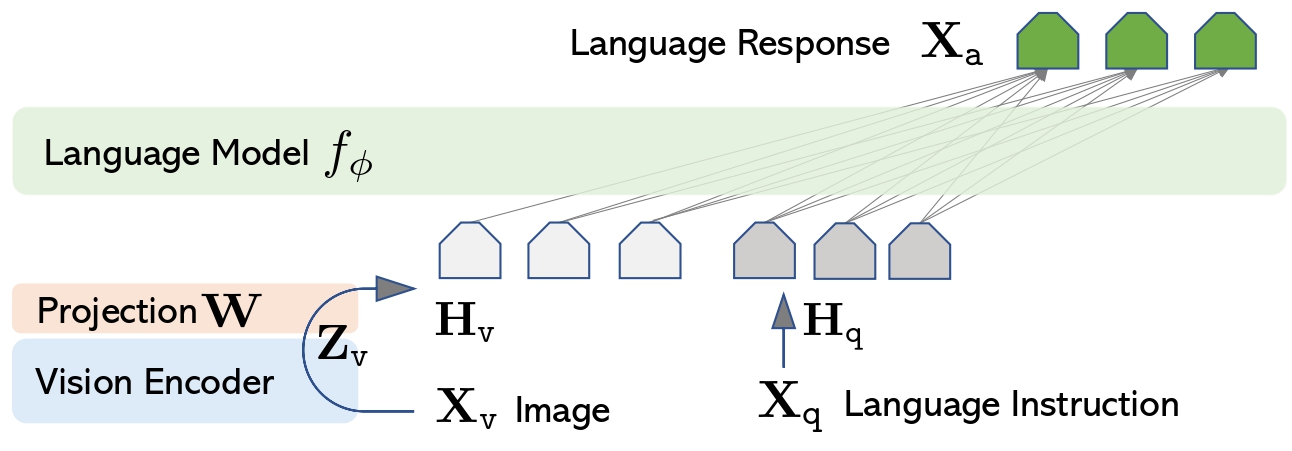 LLaVa 架构。摘自原始论文。
该模型由 [ArthurZ](https://huggingface.co/ArthurZ) 和 [ybelkada](https://huggingface.co/ybelkada) 贡献。原始代码可在[此处](https://github.com/haotian-liu/LLaVA/tree/main/llava)找到。
> [!TIP]
> 在 [from_pretrained()](/docs/transformers/main/zh/main_classes/model#transformers.PreTrainedModel.from_pretrained) 中设置 `use_kernels=True`,即可用 Hub 上的优化内核替换受支持的层。有关详细信息,请参阅 [加载内核](../kernel_doc/loading_kernels)。
## 使用技巧
- 我们建议用户在计算批量生成时使用 `padding_side="left"`,因为这能带来更准确的结果。只需确保在生成之前调用 `processor.tokenizer.padding_side = "left"` 即可。
- 请注意,该模型并未被明确训练以在同一提示中处理多张图像,尽管这在技术上是可行的,但您可能会遇到不准确的结果。
> [!NOTE]
> 在 v4.46 版本发布后,LLaVA 模型将针对添加 `processor.patch_size = {{patch_size}}`、`processor.num_additional_image_tokens = {{num_additional_image_tokens}}` 和 `processor.vision_feature_select_strategy = {{vision_feature_select_strategy}}` 发出警告。如果您拥有该模型检查点,强烈建议将这些属性添加到处理器中;如果该检查点不属于您,则建议提交一个 PR。
添加这些属性后,LLaVA 将尝试推断每张图像所需的图像 token 数量,并在文本中扩展相应数量的 `` 占位符。通常每张图像约为 500 个 token,因此请确保文本未被截断,否则在合并嵌入时将会失败。这些属性可以从模型配置中获取,例如 `model.config.vision_config.patch_size` 或 `model.config.vision_feature_select_strategy`。如果视觉骨干网络添加了 CLS token,则 `num_additional_image_tokens` 应为 `1`;如果未向视觉 patch 添加任何额外内容,则应为 `0`。
### 使用聊天模板格式化提示
每个 **checkpoint** 都使用特定的提示格式进行训练,具体取决于底层的大语言模型骨干网络。为确保格式正确,请使用处理器的 `apply_chat_template` 方法。
**重要:**
- 您必须构建对话历史——直接传入普通字符串将无法正常工作。
- 每条消息应为一个字典,包含 `"role"` 和 `"content"` 键。
- `"content"` 应为包含不同模态(如 `"text"` 和 `"image"`)的字典列表。
以下是输入结构的示例。我们将使用 [llava-hf/llava-1.5-7b-hf](https://huggingface.co/llava-hf/llava-1.5-7b-hf) 以及包含文本和图像的对话历史。每个 content 字段都必须是一个字典列表,如下所示:
```python
from transformers import AutoProcessor
processor = AutoProcessor.from_pretrained("llava-hf/llava-1.5-7b-hf")
conversation = [
{
"role": "user",
"content": [
{"type": "image"},
{"type": "text", "text": "What’s shown in this image?"},
],
},
{
"role": "assistant",
"content": [{"type": "text", "text": "This image shows a red stop sign."},]
},
{
"role": "user",
"content": [
{"type": "text", "text": "Describe the image in more details."},
],
},
]
text_prompt = processor.apply_chat_template(conversation, add_generation_prompt=True)
# Note that the template simply formats your prompt, you still have to tokenize it and obtain pixel values for your images
print(text_prompt)
"USER: \nUSER: Describe the image in more details. ASSISTANT:"
```
- 如果您想自行构建聊天提示,以下是每个 llava 检查点接受的提示格式列表:
[llava-interleave 模型](https://huggingface.co/collections/llava-hf/llava-interleave-668e19a97da0036aad4a2f19)需要以下格式:
```bash
"<|im_start|>user \nWhat is shown in this image?<|im_end|><|im_start|>assistant"
```
对于多轮对话:
```bash
"<|im_start|>user \n<|im_end|><|im_start|>assistant <|im_end|><|im_start|>user \n<|im_end|><|im_start|>assistant "
```
[llava-1.5 模型](https://huggingface.co/collections/llava-hf/llava-15-65f762d5b6941db5c2ba07e0)需要以下格式:
```bash
"USER: \n ASSISTANT:"
```
对于多轮对话:
```bash
"USER: \n ASSISTANT: USER: ASSISTANT: USER: ASSISTANT:"
```
🚀 **附加内容:**如果你使用的是 `transformers>=4.49.0`,还可以从 `apply_chat_template` 获取向量化输出。有关如何使用它的更多详细信息,请参阅下方的 **使用示例**。
## 使用示例
### 单输入推理
```python
import torch
from transformers import AutoProcessor, LlavaForConditionalGeneration
# Load the model in half-precision
model = LlavaForConditionalGeneration.from_pretrained("llava-hf/llava-1.5-7b-hf", device_map="auto")
processor = AutoProcessor.from_pretrained("llava-hf/llava-1.5-7b-hf")
conversation = [
{
"role": "user",
"content": [
{"type": "image", "url": "https://www.ilankelman.org/stopsigns/australia.jpg"},
{"type": "text", "text": "What is shown in this image?"},
],
},
]
inputs = processor.apply_chat_template(
conversation,
add_generation_prompt=True,
tokenize=True,
return_dict=True,
return_tensors="pt"
).to(model.device, torch.float16)
# Generate
generate_ids = model.generate(**inputs, max_new_tokens=30)
processor.batch_decode(generate_ids, skip_special_tokens=True)
```
### 批量推理
LLaVa 还支持批量推理。以下是具体操作方式:
```python
import torch
from transformers import AutoProcessor, LlavaForConditionalGeneration
# Load the model in half-precision
model = LlavaForConditionalGeneration.from_pretrained("llava-hf/llava-1.5-7b-hf", device_map="auto")
processor = AutoProcessor.from_pretrained("llava-hf/llava-1.5-7b-hf")
# Prepare a batch of two prompts
conversation_1 = [
{
"role": "user",
"content": [
{"type": "image", "url": "https://www.ilankelman.org/stopsigns/australia.jpg"},
{"type": "text", "text": "What is shown in this image?"},
],
},
]
conversation_2 = [
{
"role": "user",
"content": [
{"type": "image", "url": "http://images.cocodataset.org/val2017/000000039769.jpg"},
{"type": "text", "text": "What is shown in this image?"},
],
},
]
inputs = processor.apply_chat_template(
[conversation_1, conversation_2],
add_generation_prompt=True,
tokenize=True,
return_dict=True,
padding=True,
return_tensors="pt"
).to(model.device, torch.float16)
# Generate
generate_ids = model.generate(**inputs, max_new_tokens=30)
processor.batch_decode(generate_ids, skip_special_tokens=True)
```
## 关于复现原始实现的说明
为了与[原始实现](https://github.com/haotian-liu/LLaVA/tree/main)的 logits 相匹配,在实例化`LlavaImageProcessor`时,还需要额外指定`do_pad=True`:
```python
from transformers import LlavaImageProcessor
image_processor = LlavaImageProcessor.from_pretrained("llava-hf/llava-1.5-7b-hf", do_pad=True)
```
### 使用 Flash Attention 2
Flash Attention 2 是上一版优化的进一步加速与优化版本,请参阅[性能文档中的 Flash Attention 2 部分](https://huggingface.co/docs/transformers/perf_infer_gpu_one)。
## 资源
一份来自 Hugging Face 官方和社区(以 🌎 标识)的资源列表,帮助你快速上手 LLaVa。
- 一个 [Google Colab 演示](https://colab.research.google.com/drive/1qsl6cd2c8gGtEW1xV5io7S8NHh-Cp1TV?usp=sharing),介绍如何利用 4 位推理在免费层级的 Google Colab 实例上运行 Llava。
- 一个[类似的笔记本](https://github.com/NielsRogge/Transformers-Tutorials/blob/master/LLaVa/Inference_with_LLaVa_for_multimodal_generation.ipynb),展示了批量推理。🌎
## LlavaConfig[[transformers.LlavaConfig]]
#### transformers.LlavaConfig[[transformers.LlavaConfig]]
```python
transformers.LlavaConfig(transformers_version: str | None = None, architectures: list[str] | None = None, output_hidden_states: bool | None = False, return_dict: bool | None = True, dtype: str | torch.dtype | None = None, chunk_size_feed_forward: int = 0, is_encoder_decoder: bool = False, id2label: dict[int, str] | dict[str, str] | None = None, label2id: dict[str, int] | dict[str, str] | None = None, problem_type: Literal['regression', 'single_label_classification', 'multi_label_classification'] | None = None, vision_config: dict | transformers.configuration_utils.PreTrainedConfig | None = None, text_config: dict | transformers.configuration_utils.PreTrainedConfig | None = None, image_token_index: int = 32000, image_seq_length: int = 576, projector_hidden_act: str = 'gelu', vision_feature_select_strategy: typing.Literal['default', 'full'] = 'default', vision_feature_layer: int | list[int] = -2, multimodal_projector_bias: bool = True, tie_word_embeddings: bool = False)
```
[来源](https://github.com/huggingface/transformers/blob/main/src/transformers/models/llava/configuration_llava.py#L26)
**参数:**
vision_config (`Union[dict, ~configuration_utils.PreTrainedConfig]`,*可选*):视觉骨干网络的配置对象或字典。
text_config (`Union[dict, ~configuration_utils.PreTrainedConfig]`,*可选*):文本骨干网络的配置对象或字典。
image_token_index (`int`, *可选*, 默认为 `32000`) : 用作输入图像占位符的图像 token 索引。
image_seq_length (`int`, *可选*, 默认为 `576`) : 单个图像嵌入的序列长度。
projector_hidden_act (`str`,*可选*,默认为 `gelu`):多模态投影器所使用的激活函数。
vision_feature_select_strategy (`Literal[default, full]`,*可选*,默认为 `default`):用于从视觉骨干网络中选择视觉特征的特征选择策略。
vision_feature_layer (`Union[int, list[int]]`,*可选*,默认为 `-2`):用于选择视觉特征的层索引。如果提供了多个索引,则会将对应索引的视觉特征拼接起来,以形成视觉特征。
multimodal_projector_bias (`bool`,*可选*,默认为 `True`):是否在多模态投影器中使用偏置。
tie_word_embeddings (`bool`,*可选*,默认为 `False`):是否根据模型的 `tied_weights_keys` 映射来绑定权重嵌入。
这是用于存储 LlavaModel 配置的类。它根据指定的参数实例化 Llava 模型,并定义模型架构。使用默认值实例化配置将生成与 [llava-hf/llava-1.5-7b-hf](https://huggingface.co/llava-hf/llava-1.5-7b-hf) 类似的配置。
配置对象继承自 [PreTrainedConfig](/docs/transformers/main/zh/main_classes/configuration#transformers.PreTrainedConfig),可用于控制模型输出。有关更多信息,请参阅 [PreTrainedConfig](/docs/transformers/main/zh/main_classes/configuration#transformers.PreTrainedConfig) 的文档。
示例:
```python
>>> from transformers import LlavaForConditionalGeneration, LlavaConfig, CLIPVisionConfig, LlamaConfig
>>> # Initializing a CLIP-vision config
>>> vision_config = CLIPVisionConfig()
>>> # Initializing a Llama config
>>> text_config = LlamaConfig()
>>> # Initializing a Llava llava-1.5-7b style configuration
>>> configuration = LlavaConfig(vision_config, text_config)
>>> # Initializing a model from the llava-1.5-7b style configuration
>>> model = LlavaForConditionalGeneration(configuration)
>>> # Accessing the model configuration
>>> configuration = model.config
```
## LlavaImageProcessor[[transformers.LlavaImageProcessor]]
#### transformers.LlavaImageProcessor[[transformers.LlavaImageProcessor]]
```python
transformers.LlavaImageProcessor(**kwargs: *)
```
[来源](https://github.com/huggingface/transformers/blob/main/src/transformers/models/llava/image_processing_llava.py#L38)
**参数:**
do_convert_rgb (`bool`,*kwargs*,*可选*,默认为 `True`):是否将图像转换为 RGB。
do_resize (`bool`, *kwargs*, *可选*, 默认为 `True`) : 是否调整图像大小。
size (`Annotated[int | list[int] | tuple[int, ...] | dict[str, int] | None, None]`, *kwargs*,默认为 `{'shortest_edge' : 224}`):描述输入到模型的最大尺寸。
default_to_square (`bool`, *kwargs*, *可选*,默认为 `False`) : 当 size 为整数时,是否在调整大小时默认使用正方形图像。
crop_size (`Annotated[int | list[int] | tuple[int, ...] | dict[str, int] | None, None]`, *kwargs*,默认为 `{'height' : 224, 'width': 224}`):应用 `center_crop` 后输出图像的尺寸。
resample (`Annotated[Union[int, PILImageResampling, NoneType], None]`, *kwargs*,默认值为 `3`) : 如果调整图像大小,则使用的重采样滤波器。它可以是枚举 `PILImageResampling` 中的一个值。仅当 `do_resize` 设置为 `True` 时才会生效。
do_rescale (`bool`, *kwargs*, *可选*,默认为 `True`):是否对图像进行重新缩放。
rescale_factor (`float`, *kwargs*, *可选*,默认为 `0.00392156862745098`) : 当 `do_rescale` 设置为 `True` 时,用于对图像进行缩放的缩放因子。
do_normalize (`bool`,*kwargs*,*可选*,默认为 `True`):是否对图像进行归一化。
image_mean (`Union[float, list[float], tuple[float, ...]]`, *kwargs*, *可选*,默认为 `[0.48145466, 0.4578275, 0.40821073]`) : 用于归一化的图像均值。仅当 `do_normalize` 设置为 `True` 时生效。
image_std (`Union[float, list[float], tuple[float, ...]]`, *kwargs*, *可选*,默认为 `[0.26862954, 0.26130258, 0.27577711]`) : 用于归一化的图像标准差。仅当 `do_normalize` 设置为 `True` 时生效。
do_pad (`bool`, *kwargs*, *可选*,默认为 `False`) : 是否对图像进行填充。填充操作会将图像填充至批次中的最大尺寸,或填充至每张图像的固定正方形尺寸。具体的填充策略取决于模型。
pad_size (`Annotated[int | list[int] | tuple[int, ...] | dict[str, int] | None, None]`, *kwargs*) : 用于将图像填充到的尺寸,格式为 `{"height": int, "width" int}`。该尺寸必须大于预处理中提供的任何图像尺寸。如果未提供 `pad_size`,图像将被填充到批次中最大的高度和宽度。仅在 `do_pad=True.` 时应用。
do_center_crop (`bool`, *kwargs*, *可选*,默认为 `True`) : 是否对图像进行居中裁剪。
data_format (`Union[str, ~image_utils.ChannelDimension]`,*kwargs*,*可选*):仅支持 `ChannelDimension.FIRST`。为兼容旧版处理器而添加。
input_data_format (`Union[str, ~image_utils.ChannelDimension]`, *kwargs*, *可选*) : 输入图像的通道维度格式。如果未设置,则从输入图像中推断通道维度格式。可以是以下之一: - `"channels_first"` 或 `ChannelDimension.FIRST`:图像为 (num_channels, height, width) 格式。 - `"channels_last"` 或 `ChannelDimension.LAST`:图像为 (height, width, num_channels) 格式。 - `"none"` 或 `ChannelDimension.NONE`:图像为 (height, width) 格式。
device (`Annotated[Union[str, torch.device, NoneType], None]`, *kwargs*):用于处理视频的设备。如果未设置,则从输入视频中推断设备。
return_tensors (`Annotated[str | ~utils.generic.TensorType | None, None]`, *kwargs*) : 如果设置为 `'pt'`,则返回堆叠的张量,否则返回张量列表。
disable_grouping (`bool`, *kwargs*, *可选*) : 是否禁用按尺寸对图像进行分组,从而逐个处理图像而非批量处理。如果为 None,则当图像位于 CPU 上时设置为 True,否则设置为 False。此选择基于经验观察,详见此处:https://github.com/huggingface/transformers/pull/38157
image_seq_length (`int`, *kwargs*, *可选*) : 输入中每张图片所使用的图像 token 数量。为向后兼容而添加,但在未来的模型中,应将其设置为处理器的属性。
构建一个 LlavaImageProcessor 图像处理器。
#### preprocess[[transformers.LlavaImageProcessor.preprocess]]
```python
preprocess(images: typing.Union[ForwardRef('PIL.Image.Image'), numpy.ndarray, ForwardRef('torch.Tensor'), list['PIL.Image.Image'], list[numpy.ndarray], list['torch.Tensor']], *args, image_like_kwargs: dict[str, typing.Any] | None = None, **kwargs: *)
```
[来源](https://github.com/huggingface/transformers/blob/main/src/transformers/image_processing_utils.py#L382)
**参数:**
images (`Union[PIL.Image.Image, numpy.ndarray, torch.Tensor, list[PIL.Image.Image], list[numpy.ndarray], list[torch.Tensor]]`) : 要预处理的图像。期望输入单张或一批像素值在 0 到 255 之间的图像。如果传入的图像像素值在 0 到 1 之间,请设置 `do_rescale=False`。
image_like_kwargs (`dict[str, Any]`,*可选*):用于额外图像类输入的开发者标志,这些输入也将被预处理。仅在以关键字参数传递输入不起作用时使用此标志。例如,`preprocess(images, masks=masks)` 是首选方式,但对于某些模型会导致参数优先级问题。在这种情况下,可以改用 `preprocess(images, image_like_inputs={"masks": masks})`。
do_convert_rgb (`bool`, *kwargs*, *可选*) : 是否将图像转换为 RGB。
do_resize (`bool`,*kwargs*,*可选*):是否调整图像大小。
size (`Annotated[int | list[int] | tuple[int, ...] | dict[str, int] | None, None]`, *kwargs*):描述模型的最大输入维度。
default_to_square (`bool`, *kwargs*, *可选*) : 当 size 为 int 时,是否在调整大小时默认使用正方形图像。
crop_size (`Annotated[int | list[int] | tuple[int, ...] | dict[str, int] | None, None]`, *kwargs*) : 应用 `center_crop` 后输出图像的尺寸。
resample (`Annotated[Union[int, PILImageResampling, NoneType], None]`, *kwargs*) : 如果调整图像大小,则使用的重采样滤波器。它可以是枚举 `PILImageResampling` 中的一个值。仅当 `do_resize` 设置为 `True` 时才会生效。
do_rescale (`bool`, *kwargs*, *可选*) : 是否对图像进行重新缩放。
rescale_factor (`float`, *kwargs*, *可选*) : 当 `do_rescale` 设置为 `True` 时,用于对图像进行缩放的缩放因子。
do_normalize (`bool`, *kwargs*, *可选*) : 是否对图像进行归一化。
image_mean (`Union[float, list[float], tuple[float, ...]]`,*kwargs*,*可选*):用于归一化的图像均值。仅当 `do_normalize` 设置为 `True` 时生效。
image_std (`Union[float, list[float], tuple[float, ...]]`, *kwargs*, *可选*) : 用于归一化的图像标准差。仅当 `do_normalize` 设置为 `True` 时生效。
do_pad (`bool`, *kwargs*, *可选*) : 是否对图像进行填充。填充操作会将图像填充至批次中的最大尺寸,或填充至每张图像的固定正方形尺寸。具体的填充策略取决于模型。
pad_size (`Annotated[int | list[int] | tuple[int, ...] | dict[str, int] | None, None]`, *kwargs*) : 用于将图像填充到的尺寸,格式为 `{"height": int, "width" int}`。该尺寸必须大于预处理中提供的任何图像尺寸。如果未提供 `pad_size`,图像将被填充到批次中最大的高度和宽度。仅在 `do_pad=True.` 时应用。
do_center_crop (`bool`, *kwargs*, *可选*) : 是否对图像进行居中裁剪。
data_format (`Union[str, ~image_utils.ChannelDimension]`,*kwargs*,*可选*):仅支持 `ChannelDimension.FIRST`。为兼容旧版处理器而添加。
input_data_format (`Union[str, ~image_utils.ChannelDimension]`, *kwargs*, *可选*) : 输入图像的通道维度格式。如果未设置,则从输入图像中推断通道维度格式。可以是以下之一: - `"channels_first"` 或 `ChannelDimension.FIRST`:图像为 (num_channels, height, width) 格式。 - `"channels_last"` 或 `ChannelDimension.LAST`:图像为 (height, width, num_channels) 格式。 - `"none"` 或 `ChannelDimension.NONE`:图像为 (height, width) 格式。
device (`Annotated[Union[str, torch.device, NoneType], None]`, *kwargs*):用于处理视频的设备。如果未设置,则从输入视频中推断设备。
return_tensors (`Annotated[str | ~utils.generic.TensorType | None, None]`, *kwargs*) : 如果设置为 `'pt'`,则返回堆叠的张量,否则返回张量列表。
disable_grouping (`bool`, *kwargs*, *可选*) : 是否禁用按尺寸对图像进行分组,从而逐个处理图像而非批量处理。如果为 None,则当图像位于 CPU 上时设置为 True,否则设置为 False。此选择基于经验观察,详见此处:https://github.com/huggingface/transformers/pull/38157
image_seq_length (`int`, *kwargs*, *可选*) : 输入中每张图片所使用的图像 token 数量。为向后兼容而添加,但在未来的模型中,应将其设置为处理器的属性。
**返回:** `~image_processing_base.BatchFeature`
- **data** (`dict`) -- 由 __call__ 方法返回的列表/数组/张量字典(例如 'pixel_values')。
- **tensor_type** (`Union[None, str, TensorType]`,*可选*) -- 您可以在此处指定 tensor_type,以便在初始化时将 PyTorch/Numpy 张量中的整数列表进行转换。
预处理一张图像或一批图像。
## LlavaImageProcessorPil[[transformers.LlavaImageProcessorPil]]
#### transformers.LlavaImageProcessorPil[[transformers.LlavaImageProcessorPil]]
```python
transformers.LlavaImageProcessorPil(**kwargs: *)
```
[来源](https://github.com/huggingface/transformers/blob/main/src/transformers/models/llava/image_processing_pil_llava.py#L31)
**参数:**
do_convert_rgb (`bool`,*kwargs*,*可选*,默认为 `True`):是否将图像转换为 RGB。
do_resize (`bool`, *kwargs*, *可选*, 默认为 `True`) : 是否调整图像大小。
size (`Annotated[int | list[int] | tuple[int, ...] | dict[str, int] | None, None]`, *kwargs*,默认为 `{'shortest_edge' : 224}`):描述输入到模型的最大尺寸。
default_to_square (`bool`, *kwargs*, *可选*,默认为 `False`) : 当 size 为整数时,是否在调整大小时默认使用正方形图像。
crop_size (`Annotated[int | list[int] | tuple[int, ...] | dict[str, int] | None, None]`, *kwargs*,默认为 `{'height' : 224, 'width': 224}`):应用 `center_crop` 后输出图像的尺寸。
resample (`Annotated[Union[int, PILImageResampling, NoneType], None]`, *kwargs*,默认值为 `3`) : 如果调整图像大小,则使用的重采样滤波器。它可以是枚举 `PILImageResampling` 中的一个值。仅当 `do_resize` 设置为 `True` 时才会生效。
do_rescale (`bool`, *kwargs*, *可选*,默认为 `True`):是否对图像进行重新缩放。
rescale_factor (`float`, *kwargs*, *可选*,默认为 `0.00392156862745098`) : 当 `do_rescale` 设置为 `True` 时,用于对图像进行缩放的缩放因子。
do_normalize (`bool`,*kwargs*,*可选*,默认为 `True`):是否对图像进行归一化。
image_mean (`Union[float, list[float], tuple[float, ...]]`, *kwargs*, *可选*,默认为 `[0.48145466, 0.4578275, 0.40821073]`) : 用于归一化的图像均值。仅当 `do_normalize` 设置为 `True` 时生效。
image_std (`Union[float, list[float], tuple[float, ...]]`, *kwargs*, *可选*,默认为 `[0.26862954, 0.26130258, 0.27577711]`) : 用于归一化的图像标准差。仅当 `do_normalize` 设置为 `True` 时生效。
do_pad (`bool`, *kwargs*, *可选*,默认为 `False`) : 是否对图像进行填充。填充操作会将图像填充至批次中的最大尺寸,或填充至每张图像的固定正方形尺寸。具体的填充策略取决于模型。
pad_size (`Annotated[int | list[int] | tuple[int, ...] | dict[str, int] | None, None]`, *kwargs*) : 用于将图像填充到的尺寸,格式为 `{"height": int, "width" int}`。该尺寸必须大于预处理中提供的任何图像尺寸。如果未提供 `pad_size`,图像将被填充到批次中最大的高度和宽度。仅在 `do_pad=True.` 时应用。
do_center_crop (`bool`, *kwargs*, *可选*,默认为 `True`) : 是否对图像进行居中裁剪。
data_format (`Union[str, ~image_utils.ChannelDimension]`,*kwargs*,*可选*):仅支持 `ChannelDimension.FIRST`。为兼容旧版处理器而添加。
input_data_format (`Union[str, ~image_utils.ChannelDimension]`, *kwargs*, *可选*) : 输入图像的通道维度格式。如果未设置,则从输入图像中推断通道维度格式。可以是以下之一: - `"channels_first"` 或 `ChannelDimension.FIRST`:图像为 (num_channels, height, width) 格式。 - `"channels_last"` 或 `ChannelDimension.LAST`:图像为 (height, width, num_channels) 格式。 - `"none"` 或 `ChannelDimension.NONE`:图像为 (height, width) 格式。
device (`Annotated[Union[str, torch.device, NoneType], None]`, *kwargs*):用于处理视频的设备。如果未设置,则从输入视频中推断设备。
return_tensors (`Annotated[str | ~utils.generic.TensorType | None, None]`, *kwargs*) : 如果设置为 `'pt'`,则返回堆叠的张量,否则返回张量列表。
disable_grouping (`bool`, *kwargs*, *可选*) : 是否禁用按尺寸对图像进行分组,从而逐个处理图像而非批量处理。如果为 None,则当图像位于 CPU 上时设置为 True,否则设置为 False。此选择基于经验观察,详见此处:https://github.com/huggingface/transformers/pull/38157
image_seq_length (`int`, *kwargs*, *可选*) : 输入中每张图片所使用的图像 token 数量。为向后兼容而添加,但在未来的模型中,应将其设置为处理器的属性。
构建一个 LlavaImageProcessor 图像处理器。
#### preprocess[[transformers.LlavaImageProcessorPil.preprocess]]
```python
preprocess(images: typing.Union[ForwardRef('PIL.Image.Image'), numpy.ndarray, ForwardRef('torch.Tensor'), list['PIL.Image.Image'], list[numpy.ndarray], list['torch.Tensor']], *args, image_like_kwargs: dict[str, typing.Any] | None = None, **kwargs: *)
```
[来源](https://github.com/huggingface/transformers/blob/main/src/transformers/image_processing_utils.py#L382)
**参数:**
images (`Union[PIL.Image.Image, numpy.ndarray, torch.Tensor, list[PIL.Image.Image], list[numpy.ndarray], list[torch.Tensor]]`) : 要预处理的图像。期望输入单张或一批像素值在 0 到 255 之间的图像。如果传入的图像像素值在 0 到 1 之间,请设置 `do_rescale=False`。
image_like_kwargs (`dict[str, Any]`,*可选*):用于额外图像类输入的开发者标志,这些输入也将被预处理。仅在以关键字参数传递输入不起作用时使用此标志。例如,`preprocess(images, masks=masks)` 是首选方式,但对于某些模型会导致参数优先级问题。在这种情况下,可以改用 `preprocess(images, image_like_inputs={"masks": masks})`。
do_convert_rgb (`bool`, *kwargs*, *可选*) : 是否将图像转换为 RGB。
do_resize (`bool`,*kwargs*,*可选*):是否调整图像大小。
size (`Annotated[int | list[int] | tuple[int, ...] | dict[str, int] | None, None]`, *kwargs*):描述模型的最大输入维度。
default_to_square (`bool`, *kwargs*, *可选*) : 当 size 为 int 时,是否在调整大小时默认使用正方形图像。
crop_size (`Annotated[int | list[int] | tuple[int, ...] | dict[str, int] | None, None]`, *kwargs*) : 应用 `center_crop` 后输出图像的尺寸。
resample (`Annotated[Union[int, PILImageResampling, NoneType], None]`, *kwargs*) : 如果调整图像大小,则使用的重采样滤波器。它可以是枚举 `PILImageResampling` 中的一个值。仅当 `do_resize` 设置为 `True` 时才会生效。
do_rescale (`bool`, *kwargs*, *可选*) : 是否对图像进行重新缩放。
rescale_factor (`float`, *kwargs*, *可选*) : 当 `do_rescale` 设置为 `True` 时,用于对图像进行缩放的缩放因子。
do_normalize (`bool`, *kwargs*, *可选*) : 是否对图像进行归一化。
image_mean (`Union[float, list[float], tuple[float, ...]]`,*kwargs*,*可选*):用于归一化的图像均值。仅当 `do_normalize` 设置为 `True` 时生效。
image_std (`Union[float, list[float], tuple[float, ...]]`, *kwargs*, *可选*) : 用于归一化的图像标准差。仅当 `do_normalize` 设置为 `True` 时生效。
do_pad (`bool`, *kwargs*, *可选*) : 是否对图像进行填充。填充操作会将图像填充至批次中的最大尺寸,或填充至每张图像的固定正方形尺寸。具体的填充策略取决于模型。
pad_size (`Annotated[int | list[int] | tuple[int, ...] | dict[str, int] | None, None]`, *kwargs*) : 用于将图像填充到的尺寸,格式为 `{"height": int, "width" int}`。该尺寸必须大于预处理中提供的任何图像尺寸。如果未提供 `pad_size`,图像将被填充到批次中最大的高度和宽度。仅在 `do_pad=True.` 时应用。
do_center_crop (`bool`, *kwargs*, *可选*) : 是否对图像进行居中裁剪。
data_format (`Union[str, ~image_utils.ChannelDimension]`,*kwargs*,*可选*):仅支持 `ChannelDimension.FIRST`。为兼容旧版处理器而添加。
input_data_format (`Union[str, ~image_utils.ChannelDimension]`, *kwargs*, *可选*) : 输入图像的通道维度格式。如果未设置,则从输入图像中推断通道维度格式。可以是以下之一: - `"channels_first"` 或 `ChannelDimension.FIRST`:图像为 (num_channels, height, width) 格式。 - `"channels_last"` 或 `ChannelDimension.LAST`:图像为 (height, width, num_channels) 格式。 - `"none"` 或 `ChannelDimension.NONE`:图像为 (height, width) 格式。
device (`Annotated[Union[str, torch.device, NoneType], None]`, *kwargs*):用于处理视频的设备。如果未设置,则从输入视频中推断设备。
return_tensors (`Annotated[str | ~utils.generic.TensorType | None, None]`, *kwargs*) : 如果设置为 `'pt'`,则返回堆叠的张量,否则返回张量列表。
disable_grouping (`bool`, *kwargs*, *可选*) : 是否禁用按尺寸对图像进行分组,从而逐个处理图像而非批量处理。如果为 None,则当图像位于 CPU 上时设置为 True,否则设置为 False。此选择基于经验观察,详见此处:https://github.com/huggingface/transformers/pull/38157
image_seq_length (`int`, *kwargs*, *可选*) : 输入中每张图片所使用的图像 token 数量。为向后兼容而添加,但在未来的模型中,应将其设置为处理器的属性。
**返回:** `~image_processing_base.BatchFeature`
- **data** (`dict`) -- 由 __call__ 方法返回的列表/数组/张量字典(例如 'pixel_values')。
- **tensor_type** (`Union[None, str, TensorType]`,*可选*) -- 您可以在此处指定 tensor_type,以便在初始化时将 PyTorch/Numpy 张量中的整数列表进行转换。
预处理一张图像或一批图像。
## LlavaProcessor[[transformers.LlavaProcessor]]
#### transformers.LlavaProcessor[[transformers.LlavaProcessor]]
```python
transformers.LlavaProcessor(image_processor = None, tokenizer = None, patch_size = None, vision_feature_select_strategy = None, chat_template = None, image_token = '', num_additional_image_tokens = 0, **kwargs)
```
[来源](https://github.com/huggingface/transformers/blob/main/src/transformers/models/llava/processing_llava.py#L32)
**参数:**
image_processor (`LlavaImageProcessor`):图像处理器是必需的输入。
tokenizer (`TokenizersBackend`):分词器是必需的输入。
patch_size (`int`, *可选*) : 视觉塔的补丁大小。
vision_feature_select_strategy (`str`, *可选*) : 用于从视觉主干中选择视觉特征的特征选择策略。应与模型配置中的设置保持一致
chat_template (`str`) : 一个 Jinja 模板,用于将聊天中的消息列表转换为可分词的字符串。
image_token (`str`,*可选*,默认为 `""`):用于表示图像位置的专用标记。
num_additional_image_tokens (`int`,*可选*,默认为 0):添加到图像嵌入中的额外标记数量,例如 CLS(+1)。如果主干网络没有附加 CLS 或其他额外标记,则无需设置此参数。
构建一个 LlavaProcessor,它将图像处理器和分词器封装为单一处理器。
[LlavaProcessor](/docs/transformers/main/zh/model_doc/llava#transformers.LlavaProcessor) 提供了 [LlavaImageProcessor](/docs/transformers/main/zh/model_doc/llava#transformers.LlavaImageProcessor) 和 [TokenizersBackend](/docs/transformers/main/zh/main_classes/tokenizer#transformers.TokenizersBackend) 的所有功能。有关更多信息,请参阅 [~LlavaImageProcessor](/docs/transformers/main/zh/model_doc/llava#transformers.LlavaImageProcessor) 和 [~TokenizersBackend](/docs/transformers/main/zh/main_classes/tokenizer#transformers.TokenizersBackend)。
#### __调用__[[transformers.LlavaProcessor.__call__]]
```python
__call__(images: typing.Union[ForwardRef('PIL.Image.Image'), numpy.ndarray, ForwardRef('torch.Tensor'), list['PIL.Image.Image'], list[numpy.ndarray], list['torch.Tensor'], NoneType] = None, text: str | list[str] | list[list[str]] | None = None, videos: typing.Union[list['PIL.Image.Image'], numpy.ndarray, ForwardRef('torch.Tensor'), list[numpy.ndarray], list['torch.Tensor'], list[list['PIL.Image.Image']], list[list[numpy.ndarray]], list[list['torch.Tensor']], transformers.video_utils.URL, list[transformers.video_utils.URL], list[list[transformers.video_utils.URL]], transformers.video_utils.Path, list[transformers.video_utils.Path], list[list[transformers.video_utils.Path]], NoneType] = None, audio: typing.Union[numpy.ndarray, ForwardRef('torch.Tensor'), collections.abc.Sequence[numpy.ndarray], collections.abc.Sequence['torch.Tensor'], NoneType] = None, **kwargs: *)
```
[来源](https://github.com/huggingface/transformers/blob/main/src/transformers/processing_utils.py#L671)
**参数:**
images (`Union[PIL.Image.Image, numpy.ndarray, torch.Tensor, list[PIL.Image.Image], list[numpy.ndarray], list[torch.Tensor]]`, *可选*) : 要预处理的图像。期望输入单张图像或一批图像,其像素值范围为 0 到 255。如果传入的图像像素值在 0 到 1 之间,请设置 `do_rescale=False`。
text (`Union[str, list[str], list[list[str]]]`,*可选*):要编码的序列或序列批次。每个序列可以是字符串或字符串列表(预分词字符串)。如果传入预分词输入,请设置 `is_split_into_words=True` 以避免与批量输入产生歧义。
videos (`Union[list[PIL.Image.Image], numpy.ndarray, torch.Tensor, list[numpy.ndarray], list[torch.Tensor], list[list[PIL.Image.Image]], list[list[numpy.ndarray]], list[list[torch.Tensor]], ~video_utils.URL, list[~video_utils.URL], list[list[~video_utils.URL]], ~video_utils.Path, list[~video_utils.Path], list[list[~video_utils.Path]]]`,*可选*):要预处理的视频。期望输入单个视频或一批视频,其像素值范围为 0 到 255。如果传入的像素值在 0 到 1 之间,请设置 `do_rescale=False`。
audio (`Union[numpy.ndarray, torch.Tensor, collections.abc.Sequence[numpy.ndarray], collections.abc.Sequence[torch.Tensor]]`,*可选*):要准备处理的音频或音频批次。每个音频可以是 NumPy 数组或 PyTorch 张量。对于 NumPy 数组/PyTorch 张量,每个音频的形状应为 (C, T),其中 C 是通道数,T 是音频的采样长度。
return_mm_token_type_ids (`bool`, *kwargs*) : 是否返回多模态 token 类型 ID,以指示多模态占位符 token 的位置。
return_text_replacement_offsets (`bool`, *kwargs*) : 是否返回每个多模态占位符及其替换项的字符偏移量。
return_tensors (`str` 或 [TensorType](/docs/transformers/main/zh/internal/file_utils#transformers.TensorType),*可选*):如果设置,将返回特定框架的张量。可接受的值为: - `'pt'`:返回 PyTorch `torch.Tensor` 对象。 - `'np'`:返回 NumPy `np.ndarray` 对象。
- ****kwargs** ([ProcessingKwargs](/docs/transformers/main/zh/main_classes/processors#transformers.ProcessingKwargs), *可选*) : 针对每种模态(文本、图像、视频、音频)的额外处理选项。模型特定参数已在上方列出;有关支持参数的完整列表,请参阅 TypedDict 类。
## LlavaModel[[transformers.LlavaModel]]
#### transformers.LlavaModel[[transformers.LlavaModel]]
```python
transformers.LlavaModel(config: LlavaConfig)
```
[来源](https://github.com/huggingface/transformers/blob/main/src/transformers/models/llava/modeling_llava.py#L108)
**参数:**
config ([LlavaConfig](/docs/transformers/main/zh/model_doc/llava#transformers.LlavaConfig)):模型配置类,包含模型的所有参数。通过配置文件进行初始化并不会加载与模型关联的权重,仅加载配置。请查看 [from_pretrained()](/docs/transformers/main/zh/main_classes/model#transformers.PreTrainedModel.from_pretrained) 方法以加载模型权重。
Llava 模型由视觉骨干网络和语言模型组成,不包含语言建模头。
该模型继承自 [PreTrainedModel](/docs/transformers/main/zh/main_classes/model#transformers.PreTrainedModel)。请查阅父类文档,了解该库为所有模型实现的通用方法(例如下载或保存、调整输入嵌入大小、剪枝头等)。
该模型也是 PyTorch [torch.nn.Module](https://pytorch.org/docs/stable/nn.html#torch.nn.Module) 的子类。请将其作为常规的 PyTorch Module 使用,有关通用用法和行为的所有事项,请参阅 PyTorch 文档。
#### forward[[transformers.LlavaModel.forward]]
```python
forward(input_ids: typing.Optional[torch.LongTensor] = None, pixel_values: typing.Optional[torch.Tensor] = None, attention_mask: typing.Optional[torch.Tensor] = None, position_ids: typing.Optional[torch.LongTensor] = None, cache: transformers.cache_utils.Cache | None = None, inputs_embeds: typing.Optional[torch.Tensor] = None, vision_feature_layer: int | list[int] | None = None, vision_feature_select_strategy: str | None = None, image_sizes: typing.Optional[torch.Tensor] = None, mm_encoder_outputs: dict[str, transformers.modeling_outputs.BaseModelOutputWithPooling] | None = None, **kwargs: *)
```
[来源](https://github.com/huggingface/transformers/blob/main/src/transformers/models/llava/modeling_llava.py#L193)
**参数:**
input_ids (`torch.LongTensor`,形状为 `(batch_size, sequence_length)`,*可选*):输入序列中 token 在词汇表中的索引。默认情况下,填充(padding)将被忽略。可以使用 [AutoTokenizer](/docs/transformers/main/zh/model_doc/auto#transformers.AutoTokenizer) 获取索引。有关详细信息,请参阅 [PreTrainedTokenizer.encode()](/docs/transformers/main/zh/internal/tokenization_utils#transformers.PreTrainedTokenizerBase.encode) 和 [PreTrainedTokenizer.__call__()](/docs/transformers/main/zh/internal/tokenization_utils#transformers.PreTrainedTokenizerBase.__call__)。[什么是输入 ID?](../glossary#input-ids)
pixel_values (`torch.Tensor`,形状为 `(batch_size, num_channels, image_size, image_size)`,*可选*) : 与输入图像对应的张量。可以使用 `image_processor_class` 获取像素值。有关详细信息,请参阅 `image_processor_class.__call__`(`processor_class` 使用 `image_processor_class` 处理图像)。
attention_mask (`torch.Tensor`,形状为 `(batch_size, sequence_length)`,*可选*):用于避免对填充(padding)标记索引执行注意力机制的掩码。掩码值取自 `[0, 1]`: - 1 表示**未掩码**的标记, - 0 表示**已掩码**的标记。 [什么是注意力掩码?](../glossary#attention-mask)
position_ids (`torch.LongTensor`,形状为 `(batch_size, sequence_length)`,*可选*):输入序列中每个 token 在位置嵌入中的位置索引。取值范围为 `[0, config.n_positions - 1]`。[什么是位置 ID?](../glossary#position-ids)
cache (`~cache_utils.Cache`,*可选*):预计算的隐藏状态(自注意力块和交叉注意力块中的键和值),可用于加速顺序解码。这通常指模型在解码的先前阶段返回的 `cache`,此时 `use_cache=True` 或 `config.use_cache=True`。 仅允许 [Cache](/docs/transformers/main/zh/internal/generation_utils#transformers.Cache) 实例作为输入,请参阅我们的 [kv cache 指南](https://huggingface.co/docs/transformers/en/kv_cache)。如果未传入 `cache`,则默认初始化 [DynamicCache](/docs/transformers/main/zh/internal/generation_utils#transformers.DynamicCache)。 模型将输出与输入格式相同的缓存。 如果使用 `cache`,则用户预期仅输入未处理的 `input_ids`(即未向此模型提供其过去键值状态的那些),其形状为 `(batch_size, unprocessed_length)`,而不是形状为 `(batch_size, sequence_length)` 的所有 `input_ids`。
inputs_embeds (`torch.Tensor`,形状为 `(batch_size, sequence_length, hidden_size)`,*可选*):可选地,你可以选择直接传入嵌入表示,而不是传入 `input_ids`。如果你希望比模型内部的嵌入查找矩阵更精细地控制如何将 `input_ids` 索引转换为对应的向量,这将非常有用。
vision_feature_layer (`Union[int, list[int]]`,*可选*):用于选择视觉特征的层索引。如果提供了多个索引,则会将对应索引的视觉特征拼接起来,以形成视觉特征。
vision_feature_select_strategy (`str`, *可选*) : 用于从视觉主干中选择视觉特征的特征选择策略。可以是 `"default"` 或 `"full"` 之一。
image_sizes (`torch.Tensor`,形状为 `(batch_size, 2)`,*可选*):批次中图像的尺寸,每张图像为 (height, width)。
mm_encoder_outputs (`dict[str, ~modeling_outputs.BaseModelOutputWithPooling]`, *可选*) : 一个字典,其中键为支持的模态,值为该模态的编码输出。每个编码输出是一个元组,由 (`pooler_output`, *可选*: `last_hidden_states`, *可选*: `hidden_states`, *可选*: `attentions`) 组成,其中 `pooler_output` 的形状为 `(batch_size, sequence_length, hidden_size)`,*可选*),表示编码器生成的多模态特征序列,并已融合到文本嵌入中。
**返回:** `LlavaModelOutputWithPast` 或 `tuple(torch.Tensor)`
`LlavaModelOutputWithPast` 或 `torch.Tensor` 元组(如果传入 `return_dict=False` 或 `config.return_dict=False`),其包含的元素取决于配置(`None`)和输入。
[LlavaModel](/docs/transformers/main/zh/model_doc/llava#transformers.LlavaModel) 的 forward 方法重写了 `__call__` 特殊方法。
尽管前向传播的实现需要在此函数中定义,但之后应调用 `Module` 实例,而不是直接调用此函数,因为前者会负责执行预处理和后处理步骤,而后者会静默地忽略这些步骤。
- **last_hidden_state**(形状为 `(batch_size, sequence_length, hidden_size)` 的 `torch.FloatTensor`)-- 语言模型主干最后一层输出的隐藏状态序列。如果使用 `cache`,则仅输出形状为 `(batch_size, 1, hidden_size)` 的序列最后一个隐藏状态。
- **cache** (`Cache`,*可选*,在传入 `use_cache=True` 或 `config.use_cache=True` 时返回) -- 它是一个 [Cache](/docs/transformers/main/zh/internal/generation_utils#transformers.Cache) 实例。有关更多详细信息,请参阅我们的 [kv cache 指南](https://huggingface.co/docs/transformers/en/kv_cache)。其中包含预计算的隐藏状态(自注意力块中的键和值,以及如果 `config.is_encoder_decoder=True` 则还包括交叉注意力块中的键和值),可用于(参见 `cache` 输入)加速顺序解码。
- **hidden_states** (`tuple(torch.FloatTensor)`,*可选*,在传入 `output_hidden_states=True` 或 `config.output_hidden_states=True` 时返回) -- 一个 `torch.FloatTensor` 元组(如果模型具有嵌入层,则包含嵌入层的输出,以及每个层的输出各一个),形状为 `(batch_size, sequence_length, hidden_size)`。语言模型主干在每个层输出处的隐藏状态,以及可选的初始嵌入输出。
- **attentions** (`tuple(torch.FloatTensor)`,*可选*,当传入 `output_attentions=True` 或 `config.output_attentions=True` 时返回) -- 一个 `torch.FloatTensor` 元组(每层一个),形状为 `(batch_size, num_heads, sequence_length, sequence_length)`。语言模型主干的注意力权重,位于注意力 softmax 之后。
- **image_outputs**(`BaseModelOutputWithPooling`,*可选*)-- 图像编码器的输出:`last_hidden_state`、`pooler_output`、`hidden_states` 和 `attentions`。如果未处理任何图像,则为 `None`。
- **video_outputs**(`BaseModelOutputWithPooling`,*可选*)-- 视频编码器的输出:`last_hidden_state`、`pooler_output`、`hidden_states` 和 `attentions`。如果未处理任何视频,则为 `None`。
- **audio_outputs**(`BaseModelOutputWithPooling`,*可选*)-- 音频编码器的输出:`last_hidden_state`、`pooler_output`、`hidden_states` 和 `attentions`。如果未处理音频,则为 `None`。
#### get_image_features[[transformers.LlavaModel.get_image_features]]
```python
get_image_features(pixel_values: Tensor, vision_feature_layer: int | list[int] | None = None, vision_feature_select_strategy: str | None = None, image_sizes: typing.Optional[torch.Tensor] = None, **kwargs: *)
```
[来源](https://github.com/huggingface/transformers/blob/main/src/transformers/models/llava/modeling_llava.py#L117)
**参数:**
pixel_values (`torch.Tensor`,形状为 `(batch_size, num_channels, image_size, image_size)`):与输入图像对应的张量。可以使用 [LlavaImageProcessor](/docs/transformers/main/zh/model_doc/llava#transformers.LlavaImageProcessor) 获取像素值。有关详细信息,请参阅 [LlavaImageProcessor.__call__()](/docs/transformers/main/zh/model_doc/molmo2#transformers.Molmo2ImageProcessor.__call__)([LlavaProcessor](/docs/transformers/main/zh/model_doc/llava#transformers.LlavaProcessor) 使用 [LlavaImageProcessor](/docs/transformers/main/zh/model_doc/llava#transformers.LlavaImageProcessor) 处理图像)。
vision_feature_layer (`Union[int, list[int]]`,*可选*):用于选择视觉特征的层索引。如果提供了多个索引,则会将对应索引的视觉特征拼接起来,以形成视觉特征。
vision_feature_select_strategy (`str`, *可选*) : 用于从视觉主干中选择视觉特征的特征选择策略。可以是 `"default"` 或 `"full"` 之一。
image_sizes (`torch.Tensor`,形状为 `(batch_size, 2)`,*可选*):批次中图像的尺寸,每张图像为 (height, width)。
**返回:** [BaseModelOutputWithPooling](/docs/transformers/main/zh/main_classes/output#transformers.modeling_outputs.BaseModelOutputWithPooling) 或 `tuple(torch.Tensor)`
一个 [BaseModelOutputWithPooling](/docs/transformers/main/zh/main_classes/output#transformers.modeling_outputs.BaseModelOutputWithPooling) 或 `torch.Tensor` 元组(如果传入了 `return_dict=False` 或 `config.return_dict=False`),其包含的元素取决于配置([LlavaConfig](/docs/transformers/main/zh/model_doc/llava#transformers.LlavaConfig))和输入。
从视觉塔获取图像的最后隐藏状态,并应用多模态投影。
- **last_hidden_state**(形状为 `(batch_size, sequence_length, hidden_size)` 的 `torch.Tensor`)-- 模型最后一层输出的隐藏状态序列。
- **pooler_output**(形状为 `(batch_size, hidden_size)` 的 `torch.Tensor`)-- 序列中第一个 token(分类 token)的最后一层隐藏状态,经过用于辅助预训练任务的层进一步处理后的结果。例如,对于 BERT 系列模型,这返回的是分类 token 经过线性层和 tanh 激活函数处理后的结果。线性层的权重是在预训练期间通过下一句预测(分类)目标训练得到的。
- **hidden_states** (`tuple(torch.Tensor)`,*可选*,在传入 `output_hidden_states=True` 或 `config.output_hidden_states=True` 时返回) -- 一个 `torch.Tensor` 元组(如果模型具有嵌入层,则包含嵌入层的输出,以及每一层的输出),形状为 `(batch_size, sequence_length, hidden_size)`。
模型在每一层输出处的隐藏状态,以及可选的初始嵌入输出。
- **attentions** (`tuple(torch.Tensor)`,*可选*,当传入 `output_attentions=True` 或 `config.output_attentions=True` 时返回) -- 一个 `torch.Tensor` 元组(每层一个),形状为 `(batch_size, num_heads, sequence_length, sequence_length)`。
经过注意力 softmax 后的注意力权重,用于在自注意力头中计算加权平均值。
#### get_placeholder_mask[[transformers.LlavaModel.get_placeholder_mask]]
```python
get_placeholder_mask(input_ids: LongTensor, inputs_embeds: Tensor, image_features: Tensor)
```
[来源](https://github.com/huggingface/transformers/blob/main/src/transformers/models/llava/modeling_llava.py#L169)
从 `input_ids` 或 `inputs_embeds` 中获取多模态占位符掩码,并检查占位符 token 的数量是否等于多模态特征的长度。如果长度不一致,则会引发错误。
## LlavaForConditionalGeneration[[transformers.LlavaForConditionalGeneration]]
#### transformers.LlavaForConditionalGeneration[[transformers.LlavaForConditionalGeneration]]
```python
transformers.LlavaForConditionalGeneration(config: LlavaConfig)
```
[来源](https://github.com/huggingface/transformers/blob/main/src/transformers/models/llava/modeling_llava.py#L254)
**参数:**
config ([LlavaConfig](/docs/transformers/main/zh/model_doc/llava#transformers.LlavaConfig)):模型配置类,包含模型的所有参数。通过配置文件进行初始化并不会加载与模型关联的权重,仅加载配置。请查看 [from_pretrained()](/docs/transformers/main/zh/main_classes/model#transformers.PreTrainedModel.from_pretrained) 方法以加载模型权重。
由视觉骨干网络和语言模型组成的 LLAVA 模型。
该模型继承自 [PreTrainedModel](/docs/transformers/main/zh/main_classes/model#transformers.PreTrainedModel)。请查阅父类文档,了解该库为所有模型实现的通用方法(例如下载或保存、调整输入嵌入大小、剪枝头等)。
该模型也是 PyTorch [torch.nn.Module](https://pytorch.org/docs/stable/nn.html#torch.nn.Module) 的子类。请将其作为常规的 PyTorch Module 使用,有关通用用法和行为的所有事项,请参阅 PyTorch 文档。
#### forward[[transformers.LlavaForConditionalGeneration.forward]]
```python
forward(input_ids: typing.Optional[torch.LongTensor] = None, pixel_values: typing.Optional[torch.Tensor] = None, attention_mask: typing.Optional[torch.Tensor] = None, position_ids: typing.Optional[torch.LongTensor] = None, cache: transformers.cache_utils.Cache | None = None, inputs_embeds: typing.Optional[torch.Tensor] = None, vision_feature_layer: int | list[int] | None = None, vision_feature_select_strategy: str | None = None, labels: typing.Optional[torch.LongTensor] = None, logits_to_keep: typing.Union[int, torch.Tensor] = 0, image_sizes: typing.Optional[torch.Tensor] = None, mm_encoder_outputs: dict[str, transformers.modeling_outputs.BaseModelOutputWithPooling] | None = None, **kwargs: *)
```
[来源](https://github.com/huggingface/transformers/blob/main/src/transformers/models/llava/modeling_llava.py#L282)
**参数:**
input_ids (`torch.LongTensor`,形状为 `(batch_size, sequence_length)`,*可选*):输入序列中 token 在词汇表中的索引。默认情况下,填充(padding)将被忽略。可以使用 [AutoTokenizer](/docs/transformers/main/zh/model_doc/auto#transformers.AutoTokenizer) 获取索引。有关详细信息,请参阅 [PreTrainedTokenizer.encode()](/docs/transformers/main/zh/internal/tokenization_utils#transformers.PreTrainedTokenizerBase.encode) 和 [PreTrainedTokenizer.__call__()](/docs/transformers/main/zh/internal/tokenization_utils#transformers.PreTrainedTokenizerBase.__call__)。[什么是输入 ID?](../glossary#input-ids)
pixel_values (`torch.Tensor`,形状为 `(batch_size, num_channels, image_size, image_size)`,*可选*) : 与输入图像对应的张量。可以使用 `image_processor_class` 获取像素值。有关详细信息,请参阅 `image_processor_class.__call__`(`processor_class` 使用 `image_processor_class` 处理图像)。
attention_mask (`torch.Tensor`,形状为 `(batch_size, sequence_length)`,*可选*):用于避免对填充(padding)标记索引执行注意力机制的掩码。掩码值取自 `[0, 1]`: - 1 表示**未掩码**的标记, - 0 表示**已掩码**的标记。 [什么是注意力掩码?](../glossary#attention-mask)
position_ids (`torch.LongTensor`,形状为 `(batch_size, sequence_length)`,*可选*):输入序列中每个 token 在位置嵌入中的位置索引。取值范围为 `[0, config.n_positions - 1]`。[什么是位置 ID?](../glossary#position-ids)
cache (`~cache_utils.Cache`,*可选*):预计算的隐藏状态(自注意力块和交叉注意力块中的键和值),可用于加速顺序解码。这通常指模型在解码的先前阶段返回的 `cache`,此时 `use_cache=True` 或 `config.use_cache=True`。 仅允许 [Cache](/docs/transformers/main/zh/internal/generation_utils#transformers.Cache) 实例作为输入,请参阅我们的 [kv cache 指南](https://huggingface.co/docs/transformers/en/kv_cache)。如果未传入 `cache`,则默认初始化 [DynamicCache](/docs/transformers/main/zh/internal/generation_utils#transformers.DynamicCache)。 模型将输出与输入格式相同的缓存。 如果使用 `cache`,则用户预期仅输入未处理的 `input_ids`(即未向此模型提供其过去键值状态的那些),其形状为 `(batch_size, unprocessed_length)`,而不是形状为 `(batch_size, sequence_length)` 的所有 `input_ids`。
inputs_embeds (`torch.Tensor`,形状为 `(batch_size, sequence_length, hidden_size)`,*可选*):可选地,你可以选择直接传入嵌入表示,而不是传入 `input_ids`。如果你希望比模型内部的嵌入查找矩阵更精细地控制如何将 `input_ids` 索引转换为对应的向量,这将非常有用。
vision_feature_layer (`Union[int, list[int]]`,*可选*):用于选择视觉特征的层索引。如果提供了多个索引,则会将对应索引的视觉特征拼接起来,以形成视觉特征。
vision_feature_select_strategy (`str`, *可选*) : 用于从视觉主干中选择视觉特征的特征选择策略。可以是 `"default"` 或 `"full"` 之一。
labels (`torch.LongTensor`,形状为 `(batch_size, sequence_length)`,*可选*):用于计算掩码语言建模损失的标签。索引值应在 `[0, ..., config.vocab_size]` 范围内,或为 -100(参见 `input_ids` 的文档字符串)。索引值设为 `-100` 的 token 将被忽略(即被掩码),损失仅针对标签在 `[0, ..., config.vocab_size]` 范围内的 token 进行计算。
logits_to_keep (`Union[int, torch.Tensor]`,*可选*,默认为 `0`):如果为 `int`,则计算最后 `logits_to_keep` 个 token 的 logits。如果为 `0`,则计算所有 `input_ids` 的 logits(特殊情况)。生成过程只需要最后一个 token 的 logits,仅针对该 token 进行计算可以节省内存,对于长序列或大词汇量而言,这种节省相当可观。如果为 `torch.Tensor`,则必须是一维张量,对应于序列长度维度中需要保留的索引。这在使用打包张量格式(将批次和序列长度合并为单一维度)时非常有用。
image_sizes (`torch.Tensor`,形状为 `(batch_size, 2)`,*可选*):批次中图像的尺寸,每张图像为 (height, width)。
mm_encoder_outputs (`dict[str, ~modeling_outputs.BaseModelOutputWithPooling]`, *可选*) : 一个字典,其中键为支持的模态,值为该模态的编码输出。每个编码输出是一个元组,由 (`pooler_output`, *可选*: `last_hidden_states`, *可选*: `hidden_states`, *可选*: `attentions`) 组成,其中 `pooler_output` 的形状为 `(batch_size, sequence_length, hidden_size)`,*可选*),表示编码器生成的多模态特征序列,并已融合到文本嵌入中。
**返回:** `LlavaCausalLMOutputWithPast` 或 `tuple(torch.Tensor)`
`LlavaCausalLMOutputWithPast` 或 `torch.Tensor` 元组(如果传入 `return_dict=False` 或 `config.return_dict=False`),其包含的元素取决于配置(`None`)和输入。
[LlavaForConditionalGeneration](/docs/transformers/main/zh/model_doc/llava#transformers.LlavaForConditionalGeneration) 的 forward 方法重写了 `__call__` 特殊方法。
尽管前向传播的实现需要在此函数中定义,但之后应调用 `Module` 实例,而不是直接调用此函数,因为前者会负责执行预处理和后处理步骤,而后者会静默地忽略这些步骤。
- **loss** (`torch.FloatTensor`,形状为 `(1,)`,*可选*,当提供 `labels` 时返回) -- 语言建模损失(用于下一个 token 预测)。
- **logits**(形状为 `(batch_size, sequence_length, config.vocab_size)` 的 `torch.FloatTensor`)—— 语言建模头的预测分数(SoftMax 之前每个词汇表 token 的分数)。
- **cache** (`Cache`,*可选*,在传入 `use_cache=True` 或 `config.use_cache=True` 时返回) -- 它是一个 [Cache](/docs/transformers/main/zh/internal/generation_utils#transformers.Cache) 实例。有关更多详细信息,请参阅我们的 [kv cache 指南](https://huggingface.co/docs/transformers/en/kv_cache)。其中包含预计算的隐藏状态(自注意力块中的键和值,以及如果 `config.is_encoder_decoder=True` 则还包括交叉注意力块中的键和值),可用于(参见 `cache` 输入)加速顺序解码。
- **hidden_states** (`tuple(torch.FloatTensor)`,*可选*,在传入 `output_hidden_states=True` 或 `config.output_hidden_states=True` 时返回) -- 一个 `torch.FloatTensor` 元组(如果模型具有嵌入层,则包含嵌入层的输出,以及每个层的输出各一个),形状为 `(batch_size, sequence_length, hidden_size)`。语言模型主干在每个层输出处的隐藏状态,以及可选的初始嵌入输出。
- **attentions** (`tuple(torch.FloatTensor)`,*可选*,当传入 `output_attentions=True` 或 `config.output_attentions=True` 时返回) -- 一个 `torch.FloatTensor` 元组(每层一个),形状为 `(batch_size, num_heads, sequence_length, sequence_length)`。语言模型主干的注意力权重,位于注意力 softmax 之后。
- **image_outputs**(`BaseModelOutputWithPooling`,*可选*)-- 图像编码器的输出:`last_hidden_state`、`pooler_output`、`hidden_states` 和 `attentions`。如果未处理任何图像,则为 `None`。
- **video_outputs**(`BaseModelOutputWithPooling`,*可选*)-- 视频编码器的输出:`last_hidden_state`、`pooler_output`、`hidden_states` 和 `attentions`。如果未处理任何视频,则为 `None`。
- **audio_outputs**(`BaseModelOutputWithPooling`,*可选*)-- 音频编码器的输出:`last_hidden_state`、`pooler_output`、`hidden_states` 和 `attentions`。如果未处理音频,则为 `None`。
示例:
```python
>>> from PIL import Image
>>> from huggingface_hub.utils import httpx
>>> from io import BytesIO
>>> from transformers import AutoProcessor, LlavaForConditionalGeneration
>>> model = LlavaForConditionalGeneration.from_pretrained("llava-hf/llava-1.5-7b-hf")
>>> processor = AutoProcessor.from_pretrained("llava-hf/llava-1.5-7b-hf")
>>> prompt = "USER: \nWhat's the content of the image? ASSISTANT:"
>>> url = "https://www.ilankelman.org/stopsigns/australia.jpg"
>>> with httpx.stream("GET", url) as response:
... image = Image.open(BytesIO(response.read()))
>>> inputs = processor(images=image, text=prompt, return_tensors="pt")
>>> # Generate
>>> generate_ids = model.generate(**inputs, max_new_tokens=15)
>>> processor.batch_decode(generate_ids, skip_special_tokens=True, clean_up_tokenization_spaces=False)[0]
"USER: \nWhat's the content of the image? ASSISTANT: The image features a busy city street with a stop sign prominently displayed"
```
#### get_image_features[[transformers.LlavaForConditionalGeneration.get_image_features]]
```python
get_image_features(pixel_values: Tensor, vision_feature_layer: int | list[int] | None = None, vision_feature_select_strategy: str | None = None, **kwargs: *)
```
[来源](https://github.com/huggingface/transformers/blob/main/src/transformers/models/llava/modeling_llava.py#L267)
**参数:**
pixel_values (`torch.Tensor`,形状为 `(batch_size, num_channels, image_size, image_size)`):与输入图像对应的张量。可以使用 [LlavaImageProcessor](/docs/transformers/main/zh/model_doc/llava#transformers.LlavaImageProcessor) 获取像素值。有关详细信息,请参阅 [LlavaImageProcessor.__call__()](/docs/transformers/main/zh/model_doc/molmo2#transformers.Molmo2ImageProcessor.__call__)([LlavaProcessor](/docs/transformers/main/zh/model_doc/llava#transformers.LlavaProcessor) 使用 [LlavaImageProcessor](/docs/transformers/main/zh/model_doc/llava#transformers.LlavaImageProcessor) 处理图像)。
vision_feature_layer (`Union[int, list[int]]`,*可选*):用于选择视觉特征的层索引。如果提供了多个索引,则会将对应索引的视觉特征拼接起来,以形成视觉特征。
vision_feature_select_strategy (`str`, *可选*) : 用于从视觉主干中选择视觉特征的特征选择策略。可以是 `"default"` 或 `"full"` 之一。
**返回:** [BaseModelOutputWithPooling](/docs/transformers/main/zh/main_classes/output#transformers.modeling_outputs.BaseModelOutputWithPooling) 或 `tuple(torch.Tensor)`
一个 [BaseModelOutputWithPooling](/docs/transformers/main/zh/main_classes/output#transformers.modeling_outputs.BaseModelOutputWithPooling) 或 `torch.Tensor` 元组(如果传入了 `return_dict=False` 或 `config.return_dict=False`),其包含的元素取决于配置([LlavaConfig](/docs/transformers/main/zh/model_doc/llava#transformers.LlavaConfig))和输入。
- **last_hidden_state**(形状为 `(batch_size, sequence_length, hidden_size)` 的 `torch.Tensor`)-- 模型最后一层输出的隐藏状态序列。
- **pooler_output**(形状为 `(batch_size, hidden_size)` 的 `torch.Tensor`)-- 序列中第一个 token(分类 token)的最后一层隐藏状态,经过用于辅助预训练任务的层进一步处理后的结果。例如,对于 BERT 系列模型,这返回的是分类 token 经过线性层和 tanh 激活函数处理后的结果。线性层的权重是在预训练期间通过下一句预测(分类)目标训练得到的。
- **hidden_states** (`tuple(torch.Tensor)`,*可选*,在传入 `output_hidden_states=True` 或 `config.output_hidden_states=True` 时返回) -- 一个 `torch.Tensor` 元组(如果模型具有嵌入层,则包含嵌入层的输出,以及每一层的输出),形状为 `(batch_size, sequence_length, hidden_size)`。
模型在每一层输出处的隐藏状态,以及可选的初始嵌入输出。
- **attentions** (`tuple(torch.Tensor)`,*可选*,当传入 `output_attentions=True` 或 `config.output_attentions=True` 时返回) -- 一个 `torch.Tensor` 元组(每层一个),形状为 `(batch_size, num_heads, sequence_length, sequence_length)`。
经过注意力 softmax 后的注意力权重,用于在自注意力头中计算加权平均值。
示例:
```python
>>> from PIL import Image
>>> from transformers import AutoProcessor, LlavaForConditionalGeneration
>>> model = LlavaForConditionalGeneration.from_pretrained("llava-hf/llava-1.5-7b-hf")
>>> processor = AutoProcessor.from_pretrained("llava-hf/llava-1.5-7b-hf")
>>> messages = [
... {
... "role": "user", "content": [
... {"type": "image", "url": "https://huggingface.co/datasets/huggingface/documentation-images/resolve/main/pipeline-cat-chonk.jpeg"},
... {"type": "text", "text": "Where is the cat standing?"},
... ]
... },
... ]
>>> inputs = processor.apply_chat_template(
... messages,
... tokenize=True,
... return_dict=True,
... return_tensors="pt",
... add_generation_prompt=True
... )
>>> # Generate
>>> generate_ids = model.generate(**inputs)
>>> processor.batch_decode(generate_ids, skip_special_tokens=True)[0]
```