# VideoMAE
## 概述
VideoMAE 模型由 Zhan Tong、Yibing Song、Jue Wang 和 Limin Wang 在 [VideoMAE: Masked Autoencoders are Data-Efficient Learners for Self-Supervised Video Pre-Training](https://huggingface.co/papers/2203.12602) 中提出。VideoMAE 将掩码自编码器([MAE](vit_mae))扩展到视频领域,并声称在多个视频分类基准测试中达到了最先进的性能。
该论文的摘要如下:
*在超大规模数据集上预训练视频 Transformer 通常是在较小数据集上取得卓越性能的必要条件。本文表明,视频掩码自编码器(VideoMAE)是一种数据高效的自监督视频预训练(SSVP)学习器。受近期 ImageMAE 的启发,我们提出了定制化的视频管状掩码与重建策略。事实证明,这些简单的设计能够有效克服视频重建过程中由时间相关性引起的信息泄露问题。我们在 SSVP 方面获得了三个重要发现:(1)极高的掩码比例(即 90% 至 95%)仍能使 VideoMAE 取得良好的性能。视频中时间上冗余的内容使得其掩码比例可以高于图像。(2)VideoMAE 在非常小的数据集(即约 3k-4k 个视频)上无需使用任何额外数据即可取得令人瞩目的结果。这在一定程度上归功于视频重建这一具有挑战性的任务,它迫使模型学习高层结构。(3)VideoMAE 表明,对于 SSVP 而言,数据质量比数据数量更为重要。预训练数据集与目标数据集之间的领域偏移是 SSVP 中的重要问题。值得注意的是,采用标准 ViT 骨干网络的 VideoMAE 在无需任何额外数据的情况下,在 Kinects-400 上达到 83.9%,在 Something-Something V2 上达到 75.3%,在 UCF101 上达到 90.8%,在 HMDB51 上达到 61.1%。*
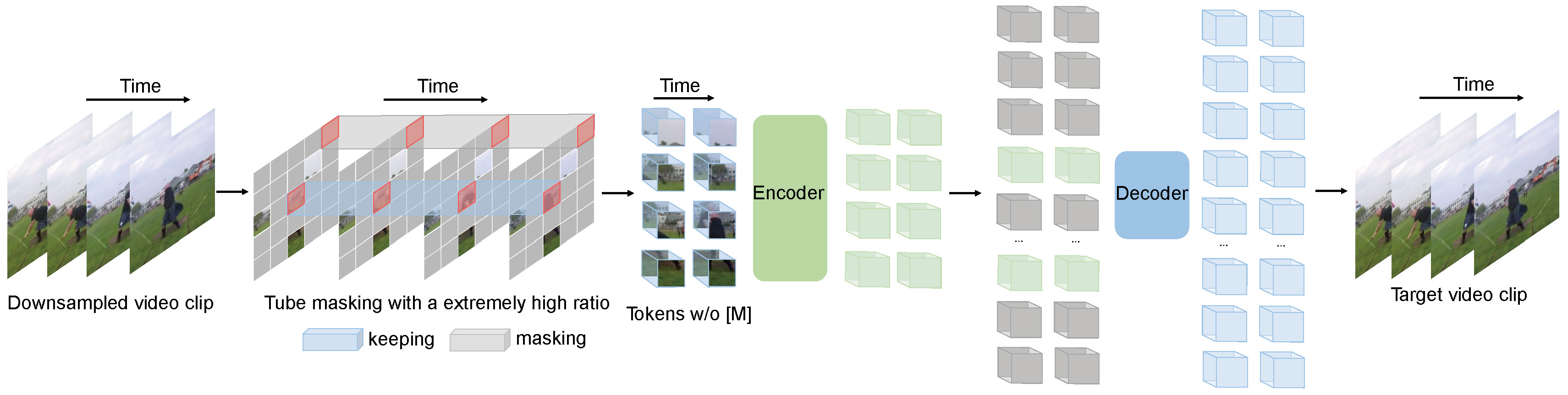 VideoMAE 预训练。摘自原始论文。
该模型由 [nielsr](https://huggingface.co/nielsr) 贡献。原始代码可在[此处](https://github.com/MCG-NJU/VideoMAE)找到。
## 使用缩放点积注意力(SDPA)
PyTorch 在 `torch.nn.functional` 中包含了原生的缩放点积注意力(SDPA)算子。该函数涵盖了多种实现方式,可根据输入和所用硬件进行应用。有关更多信息,请参阅[官方文档](https://pytorch.org/docs/stable/generated/torch.nn.functional.scaled_dot_product_attention.html)或[GPU 推理](https://huggingface.co/docs/transformers/main/en/perf_infer_gpu_one#pytorch-scaled-dot-product-attention)页面。
当存在可用实现时,`torch>=2.1.1` 默认使用 SDPA,但您也可以在 `from_pretrained()` 中设置 `attn_implementation="sdpa"` 以显式请求使用 SDPA。
```python
from transformers import VideoMAEForVideoClassification
model = VideoMAEForVideoClassification.from_pretrained("MCG-NJU/videomae-base-finetuned-kinetics", attn_implementation="sdpa", device_map="auto")
...
```
为了获得最佳加速效果,我们建议以半精度(例如 `torch.float16` 或 `torch.bfloat16`)加载模型。
在本地基准测试(A100-40GB、PyTorch 2.3.0、操作系统 Ubuntu 22.04)中,使用 `float32` 和 `MCG-NJU/videomae-base-finetuned-kinetics` 模型时,我们在推理过程中观察到以下加速效果。
| 批处理大小 | 平均推理时间(毫秒),eager 模式 | 平均推理时间(毫秒),sdpa 模型 | 加速,Sdpa / Eager (x) |
|--------------|-------------------------------------------|-------------------------------------------|------------------------------|
| 1 | 37 | 10 | 3.7 |
| 2 | 24 | 18 | 1.33 |
| 4 | 43 | 32 | 1.34 |
| 8 | 84 | 60 | 1.4 |
## 资源
以下是 Hugging Face 官方和社区(以 🌎 标识)提供的资源列表,可帮助您入门 VideoMAE。如果您希望提交资源以收录于此,欢迎随时发起 Pull Request,我们将进行审核!理想情况下,该资源应展示一些新内容,而非重复现有资源。
**视频分类**
- [一个笔记本](https://github.com/huggingface/notebooks/blob/main/examples/video_classification.ipynb),展示了如何
在自定义数据集上微调 VideoMAE 模型。
- [视频分类任务指南](../tasks/video_classification)
- [一个 🤗 Space](https://huggingface.co/spaces/sayakpaul/video-classification-ucf101-subset),演示如何使用视频分类模型执行推理。
## VideoMAEConfig[[transformers.VideoMAEConfig]]
#### transformers.VideoMAEConfig[[transformers.VideoMAEConfig]]
```python
transformers.VideoMAEConfig(transformers_version: str | None = None, architectures: list[str] | None = None, output_hidden_states: bool | None = False, return_dict: bool | None = True, dtype: str | torch.dtype | None = None, chunk_size_feed_forward: int = 0, is_encoder_decoder: bool = False, id2label: dict[int, str] | dict[str, str] | None = None, label2id: dict[str, int] | dict[str, str] | None = None, problem_type: Literal['regression', 'single_label_classification', 'multi_label_classification'] | None = None, image_size: int | list[int] | tuple[int, int] = 224, patch_size: int | list[int] | tuple[int, int] = 16, num_channels: int = 3, num_frames: int = 16, tubelet_size: int = 2, hidden_size: int = 768, num_hidden_layers: int = 12, num_attention_heads: int = 12, intermediate_size: int = 3072, hidden_act: str = 'gelu', hidden_dropout_prob: float | int = 0.0, attention_probs_dropout_prob: float | int = 0.0, initializer_range: float = 0.02, layer_norm_eps: float = 1e-12, qv_bias: bool = True, use_mean_pooling: bool = True, decoder_num_attention_heads: int = 6, decoder_hidden_size: int = 384, decoder_num_hidden_layers: int = 4, decoder_intermediate_size: int = 1536, norm_pix_loss: bool = True)
```
[来源](https://github.com/huggingface/transformers/blob/main/src/transformers/models/videomae/configuration_videomae.py#L24)
**参数:**
image_size (`Union[int, list[int], tuple[int, int]]`,*可选*,默认为 `224`):每张图片的尺寸(分辨率)。
patch_size (`Union[int, list[int], tuple[int, int]]`,*可选*,默认为 `16`):每个 patch 的大小(分辨率)。
num_channels (`int`,*可选*,默认为 `3`):输入通道数。
num_frames (`int`,*可选*,默认为 16):每个视频中的帧数。
tubelet_size (`int`,*可选*,默认为 2):tubelet 的数量。
hidden_size (`int`,*可选*,默认为 `768`):隐藏表示的维度。
num_hidden_layers (`int`,*可选*,默认为 `12`):Transformer 解码器中的隐藏层数。
num_attention_heads (`int`,*可选*,默认为 `12`):Transformer 解码器中每个注意力层的注意力头数量。
intermediate_size (`int`,*可选*,默认值为 `3072`):MLP 表示的维度。
hidden_act (`str`,*可选*,默认为 `gelu`):解码器中的非线性激活函数(函数或字符串)。例如,`"gelu"`、`"relu"`、`"silu"` 等。
hidden_dropout_prob (`Union[float, int]`,*可选*,默认值为 `0.0`):嵌入层、编码器和池化器中所有全连接层的 dropout 概率。
attention_probs_dropout_prob (`Union[float, int]`,*可选*,默认值为 `0.0`):注意力概率的 dropout 比率。
initializer_range (`float`,*可选*,默认值为 `0.02`):用于初始化所有权重矩阵的 truncated_normal_initializer 的标准差。
layer_norm_eps (`float`, *可选*,默认为 `1e-12`):层归一化层所使用的 epsilon。
qv_bias (`bool`,*可选*,默认为 `True`):是否要在自注意力层的查询和值中添加偏置。
use_mean_pooling (`bool`,*可选*,默认为 `True`):是否对最终隐藏状态进行平均池化,而不是使用 [CLS] 令牌的最终隐藏状态。
decoder_num_attention_heads (`int`,*可选*,默认为 6):解码器中每个注意力层的注意力头数量。
decoder_hidden_size (`int`,*可选*,默认为 384):解码器的维度。
decoder_num_hidden_layers (`int`,*可选*,默认为 4):解码器中的隐藏层数。
decoder_intermediate_size (`int`,*可选*,默认为 1536):解码器中“中间”(即前馈)层的维度。
norm_pix_loss (`bool`,*可选*,默认为 `True`):是否对目标补丁像素进行归一化。
这是用于存储 VideoMAEModel 配置的类。它根据指定的参数实例化 Videomae 模型,并定义模型架构。使用默认值实例化配置将生成与 [MCG-NJU/videomae-base](https://huggingface.co/MCG-NJU/videomae-base) 类似的配置。
配置对象继承自 [PreTrainedConfig](/docs/transformers/main/zh/main_classes/configuration#transformers.PreTrainedConfig),可用于控制模型输出。有关更多信息,请参阅 [PreTrainedConfig](/docs/transformers/main/zh/main_classes/configuration#transformers.PreTrainedConfig) 的文档。
示例:
```python
>>> from transformers import VideoMAEConfig, VideoMAEModel
>>> # Initializing a VideoMAE videomae-base style configuration
>>> configuration = VideoMAEConfig()
>>> # Randomly initializing a model from the configuration
>>> model = VideoMAEModel(configuration)
>>> # Accessing the model configuration
>>> configuration = model.config
```
## VideoMAEImageProcessor[[transformers.VideoMAEImageProcessor]]
#### transformers.VideoMAEImageProcessor[[transformers.VideoMAEImageProcessor]]
```python
transformers.VideoMAEImageProcessor(**kwargs: *)
```
[来源](https://github.com/huggingface/transformers/blob/main/src/transformers/models/videomae/image_processing_videomae.py#L35)
**参数:**
do_convert_rgb (`bool`, *kwargs*, *可选*) : 是否将图像转换为 RGB。
do_resize (`bool`, *kwargs*, *可选*, 默认为 `True`) : 是否调整图像大小。
size (`Annotated[int | list[int] | tuple[int, ...] | dict[str, int] | None, None]`, *kwargs*,默认为 `{'shortest_edge' : 224}`):描述输入到模型的最大尺寸。
default_to_square (`bool`, *kwargs*, *可选*,默认为 `False`) : 当 size 为整数时,是否在调整大小时默认使用正方形图像。
crop_size (`Annotated[int | list[int] | tuple[int, ...] | dict[str, int] | None, None]`, *kwargs*,默认为 `{'height' : 224, 'width': 224}`):应用 `center_crop` 后输出图像的尺寸。
resample (`Annotated[Union[int, PILImageResampling, NoneType], None]`, *kwargs*,默认为 `2`) : 如果调整图像大小,则使用的重采样滤波器。它可以是枚举 `PILImageResampling` 中的一个值。仅当 `do_resize` 设置为 `True` 时才会生效。
do_rescale (`bool`, *kwargs*, *可选*,默认为 `True`):是否对图像进行重新缩放。
rescale_factor (`float`, *kwargs*, *可选*,默认为 `0.00392156862745098`) : 当 `do_rescale` 设置为 `True` 时,用于对图像进行缩放的缩放因子。
do_normalize (`bool`,*kwargs*,*可选*,默认为 `True`):是否对图像进行归一化。
image_mean (`Union[float, list[float], tuple[float, ...]]`,*kwargs*,*可选*,默认为 `[0.5, 0.5, 0.5]`):用于归一化的图像均值。仅当 `do_normalize` 设置为 `True` 时生效。
image_std (`Union[float, list[float], tuple[float, ...]]`, *kwargs*, *可选*,默认为 `[0.5, 0.5, 0.5]`) : 用于归一化的图像标准差。仅当 `do_normalize` 设置为 `True` 时生效。
do_pad (`bool`, *kwargs*, *可选*) : 是否对图像进行填充。填充操作会将图像填充至批次中的最大尺寸,或填充至每张图像的固定正方形尺寸。具体的填充策略取决于模型。
pad_size (`Annotated[int | list[int] | tuple[int, ...] | dict[str, int] | None, None]`, *kwargs*) : 用于将图像填充到的尺寸,格式为 `{"height": int, "width" int}`。该尺寸必须大于预处理中提供的任何图像尺寸。如果未提供 `pad_size`,图像将被填充到批次中最大的高度和宽度。仅在 `do_pad=True.` 时应用。
do_center_crop (`bool`, *kwargs*, *可选*,默认为 `True`) : 是否对图像进行居中裁剪。
data_format (`Union[str, ~image_utils.ChannelDimension]`,*kwargs*,*可选*):仅支持 `ChannelDimension.FIRST`。为兼容旧版处理器而添加。
input_data_format (`Union[str, ~image_utils.ChannelDimension]`, *kwargs*, *可选*) : 输入图像的通道维度格式。如果未设置,则从输入图像中推断通道维度格式。可以是以下之一: - `"channels_first"` 或 `ChannelDimension.FIRST`:图像为 (num_channels, height, width) 格式。 - `"channels_last"` 或 `ChannelDimension.LAST`:图像为 (height, width, num_channels) 格式。 - `"none"` 或 `ChannelDimension.NONE`:图像为 (height, width) 格式。
device (`Annotated[Union[str, torch.device, NoneType], None]`, *kwargs*):用于处理视频的设备。如果未设置,则从输入视频中推断设备。
return_tensors (`Annotated[str | ~utils.generic.TensorType | None, None]`, *kwargs*) : 如果设置为 `'pt'`,则返回堆叠的张量,否则返回张量列表。
disable_grouping (`bool`, *kwargs*, *可选*) : 是否禁用按尺寸对图像进行分组,从而逐个处理图像而非批量处理。如果为 None,则当图像位于 CPU 上时设置为 True,否则设置为 False。此选择基于经验观察,详见此处:https://github.com/huggingface/transformers/pull/38157
image_seq_length (`int`, *kwargs*, *可选*) : 输入中每张图片所使用的图像 token 数量。为向后兼容而添加,但在未来的模型中,应将其设置为处理器的属性。
构建一个 VideoMAEImageProcessor 图像处理器。
#### preprocess[[transformers.VideoMAEImageProcessor.preprocess]]
```python
preprocess(videos: typing.Union[ForwardRef('PIL.Image.Image'), numpy.ndarray, ForwardRef('torch.Tensor'), list['PIL.Image.Image'], list[numpy.ndarray], list['torch.Tensor']], **kwargs: *)
```
[来源](https://github.com/huggingface/transformers/blob/main/src/transformers/models/videomae/image_processing_videomae.py#L53)
**参数:**
videos (`Union[PIL.Image.Image, numpy.ndarray, torch.Tensor, list[PIL.Image.Image], list[numpy.ndarray], list[torch.Tensor]]`) : 要预处理的视频或视频批次。期望输入为单个视频(帧列表)或视频批次(帧列表的列表)。每一帧可以是 PIL 图像、numpy 数组或 torch 张量,其像素值范围为 0 到 255。如果传入的帧像素值在 0 到 1 之间,请设置 `do_rescale=False`。
do_convert_rgb (`bool`, *kwargs*, *可选*) : 是否将图像转换为 RGB。
do_resize (`bool`,*kwargs*,*可选*):是否调整图像大小。
size (`Annotated[int | list[int] | tuple[int, ...] | dict[str, int] | None, None]`, *kwargs*):描述模型的最大输入维度。
default_to_square (`bool`, *kwargs*, *可选*) : 当 size 为 int 时,是否在调整大小时默认使用正方形图像。
crop_size (`Annotated[int | list[int] | tuple[int, ...] | dict[str, int] | None, None]`, *kwargs*) : 应用 `center_crop` 后输出图像的尺寸。
resample (`Annotated[Union[int, PILImageResampling, NoneType], None]`, *kwargs*) : 如果调整图像大小,则使用的重采样滤波器。它可以是枚举 `PILImageResampling` 中的一个值。仅当 `do_resize` 设置为 `True` 时才会生效。
do_rescale (`bool`, *kwargs*, *可选*) : 是否对图像进行重新缩放。
rescale_factor (`float`, *kwargs*, *可选*) : 当 `do_rescale` 设置为 `True` 时,用于对图像进行缩放的缩放因子。
do_normalize (`bool`, *kwargs*, *可选*) : 是否对图像进行归一化。
image_mean (`Union[float, list[float], tuple[float, ...]]`,*kwargs*,*可选*):用于归一化的图像均值。仅当 `do_normalize` 设置为 `True` 时生效。
image_std (`Union[float, list[float], tuple[float, ...]]`, *kwargs*, *可选*) : 用于归一化的图像标准差。仅当 `do_normalize` 设置为 `True` 时生效。
do_pad (`bool`, *kwargs*, *可选*) : 是否对图像进行填充。填充操作会将图像填充至批次中的最大尺寸,或填充至每张图像的固定正方形尺寸。具体的填充策略取决于模型。
pad_size (`Annotated[int | list[int] | tuple[int, ...] | dict[str, int] | None, None]`, *kwargs*) : 用于将图像填充到的尺寸,格式为 `{"height": int, "width" int}`。该尺寸必须大于预处理中提供的任何图像尺寸。如果未提供 `pad_size`,图像将被填充到批次中最大的高度和宽度。仅在 `do_pad=True.` 时应用。
do_center_crop (`bool`, *kwargs*, *可选*) : 是否对图像进行居中裁剪。
data_format (`Union[str, ~image_utils.ChannelDimension]`,*kwargs*,*可选*):仅支持 `ChannelDimension.FIRST`。为兼容旧版处理器而添加。
input_data_format (`Union[str, ~image_utils.ChannelDimension]`, *kwargs*, *可选*) : 输入图像的通道维度格式。如果未设置,则从输入图像中推断通道维度格式。可以是以下之一: - `"channels_first"` 或 `ChannelDimension.FIRST`:图像为 (num_channels, height, width) 格式。 - `"channels_last"` 或 `ChannelDimension.LAST`:图像为 (height, width, num_channels) 格式。 - `"none"` 或 `ChannelDimension.NONE`:图像为 (height, width) 格式。
device (`Annotated[Union[str, torch.device, NoneType], None]`, *kwargs*):用于处理视频的设备。如果未设置,则从输入视频中推断设备。
return_tensors (`Annotated[str | ~utils.generic.TensorType | None, None]`, *kwargs*) : 如果设置为 `'pt'`,则返回堆叠的张量,否则返回张量列表。
disable_grouping (`bool`, *kwargs*, *可选*) : 是否禁用按尺寸对图像进行分组,从而逐个处理图像而非批量处理。如果为 None,则当图像位于 CPU 上时设置为 True,否则设置为 False。此选择基于经验观察,详见此处:https://github.com/huggingface/transformers/pull/38157
image_seq_length (`int`, *kwargs*, *可选*) : 输入中每张图片所使用的图像 token 数量。为向后兼容而添加,但在未来的模型中,应将其设置为处理器的属性。
**返回:** `~image_processing_base.BatchFeature`
- **data** (`dict`) -- 由 __call__ 方法返回的列表/数组/张量字典(例如 'pixel_values')。
- **tensor_type** (`Union[None, str, TensorType]`,*可选*) -- 您可以在此处指定 tensor_type,以便在初始化时将 PyTorch/Numpy 张量中的整数列表进行转换。
## VideoMAEImageProcessorPil[[transformers.VideoMAEImageProcessorPil]]
#### transformers.VideoMAEImageProcessorPil[[transformers.VideoMAEImageProcessorPil]]
```python
transformers.VideoMAEImageProcessorPil(**kwargs: *)
```
[来源](https://github.com/huggingface/transformers/blob/main/src/transformers/models/videomae/image_processing_pil_videomae.py#L33)
**参数:**
do_convert_rgb (`bool`, *kwargs*, *可选*) : 是否将图像转换为 RGB。
do_resize (`bool`, *kwargs*, *可选*, 默认为 `True`) : 是否调整图像大小。
size (`Annotated[int | list[int] | tuple[int, ...] | dict[str, int] | None, None]`, *kwargs*,默认为 `{'shortest_edge' : 224}`):描述输入到模型的最大尺寸。
default_to_square (`bool`, *kwargs*, *可选*,默认为 `False`) : 当 size 为整数时,是否在调整大小时默认使用正方形图像。
crop_size (`Annotated[int | list[int] | tuple[int, ...] | dict[str, int] | None, None]`, *kwargs*,默认为 `{'height' : 224, 'width': 224}`):应用 `center_crop` 后输出图像的尺寸。
resample (`Annotated[Union[int, PILImageResampling, NoneType], None]`, *kwargs*,默认为 `2`) : 如果调整图像大小,则使用的重采样滤波器。它可以是枚举 `PILImageResampling` 中的一个值。仅当 `do_resize` 设置为 `True` 时才会生效。
do_rescale (`bool`, *kwargs*, *可选*,默认为 `True`):是否对图像进行重新缩放。
rescale_factor (`float`, *kwargs*, *可选*,默认为 `0.00392156862745098`) : 当 `do_rescale` 设置为 `True` 时,用于对图像进行缩放的缩放因子。
do_normalize (`bool`,*kwargs*,*可选*,默认为 `True`):是否对图像进行归一化。
image_mean (`Union[float, list[float], tuple[float, ...]]`,*kwargs*,*可选*,默认为 `[0.5, 0.5, 0.5]`):用于归一化的图像均值。仅当 `do_normalize` 设置为 `True` 时生效。
image_std (`Union[float, list[float], tuple[float, ...]]`, *kwargs*, *可选*,默认为 `[0.5, 0.5, 0.5]`) : 用于归一化的图像标准差。仅当 `do_normalize` 设置为 `True` 时生效。
do_pad (`bool`, *kwargs*, *可选*) : 是否对图像进行填充。填充操作会将图像填充至批次中的最大尺寸,或填充至每张图像的固定正方形尺寸。具体的填充策略取决于模型。
pad_size (`Annotated[int | list[int] | tuple[int, ...] | dict[str, int] | None, None]`, *kwargs*) : 用于将图像填充到的尺寸,格式为 `{"height": int, "width" int}`。该尺寸必须大于预处理中提供的任何图像尺寸。如果未提供 `pad_size`,图像将被填充到批次中最大的高度和宽度。仅在 `do_pad=True.` 时应用。
do_center_crop (`bool`, *kwargs*, *可选*,默认为 `True`) : 是否对图像进行居中裁剪。
data_format (`Union[str, ~image_utils.ChannelDimension]`,*kwargs*,*可选*):仅支持 `ChannelDimension.FIRST`。为兼容旧版处理器而添加。
input_data_format (`Union[str, ~image_utils.ChannelDimension]`, *kwargs*, *可选*) : 输入图像的通道维度格式。如果未设置,则从输入图像中推断通道维度格式。可以是以下之一: - `"channels_first"` 或 `ChannelDimension.FIRST`:图像为 (num_channels, height, width) 格式。 - `"channels_last"` 或 `ChannelDimension.LAST`:图像为 (height, width, num_channels) 格式。 - `"none"` 或 `ChannelDimension.NONE`:图像为 (height, width) 格式。
device (`Annotated[Union[str, torch.device, NoneType], None]`, *kwargs*):用于处理视频的设备。如果未设置,则从输入视频中推断设备。
return_tensors (`Annotated[str | ~utils.generic.TensorType | None, None]`, *kwargs*) : 如果设置为 `'pt'`,则返回堆叠的张量,否则返回张量列表。
disable_grouping (`bool`, *kwargs*, *可选*) : 是否禁用按尺寸对图像进行分组,从而逐个处理图像而非批量处理。如果为 None,则当图像位于 CPU 上时设置为 True,否则设置为 False。此选择基于经验观察,详见此处:https://github.com/huggingface/transformers/pull/38157
image_seq_length (`int`, *kwargs*, *可选*) : 输入中每张图片所使用的图像 token 数量。为向后兼容而添加,但在未来的模型中,应将其设置为处理器的属性。
构建一个 VideoMAEImageProcessor 图像处理器。
#### preprocess[[transformers.VideoMAEImageProcessorPil.preprocess]]
```python
preprocess(videos: typing.Union[ForwardRef('PIL.Image.Image'), numpy.ndarray, ForwardRef('torch.Tensor'), list['PIL.Image.Image'], list[numpy.ndarray], list['torch.Tensor']], **kwargs: *)
```
[来源](https://github.com/huggingface/transformers/blob/main/src/transformers/models/videomae/image_processing_pil_videomae.py#L51)
**参数:**
videos (`Union[PIL.Image.Image, numpy.ndarray, torch.Tensor, list[PIL.Image.Image], list[numpy.ndarray], list[torch.Tensor]]`) : 要预处理的视频或视频批次。期望输入为单个视频(帧列表)或视频批次(帧列表的列表)。每一帧可以是 PIL 图像、numpy 数组或 torch 张量,其像素值范围为 0 到 255。如果传入的帧像素值在 0 到 1 之间,请设置 `do_rescale=False`。
do_convert_rgb (`bool`, *kwargs*, *可选*) : 是否将图像转换为 RGB。
do_resize (`bool`,*kwargs*,*可选*):是否调整图像大小。
size (`Annotated[int | list[int] | tuple[int, ...] | dict[str, int] | None, None]`, *kwargs*):描述模型的最大输入维度。
default_to_square (`bool`, *kwargs*, *可选*) : 当 size 为 int 时,是否在调整大小时默认使用正方形图像。
crop_size (`Annotated[int | list[int] | tuple[int, ...] | dict[str, int] | None, None]`, *kwargs*) : 应用 `center_crop` 后输出图像的尺寸。
resample (`Annotated[Union[int, PILImageResampling, NoneType], None]`, *kwargs*) : 如果调整图像大小,则使用的重采样滤波器。它可以是枚举 `PILImageResampling` 中的一个值。仅当 `do_resize` 设置为 `True` 时才会生效。
do_rescale (`bool`, *kwargs*, *可选*) : 是否对图像进行重新缩放。
rescale_factor (`float`, *kwargs*, *可选*) : 当 `do_rescale` 设置为 `True` 时,用于对图像进行缩放的缩放因子。
do_normalize (`bool`, *kwargs*, *可选*) : 是否对图像进行归一化。
image_mean (`Union[float, list[float], tuple[float, ...]]`,*kwargs*,*可选*):用于归一化的图像均值。仅当 `do_normalize` 设置为 `True` 时生效。
image_std (`Union[float, list[float], tuple[float, ...]]`, *kwargs*, *可选*) : 用于归一化的图像标准差。仅当 `do_normalize` 设置为 `True` 时生效。
do_pad (`bool`, *kwargs*, *可选*) : 是否对图像进行填充。填充操作会将图像填充至批次中的最大尺寸,或填充至每张图像的固定正方形尺寸。具体的填充策略取决于模型。
pad_size (`Annotated[int | list[int] | tuple[int, ...] | dict[str, int] | None, None]`, *kwargs*) : 用于将图像填充到的尺寸,格式为 `{"height": int, "width" int}`。该尺寸必须大于预处理中提供的任何图像尺寸。如果未提供 `pad_size`,图像将被填充到批次中最大的高度和宽度。仅在 `do_pad=True.` 时应用。
do_center_crop (`bool`, *kwargs*, *可选*) : 是否对图像进行居中裁剪。
data_format (`Union[str, ~image_utils.ChannelDimension]`,*kwargs*,*可选*):仅支持 `ChannelDimension.FIRST`。为兼容旧版处理器而添加。
input_data_format (`Union[str, ~image_utils.ChannelDimension]`, *kwargs*, *可选*) : 输入图像的通道维度格式。如果未设置,则从输入图像中推断通道维度格式。可以是以下之一: - `"channels_first"` 或 `ChannelDimension.FIRST`:图像为 (num_channels, height, width) 格式。 - `"channels_last"` 或 `ChannelDimension.LAST`:图像为 (height, width, num_channels) 格式。 - `"none"` 或 `ChannelDimension.NONE`:图像为 (height, width) 格式。
device (`Annotated[Union[str, torch.device, NoneType], None]`, *kwargs*):用于处理视频的设备。如果未设置,则从输入视频中推断设备。
return_tensors (`Annotated[str | ~utils.generic.TensorType | None, None]`, *kwargs*) : 如果设置为 `'pt'`,则返回堆叠的张量,否则返回张量列表。
disable_grouping (`bool`, *kwargs*, *可选*) : 是否禁用按尺寸对图像进行分组,从而逐个处理图像而非批量处理。如果为 None,则当图像位于 CPU 上时设置为 True,否则设置为 False。此选择基于经验观察,详见此处:https://github.com/huggingface/transformers/pull/38157
image_seq_length (`int`, *kwargs*, *可选*) : 输入中每张图片所使用的图像 token 数量。为向后兼容而添加,但在未来的模型中,应将其设置为处理器的属性。
**返回:** `~image_processing_base.BatchFeature`
- **data** (`dict`) -- 由 __call__ 方法返回的列表/数组/张量字典(例如 'pixel_values')。
- **tensor_type** (`Union[None, str, TensorType]`,*可选*) -- 您可以在此处指定 tensor_type,以便在初始化时将 PyTorch/Numpy 张量中的整数列表进行转换。
## VideoMAEVideoProcessor[[transformers.VideoMAEVideoProcessor]]
#### transformers.VideoMAEVideoProcessor[[transformers.VideoMAEVideoProcessor]]
```python
transformers.VideoMAEVideoProcessor(**kwargs: *)
```
[来源](https://github.com/huggingface/transformers/blob/main/src/transformers/models/videomae/video_processing_videomae.py#L25)
**参数:**
do_convert_rgb (`bool`,*kwargs*,*可选*,默认为 `True`):是否将图像转换为 RGB。
do_resize (`bool`, *kwargs*, *可选*, 默认为 `True`) : 是否调整图像大小。
size (`Annotated[int | list[int] | tuple[int, ...] | dict[str, int] | None, None]`, *kwargs*,默认为 `{'shortest_edge' : 224}`):描述输入到模型的最大尺寸。
default_to_square (`bool`, *kwargs*, *可选*,默认为 `False`) : 当 size 为整数时,是否在调整大小时默认使用正方形图像。
resample (`Annotated[Union[int, PILImageResampling, NoneType], None]`, *kwargs*,默认为 `2`) : 如果调整图像大小,则使用的重采样滤波器。它可以是枚举 `PILImageResampling` 中的一个值。仅当 `do_resize` 设置为 `True` 时才会生效。
do_rescale (`bool`, *kwargs*, *可选*,默认为 `True`):是否对图像进行重新缩放。
rescale_factor (`float`, *kwargs*, *可选*,默认为 `0.00392156862745098`) : 当 `do_rescale` 设置为 `True` 时,用于对图像进行缩放的缩放因子。
do_normalize (`bool`,*kwargs*,*可选*,默认为 `True`):是否对图像进行归一化。
image_mean (`Union[float, list[float], tuple[float, ...]]`,*kwargs*,*可选*,默认为 `[0.5, 0.5, 0.5]`):用于归一化的图像均值。仅当 `do_normalize` 设置为 `True` 时生效。
image_std (`Union[float, list[float], tuple[float, ...]]`, *kwargs*, *可选*,默认为 `[0.5, 0.5, 0.5]`) : 用于归一化的图像标准差。仅当 `do_normalize` 设置为 `True` 时生效。
do_center_crop (`bool`, *kwargs*, *可选*,默认为 `True`) : 是否对图像进行居中裁剪。
do_pad (`bool`, *kwargs*, *可选*) : 是否对图像进行填充。填充操作会将图像填充至批次中的最大尺寸,或填充至每张图像的固定正方形尺寸。具体的填充策略取决于模型。
crop_size (`Annotated[int | list[int] | tuple[int, ...] | dict[str, int] | None, None]`, *kwargs*,默认为 `{'height' : 224, 'width': 224}`):应用 `center_crop` 后输出图像的尺寸。
data_format (`Union[str, ~image_utils.ChannelDimension]`,*kwargs*,*可选*):仅支持 `ChannelDimension.FIRST`。为兼容旧版处理器而添加。
input_data_format (`Union[str, ~image_utils.ChannelDimension]`, *kwargs*, *可选*) : 输入图像的通道维度格式。如果未设置,则从输入图像中推断通道维度格式。可以是以下之一: - `"channels_first"` 或 `ChannelDimension.FIRST`:图像为 (num_channels, height, width) 格式。 - `"channels_last"` 或 `ChannelDimension.LAST`:图像为 (height, width, num_channels) 格式。 - `"none"` 或 `ChannelDimension.NONE`:图像为 (height, width) 格式。
device (`Annotated[Union[str, torch.device, NoneType], None]`, *kwargs*):用于处理视频的设备。如果未设置,则从输入视频中推断设备。
do_sample_frames (`bool`, *kwargs*, *可选*,默认为 `False`):是否在处理前从视频中采样帧,还是处理整个视频。
video_metadata (`Annotated[~video_utils.VideoMetadata | dict | list[dict | ~video_utils.VideoMetadata] | list[list[dict | ~video_utils.VideoMetadata]] | None, None]`, *kwargs*) : 视频的元数据,包含总时长、帧率(fps)和总帧数等信息。该元数据将用于从视频中采样帧或计算时间戳。除非您打算在预处理之前手动解码视频,否则请勿传入任何元数据。
fps (`Annotated[int | float | None, None]`, *kwargs*) : 当 `do_sample_frames=True` 时,每秒采样的目标帧数。
num_frames (`Annotated[int | None, None]`, *kwargs*) : 当 `do_sample_frames=True` 时,要采样的最大帧数。
return_metadata (`bool`, *kwargs*, *可选*,默认为 `False`) : 是否返回视频元数据。视频元数据是一个包含视频时长、帧率、解码后端等信息的对象。
return_tensors (`Annotated[str | ~utils.generic.TensorType | None, None]`, *kwargs*) : 如果设置,将返回特定框架的张量。可接受的值为: - `'pt'`:返回 PyTorch `torch.Tensor` 对象。 - `'np'`:返回 NumPy `np.ndarray` 对象。
- ****kwargs** ([VideosKwargs](/docs/transformers/main/zh/main_classes/processors#transformers.VideosKwargs), *optional*) : 每种模态(文本、图像、视频、音频)的额外处理选项。模型特定参数已在上方列出;有关支持参数的完整列表,请参阅 TypedDict 类。
构建一个 VideoMAEVideoProcessor 视频处理器。
#### preprocess[[transformers.VideoMAEVideoProcessor.preprocess]]
```python
preprocess(videos: typing.Union[list['PIL.Image.Image'], numpy.ndarray, ForwardRef('torch.Tensor'), list[numpy.ndarray], list['torch.Tensor'], list[list['PIL.Image.Image']], list[list[numpy.ndarray]], list[list['torch.Tensor']], transformers.video_utils.URL, list[transformers.video_utils.URL], list[list[transformers.video_utils.URL]], transformers.video_utils.Path, list[transformers.video_utils.Path], list[list[transformers.video_utils.Path]]], **kwargs: *)
```
[来源](https://github.com/huggingface/transformers/blob/main/src/transformers/models/videomae/video_processing_videomae.py#L41)
**参数:**
videos (`Union[list[PIL.Image.Image], numpy.ndarray, torch.Tensor, list[numpy.ndarray], list[torch.Tensor], list[list[PIL.Image.Image]], list[list[numpy.ndarray]], list[list[torch.Tensor]], ~video_utils.URL, list[~video_utils.URL], list[list[~video_utils.URL]], ~video_utils.Path, list[~video_utils.Path], list[list[~video_utils.Path]]]`) : 待预处理的视频。期望输入单个视频或一批视频,其像素值范围为 0 到 255。如果传入的像素值在 0 到 1 之间,请设置 `do_rescale=False`。
do_convert_rgb (`bool`, *kwargs*, *可选*) : 是否将图像转换为 RGB。
do_resize (`bool`,*kwargs*,*可选*):是否调整图像大小。
size (`Annotated[int | list[int] | tuple[int, ...] | dict[str, int] | None, None]`, *kwargs*):描述模型的最大输入维度。
default_to_square (`bool`, *kwargs*, *可选*) : 当 size 为 int 时,是否在调整大小时默认使用正方形图像。
resample (`Annotated[Union[int, PILImageResampling, NoneType], None]`, *kwargs*) : 如果调整图像大小,则使用的重采样滤波器。它可以是枚举 `PILImageResampling` 中的一个值。仅当 `do_resize` 设置为 `True` 时才会生效。
do_rescale (`bool`, *kwargs*, *可选*) : 是否对图像进行重新缩放。
rescale_factor (`float`, *kwargs*, *可选*) : 当 `do_rescale` 设置为 `True` 时,用于对图像进行缩放的缩放因子。
do_normalize (`bool`, *kwargs*, *可选*) : 是否对图像进行归一化。
image_mean (`Union[float, list[float], tuple[float, ...]]`,*kwargs*,*可选*):用于归一化的图像均值。仅当 `do_normalize` 设置为 `True` 时生效。
image_std (`Union[float, list[float], tuple[float, ...]]`, *kwargs*, *可选*) : 用于归一化的图像标准差。仅当 `do_normalize` 设置为 `True` 时生效。
do_center_crop (`bool`, *kwargs*, *可选*) : 是否对图像进行居中裁剪。
do_pad (`bool`, *kwargs*, *可选*) : 是否对图像进行填充。填充操作会将图像填充至批次中的最大尺寸,或填充至每张图像的固定正方形尺寸。具体的填充策略取决于模型。
crop_size (`Annotated[int | list[int] | tuple[int, ...] | dict[str, int] | None, None]`, *kwargs*) : 应用 `center_crop` 后输出图像的尺寸。
data_format (`Union[str, ~image_utils.ChannelDimension]`,*kwargs*,*可选*):仅支持 `ChannelDimension.FIRST`。为兼容旧版处理器而添加。
input_data_format (`Union[str, ~image_utils.ChannelDimension]`, *kwargs*, *可选*) : 输入图像的通道维度格式。如果未设置,则从输入图像中推断通道维度格式。可以是以下之一: - `"channels_first"` 或 `ChannelDimension.FIRST`:图像为 (num_channels, height, width) 格式。 - `"channels_last"` 或 `ChannelDimension.LAST`:图像为 (height, width, num_channels) 格式。 - `"none"` 或 `ChannelDimension.NONE`:图像为 (height, width) 格式。
device (`Annotated[Union[str, torch.device, NoneType], None]`, *kwargs*):用于处理视频的设备。如果未设置,则从输入视频中推断设备。
do_sample_frames (`bool`, *kwargs*, *可选*) : 是否在处理前从视频中采样帧,还是处理整个视频。
video_metadata (`Annotated[~video_utils.VideoMetadata | dict | list[dict | ~video_utils.VideoMetadata] | list[list[dict | ~video_utils.VideoMetadata]] | None, None]`, *kwargs*) : 视频的元数据,包含总时长、帧率(fps)和总帧数等信息。该元数据将用于从视频中采样帧或计算时间戳。除非您打算在预处理之前手动解码视频,否则请勿传入任何元数据。
fps (`Annotated[int | float | None, None]`, *kwargs*) : 当 `do_sample_frames=True` 时,每秒采样的目标帧数。
num_frames (`Annotated[int | None, None]`, *kwargs*) : 当 `do_sample_frames=True` 时,要采样的最大帧数。
return_metadata (`bool`, *kwargs*, *可选*) : 是否返回视频元数据。视频元数据是一个包含视频时长、帧率、解码后端等信息的对象。
return_tensors (`Annotated[str | ~utils.generic.TensorType | None, None]`, *kwargs*) : 如果设置为 `'pt'`,则返回堆叠的张量,否则返回张量列表。
**返回:** `~image_processing_base.BatchFeature`
- **data** (`dict`) -- 由 __call__ 方法返回的列表/数组/张量字典(例如 'pixel_values')。
- **tensor_type** (`Union[None, str, TensorType]`,*可选*) -- 您可以在此处指定 tensor_type,以便在初始化时将 PyTorch/Numpy 张量中的整数列表进行转换。
## VideoMAEModel[[transformers.VideoMAEModel]]
#### transformers.VideoMAEModel[[transformers.VideoMAEModel]]
```python
transformers.VideoMAEModel(config: VideoMAEConfig)
```
[来源](https://github.com/huggingface/transformers/blob/main/src/transformers/models/videomae/modeling_videomae.py#L398)
**参数:**
config ([VideoMAEConfig](/docs/transformers/main/zh/model_doc/videomae#transformers.VideoMAEConfig)):模型配置类,包含模型的所有参数。通过配置文件进行初始化时,不会加载与模型关联的权重,仅加载配置。请查看 [from_pretrained()](/docs/transformers/main/zh/main_classes/model#transformers.PreTrainedModel.from_pretrained) 方法以加载模型权重。
原始的 Videomae 模型,输出原始隐藏状态,顶部未添加任何特定头。
该模型继承自 [PreTrainedModel](/docs/transformers/main/zh/main_classes/model#transformers.PreTrainedModel)。请查阅父类文档,了解该库为所有模型实现的通用方法(例如下载或保存、调整输入嵌入大小、剪枝头等)。
该模型也是 PyTorch [torch.nn.Module](https://pytorch.org/docs/stable/nn.html#torch.nn.Module) 的子类。请将其作为常规的 PyTorch Module 使用,有关通用用法和行为的所有事项,请参阅 PyTorch 文档。
#### forward[[transformers.VideoMAEModel.forward]]
```python
forward(pixel_values: Tensor, bool_masked_pos: typing.Optional[torch.BoolTensor] = None, **kwargs: *)
```
[来源](https://github.com/huggingface/transformers/blob/main/src/transformers/models/videomae/modeling_videomae.py#L417)
**参数:**
pixel_values (`torch.Tensor`,形状为 `(batch_size, num_channels, image_size, image_size)`):与输入图像对应的张量。可以使用 [VideoMAEImageProcessor](/docs/transformers/main/zh/model_doc/videomae#transformers.VideoMAEImageProcessor) 获取像素值。有关详细信息,请参阅 [VideoMAEImageProcessor.__call__()](/docs/transformers/main/zh/model_doc/molmo2#transformers.Molmo2ImageProcessor.__call__)(`processor_class` 使用 [VideoMAEImageProcessor](/docs/transformers/main/zh/model_doc/videomae#transformers.VideoMAEImageProcessor) 处理图像)。
bool_masked_pos (`torch.BoolTensor`,形状为 `(batch_size, sequence_length)`,*可选*):布尔掩码位置。指示哪些 patch 被掩码(1),哪些未被掩码(0)。批次中的每个视频必须具有相同数量的被掩码 patch。如果为 `None`,则考虑所有 patch。序列长度为 `(num_frames // tubelet_size) * (image_size // patch_size) ** 2`。
**返回:** [BaseModelOutput](/docs/transformers/main/zh/main_classes/output#transformers.modeling_outputs.BaseModelOutput) 或 `tuple(torch.Tensor)`
一个 [BaseModelOutput](/docs/transformers/main/zh/main_classes/output#transformers.modeling_outputs.BaseModelOutput) 或 `torch.Tensor` 元组(如果传入了 `return_dict=False` 或 `config.return_dict=False`),其包含的元素取决于配置([VideoMAEConfig](/docs/transformers/main/zh/model_doc/videomae#transformers.VideoMAEConfig))和输入。
[VideoMAEModel](/docs/transformers/main/zh/model_doc/videomae#transformers.VideoMAEModel) 的 forward 方法会重写 `__call__` 特殊方法。
尽管前向传播的实现需要在此函数中定义,但之后应调用 `Module` 实例,而不是直接调用此函数,因为前者会负责执行预处理和后处理步骤,而后者会静默地忽略这些步骤。
- **last_hidden_state**(形状为 `(batch_size, sequence_length, hidden_size)` 的 `torch.Tensor`)-- 模型最后一层输出的隐藏状态序列。
- **hidden_states** (`tuple(torch.Tensor)`,*可选*,在传入 `output_hidden_states=True` 或 `config.output_hidden_states=True` 时返回) -- 一个 `torch.Tensor` 元组(如果模型具有嵌入层,则包含嵌入层的输出,以及每一层的输出),形状为 `(batch_size, sequence_length, hidden_size)`。
模型在每一层输出处的隐藏状态,以及可选的初始嵌入输出。
- **attentions** (`tuple(torch.Tensor)`,*可选*,当传入 `output_attentions=True` 或 `config.output_attentions=True` 时返回) -- 一个 `torch.Tensor` 元组(每层一个),形状为 `(batch_size, num_heads, sequence_length, sequence_length)`。
经过注意力 softmax 后的注意力权重,用于在自注意力头中计算加权平均值。
示例:
```python
>>> import torch
>>> from transformers import VideoMAEVideoProcessor, VideoMAEModel
>>> from huggingface_hub import hf_hub_download
>>> # replace this with your own video file
>>> video_path = hf_hub_download(
... repo_id="nielsr/video-demo", filename="eating_spaghetti.mp4", repo_type="dataset"
... )
>>> video_processor = VideoMAEVideoProcessor.from_pretrained("MCG-NJU/videomae-base")
>>> model = VideoMAEModel.from_pretrained("MCG-NJU/videomae-base")
>>> # prepare video for the model
>>> inputs = video_processor(video_path, return_tensors="pt")
>>> # forward pass
>>> with torch.no_grad():
... outputs = model(**inputs)
>>> last_hidden_states = outputs.last_hidden_state
>>> list(last_hidden_states.shape)
[1, 1568, 768]
```
## VideoMAEForPreTraining[[transformers.VideoMAEForPreTraining]]
`VideoMAEForPreTraining` 在顶部包含解码器,用于自监督预训练。
#### transformers.VideoMAEForPreTraining[[transformers.VideoMAEForPreTraining]]
```python
transformers.VideoMAEForPreTraining(config: VideoMAEConfig)
```
[来源](https://github.com/huggingface/transformers/blob/main/src/transformers/models/videomae/modeling_videomae.py#L511)
**参数:**
config ([VideoMAEConfig](/docs/transformers/main/zh/model_doc/videomae#transformers.VideoMAEConfig)):模型配置类,包含模型的所有参数。通过配置文件进行初始化时,不会加载与模型关联的权重,仅加载配置。请查看 [from_pretrained()](/docs/transformers/main/zh/main_classes/model#transformers.PreTrainedModel.from_pretrained) 方法以加载模型权重。
带有解码器的 VideoMAE 模型 Transformer,用于自监督预训练。
该模型继承自 [PreTrainedModel](/docs/transformers/main/zh/main_classes/model#transformers.PreTrainedModel)。请查阅父类文档,了解该库为所有模型实现的通用方法(例如下载或保存、调整输入嵌入大小、剪枝头等)。
该模型也是 PyTorch [torch.nn.Module](https://pytorch.org/docs/stable/nn.html#torch.nn.Module) 的子类。请将其作为常规的 PyTorch Module 使用,有关通用用法和行为的所有事项,请参阅 PyTorch 文档。
#### forward[[transformers.VideoMAEForPreTraining.forward]]
```python
forward(pixel_values: Tensor, bool_masked_pos: BoolTensor, **kwargs: *)
```
[来源](https://github.com/huggingface/transformers/blob/main/src/transformers/models/videomae/modeling_videomae.py#L529)
**参数:**
pixel_values (`torch.Tensor`,形状为 `(batch_size, num_channels, image_size, image_size)`):与输入图像对应的张量。可以使用 [VideoMAEImageProcessor](/docs/transformers/main/zh/model_doc/videomae#transformers.VideoMAEImageProcessor) 获取像素值。有关详细信息,请参阅 [VideoMAEImageProcessor.__call__()](/docs/transformers/main/zh/model_doc/molmo2#transformers.Molmo2ImageProcessor.__call__)(`processor_class` 使用 [VideoMAEImageProcessor](/docs/transformers/main/zh/model_doc/videomae#transformers.VideoMAEImageProcessor) 处理图像)。
bool_masked_pos (`torch.BoolTensor`,形状为 `(batch_size, sequence_length)`):布尔掩码位置。指示哪些 patch 被掩码(1),哪些未被掩码(0)。批次中的每个视频必须具有相同数量的被掩码 patch。序列长度为 `(num_frames // tubelet_size) * (image_size // patch_size) ** 2`。
**返回:** `VideoMAEForPreTrainingOutput` 或 `tuple(torch.Tensor)`
`VideoMAEForPreTrainingOutput` 或 `torch.Tensor` 元组(如果传入 `return_dict=False` 或 `config.return_dict=False`),其包含的元素取决于配置([VideoMAEConfig](/docs/transformers/main/zh/model_doc/videomae#transformers.VideoMAEConfig))和输入。
[VideoMAEForPreTraining](/docs/transformers/main/zh/model_doc/videomae#transformers.VideoMAEForPreTraining) 的 forward 方法重写了 `__call__` 特殊方法。
尽管前向传播的实现需要在此函数中定义,但之后应调用 `Module` 实例,而不是直接调用此函数,因为前者会负责执行预处理和后处理步骤,而后者会静默地忽略这些步骤。
- **loss**(形状为 `(1,)` 的 `torch.Tensor`)-- 像素重建损失。
- **logits**(形状为 `(batch_size, patch_size ** 2 * num_channels)` 的 `torch.Tensor`)-- 像素重建 logits。
- **hidden_states** (`tuple[torch.Tensor]`,*可选*,在传入 `output_hidden_states=True` 或 `config.output_hidden_states=True` 时返回) -- 一个 `torch.Tensor` 元组(如果模型具有嵌入层,则包含嵌入层输出的一个张量,以及每个层输出的一个张量),形状为 `(batch_size, sequence_length, hidden_size)`。
模型在每一层输出处的隐藏状态,以及可选的初始嵌入输出。
- **attentions** (`tuple[torch.Tensor]`,*可选*,当传入 `output_attentions=True` 或 `config.output_attentions=True` 时返回) -- 一个 `torch.Tensor` 元组(每层一个),形状为 `(batch_size, num_heads, sequence_length, sequence_length)`。
经过注意力 softmax 后的注意力权重,用于在自注意力头中计算加权平均值。
示例:
```python
>>> from transformers import AutoImageProcessor, VideoMAEForPreTraining
>>> import numpy as np
>>> import torch
>>> num_frames = 16
>>> video = list(np.random.randint(0, 256, (num_frames, 3, 224, 224)))
>>> image_processor = AutoImageProcessor.from_pretrained("MCG-NJU/videomae-base")
>>> model = VideoMAEForPreTraining.from_pretrained("MCG-NJU/videomae-base")
>>> pixel_values = image_processor(video, return_tensors="pt").pixel_values
>>> num_patches_per_frame = (model.config.image_size // model.config.patch_size) ** 2
>>> seq_length = (num_frames // model.config.tubelet_size) * num_patches_per_frame
>>> bool_masked_pos = torch.randint(0, 2, (1, seq_length)).bool()
>>> outputs = model(pixel_values, bool_masked_pos=bool_masked_pos)
>>> loss = outputs.loss
```
## VideoMAEForVideoClassification[[transformers.VideoMAEForVideoClassification]]
#### transformers.VideoMAEForVideoClassification[[transformers.VideoMAEForVideoClassification]]
```python
transformers.VideoMAEForVideoClassification(config: VideoMAEConfig)
```
[来源](https://github.com/huggingface/transformers/blob/main/src/transformers/models/videomae/modeling_videomae.py#L684)
**参数:**
config ([VideoMAEConfig](/docs/transformers/main/zh/model_doc/videomae#transformers.VideoMAEConfig)):模型配置类,包含模型的所有参数。通过配置文件进行初始化时,不会加载与模型关联的权重,仅加载配置。请查看 [from_pretrained()](/docs/transformers/main/zh/main_classes/model#transformers.PreTrainedModel.from_pretrained) 方法以加载模型权重。
VideoMAE 模型,顶部带有视频分类头(在所有 token 的平均池化隐藏状态之上添加一个线性层),例如用于 ImageNet。
该模型继承自 [PreTrainedModel](/docs/transformers/main/zh/main_classes/model#transformers.PreTrainedModel)。请查阅父类文档,了解该库为所有模型实现的通用方法(例如下载或保存、调整输入嵌入大小、剪枝头等)。
该模型也是 PyTorch [torch.nn.Module](https://pytorch.org/docs/stable/nn.html#torch.nn.Module) 的子类。请将其作为常规的 PyTorch Module 使用,有关通用用法和行为的所有事项,请参阅 PyTorch 文档。
#### forward[[transformers.VideoMAEForVideoClassification.forward]]
```python
forward(pixel_values: typing.Optional[torch.Tensor] = None, labels: typing.Optional[torch.Tensor] = None, **kwargs: *)
```
[来源](https://github.com/huggingface/transformers/blob/main/src/transformers/models/videomae/modeling_videomae.py#L698)
**参数:**
pixel_values (`torch.Tensor`,形状为 `(batch_size, num_channels, image_size, image_size)`,*可选*) : 与输入图像对应的张量。可以使用 [VideoMAEImageProcessor](/docs/transformers/main/zh/model_doc/videomae#transformers.VideoMAEImageProcessor) 获取像素值。有关详细信息,请参阅 [VideoMAEImageProcessor.__call__()](/docs/transformers/main/zh/model_doc/molmo2#transformers.Molmo2ImageProcessor.__call__)(`processor_class` 使用 [VideoMAEImageProcessor](/docs/transformers/main/zh/model_doc/videomae#transformers.VideoMAEImageProcessor) 处理图像)。
labels (`torch.LongTensor`,形状为 `(batch_size,)`,*可选*) : 用于计算图像分类/回归损失的标签。索引应在 `[0, ..., config.num_labels - 1]` 范围内。如果 `config.num_labels == 1`,则计算回归损失(均方损失);如果 `config.num_labels > 1`,则计算分类损失(交叉熵)。
**返回:** [ImageClassifierOutput](/docs/transformers/main/zh/main_classes/output#transformers.modeling_outputs.ImageClassifierOutput) 或 `tuple(torch.Tensor)`
一个 [ImageClassifierOutput](/docs/transformers/main/zh/main_classes/output#transformers.modeling_outputs.ImageClassifierOutput) 或 `torch.Tensor` 元组(如果传入了 `return_dict=False` 或 `config.return_dict=False`),其包含的元素取决于配置([VideoMAEConfig](/docs/transformers/main/zh/model_doc/videomae#transformers.VideoMAEConfig))和输入。
[VideoMAEForVideoClassification](/docs/transformers/main/zh/model_doc/videomae#transformers.VideoMAEForVideoClassification) 的 forward 方法重写了 `__call__` 特殊方法。
尽管前向传播的实现需要在此函数中定义,但之后应调用 `Module` 实例,而不是直接调用此函数,因为前者会负责执行预处理和后处理步骤,而后者会静默地忽略这些步骤。
- **loss** (`torch.Tensor`,形状为 `(1,)`,*可选*,当提供 `labels` 时返回) -- 分类损失(如果 config.num_labels==1,则为回归损失)。
- **logits**(形状为 `(batch_size, config.num_labels)` 的 `torch.Tensor`)-- 分类(或当 config.num_labels==1 时为回归)得分(SoftMax 之前)。
- **hidden_states** (`tuple(torch.Tensor)`,*可选*,在传入 `output_hidden_states=True` 或 `config.output_hidden_states=True` 时返回) -- 一个 `torch.Tensor` 元组(如果模型具有嵌入层,则包含嵌入层输出的一个张量,以及每个阶段输出的一个张量),形状为 `(batch_size, sequence_length, hidden_size)`。模型在每个阶段输出处的隐藏状态(也称为特征图)。
- **attentions** (`tuple(torch.Tensor)`,*可选*,当传入 `output_attentions=True` 或 `config.output_attentions=True` 时返回) -- 一个 `torch.Tensor` 元组(每层一个),形状为 `(batch_size, num_heads, patch_size, sequence_length)`。
经过注意力 softmax 后的注意力权重,用于在自注意力头中计算加权平均值。
示例:
```python
>>> import torch
>>> from transformers import VideoMAEVideoProcessor, VideoMAEForVideoClassification
>>> from huggingface_hub import hf_hub_download
>>> # replace this with your own video file
>>> video_path = hf_hub_download(
... repo_id="nielsr/video-demo", filename="eating_spaghetti.mp4", repo_type="dataset"
... )
>>> video_processor = VideoMAEVideoProcessor.from_pretrained("MCG-NJU/videomae-base-finetuned-kinetics")
>>> model = VideoMAEForVideoClassification.from_pretrained("MCG-NJU/videomae-base-finetuned-kinetics")
>>> inputs = video_processor(video_path, return_tensors="pt")
>>> with torch.no_grad():
... outputs = model(**inputs)
... logits = outputs.logits
>>> # model predicts one of the 400 Kinetics-400 classes
>>> predicted_label = logits.argmax(-1).item()
>>> print(model.config.id2label[predicted_label])
eating spaghetti
```