# ZoeDepth
[ZoeDepth](https://huggingface.co/papers/2302.12288) 是一种深度估计模型,它从单张图像中同时结合了相对深度估计(物体之间的相对距离)和度量深度估计(以度量单位进行的精确深度测量)的泛化性能。该模型在 12 个数据集上使用相对深度进行预训练,并在 2 个数据集(NYU Depth v2 和 KITTI)上针对度量精度进行训练。模型采用了一个轻量级头部,其中包含针对每个领域的度量分箱模块;在推理阶段,它会通过一个潜在分类器为每张输入图像自动选择相应的头部。
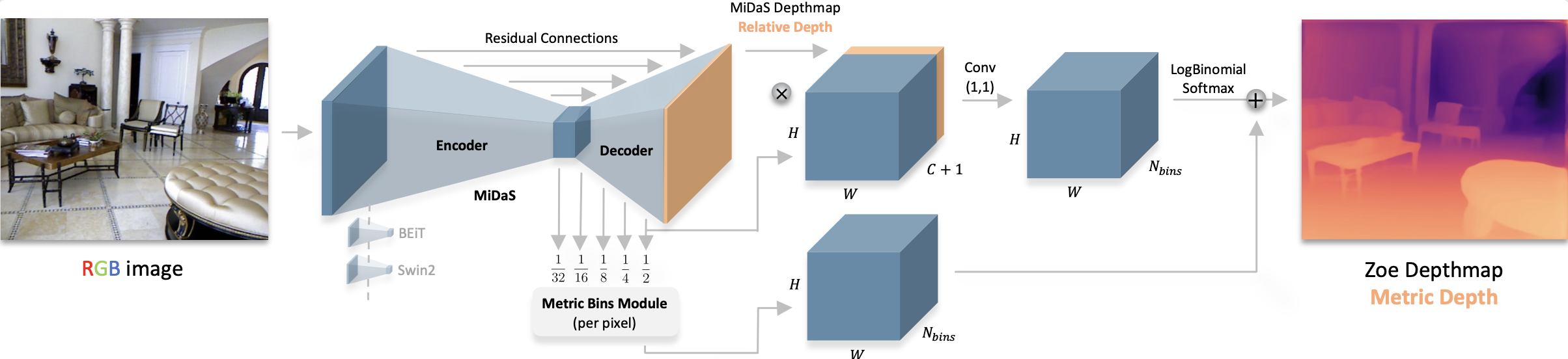 您可以在 [Intel](https://huggingface.co/Intel?search=zoedepth) 组织下找到所有原始的 ZoeDepth 检查点。
以下示例演示了如何使用 [Pipeline](/docs/transformers/main/zh/main_classes/pipelines#transformers.Pipeline) 或 [AutoModel](/docs/transformers/main/zh/model_doc/auto#transformers.AutoModel) 类来估计深度。
```python
import requests
from PIL import Image
from transformers import pipeline
url = "https://huggingface.co/datasets/huggingface/documentation-images/resolve/main/pipeline-cat-chonk.jpeg"
image = Image.open(requests.get(url, stream=True).raw)
pipeline = pipeline(
task="depth-estimation",
model="Intel/zoedepth-nyu-kitti",
device=0
)
results = pipeline(image)
results["depth"]
```
```python
import requests
import torch
from PIL import Image
from transformers import AutoImageProcessor, AutoModelForDepthEstimation
image_processor = AutoImageProcessor.from_pretrained(
"Intel/zoedepth-nyu-kitti"
)
model = AutoModelForDepthEstimation.from_pretrained(
"Intel/zoedepth-nyu-kitti",
device_map="auto"
)
url = "https://huggingface.co/datasets/huggingface/documentation-images/resolve/main/pipeline-cat-chonk.jpeg"
image = Image.open(requests.get(url, stream=True).raw)
inputs = image_processor(image, return_tensors="pt").to(model.device)
with torch.no_grad():
outputs = model(inputs)
# interpolate to original size and visualize the prediction
## ZoeDepth dynamically pads the input image, so pass the original image size as argument
## to `post_process_depth_estimation` to remove the padding and resize to original dimensions.
post_processed_output = image_processor.post_process_depth_estimation(
outputs,
source_sizes=[(image.height, image.width)],
)
predicted_depth = post_processed_output[0]["predicted_depth"]
depth = (predicted_depth - predicted_depth.min()) / (predicted_depth.max() - predicted_depth.min())
depth = depth.detach().cpu().numpy() * 255
Image.fromarray(depth.astype("uint8"))
```
## 备注
- 在[原始实现](https://github.com/isl-org/ZoeDepth/blob/edb6daf45458569e24f50250ef1ed08c015f17a7/zoedepth/models/depth_model.py#L131)中,ZoeDepth 会对原始图像和翻转后的图像分别执行推理,并对结果取平均值。`post_process_depth_estimation` 函数通过将翻转后的输出传递给可选的 `outputs_flipped` 参数来处理此操作,如下所示。
```py
with torch.no_grad():
outputs = model(pixel_values)
outputs_flipped = model(pixel_values=torch.flip(inputs.pixel_values, dims=[3]))
post_processed_output = image_processor.post_process_depth_estimation(
outputs,
source_sizes=[(image.height, image.width)],
outputs_flipped=outputs_flipped,
)
```
## 资源
- 请参阅此 [notebook](https://github.com/NielsRogge/Transformers-Tutorials/tree/master/ZoeDepth) 以获取推理示例。
## ZoeDepthConfig[[transformers.ZoeDepthConfig]]
#### transformers.ZoeDepthConfig[[transformers.ZoeDepthConfig]]
```python
transformers.ZoeDepthConfig(transformers_version: str | None = None, architectures: list[str] | None = None, output_hidden_states: bool | None = False, return_dict: bool | None = True, dtype: str | torch.dtype | None = None, chunk_size_feed_forward: int = 0, is_encoder_decoder: bool = False, id2label: dict[int, str] | dict[str, str] | None = None, label2id: dict[str, int] | dict[str, str] | None = None, problem_type: Literal['regression', 'single_label_classification', 'multi_label_classification'] | None = None, backbone_config: dict | transformers.configuration_utils.PreTrainedConfig | None = None, hidden_act: str = 'gelu', initializer_range: float = 0.02, batch_norm_eps: float = 1e-05, readout_type: typing.Literal['ignore', 'add', 'project'] = 'project', reassemble_factors: list[int | float] | tuple[int | float, ...] = (4, 2, 1, 0.5), neck_hidden_sizes: list[int] | tuple[int, ...] = (96, 192, 384, 768), fusion_hidden_size: int = 256, head_in_index: int = -1, use_batch_norm_in_fusion_residual: bool = False, use_bias_in_fusion_residual: bool | None = None, num_relative_features: int = 32, add_projection: bool = False, bottleneck_features: int = 256, num_attractors: list[int] | tuple[int, ...] = (16, 8, 4, 1), bin_embedding_dim: int = 128, attractor_alpha: int = 1000, attractor_gamma: int = 2, attractor_kind: typing.Literal['mean', 'sum'] = 'mean', min_temp: float = 0.0212, max_temp: float = 50.0, bin_centers_type: str = 'softplus', bin_configurations: list[dict] | None = None, num_patch_transformer_layers: int | None = None, patch_transformer_hidden_size: int | None = None, patch_transformer_intermediate_size: int | None = None, patch_transformer_num_attention_heads: int | None = None)
```
[来源](https://github.com/huggingface/transformers/blob/main/src/transformers/models/zoedepth/configuration_zoedepth.py#L32)
**参数:**
backbone_config (`Union[dict, ~configuration_utils.PreTrainedConfig]`,*可选*):骨干模型的配置。
hidden_act (`str`,*可选*,默认为 `gelu`):解码器中的非线性激活函数(函数或字符串)。例如,`"gelu"`、`"relu"`、`"silu"` 等。
initializer_range (`float`,*可选*,默认值为 `0.02`):用于初始化所有权重矩阵的 truncated_normal_initializer 的标准差。
batch_norm_eps (`float`, *可选*, 默认为 `1e-05`) : 批归一化层使用的 epsilon。
readout_type (`str`, *可选*, 默认为 `"project"`) : 在处理 ViT 骨干网络中间隐藏状态的读出令牌(CLS 令牌)时使用的读出类型。可以是 [`"ignore"`, `"add"`, `"project"`] 之一。- "ignore" 直接忽略 CLS 令牌。- "add" 通过相加表示,将 CLS 令牌的信息传递给所有其他令牌。- "project" 通过将读出与所有其他令牌拼接,然后使用线性层后接 GELU 非线性函数将表示投影到原始特征维度 D,从而将信息传递给其他令牌。
reassemble_factors (`list[int]`,*可选*,默认为 `[4, 2, 1, 0.5]`):重组层的上/下采样因子。
neck_hidden_sizes (`list[str]`, *可选*, 默认为 `[96, 192, 384, 768]`) : 骨干网络特征图要投影到的隐藏层大小。
fusion_hidden_size (`int`,*可选*,默认为 256):融合前的通道数。
head_in_index (`int`,*可选*,默认为 -1):在 heads 中使用的特征索引。
use_batch_norm_in_fusion_residual (`bool`,*可选*,默认为 `False`):是否在融合块的预激活残差单元中使用批归一化。
use_bias_in_fusion_residual (`bool`,*可选*,默认为 `True`):是否在融合块的前激活残差单元中使用偏置。
num_relative_features (`int`,*可选*,默认为 32):相对深度估计头中使用的特征数量。
add_projection (`bool`,*可选*,默认为 `False`):是否在深度估计头之前添加投影层。
bottleneck_features (`int`,*可选*,默认为 256):瓶颈层中的特征数量。
num_attractors (`list[int], *optional*, defaults to `[16, 8, 4, 1]`) : 每个阶段使用的吸引子数量。
bin_embedding_dim (`int`, *可选*, 默认为 128) : 分箱嵌入的维度。
attractor_alpha (`int`,*可选*,默认值为 1000):在吸引子中使用的 alpha 值。
attractor_gamma (`int`,*可选*,默认为 2):在吸引子中使用的 gamma 值。
attractor_kind (`str`,*可选*,默认为 `"mean"`):要使用的吸引子类型。可以是 [`"mean"`,`"sum"`] 之一。
min_temp (`float`, *可选*,默认为 0.0212):需要考虑的最低温度值。
max_temp (`float`, *可选*,默认为 50.0):要考虑的最高温度值。
bin_centers_type (`str`, *可选*, 默认为 `"softplus"`) : 用于 bin centers 的激活类型。可以是 "normed" 或 "softplus"。对于 "normed" bin centers,会应用线性归一化技巧,从而得到有界的 bin centers。对于 "softplus",使用 softplus 激活函数,因此是无界的。
bin_configurations (`list[dict]`, *可选*,默认为 `[{'n_bins' : 64, 'min_depth': 0.001, 'max_depth': 10.0}]`):每个 bin head 的配置。每个配置应包含以下键: - name (`str`):bin head 的名称 - 仅在存在多个 bin 配置时必填。 - `n_bins` (`int`):要使用的 bin 数量。 - `min_depth` (`float`):要考虑的最小深度值。 - `max_depth` (`float`):要考虑的最大深度值。 如果只传入单个配置,模型将使用具有指定配置的单个 head。如果传入多个配置,模型将使用具有指定配置的多个 head。
num_patch_transformer_layers (`int`, *可选*) : 在 patch transformer 中使用的 transformer 层数。仅在存在多个 bin 配置时使用。
patch_transformer_hidden_size (`int`, *可选*) : 在 patch transformer 中使用的隐藏层大小。仅在存在多个 bin 配置时使用。
patch_transformer_intermediate_size (`int`, *可选*) : 在 patch transformer 中使用的中间大小。仅在存在多个 bin 配置时使用。
patch_transformer_num_attention_heads (`int`, *可选*) : 在 patch transformer 中使用的注意力头数量。仅在存在多个 bin 配置时使用。
这是用于存储 ZoedepthModel 配置的类。它根据指定的参数实例化 Zoedepth 模型,并定义模型架构。使用默认值实例化配置将得到与 [Intel/zoedepth-nyu](https://huggingface.co/Intel/zoedepth-nyu) 类似的配置。
配置对象继承自 [PreTrainedConfig](/docs/transformers/main/zh/main_classes/configuration#transformers.PreTrainedConfig),可用于控制模型输出。有关更多信息,请参阅 [PreTrainedConfig](/docs/transformers/main/zh/main_classes/configuration#transformers.PreTrainedConfig) 的文档。
示例:
```python
>>> from transformers import ZoeDepthConfig, ZoeDepthForDepthEstimation
>>> # Initializing a ZoeDepth zoedepth-large style configuration
>>> configuration = ZoeDepthConfig()
>>> # Initializing a model from the zoedepth-large style configuration
>>> model = ZoeDepthForDepthEstimation(configuration)
>>> # Accessing the model configuration
>>> configuration = model.config
```
## ZoeDepthImageProcessor[[transformers.ZoeDepthImageProcessor]]
#### transformers.ZoeDepthImageProcessor[[transformers.ZoeDepthImageProcessor]]
```python
transformers.ZoeDepthImageProcessor(**kwargs: *)
```
[来源](https://github.com/huggingface/transformers/blob/main/src/transformers/models/zoedepth/image_processing_zoedepth.py#L105)
**参数:**
do_convert_rgb (`bool`, *kwargs*, *可选*) : 是否将图像转换为 RGB。
do_resize (`bool`, *kwargs*, *可选*, 默认为 `True`) : 是否调整图像大小。
size (`Annotated[int | list[int] | tuple[int, ...] | dict[str, int] | None, None]`, *kwargs*,默认为 `{'height' : 384, 'width': 512}`):描述输入到模型的最大尺寸。
default_to_square (`bool`,*kwargs*,*可选*,默认为 `True`):当 size 为整数时,是否在调整大小时默认使用正方形图像。
crop_size (`Annotated[int | list[int] | tuple[int, ...] | dict[str, int] | None, None]`, *kwargs*) : 应用 `center_crop` 后输出图像的尺寸。
resample (`Annotated[Union[int, PILImageResampling, NoneType], None]`, *kwargs*,默认为 `2`) : 如果调整图像大小,则使用的重采样滤波器。它可以是枚举 `PILImageResampling` 中的一个值。仅当 `do_resize` 设置为 `True` 时才会生效。
do_rescale (`bool`, *kwargs*, *可选*,默认为 `True`):是否对图像进行重新缩放。
rescale_factor (`float`, *kwargs*, *可选*,默认为 `0.00392156862745098`) : 当 `do_rescale` 设置为 `True` 时,用于对图像进行缩放的缩放因子。
do_normalize (`bool`,*kwargs*,*可选*,默认为 `True`):是否对图像进行归一化。
image_mean (`Union[float, list[float], tuple[float, ...]]`,*kwargs*,*可选*,默认为 `[0.5, 0.5, 0.5]`):用于归一化的图像均值。仅当 `do_normalize` 设置为 `True` 时生效。
image_std (`Union[float, list[float], tuple[float, ...]]`, *kwargs*, *可选*,默认为 `[0.5, 0.5, 0.5]`) : 用于归一化的图像标准差。仅当 `do_normalize` 设置为 `True` 时生效。
do_pad (`bool`, *kwargs*, *可选*,默认为 `True`) : 是否对图像进行填充。填充操作会将图像填充至批次中的最大尺寸,或填充至每张图像的固定正方形尺寸。具体的填充策略取决于模型。
pad_size (`Annotated[int | list[int] | tuple[int, ...] | dict[str, int] | None, None]`, *kwargs*) : 用于将图像填充到的尺寸,格式为 `{"height": int, "width" int}`。该尺寸必须大于预处理中提供的任何图像尺寸。如果未提供 `pad_size`,图像将被填充到批次中最大的高度和宽度。仅在 `do_pad=True.` 时应用。
do_center_crop (`bool`, *kwargs*, *可选*) : 是否对图像进行居中裁剪。
data_format (`Union[str, ~image_utils.ChannelDimension]`,*kwargs*,*可选*):仅支持 `ChannelDimension.FIRST`。为兼容旧版处理器而添加。
input_data_format (`Union[str, ~image_utils.ChannelDimension]`, *kwargs*, *可选*) : 输入图像的通道维度格式。如果未设置,则从输入图像中推断通道维度格式。可以是以下之一: - `"channels_first"` 或 `ChannelDimension.FIRST`:图像为 (num_channels, height, width) 格式。 - `"channels_last"` 或 `ChannelDimension.LAST`:图像为 (height, width, num_channels) 格式。 - `"none"` 或 `ChannelDimension.NONE`:图像为 (height, width) 格式。
device (`Annotated[Union[str, torch.device, NoneType], None]`, *kwargs*):用于处理视频的设备。如果未设置,则从输入视频中推断设备。
return_tensors (`Annotated[str | ~utils.generic.TensorType | None, None]`, *kwargs*) : 如果设置为 `'pt'`,则返回堆叠的张量,否则返回张量列表。
disable_grouping (`bool`, *kwargs*, *可选*) : 是否禁用按尺寸对图像进行分组,从而逐个处理图像而非批量处理。如果为 None,则当图像位于 CPU 上时设置为 True,否则设置为 False。此选择基于经验观察,详见此处:https://github.com/huggingface/transformers/pull/38157
image_seq_length (`int`, *kwargs*, *可选*) : 输入中每张图片所使用的图像 token 数量。为向后兼容而添加,但在未来的模型中,应将其设置为处理器的属性。
keep_aspect_ratio (`bool`, *kwargs*, *可选*,默认为 `self.keep_aspect_ratio`) : 如果为 `True`,则通过选择高度和宽度缩放因子中较小的一个,并将其同时应用于两个维度来调整图像大小。这确保了图像在尽可能少地缩小的同时,仍能适应所需的输出尺寸。如果同时设置了 `ensure_multiple_of`,则图像会进一步调整大小,使其成为该值的倍数,方法是将高度和宽度向下取整到该值最近的倍数。可以通过 `preprocess` 中的 `keep_aspect_ratio` 进行覆盖。
ensure_multiple_of (`int`, *kwargs*, *可选*,默认为 `self.ensure_multiple_of`) : 如果 `do_resize` 为 `True`,图像将被调整为此值整数倍的尺寸。其工作原理是将高度和宽度向下取整到该值最近的整数倍。无论 `keep_aspect_ratio` 是否设置为 `True` 均可正常工作。可被 `preprocess` 中的 `ensure_multiple_of` 覆盖。
构建 ZoeDepthImageProcessor 图像处理器。
#### preprocess[[transformers.ZoeDepthImageProcessor.preprocess]]
```python
preprocess(images: typing.Union[ForwardRef('PIL.Image.Image'), numpy.ndarray, ForwardRef('torch.Tensor'), list['PIL.Image.Image'], list[numpy.ndarray], list['torch.Tensor']], **kwargs: *)
```
[来源](https://github.com/huggingface/transformers/blob/main/src/transformers/models/zoedepth/image_processing_zoedepth.py#L121)
**参数:**
images (`Union[PIL.Image.Image, numpy.ndarray, torch.Tensor, list[PIL.Image.Image], list[numpy.ndarray], list[torch.Tensor]]`) : 要预处理的图像。期望输入单张或一批像素值在 0 到 255 之间的图像。如果传入的图像像素值在 0 到 1 之间,请设置 `do_rescale=False`。
do_convert_rgb (`bool`, *kwargs*, *可选*) : 是否将图像转换为 RGB。
do_resize (`bool`,*kwargs*,*可选*):是否调整图像大小。
size (`Annotated[int | list[int] | tuple[int, ...] | dict[str, int] | None, None]`, *kwargs*):描述模型的最大输入维度。
default_to_square (`bool`, *kwargs*, *可选*) : 当 size 为 int 时,是否在调整大小时默认使用正方形图像。
crop_size (`Annotated[int | list[int] | tuple[int, ...] | dict[str, int] | None, None]`, *kwargs*) : 应用 `center_crop` 后输出图像的尺寸。
resample (`Annotated[Union[int, PILImageResampling, NoneType], None]`, *kwargs*) : 如果调整图像大小,则使用的重采样滤波器。它可以是枚举 `PILImageResampling` 中的一个值。仅当 `do_resize` 设置为 `True` 时才会生效。
do_rescale (`bool`, *kwargs*, *可选*) : 是否对图像进行重新缩放。
rescale_factor (`float`, *kwargs*, *可选*) : 当 `do_rescale` 设置为 `True` 时,用于对图像进行缩放的缩放因子。
do_normalize (`bool`, *kwargs*, *可选*) : 是否对图像进行归一化。
image_mean (`Union[float, list[float], tuple[float, ...]]`,*kwargs*,*可选*):用于归一化的图像均值。仅当 `do_normalize` 设置为 `True` 时生效。
image_std (`Union[float, list[float], tuple[float, ...]]`, *kwargs*, *可选*) : 用于归一化的图像标准差。仅当 `do_normalize` 设置为 `True` 时生效。
do_pad (`bool`, *kwargs*, *可选*) : 是否对图像进行填充。填充操作会将图像填充至批次中的最大尺寸,或填充至每张图像的固定正方形尺寸。具体的填充策略取决于模型。
pad_size (`Annotated[int | list[int] | tuple[int, ...] | dict[str, int] | None, None]`, *kwargs*) : 用于将图像填充到的尺寸,格式为 `{"height": int, "width" int}`。该尺寸必须大于预处理中提供的任何图像尺寸。如果未提供 `pad_size`,图像将被填充到批次中最大的高度和宽度。仅在 `do_pad=True.` 时应用。
do_center_crop (`bool`, *kwargs*, *可选*) : 是否对图像进行居中裁剪。
data_format (`Union[str, ~image_utils.ChannelDimension]`,*kwargs*,*可选*):仅支持 `ChannelDimension.FIRST`。为兼容旧版处理器而添加。
input_data_format (`Union[str, ~image_utils.ChannelDimension]`, *kwargs*, *可选*) : 输入图像的通道维度格式。如果未设置,则从输入图像中推断通道维度格式。可以是以下之一: - `"channels_first"` 或 `ChannelDimension.FIRST`:图像为 (num_channels, height, width) 格式。 - `"channels_last"` 或 `ChannelDimension.LAST`:图像为 (height, width, num_channels) 格式。 - `"none"` 或 `ChannelDimension.NONE`:图像为 (height, width) 格式。
device (`Annotated[Union[str, torch.device, NoneType], None]`, *kwargs*):用于处理视频的设备。如果未设置,则从输入视频中推断设备。
return_tensors (`Annotated[str | ~utils.generic.TensorType | None, None]`, *kwargs*) : 如果设置为 `'pt'`,则返回堆叠的张量,否则返回张量列表。
disable_grouping (`bool`, *kwargs*, *可选*) : 是否禁用按尺寸对图像进行分组,从而逐个处理图像而非批量处理。如果为 None,则当图像位于 CPU 上时设置为 True,否则设置为 False。此选择基于经验观察,详见此处:https://github.com/huggingface/transformers/pull/38157
image_seq_length (`int`, *kwargs*, *可选*) : 输入中每张图片所使用的图像 token 数量。为向后兼容而添加,但在未来的模型中,应将其设置为处理器的属性。
keep_aspect_ratio (`bool`, *kwargs*, *可选*,默认为 `self.keep_aspect_ratio`) : 如果为 `True`,则通过选择高度和宽度缩放因子中较小的一个,并将其同时应用于两个维度来调整图像大小。这确保了图像在尽可能少地缩小的同时,仍能适应所需的输出尺寸。如果同时设置了 `ensure_multiple_of`,则图像会进一步调整大小,使其成为该值的倍数,方法是将高度和宽度向下取整到该值最近的倍数。可以通过 `preprocess` 中的 `keep_aspect_ratio` 进行覆盖。
ensure_multiple_of (`int`, *kwargs*, *可选*,默认为 `self.ensure_multiple_of`) : 如果 `do_resize` 为 `True`,图像将被调整为此值整数倍的尺寸。其工作原理是将高度和宽度向下取整到该值最近的整数倍。无论 `keep_aspect_ratio` 是否设置为 `True` 均可正常工作。可被 `preprocess` 中的 `ensure_multiple_of` 覆盖。
**返回:** `~image_processing_base.BatchFeature`
- **data** (`dict`) -- 由 __call__ 方法返回的列表/数组/张量字典(例如 'pixel_values')。
- **tensor_type** (`Union[None, str, TensorType]`,*可选*) -- 您可以在此处指定 tensor_type,以便在初始化时将 PyTorch/Numpy 张量中的整数列表进行转换。
## ZoeDepthImageProcessorPil[[transformers.ZoeDepthImageProcessorPil]]
#### transformers.ZoeDepthImageProcessorPil[[transformers.ZoeDepthImageProcessorPil]]
```python
transformers.ZoeDepthImageProcessorPil(**kwargs: *)
```
[来源](https://github.com/huggingface/transformers/blob/main/src/transformers/models/zoedepth/image_processing_pil_zoedepth.py#L113)
**参数:**
do_convert_rgb (`bool`, *kwargs*, *可选*) : 是否将图像转换为 RGB。
do_resize (`bool`, *kwargs*, *可选*, 默认为 `True`) : 是否调整图像大小。
size (`Annotated[int | list[int] | tuple[int, ...] | dict[str, int] | None, None]`, *kwargs*,默认为 `{'height' : 384, 'width': 512}`):描述输入到模型的最大尺寸。
default_to_square (`bool`,*kwargs*,*可选*,默认为 `True`):当 size 为整数时,是否在调整大小时默认使用正方形图像。
crop_size (`Annotated[int | list[int] | tuple[int, ...] | dict[str, int] | None, None]`, *kwargs*) : 应用 `center_crop` 后输出图像的尺寸。
resample (`Annotated[Union[int, PILImageResampling, NoneType], None]`, *kwargs*,默认为 `2`) : 如果调整图像大小,则使用的重采样滤波器。它可以是枚举 `PILImageResampling` 中的一个值。仅当 `do_resize` 设置为 `True` 时才会生效。
do_rescale (`bool`, *kwargs*, *可选*,默认为 `True`):是否对图像进行重新缩放。
rescale_factor (`float`, *kwargs*, *可选*,默认为 `0.00392156862745098`) : 当 `do_rescale` 设置为 `True` 时,用于对图像进行缩放的缩放因子。
do_normalize (`bool`,*kwargs*,*可选*,默认为 `True`):是否对图像进行归一化。
image_mean (`Union[float, list[float], tuple[float, ...]]`,*kwargs*,*可选*,默认为 `[0.5, 0.5, 0.5]`):用于归一化的图像均值。仅当 `do_normalize` 设置为 `True` 时生效。
image_std (`Union[float, list[float], tuple[float, ...]]`, *kwargs*, *可选*,默认为 `[0.5, 0.5, 0.5]`) : 用于归一化的图像标准差。仅当 `do_normalize` 设置为 `True` 时生效。
do_pad (`bool`, *kwargs*, *可选*,默认为 `True`) : 是否对图像进行填充。填充操作会将图像填充至批次中的最大尺寸,或填充至每张图像的固定正方形尺寸。具体的填充策略取决于模型。
pad_size (`Annotated[int | list[int] | tuple[int, ...] | dict[str, int] | None, None]`, *kwargs*) : 用于将图像填充到的尺寸,格式为 `{"height": int, "width" int}`。该尺寸必须大于预处理中提供的任何图像尺寸。如果未提供 `pad_size`,图像将被填充到批次中最大的高度和宽度。仅在 `do_pad=True.` 时应用。
do_center_crop (`bool`, *kwargs*, *可选*) : 是否对图像进行居中裁剪。
data_format (`Union[str, ~image_utils.ChannelDimension]`,*kwargs*,*可选*):仅支持 `ChannelDimension.FIRST`。为兼容旧版处理器而添加。
input_data_format (`Union[str, ~image_utils.ChannelDimension]`, *kwargs*, *可选*) : 输入图像的通道维度格式。如果未设置,则从输入图像中推断通道维度格式。可以是以下之一: - `"channels_first"` 或 `ChannelDimension.FIRST`:图像为 (num_channels, height, width) 格式。 - `"channels_last"` 或 `ChannelDimension.LAST`:图像为 (height, width, num_channels) 格式。 - `"none"` 或 `ChannelDimension.NONE`:图像为 (height, width) 格式。
device (`Annotated[Union[str, torch.device, NoneType], None]`, *kwargs*):用于处理视频的设备。如果未设置,则从输入视频中推断设备。
return_tensors (`Annotated[str | ~utils.generic.TensorType | None, None]`, *kwargs*) : 如果设置为 `'pt'`,则返回堆叠的张量,否则返回张量列表。
disable_grouping (`bool`, *kwargs*, *可选*) : 是否禁用按尺寸对图像进行分组,从而逐个处理图像而非批量处理。如果为 None,则当图像位于 CPU 上时设置为 True,否则设置为 False。此选择基于经验观察,详见此处:https://github.com/huggingface/transformers/pull/38157
image_seq_length (`int`, *kwargs*, *可选*) : 输入中每张图片所使用的图像 token 数量。为向后兼容而添加,但在未来的模型中,应将其设置为处理器的属性。
keep_aspect_ratio (`bool`, *kwargs*, *可选*,默认为 `self.keep_aspect_ratio`) : 如果为 `True`,则通过选择高度和宽度缩放因子中较小的一个,并将其同时应用于两个维度来调整图像大小。这确保了图像在尽可能少地缩小的同时,仍能适应所需的输出尺寸。如果同时设置了 `ensure_multiple_of`,则图像会进一步调整大小,使其成为该值的倍数,方法是将高度和宽度向下取整到该值最近的倍数。可以通过 `preprocess` 中的 `keep_aspect_ratio` 进行覆盖。
ensure_multiple_of (`int`, *kwargs*, *可选*,默认为 `self.ensure_multiple_of`) : 如果 `do_resize` 为 `True`,图像将被调整为此值整数倍的尺寸。其工作原理是将高度和宽度向下取整到该值最近的整数倍。无论 `keep_aspect_ratio` 是否设置为 `True` 均可正常工作。可被 `preprocess` 中的 `ensure_multiple_of` 覆盖。
构建 ZoeDepthImageProcessor 图像处理器。
#### preprocess[[transformers.ZoeDepthImageProcessorPil.preprocess]]
```python
preprocess(images: typing.Union[ForwardRef('PIL.Image.Image'), numpy.ndarray, ForwardRef('torch.Tensor'), list['PIL.Image.Image'], list[numpy.ndarray], list['torch.Tensor']], **kwargs: *)
```
[来源](https://github.com/huggingface/transformers/blob/main/src/transformers/models/zoedepth/image_processing_pil_zoedepth.py#L129)
**参数:**
images (`Union[PIL.Image.Image, numpy.ndarray, torch.Tensor, list[PIL.Image.Image], list[numpy.ndarray], list[torch.Tensor]]`) : 要预处理的图像。期望输入单张或一批像素值在 0 到 255 之间的图像。如果传入的图像像素值在 0 到 1 之间,请设置 `do_rescale=False`。
do_convert_rgb (`bool`, *kwargs*, *可选*) : 是否将图像转换为 RGB。
do_resize (`bool`,*kwargs*,*可选*):是否调整图像大小。
size (`Annotated[int | list[int] | tuple[int, ...] | dict[str, int] | None, None]`, *kwargs*):描述模型的最大输入维度。
default_to_square (`bool`, *kwargs*, *可选*) : 当 size 为 int 时,是否在调整大小时默认使用正方形图像。
crop_size (`Annotated[int | list[int] | tuple[int, ...] | dict[str, int] | None, None]`, *kwargs*) : 应用 `center_crop` 后输出图像的尺寸。
resample (`Annotated[Union[int, PILImageResampling, NoneType], None]`, *kwargs*) : 如果调整图像大小,则使用的重采样滤波器。它可以是枚举 `PILImageResampling` 中的一个值。仅当 `do_resize` 设置为 `True` 时才会生效。
do_rescale (`bool`, *kwargs*, *可选*) : 是否对图像进行重新缩放。
rescale_factor (`float`, *kwargs*, *可选*) : 当 `do_rescale` 设置为 `True` 时,用于对图像进行缩放的缩放因子。
do_normalize (`bool`, *kwargs*, *可选*) : 是否对图像进行归一化。
image_mean (`Union[float, list[float], tuple[float, ...]]`,*kwargs*,*可选*):用于归一化的图像均值。仅当 `do_normalize` 设置为 `True` 时生效。
image_std (`Union[float, list[float], tuple[float, ...]]`, *kwargs*, *可选*) : 用于归一化的图像标准差。仅当 `do_normalize` 设置为 `True` 时生效。
do_pad (`bool`, *kwargs*, *可选*) : 是否对图像进行填充。填充操作会将图像填充至批次中的最大尺寸,或填充至每张图像的固定正方形尺寸。具体的填充策略取决于模型。
pad_size (`Annotated[int | list[int] | tuple[int, ...] | dict[str, int] | None, None]`, *kwargs*) : 用于将图像填充到的尺寸,格式为 `{"height": int, "width" int}`。该尺寸必须大于预处理中提供的任何图像尺寸。如果未提供 `pad_size`,图像将被填充到批次中最大的高度和宽度。仅在 `do_pad=True.` 时应用。
do_center_crop (`bool`, *kwargs*, *可选*) : 是否对图像进行居中裁剪。
data_format (`Union[str, ~image_utils.ChannelDimension]`,*kwargs*,*可选*):仅支持 `ChannelDimension.FIRST`。为兼容旧版处理器而添加。
input_data_format (`Union[str, ~image_utils.ChannelDimension]`, *kwargs*, *可选*) : 输入图像的通道维度格式。如果未设置,则从输入图像中推断通道维度格式。可以是以下之一: - `"channels_first"` 或 `ChannelDimension.FIRST`:图像为 (num_channels, height, width) 格式。 - `"channels_last"` 或 `ChannelDimension.LAST`:图像为 (height, width, num_channels) 格式。 - `"none"` 或 `ChannelDimension.NONE`:图像为 (height, width) 格式。
device (`Annotated[Union[str, torch.device, NoneType], None]`, *kwargs*):用于处理视频的设备。如果未设置,则从输入视频中推断设备。
return_tensors (`Annotated[str | ~utils.generic.TensorType | None, None]`, *kwargs*) : 如果设置为 `'pt'`,则返回堆叠的张量,否则返回张量列表。
disable_grouping (`bool`, *kwargs*, *可选*) : 是否禁用按尺寸对图像进行分组,从而逐个处理图像而非批量处理。如果为 None,则当图像位于 CPU 上时设置为 True,否则设置为 False。此选择基于经验观察,详见此处:https://github.com/huggingface/transformers/pull/38157
image_seq_length (`int`, *kwargs*, *可选*) : 输入中每张图片所使用的图像 token 数量。为向后兼容而添加,但在未来的模型中,应将其设置为处理器的属性。
keep_aspect_ratio (`bool`, *kwargs*, *可选*,默认为 `self.keep_aspect_ratio`) : 如果为 `True`,则通过选择高度和宽度缩放因子中较小的一个,并将其同时应用于两个维度来调整图像大小。这确保了图像在尽可能少地缩小的同时,仍能适应所需的输出尺寸。如果同时设置了 `ensure_multiple_of`,则图像会进一步调整大小,使其成为该值的倍数,方法是将高度和宽度向下取整到该值最近的倍数。可以通过 `preprocess` 中的 `keep_aspect_ratio` 进行覆盖。
ensure_multiple_of (`int`, *kwargs*, *可选*,默认为 `self.ensure_multiple_of`) : 如果 `do_resize` 为 `True`,图像将被调整为此值整数倍的尺寸。其工作原理是将高度和宽度向下取整到该值最近的整数倍。无论 `keep_aspect_ratio` 是否设置为 `True` 均可正常工作。可被 `preprocess` 中的 `ensure_multiple_of` 覆盖。
**返回:** `~image_processing_base.BatchFeature`
- **data** (`dict`) -- 由 __call__ 方法返回的列表/数组/张量字典(例如 'pixel_values')。
- **tensor_type** (`Union[None, str, TensorType]`,*可选*) -- 您可以在此处指定 tensor_type,以便在初始化时将 PyTorch/Numpy 张量中的整数列表进行转换。
## ZoeDepthForDepthEstimation[[transformers.ZoeDepthForDepthEstimation]]
#### transformers.ZoeDepthForDepthEstimation[[transformers.ZoeDepthForDepthEstimation]]
```python
transformers.ZoeDepthForDepthEstimation(config: ZoeDepthConfig)
```
[来源](https://github.com/huggingface/transformers/blob/main/src/transformers/models/zoedepth/modeling_zoedepth.py#L1224)
**参数:**
config ([ZoeDepthConfig](/docs/transformers/main/zh/model_doc/zoedepth#transformers.ZoeDepthConfig)):模型配置类,包含模型的所有参数。使用配置文件进行初始化时,不会加载与模型关联的权重,仅加载配置。请查看 [from_pretrained()](/docs/transformers/main/zh/main_classes/model#transformers.PreTrainedModel.from_pretrained) 方法以加载模型权重。
在顶部添加一个或多个度量深度估计头的 ZoeDepth 模型。
该模型继承自 [PreTrainedModel](/docs/transformers/main/zh/main_classes/model#transformers.PreTrainedModel)。请查阅父类文档,了解该库为所有模型实现的通用方法(例如下载或保存、调整输入嵌入大小、剪枝头等)。
该模型也是 PyTorch [torch.nn.Module](https://pytorch.org/docs/stable/nn.html#torch.nn.Module) 的子类。请将其作为常规的 PyTorch Module 使用,有关通用用法和行为的所有事项,请参阅 PyTorch 文档。
#### forward[[transformers.ZoeDepthForDepthEstimation.forward]]
```python
forward(pixel_values: Tensor, labels: typing.Optional[torch.LongTensor] = None, output_attentions: bool | None = None, output_hidden_states: bool | None = None, return_dict: bool | None = None, **kwargs)
```
[来源](https://github.com/huggingface/transformers/blob/main/src/transformers/models/zoedepth/modeling_zoedepth.py#L1250)
**参数:**
pixel_values (`torch.Tensor`,形状为 `(batch_size, num_channels, image_size, image_size)`):与输入图像对应的张量。可以使用 [ZoeDepthImageProcessor](/docs/transformers/main/zh/model_doc/zoedepth#transformers.ZoeDepthImageProcessor) 获取像素值。有关详细信息,请参阅 [ZoeDepthImageProcessor.__call__()](/docs/transformers/main/zh/model_doc/molmo2#transformers.Molmo2ImageProcessor.__call__)(`processor_class` 使用 [ZoeDepthImageProcessor](/docs/transformers/main/zh/model_doc/zoedepth#transformers.ZoeDepthImageProcessor) 处理图像)。
labels (`torch.LongTensor`,形状为 `(batch_size, height, width)`,*可选*):用于计算损失的真实深度估计图。
output_attentions (`bool`, *可选*) : 是否返回所有注意力层的注意力张量。有关更多详细信息,请参阅返回张量中的 `attentions`。
output_hidden_states (`bool`, *可选*) : 是否返回所有层的隐藏状态。有关更多详细信息,请参阅返回张量中的 `hidden_states`。
return_dict (`bool`, *可选*) : 是否返回 [ModelOutput](/docs/transformers/main/zh/main_classes/output#transformers.utils.ModelOutput) 而不是普通元组。
**返回:** [DepthEstimatorOutput](/docs/transformers/main/zh/main_classes/output#transformers.modeling_outputs.DepthEstimatorOutput) 或 `tuple(torch.Tensor)`
一个 [DepthEstimatorOutput](/docs/transformers/main/zh/main_classes/output#transformers.modeling_outputs.DepthEstimatorOutput) 或 `torch.Tensor` 元组(如果传入了 `return_dict=False` 或 `config.return_dict=False`),其包含的元素取决于配置([ZoeDepthConfig](/docs/transformers/main/zh/model_doc/zoedepth#transformers.ZoeDepthConfig))和输入。
[ZoeDepthForDepthEstimation](/docs/transformers/main/zh/model_doc/zoedepth#transformers.ZoeDepthForDepthEstimation) 的 forward 方法重写了 `__call__` 特殊方法。
尽管前向传播的实现需要在此函数中定义,但之后应调用 `Module` 实例,而不是直接调用此函数,因为前者会负责执行预处理和后处理步骤,而后者会静默地忽略这些步骤。
- **loss** (`torch.Tensor`,形状为 `(1,)`,*可选*,当提供 `labels` 时返回) -- 分类损失(如果 config.num_labels==1,则为回归损失)。
- **predicted_depth**(形状为 `(batch_size, height, width)` 的 `torch.Tensor`)-- 每个像素的预测深度。
- **hidden_states** (`tuple(torch.Tensor)`,*可选*,在传入 `output_hidden_states=True` 或 `config.output_hidden_states=True` 时返回) -- 一个 `torch.Tensor` 元组(如果模型具有嵌入层,则包含嵌入层输出的一个张量,以及每个层输出的一个张量),形状为 `(batch_size, num_channels, height, width)`。
模型在每一层输出处的隐藏状态,以及可选的初始嵌入输出。
- **attentions** (`tuple(torch.Tensor)`,*可选*,当传入 `output_attentions=True` 或 `config.output_attentions=True` 时返回) -- 一个 `torch.Tensor` 元组(每层一个),形状为 `(batch_size, num_heads, patch_size, sequence_length)`。
经过注意力 softmax 后的注意力权重,用于在自注意力头中计算加权平均值。
示例:
```python
>>> from transformers import AutoImageProcessor, ZoeDepthForDepthEstimation
>>> import torch
>>> import numpy as np
>>> from PIL import Image
>>> from huggingface_hub.utils import httpx
>>> from io import BytesIO
>>> url = "http://images.cocodataset.org/val2017/000000039769.jpg"
>>> with httpx.stream("GET", url) as response:
... image = Image.open(BytesIO(response.read()))
>>> image_processor = AutoImageProcessor.from_pretrained("Intel/zoedepth-nyu-kitti")
>>> model = ZoeDepthForDepthEstimation.from_pretrained("Intel/zoedepth-nyu-kitti")
>>> # prepare image for the model
>>> inputs = image_processor(images=image, return_tensors="pt")
>>> with torch.no_grad():
... outputs = model(**inputs)
>>> # interpolate to original size
>>> post_processed_output = image_processor.post_process_depth_estimation(
... outputs,
... source_sizes=[(image.height, image.width)],
... )
>>> # visualize the prediction
>>> predicted_depth = post_processed_output[0]["predicted_depth"]
>>> depth = predicted_depth * 255 / predicted_depth.max()
>>> depth = depth.detach().cpu().numpy()
>>> depth = Image.fromarray(depth.astype("uint8"))
```