
# ComfyUI MiniMax H3 Context Loop
Build a multi-scene MiniMax H3 video with one reusable sampling graph.
Review each scene, compare takes, resume from checkpoints, and assemble the
result later—without keeping the whole production in memory.
[Getting started](docs/GETTING_STARTED.md) ·
[Workflows](example_workflows/README.md) ·
[Changelog](CHANGELOG.md) ·
[Documentation](docs/README.md)
## Changelog
### 0.6.5 — Upscale anchor overrides and clear checkpoint sources
- Choose semantic-anchor size and mode for cached, rebuilt, or connected
upscale references, including the VIDEO conditioning node.
- Checkpoint Manager explicitly names the output branch, available scenes,
Original/DeRoPE source and fallback scenes, independently of preview browsing.
### 0.6.4 — Preserve reference sizing during recovery
- Recover saved Max sizing through linked inputs and Tagged Scene Options.
- Apply Match/Max upscale overrides to automatic caches too, rebuilding native
picture conditioning from original masters without changing the source cache.
### 0.6.3 — Cancellation-safe processing saves
- Preserve saved DeRoPE/upscale scenes when manifest updates or network
acknowledgements fail.
- Recover interrupted PNG publication from a scene journal; accept recreated
video containers when their delivered pixels match the existing PNGs.
- Keep earlier scenes and conflicting partial files safe. See
[cancellation and scene-level resume](docs/processing-resume.md).
### 0.6.2 — Upscale recovery and saving
- **Recover lost reference caches.** Upscale rebuilds missing Ref2VA tensors
from verified saved reference media. Per-reference tensor files avoid repeated
bundles; legacy caches remain readable and can be converted safely.
- **Reliable deferred sources.** Full-sequence upscale respects selected final-cut
alternates and saved DeRoPE sources. Checkpoint previews no longer shorten the
processing range. Processing tabs expose saved versions and guarded cleanup.
- **Scene-by-scene PNG export.** The existing PNG Sequence + Audio node accepts
file-backed VIDEO and passes it through after saving each scene, with selectable
8/16-bit PNGs, bounded memory, and network-storage-safe reuse.
- **Exact recovery records.** New takes keep their own Plan/workflow snapshots;
later edits cannot replace those saved settings. Original media must still
exist for a lost reference cache to be rebuilt.
- **Grouped source audio.** Assign full mix, vocals and instrumental in the
Carousel or Audio Tracks node. Vocals drive lip-sync; the full mix stays the
soundtrack. Per-scene Lip-sync On/Off controls do not alter delivery.
### 0.6.1 — Chapter output and authoring
- **Chapter output.** Export or recover a chosen chapter, including its already
generated scenes while it is unfinished. Chapters can use different resolutions;
locked saved scenes preserve their chapter's original size.
- **Local checkpoint branches.** Pin a branch for this workflow's output without
changing the project's active branch. Select **Selected chapter only** for
chapter-specific export and upscale experiments.
- **Authoring polish.** Rich prompt marker menus and completion improvements,
clearer responsive/light-theme controls, and scene duplication that preserves
prompts and updates context links correctly.
- **Pixel upscale controls.** Optional conditioning width and height; `0` keeps
automatic sizing from the upscaled images.
### 0.6 — Better authoring, recovery, and export
- **Production Plan.** The familiar scene columns, with settings organized
into Project, Canvas, Generation, and Delivery. The original Plan node stays
available; migration is optional.
- **Context Builder.** Compose picture context from multiple saved-scene
windows, choose their frame repartition, and adjust boundary controls in
Plan Studio. Audio follows the predecessor by default and can be unlocked
for independent context selection.
- **Plan Studio and review.** Non-destructive trims, picture-only final-cut
alternates, and scene LoRA routes. Candidate selection now keeps seeds and
settings synchronized across the Plan and editors.
- **Project Asset Carousel.** More reliable project switching and previews,
editable semantic-anchor size/mode with downstream inheritance, and video
references that keep their own duration.
- **Recovery and editing fixes.** Safer checkpoint rollback, stale-response
protection when switching projects, and fixes for empty-scene navigation,
archive restoration, and source audio after scene resizing.
- **Faster PNG + WAV export.** Parallel PNG saving, progress and timing logs,
plus synchronized audio export. Connect the video VAE, audio VAE, or both.
- **Rebuilt 0.6 workflows.** Clean settings, readable layouts, and wiring
checked against the release nodes. Studio examples include the Carousel and
Checkpoint Manager; older workflows are kept in the archive.
- **Experimental pixel upscaling.** A scene-by-scene DLSS5 + USDU example with
conditioning matched to the actual upscaled image size and original audio
preserved. Full external GPU refinement testing is still pending.
[Full changelog](CHANGELOG.md) ·
[0.5 → 0.6 visual overview](docs/assets/minimax-h3-context-loop-0.5-to-0.6-major-improvements.png)
Earlier milestones
- **0.5:** generation profiles, candidate review, checkpoint branches, project
assets, and deferred upscale workflows.
- **0.4:** tagged references, Studio authoring, saved-run recovery, and masked
video/audio editing.
- **0.1–0.3:** the recursive scene loop, review gate, per-scene checkpoints,
prompt editor, and archival PNG export.
## Install
From `ComfyUI/custom_nodes`:
```bash
git clone https://github.com/seitanism/ComfyUI-H3-Motion-Context-MultiRef.git
git clone https://github.com/ethanfel/ComfyUI-MiniMaxH3-Context-Loop.git
```
`main` is the 0.6 release line. Use `nightly` only for development features.
Restart ComfyUI. Use a build with native MiniMax H3 **Add Guide** support and
install your H3 model, text encoder, video VAE, and audio VAE; models are not
bundled. `ffmpeg` on `PATH` is recommended for review and assembly. Optional
upscale packs and example assets are listed in the [workflow catalog](example_workflows/README.md).
## First run
1. Open [T2V Normal]() and
select the four model files.
2. Give **Production Plan** a unique `run_name`, edit the scene prompts, and
keep the default Generation Profile for a first test.
3. Queue. Preflight checks the plan, then the loop renders and checkpoints one
scene at a time.
4. At **Review Gate**, approve, retry, reroll, or approve and stop. After the
last approval, **Assemble** writes the final MP4.
For Studio workflows, set the run name in **Project Asset Carousel** instead.
See [Getting started](docs/GETTING_STARTED.md) for setup and recovery steps.
## Choose a workflow
| Starting point | Workflow |
|---|---|
| Text | [T2V Normal]() |
| First image / first and last images | [I2V Normal]() / [FL2V Normal]() |
| Tagged references and timeline editing | [Ref2V Studio]() |
| References with a source soundtrack | [Ref2V Studio Source Audio]() |
| Inpaint, extend, bridge, or upscale video | [All examples and requirements](example_workflows/README.md) |
**Normal** keeps the scene-column editor. **Studio** adds an optional
experimental timeline interface without changing the sampling graph.
How the graph is organized
### How the graph is organized
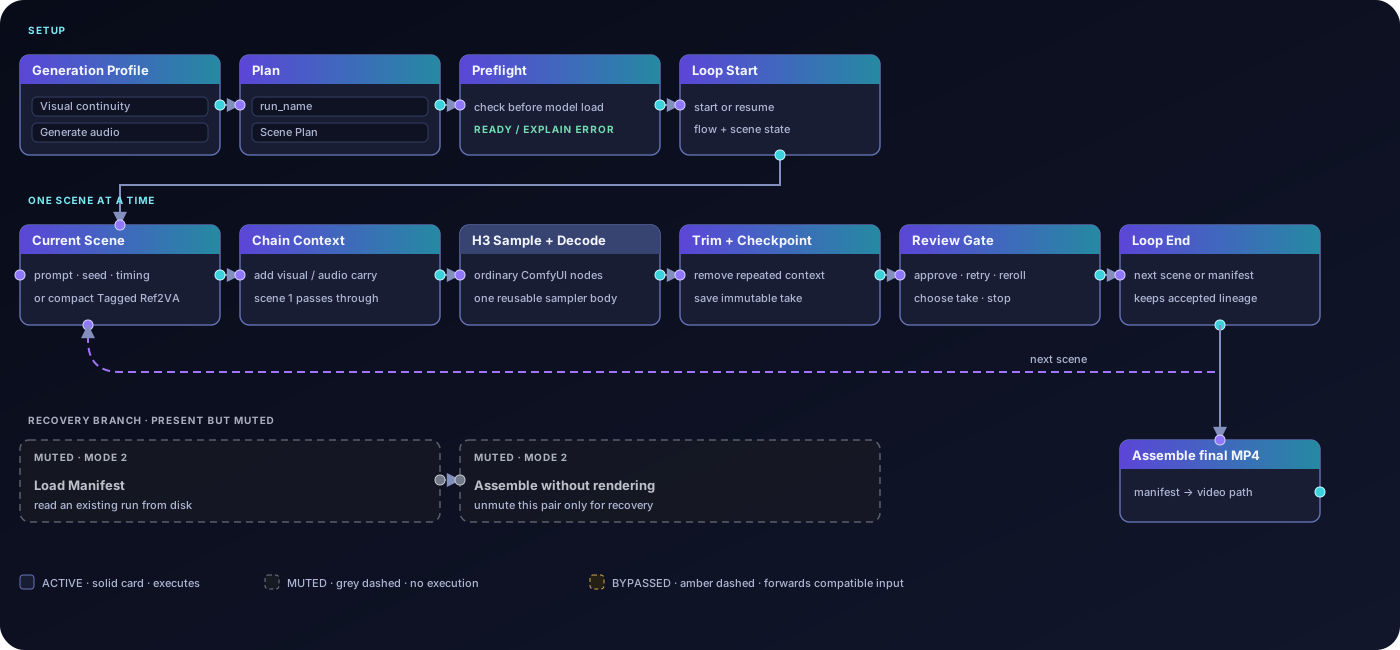
Only the current scene enters the sampler. Loop End advances to the next scene
or passes a manifest to Assemble. The muted **Load Manifest → Assemble** branch
can assemble saved scenes without rendering again.
## Updating from 0.5
Back up your workflows and project folders before updating. Existing Plan nodes
remain supported; the new examples have **0.6** in their filenames, and the
older examples are preserved under [Archive/0.5](example_workflows/Archive/0.5/).
Restart ComfyUI after updating and hard-refresh the browser.
Keep the same `run_name` to resume the same production; use a new one for a
different project. Saved runs live in `output/h3_chains//`, with final
movies under `final/`. Carousel media lives in `input/h3_projects//`
and is mirrored into the run for recovery. These paths follow your configured
ComfyUI input/output directories. Resume checks still reject incompatible
generation changes; see [Runs and recovery](docs/RUNS_AND_RECOVERY.md).
The repository is now spelled **Context-Loop**. Existing installs named
`ComfyUI-MiniMaxH3-Contex-Loop` can stay in place—do not install a second copy
just to change the folder name.
## Origins and license
Started from **NikoDemon80's** [H3 Motion Context](https://github.com/NikoDemon80/ComfyUI-H3-Motion-Context).
See [Feature origins](docs/FEATURE_TRACEABILITY.md) and
[Third-party notices](THIRD_PARTY_NOTICES.md) for contributors and upstream work.
GPL-3.0 · [License](LICENSE) · [Contributing](CONTRIBUTING.md)