Document Understander (DU)
==========================
Combining the power of latest LLMs, human expertise, and iterative improvement, PCAS Document Understander is an AI system to form deep understanding, and effect meaningful transformations, of large structured documents.
Here's a top-level overview of what DU does:
* DU ingests a single document or a library of related documents in a variety of formats (Word, PDF, DITA, DocBook, HTML).
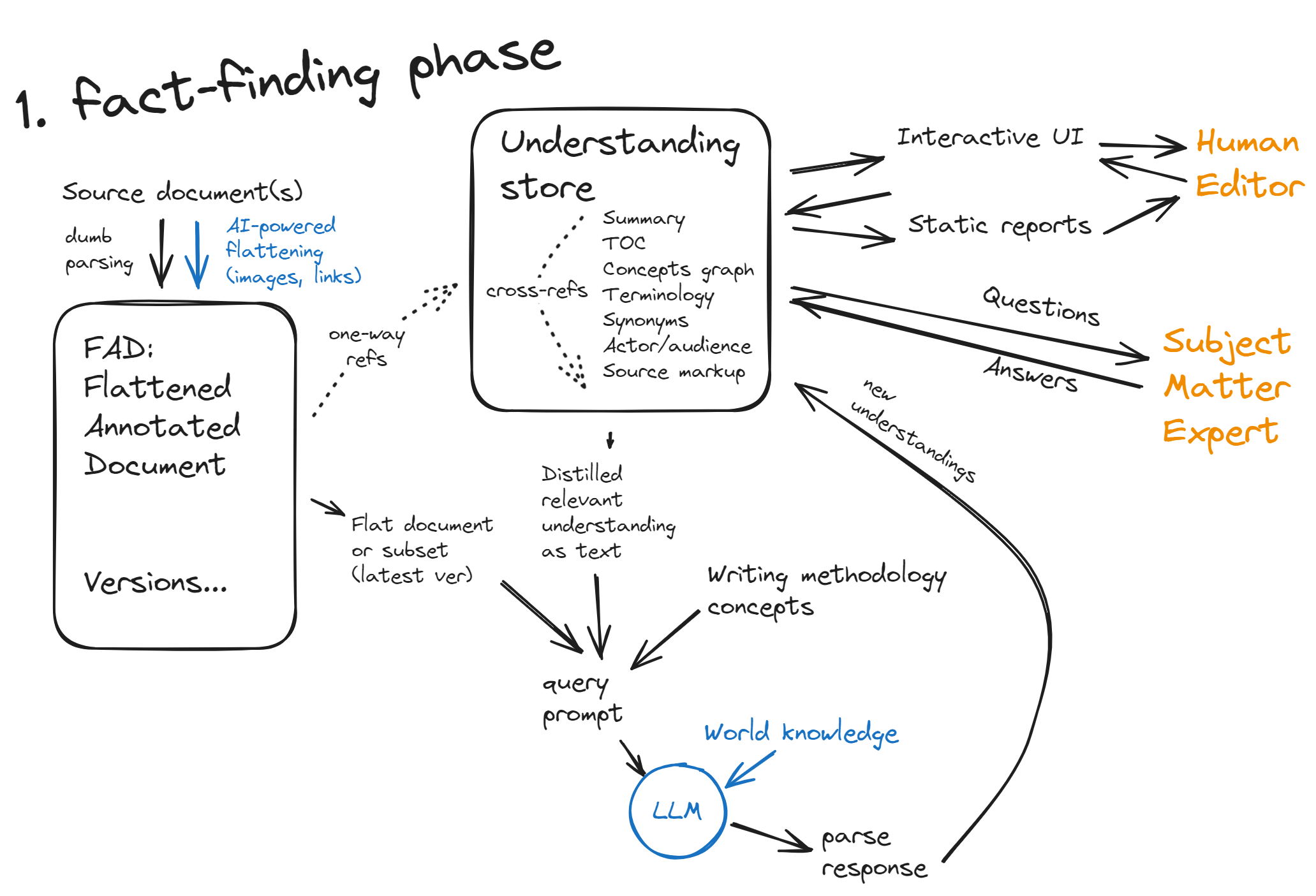
* DU performs a series of AI-powered fact-finding routines to form an **understanding** of the document: its purpose, scope, concepts and their relationships, audience, specific terminology. All this is stored in its understanding store using a variety of formats: text summaries, lists, knowledge graphs. Components of the understanding store are used, in condensed text form, as part of LLM queries about the document.
* As it goes through the fact-finding process, DU presents its developing understanding to the **human editor (HE)** via static reports or interactive UIs (spreadsheets, lists, document text with annotations). With an interactive UI, DU allows HE to directly edit some aspects of its understanding store.
* Sometimes, DU's underlying AI may feel like it doesn't have enough background knowledge to understand what the document is trying to say. In that case, it lists questions for a **subject matter expert (SME)** to answer. Once answered, these answers become part of the understanding store and may inform editing suggestions.
* DU is guided by a **writing methodology**. The foundational part of this methodology (e.g. the information types) is encoded in the way it runs its fact-finding routines and organizes its understanding store; the surface layers of the methodology (e.g. rules for formatting lists) are expressed as texts and can be varied depending on the customer's preferences.
* After DU gains enough understanding of the document, it generates **editing suggestions**. These may range from large-scale restructurings to terminology unifications to rewriting specific bits for tone, audience, clarity, etc. Normally, the suggestions are ordered depth-to-surface (e.g. we address the overall structure first and editing style last), but this order is not absolute; for example, it may make sense to fix the terminology first, then re-run fact-finding to gain a better understanding, and then get a better idea for how to structure the document.
* HE may review DU's suggestions, greenlighting some and redlighting others, and possibly changing their order. Also, by spotting issues via the UI reports, HE can give their own suggestions (as freeform text).
* DU implements these suggestions one by one, creating new **versions** of the document. Each version is reviewed by HE; if problems are spotted, changes are made to the understanding store and/or the suggestion instructions, and the change is re-run again. Alternatively, HE may just do a quick manual fix is the problems are few; these fixes are recorded in the same new version of the document with annotations.
* Once there's a new version of the document (created by DU, modified by HE, or authored entirely externally), DU performs a diff and decides which aspects and spans of its understanding store were invalidated and need to be re-found. Then DU reviews its queue of suggestions to remove those which are no longer relevant, update the order, or add new suggestions it can identify now. This process can be repeated iteratively.
# Fact-finding phase
DU functions in one of the two major modes: fact-finding and editing. Generally, fact-finding comes first, but it can switch back and forth between these modes. Creation of a new version of the document (even if it was done by DU itself) or addind a new document to its document library triggers going back to the fact-finding mode to update those parts of the understanding store that were invalidated.
## Input to the system
DU starts with one document or a whole library of documents. If it's a library, one document at a time is the current one for both fact-finding and editing; others serve as providers of a wider context. The HE can switch DU from one document in the library to another, retaining most of the understanding it accumulated from working on the first document.
Eventually, DU will support a variety of document formats. For the MVP (minimal viable product we will be able to demo to customers), we will focus on HTML input.
## FAD (Flattened Annotated Document)
On ingestion, documents are flattened, that is, converted to plain text with all formatting stripped. Why?
Because our aim is to effect a really deep transformation of the document. Picture an insect that goes through metamorphosis: the larva wraps itself into a cocoon and pretty much dissolves itself inside into a soup, disassembling most of the organs of the larva stage. Out of this soup, the new body of the adult insect crystallizes inside the cocoon until it's ready to hatch out. Similarly, we dissolve the existing content into the smallest meaningful parts — sentences — so that we can reassemble it into something radically different.
Here's another way to look at it. 25 years ago, the XML revolution was driven by the desire to capture and preserve the semantic document markup, because in the pre-AI era it was a precious product of human labor. Now, when intelligent assistance is cheap and plentiful, we should direct our human attention to higher levels of meaning and leave low-level expression, including markup, to the intelligent machines. Hence, we say goodbye to the fussy hierarchical XML and return to the roots of unformatted speech, marking it up anew every time it's needed.
The FAD is a plain text format with no subdivisions or hierarchy. However, it supports an arbitrary number of *annotations*: spans or points linked to an object that stores some information about this span. Think of annotations as freely overlapping marker highlights of different colors (span annotations) or points in the text (point annotations), with a margin note linked to each annotation.
Technically, an annotation mark in the FUD is one of the three rarely used Unicode characters, followed by an 8-digit annotation GUID. For example:
`⌦00000123This is a sentence.⌫00000123`
This is the text span `This is a sentence.` marked up by a span annotation with GUID 123. It uses Unicode characters ⌦ (U+2326) and ⌫ (U+232B). For a point annotation, use ⌧ (U+2327):
`This is a sentence.⌧00000124`
This is a point annotation with GUID 124 right after `sentence.`
## Annotations
Each annotation class is a data structure that can hold all kinds of data, such as numbers or links to other annotations. However, each annotation will also have a text-only representation which packs all of its content into a readable English sentence. It will have code that translates its data into that text representation as well as parses this representation, if changed, back to the data structure. This makes all annotations transparently editable for humans and understandable for the LLM. (If an annotation has more data than can fit into a readable sentence, it's an indication that we need to break it up into multiple linked annotations.)
After the parseable first sentence, the annotation can also have arbitrary text as a commentary. That commentary may come from a human editor or from the LLM. That commentary it is not parsed but it is passed to the LLM whenever it sees that annotation, and so can affect LLM's responses.
The taxonomy of annotation classes is TBD, for now we foresee at least:
### Annotations coming from the source
* **Source markup** annotations will preserve the markup that parts of text had in the source document. So, in FAD, the source formatting and its implied semantics is not lost but just flattened (made non-hierarchical). How much this markup is used in fact-finding remains to be seen, but preserving it should be straightforward.
* **Source images** are converted to annotations. For images, we will utilize an AI vision model that will produce a description of the image, including any texts in it. E.g. a diagram would be replaced by an image annotation containing a description such as: `A rectangular block titled 'Prompt', from it an arrow leads to a diamond-shaped block titled 'LLM', and from it an arrow leads to a rectangular block titled 'Response'.` This way, the content of the image is preserved in the text of the document and can be part of the prompt for the LLM. (Alternatively, if we use an LLM with vision capabilities, the image will be just referred to from the text using a link annotation and fed to the LLM alongside the text.) The idea here is to reduce both text and images to the same medium of expression, to enable complex edits such as "replace this image with a paragraph of descriptive text" and, conversely, "express this paragraph as a diagram".
* **Source tables**, similar to images, are converted to textual descriptions. For example: `A table with two columns titled "When" and "Then", with each row describing one condition and its consequence`, annotated as a source table summary, followed by the content of the rows desribed in such a way that they make sense as sentences. Again, the idea here is to enable easy conversion of the content from tabular to text form and back as the document is being edited.
* **Source links** are preserved as link annotations that refer to anchor annotations in another part of the document. In the source, such links can take many forms: hyperlinks, phrases such as "See section 1.2.3", "See the next chapter for more information", "As we've seen in the last section" etc. This will require an AI-assisted pass to recognize links, locate their anchors (which, in case of page numbers, can be very imprecise), and convert them to point annotations. For use in LLM prompts, such link annotations are converted to some standard form expressed in XML to that the LLM can understand them. In the editing phase, there will be passes to adjust the density of links (add more or remove if too many) and then, depending on the target format, a pass to replace them with consistent text expressions (such as "See <section-number> <section-title> on page <page-number>").
### Annotations coming from DU fact-finding and HE/SME interactions
* **Semantic analysis annotations** results: per-section, per-block, and per-sentence annotations recording our best current idea of this piece's information type (task, process, principle, concept, reference), actor, audience, references to main concepts that are important in the context of the entire document.
* **Duplication annotations**: when one part of the document is similar in content to another, both are annotated as duplicates. This annotation links to an object in the understanding store that stores LLM's comments on how similar these fragments are, in what ways they are different, and how to possibly remove the duplication.
* **Gap annotations**: similarly, we prod the LLM to identify where it might feel like some cricial information or link is missing. We don't ask it to fill in this information right away, but we record the spots with LLM's comments.
* **Contradictions**: !!!
* **Tone annotations**: We ask LLM to identify sentences or words that are out of place in the tone (too colloquial, too flowery, too scientific, etc). We record the spans the LLM indicates with its comments.
* **Understanding faults**: We ask LLM to identify places where it is not completely sure of the meaning of the sentence, and record such spans with its comments.
* **Editor notes**: Not all annotations come from the LLM; human editors, via a UI, can edit or delete any annotation but also can add their own. Such annotations will still belong to one of the annotation classes supported by the system, and once created will be treated the same as all other annotations of that class (i.e. shown to the LLM when this class is relevant to the current task LLM is given).
* **Change suggestions**: As we progress through collecting, reviewing, editing of annotations and other components of the understanding store, at some point we start turning our observations into change suggestions. Some of them can be document-wide (for example, a new structure expressed as a TOC) so not linked to any specific place in the document; others, however, will focus on small portions of the document via annotating those portions.
* **Generated markup annotations**: One of the operations in the document editing phase will be marking up the document anew — writing and marking up headings, captions, paragraphs, inline markup, links, etc. These will be marked up by annotations similar to source markup but indicating that it's new markup that doesn't come from the source (though this distinction will not necessarily be exposed to the LLM, when it will see any markup at all).
## Understanding store
The understanding store is a collection of data structures that accumulate the results of fact-finding routines. It includes all the annotations linked from the document but also contains other objects that are not linked from the document. Objects in the store may link to other objects (each one has a GUID) but never to points in the FAD; all links from FAD to the store are one-way.
Different parts of the understanding store might utilize different data structures, such as lists and dictionaries. The concepts of the document will be captured in a linked graph structure; it might even make sense to implement the entire understanding store as a graph structure.
Here are some of the elements of the understanding store (likely many more will be added as the system is being developed):
* Document type description (manual, textbook, scientific paper, getting-started overview, etc)
* Summary or abstract: a one-paragraph description of the document
* TOC: a deduced, purely from the content, hierarchy of sections with titles
* A summary of each section
* The main concepts that the document deals with, and relationships between them
* A list of terms specific to the document, with synonymic relationships
* Primary audience, actors, and actions that the document talks about, with their descriptions
* All of the annotations from the FAD (markup, semantic analysis, info types, gaps/dupes, etc)
* Communications with SMEs: questions from the system and answers from experts
* Manual guidelines from the human editor
Generally, the secret sauce of the DU and its competitive advantage is in these data structures and the fact-finding routines that fill in these structures with data from the document. It is likely that some of the data we now envision will turn out to be too hard to reliably find or useless, while other kinds of data will emerge as workhorses of the understanding process.
## Fact-finding routines
Basically, the way we find out elements of the understanding store is by giving the LLM our document and asking questions about it. The response of the LLM is then parsed and the collected data is placed into the understanding store. Each component of the understanding store has its own way of questioning the LLM for its data, and developing these will likely take most of the effort in creating DU.
Every routine has a way to know which part of the document it depends on (for example, summary of a section only depends on that section) and what kinds of changes in that part of the document will or will not invalidate it. Along with its dependence on the document, each routine and its understanding data structure may depend on other data in the understanding store and will be invalidated if that upstream data changes. Once data is invalidated, its routine is rerun; if it finds its data changed, then it in turn triggers the other routines that depend on it.
This principle of constant updating and keeping our understanding fresh can be taken further. Even when there's no explicit dependence of one understanding component on another, we will regenerate those components which were last updated so long ago that other components have appeared or updated since then. For example, one of the first routines we run is making a summary of the entire document; at this point, we do it just by giving the LLM our document and an instruction to summarize it, because we have nothing else yet. Later, a different routine compiles a graph of the document's main concepts and their relationships. When we have that graph, it makes sense to regenerate the summary, this time giving the LLM not just the document but also the conceptual graph expressed as text, because the analysis of the concepts may well affect how we summarize the content of the document.
## Communicating with the LLM
This is the core of the system. Since new and more powerful LLMs are popping up regularly, we envision this subsystem to be a plug-in API that can accomodate different LLM plugins, each potentially with its own ways of structuring the context, expressing instructions, and parsing the results that work best with this LLM. Pluggable LLMs will allow us to estimate and compare performance of different LLMs on different kinds of documents.
While this area is explosively evolving, we can lay out several general principles we will use in communicating with the LLM. All of these are preliminary intuitions that we will need to confirm or reject by testing; the relevance of these principles may change as the capabilities of LLMs evolve.
### Full context
Recent emergence of LLMs with significant context windows (GPT4 Turbo: 128k tokens, Claude 3: 200k, Gemini 1.5: 1M) is what makes this project feasible.
When using new technology, we should focus on what it does best. Modern LLMs are barely approaching an average human in their reasoning capabilities, but they already far exceed humans in the context size: no human can read a large document as fast, and recall parts of it as efficiently, as a modern long-context LLM. In building the DU, we are trying to compensate for the relative dumbness of the AI by giving it a large tightly packed query.
This means that, whenever possible, we will give the LLM the complete flattened document we are working with, even when we ask it to focus on one specific part of it. In addition to the document, we also pack into our query as much relevant understanding as we already have. This way, the LLM will not need to redo the thinking it has already done. For example, one of the first fact-finding routines will ask LLM to summarize the document; any further routines will include in their LLM queries *both* the document and the latest version of its summary. This way, we save and reuse the intelligent effort that was expended by LLM on creating the summary so that, in some sense, further analysis on the document can continue from the point we have reached. This is similar to Retrieval-Augmented Generation (RAG) except that we use the processed and condensed results of previous LLM invocations to enrich the context of the current query.
This approach has limitations. An LLM's context size may be insufficient to fit the entire document or library of documents we work on. Also, commercial LLMs charge by the tokens of context, so we are incentivized to make our queries smaller. We may therefore need to do some work on compressing the document(s) (for example, by replacing irrelevant sections with their summaries, by externalizing chunks of numeric and other non-text data, by temporarily replacing token-hungry abbreviations with single-token words) and on filtering down the amount of understanding data we place in the context. We will need to do research to determine how much of this optimization is needed.
### Narrow focus
While we give LLM as much context as possible, we instruct it to do as little as possible. While it's tempting to save on input/output tokens by packing several instructions into one prompt, LLM performance suffers when you ask it to do too many things. We can perhaps still give multiple instructions if they are the same in nature and focus on the same area of the document (for example, "do an actor/audience analysis of each of the 4 sentences in the first paragraph in section 1.2.3").
!!!output limit
### Semantic markup
We generally feed LLM a flattened text-only version of the document. However, when we need to point out elements in the document we want LLM to look at, and to convey to it results of the analysis already done (when it's relevant to the task at hand), we will use semantic XML markup.
There's not going to be any DTD because we are not creating a standard. We are back to the roots of semantic markup: looking at content and telling what different parts of it *are*. We are using XML syntax for this because it's likely the most familiar to the LLM. For example, we enclose the document itself in `...`, the section(s) in question in ``, paragraphs in `...`, etc. When necessary, we use attributes, for example to capture the result of semantic analysis of this sentence could look like:
`When necessary, we use attributes`
reflecting that in this sentence, "we" is the actor, serving as a synonym for the role of "DU developers".
### Chain of thought
LLMs don't have the inner monologue, their responses are basically improvised on the spot. Many studies have shown that one way to improve the quality of LLM answers is to instruct it to think as it goes, producing a chain of thought, before it gives a final answer. We are going to experiment with this technique to see how much improvement it brings us.
### Iterativeness
Another way to improve LLM performance is simply to ask the same question twice, the second time giving it its first question back and asking it to verify and either confirm or change it.
### Confidentiality of data
Some clients may be unwilling to submit their data to third-party LLMs. Eventually, as this technology develops, we may be able to host our own LLM capable enough to power this project. Until then, however, we will need to rely on outside LLM providers. To satisfy our clients' confidentiality requirements, we will implement scrubbing filters that remove or obfuscate sensitive information.
## Human UI
As DU goes through its fact-finding phase, we want to have a complete visibility into what it's doing. We want to be able to directly correct its findings and/or rerun the routines with adjustments. For this, we will create a variety of interactive UIs as well as static reports.
### Document + annotations
One obvious UI paradigm would be displaying the document with annotations. The user would be able to switch on and off which kinds of annotations to show. Document spans are marked with color and the annotations are shown in a sidebar. The user will have options to delete each annotation, edit its text (where the first sentence, encoding the data, may have a template to adhere to whereas the rest can be freeform text). User can also add a new annotation by marking a span and selecting one of the predefined annotation types.
If there is a systematic problem with all annotations of one kind, there are a few approaches to try. The user can review the order of the fact-finding missions that were done up to this point, change that order, and rerun the sequence. The idea here is that some fact-finding routine fails because it doesn't have enough context collected from the document previously, and changing the order may address this. Another approach is to rerun the fact-finding that created bad annotations but add a freeform intro text that would be prepended to all its prompts and hopefully guide the LLM to do a better job extracting information.
### Reports
Another way to present information to the user is by generating reports from the understanding store. This is especially useful for large documents or document libraries. Such a report may show a list of actors or audiences per sentence, information type per section, contexts for all occurrences of a term (and its synonyms), etc.
These reports can be static, or they can enable some kind of automated feedback. For example, if we export all sentences with their audience types as a spreadsheet, the user can conveniently review by document order or by type, spotting inconsistencies. The user can then directly edit the "new audience" column next to "audience". Then the edited spreadsheet is imported back into DU which generates editing suggestions for the sentences that have "new audience" added by the user.
## Questions for SMEs
Just like a human editor can have problems with understanding some parts of a complex document, so can an LLM. It won't ask questions on its own, but we can prod it with prompts like "If given a chance to ask an expert, what would you ask them to clarify your understanding of this sentence/paragraph/section?" "What is the most unusual aspect of how [objects] are treated in this document, compared to what you know about them?" "Do you think you have complete understanding of what this section is saying? If not, what would you like to clarify with an expert?"
With its usual servility, LLM will think up questions. Not all of them will make sense. We will first feed these questions back to the LLM itself and ask it to do its best answering. Then, possibly after manual filtering by the editor, we will present the best questions and their tentative answers to a subject matter expert. The SME will have four options:
* reject the question as meaningless
* answer the question as it is given
* edit the question and provide an answer
* accept both the question and DU's tentative answer
Once answered, the question and the answer will become part of the understanding store and will be prepended to the prompts as part of the context.
# Editing phase
All the hard work of understanding serves to eventually transform the document — create a new better document out of the old.
Editing tasks range all the way from small scattered edits to fix local problems to complete rewriting of the document from scratch. The understanding phase will give the editors a good enough idea of how bad the problems with the current document are; however, the scope of the editing work will ultimately depend on the client's requirements, so DU will give editors a choice in this matter.
However, even if you aim at a deep restructuring, it doesn't mean that small superficial edits are useless. In fact, it may make sense to do as many of them as possible *first*, collecting the low-hanging fruit, because the resulting improvement of the document will make it more understandable (the understanding phase reruns to update the store after each chage) and the plan for the big rewrite will be easier to come up with. Both big rewrites and small fixes can be repeated multiple times.
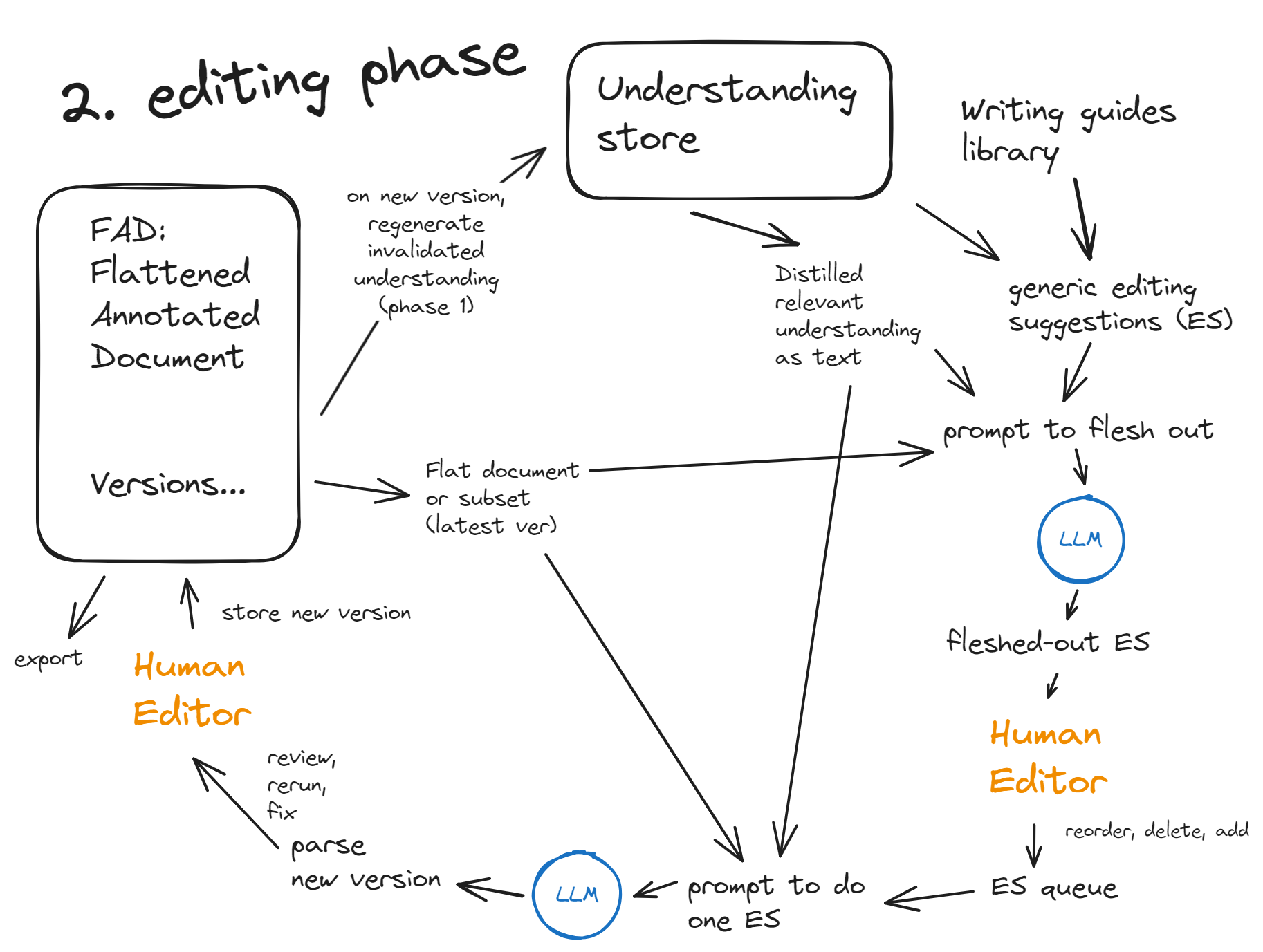
The general workflow in the editing phase follows the three-step paradigm:
1. Plan
2. Edit
3. Review
The LLM is involved in the planning step and the editing step. Human editors are normally involved in planning and review, but can take over the editing step from the system if they want to do it manually.
## Plan
The starting point of the planning stage is the *generic editing suggestions* that come from a writing methodology — generic style guides and/or PCAS writing standards that DU has in its library. The contents of this library are reviewable and changeable, so that DU can adapt to varying requirements of clients. For example, some clients may want a different way of formatting lists or different rules for titles.
Basically, DU will look at a component of its understanding store, look up a relevant guideline from the library, and combine them into a prompt to the LLM asking it whether it thinks it makes sense to change (a specific portion of) the document per this specific guideline.
Small editing suggestions would largely stem from the semantic/gap/duplicate analysis done in the fact-finding phase. Large restructuring suggestions might come from model structures that the guidelines prescribe for this type of document. Also, human editors may create a template for a particular type of section, topic, or block. Such a template is then inserted into the library of writing guides, and DU is instructed to flesh it out by applying it to all sections/topics/blocks of that type.
LLM then looks at the generic editing suggestion it is given and at a place in the document indicated in the prompt and does its best to determine if this suggestion is applicable there. If it is applicable (i.e. the LLM is confident enough about its applicability), the LLM writes out what the text will look like after the change. Such an edit proposed by the LLM is recorded as a *fleshed-out editing suggestion*. These are sent to the human editors for review. Editors may delete, rewrite, change order of the suggestions, or add their own.
## Edit
At the edit stage, approved fleshed-out editing suggestions from the queue are sent, one by one, to the LLM for execution. Edited text is verified to guard against pieces dropped or hallucinated in, and then it is shown to the human editor for review.
## Review
At the review stage, human editors have a chance to accept the changed text or, if it is deficient, rerun the change after adding an additional instruction for the LLM.
An approved change is recorded by DU as a new version. It also triggers a regeneration of part or all of the understanding store so that it is always in sync with the latest version. Once we have a history of several versions, we can ask LLM to do more problem spotting (again, for things like dropped or hallucinated texts) by comparing versions that are several edits apart.
# Testing approaches
We want DU to be developed in a test-driven fashion. This is an established paradigm for creating quality software. However, when it comes to AI-powered code paths, new approaches to testing are needed because an LLM's output is never exactly reproducible.
One approach to try will be to relegate test verification to LLM as well. We would create a test case around a document. On that document, DU, in fully automatic mode, creates an understanding store. Once a human verifies that this understanding store is adequate, we save it as a test reference.
Then, once we do a change to the system, we rerun it on the same document. We get a store which will be different from the reference in many ways — small and perhaps not so small. We then submit the reference output and the new output to LLM and ask it to do an intelligent compare.
For example, we give LLM the old and the new list of main concepts in the text and ask it: how many concepts from one list have a close equivalent in the other list? If this number is above some predefined threshold, we consider the test passed. Otherwise, we do a human check on the new output to see if it has actually become worse or better than before. If it's worse, we failed the test; if it's better, we passed the test but need to save a new better version of the reference store.
This approach would involve more human effort than the traditional fully automated way, but it will still be mostly automatic. It would allow us to be bold in making changes to the system after it has reached some level of meaninful usefulness. Protected by tests, we can freely experiment with the system without fear to break what already works.
Having such tests will also allow us to directly compare performance of different LLMs, and to measure how variable parameters — length of context, level of iterativeness, volume of instructions per request, etc. — affect the performance.