


Use the King Slime CUA prompt from the supplement
Browse files
README.md
CHANGED
|
@@ -74,68 +74,66 @@ Use the bundled `chat_template.jinja` to format observations and task context. P
|
|
| 74 |
|
| 75 |
## Single-frame CUA example
|
| 76 |
|
| 77 |
-
|
| 78 |
|
| 79 |
-
###
|
| 80 |
-
|
| 81 |
-
This prompt was written for the single-frame demonstration below.
|
| 82 |
|
| 83 |
```text
|
| 84 |
-
You are playing the
|
| 85 |
-
|
| 86 |
-
|
| 87 |
-
|
| 88 |
-
|
| 89 |
-
|
| 90 |
-
-
|
| 91 |
-
-
|
| 92 |
-
|
| 93 |
-
|
| 94 |
-
|
| 95 |
-
-
|
| 96 |
-
|
| 97 |
-
|
| 98 |
-
|
| 99 |
-
|
| 100 |
-
<|action_start|>X Y Z ; k1 ; k2 ; k3 ; k4 ; k5 ; k6<|action_end|>
|
| 101 |
-
|
| 102 |
-
X and Y are relative mouse deltas from -1000 to 1000. Z is the scroll delta from -5 to 5. Use 0 for an unused mouse or scroll axis.
|
| 103 |
-
List the keys or mouse buttons held in each of the six consecutive 33 ms steps. Separate keys within a step with spaces. Leave a step empty when no keys are held and keep its separators.
|
| 104 |
```
|
| 105 |
|
| 106 |
### Input frame
|
| 107 |
|
| 108 |
-
|
|
|
|
|
|
|
| 109 |
|
| 110 |
### Model output
|
| 111 |
|
| 112 |
-
|
| 113 |
|
| 114 |
-
<pre style="white-space: pre-wrap; overflow-wrap: anywhere;"><code style="white-space: inherit; overflow-wrap: inherit;"><|action_start|>
|
| 115 |
|
| 116 |
-
|
| 117 |
|
| 118 |
<details>
|
| 119 |
-
<summary>
|
| 120 |
|
| 121 |
-
Load `processor` and `model` as shown above. Save the system prompt
|
| 122 |
|
| 123 |
```python
|
|
|
|
| 124 |
from pathlib import Path
|
| 125 |
|
| 126 |
from PIL import Image
|
| 127 |
import torch
|
| 128 |
|
| 129 |
-
system_prompt = Path("
|
| 130 |
-
|
|
|
|
|
|
|
|
|
|
|
|
|
|
|
|
| 131 |
messages = [
|
| 132 |
{"role": "system", "content": system_prompt},
|
| 133 |
-
{"role": "user", "content": [
|
| 134 |
-
{"type": "text", "text": "current game screen"},
|
| 135 |
-
{"type": "image", "image": frame},
|
| 136 |
-
]},
|
| 137 |
]
|
| 138 |
-
|
| 139 |
inputs = processor.apply_chat_template(
|
| 140 |
messages,
|
| 141 |
add_generation_prompt=True,
|
|
@@ -143,16 +141,20 @@ inputs = processor.apply_chat_template(
|
|
| 143 |
return_dict=True,
|
| 144 |
return_tensors="pt",
|
| 145 |
).to(model.device)
|
| 146 |
-
turn_end = processor.tokenizer.convert_tokens_to_ids("<|im_end|>")
|
| 147 |
|
|
|
|
| 148 |
with torch.inference_mode():
|
| 149 |
output = model.generate(
|
| 150 |
-
**inputs,
|
|
|
|
|
|
|
|
|
|
|
|
|
|
|
|
|
|
|
|
|
|
| 151 |
)
|
| 152 |
-
|
| 153 |
new_ids = output[0, inputs["input_ids"].shape[-1]:].tolist()
|
| 154 |
-
if new_ids and new_ids[-1] == turn_end:
|
| 155 |
-
new_ids = new_ids[:-1]
|
| 156 |
print(processor.decode(new_ids, skip_special_tokens=False, clean_up_tokenization_spaces=False))
|
| 157 |
```
|
| 158 |
|
|
|
|
| 74 |
|
| 75 |
## Single-frame CUA example
|
| 76 |
|
| 77 |
+
This example uses the Terraria King Slime CUA system prompt shown in the GameDojo supplementary material. The conversation contains this system prompt and one image-only user turn.
|
| 78 |
|
| 79 |
+
### System prompt for King Slime
|
|
|
|
|
|
|
| 80 |
|
| 81 |
```text
|
| 82 |
+
You are an experienced PC game player, proficient in keyboard and mouse operations. You are playing "Pixel Arena: Sword and Bow". Based on the current game screen and the corresponding historical trajectory, plan the next 200ms of actions, consisting of 6 steps. Each step is spaced 33ms apart. Every step lasts 33ms from its start time until the next step begins.
|
| 83 |
+
|
| 84 |
+
Output Format
|
| 85 |
+
<|action_start|>X Y Z ; k1 k2 ; k3 ; k4 ; k5 ; k6 ; k7<|action_end|>
|
| 86 |
+
|
| 87 |
+
Explanation
|
| 88 |
+
1. Mouse Movement: Relative integers X, Y in [-1000, 1000] (X>0 right, Y>0 down) and scroll Z in [-5, 5] (Z>0 up).
|
| 89 |
+
2. Key Sequence: 6 groups separated by ;; space-separated keys within each group (at most 4 keys/group). Leave an empty group blank while keeping ;. Keys listed in consecutive groups stay held; unlisted keys are released.
|
| 90 |
+
3. Output only one plain line matching the format, with no line breaks or quotes.
|
| 91 |
+
Key Naming Rules: Capital letters (W, A), capitalized names (Space, Shift), mouse buttons (LB, RB).
|
| 92 |
+
|
| 93 |
+
Game: Side-view 2D arena with two wooden platforms. Empty the boss's health bar within 300 s without losing all health.
|
| 94 |
+
Controls (only these keys are active): A/D move left/right; Space jump/fly; S drop through platform; J/LB use weapon; Q swap sword/bow; E shoot bow at crosshair; RB swing sword.
|
| 95 |
+
Mouse: X/Y move crosshair (1000 = full screen width/height); bow shoots toward crosshair.
|
| 96 |
+
Boss: King Slime: Giant gel creature that leaps to crush you, sheds small blobs when hit, and teleports near you. Moves: 1. Leap; 2. Teleport; 3. Gel Spawns.
|
| 97 |
+
Health bars and other status are shown on the screen; read them yourself.
|
|
|
|
|
|
|
|
|
|
|
|
|
| 98 |
```
|
| 99 |
|
| 100 |
### Input frame
|
| 101 |
|
| 102 |
+
The source frame below is resized to 854 × 480 and JPEG-encoded at quality 90 before inference.
|
| 103 |
+
|
| 104 |
+
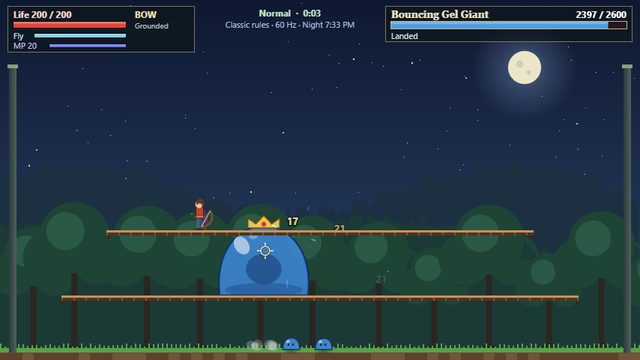
|
| 105 |
|
| 106 |
### Model output
|
| 107 |
|
| 108 |
+
The published BF16 checkpoint generated this reply with its non-thinking chat template. The run used Transformers 5.24.0 on Apple MPS, sampling at temperature 1.0 with top-p 1.0, no top-k cutoff, and a 256-token limit. Generation stopped upon emitting `<|action_end|>`.
|
| 109 |
|
| 110 |
+
<pre style="white-space: pre-wrap; overflow-wrap: anywhere;"><code style="white-space: inherit; overflow-wrap: inherit;"><|action_start|>-7 33 0 ; E S ; E S ; E S ; E S ; E S ; E S<|action_end|></code></pre>
|
| 111 |
|
| 112 |
+
The mouse deltas move the crosshair left and down, with no scroll. Each of the six steps holds `E` to shoot the bow and `S` to drop through the platform.
|
| 113 |
|
| 114 |
<details>
|
| 115 |
+
<summary>Run the same example with Transformers</summary>
|
| 116 |
|
| 117 |
+
Load `processor` and `model` as shown above. Save the system prompt as `king_slime_cua_prompt.txt` and the source image as `king-slime.jpg`.
|
| 118 |
|
| 119 |
```python
|
| 120 |
+
from io import BytesIO
|
| 121 |
from pathlib import Path
|
| 122 |
|
| 123 |
from PIL import Image
|
| 124 |
import torch
|
| 125 |
|
| 126 |
+
system_prompt = Path("king_slime_cua_prompt.txt").read_text(encoding="utf-8").rstrip("\n")
|
| 127 |
+
with Image.open("king-slime.jpg") as source:
|
| 128 |
+
encoded = BytesIO()
|
| 129 |
+
resized = source.convert("RGB").resize((854, 480), Image.Resampling.LANCZOS)
|
| 130 |
+
resized.save(encoded, format="JPEG", quality=90)
|
| 131 |
+
frame = Image.open(encoded).convert("RGB")
|
| 132 |
+
|
| 133 |
messages = [
|
| 134 |
{"role": "system", "content": system_prompt},
|
| 135 |
+
{"role": "user", "content": [{"type": "image", "image": frame}]},
|
|
|
|
|
|
|
|
|
|
| 136 |
]
|
|
|
|
| 137 |
inputs = processor.apply_chat_template(
|
| 138 |
messages,
|
| 139 |
add_generation_prompt=True,
|
|
|
|
| 141 |
return_dict=True,
|
| 142 |
return_tensors="pt",
|
| 143 |
).to(model.device)
|
|
|
|
| 144 |
|
| 145 |
+
torch.manual_seed(42)
|
| 146 |
with torch.inference_mode():
|
| 147 |
output = model.generate(
|
| 148 |
+
**inputs,
|
| 149 |
+
do_sample=True,
|
| 150 |
+
temperature=1.0,
|
| 151 |
+
top_p=1.0,
|
| 152 |
+
top_k=0,
|
| 153 |
+
max_new_tokens=256,
|
| 154 |
+
stop_strings=["<|action_end|>"],
|
| 155 |
+
tokenizer=processor.tokenizer,
|
| 156 |
)
|
|
|
|
| 157 |
new_ids = output[0, inputs["input_ids"].shape[-1]:].tolist()
|
|
|
|
|
|
|
| 158 |
print(processor.decode(new_ids, skip_special_tokens=False, clean_up_tokenization_spaces=False))
|
| 159 |
```
|
| 160 |
|