


Document a verified GameDojo-4B single-frame inference
Browse files
README.md
CHANGED
|
@@ -71,3 +71,89 @@ model = Qwen3_5ForConditionalGeneration.from_pretrained(
|
|
| 71 |
```
|
| 72 |
|
| 73 |
Use the bundled `chat_template.jinja` to format observations and task context. Pass the generated actions to the GameDojo CUA executor to advance the encounter.
|
|
|
|
|
|
|
|
|
|
|
|
|
|
|
|
|
|
|
|
|
|
|
|
|
|
|
|
|
|
|
|
|
|
|
|
|
|
|
|
|
|
|
|
|
|
|
|
|
|
|
|
|
|
|
|
|
|
|
|
|
|
|
|
|
|
|
|
|
|
|
|
|
|
|
|
|
|
|
|
|
|
|
|
|
|
|
|
|
|
|
|
|
|
|
|
|
|
|
|
|
|
|
|
|
|
|
|
|
|
|
|
|
|
|
|
|
|
|
|
|
|
|
|
|
|
|
|
|
|
|
|
|
|
|
|
|
|
|
|
|
|
|
|
|
|
|
|
|
|
|
|
|
|
|
|
|
|
|
|
|
|
|
|
|
|
|
|
|
|
|
|
|
|
|
|
|
|
|
|
|
|
|
|
|
|
|
|
|
|
|
|
|
|
|
|
|
|
|
|
|
|
|
|
|
|
|
|
|
|
|
|
|
|
|
|
|
|
|
|
|
|
|
|
|
|
|
|
|
|
|
|
|
|
|
|
|
|
|
|
|
|
|
|
|
|
|
|
|
|
|
|
|
|
|
|
|
|
|
|
|
| 71 |
```
|
| 72 |
|
| 73 |
Use the bundled `chat_template.jinja` to format observations and task context. Pass the generated actions to the GameDojo CUA executor to advance the encounter.
|
| 74 |
+
|
| 75 |
+
## Single-frame CUA example
|
| 76 |
+
|
| 77 |
+
GameDojo-4B receives a game frame and the encounter instructions. In this example it plays the Doom Cyberdemon encounter and produces one 200 ms chunk of keyboard and mouse controls. The user turn contains the text `current game screen` followed by the image below.
|
| 78 |
+
|
| 79 |
+
### System prompt
|
| 80 |
+
|
| 81 |
+
```text
|
| 82 |
+
You are playing the Cyberdemon encounter in GameDojo's Doom environment. Your goal is to defeat the Cyberdemon while staying alive.
|
| 83 |
+
|
| 84 |
+
## Game rules
|
| 85 |
+
The crosshair marks where you are aiming. Keep the Cyberdemon in your sights and fire when you have a clear shot. Strafe to avoid incoming rockets. The HUD shows your ammo, health, and armor.
|
| 86 |
+
|
| 87 |
+
## Controls
|
| 88 |
+
- W / S: move forward / backward.
|
| 89 |
+
- A / D: strafe left / right.
|
| 90 |
+
- Q / E: turn left / right.
|
| 91 |
+
- Mouse X Y: turn the view. Positive X turns right.
|
| 92 |
+
- LB: fire. RB: switch to the next weapon.
|
| 93 |
+
- Shift: run.
|
| 94 |
+
|
| 95 |
+
## Output format
|
| 96 |
+
Use the current game screen to choose the next 200 ms of controls. Return one action chunk on a single line.
|
| 97 |
+
|
| 98 |
+
<|action_start|>X Y Z ; k1 ; k2 ; k3 ; k4 ; k5 ; k6<|action_end|>
|
| 99 |
+
|
| 100 |
+
X and Y are relative mouse deltas from -1000 to 1000. Z is the scroll delta from -5 to 5. Use 0 for an unused mouse or scroll axis.
|
| 101 |
+
List the keys or mouse buttons held in each of the six consecutive 33 ms steps. Separate keys within a step with spaces. Leave a step empty when no keys are held and keep its separators.
|
| 102 |
+
```
|
| 103 |
+
|
| 104 |
+
### Input frame
|
| 105 |
+
|
| 106 |
+
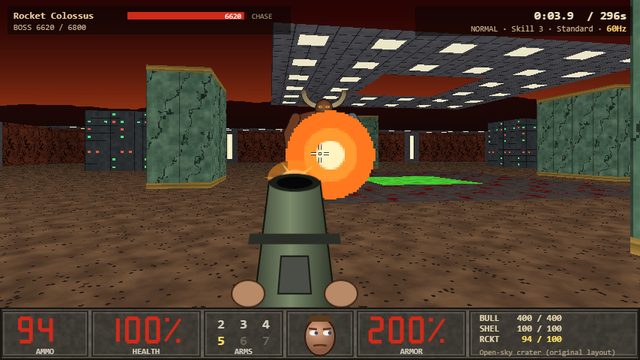
|
| 107 |
+
|
| 108 |
+
### Model output
|
| 109 |
+
|
| 110 |
+
This is the decoded reply from the released GameDojo-4B BF16 checkpoint with greedy decoding (Transformers 5.24.0, PyTorch 2.15.0, Apple MPS). The bundled chat template prefills an empty thinking block. The terminal chat-turn token is removed from the display.
|
| 111 |
+
|
| 112 |
+
```text
|
| 113 |
+
<|action_start|>0 0 0 ; A Shift ; A Shift ; A Shift ; A Shift ; A Shift ; A Shift<|action_end|>
|
| 114 |
+
```
|
| 115 |
+
|
| 116 |
+
All six steps hold `A` and `Shift`, so the agent strafes left at running speed for the entire chunk. Mouse movement and scroll are both zero.
|
| 117 |
+
|
| 118 |
+
<details>
|
| 119 |
+
<summary>Reproduce the example with Transformers</summary>
|
| 120 |
+
|
| 121 |
+
Load `processor` and `model` as shown above. Save the system prompt to `cyberdemon_prompt.txt` and the input image to `cyberdemon.jpg`.
|
| 122 |
+
|
| 123 |
+
```python
|
| 124 |
+
from pathlib import Path
|
| 125 |
+
|
| 126 |
+
from PIL import Image
|
| 127 |
+
import torch
|
| 128 |
+
|
| 129 |
+
system_prompt = Path("cyberdemon_prompt.txt").read_text(encoding="utf-8").rstrip("\n")
|
| 130 |
+
frame = Image.open("cyberdemon.jpg").convert("RGB")
|
| 131 |
+
messages = [
|
| 132 |
+
{"role": "system", "content": system_prompt},
|
| 133 |
+
{"role": "user", "content": [
|
| 134 |
+
{"type": "text", "text": "current game screen"},
|
| 135 |
+
{"type": "image", "image": frame},
|
| 136 |
+
]},
|
| 137 |
+
]
|
| 138 |
+
|
| 139 |
+
inputs = processor.apply_chat_template(
|
| 140 |
+
messages,
|
| 141 |
+
add_generation_prompt=True,
|
| 142 |
+
tokenize=True,
|
| 143 |
+
return_dict=True,
|
| 144 |
+
return_tensors="pt",
|
| 145 |
+
).to(model.device)
|
| 146 |
+
turn_end = processor.tokenizer.convert_tokens_to_ids("<|im_end|>")
|
| 147 |
+
|
| 148 |
+
with torch.inference_mode():
|
| 149 |
+
output = model.generate(
|
| 150 |
+
**inputs, max_new_tokens=96, do_sample=False, eos_token_id=turn_end,
|
| 151 |
+
)
|
| 152 |
+
|
| 153 |
+
new_ids = output[0, inputs["input_ids"].shape[-1]:].tolist()
|
| 154 |
+
if new_ids and new_ids[-1] == turn_end:
|
| 155 |
+
new_ids = new_ids[:-1]
|
| 156 |
+
print(processor.decode(new_ids, skip_special_tokens=False, clean_up_tokenization_spaces=False))
|
| 157 |
+
```
|
| 158 |
+
|
| 159 |
+
</details>
|