

File size: 27,819 Bytes
84eb435 00992f5 84eb435 | 1 2 3 4 5 6 7 8 9 10 11 12 13 14 15 16 17 18 19 20 21 22 23 24 25 26 27 28 29 30 31 32 33 34 35 36 37 38 39 40 41 42 43 44 45 46 47 48 49 50 51 52 53 54 55 56 57 58 59 60 61 62 63 64 65 66 67 68 69 70 71 72 73 74 75 76 77 78 79 80 81 82 83 84 85 86 87 88 89 90 91 92 93 94 95 96 97 98 99 100 101 102 103 104 105 106 107 108 109 110 111 112 113 114 115 116 117 118 119 120 121 122 123 124 125 126 127 128 129 130 131 132 133 134 135 136 137 138 139 140 141 142 143 144 145 146 147 148 149 150 151 152 153 154 155 156 157 158 159 160 161 162 163 164 165 166 167 168 169 170 171 172 173 174 175 176 177 178 179 180 181 182 183 184 185 186 187 188 189 190 191 192 193 194 195 196 197 198 199 200 201 202 203 204 205 206 207 208 209 210 211 212 213 214 215 216 217 218 219 220 221 222 223 224 225 226 227 228 229 230 231 232 233 234 235 236 237 238 239 240 241 242 243 244 245 246 247 248 249 250 251 252 253 254 255 256 257 258 259 260 261 262 263 264 265 266 267 268 269 270 271 272 273 274 275 276 277 278 279 280 281 282 283 284 285 286 287 288 289 290 291 292 293 294 295 296 297 298 299 300 301 302 303 304 305 306 307 308 309 310 311 312 313 314 315 316 317 318 319 320 321 322 323 324 325 326 327 328 329 330 331 332 333 334 335 336 337 338 339 340 341 342 343 344 345 346 347 348 349 350 351 352 353 354 355 356 357 358 359 360 361 362 363 364 365 366 367 368 369 370 371 372 373 374 375 376 377 378 379 380 381 382 383 384 385 386 387 388 389 390 391 392 393 394 395 396 397 398 399 400 401 402 403 404 405 406 407 408 409 410 411 412 413 414 415 416 417 418 419 420 421 422 423 424 425 426 427 428 429 430 431 432 433 434 435 436 437 438 439 440 441 442 443 444 445 446 447 448 449 450 451 452 453 454 455 456 457 458 459 460 461 462 463 464 465 466 467 468 469 470 471 472 473 474 475 476 477 478 479 480 481 482 483 484 485 486 487 488 489 490 491 492 493 494 495 496 497 498 499 500 | ---
license: other
license_name: s-lab-license-1.0
pipeline_tag: image-to-video
library_name: onnx
tags:
- onnx
- moonbox
- onnxruntime
- propainter
- video-inpainting
- object-removal
- optical-flow
- raft
---
# ProPainter ONNX
ONNX builds of [ProPainter](https://github.com/sczhou/ProPainter), made by Moonbox for on-device use with ONNX Runtime (CPU, CUDA, DirectML). Each
precision is one folder holding the graphs and a small Python `pipeline.py` that does the rest (image preprocessing,
the frame loop, mask handling); what the graphs take and return is under *How to run*.
## Files
The last column is the benchmark against the original PyTorch model (details under *How to run*): how closely each
output frame matches the original's on the same clips and masks.
| Precision | File | Size | sha256 | Benchmark |
|---|---|---|---|---|
| fp16 | [`fp16/fc_decoder.onnx`](https://huggingface.co/moonbox-dev/ProPainter-ONNX/blob/main/fp16/fc_decoder.onnx) | 0.6 MB | `48750e6e2291` | inpainted-region PSNR vs the original: mean 52.8 / 54.4 dB, worst frame 43.6 dB; 20.9 / 17.1 s per clip (CUDA; original 39 / 30 s) |
| fp16 | [`fp16/fc_encoder.onnx`](https://huggingface.co/moonbox-dev/ProPainter-ONNX/blob/main/fp16/fc_encoder.onnx) | 1.3 MB | `269ee000d9d5` | inpainted-region PSNR vs the original: mean 52.8 / 54.4 dB, worst frame 43.6 dB; 20.9 / 17.1 s per clip (CUDA; original 39 / 30 s) |
| fp16 | [`fp16/fc_step_backward.onnx`](https://huggingface.co/moonbox-dev/ProPainter-ONNX/blob/main/fp16/fc_step_backward.onnx) | 7.9 MB | `cf55f6d4fa1d` | inpainted-region PSNR vs the original: mean 52.8 / 54.4 dB, worst frame 43.6 dB; 20.9 / 17.1 s per clip (CUDA; original 39 / 30 s) |
| fp16 | [`fp16/fc_step_forward.onnx`](https://huggingface.co/moonbox-dev/ProPainter-ONNX/blob/main/fp16/fc_step_forward.onnx) | 8.5 MB | `338b54350aac` | inpainted-region PSNR vs the original: mean 52.8 / 54.4 dB, worst frame 43.6 dB; 20.9 / 17.1 s per clip (CUDA; original 39 / 30 s) |
| fp16 | [`fp16/gen_encoder.onnx`](https://huggingface.co/moonbox-dev/ProPainter-ONNX/blob/main/fp16/gen_encoder.onnx) | 8.4 MB | `29bcde1a374d` | inpainted-region PSNR vs the original: mean 52.8 / 54.4 dB, worst frame 43.6 dB; 20.9 / 17.1 s per clip (CUDA; original 39 / 30 s) |
| fp16 | [`fp16/gen_step_backward.onnx`](https://huggingface.co/moonbox-dev/ProPainter-ONNX/blob/main/fp16/gen_step_backward.onnx) | 6.8 MB | `a3e60860c293` | inpainted-region PSNR vs the original: mean 52.8 / 54.4 dB, worst frame 43.6 dB; 20.9 / 17.1 s per clip (CUDA; original 39 / 30 s) |
| fp16 | [`fp16/gen_step_forward.onnx`](https://huggingface.co/moonbox-dev/ProPainter-ONNX/blob/main/fp16/gen_step_forward.onnx) | 6.8 MB | `f33655516654` | inpainted-region PSNR vs the original: mean 52.8 / 54.4 dB, worst frame 43.6 dB; 20.9 / 17.1 s per clip (CUDA; original 39 / 30 s) |
| fp16 | [`fp16/gen_transformer.onnx`](https://huggingface.co/moonbox-dev/ProPainter-ONNX/blob/main/fp16/gen_transformer.onnx) | 66.6 MB | `e4d7aec32f7f` | inpainted-region PSNR vs the original: mean 52.8 / 54.4 dB, worst frame 43.6 dB; 20.9 / 17.1 s per clip (CUDA; original 39 / 30 s) |
| fp16 | [`fp16/img_step.onnx`](https://huggingface.co/moonbox-dev/ProPainter-ONNX/blob/main/fp16/img_step.onnx) | 17.8 kB | `49973fad918f` | inpainted-region PSNR vs the original: mean 52.8 / 54.4 dB, worst frame 43.6 dB; 20.9 / 17.1 s per clip (CUDA; original 39 / 30 s) |
| fp16 | [`fp16/pipeline.py`](https://huggingface.co/moonbox-dev/ProPainter-ONNX/blob/main/fp16/pipeline.py) | 13.3 kB | `608ba7424349` | inpainted-region PSNR vs the original: mean 52.8 / 54.4 dB, worst frame 43.6 dB; 20.9 / 17.1 s per clip (CUDA; original 39 / 30 s) |
| fp16 | [`fp16/raft.onnx`](https://huggingface.co/moonbox-dev/ProPainter-ONNX/blob/main/fp16/raft.onnx) | 21.6 MB | `2b8b0cb0b202` | inpainted-region PSNR vs the original: mean 52.8 / 54.4 dB, worst frame 43.6 dB; 20.9 / 17.1 s per clip (CUDA; original 39 / 30 s) |
| int8 | [`int8/fc_decoder.onnx`](https://huggingface.co/moonbox-dev/ProPainter-ONNX/blob/main/int8/fc_decoder.onnx) | 0.3 MB | `d1053b01b442` | weight-only int8: inpainted-region PSNR mean 42.2 / 43.5 dB, worst frame 35.8 dB; 23.7 / 20.5 s per clip (CUDA) |
| int8 | [`int8/fc_encoder.onnx`](https://huggingface.co/moonbox-dev/ProPainter-ONNX/blob/main/int8/fc_encoder.onnx) | 0.7 MB | `949766e8c135` | weight-only int8: inpainted-region PSNR mean 42.2 / 43.5 dB, worst frame 35.8 dB; 23.7 / 20.5 s per clip (CUDA) |
| int8 | [`int8/fc_step_backward.onnx`](https://huggingface.co/moonbox-dev/ProPainter-ONNX/blob/main/int8/fc_step_backward.onnx) | 2.9 MB | `c8f887385659` | weight-only int8: inpainted-region PSNR mean 42.2 / 43.5 dB, worst frame 35.8 dB; 23.7 / 20.5 s per clip (CUDA) |
| int8 | [`int8/fc_step_forward.onnx`](https://huggingface.co/moonbox-dev/ProPainter-ONNX/blob/main/int8/fc_step_forward.onnx) | 3.0 MB | `73071dbb750b` | weight-only int8: inpainted-region PSNR mean 42.2 / 43.5 dB, worst frame 35.8 dB; 23.7 / 20.5 s per clip (CUDA) |
| int8 | [`int8/gen_encoder.onnx`](https://huggingface.co/moonbox-dev/ProPainter-ONNX/blob/main/int8/gen_encoder.onnx) | 4.2 MB | `e69ecdc695b2` | weight-only int8: inpainted-region PSNR mean 42.2 / 43.5 dB, worst frame 35.8 dB; 23.7 / 20.5 s per clip (CUDA) |
| int8 | [`int8/gen_step_backward.onnx`](https://huggingface.co/moonbox-dev/ProPainter-ONNX/blob/main/int8/gen_step_backward.onnx) | 2.2 MB | `dc50acb1ea89` | weight-only int8: inpainted-region PSNR mean 42.2 / 43.5 dB, worst frame 35.8 dB; 23.7 / 20.5 s per clip (CUDA) |
| int8 | [`int8/gen_step_forward.onnx`](https://huggingface.co/moonbox-dev/ProPainter-ONNX/blob/main/int8/gen_step_forward.onnx) | 2.2 MB | `d17994ba880e` | weight-only int8: inpainted-region PSNR mean 42.2 / 43.5 dB, worst frame 35.8 dB; 23.7 / 20.5 s per clip (CUDA) |
| int8 | [`int8/gen_transformer.onnx`](https://huggingface.co/moonbox-dev/ProPainter-ONNX/blob/main/int8/gen_transformer.onnx) | 34.8 MB | `551d2cedd7d8` | weight-only int8: inpainted-region PSNR mean 42.2 / 43.5 dB, worst frame 35.8 dB; 23.7 / 20.5 s per clip (CUDA) |
| int8 | [`int8/img_step.onnx`](https://huggingface.co/moonbox-dev/ProPainter-ONNX/blob/main/int8/img_step.onnx) | 17.8 kB | `49973fad918f` | weight-only int8: inpainted-region PSNR mean 42.2 / 43.5 dB, worst frame 35.8 dB; 23.7 / 20.5 s per clip (CUDA) |
| int8 | [`int8/pipeline.py`](https://huggingface.co/moonbox-dev/ProPainter-ONNX/blob/main/int8/pipeline.py) | 13.3 kB | `608ba7424349` | weight-only int8: inpainted-region PSNR mean 42.2 / 43.5 dB, worst frame 35.8 dB; 23.7 / 20.5 s per clip (CUDA) |
| int8 | [`int8/raft.onnx`](https://huggingface.co/moonbox-dev/ProPainter-ONNX/blob/main/int8/raft.onnx) | 5.9 MB | `1ab239cd357d` | weight-only int8: inpainted-region PSNR mean 42.2 / 43.5 dB, worst frame 35.8 dB; 23.7 / 20.5 s per clip (CUDA) |
## How to run
ProPainter (S-Lab, NTU: video inpainting and object removal from per-frame masks) as ten ONNX graphs plus
`pipeline.py`, a numpy runtime that reproduces the repository's `inference_propainter.py` (video inpainting mode, its
defaults) around them. **Non-commercial use only** (S-Lab License 1.0, below).
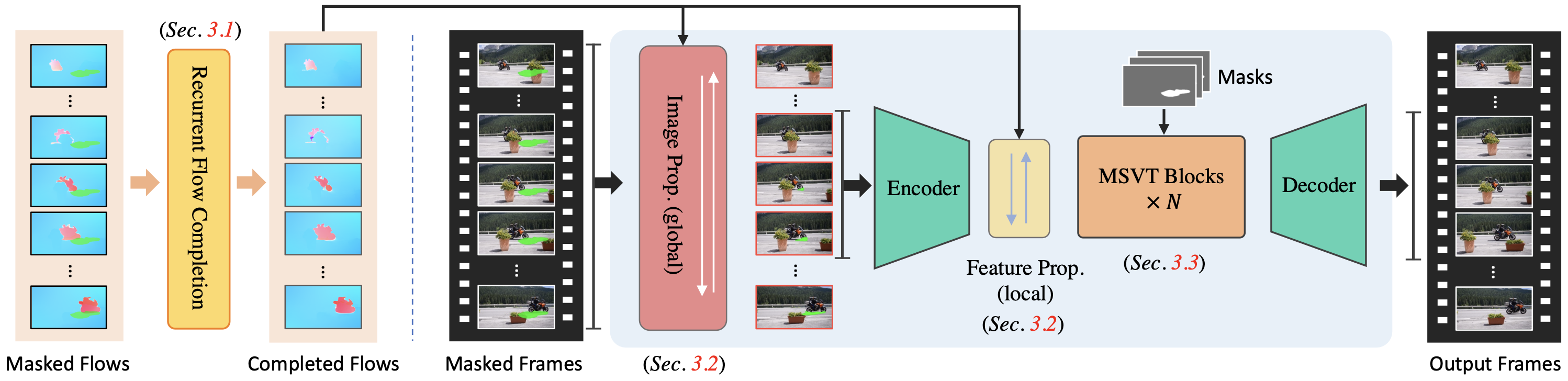
ProPainter works in three stages: optical flow between frames (RAFT), flow completion inside the masked regions,
then a generator that propagates pixels and features along the completed flow and fills the rest with a temporal
sparse transformer. The recurrent passes over frames are exported one step per graph; `pipeline.py` runs the loops.
- `raft.onnx`: `image1`, `image2` [N, 3, H, W] in [-1, 1] -> `flow` [N, 2, H, W] (20 refinement iterations).
- Flow completion:
- `fc_encoder.onnx`: masked `flows` [1, T, 2, H, W] and `masks` [1, T, 1, H, W] -> features at 1/8 and 1/4 scale.
- `fc_step_backward.onnx` / `fc_step_forward.onnx`: one frame of its second-order deformable propagation.
- `fc_decoder.onnx`: fusion and decoder -> completed flow [T, 2, H, W].
- `img_step.onnx`: one frame of the image propagation (flow warping with a forward-backward consistency check; no
learned weights).
- Generator:
- `gen_encoder.onnx`: frames, masks and updated masks [t, ...] -> features [t, 128, H/4, W/4].
- `gen_step_backward.onnx` / `gen_step_forward.onnx`: one frame of its deformable feature propagation.
- `gen_transformer.onnx`: fusion, the temporal sparse transformer and the decoder -> frames [l_t, 3, H, W].
All graphs take any frame size that is a multiple of 8. `pipeline.py` resizes other sizes down to the nearest one,
as the original does.
`pipeline.py` reproduces the original's steps:
- **Masks:** dilated by 4 pixels, for flow and for inpainting.
- **Flow:** RAFT in short clips (12 frames up to 640 px wide). Flow completion in sub-videos of 80.
- **Propagation:** image propagation in sub-videos of 100.
- **Generator:** windows of 11 neighbouring frames plus reference frames every 10th frame; overlapping windows are
averaged.
- **Output:** inpainted pixels composited back into the input frames.
It needs numpy, scipy, onnxruntime (or onnxruntime-gpu) and Pillow:
```python
import sys
from PIL import Image
from pathlib import Path
sys.path.insert(0, "fp16")
import pipeline
pp = pipeline.ProPainter("fp16", "cuda")
frames = [Image.open(p).convert("RGB") for p in sorted(Path("clip").iterdir())]
masks = [Image.open(p) for p in sorted(Path("clip_mask").iterdir())] # white = remove; or a single mask image
out = pp(frames, masks) # list of uint8 RGB frames
```
Or from the command line: `python fp16/pipeline.py clip_frames/ clip_masks/ out/ --cuda`. The repository's video
outpainting mode isn't ported. On Windows, give CUDA sessions the run option `memory.enable_memory_arena_shrinkage` =
`gpu:0`, as `pipeline.py` does.
**How the graphs differ from the PyTorch modules (same arithmetic).**
- Deformable convolutions are written as GridSample per kernel tap plus a MatMul. ONNX Runtime 1.23 has no DeformConv
kernel. This form matches torchvision's to 3e-6.
- The sparse transformer picks attention per window with a data-dependent loop. In the graph, both attention kinds
are computed for every window and selected with the window mask.
- Its fold step is a grouped transposed convolution.
- Sizes are computed from the input shape, so any frame size works.
Running the exported loop with the original PyTorch modules reproduces the original's frames to 81 dB PSNR.
**Precisions.**
- `fp16/`: the encoders, decoders and the transformer in fp16 math (fp32 inputs / outputs). RAFT and the per-frame
step graphs stay fp32: their weights are small, and ONNX Runtime's CUDA provider runs fp16 GridSample on the CPU
(RAFT took 1.1 s per call instead of 79 ms).
- `int8/`: weight-only int8 (per output channel) on every network's convolutions and matmuls.
- `img_step` has no weights and stays fp32 in both.
- No bf16 (fp16 passes) and no int4: this is a convolutional network, and 4-bit MatMulNBits would cover only the
transformer.
**Benchmark.**
- **Clips:** the repository's two sample clips with their masks (object removal): bmx-trees (80 frames) and tennis
(70 frames), 432 x 240.
- **Original:** `inference_propainter.py` in fp32 on CUDA with its defaults.
- **Score:** PSNR of every output frame against the original's, over the dilated mask, i.e. the inpainted pixels
(outside it both copy the input). Mean over frames, and the worst frame.
- **Pass mark:** at least 30 dB on every frame.
- **Timing:** seconds per clip on an RTX 3080 Laptop GPU (16 GB), whole pipeline including RAFT.
| | inpainted region, bmx-trees: mean / worst | tennis: mean / worst | seconds per clip |
|---|---|---|---|
| original (PyTorch fp32, CUDA) | - | - | 39 / 30 |
| ONNX graphs in fp32 (not published) | 58.2 / 49.0 dB | 58.7 / 50.4 dB | 25 / 21 |
| `fp16/` (CUDA) | 52.8 / 43.6 dB | 54.4 / 49.5 dB | 21 / 17 |
| `int8/` (CUDA) | 42.2 / 35.8 dB | 43.5 / 39.1 dB | 24 / 21 |
Both builds remove the objects the same way the original does. Side by side, the int8 frames are indistinguishable
from the original's.
Before the benchmark, each graph was checked against its PyTorch module (largest absolute difference, float32), at a
frame size and frame count other than those it was exported at:
- The flow completion and generator graphs: at most 7e-5.
- The image propagation step: exact.
- RAFT: 2e-4 to 1e-3 on flows of about 3 pixels.
## How these were made
From [ProPainter](https://github.com/sczhou/ProPainter) at revision `326782529a`. The graphs were exported from the original PyTorch modules with
torch.onnx (opset 17 / 18) and checked against them. Weight-only quantization: int8 is a per-output-channel int8
weight behind DequantizeLinear, int4 is ONNX Runtime's MatMulNBits (block 32). Each card above says which precision
every graph uses. Every precision was benchmarked against the original before upload (the pass mark is under *How to run*), and the
`sha256` column above is what the files must hash to.
## License
S-Lab License 1.0 (non-commercial). These files are a derivative of the original model and carry its license: it is copied in this
repository, and it governs your use of these files. The original model card follows unchanged.
---
# Original model card
<div align="center">
<div class="logo">
<a href="https://shangchenzhou.com/projects/ProPainter/">
<img src="https://raw.githubusercontent.com/sczhou/ProPainter/326782529a63d997cab80ab21439b92ed422b3d3/assets/propainter_logo1_glow.png" style="width: 180px">
</a>
</div>
<h1>ProPainter: Improving Propagation and Transformer for Video Inpainting</h1>
<div>
<a href='https://shangchenzhou.com/' target='_blank'>Shangchen Zhou</a> 
<a href='https://li-chongyi.github.io/' target='_blank'>Chongyi Li</a> 
<a href='https://ckkelvinchan.github.io/' target='_blank'>Kelvin C.K. Chan</a> 
<a href='https://www.mmlab-ntu.com/person/ccloy/' target='_blank'>Chen Change Loy</a>
</div>
<div>
S-Lab, Nanyang Technological University 
</div>
<div>
<strong>ICCV 2023</strong>
</div>
<div>
<h4 align="center">
<a href="https://shangchenzhou.com/projects/ProPainter" target='_blank'>
<img src="https://img.shields.io/badge/🐳-Project%20Page-blue">
</a>
<a href="https://arxiv.org/abs/2309.03897" target='_blank'>
<img src="https://img.shields.io/badge/arXiv-2309.03897-b31b1b.svg">
</a>
<a href="https://youtu.be/92EHfgCO5-Q" target='_blank'>
<img src="https://img.shields.io/badge/Demo%20Video-%23FF0000.svg?logo=YouTube&logoColor=white">
</a>
<a href="https://huggingface.co/spaces/sczhou/ProPainter" target='_blank'>
<img src="https://img.shields.io/badge/Demo-%F0%9F%A4%97%20Hugging%20Face-blue">
</a>
<a href="https://openxlab.org.cn/apps/detail/ShangchenZhou/ProPainter" target='_blank'>
<img src="https://img.shields.io/badge/Demo-%F0%9F%91%A8%E2%80%8D%F0%9F%8E%A8%20OpenXLab-blue">
</a>
<img src="https://api.infinitescript.com/badgen/count?name=sczhou/ProPainter">
</h4>
</div>
⭐ If ProPainter is helpful to your projects, please help star this repo. Thanks! 🤗
:open_book: For more visual results, go checkout our <a href="https://shangchenzhou.com/projects/ProPainter/" target="_blank">project page</a>
---
</div>
## Update
- **2026.10.27**: Our [Hugging Face demo](https://huggingface.co/spaces/sczhou/ProPainter) now supports SAM 2.1 for interactive video segmentation. Try the updated demo! 🤗
- **2023.11.09**: Integrated to :man_artist: [OpenXLab](https://openxlab.org.cn/apps). Try out online demo! [](https://openxlab.org.cn/apps/detail/ShangchenZhou/ProPainter)
- **2023.11.09**: Integrated to :hugs: [Hugging Face](https://huggingface.co/spaces). Try out online demo! [](https://huggingface.co/spaces/sczhou/ProPainter)
- **2023.09.24**: We remove the watermark removal demos officially to prevent the misuse of our work for unethical purposes.
- **2023.09.21**: Add features for memory-efficient inference. Check our [GPU memory](https://github.com/sczhou/ProPainter#-memory-efficient-inference) requirements. 🚀
- **2023.09.07**: Our code and model are publicly available. 🐳
- **2023.09.01**: This repo is created.
### TODO
- [ ] Make a Colab demo.
- [x] ~~Make a interactive Gradio demo.~~
- [x] ~~Update features for memory-efficient inference.~~
## Results
#### 👨🏻🎨 Object Removal
<table>
<tr>
<td>
<img src="https://raw.githubusercontent.com/sczhou/ProPainter/326782529a63d997cab80ab21439b92ed422b3d3/assets/object_removal1.gif">
</td>
<td>
<img src="https://raw.githubusercontent.com/sczhou/ProPainter/326782529a63d997cab80ab21439b92ed422b3d3/assets/object_removal2.gif">
</td>
</tr>
</table>
#### 🎨 Video Completion
<table>
<tr>
<td>
<img src="https://raw.githubusercontent.com/sczhou/ProPainter/326782529a63d997cab80ab21439b92ed422b3d3/assets/video_completion1.gif">
</td>
<td>
<img src="https://raw.githubusercontent.com/sczhou/ProPainter/326782529a63d997cab80ab21439b92ed422b3d3/assets/video_completion2.gif">
</td>
</tr>
<tr>
<td>
<img src="https://raw.githubusercontent.com/sczhou/ProPainter/326782529a63d997cab80ab21439b92ed422b3d3/assets/video_completion3.gif">
</td>
<td>
<img src="https://raw.githubusercontent.com/sczhou/ProPainter/326782529a63d997cab80ab21439b92ed422b3d3/assets/video_completion4.gif">
</td>
</tr>
</table>
## Overview
## Dependencies and Installation
1. Clone Repo
```bash
git clone https://github.com/sczhou/ProPainter.git
```
2. Create Conda Environment and Install Dependencies
```bash
# create new anaconda env
conda create -n propainter python=3.8 -y
conda activate propainter
# install python dependencies
pip3 install -r requirements.txt
```
- CUDA >= 9.2
- PyTorch >= 1.7.1
- Torchvision >= 0.8.2
- Other required packages in `requirements.txt`
## Get Started
### Prepare pretrained models
Download our pretrained models from [Releases V0.1.0](https://github.com/sczhou/ProPainter/releases/tag/v0.1.0) to the `weights` folder. (All pretrained models can also be automatically downloaded during the first inference.)
The directory structure will be arranged as:
```
weights
|- ProPainter.pth
|- recurrent_flow_completion.pth
|- raft-things.pth
|- i3d_rgb_imagenet.pt (for evaluating VFID metric)
|- README.md
```
### 🏂 Quick test
We provide some examples in the [`inputs`](https://raw.githubusercontent.com/sczhou/ProPainter/326782529a63d997cab80ab21439b92ed422b3d3/inputs) folder.
Run the following commands to try it out:
```shell
# The first example (object removal)
python inference_propainter.py --video inputs/object_removal/bmx-trees --mask inputs/object_removal/bmx-trees_mask
# The second example (video completion)
python inference_propainter.py --video inputs/video_completion/running_car.mp4 --mask inputs/video_completion/mask_square.png --height 240 --width 432
```
The results will be saved in the `results` folder.
To test your own videos, please prepare the input `mp4 video` (or `split frames`) and `frame-wise mask(s)`.
If you want to specify the video resolution for processing or avoid running out of memory, you can set the video size of `--width` and `--height`:
```shell
# process a 576x320 video; set --fp16 to use fp16 (half precision) during inference.
python inference_propainter.py --video inputs/video_completion/running_car.mp4 --mask inputs/video_completion/mask_square.png --height 320 --width 576 --fp16
```
#### 💃🏻 Interactive Demo
We also provide an interactive demo for object removal, allowing users to select any object they wish to remove from a video. You can try the demo on [Hugging Face](https://huggingface.co/spaces/sczhou/ProPainter) or run it [locally](https://github.com/sczhou/ProPainter/tree/main/web-demos/hugging_face).
<div align="center">
<img src="https://raw.githubusercontent.com/sczhou/ProPainter/326782529a63d997cab80ab21439b92ed422b3d3/web-demos/hugging_face/assets/demo.gif" alt="Demo GIF" style="max-width: 512px; height: auto;">
</div>
*Please note that the demo's interface and usage may differ from the GIF animation above. For detailed instructions, refer to the [user guide](https://github.com/sczhou/ProPainter/blob/main/web-demos/hugging_face/README.md).*
### 🚀 Memory-efficient inference
Video inpainting typically requires a significant amount of GPU memory. Here, we offer various features that facilitate memory-efficient inference, effectively avoiding the Out-Of-Memory (OOM) error. You can use the following options to reduce memory usage further:
- Reduce the number of local neighbors through decreasing the `--neighbor_length` (default 10).
- Reduce the number of global references by increasing the `--ref_stride` (default 10).
- Set the `--resize_ratio` (default 1.0) to resize the processing video.
- Set a smaller video size via specifying the `--width` and `--height`.
- Set `--fp16` to use fp16 (half precision) during inference.
- Reduce the frames of sub-videos `--subvideo_length` (default 80), which effectively decouples GPU memory costs and video length.
Blow shows the estimated GPU memory requirements for different sub-video lengths with fp32/fp16 precision:
| Resolution | 50 frames | 80 frames |
| :--- | :----: | :----: |
| 1280 x 720 | 28G / 19G | OOM / 25G |
| 720 x 480 | 11G / 7G | 13G / 8G |
| 640 x 480 | 10G / 6G | 12G / 7G |
| 320 x 240 | 3G / 2G | 4G / 3G |
## Dataset preparation
<table>
<thead>
<tr>
<th>Dataset</th>
<th>YouTube-VOS</th>
<th>DAVIS</th>
</tr>
</thead>
<tbody>
<tr>
<td>Description</td>
<td>For training (3,471) and evaluation (508)</td>
<td>For evaluation (50 in 90)</td>
<tr>
<td>Images</td>
<td> [<a href="https://competitions.codalab.org/competitions/19544#participate-get-data">Official Link</a>] (Download train and test all frames) </td>
<td> [<a href="https://data.vision.ee.ethz.ch/csergi/share/davis/DAVIS-2017-trainval-480p.zip">Official Link</a>] (2017, 480p, TrainVal) </td>
</tr>
<tr>
<td>Masks</td>
<td colspan="2"> [<a href="https://drive.google.com/file/d/1dFTneS_zaJAHjglxU10gYzr1-xALgHa4/view?usp=sharing">Google Drive</a>] [<a href="https://pan.baidu.com/s/1JC-UKmlQfjhVtD81196cxA?pwd=87e3">Baidu Disk</a>] (For reproducing paper results; provided in <a href="https://arxiv.org/abs/2309.03897">ProPainter</a> paper) </td>
</tr>
</tbody>
</table>
The training and test split files are provided in `datasets/<dataset_name>`. For each dataset, you should place `JPEGImages` to `datasets/<dataset_name>`. Resize all video frames to size `432x240` for training. Unzip downloaded mask files to `datasets`.
The `datasets` directory structure will be arranged as: (**Note**: please check it carefully)
```
datasets
|- davis
|- JPEGImages_432_240
|- <video_name>
|- 00000.jpg
|- 00001.jpg
|- test_masks
|- <video_name>
|- 00000.png
|- 00001.png
|- train.json
|- test.json
|- youtube-vos
|- JPEGImages_432_240
|- <video_name>
|- 00000.jpg
|- 00001.jpg
|- test_masks
|- <video_name>
|- 00000.png
|- 00001.png
|- train.json
|- test.json
```
## Training
Our training configures are provided in [`train_flowcomp.json`](https://raw.githubusercontent.com/sczhou/ProPainter/326782529a63d997cab80ab21439b92ed422b3d3/configs/train_flowcomp.json) (for Recurrent Flow Completion Network) and [`train_propainter.json`](https://raw.githubusercontent.com/sczhou/ProPainter/326782529a63d997cab80ab21439b92ed422b3d3/configs/train_propainter.json) (for ProPainter).
Run one of the following commands for training:
```shell
# For training Recurrent Flow Completion Network
python train.py -c configs/train_flowcomp.json
# For training ProPainter
python train.py -c configs/train_propainter.json
```
You can run the **same command** to **resume** your training.
To speed up the training process, you can precompute optical flow for the training dataset using the following command:
```shell
# Compute optical flow for training dataset
python scripts/compute_flow.py --root_path <dataset_root> --save_path <save_flow_root> --height 240 --width 432
```
## Evaluation
Run one of the following commands for evaluation:
```shell
# For evaluating flow completion model
python scripts/evaluate_flow_completion.py --dataset <dataset_name> --video_root <video_root> --mask_root <mask_root> --save_results
# For evaluating ProPainter model
python scripts/evaluate_propainter.py --dataset <dataset_name> --video_root <video_root> --mask_root <mask_root> --save_results
```
The scores and results will also be saved in the `results_eval` folder.
Please `--save_results` for further [evaluating temporal warping error](https://github.com/phoenix104104/fast_blind_video_consistency#evaluation).
## Citation
If you find our repo useful for your research, please consider citing our paper:
```bibtex
@inproceedings{zhou2023propainter,
title={{ProPainter}: Improving Propagation and Transformer for Video Inpainting},
author={Zhou, Shangchen and Li, Chongyi and Chan, Kelvin C.K and Loy, Chen Change},
booktitle={Proceedings of IEEE International Conference on Computer Vision (ICCV)},
year={2023}
}
```
## License
#### Non-Commercial Use Only Declaration
The ProPainter is made available for use, reproduction, and distribution strictly for non-commercial purposes. The code and models are licensed under <a rel="license" href="./LICENSE">NTU S-Lab License 1.0</a>. Redistribution and use should follow this license.
For inquiries or to obtain permission for commercial use, please consult Dr. Shangchen Zhou (shangchenzhou@gmail.com).
## Projects that use ProPainter
If you develop or use ProPainter in your projects, feel free to let me know. Also, please include this [ProPainter](https://github.com/sczhou/ProPainter) repo link, authorship information, and our [S-Lab license](https://github.com/sczhou/ProPainter/blob/main/LICENSE) (with link).
#### Projects/Applications from the Community
- Streaming ProPainter: https://github.com/osmr/propainter
- Faster ProPainter: https://github.com/halfzm/faster-propainter
- ProPainter WebUI: https://github.com/halfzm/ProPainter-Webui
- ProPainter ComfyUI: https://github.com/daniabib/ComfyUI_ProPainter_Nodes
- Cutie (video segmentation): https://github.com/hkchengrex/Cutie
- Cinetransfer (character transfer): https://virtualfilmstudio.github.io/projects/cinetransfer
- Motionshop (character transfer): https://aigc3d.github.io/motionshop
#### PyPI
- propainter: https://pypi.org/project/propainter
- pytorchcv: https://pypi.org/project/pytorchcv
## Contact
If you have any questions, please feel free to reach me out at shangchenzhou@gmail.com.
## Acknowledgement
This code is based on [E<sup>2</sup>FGVI](https://github.com/MCG-NKU/E2FGVI) and [STTN](https://github.com/researchmm/STTN). Some code are brought from [BasicVSR++](https://github.com/ckkelvinchan/BasicVSR_PlusPlus). Thanks for their awesome works.
Special thanks to [Yihang Luo](https://github.com/Luo-Yihang) for his valuable contributions to build and maintain the Gradio demos for ProPainter.
|