


ACE-Brain
Collection
3 items • Updated
ACE-Brain-0.6-9B is a 9B vision-language model that strengthens spatial grounding for physical foundation models. Given one or more images and a natural-language query, it identifies task-relevant objects, counts instances, resolves spatial relationships, and localizes interaction targets.
Built on Qwen3.5-9B, ACE-Brain-0.6-9B is fine-tuned on approximately 1.5 million training samples. A unified data pipeline converts robot manipulation recordings, egocentric interactions, object and part annotations, and spatial data into verifiable grounding supervision. Training updates the language-model parameters while keeping the vision encoder frozen.
On seven public grounding benchmarks, ACE-Brain-0.6-9B achieves a reported Avg-7 of 75.41, compared with 73.68 for GPT-6 Astra. It exceeds Astra on four of seven benchmarks, with remaining gaps on PixMo-Count, RefSpatial, and PointArena.
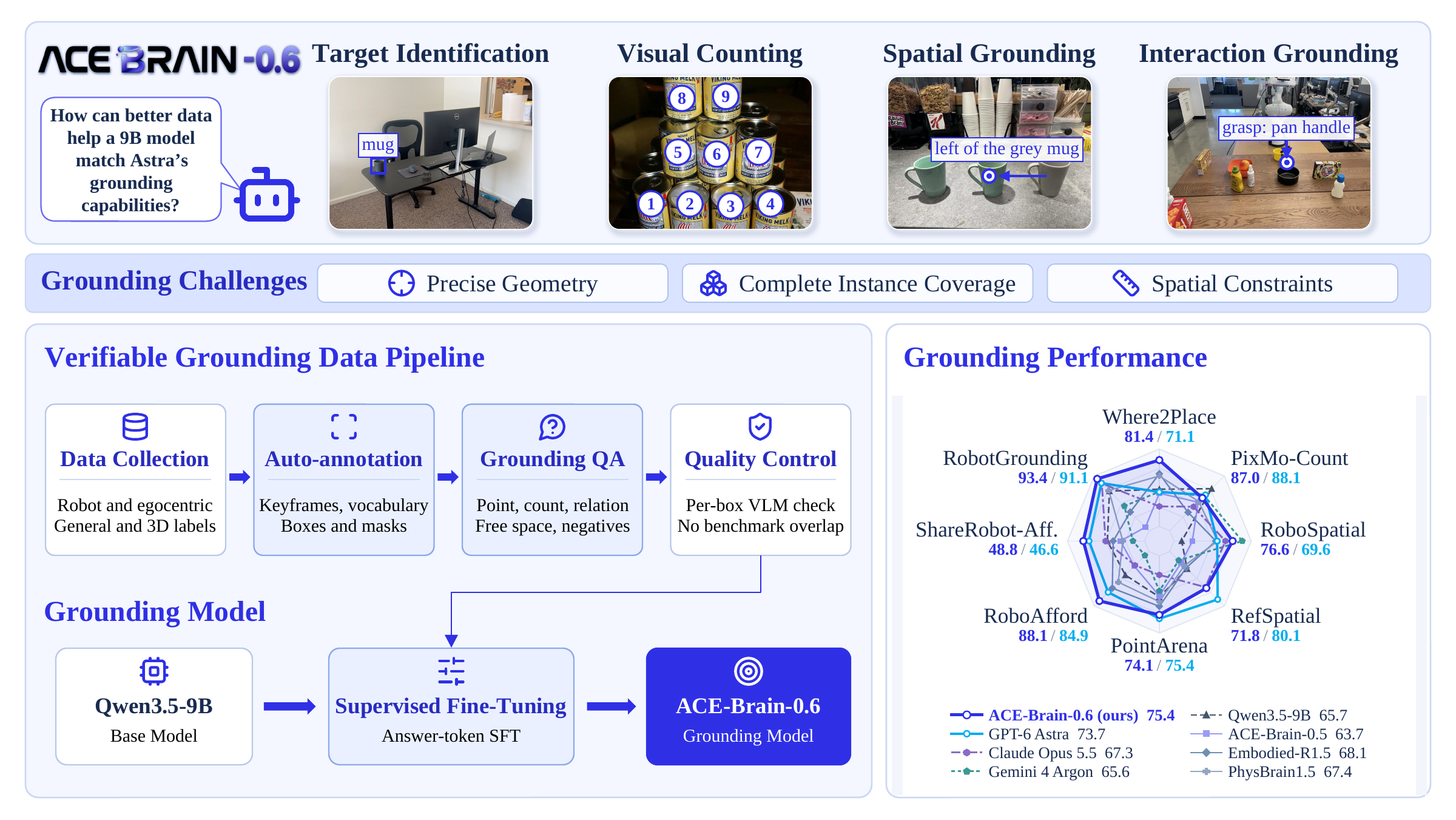
yes, no, or none) for target identification, multi-instance perception, spatial grounding, and interaction grounding.Results below are reported in Table 1 of the paper. Higher is better; bold marks the best score among the models shown.
| Benchmark | GPT-5.5 | GPT-5.6-sol | GPT-6 Astra | Claude Opus 5.5 | Gemini 4 Argon | ACE-Brain-0.6-9B |
|---|---|---|---|---|---|---|
| Where2Place | 45.25 | 46.23 | 71.10 | 66.44 | 71.20 | 81.44 |
| PixMo-Count | 82.61 | 83.55 | 88.10 | 83.74 | 87.71 | 86.96 |
| RoboSpatial | 59.19 | 64.34 | 69.55 | 73.30 | 80.94 | 76.56 |
| RefSpatial | 60.29 | 54.51 | 80.14 | 71.10 | 51.56 | 71.84 |
| PointArena | 68.02 | 69.76 | 75.36 | 61.20 | 66.40 | 74.13 |
| RoboAfford | 68.04 | 71.45 | 84.94 | 75.10 | 71.48 | 88.14 |
| ShareRobot (affordance) | 38.57 | 36.66 | 46.60 | 40.20 | 29.53 | 48.82 |
| Avg-7 · public benchmarks | 60.28 | 60.93 | 73.68 | 67.30 | 65.55 | 75.41 |
| RobotGrounding · in-house benchmark | 83.96 | 85.18 | 91.10 | 90.89 | 78.51 | 93.42 |
Avg-7 is the unweighted mean of the seven public benchmark scores. RobotGrounding is evaluated separately and is not included in Avg-7. It contains 2,591 questions and reports a macro average over 14 scoring groups.
Install a Transformers version with Qwen3.5 support:
pip install -U "transformers>=5.2.0" accelerate torch torchvision pillow
The example uses the checkpoint and processor files from this repository in non-thinking mode. Replace scene.jpg and the query with your own image and grounding instruction.
import torch
from PIL import Image
from transformers import AutoProcessor, Qwen3_5ForConditionalGeneration

model_id = "ACERobotics/ACE-Brain-0.6-9B"

processor = AutoProcessor.from_pretrained(model_id)
model = Qwen3_5ForConditionalGeneration.from_pretrained(
    model_id,
    dtype="auto",
    device_map="auto",
).eval()

image = Image.open("scene.jpg").convert("RGB")
messages = [
    {
        "role": "user",
        "content": [
            {"type": "image", "image": image},
            {
                "type": "text",
                "text": (
                    "Point to the red cup in the image. "
                    "Return a point as [[x, y]], with integer coordinates "
                    "normalized to [0, 1000]. Return none if it is absent."
                ),
            },
        ],
    }
]

inputs = processor.apply_chat_template(
    messages,
    tokenize=True,
    add_generation_prompt=True,
    enable_thinking=False,
    return_dict=True,
    return_tensors="pt",
).to(model.device)

with torch.inference_mode():
    generated_ids = model.generate(
        **inputs,
        max_new_tokens=128,
        do_sample=False,
    )

answer_ids = generated_ids[:, inputs["input_ids"].shape[1]:]
answer = processor.batch_decode(
    answer_ids,
    skip_special_tokens=True,
    clean_up_tokenization_spaces=False,
)[0]
print(answer)
Grounding coordinates are integers normalized to [0, 1000] along each image axis. Depending on the query, the model can return a point, a list of points, a box, a count, or a categorical answer. Free-space grounding identifies unoccupied 2D regions and does not by itself establish 3D placement feasibility.
The example uses greedy decoding for simplicity. The reported benchmarks use temperature 0.2 and a 128-token output budget, except PixMo-Count, which uses 1,024 tokens. See the report for the full evaluation protocol and the Transformers Qwen3.5 documentation for the model interface.
If you find ACE-Brain-0.6-9B useful for your research and applications, please cite our paper:
ACE-Brain-0.6: Scaling Spatial Grounding for Physical Foundation Models · PDF
@misc{wang2026acebrain06scalingspatialgrounding,
      title={ACE-Brain-0.6: Scaling Spatial Grounding for Physical Foundation Models},
      author={Yinhe Wang and Tao Tao and Zexin He and Shuang Luo and Wei Mao and Yao Mu and Feng Pan and Hanming Deng and Lewei Lu and Zhi Hou and Xingang Pan and Dahua Lin and Dacheng Tao and Xiaogang Wang},
      year={2026},
      eprint={2610.27040},
      archivePrefix={arXiv},
      primaryClass={cs.RO},
      url={https://arxiv.org/abs/2610.27040},
}
docker model run hf.co/ACERobotics/ACE-Brain-0.6-9B