Instructions to use AnkitAI/TinyJev-4B with libraries, inference providers, notebooks, and local apps. Follow these links to get started.
- Libraries
- Transformers
How to use AnkitAI/TinyJev-4B with Transformers:
# Use a pipeline as a high-level helper from transformers import pipeline pipe = pipeline("text-classification", model="AnkitAI/TinyJev-4B") messages = [ { "role": "user", "content": [ {"type": "image", "url": "https://huggingface.co/datasets/huggingface/documentation-images/resolve/main/p-blog/candy.JPG"}, {"type": "text", "text": "What animal is on the candy?"} ] }, ] pipe(text=messages)# Load model directly from transformers import AutoProcessor, AutoModelForMultimodalLM processor = AutoProcessor.from_pretrained("AnkitAI/TinyJev-4B") model = AutoModelForMultimodalLM.from_pretrained("AnkitAI/TinyJev-4B", device_map="auto") messages = [ { "role": "user", "content": [ {"type": "image", "url": "https://huggingface.co/datasets/huggingface/documentation-images/resolve/main/p-blog/candy.JPG"}, {"type": "text", "text": "What animal is on the candy?"} ] }, ] inputs = processor.apply_chat_template( messages, add_generation_prompt=True, tokenize=True, return_dict=True, return_tensors="pt", ).to(model.device) outputs = model.generate(**inputs, max_new_tokens=40) print(processor.decode(outputs[0][inputs["input_ids"].shape[-1]:])) - Notebooks
- Google Colab
- Kaggle
- Local Apps Settings
- llama.cpp
How to use AnkitAI/TinyJev-4B with llama.cpp:
Install (macOS, Linux)
curl -LsSf https://llama.app/install.sh | sh # Start a local OpenAI-compatible server with a web UI: llama serve -hf AnkitAI/TinyJev-4B:Q4_K_M # Run inference directly in the terminal: llama cli -hf AnkitAI/TinyJev-4B:Q4_K_M
Install from WinGet (Windows)
winget install llama.cpp # Start a local OpenAI-compatible server with a web UI: llama serve -hf AnkitAI/TinyJev-4B:Q4_K_M # Run inference directly in the terminal: llama cli -hf AnkitAI/TinyJev-4B:Q4_K_M
Use pre-built binary
# Download pre-built binary from: # https://github.com/ggerganov/llama.cpp/releases # Start a local OpenAI-compatible server with a web UI: ./llama-server -hf AnkitAI/TinyJev-4B:Q4_K_M # Run inference directly in the terminal: ./llama-cli -hf AnkitAI/TinyJev-4B:Q4_K_M
Build from source code
git clone https://github.com/ggerganov/llama.cpp.git cd llama.cpp cmake -B build cmake --build build -j --target llama-server llama-cli # Start a local OpenAI-compatible server with a web UI: ./build/bin/llama-server -hf AnkitAI/TinyJev-4B:Q4_K_M # Run inference directly in the terminal: ./build/bin/llama-cli -hf AnkitAI/TinyJev-4B:Q4_K_M
Use Docker
docker model run hf.co/AnkitAI/TinyJev-4B:Q4_K_M

- LM Studio
- Jan
- Ollama
How to use AnkitAI/TinyJev-4B with Ollama:
ollama run hf.co/AnkitAI/TinyJev-4B:Q4_K_M
- Unsloth Desktop
- Pi
How to use AnkitAI/TinyJev-4B with Pi:
Start the llama.cpp server
# Install llama.cpp: brew install llama.cpp # Start a local OpenAI-compatible server: llama serve -hf AnkitAI/TinyJev-4B:Q4_K_M
Configure the model in Pi
# Install Pi: npm install -g @earendil-works/pi-coding-agent # Add to ~/.pi/agent/models.json: { "providers": { "llama-cpp": { "baseUrl": "http://localhost:8080/v1", "api": "openai-completions", "apiKey": "none", "models": [ { "id": "AnkitAI/TinyJev-4B:Q4_K_M" } ] } } }Run Pi
# Start Pi in your project directory: pi
- Docker Model Runner
How to use AnkitAI/TinyJev-4B with Docker Model Runner:
docker model run hf.co/AnkitAI/TinyJev-4B:Q4_K_M
- Lemonade
How to use AnkitAI/TinyJev-4B with Lemonade:
Pull the model
# Download Lemonade from https://lemonade-server.ai/ lemonade pull AnkitAI/TinyJev-4B:Q4_K_M
Run and chat with the model
lemonade run user.TinyJev-4B-Q4_K_M
List all available models
lemonade list
- Hermes Agent
How to use AnkitAI/TinyJev-4B with Hermes Agent:
Start the llama.cpp server
# Install llama.cpp: brew install llama.cpp # Start a local OpenAI-compatible server: llama serve -hf AnkitAI/TinyJev-4B:Q4_K_M
Configure Hermes
# Install Hermes: curl -fsSL https://hermes-agent.nousresearch.com/install.sh | bash hermes setup # Point Hermes at the local server: hermes config set model.provider custom hermes config set model.base_url http://127.0.0.1:8080/v1 hermes config set model.default AnkitAI/TinyJev-4B:Q4_K_M
Run Hermes
hermes
- Atomic Chat
- OpenClaw
How to use AnkitAI/TinyJev-4B with OpenClaw:
Start the llama.cpp server
# Install llama.cpp: brew install llama.cpp # Start a local OpenAI-compatible server: llama serve -hf AnkitAI/TinyJev-4B:Q4_K_M
Configure OpenClaw
# Install OpenClaw: npm install -g openclaw@latest # Register the local server and set it as the default model: openclaw onboard --non-interactive --mode local \ --auth-choice custom-api-key \ --custom-base-url http://127.0.0.1:8080/v1 \ --custom-model-id "AnkitAI/TinyJev-4B:Q4_K_M" \ --custom-provider-id llama-cpp \ --custom-compatibility openai \ --custom-text-input \ --accept-risk \ --skip-health
Run OpenClaw
openclaw agent --local --agent main --message "Hello from Hugging Face"
Install from WinGet (Windows)
winget install llama.cpp
# Start a local OpenAI-compatible server with a web UI:
llama serve -hf AnkitAI/TinyJev-4B:Q4_K_M# Run inference directly in the terminal:
llama cli -hf AnkitAI/TinyJev-4B:Q4_K_MUse pre-built binary
# Download pre-built binary from:
# https://github.com/ggerganov/llama.cpp/releases# Start a local OpenAI-compatible server with a web UI:
./llama-server -hf AnkitAI/TinyJev-4B:Q4_K_M# Run inference directly in the terminal:
./llama-cli -hf AnkitAI/TinyJev-4B:Q4_K_MBuild from source code
git clone https://github.com/ggerganov/llama.cpp.git
cd llama.cpp
cmake -B build
cmake --build build -j --target llama-server llama-cli# Start a local OpenAI-compatible server with a web UI:
./build/bin/llama-server -hf AnkitAI/TinyJev-4B:Q4_K_M# Run inference directly in the terminal:
./build/bin/llama-cli -hf AnkitAI/TinyJev-4B:Q4_K_MUse Docker
docker model run hf.co/AnkitAI/TinyJev-4B:Q4_K_MSend this model some text and questions with the answers you will accept. It returns a probability for every option you offered and nothing else: it never writes prose, it scores your options and stops.
TinyJev 4B v2 is built for Ollama's decision API (/v1/systemone, Ollama 0.35.1 or newer). It was trained on
the exact bytes Ollama sends to a decision model, and it ships with a 16k-token window, so a whole contract,
policy or email thread fits in one request. Of Ollama's launch decision models, Tev1 (4B and 0.8B) ships with
a 2k window and Nimble 9B with 8k.
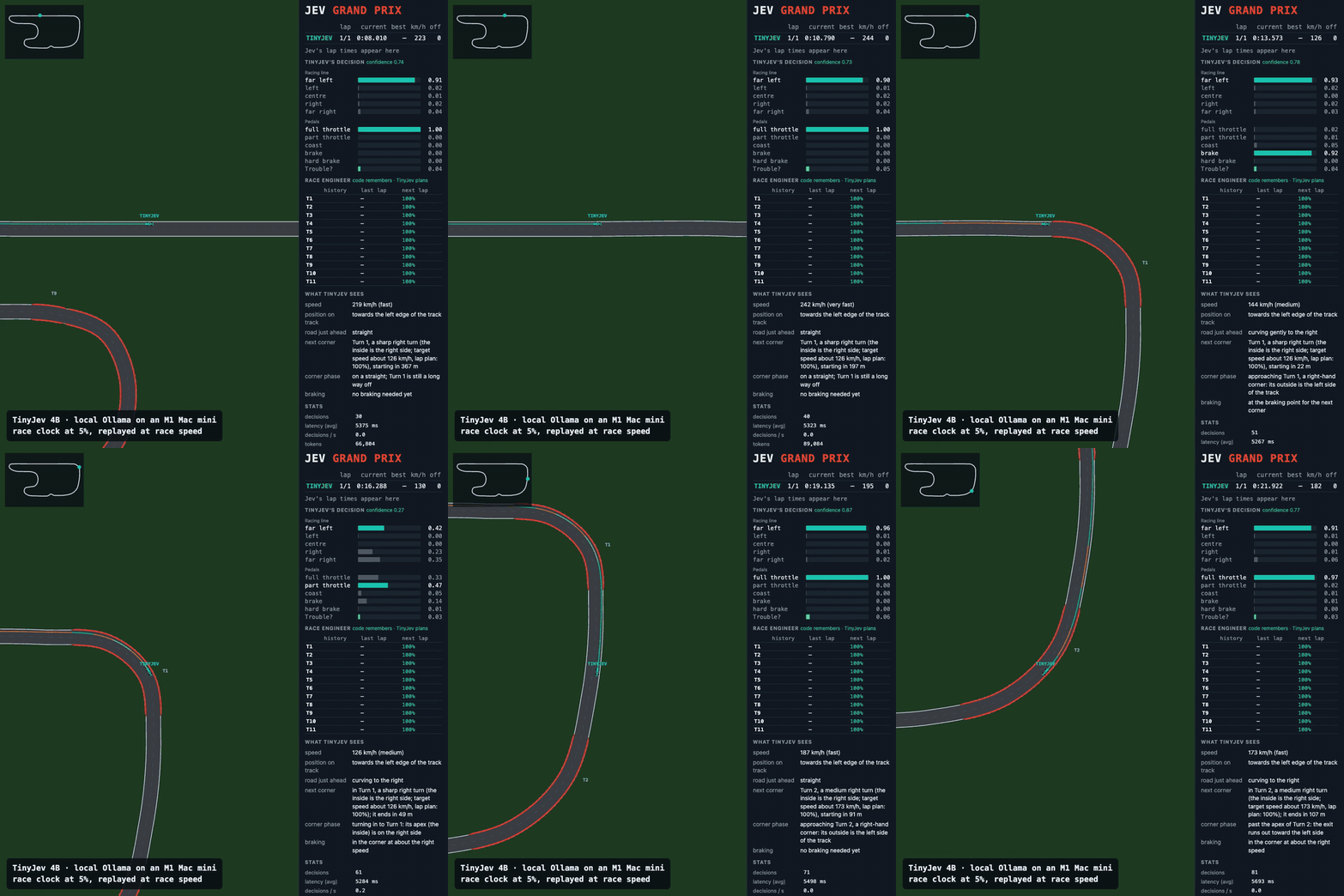
One lap of Jev Grand Prix, driven through a local Ollama: every decision picks the racing line and the pedals, and code steers. An M1 Mac mini needs about 5 s per decision, so the race clock ran at 5% and the clip plays back at race speed. Its first lap from a standing start: 59.0 s, no off-tracks; the game's README reports 59.2 s for TypeSafe's hosted Jev on its first lap.
Run it
ollama pull parable/tinyjev # Ollama 0.35.1 or newer, 4.5 GB
curl http://localhost:11434/v1/systemone -d '{
"model": "parable/tinyjev",
"state": "Shoes arrived two weeks late and in the wrong size. Also I see two charges on my card.",
"questions": {
"team": {"type": "choice", "instructions": "Which team should handle this?",
"criteria": {"returns": "Exchanges, refunds, wrong or damaged items",
"shipping": "Delivery status, delays, lost packages",
"billing": "Charges, invoices, payment problems"}},
"escalate": {"type": "noul", "instructions": "Does this need urgent human attention?"}
}}'
From Python, pip install tinyjev then tinyjev.load("TinyJev-4B").predict({...}) talks to your local Ollama.
Without ollama.com: download TinyJev-4B-Q8_0.gguf and Modelfile from this repo and run
ollama create tinyjev -f Modelfile. TinyJev-4B-Q4_K_M.gguf is the smaller file (2.7 GB); change the FROM
line to use it.
Measured
Every row runs through Ollama 0.35.1's own /v1/systemone, same inputs, Q8_0 weights.
| Model | JevBench public (231) | OpenDecision 500 | Contracts: 60 unseen NDAs (180 questions) |
|---|---|---|---|
| TinyJev 4B v2 | 0.766 | 490 | 0.806 |
| Tev1 4B, as shipped in Ollama (2k window) | 0.688 | 487 | 0.406 |
| Tev1 4B, window raised to 16k | 0.762 | 487 | 0.728 |
| Qwen3.5-4B, no fine-tuning | 0.693 | 479 | โ |
JevBench is the public split of fstandhartinger/jevbench, scored by
its own typesafe adapter; requests Ollama rejects for length count as wrong. OpenDecision is the 500-case suite in
benchmarks/opendecision. The contract
column asks what each test-split NDA from ContractNLI says about three of its clauses (says so / says the opposite
/ silent), in wording never used in training. Tev1 as shipped rejects 26 of the 60 NDAs as longer than its window, and those questions count as wrong. Each NDA's rare "says the opposite" clauses are asked first, so 46% of the questions are contradictions.
On short decisions TinyJev v2 is level with Tev1 at a 16k window: 177 against 176 of the 231 JevBench items, 490 against 487 on OpenDecision. The lead is on long contracts. On JevBench's 19 long-policy items Tev1 still wins, 8 to 6.
How it was built
- Base: Qwen3.5-4B, LoRA r8 / alpha 16 on every linear layer of the language model, merged into these weights.
- Data: Together AI's public Tev1 training set (37,840 decisions, MIT), re-rendered byte for byte in the prompt Ollama builds, plus 1,269 long-document questions from ContractNLI train-split NDAs (median 2.3k tokens, longest 11.8k).
- Recipe: loss on the single answer letter, lr 5e-5 cosine, one epoch, one A100 for about two hours.
- Kept out: no JevBench or OpenDecision item. A 13-gram check against both finds zero overlap.
Ollama scores each question with one forward pass and a softmax over the option letters, so the probabilities are the model's own. Each question in a request costs one read of the prompt: about 1.8 s per question for a 700-token prompt on an M1 Mac mini at Q8_0.
Known weakness, measured: multi-step date and number reasoning. It gets 1 of JevBench's 15 hard temporal items, as does Tev1.
Version 1
The previous TinyJev 4B (Qwen3-4B-Base plus a pointer head, scored in-process with MLX or PyTorch) is kept at
revision v1: tinyjev.load("TinyJev-4B-v1"), or revision="v1" with huggingface_hub.
Credits
Built on Qwen3.5-4B (Apache-2.0). Training recipe and the bulk of the data from Tev1 by Together AI (MIT). Contract data from ContractNLI (Koreeda and Manning, 2021, Hitachi America, CC BY 4.0). The decision interface follows TypeSafe's Jev as implemented by Ollama. The racing demo is Jev Grand Prix by enoyola (MIT).
Support the Project
If this model is useful in your work, you can support independent research:

- Downloads last month
- 60

Install (macOS, Linux)
# Start a local OpenAI-compatible server with a web UI: llama serve -hf AnkitAI/TinyJev-4B:Q4_K_M# Run inference directly in the terminal: llama cli -hf AnkitAI/TinyJev-4B:Q4_K_M

