


Clover-35B-A3B-Preview-GGUF
Clover-35B-A3B-Preview is the first model released by DiffuSpace, delivering state-of-the-art performance among open-source diffusion language models at release on the benchmarks reported in our launch blog. Clover combines a 35B-parameter mixture-of-experts backbone with approximately 3B active parameters per token, block diffusion generation, and a 128K context window.
This repository provides the official GGUF quantizations for local inference with our llama.cpp integration. The 8-bit and 4-bit variants support self-speculative decoding using a single model, without separate draft-model weights.
Blog · Code · BF16 model · llama.cpp PR
Performance
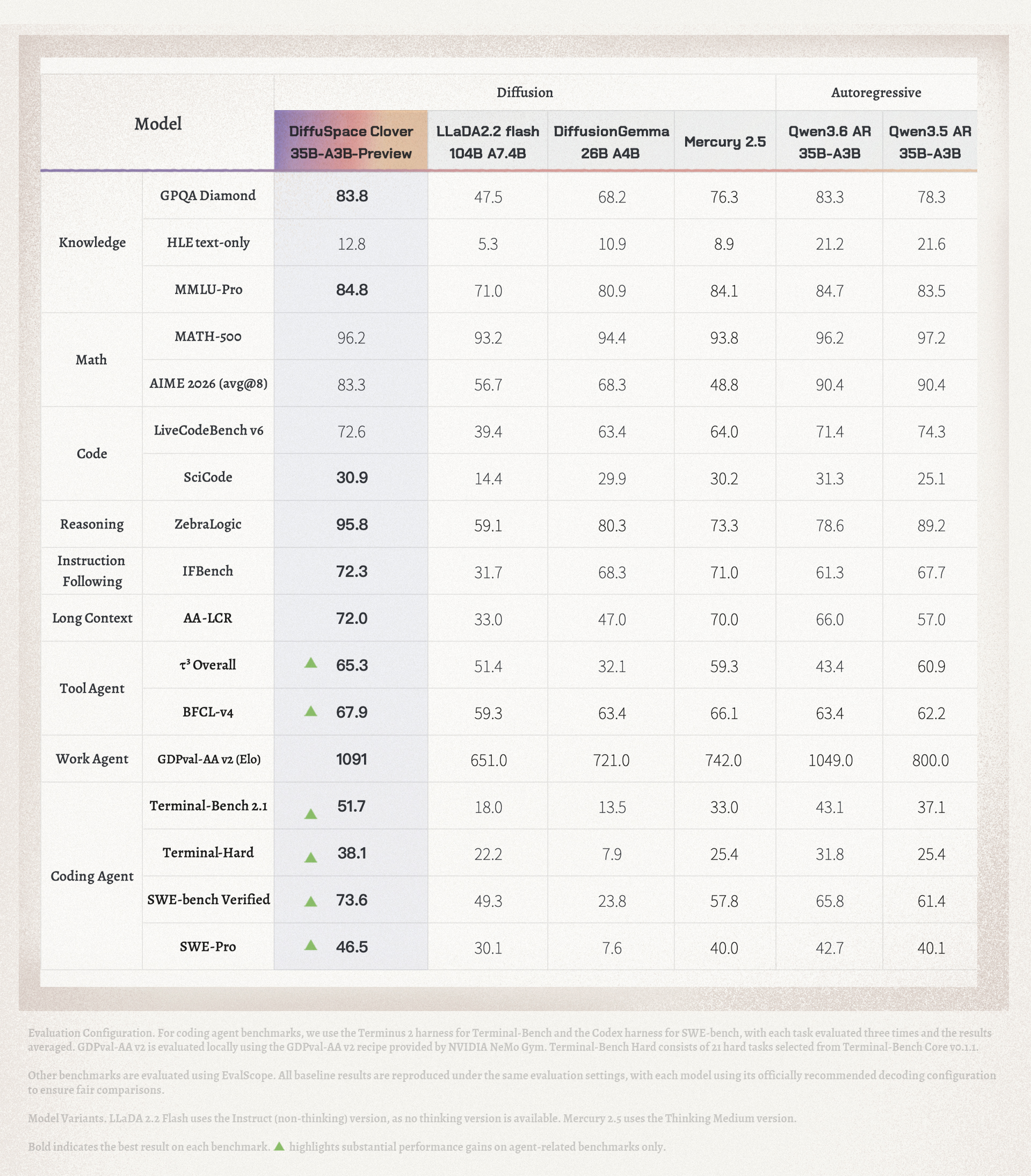
See the launch blog for evaluation settings and comparisons. These results describe the original model; they are not separate evaluations of the GGUF quantizations. Quantization and inference settings can affect quality and speed.
Available quantizations
Download only the variant you want to run; each file is a complete model.
| File | Size | Description |
|---|---|---|
| Clover-35B-A3B-Preview-Q8_0.gguf | 35.26 GiB | Primarily 8-bit quantization; the largest of the three variants. |
| Clover-35B-A3B-Preview-Q4_K_M.gguf | 21.42 GiB | Mixed quantization using Q4_K, Q6_K, Q8_0, and floating-point tensors. |
| Clover-35B-A3B-Preview-Q4_0.gguf | 18.24 GiB | Q4_0 quantization with some tensors retained in floating point; the smallest download. |
Sizes above use GiB (2³⁰ bytes); the corresponding decimal sizes are approximately 37.86 GB, 23.00 GB, and 19.59 GB. File checksums are provided in SHA256SUMS.
Architecture and decoding
Clover uses a hybrid Gated DeltaNet (GDN) / full-attention MoE backbone. Additional learned GDN parameters support bidirectional attention within diffusion blocks while preserving a causal prefix.
The llama.cpp integration provides self-speculative decoding through draft-self: Clover proposes tokens with its block diffusion capability and verifies them with its own causal decoding path. A separate draft model is not required.
The supported context window is 131,072 tokens, including both the prompt and generated response. The GGUF metadata records this limit. Start with a smaller runtime context and increase it as needed to fit your workload and memory budget.
Local and on-device inference
GGUF makes Clover available for local deployment through the linked llama.cpp integration. Choose a quantization according to the memory available on your machine. Q8_0 uses more memory to retain higher precision; Q4_K_M provides a mixed-precision option; Q4_0 has the smallest weight footprint.
File size is not total inference memory. Allow additional RAM or VRAM for attention caches, recurrent state, and compute buffers. Longer contexts increase memory requirements. Approximately 3B parameters are active per token, but the model still contains approximately 35B parameters of weights.
The example below uses NVIDIA CUDA. A CPU-only build is also shown. Actual speed depends on the hardware, quantization, prompt length, and number of accepted draft tokens.
Quick start
Use the Clover implementation in llama.cpp PR #31306. The commands below fetch that PR explicitly so the build includes Clover support.
1. Get the source
git clone https://github.com/ggml-org/llama.cpp.git
cd llama.cpp
git fetch origin pull/31306/head
git checkout --detach FETCH_HEAD
2. Build
For an NVIDIA GPU, install a compatible CUDA toolkit and build the speculative decoding example:
cmake -S . -B build-clover \
  -DGGML_CUDA=ON \
  -DLLAMA_CURL=OFF \
  -DLLAMA_BUILD_TESTS=OFF \
  -DLLAMA_BUILD_SERVER=OFF \
  -DCMAKE_BUILD_TYPE=Release
cmake --build build-clover --config Release --target llama-speculative-simple -j
CPU-only build
cmake -S . -B build-clover-cpu \
  -DGGML_CUDA=OFF \
  -DGGML_BLAS=OFF \
  -DLLAMA_CURL=OFF \
  -DLLAMA_BUILD_TESTS=OFF \
  -DLLAMA_BUILD_SERVER=OFF \
  -DCMAKE_BUILD_TYPE=Release
cmake --build build-clover-cpu --config Release --target llama-speculative-simple -j
Use ./build-clover-cpu/bin/llama-speculative-simple in the run command below and set -ngl 0.
3. Download a model
From the llama.cpp directory, download one GGUF file:
pip install -U huggingface_hub
hf download Diffuspace/Clover-35B-A3B-Preview-GGUF \
  Clover-35B-A3B-Preview-Q4_K_M.gguf \
  --local-dir models
Replace the filename with the Q8_0 or Q4_0 variant to use a different quantization.
4. Run self-speculative decoding
The llama-speculative-simple example reads a raw prompt, so include the model's chat formatting explicitly:
cat > prompt.txt <<'EOF'
<|im_start|>user
What is diffusion?<|im_end|>
<|im_start|>assistant
<think>
EOF

./build-clover/bin/llama-speculative-simple \
  -m models/Clover-35B-A3B-Preview-Q4_K_M.gguf \
  -f prompt.txt \
  --spec-type draft-self \
  --spec-draft-n-max 15 \
  --spec-accept-ratio 0.9 \
  --spec-accept-delta 0.6 \
  --temp 0 --top-k 1 --seed 42 \
  -ctk bf16 -ctv bf16 \
  -c 8192 -n 4096 -b 256 -ub 256 \
  -ngl 99 -t 8 -tb 8 \
  --flash-attn on --color off
This example uses greedy generation and the PR's entropy-based draft acceptance settings. Keep those acceptance options with the llama-speculative-simple executable; they are not general-purpose flags for every llama.cpp frontend.
-c sets the runtime context size, and -n limits newly generated tokens, including the thinking phase. Increase them for longer tasks while keeping the prompt and response within the 128K limit. This example executable also requires the prompt to fit within -b; increase the batch size for longer prompts. -ngl 99 requests GPU offloading for all model layers, so ensure sufficient VRAM for the selected model and context.
For the standard Hugging Face inference path, see the BF16 model card. For serving and evaluation with SGLang, see the official code repository.
License and attribution
Clover is derived from Qwen3.6-35B-A3B and released under Apache-2.0. The accompanying LICENSE preserves the upstream license and copyright statement. These GGUF files are quantized versions of the official Clover model; see ATTRIBUTIONS.md for provenance and modification notices.
llama.cpp is distributed separately under its own MIT license.
- Downloads last month
- -
4-bit
8-bit
Model tree for Diffuspace/Clover-35B-A3B-Preview-GGUF
Base model
Qwen/Qwen3.6-35B-A3B