

Anima Reference Adapter: user guide
This guide walks through installing the adapter in ComfyUI, making a first image, writing prompts, using two characters, tuning the settings and fixing common problems. For the method and measurements, see the README.
1. What you need
- ComfyUI that runs Anima. If you can already make images with Anima, you have everything.
- The Anima files from circlestone-labs/Anima:
anima-base-v1.0.safetensorsinComfyUI/models/diffusion_models/qwen_3_06b_base.safetensorsinComfyUI/models/text_encoders/qwen_image_vae.safetensorsinComfyUI/models/vae/
- About 1 GB of free VRAM on top of what Anima needs (the reference's cached keys and values at 1 MP). It was tested on an 8 GB RTX 3060 Ti.
The adapter weights do not need a separate download: the node fetches them on first use.
2. Install the nodes
cd ComfyUI/custom_nodes
git clone https://github.com/ArcAnima/ComfyUI-Anima-Ref-Adapter.git
Restart ComfyUI. Without git, download the repository as a ZIP from GitHub (Code → Download ZIP) and
unpack it into ComfyUI/custom_nodes/.
3. Your first image
- Download
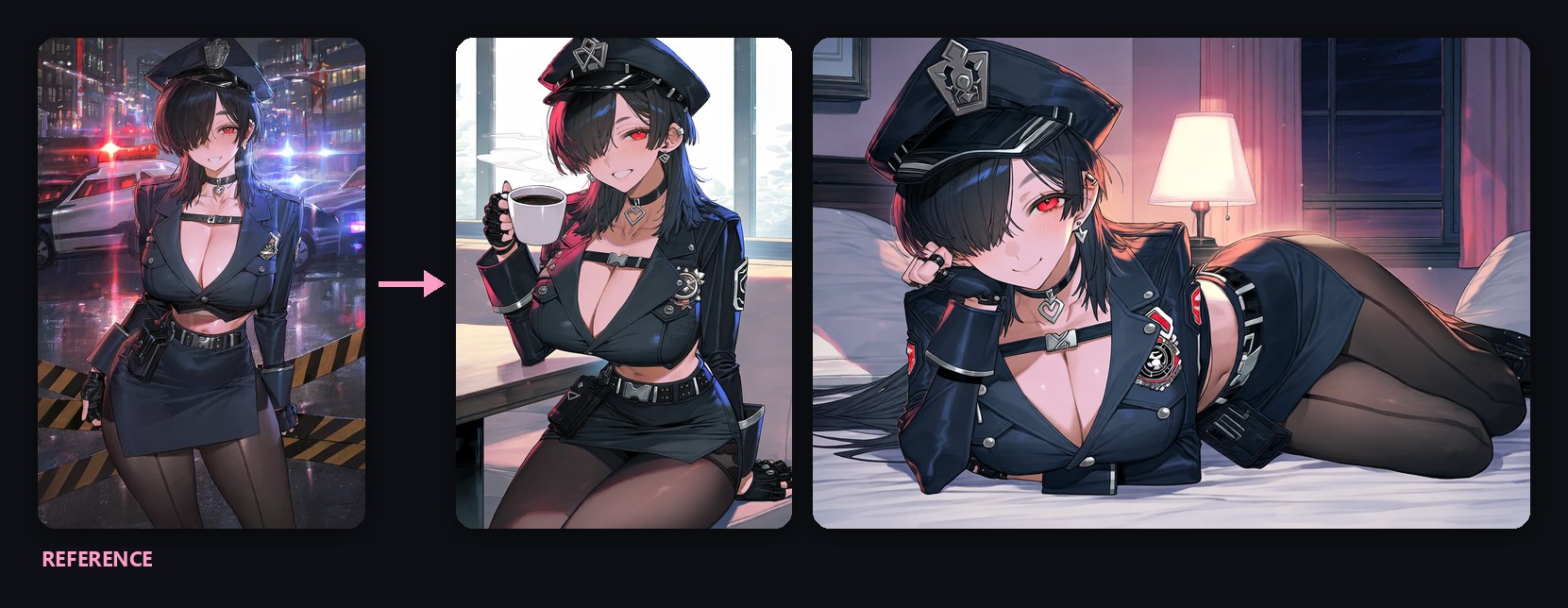
anima_ref_adapter.jsonand drag it onto the ComfyUI canvas. It is the standard Anima text-to-image workflow with one extra node, Anima Ref Adapter, between the model loader and the KSampler. - In Load Image, choose your reference image.
- In the positive prompt, keep the quality tags and describe only the scene (see section 4).
- Queue. The first run downloads
anima_ref_adapter_v2_r64.safetensors(183 MB) intoComfyUI/models/loras/; later runs start right away.
4. Writing the prompt
The reference supplies the character (face, hair, eyes, outfit, accessories) and much of the drawing style. The prompt supplies everything else.
| write | do not write |
|---|---|
quality tags: masterpiece, best quality, score_7, safe, |
the character's name |
1girl or 1boy, and solo |
artist tags |
framing: cowboy shot, full body, upper body, portrait |
hair, eye and outfit tags (a few are fine) |
pose and action: sitting, lying, on side, holding cup |
|
expression: smile, sleepy, laughing |
|
place, time and light: cafe, indoors, day, beach, sunset |
Example: masterpiece, best quality, score_7, safe, 1girl, solo, cowboy shot, sitting, cafe, holding cup, smile, looking at viewer, indoors, window, day
Tips:
- Write a pose that differs from the reference's. The adapter is trained not to copy the reference's pose, and a clear pose in the prompt helps.
- Parts the reference does not show (the legs in a bust-up image, the back of an outfit) are guessed by the model. A reference that shows the whole character gives more consistent outfits.
- Anima's negative prompt from its model card works as is.
5. Two characters
- Open
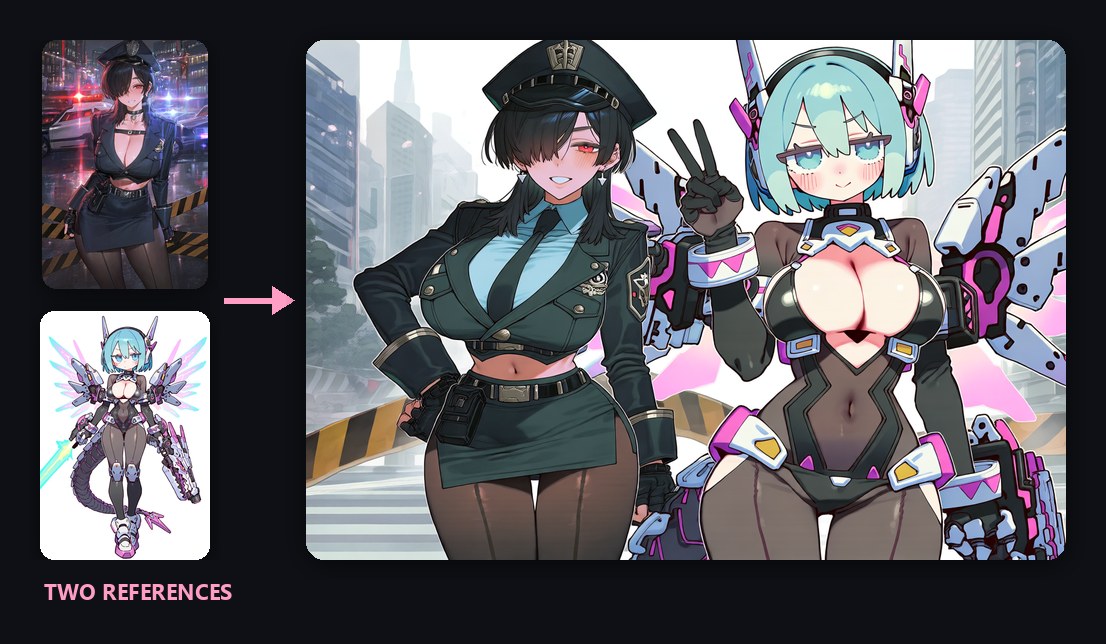
anima_ref_adapter_two_characters.json. It has two Load Image nodes joined side by side by the core Image Stitch node. - Load the left character in the first image and the right character in the second.
- Replace
solowith2girls(or1boy, 1girl,2boys) and say who is where, with a few words each:2girls, the girl on the left is a policewoman with black hair over one eye, the girl on the right is a mecha girl with aqua hair and mechanical wings, standing side by side, peace sign, smile, city, street, day - Use a landscape size such as 1216x832.
The two drawing styles tend to merge into one; the characters themselves stay apart.
6. Settings
All on the Anima Ref Adapter node.
| setting | default | what it does |
|---|---|---|
ref_guidance |
4.5 | How hard to push toward the reference. Raise it (5-6) when the character drifts; lower it when colors get too strong. At 1 there is no extra model call, so it is faster but weaker. |
correction |
apg |
Keeps colors in check at high guidance. rescale is an alternative; none turns it off. |
ref_end |
1.0 | The point in the schedule after which ref_guidance stops (the reference itself stays). About 0.6 is faster with nearly the same image. |
ref_megapixels |
1.0 | Size the reference is resized to. Lower it (0.5-0.7) to save VRAM. |
strength |
1.0 | Strength of the adapter LoRA. |
Other LoRAs (style, detail) go in front of the adapter node, between the model loader and Anima Ref Adapter.
7. Making it faster
| method | how | effect (RTX 3060 Ti, 832x1216) |
|---|---|---|
| turbo LoRA | a turbo LoRA for Anima base in front of the adapter; 10 steps, cfg 1, ref_guidance 1 |
67 s → 11 s; the reference style weakens |
ref_guidance 1 |
on the node | 67 s → 50 s |
| SageAttention | KJNodes Patch Sage Attention in front of the adapter | about 7% |
| EasyCache | the core EasyCache node after the adapter | about 7% |
ref_end 0.6 |
on the node | about 7% |
8. Troubleshooting
| problem | what to do |
|---|---|
| The result looks like an ordinary Anima image, not the reference | Check that the KSampler's model comes from Anima Ref Adapter, not from the model loader directly. Raise ref_guidance. |
| Colors are too strong or burnt | Lower ref_guidance (3-4) and keep correction on apg. |
| The pose copies the reference | Write a clear, different pose and framing in the prompt. |
| The reference character appears again as a poster or a figure in the scene | A known limitation; change the seed or lower ref_guidance. |
| The download fails | Download anima_ref_adapter_v2_r64.safetensors by hand into ComfyUI/models/loras/. |
| Out of memory | Lower ref_megapixels, or use a smaller output size. |
| You want the pilot adapter | Use anima_ref_adapter_advanced.json: the pilot needs the reference at the output size. |
9. Forge Neo
An extension for Stable Diffusion WebUI Forge (Neo) is available: sd-forge-anima-ref-adapter.