Text Generation
MLX
Safetensors
English
information-extraction
structured-output
json
small-language-model
apple-silicon
from-scratch
post-training
research
Instructions to use OpenSML/OpenSML-JSONLite-175M with libraries, inference providers, notebooks, and local apps. Follow these links to get started.
- Libraries
- MLX
How to use OpenSML/OpenSML-JSONLite-175M with MLX:
# Make sure mlx-lm is installed # pip install --upgrade mlx-lm # if on a CUDA device, also pip install mlx[cuda] # Generate text with mlx-lm from mlx_lm import load, generate model, tokenizer = load("OpenSML/OpenSML-JSONLite-175M") prompt = "Once upon a time in" text = generate(model, tokenizer, prompt=prompt, verbose=True) - Notebooks
- Google Colab
- Kaggle
- Local Apps Settings
- LM Studio
- MLX LM
How to use OpenSML/OpenSML-JSONLite-175M with MLX LM:
Generate or start a chat session
# Install MLX LM uv tool install mlx-lm # Generate some text mlx_lm.generate --model "OpenSML/OpenSML-JSONLite-175M" --prompt "Once upon a time"
- Atomic Chat
|
Download complete-request-exact.svg from OpenSML/OpenSML-JSONLite-175M: direct link, hf CLI and curl.
- Browser
- Download file 1.39 kB
-
https://huggingface.co/OpenSML/OpenSML-JSONLite-175M/resolve/main/complete-request-exact.svg
- Command line
-
hf download hf://OpenSML/OpenSML-JSONLite-175M/complete-request-exact.svg
-
curl -L -o complete-request-exact.svg https://huggingface.co/OpenSML/OpenSML-JSONLite-175M/resolve/main/complete-request-exact.svg
1.39 kB
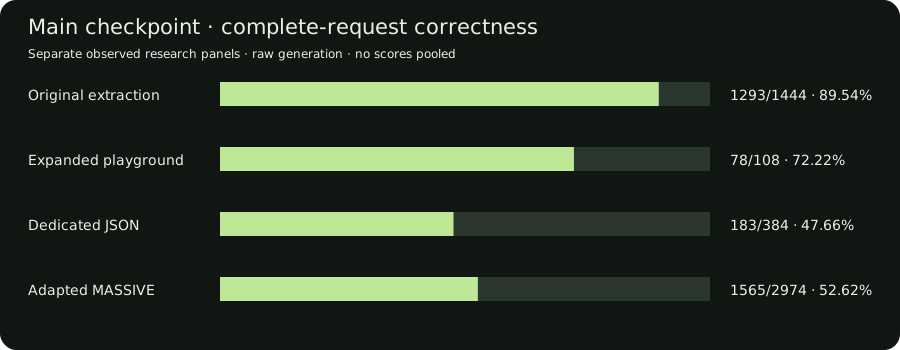
| <svg xmlns="http://www.w3.org/2000/svg" width="900" height="350" viewBox="0 0 900 350"><rect width="900" height="350" rx="16" fill="#101713"/><g font-family="sans-serif" fill="#e8f0e9"><text x="28" y="34" font-size="21">Main checkpoint 路 complete-request correctness</text><text x="28" y="58" font-size="12">Separate observed research panels 路 raw generation 路 no scores pooled</text><text x="28" y="100" font-size="14">Original extraction</text><rect x="220" y="82" width="490" height="24" fill="#29372f"/><rect x="220" y="82" width="438.76" height="24" fill="#bfe798"/><text x="730" y="100" font-size="14">1293/1444 路 89.54%</text><text x="28" y="165" font-size="14">Expanded playground</text><rect x="220" y="147" width="490" height="24" fill="#29372f"/><rect x="220" y="147" width="353.89" height="24" fill="#bfe798"/><text x="730" y="165" font-size="14">78/108 路 72.22%</text><text x="28" y="230" font-size="14">Dedicated JSON</text><rect x="220" y="212" width="490" height="24" fill="#29372f"/><rect x="220" y="212" width="233.52" height="24" fill="#bfe798"/><text x="730" y="230" font-size="14">183/384 路 47.66%</text><text x="28" y="295" font-size="14">Adapted MASSIVE</text><rect x="220" y="277" width="490" height="24" fill="#29372f"/><rect x="220" y="277" width="257.85" height="24" fill="#bfe798"/><text x="730" y="295" font-size="14">1565/2974 路 52.62%</text></g></svg> |