

HunyuanImage-3.0 Instruct-Distil for ComfyUI
The 8-step distilled version of the Instruct model: the fastest of the three, with prompt rewriting, image editing and multi-image fusion.
These are Tencent's tencent/HunyuanImage-3.0-Instruct-Distil weights converted to single-file checkpoints that run natively in ComfyUI through the ComfyUI-HunyuanImage3 custom nodes, with ComfyUI's own samplers, memory management and offloading. The model has 80B parameters (13B active per token), so on consumer GPUs it streams its weights from system RAM. Tested on an RTX 4090 and an RTX 3090 (24 GB each) with 188 GB of RAM; with the W4A8 file loaded, ComfyUI held about 50 GB of system RAM. The Instruct-Distil W4A8 also runs within 16 GB and 12 GB of VRAM, about 15–20 % slower (details).
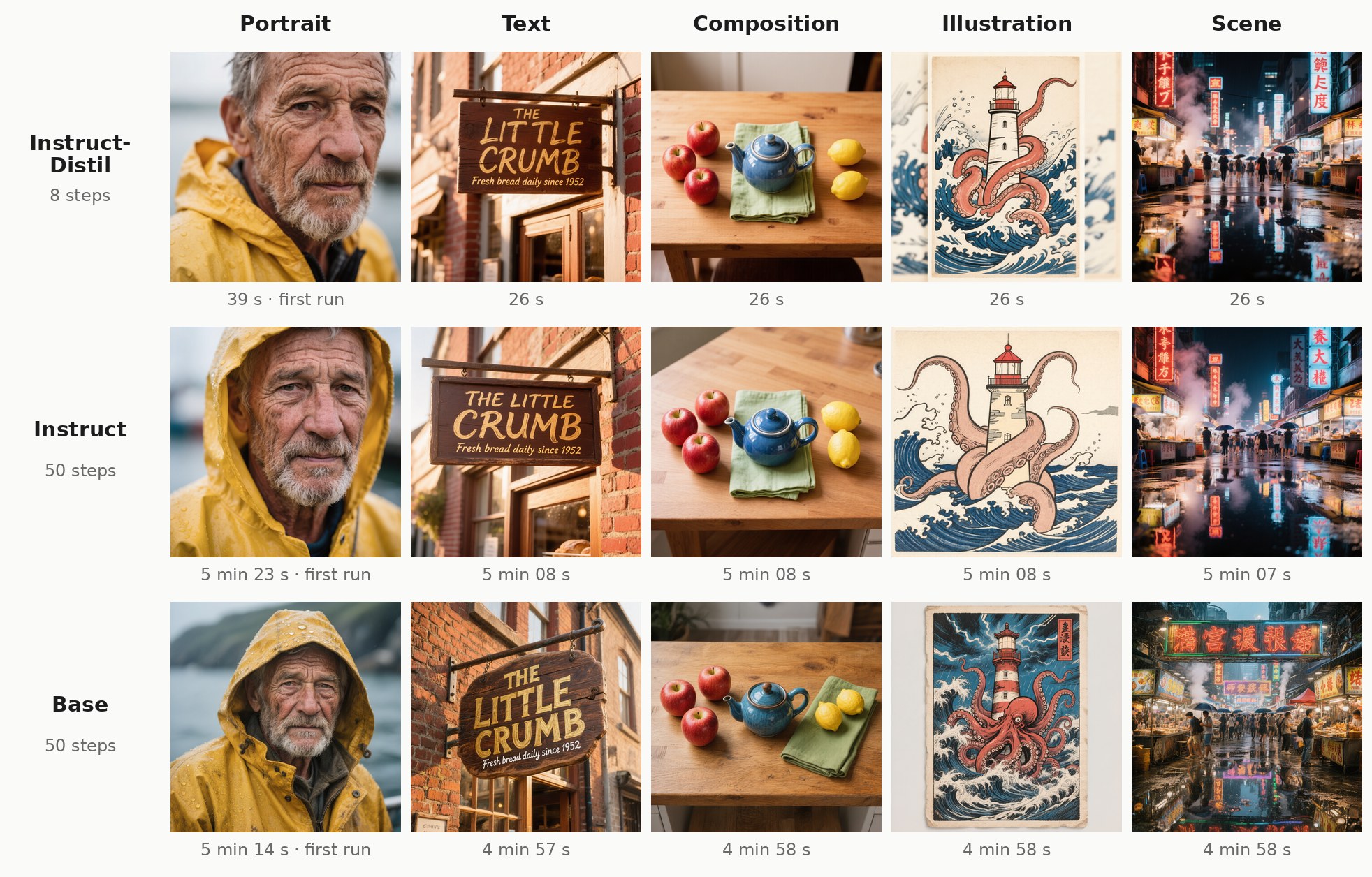
Instruct-Distil, Instruct and Base at their recommended settings, W4A8. Compare every image across the three models, the three weight formats and Spectrum; speed tables, prompt rewriting and editing are in the GitHub README.
Speed: ~26 s per 1024×1024 image (8 steps, W4A8, one RTX 4090; ~49 s with int8).
Which file do I need?
This is the model to start with: 8 steps, about 26 s per image where the Instruct and the Base take about 5 minutes, on the same hardware. Most people want hunyuan_image_3_instruct_distil_w4a8.safetensors (the smallest and fastest) and the VAE; the model's config.json and tokenizer.json ship with the custom nodes.
| File | Format | Size | Notes |
|---|---|---|---|
hunyuan_image_3_instruct_distil_w4a8.safetensors |
W4A8 | 43.7 GiB | Recommended. 4-bit weights, 8-bit activations; fits the 24 GB-card workflow best |
hunyuan_image_3_instruct_distil_int8_convrot.safetensors |
int8 ConvRot | 76.2 GiB | 8-bit weights, closer to the original (1 % weight error vs 7 % for W4A8); ~1.9× slower per step |
hunyuan_image_3_instruct_distil_bf16.safetensors |
bf16 | 150.5 GiB | Unquantized reference, tensor-for-tensor identical to Tencent's weights |
hunyuan_image_3_instruct_distil_cot_head.safetensors |
bf16 | 1.0 GiB | the text head, only for prompt rewriting |
vae/hunyuan_image_3_vae_fp16.safetensors |
fp16 | 2.3 GiB | the VAE (identical for all three models); _fp32 also provided |
clip_vision/hunyuan_image_3_instruct_distil_siglip2_so400m_naflex.safetensors |
bf16 | 0.8 GiB | vision tower, for image editing |
Prompt rewriting (the HunyuanImage 3.0 Prompt Rewriting node) predicts text with the small head in hunyuan_image_3_instruct_distil_cot_head.safetensors. Put it in models/diffusion_models/ and the node finds it by itself; images never use it, so plain generation doesn't need it.
Image-to-image editing uses this model's own vision tower (clip_vision/…): each HunyuanImage-3.0 checkpoint has a different one.
Quick start
- Install the custom nodes: clone https://github.com/PedroMarinhoDev/ComfyUI-HunyuanImage3 into
ComfyUI/custom_nodes/and restart ComfyUI. - Put the files in ComfyUI's model folders:
models/diffusion_models/: the checkpoint (and thecot_headfile for prompt rewriting)models/vae/:hunyuan_image_3_vae_fp16.safetensorsmodels/clip_vision/: the vision tower (image editing only)
- Open this model's example workflow from the repo's
workflows/folder (hunyuan_image_3_instruct_distil_txt2img.json,hunyuan_image_3_instruct_distil_img2img.json). Each has a Read me note listing these files. The loader recognizes the model from its weights, so there is nothing else to set.
Recommended sampling: 8 steps, euler / simple, cfg 1.0, plus the HunyuanImage-3.0 Guidance node at 2.5 (guidance is built into this model, so the sampler's cfg stays at 1.0).
Speed, comparisons and every node option are in the GitHub README.
What was changed
These files are modified versions of Tencent's release, as the license requires us to state:
- The original sharded bf16 checkpoint was re-laid out as single files. Per-expert weights are stacked into one bank per layer and projection, and the key names follow the ComfyUI port.
- W4A8: expert and dense projection weights quantized to 4-bit (fp8 per-group scales, ConvRot rotation, per-expert Lloyd-Max codebooks), activations to 8-bit. int8 ConvRot: 8-bit per-channel with ConvRot rotation. Embeddings, norms, the router and the output head stay bf16.
- The VAE, the SigLIP2 vision tower and the text head (
lm_head,model.ln_f, used only for prompt rewriting) are split into their own files; thecot_headfile carries the head. - No weights were retrained or fine-tuned. The conversion scripts are in the GitHub repo (
tools/convert_all.py).
License
The weights are under the Tencent Hunyuan Community License Agreement, inherited from tencent/HunyuanImage-3.0-Instruct-Distil; see also NOTICE.
The license does not apply in the European Union, the United Kingdom or South Korea, and grants no rights there. It also carries an Acceptable Use Policy (in the LICENSE, Exhibit A) and conditions for services with over 100 million monthly active users. Read it before use.
Tencent Hunyuan is licensed under the Tencent Hunyuan Community License Agreement, Copyright © 2025 Tencent. All Rights Reserved. The trademark rights of “Tencent Hunyuan” are owned by Tencent or its affiliate.
Credits
HunyuanImage-3.0 by Tencent Hunyuan. ComfyUI port and conversions: ComfyUI-HunyuanImage3.
Model tree for PedroMarinhoDev/HunyuanImage-3.0-Instruct-Distil-ComfyUI
Base model
tencent/HunyuanImage-3.0-Instruct-Distil