

Instructions to use QuixiAI/GLM-5.2-Vision-GGUF with libraries, inference providers, notebooks, and local apps. Follow these links to get started.
- Libraries
- llama-cpp-python
How to use QuixiAI/GLM-5.2-Vision-GGUF with llama-cpp-python:
# !pip install llama-cpp-python from llama_cpp import Llama llm = Llama.from_pretrained( repo_id="QuixiAI/GLM-5.2-Vision-GGUF", filename="Q8_0/GLM-5.2-Q8_0-00017-of-00017.gguf", )
llm.create_chat_completion( messages = [ { "role": "user", "content": [ { "type": "text", "text": "Describe this image in one sentence." }, { "type": "image_url", "image_url": { "url": "https://cdn.britannica.com/61/93061-050-99147DCE/Statue-of-Liberty-Island-New-York-Bay.jpg" } } ] } ] ) - Notebooks
- Google Colab
- Kaggle
- Local Apps Settings
- llama.cpp
How to use QuixiAI/GLM-5.2-Vision-GGUF with llama.cpp:
Install (macOS, Linux)
curl -LsSf https://llama.app/install.sh | sh # Start a local OpenAI-compatible server with a web UI: llama serve -hf QuixiAI/GLM-5.2-Vision-GGUF:UD-Q4_K_M # Run inference directly in the terminal: llama cli -hf QuixiAI/GLM-5.2-Vision-GGUF:UD-Q4_K_M
Install from WinGet (Windows)
winget install llama.cpp # Start a local OpenAI-compatible server with a web UI: llama serve -hf QuixiAI/GLM-5.2-Vision-GGUF:UD-Q4_K_M # Run inference directly in the terminal: llama cli -hf QuixiAI/GLM-5.2-Vision-GGUF:UD-Q4_K_M
Use pre-built binary
# Download pre-built binary from: # https://github.com/ggerganov/llama.cpp/releases # Start a local OpenAI-compatible server with a web UI: ./llama-server -hf QuixiAI/GLM-5.2-Vision-GGUF:UD-Q4_K_M # Run inference directly in the terminal: ./llama-cli -hf QuixiAI/GLM-5.2-Vision-GGUF:UD-Q4_K_M
Build from source code
git clone https://github.com/ggerganov/llama.cpp.git cd llama.cpp cmake -B build cmake --build build -j --target llama-server llama-cli # Start a local OpenAI-compatible server with a web UI: ./build/bin/llama-server -hf QuixiAI/GLM-5.2-Vision-GGUF:UD-Q4_K_M # Run inference directly in the terminal: ./build/bin/llama-cli -hf QuixiAI/GLM-5.2-Vision-GGUF:UD-Q4_K_M
Use Docker
docker model run hf.co/QuixiAI/GLM-5.2-Vision-GGUF:UD-Q4_K_M
- LM Studio
- Jan
- vLLM
How to use QuixiAI/GLM-5.2-Vision-GGUF with vLLM:
Install from pip and serve model
# Install vLLM from pip: pip install vllm # Start the vLLM server: vllm serve "QuixiAI/GLM-5.2-Vision-GGUF" # Call the server using curl (OpenAI-compatible API): curl -X POST "http://localhost:8000/v1/chat/completions" \ -H "Content-Type: application/json" \ --data '{ "model": "QuixiAI/GLM-5.2-Vision-GGUF", "messages": [ { "role": "user", "content": [ { "type": "text", "text": "Describe this image in one sentence." }, { "type": "image_url", "image_url": { "url": "https://cdn.britannica.com/61/93061-050-99147DCE/Statue-of-Liberty-Island-New-York-Bay.jpg" } } ] } ] }'Use Docker
docker model run hf.co/QuixiAI/GLM-5.2-Vision-GGUF:UD-Q4_K_M
- Ollama
How to use QuixiAI/GLM-5.2-Vision-GGUF with Ollama:
ollama run hf.co/QuixiAI/GLM-5.2-Vision-GGUF:UD-Q4_K_M
- Unsloth Studio
How to use QuixiAI/GLM-5.2-Vision-GGUF with Unsloth Studio:
Install Unsloth Studio (macOS, Linux, WSL)
curl -fsSL https://unsloth.ai/install.sh | sh # Run unsloth studio unsloth studio -H 0.0.0.0 -p 8888 # Then open http://localhost:8888 in your browser # Search for QuixiAI/GLM-5.2-Vision-GGUF to start chatting
Install Unsloth Studio (Windows)
irm https://unsloth.ai/install.ps1 | iex # Run unsloth studio unsloth studio -H 0.0.0.0 -p 8888 # Then open http://localhost:8888 in your browser # Search for QuixiAI/GLM-5.2-Vision-GGUF to start chatting
Using HuggingFace Spaces for Unsloth
# No setup required # Open https://huggingface.co/spaces/unsloth/studio in your browser # Search for QuixiAI/GLM-5.2-Vision-GGUF to start chatting
- Pi
How to use QuixiAI/GLM-5.2-Vision-GGUF with Pi:
Start the llama.cpp server
# Install llama.cpp: brew install llama.cpp # Start a local OpenAI-compatible server: llama serve -hf QuixiAI/GLM-5.2-Vision-GGUF:UD-Q4_K_M
Configure the model in Pi
# Install Pi: npm install -g @mariozechner/pi-coding-agent # Add to ~/.pi/agent/models.json: { "providers": { "llama-cpp": { "baseUrl": "http://localhost:8080/v1", "api": "openai-completions", "apiKey": "none", "models": [ { "id": "QuixiAI/GLM-5.2-Vision-GGUF:UD-Q4_K_M" } ] } } }Run Pi
# Start Pi in your project directory: pi
- Hermes Agent new
How to use QuixiAI/GLM-5.2-Vision-GGUF with Hermes Agent:
Start the llama.cpp server
# Install llama.cpp: brew install llama.cpp # Start a local OpenAI-compatible server: llama serve -hf QuixiAI/GLM-5.2-Vision-GGUF:UD-Q4_K_M
Configure Hermes
# Install Hermes: curl -fsSL https://hermes-agent.nousresearch.com/install.sh | bash hermes setup # Point Hermes at the local server: hermes config set model.provider custom hermes config set model.base_url http://127.0.0.1:8080/v1 hermes config set model.default QuixiAI/GLM-5.2-Vision-GGUF:UD-Q4_K_M
Run Hermes
hermes
- Atomic Chat new
- OpenClaw new
How to use QuixiAI/GLM-5.2-Vision-GGUF with OpenClaw:
Start the llama.cpp server
# Install llama.cpp: brew install llama.cpp # Start a local OpenAI-compatible server: llama serve -hf QuixiAI/GLM-5.2-Vision-GGUF:UD-Q4_K_M
Configure OpenClaw
# Install OpenClaw: npm install -g openclaw@latest # Register the local server and set it as the default model: openclaw onboard --non-interactive --mode local \ --auth-choice custom-api-key \ --custom-base-url http://127.0.0.1:8080/v1 \ --custom-model-id "QuixiAI/GLM-5.2-Vision-GGUF:UD-Q4_K_M" \ --custom-provider-id llama-cpp \ --custom-compatibility openai \ --custom-text-input \ --accept-risk \ --skip-health
Run OpenClaw
openclaw agent --local --agent main --message "Hello from Hugging Face"
- Docker Model Runner
How to use QuixiAI/GLM-5.2-Vision-GGUF with Docker Model Runner:
docker model run hf.co/QuixiAI/GLM-5.2-Vision-GGUF:UD-Q4_K_M
- Lemonade
How to use QuixiAI/GLM-5.2-Vision-GGUF with Lemonade:
Pull the model
# Download Lemonade from https://lemonade-server.ai/ lemonade pull QuixiAI/GLM-5.2-Vision-GGUF:UD-Q4_K_M
Run and chat with the model
lemonade run user.GLM-5.2-Vision-GGUF-UD-Q4_K_M
List all available models
lemonade list
GLM-5.2-Vision-GGUF
This multimodal GGUF release is from QuixiAI and Eric Hartford, creator of Dolphin and Samantha.
It combines GLM-5.2 text GGUF quantizations with a shared F16 MoonViT vision tower and multimodal projector. The text GGUF and mmproj-GLM-5.2-Vision-f16.gguf are loaded as separate files by llama.cpp; the same mmproj works with every compatible quant in this repository.
GLM-5.2-Vision requires the llama.cpp changes in PR #26126. Until the change is available in llama.cpp main, build from that PR branch or apply the patch locally.
Credits
This release was made possible by work from the following people and organizations:
- Z.ai for the original GLM-5.2 language model.
- Baseten for GLM-5.2-Vision, including the MoonViT vision tower and trained multimodal projector used here.
- Unsloth for the Dynamic/UD GGUF quantizations included in this repository.
- antirez for the routed-expert GLM-5.2 quantizations included in this repository.
- ibrahima2222 for the GLM-5.2-Vision llama.cpp conversion/runtime patch and reference mmproj implementation.
QuixiAI and Eric Hartford packaged, validated, and are publishing this combined GLM-5.2-Vision GGUF release. Please also credit the upstream projects when redistributing these files.
Using the vision model
Use one text GGUF (or the first shard of a split quant) together with the shared mmproj:
llama-mtmd-cli \
--model /path/to/GLM-5.2-QUANT.gguf \
--mmproj /path/to/mmproj-GLM-5.2-Vision-f16.gguf \
--image /path/to/image.jpg \
--prompt "Describe this image." \
--jinja \
--n-gpu-layers all
The included create_mmproj.py script can reproduce the mmproj from the Baseten GLM-5.2-Vision checkpoint using a llama.cpp checkout that contains the changes from PR #26126.
Unsloth resources
Read the Unsloth GLM-5.2 guide for additional text-model instructions.
See Unsloth Dynamic 2.0 GGUFs for our quantization benchmarks.
- You can now run GLM-5.2 in Unsloth Studio with toggles for High and Max thinking.
- Read our GLM-5.2 guide for analysis and instructions.
- See below for example of 1-bit UD-IQ1_M GGUF running in Unsloth:
GLM-5.2
👋 Join our WeChat or Discord community.
📖 Check out the GLM-5.2 blog and GLM-5 Technical report.
📍 Use GLM-5.2 API services on Z.ai API Platform.
🔜 Try GLM-5.2 here.
Introduction
We're introducing GLM-5.2, our latest flagship model for long-horizon tasks. It marks a substantial leap in long-horizon task capability over its predecessor GLM-5.1 and, for the first time, delivers that capability on a solid 1M-token context. GLM-5.2's new capabilities include:
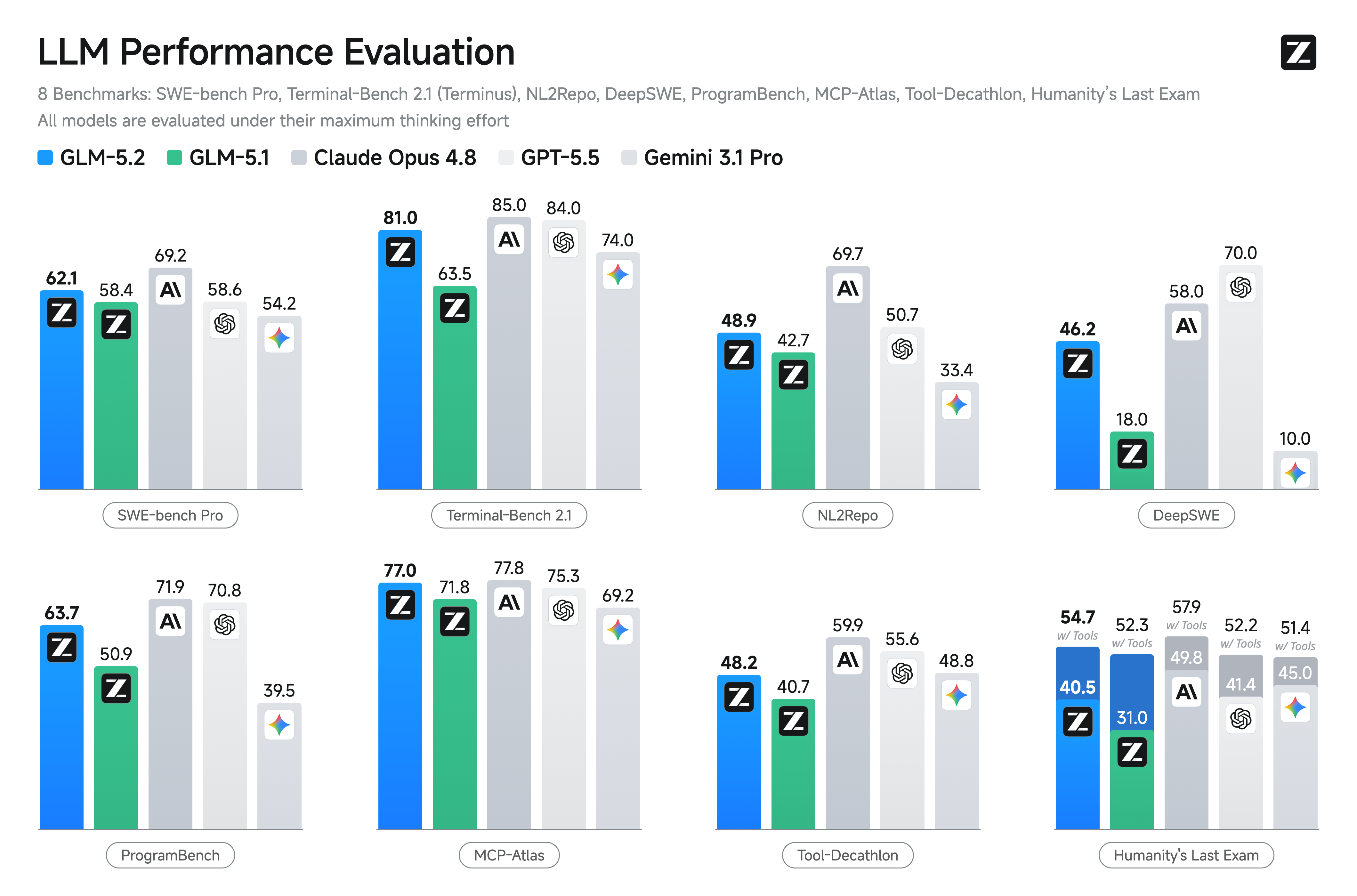
- Solid 1M Context: A solid 1M-token context that stably sustains long-horizon work
- Advanced Coding with Flexible Effort: Stronger coding capabilities with multiple thinking effort levels to balance performance and latency
- Improved Architecture: We propose IndexShare, which reuses the same indexer across every four sparse attention layers, reducing per-token FLOPs by 2.9× at a 1M context length. We also improve GLM-5.2’s MTP layer for speculative decoding, increasing the acceptance length by up to 20%
- Pure Open: An MIT open-source license — no regional limits, technical access without borders
Benchmark
| Benchmark | GLM-5.2 | GLM-5.1 | Qwen3.7-Max | MiniMax M3 | DeepSeek-V4-Pro | Claude Opus 4.8 | GPT-5.5 | Gemini 3.1 Pro |
|---|---|---|---|---|---|---|---|---|
| Reasoning | ||||||||
| HLE | 40.5 | 31 | 41.4 | 37 | 37.7 | 49.8* | 41.4* | 45 |
| HLE (w/ Tools) | 54.7 | 52.3 | 53.5 | - | 48.2 | 57.9* | 52.2* | 51.4* |
| CritPt | 20.9 | 4.6 | 13.4 | 3.7 | 12.9 | 20.9 | 27.1 | 17.7 |
| AIME 2026 | 99.2 | 95.3 | 97 | - | 94.6 | 95.7 | 98.3 | 98.2 |
| HMMT Nov. 2025 | 94.4 | 94 | 95 | 84.4 | 94.4 | 96.5 | 96.5 | 94.8 |
| HMMT Feb. 2026 | 92.5 | 82.6 | 97.1 | 84.4 | 95.2 | 96.7 | 96.7 | 87.3 |
| IMOAnswerBench | 91.0 | 83.8 | 90 | - | 89.8 | 83.5 | - | 81 |
| GPQA-Diamond | 91.2 | 86.2 | 90 | 93 | 90.1 | 93.6 | 93.6 | 94.3 |
| Coding | ||||||||
| SWE-bench Pro | 62.1 | 58.4 | 60.6 | 59 | 55.4 | 69.2 | 58.6 | 54.2 |
| NL2Repo | 48.9 | 42.7 | 47.2 | 42.1 | 35.5 | 69.7 | 50.7 | 33.4 |
| DeepSWE | 46.2 | 18 | 18 | 20 | 8 | 58 | 70 | 10 |
| ProgramBench | 63.7 | 50.9 | - | - | 47.8 | 71.9 | 70.8 | 39.5 |
| Terminal Bench 2.1 (Terminus-2) | 81.0 | 63.5 | 75 | 65 | 64 | 85 | 84 | 74 |
| Terminal Bench 2.1 (Best Reported Harness) | 82.7 | 69 | - | - | - | 78.9 | 83.4 | 70.7 |
| FrontierSWE (Dominance) | 74.4 | 30.5 | - | - | 29.0 | 75.1 | 72.6 | 39.6 |
| PostTrainBench | 34.3 | 20.1 | - | - | - | 37.2 | 28.4 | 21.6 |
| SWE-Marathon | 13.0 | 1.0 | - | - | - | 26.0 | 12.0 | 4.0 |
| Agentic | ||||||||
| MCP-Atlas (Public Set) | 76.8 | 71.8 | 76.4 | 74.2 | 73.6 | 77.8 | 75.3 | 69.2 |
| Tool-Decathlon | 48.2 | 40.7 | - | - | 52.8 | 59.9 | 55.6 | 48.8 |
Citation
If you find GLM-5.2 useful in your research, please cite our technical report:
@misc{glm5team2026glm5vibecodingagentic,
title={GLM-5: from Vibe Coding to Agentic Engineering},
author={GLM-5-Team and : and Aohan Zeng and Xin Lv and Zhenyu Hou and Zhengxiao Du and Qinkai Zheng and Bin Chen and Da Yin and Chendi Ge and Chenghua Huang and Chengxing Xie and Chenzheng Zhu and Congfeng Yin and Cunxiang Wang and Gengzheng Pan and Hao Zeng and Haoke Zhang and Haoran Wang and Huilong Chen and Jiajie Zhang and Jian Jiao and Jiaqi Guo and Jingsen Wang and Jingzhao Du and Jinzhu Wu and Kedong Wang and Lei Li and Lin Fan and Lucen Zhong and Mingdao Liu and Mingming Zhao and Pengfan Du and Qian Dong and Rui Lu and Shuang-Li and Shulin Cao and Song Liu and Ting Jiang and Xiaodong Chen and Xiaohan Zhang and Xuancheng Huang and Xuezhen Dong and Yabo Xu and Yao Wei and Yifan An and Yilin Niu and Yitong Zhu and Yuanhao Wen and Yukuo Cen and Yushi Bai and Zhongpei Qiao and Zihan Wang and Zikang Wang and Zilin Zhu and Ziqiang Liu and Zixuan Li and Bojie Wang and Bosi Wen and Can Huang and Changpeng Cai and Chao Yu and Chen Li and Chengwei Hu and Chenhui Zhang and Dan Zhang and Daoyan Lin and Dayong Yang and Di Wang and Ding Ai and Erle Zhu and Fangzhou Yi and Feiyu Chen and Guohong Wen and Hailong Sun and Haisha Zhao and Haiyi Hu and Hanchen Zhang and Hanrui Liu and Hanyu Zhang and Hao Peng and Hao Tai and Haobo Zhang and He Liu and Hongwei Wang and Hongxi Yan and Hongyu Ge and Huan Liu and Huanpeng Chu and Jia'ni Zhao and Jiachen Wang and Jiajing Zhao and Jiamin Ren and Jiapeng Wang and Jiaxin Zhang and Jiayi Gui and Jiayue Zhao and Jijie Li and Jing An and Jing Li and Jingwei Yuan and Jinhua Du and Jinxin Liu and Junkai Zhi and Junwen Duan and Kaiyue Zhou and Kangjian Wei and Ke Wang and Keyun Luo and Laiqiang Zhang and Leigang Sha and Liang Xu and Lindong Wu and Lintao Ding and Lu Chen and Minghao Li and Nianyi Lin and Pan Ta and Qiang Zou and Rongjun Song and Ruiqi Yang and Shangqing Tu and Shangtong Yang and Shaoxiang Wu and Shengyan Zhang and Shijie Li and Shuang Li and Shuyi Fan and Wei Qin and Wei Tian and Weining Zhang and Wenbo Yu and Wenjie Liang and Xiang Kuang and Xiangmeng Cheng and Xiangyang Li and Xiaoquan Yan and Xiaowei Hu and Xiaoying Ling and Xing Fan and Xingye Xia and Xinyuan Zhang and Xinze Zhang and Xirui Pan and Xu Zou and Xunkai Zhang and Yadi Liu and Yandong Wu and Yanfu Li and Yidong Wang and Yifan Zhu and Yijun Tan and Yilin Zhou and Yiming Pan and Ying Zhang and Yinpei Su and Yipeng Geng and Yong Yan and Yonglin Tan and Yuean Bi and Yuhan Shen and Yuhao Yang and Yujiang Li and Yunan Liu and Yunqing Wang and Yuntao Li and Yurong Wu and Yutao Zhang and Yuxi Duan and Yuxuan Zhang and Zezhen Liu and Zhengtao Jiang and Zhenhe Yan and Zheyu Zhang and Zhixiang Wei and Zhuo Chen and Zhuoer Feng and Zijun Yao and Ziwei Chai and Ziyuan Wang and Zuzhou Zhang and Bin Xu and Minlie Huang and Hongning Wang and Juanzi Li and Yuxiao Dong and Jie Tang},
year={2026},
eprint={2602.15763},
archivePrefix={arXiv},
primaryClass={cs.LG},
url={https://arxiv.org/abs/2602.15763},
}
- Downloads last month
- -
1-bit
2-bit
3-bit
4-bit
5-bit
6-bit
8-bit
