

Add assistant mask support to Qwen3-14B

Enable Assistant Token Masking for Qwen3-14B
This pull request introduces support for assistant token masking in Qwen models by incorporating the {% generation %} tag within the chat template.
HuggingFace Transformers supports returning a mask of the tokens generated by the assistant in the return_assistant_tokens_mask argument of tokenizer.apply_chat_template (see huggingface/transformers#30650). Unfortunately, a lot of LLMs don't support this feature yet even though it's been a year since it was added.
🛠️ Chat Template Proposed Change
--- tokenizer_config.json (original)
+++ tokenizer_config.json (modified)
@@ -40,14 +40,17 @@
                 {%- set content = content.split('</think>')[-1].lstrip('\n') %}
             {%- endif %}
         {%- endif %}
+
+        {{- '<|im_start|>' + message.role }}
+        {% generation %}
         {%- if loop.index0 > ns.last_query_index %}
             {%- if loop.last or (not loop.last and reasoning_content) %}
-                {{- '<|im_start|>' + message.role + '\n<think>\n' + reasoning_content.strip('\n') + '\n</think>\n\n' + content.lstrip('\n') }}
+                {{- '<think>\n' + reasoning_content.strip('\n') + '\n</think>\n\n' + content.lstrip('\n') }}
             {%- else %}
-                {{- '<|im_start|>' + message.role + '\n' + content }}
+                {{- content }}
             {%- endif %}
         {%- else %}
-            {{- '<|im_start|>' + message.role + '\n' + content }}
+            {{- content }}
         {%- endif %}
         {%- if message.tool_calls %}
             {%- for tool_call in message.tool_calls %}
@@ -68,7 +71,8 @@
                 {{- '}\n</tool_call>' }}
             {%- endfor %}
         {%- endif %}
-        {{- '<|im_end|>\n' }}
+        {{- '<|im_end|>' }}
+        {% endgeneration %}
     {%- elif message.role == "tool" %}
         {%- if loop.first or (messages[loop.index0 - 1].role != "tool") %}
             {{- '<|im_start|>user' }}
Why This is Important
As an example, distinguishing between tokens generated by the assistant and those originating from the user or environment is critical for various advanced applications. A prime example is multi-turn Reinforcement Learning (RL) training.
Currently, in frameworks like VeRL, identifying actor-generated tokens often requires manual reconstruction from the model's output. With this change to chat template, this process should be significantly simplified by leveraging existing solutions and not reinventing the wheel.
It would be great if Qwen models supported this feature, as they are widely used in the RL community.
🚀 Usage Example
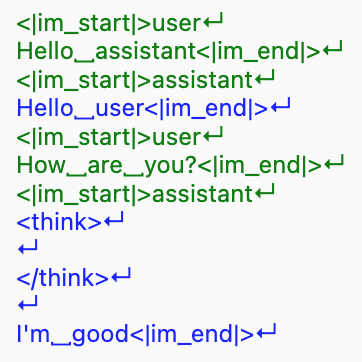
The following demonstrates how to retrieve the assistant token mask:
import transformers

tokenizer = transformers.AutoTokenizer.from_pretrained("Qwen/Qwen3-14B")

conversation = [
    {"role": "user", "content": "Hello assistant"},
    {"role": "assistant", "content": "Hello user"},
    {"role": "user", "content": "How are you?"},
    {"role": "assistant", "content": "I'm good"},
]

tokenized_output = tokenizer.apply_chat_template(
    conversation,
    return_assistant_tokens_mask=True,
    return_dict=True,
)

print("Tokenized Output with Assistant Mask:")
print(tokenized_output)

# BEFORE
# {'input_ids': [151644, 872, 198, 9707, 17847, 151645, 198, 151644, 77091, 198, 9707, 1196, 151645, 198, 151644, 872, 198, 4340, 525, 498, 30, 151645, 198, 151644, 77091, 198, 151667, 271, 151668, 271, 40, 2776, 1661, 151645, 198],
#  'attention_mask': [1, 1, 1, 1, 1, 1, 1, 1, 1, 1, 1, 1, 1, 1, 1, 1, 1, 1, 1, 1, 1, 1, 1, 1, 1, 1, 1, 1, 1, 1, 1, 1, 1, 1, 1],
#  'assistant_masks': [0, 0, 0, 0, 0, 0, 0, 0, 0, 0, 0, 0, 0, 0, 0, 0, 0, 0, 0, 0, 0, 0, 0, 0, 0, 0, 0, 0, 0, 0, 0, 0, 0, 0, 0]
# }

# AFTER
# {'input_ids': [151644, 872, 198, 9707, 17847, 151645, 198, 151644, 77091, 198, 9707, 1196, 151645, 198, 151644, 872, 198, 4340, 525, 498, 30, 151645, 198, 151644, 77091, 198, 151667, 271, 151668, 271, 40, 2776, 1661, 151645, 198],
#  'attention_mask': [1, 1, 1, 1, 1, 1, 1, 1, 1, 1, 1, 1, 1, 1, 1, 1, 1, 1, 1, 1, 1, 1, 1, 1, 1, 1, 1, 1, 1, 1, 1, 1, 1, 1, 1],
#  'assistant_masks': [0, 0, 0, 0, 0, 0, 0, 0, 0, 0, 1, 1, 1, 1, 0, 0, 0, 0, 0, 0, 0, 0, 0, 0, 0, 0, 1, 1, 1, 1, 1, 1, 1, 1, 1]
# }
Visualizing the mask helps understand which parts of the input correspond to the assistant's generation:
Testing
- Verified template works with both tool and non-tool scenarios
- Verified works with reasoning content