Instructions to use UnbindAI/Unbind-Flash-V1 with libraries, inference providers, notebooks, and local apps. Follow these links to get started.
- Notebooks
- Google Colab
- Kaggle
- Local Apps Settings
- llama.cpp
How to use UnbindAI/Unbind-Flash-V1 with llama.cpp:
Install (macOS, Linux)
curl -LsSf https://llama.app/install.sh | sh # Start a local OpenAI-compatible server with a web UI: llama serve -hf UnbindAI/Unbind-Flash-V1:Q2_K_S # Run inference directly in the terminal: llama cli -hf UnbindAI/Unbind-Flash-V1:Q2_K_S
Install from WinGet (Windows)
winget install llama.cpp # Start a local OpenAI-compatible server with a web UI: llama serve -hf UnbindAI/Unbind-Flash-V1:Q2_K_S # Run inference directly in the terminal: llama cli -hf UnbindAI/Unbind-Flash-V1:Q2_K_S
Build from source code
git clone https://github.com/ggml-org/llama.cpp.git cd llama.cpp cmake -B build cmake --build build -j --target llama-app # Start a local OpenAI-compatible server with a web UI: ./build/bin/llama serve -hf UnbindAI/Unbind-Flash-V1:Q2_K_S # Run inference directly in the terminal: ./build/bin/llama cli -hf UnbindAI/Unbind-Flash-V1:Q2_K_S
Use Docker
docker model run hf.co/UnbindAI/Unbind-Flash-V1:Q2_K_S
- Llama new
- LM Studio
- Jan
- vLLM
How to use UnbindAI/Unbind-Flash-V1 with vLLM:
Install from pip and serve model
# Install vLLM from pip: pip install vllm # Start the vLLM server: vllm serve "UnbindAI/Unbind-Flash-V1" # Call the server using curl (OpenAI-compatible API): curl -X POST "http://localhost:8000/v1/chat/completions" \ -H "Content-Type: application/json" \ --data '{ "model": "UnbindAI/Unbind-Flash-V1", "messages": [ { "role": "user", "content": "What is the capital of France?" } ] }'Use Docker
docker model run hf.co/UnbindAI/Unbind-Flash-V1:Q2_K_S
- Ollama
How to use UnbindAI/Unbind-Flash-V1 with Ollama:
ollama run hf.co/UnbindAI/Unbind-Flash-V1:Q2_K_S
- Unsloth Desktop
- Pi
How to use UnbindAI/Unbind-Flash-V1 with Pi:
Start the llama.cpp server
# Install llama.cpp: brew install llama.cpp # Start a local OpenAI-compatible server: llama serve -hf UnbindAI/Unbind-Flash-V1:Q2_K_S
Configure the model in Pi
# Install Pi: npm install -g @earendil-works/pi-coding-agent # Add to ~/.pi/agent/models.json: { "providers": { "llama-cpp": { "baseUrl": "http://localhost:8080/v1", "api": "openai-completions", "apiKey": "none", "models": [ { "id": "UnbindAI/Unbind-Flash-V1:Q2_K_S" } ] } } }Run Pi
# Start Pi in your project directory: pi
- Docker Model Runner
How to use UnbindAI/Unbind-Flash-V1 with Docker Model Runner:
docker model run hf.co/UnbindAI/Unbind-Flash-V1:Q2_K_S
- Lemonade
How to use UnbindAI/Unbind-Flash-V1 with Lemonade:
Pull the model
# Download Lemonade from https://lemonade-server.ai/ lemonade pull UnbindAI/Unbind-Flash-V1:Q2_K_S
Run and chat with the model
lemonade run user.Unbind-Flash-V1-Q2_K_S
List all available models
lemonade list
- Hermes Agent
How to use UnbindAI/Unbind-Flash-V1 with Hermes Agent:
Start the llama.cpp server
# Install llama.cpp: brew install llama.cpp # Start a local OpenAI-compatible server: llama serve -hf UnbindAI/Unbind-Flash-V1:Q2_K_S
Configure Hermes
# Install Hermes: curl -fsSL https://hermes-agent.nousresearch.com/install.sh | bash hermes setup # Point Hermes at the local server: hermes config set model.provider custom hermes config set model.base_url http://127.0.0.1:8080/v1 hermes config set model.default UnbindAI/Unbind-Flash-V1:Q2_K_S
Run Hermes
hermes
- Atomic Chat
- OpenClaw
How to use UnbindAI/Unbind-Flash-V1 with OpenClaw:
Start the llama.cpp server
# Install llama.cpp: brew install llama.cpp # Start a local OpenAI-compatible server: llama serve -hf UnbindAI/Unbind-Flash-V1:Q2_K_S
Configure OpenClaw
# Install OpenClaw: npm install -g openclaw@latest # Register the local server and set it as the default model: openclaw onboard --non-interactive --mode local \ --auth-choice custom-api-key \ --custom-base-url http://127.0.0.1:8080/v1 \ --custom-model-id "UnbindAI/Unbind-Flash-V1:Q2_K_S" \ --custom-provider-id llama-cpp \ --custom-compatibility openai \ --custom-text-input \ --accept-risk \ --skip-health
Run OpenClaw
openclaw agent --local --agent main --message "Hello from Hugging Face"
|
Download assets/results-v1/07-livecodebench.svg from UnbindAI/Unbind-Flash-V1: direct link, hf CLI and curl.
- Browser
- Download file 5.78 kB
-
https://huggingface.co/UnbindAI/Unbind-Flash-V1/resolve/main/assets/results-v1/07-livecodebench.svg
- Command line
-
hf download hf://UnbindAI/Unbind-Flash-V1/assets/results-v1/07-livecodebench.svg
-
curl -L -o 07-livecodebench.svg https://huggingface.co/UnbindAI/Unbind-Flash-V1/resolve/main/assets/results-v1/07-livecodebench.svg
5.78 kB
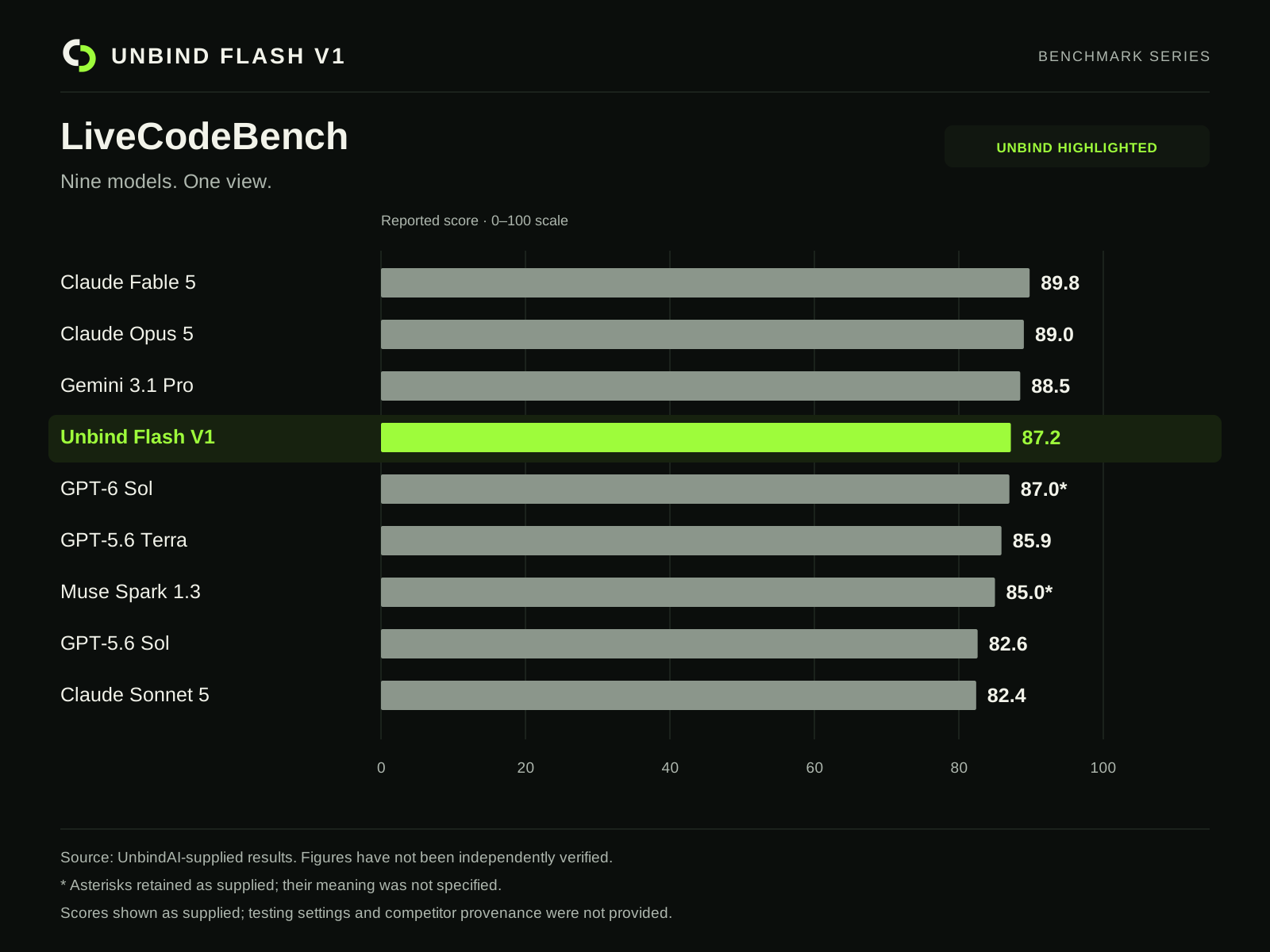
| <svg xmlns="http://www.w3.org/2000/svg" width="1600" height="1200" viewBox="0 0 1600 1200"><title>LiveCodeBench comparison</title><style>text{font-family:Arial,sans-serif;font-variant-numeric:tabular-nums}</style><rect x="0" y="0" width="1600" height="1200" rx="0" fill="#0b0e0c" /><svg x="76" y="46" width="48" height="48" viewBox="0 0 256 256"><path fill="#f2f3ea" d="M109 18c-25 0-48 10-65 27C27 62 18 84 18 108c0 50 40 90 90 90h13v-41h-13c-27 0-49-22-49-49s22-49 50-49h21V18z"/><path fill="#9efc3b" d="M147 238c25 0 48-10 65-27 17-17 26-39 26-63 0-50-40-90-90-90h-13v41h13c27 0 49 22 49 49s-22 49-50 49h-21v41z"/></svg><text x="140" y="80" fill="#f2f3ea" font-size="28" font-weight="700" text-anchor="start" letter-spacing="3">UNBIND FLASH V1</text><text x="1524" y="77" fill="#aeb7ae" font-size="18" font-weight="400" text-anchor="end" letter-spacing="2">BENCHMARK SERIES</text><line x1="76" y1="116" x2="1524" y2="116" stroke="#2b362b"/><text x="76" y="188" fill="#f2f3ea" font-size="48" font-weight="700" text-anchor="start" >LiveCodeBench</text><text x="76" y="237" fill="#aeb7ae" font-size="25" font-weight="400" text-anchor="start" >Nine models. One view.</text><rect x="1190" y="158" width="334" height="53" rx="10" fill="#111710" /><text x="1357" y="192" fill="#9efc3b" font-size="17" font-weight="700" text-anchor="middle" letter-spacing="1">UNBIND HIGHLIGHTED</text><text x="480" y="284" fill="#aeb7ae" font-size="18" font-weight="400" text-anchor="start" >Reported score · 0–100 scale</text><line x1="480" y1="316" x2="480" y2="932" stroke="#2b362b"/><text x="480" y="974" fill="#aeb7ae" font-size="19" font-weight="400" text-anchor="middle" >0</text><line x1="662" y1="316" x2="662" y2="932" stroke="#2b362b"/><text x="662" y="974" fill="#aeb7ae" font-size="19" font-weight="400" text-anchor="middle" >20</text><line x1="844" y1="316" x2="844" y2="932" stroke="#2b362b"/><text x="844" y="974" fill="#aeb7ae" font-size="19" font-weight="400" text-anchor="middle" >40</text><line x1="1026" y1="316" x2="1026" y2="932" stroke="#2b362b"/><text x="1026" y="974" fill="#aeb7ae" font-size="19" font-weight="400" text-anchor="middle" >60</text><line x1="1208" y1="316" x2="1208" y2="932" stroke="#2b362b"/><text x="1208" y="974" fill="#aeb7ae" font-size="19" font-weight="400" text-anchor="middle" >80</text><line x1="1390" y1="316" x2="1390" y2="932" stroke="#2b362b"/><text x="1390" y="974" fill="#aeb7ae" font-size="19" font-weight="400" text-anchor="middle" >100</text><text x="76" y="364" fill="#f2f3ea" font-size="25" font-weight="400" text-anchor="start" >Claude Fable 5</text><rect x="480" y="338" width="817.18" height="37" rx="2" fill="#8b968b" /><text x="1311.1799999999998" y="365" fill="#f2f3ea" font-size="25" font-weight="700" text-anchor="start" >89.8</text><text x="76" y="429" fill="#f2f3ea" font-size="25" font-weight="400" text-anchor="start" >Claude Opus 5</text><rect x="480" y="403" width="809.9" height="37" rx="2" fill="#8b968b" /><text x="1303.9" y="430" fill="#f2f3ea" font-size="25" font-weight="700" text-anchor="start" >89.0</text><text x="76" y="494" fill="#f2f3ea" font-size="25" font-weight="400" text-anchor="start" >Gemini 3.1 Pro</text><rect x="480" y="468" width="805.35" height="37" rx="2" fill="#8b968b" /><text x="1299.35" y="495" fill="#f2f3ea" font-size="25" font-weight="700" text-anchor="start" >88.5</text><rect x="61" y="523" width="1478" height="60" rx="10" fill="#17220f" /><text x="76" y="559" fill="#9efc3b" font-size="25" font-weight="700" text-anchor="start" >Unbind Flash V1</text><rect x="480" y="533" width="793.52" height="37" rx="2" fill="#9efc3b" /><text x="1287.52" y="560" fill="#9efc3b" font-size="25" font-weight="700" text-anchor="start" >87.2</text><text x="76" y="624" fill="#f2f3ea" font-size="25" font-weight="400" text-anchor="start" >GPT-6 Sol</text><rect x="480" y="598" width="791.7" height="37" rx="2" fill="#8b968b" /><text x="1285.7" y="625" fill="#f2f3ea" font-size="25" font-weight="700" text-anchor="start" >87.0*</text><text x="76" y="689" fill="#f2f3ea" font-size="25" font-weight="400" text-anchor="start" >GPT-5.6 Terra</text><rect x="480" y="663" width="781.69" height="37" rx="2" fill="#8b968b" /><text x="1275.69" y="690" fill="#f2f3ea" font-size="25" font-weight="700" text-anchor="start" >85.9</text><text x="76" y="754" fill="#f2f3ea" font-size="25" font-weight="400" text-anchor="start" >Muse Spark 1.3</text><rect x="480" y="728" width="773.5" height="37" rx="2" fill="#8b968b" /><text x="1267.5" y="755" fill="#f2f3ea" font-size="25" font-weight="700" text-anchor="start" >85.0*</text><text x="76" y="819" fill="#f2f3ea" font-size="25" font-weight="400" text-anchor="start" >GPT-5.6 Sol</text><rect x="480" y="793" width="751.66" height="37" rx="2" fill="#8b968b" /><text x="1245.6599999999999" y="820" fill="#f2f3ea" font-size="25" font-weight="700" text-anchor="start" >82.6</text><text x="76" y="884" fill="#f2f3ea" font-size="25" font-weight="400" text-anchor="start" >Claude Sonnet 5</text><rect x="480" y="858" width="749.84" height="37" rx="2" fill="#8b968b" /><text x="1243.8400000000001" y="885" fill="#f2f3ea" font-size="25" font-weight="700" text-anchor="start" >82.4</text><line x1="76" y1="1045" x2="1524" y2="1045" stroke="#2b362b"/><text x="76" y="1087" fill="#aeb7ae" font-size="19" font-weight="400" text-anchor="start" >Source: UnbindAI-supplied results. Figures have not been independently verified.</text><text x="76" y="1122" fill="#aeb7ae" font-size="19" font-weight="400" text-anchor="start" >* Asterisks retained as supplied; their meaning was not specified.</text><text x="76" y="1157" fill="#aeb7ae" font-size="19" font-weight="400" text-anchor="start" >Scores shown as supplied; testing settings and competitor provenance were not provided.</text></svg> |