| --- |
| tags: |
| - image-to-text |
| - image-captioning |
| license: apache-2.0 |
| widget: |
| - src: >- |
| https://huggingface.co/datasets/mishig/sample_images/resolve/main/savanna.jpg |
| example_title: Savanna |
| - src: >- |
| https://huggingface.co/datasets/mishig/sample_images/resolve/main/football-match.jpg |
| example_title: Football Match |
| - src: >- |
| https://huggingface.co/datasets/mishig/sample_images/resolve/main/airport.jpg |
| example_title: Airport |
| duplicated_from: nlpconnect/vit-gpt2-image-captioning |
| --- |
| |
| # nlpconnect/vit-gpt2-image-captioning |
|
|
| This is an image captioning model trained by @ydshieh in [flax ](https://github.com/huggingface/transformers/tree/main/examples/flax/image-captioning) this is pytorch version of [this](https://huggingface.co/ydshieh/vit-gpt2-coco-en-ckpts). |
|
|
|
|
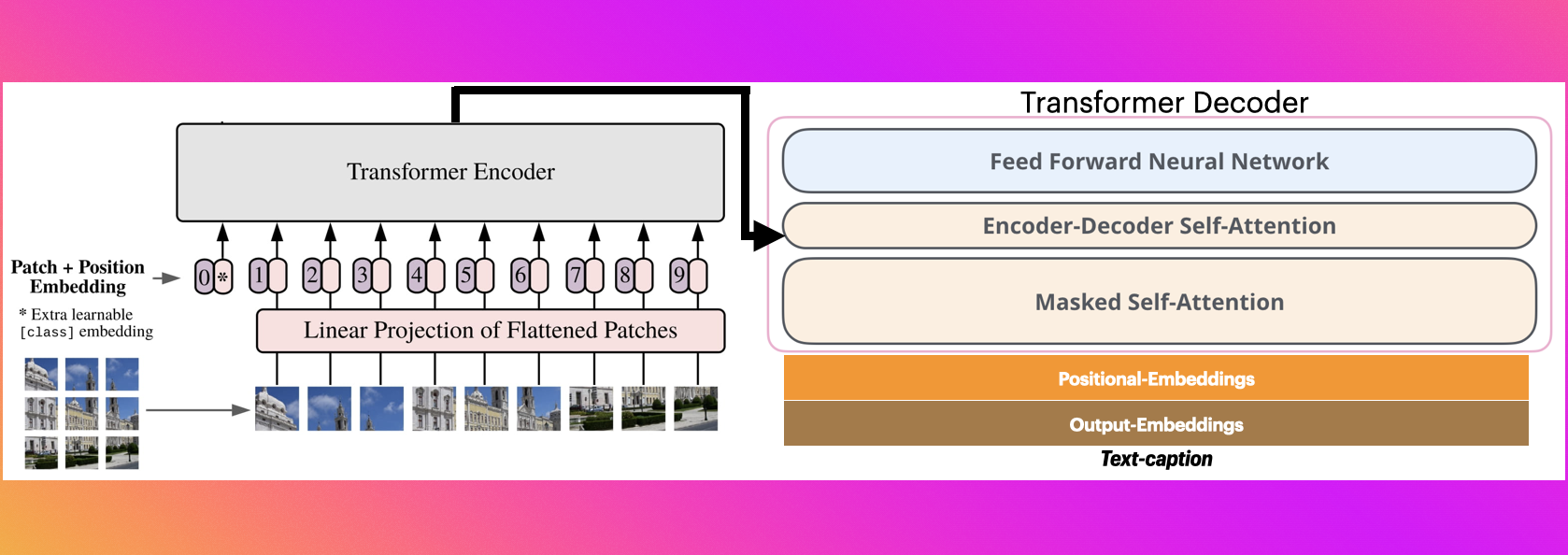
| # The Illustrated Image Captioning using transformers |
|
|
|  |
|
|
| * https://ankur3107.github.io/blogs/the-illustrated-image-captioning-using-transformers/ |
|
|
|
|
| # Sample running code |
|
|
| ```python |
| |
| from transformers import VisionEncoderDecoderModel, ViTImageProcessor, AutoTokenizer |
| import torch |
| from PIL import Image |
| |
| model = VisionEncoderDecoderModel.from_pretrained("nlpconnect/vit-gpt2-image-captioning") |
| feature_extractor = ViTImageProcessor.from_pretrained("nlpconnect/vit-gpt2-image-captioning") |
| tokenizer = AutoTokenizer.from_pretrained("nlpconnect/vit-gpt2-image-captioning") |
| |
| device = torch.device("cuda" if torch.cuda.is_available() else "cpu") |
| model.to(device) |
| |
| |
| |
| max_length = 16 |
| num_beams = 4 |
| gen_kwargs = {"max_length": max_length, "num_beams": num_beams} |
| def predict_step(image_paths): |
| images = [] |
| for image_path in image_paths: |
| i_image = Image.open(image_path) |
| if i_image.mode != "RGB": |
| i_image = i_image.convert(mode="RGB") |
| |
| images.append(i_image) |
| |
| pixel_values = feature_extractor(images=images, return_tensors="pt").pixel_values |
| pixel_values = pixel_values.to(device) |
| |
| output_ids = model.generate(pixel_values, **gen_kwargs) |
| |
| preds = tokenizer.batch_decode(output_ids, skip_special_tokens=True) |
| preds = [pred.strip() for pred in preds] |
| return preds |
| |
| |
| predict_step(['doctor.e16ba4e4.jpg']) # ['a woman in a hospital bed with a woman in a hospital bed'] |
| |
| ``` |
|
|
| # Sample running code using transformers pipeline |
|
|
| ```python |
| |
| from transformers import pipeline |
| |
| image_to_text = pipeline("image-to-text", model="nlpconnect/vit-gpt2-image-captioning") |
| |
| image_to_text("https://ankur3107.github.io/assets/images/image-captioning-example.png") |
| |
| # [{'generated_text': 'a soccer game with a player jumping to catch the ball '}] |
| |
| |
| ``` |
|
|
|
|
| # Contact for any help |
| * https://huggingface.co/ankur310794 |
| * https://twitter.com/ankur310794 |
| * http://github.com/ankur3107 |
| * https://www.linkedin.com/in/ankur310794 |