


Install Unsloth Studio (Windows)
irm https://unsloth.ai/install.ps1 | iex
# Run unsloth studio
unsloth studio -H 0.0.0.0 -p 8888
# Then open http://localhost:8888 in your browser
# Search for braydenh563/Qwen3.6-35B-Uncensored-HauhauCS-1M-MTP-Ollama to start chatting
Using HuggingFace Spaces for Unsloth
# No setup required# Open https://huggingface.co/spaces/unsloth/studio in your browser
# Search for braydenh563/Qwen3.6-35B-Uncensored-HauhauCS-1M-MTP-Ollama to start chatting
Qwen3.6-35B Uncensored: 1M Context + MTP + Vision, one file
Note from braydenh563: The file naming conventions used by satgeze prevented Hugging Face from allowing the file to be pulled directly into ollama. I have renamed the gguf file to correct this issue. Everything else remains the same.
HauhauCS's Aggressive uncensored build of Qwen3.6-35B-A3B, extended to a 1,048,576-token context and fused with the official MTP speculative-decoding layer. Every claim on the banner is measured, not inherited. Verification data ships in this repo.
| Capability | Status | Evidence |
|---|---|---|
| 1M context | Certified July 6, 2026 | 70/70 needles, full ladder 64K to 1M, 10 depths per rung, f16 KV, temp 0 |
| MTP speculative decoding | Grafted and vetted | 284.6 to 380.1 tok/s (+33.6%), draft acceptance 0.864, RTX 5090 |
| Vision | Verified | mmproj tower reads image text and identifies objects correctly |
| Uncensored | HauhauCS Aggressive | Trunk weights bit-identical to the HauhauCS release |
Needle-in-a-haystack certification
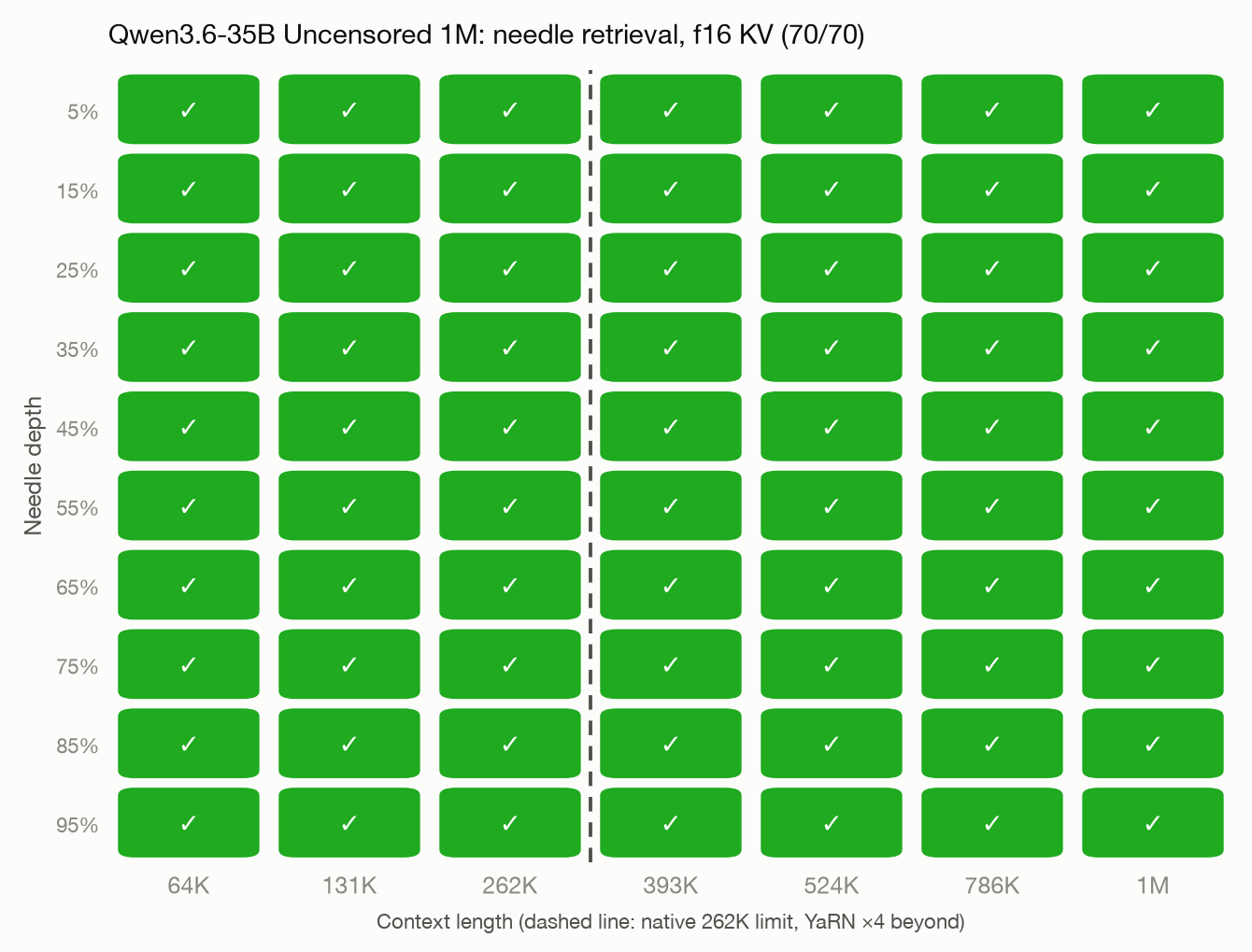
Native context is 262,144. YaRN rope scaling (factor 4) extends to 1,048,576, and retrieval stays perfect across the entire extension: every rung from 64K to 1M scored 10/10 at depths from 5 to 95 percent. Raw per-needle records are in results.jsonl.
MTP: how it got here and what it does

Qwen3.6 ships a multi-token-prediction layer in the official checkpoint, but uncensored community trunks usually drop it. This build grafts the official MTP layer (via Unsloth's MTP GGUF) back onto the uncensored trunk at the GGUF tensor level. The draft head then predicts ahead and the trunk verifies every token, so output is identical to standard decoding, only faster.
Measured on the uncensored trunk (RTX 5090, 16K ctx): 284.6 tok/s standard, 380.1 tok/s with --spec-type draft-mtp (+33.6 percent). Draft acceptance 0.864 with mean accepted run 3.59, which is higher than we measured on the official trunk (0.816). A 262K needle test with speculation active scored 10/10, confirming the graft changes nothing about retrieval.
Files
| File | Size | What it is |
|---|---|---|
qwen3.6-35b-uncensored-1M-MTP-Q4_K_M.gguf |
21.7 GB | The one-file package: uncensored trunk + 1M rope + MTP layer |
mmproj-qwen36-hauhau-f16.gguf |
899 MB | Vision tower, attach at runtime |
qwen36_heatmap.png, qwen36_mtp_speedup.png, results.jsonl |
small | Verification evidence |
The plain non-MTP 1M trunk and other quants live on the ModelScope mirror.
Every file, every mirror
Nothing was discontinued: every quant is one click away. Hugging Face carries the curated picks, ModelScope always carries everything, and Ollama serves ready-to-run tags.
On Ollama every tag ships with the vision tower bundled and the 1M rope metadata baked in.
| File | Size | Hugging Face | ModelScope | Ollama |
|---|---|---|---|---|
mmproj-qwen36-hauhau-f16.gguf |
899 MB | download | download | bundled in every tag |
qwen3.6-35b-uncensored-1M-MTP-Q4_K_M.gguf |
21.7 GB | download | download | ollama run satgeze/qwen36-35b-uncensored-1m |
qwen3.6-35b-uncensored-1M-Q4_K_M.gguf |
21.2 GB | on ModelScope | download | ollama run satgeze/qwen36-35b-uncensored-1m:q4_k_m-no-mtp |
Run with Claude Code (or any Anthropic-API agent)
llama-server natively speaks the Anthropic messages protocol, so Claude Code can use this model directly. Two integration fixes are required, both included here:
llama-server -m qwen3.6-35b-uncensored-1M-MTP-Q4_K_M.gguf \
-c 262144 -np 2 --cache-reuse 256 -ngl 99 --jinja \
--chat-template-file chat_template_claude_code.jinja \
--spec-type draft-mtp --spec-draft-n-max 3 \
--mmproj mmproj-qwen36-hauhau-f16.gguf \
--port 8040 --host 0.0.0.0
Then in the client shell:
export ANTHROPIC_BASE_URL=http://<server-ip>:8040
export ANTHROPIC_AUTH_TOKEN=local
export ANTHROPIC_MODEL=qwen36-35b-uncensored-1m-mtp
claude
Why the flags: chat_template_claude_code.jinja is the embedded template with one strictness check relaxed (the original raises an exception on the multiple system blocks agent harnesses send). -np 2 matters because Claude Code fires background side-requests; with a single slot they evict your main generation. Measured on an RTX 5090: 330 to 380 tok/s decode with speculation active, tool calls and vision working.
How this was built
- 1M context: YaRN rope-scaling metadata (factor 4.0, original context 262,144) written directly into the GGUF header with gguf-py. No weights change, no fine-tuning, no runtime flags needed: llama.cpp and Ollama read the baked metadata.
- MTP graft: the official MTP layer tensors (block 41 of the donor GGUF) appended onto the uncensored trunk,
block_countandnextn_predict_layersmetadata updated to match. GGUF surgery, not training. - Certification: multi-needle retrieval harness (10 needles per rung at depths 5 to 95 percent, temperature 0, seeded to bust prompt caches) run against llama-server with f16 KV cache. Certification is only ever done on f16 KV; quantized KV is a labeled budget option, never the baseline.
Run it
llama.cpp (full speed, MTP active):
llama-server -m qwen3.6-35b-uncensored-1M-MTP-Q4_K_M.gguf \
-c 1048576 -np 1 --jinja \
--spec-type draft-mtp --spec-draft-n-max 3 \
--mmproj mmproj-qwen36-hauhau-f16.gguf
Ollama (1M and vision work; MTP tensors load harmlessly but Ollama has no speculative decoding yet, so no speed gain there):
FROM ./qwen3.6-35b-uncensored-1M-MTP-Q4_K_M.gguf
RENDERER qwen3.5
PARSER qwen3.5
PARAMETER num_ctx 262144
The RENDERER and PARSER lines matter: imported GGUFs without a native renderer hit template bugs under tool-heavy use (for example as a coding-agent backend). Raise num_ctx as memory allows. Measured footprints: 44 GB total at 1M f16 KV on a 128 GB Mac (100 percent GPU, 72 tok/s decode); a 32 GB card holds roughly 262K fully resident.
Honest notes
- Uncensoring quality versus the official model has not been independently benchmarked here. For capability benchmarks of the base model, see the official Qwen3.6-35B-A3B card; weights here are bit-identical to the HauhauCS release apart from rope metadata and the added MTP layer, so base capability carries over modulo Q4_K_M quantization.
- The MTP layer came from the official checkpoint and pairs with this trunk architecture; acceptance 0.864 was measured on real coding prompts, and speculative decoding never changes outputs by construction.
Engine bench: same model, three engines
Measured July 8, 2026 on this exact Q4_K_M + MTP build, M3 Max 128GB, identical prompt, uniform wall-clock method, idle machine:
| Engine | Decode tok/s |
|---|---|
| llama.cpp llama-server + MTP | 79.1 |
| MLX | 72.7 |
| Ollama | 65.6 |
llama-server with the MTP draft head is the fastest way to run this model on Apple silicon, about 20 percent ahead of Ollama (which does not use speculative decoding for imported GGUFs).
How to actually use a 1M-context model
Habits that measurably help, from our RULER, hop and adherence testing across this fleet:
- Re-state standing instructions near the end of long prompts; recency beats depth.
- One big reference dump beats a long accumulated conversation. Fresh session per task.
- After any compaction or summarization, repeat your active rules yourself.
- Prefill at 500K+ takes real time on any hardware; stage your questions accordingly.
- Know your quant: the results tables on this card show what each quant actually holds at depth; pick the strongest one your memory allows.
Credits
Base model: Qwen (Apache-2.0), including the official MTP layer. Uncensoring and trunk quant: HauhauCS. MTP GGUF packaging: Unsloth. 1M YaRN extension, MTP graft, and certification: SatGeze.
Mirrors: Hugging Face | ModelScope. Tooling: github.com/satindergrewal/aviary-1m.
- Downloads last month
- 4,780
4-bit
Model tree for braydenh563/Qwen3.6-35B-Uncensored-HauhauCS-1M-MTP-Ollama
Base model
Qwen/Qwen3.6-35B-A3B
Install Unsloth Studio (macOS, Linux, WSL)
# Run unsloth studio
unsloth studio -H 0.0.0.0 -p 8888
# Then open http://localhost:8888 in your browser
# Search for braydenh563/Qwen3.6-35B-Uncensored-HauhauCS-1M-MTP-Ollama to start chatting