

FIBO
Collection
The FIBO model family (Generation & Edit) • 15 items • Updated • 4




🏆 #1 in image editing and 🥈 #2 in text-to-image among open-weights models on Artificial Analysis (October 20, 2026).
One model to edit and generate images, and the foundation to build your own.
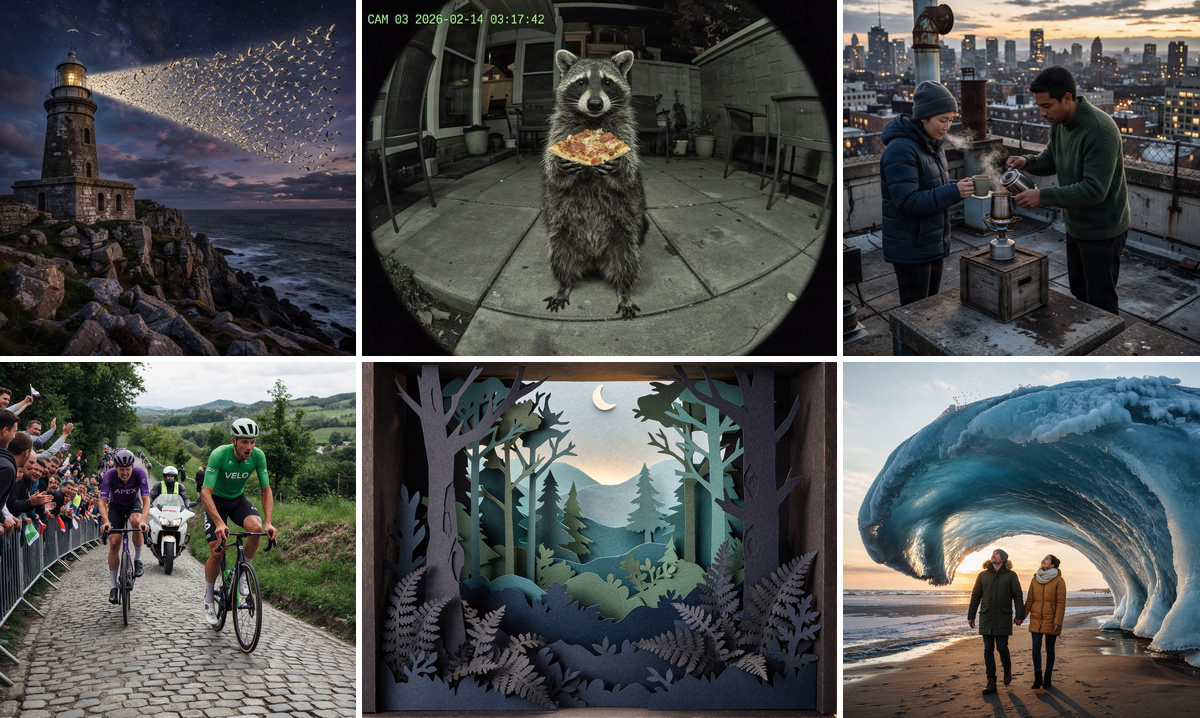
Fibo 2.0 is the next generation of Bria's FIBO family. For the first time, image editing and image generation live in a single unified model. It keeps the foundation that made FIBO the most controllable open image model: training on long, structured captions through the Visual GenAI Language (VGL). On top of that foundation it adds high-quality, general-purpose editing and a leap in text rendering, texture and anatomy. Like every FIBO model, it is trained exclusively on licensed data.
Fibo 2.0 Dev is the full, non-distilled base model. It runs with classifier-free guidance for maximum quality and control, and it is the starting point for professional fine-tuning. For few-step production editing, use Fibo 2.0 Edit Turbo.
🚀 Coming soon: multi-turn editing. Chain edit after edit, each one building on the last, while the rest of the image stays pixel-stable.
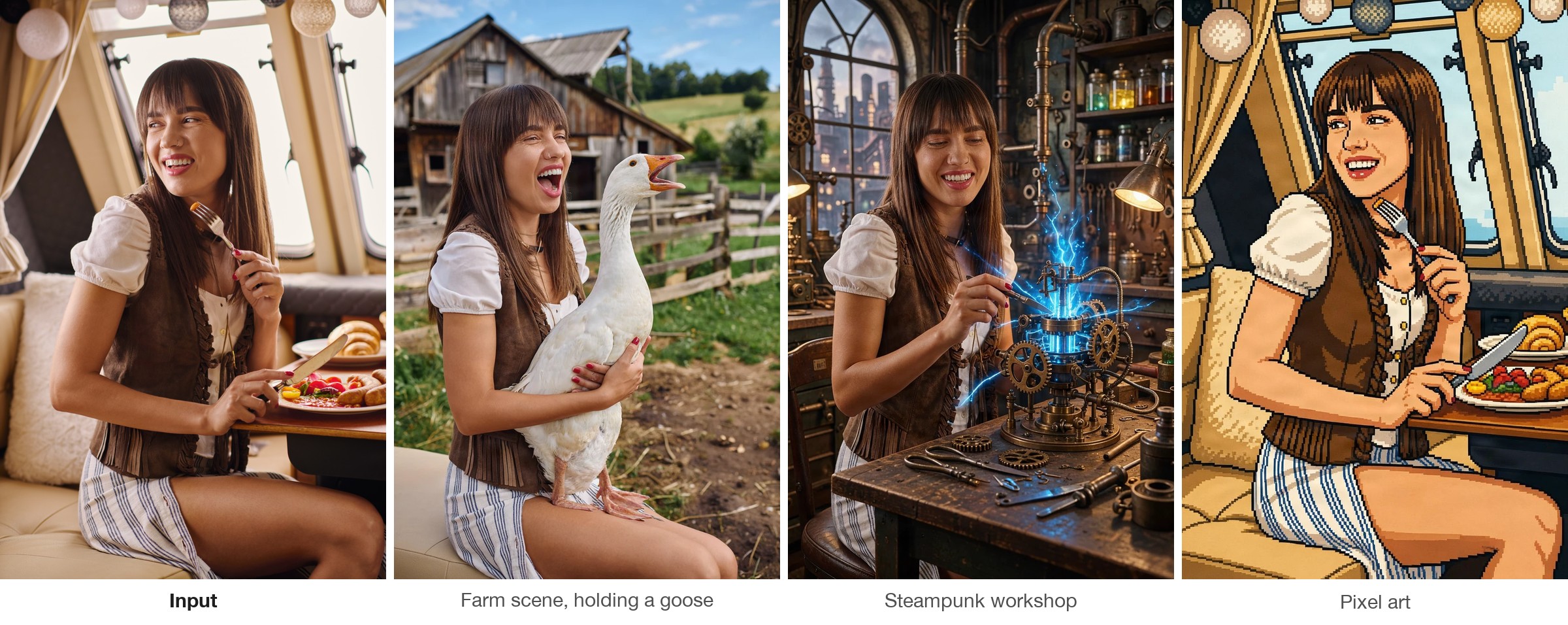
| 🎯 High-quality general editing | Instruction-based edits that generalize across a wide range of tasks while preserving everything you didn't ask to change: identity, layout, lighting and fine detail. Masked and multi-reference edits are supported. |
| 🔀 Unified editing + generation | A single model handles image editing, text-to-image and iterative refinement. One deployment covers both. |
| 🔤 Better text, texture and anatomy | Clear gains in legible in-image typography, realistic material and surface texture, and correct human anatomy (hands, faces, poses). |
| ⚡ Dev and Edit Turbo variants | Edit Turbo is distilled for few-step, low-latency image editing. Dev (this model) is the full-quality base, built for professional fine-tuning and research. |
| 📐 Still structured, still state of the art | Still trained on structured captions, which gives Fibo 2.0 state-of-the-art prompt adherence and controllability among open models. |
| 🛡️ Still 100% licensed | Trained exclusively on licensed data, like every FIBO release. |
Fibo 2.0 is a platform, and we're already building on it:
| Release | What it does |
|---|---|
| 🔁 Multi-Turn Local Editing LoRA | Chain many localized edits in a row while the rest of the image stays pixel-stable, for true conversational editing. |
| ✂️ Background Removal | Clean, production-grade subject cutouts, built natively on Fibo 2.0. |
| 📦 Product Shot LoRA | Studio-quality product photography and placement for e-commerce and catalogs. |
| 📷 Boring Reality Style | Authentic, unpolished, everyday photo realism that looks captured, not generated. |
| 🧽 Eraser by Mask | Paint a mask and remove any object, with seamless, context-aware fill. |
| 🖼️ Image Expansion | Extend images beyond their borders (outpainting) to any aspect ratio, with a coherent continuation of the scene. |
Follow Bria on Hugging Face and join our Discord to be the first to know.
Most image models excel at imagination but not at control. FIBO was built for professional workflows. It was trained on structured JSON captions of up to 1,000+ words that describe lighting, composition, color, camera and depth of field explicitly. This gives the model native disentanglement: you can change one attribute, such as the camera angle, the time of day or a subject's outfit, without the rest of the scene drifting.
Fibo 2.0 applies the same principle to editing. An edit is a precise, structured change to a visual blueprint, not a loose text prompt, so the results are explicit, interpretable and repeatable.
Fibo 2.0 is natively built on Visual GenAI Language (VGL). VGL replaces vague natural-language descriptions with explicit JSON that both humans and machines can read. Lighting, composition, style, camera parameters and every object in the scene are separate, addressable fields. Generation becomes "render this blueprint," and editing becomes "apply this diff to the blueprint."
You never have to write JSON by hand. bria-vgl, the same open-source package behind Bria's API, turns short prompts and plain-language edit instructions into full structured prompts for you.
| Mode | Input | What happens |
|---|---|---|
| Edit ✨ | Source image + instruction | Add, remove or replace objects, or change style, lighting, background, materials or text. Everything you didn't ask to change is preserved. |
| Masked edit ✨ | Source image + mask + instruction | The edit is confined to the masked region, and the rest of the image is left untouched. |
| Multi-reference ✨ | Up to 4 reference images + instruction | Information from every reference is combined into one result, for reference-guided composition, virtual try-on, product integration, and style or appearance transfer. |
| Generate | Short text prompt | The VLM expands your idea into a rich structured prompt, and Fibo 2.0 renders it. You get the image and the full JSON. |
| Inspire | Reference image + short prompt | A new structured prompt borrows the reference's subject, style or composition; Fibo 2.0 generates it from text and never sees the image. |
🏆 #1 in image editing and 🥈 #2 in text-to-image among open-weights models on the Artificial Analysis Image Arena.
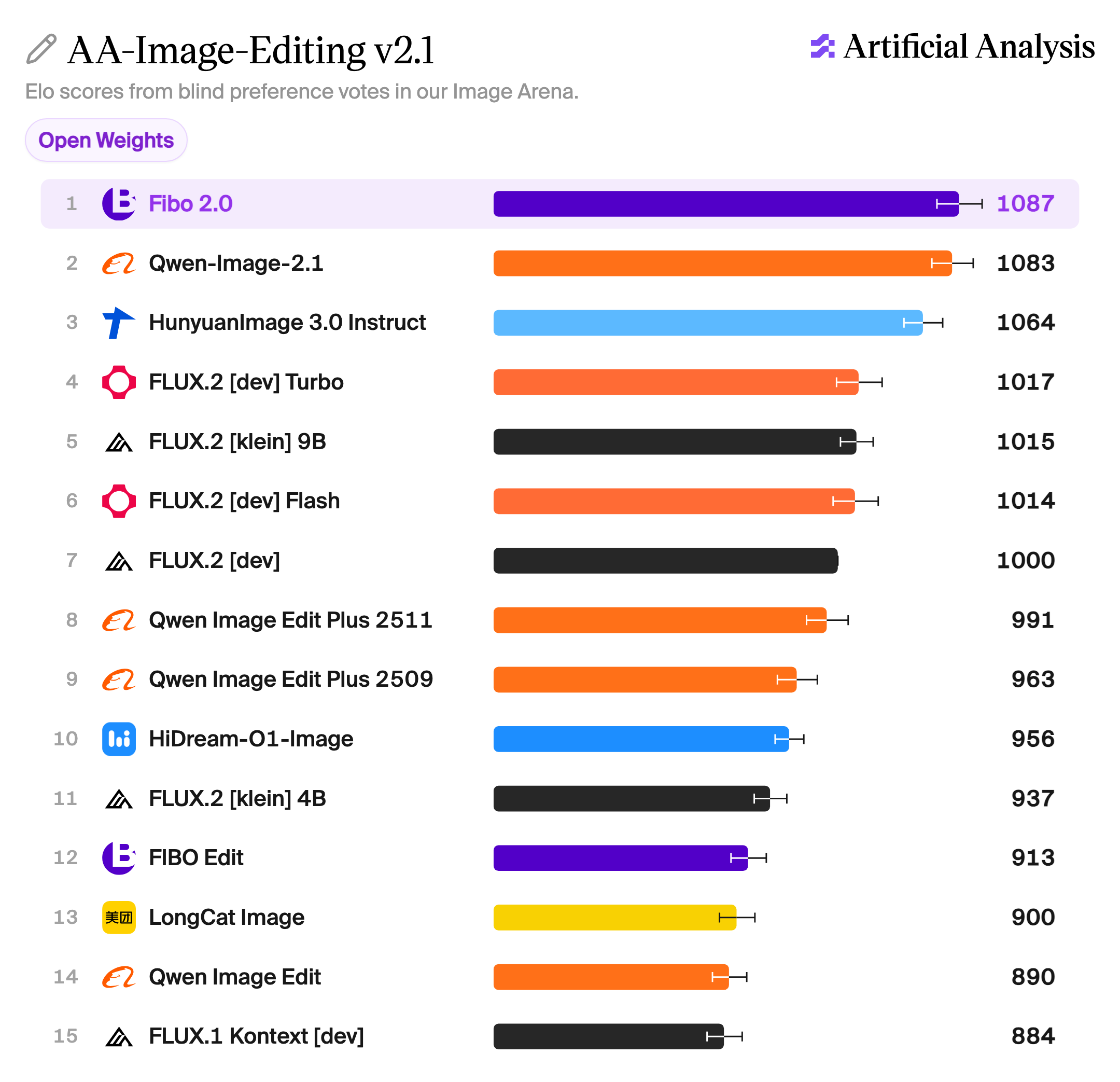
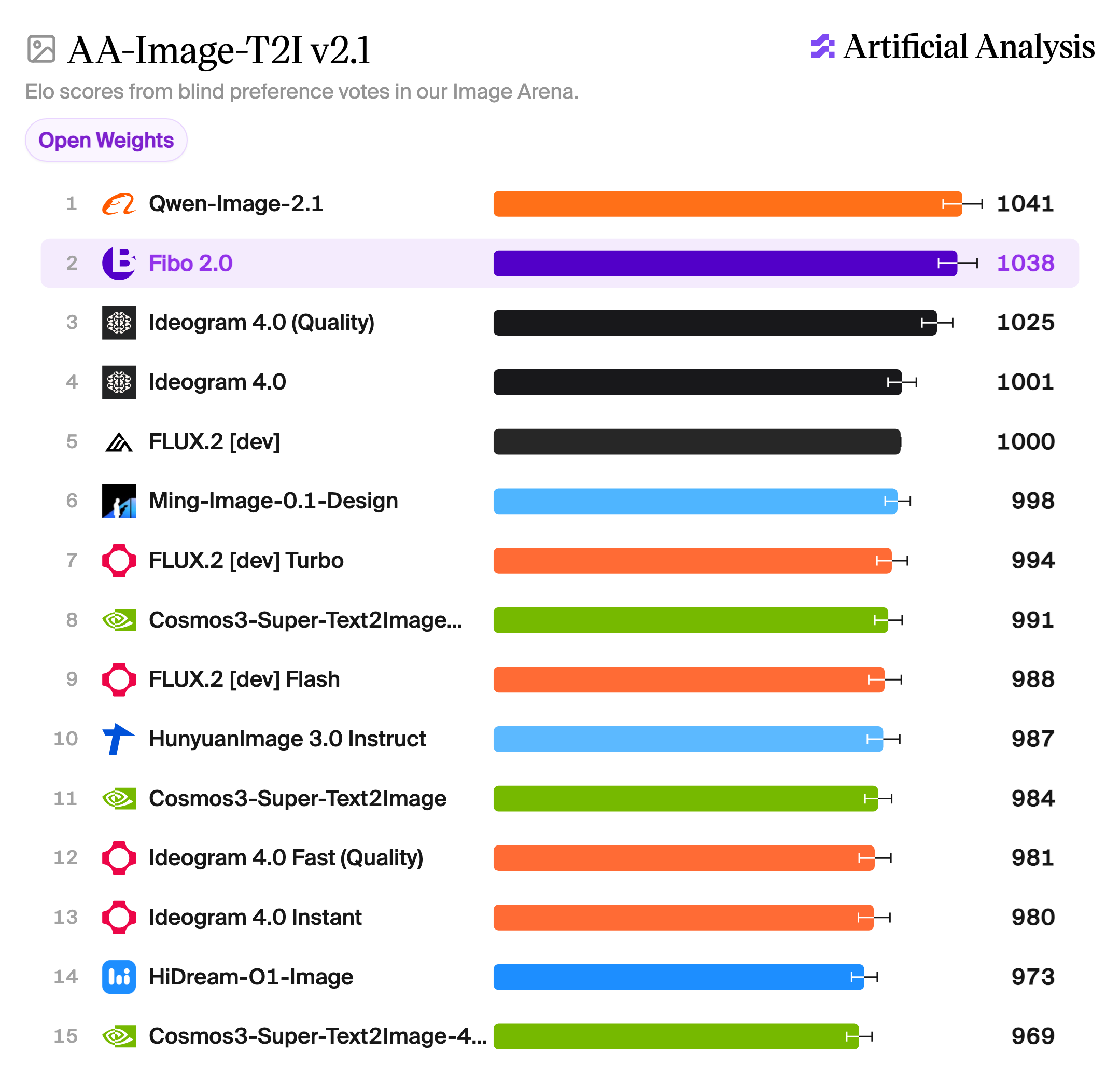
Rankings as of October 20, 2026.
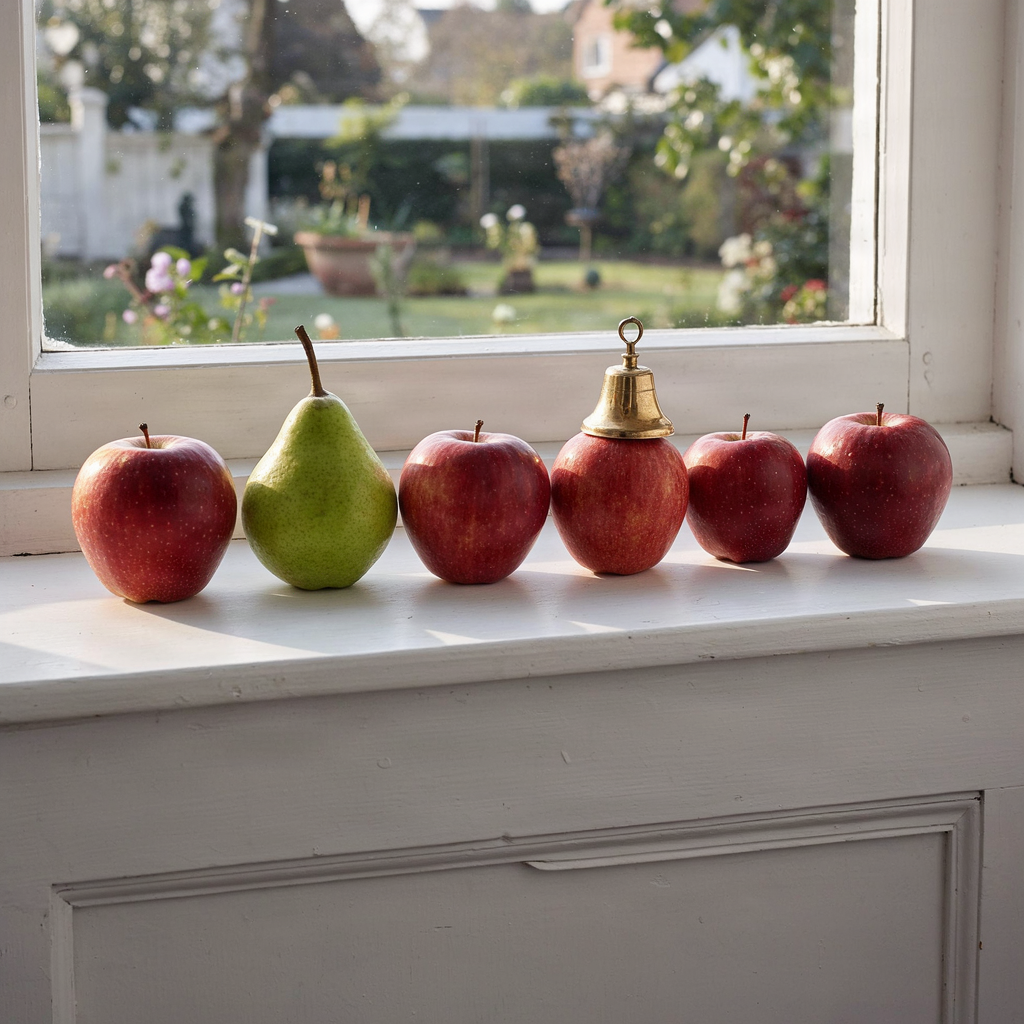 |
"On a white windowsill, a row of exactly five red apples and one green pear, the pear in the second position from the left. A small brass bell sits on top of the third apple from the right. Morning light, minimal still life." Structured captions make Fibo 2.0 follow counts, positions and attributes precisely. |
| Text-to-image | Image editing | |
|---|---|---|
| 🚀 Try it now | Generate sandbox | Edit sandbox |
| ⚡ Fal.ai | bria/fibo-2/generate | bria/fibo-2/edit |
| 🤗 Hugging Face Space | Fibo-2.0-T2I | Fibo-2.0-editing (runs Edit Turbo) |
Bria API: docs.bria.ai · Bria Create: create.bria.ai
ComfyUI: Bria ComfyUI nodes · Agents: Bria agent skill
License: Creative Commons Attribution–Non-Commercial (CC BY-NC 4.0)
The model is released under a CC BY-NC 4.0 license for non-commercial use.
Commercial use is subject to a commercial agreement with BRIA. Available here.
BriaFibo2Pipeline is being added to diffusers (PR #14991). Until it is merged, install diffusers from the PR branch. bria-vgl writes the structured prompts, with the same prompts and model as the Bria API and fal endpoints.
pip install -U "git+https://github.com/muhammadali-afridi/diffusers@ali/fibo2" torch torchvision transformers accelerate
Install bria-vgl with pip or uv:
pip install bria-vgl
# or
uv add bria-vgl
bria-vgl runs on Gemini; set your key (get one here):
export GEMINI_API_KEY="your-api-key"
🛠️ Full base model. Use
num_inference_steps=50andguidance_scale=5.0. For few-step, guidance-free editing, use Fibo 2.0 Edit Turbo.
Fibo 2.0 reads structured VGL captions. bria-vgl turns a short prompt, or images plus a plain-language instruction, into one: create() for generation, modify() for edits.
import json
import torch
from PIL import Image
from diffusers import BriaFibo2Pipeline
from huggingface_hub import hf_hub_download
from bria_vgl import create, modify
from bria_vgl.dialects.thales import EditImages, EditImageWithMask, Generate, Inspire

pipe = BriaFibo2Pipeline.from_pretrained("briaai/Fibo-2.0-dev", dtype=torch.bfloat16).to("cuda")
# On Hopper GPUs (H100), FlashAttention-3 is faster:
# pipe.transformer.set_attention_backend("_flash_3_varlen_hub")

# Fibo 2.0 sees each text in the caption drawn as a small image.
fonts = [hf_hub_download("briaai/Fibo-2.0-dev", name, subfolder="fonts") for name in ("Aileron-Regular.otf", "DejaVuSans.ttf")]

# Negative prompts: text-to-image steers away from soft, featureless, artifact-laden images; edits use the empty caption the model was trained with.
NEGATIVE_T2I = '{"short_description":"","objects":[{"description":"the main subject","texture":"smooth, featureless, plastic-like, airbrushed, no fine surface detail","appearance_details":"soft blurred edges, simplified shapes, no fine detail","skin_tone_and_texture":"waxy airbrushed skin, poreless, plastic smooth"}],"background_setting":"a plain seamless studio backdrop, perfectly smooth gradient, blurred and featureless, no visible texture","lighting":{},"aesthetics":{"artifacts":["oversaturated colours","neon colour cast","overexposed highlights","lens flare","slight blur","motion blur","haze"]},"photographic_characteristics":{"depth_of_field":"shallow, heavy bokeh obscuring most of the frame","focus":"soft, slightly out of focus, lacking fine texture"},"style_medium":"","context":"","artistic_style":""}'
NEGATIVE_EDIT = '{"short_description":"","objects":[],"background_setting":"","lighting":{},"aesthetics":{},"photographic_characteristics":{},"style_medium":"","context":"","artistic_style":""}'


# bria-vgl's scene as the JSON prompt the pipeline reads
def vgl(scene) -> str:
    return json.dumps(scene.model_dump(exclude_none=True), ensure_ascii=False)
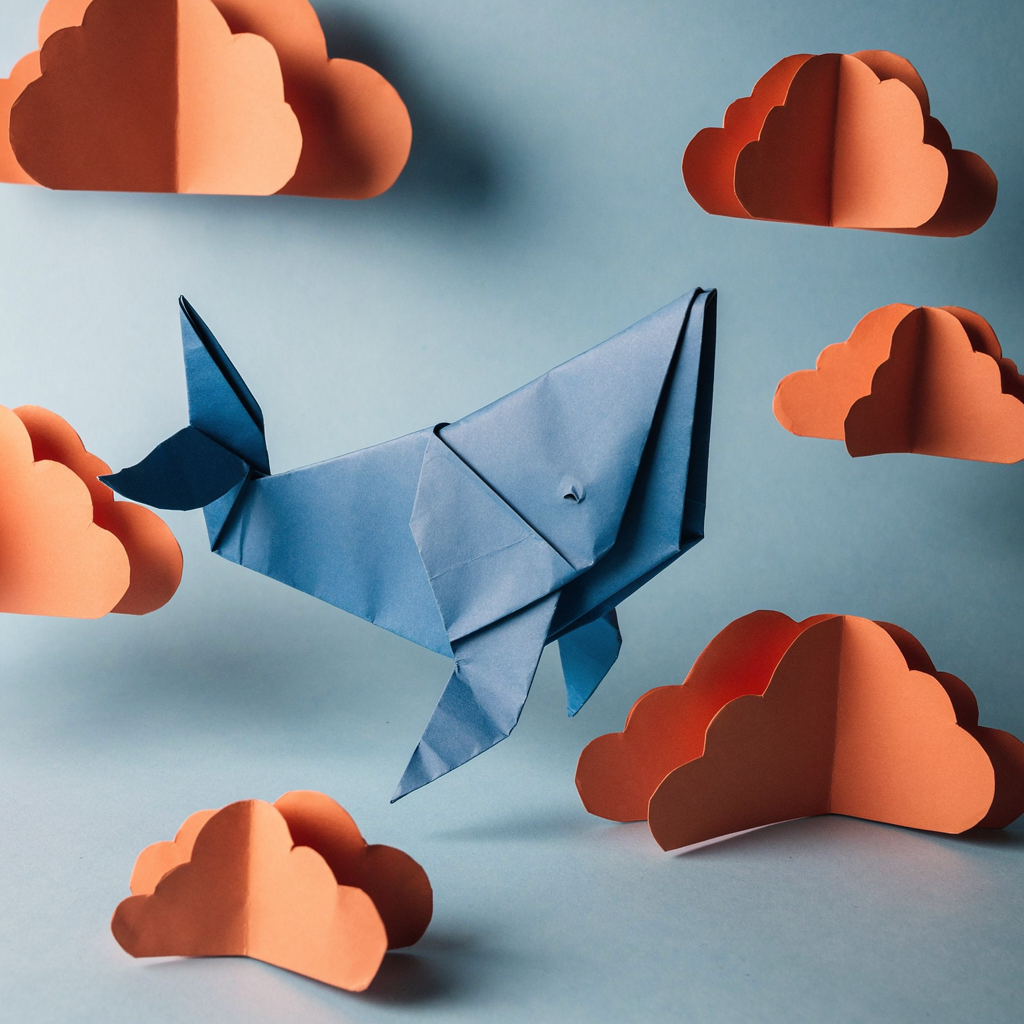
scene = create(Generate(prompt="An origami whale swimming through paper clouds"), seed=0)
image = pipe(prompt=vgl(scene), negative_prompt=NEGATIVE_T2I, width=1424, height=800, num_inference_steps=50, guidance_scale=5.0, fonts=fonts).images[0]
image.save("generate.png")
width and height set the output size. Use multiples of 16 at about one megapixel, the area Fibo 2.0 was trained at: for example 1024×1024 (the default), 1424×800 (16:9) or 1248×832 (3:2).

You get the image and its full structured caption (scene), which you can inspect, edit and render again.
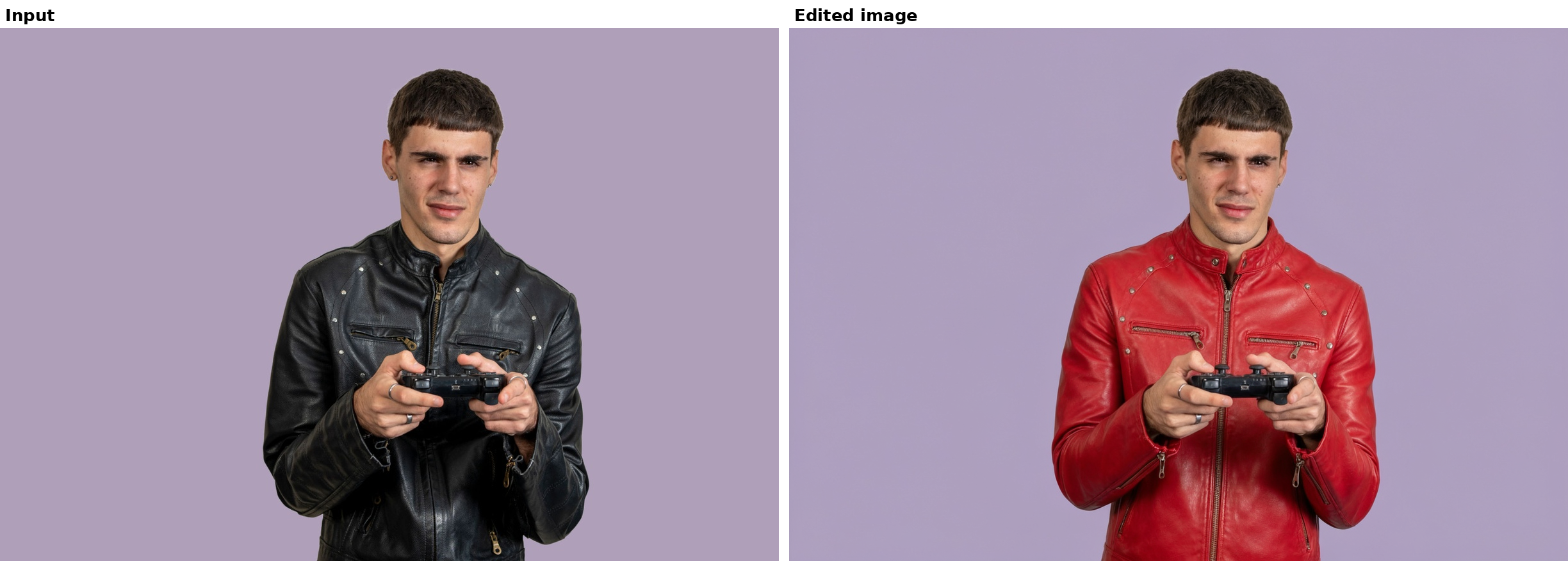
source = Image.open("photo.jpg").convert("RGB")
scene = modify(EditImages(prompt="replace the jacket with a red leather one", images=[source]), seed=0)
print(scene.edit_instruction)  # the instruction, rewritten in the form Fibo 2.0 was trained on

edited = pipe(prompt=vgl(scene), negative_prompt=NEGATIVE_EDIT, image=source, num_inference_steps=50, guidance_scale=5.0, fonts=fonts).images[0]
edited.save("edited.png")
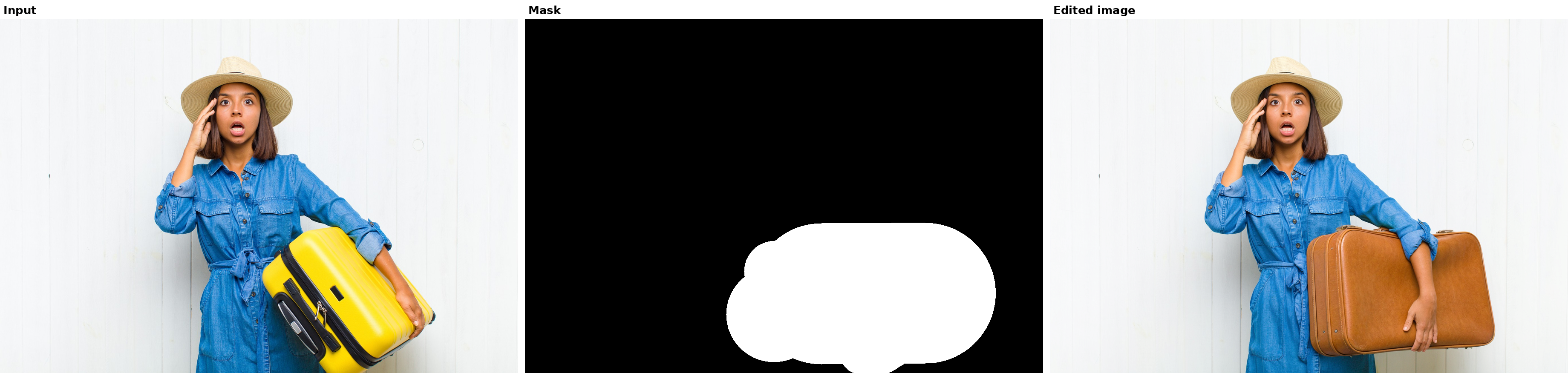
White marks the region to regenerate; everything else is kept. The mask goes to both bria-vgl and the pipeline.
source = Image.open("suitcase.png").convert("RGB")
mask = Image.open("suitcase_mask.png").convert("L")  # same size as the source
scene = modify(EditImageWithMask(prompt="replace the suitcase with a vintage brown leather one", image=source, mask=mask), seed=0)
edited = pipe(prompt=vgl(scene), negative_prompt=NEGATIVE_EDIT, image=source, mask=mask, num_inference_steps=50, guidance_scale=5.0, fonts=fonts).images[0]
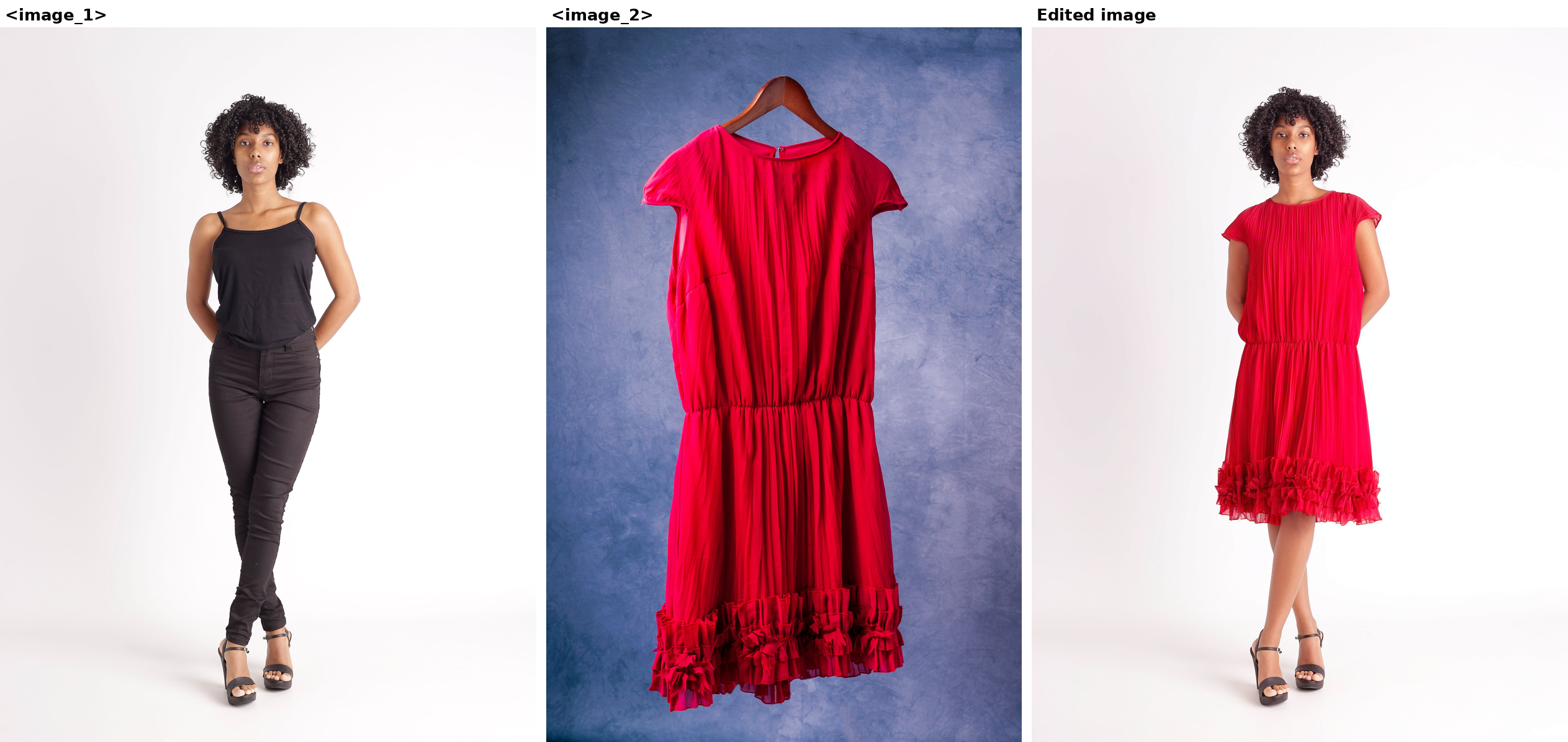
Up to 4 images, referred to in order as <image_1>, <image_2>, and so on.
references = [Image.open("person.png").convert("RGB"), Image.open("dress.png").convert("RGB")]
scene = modify(EditImages(prompt="dress the person in <image_1> in the dress from <image_2>", images=references), seed=0)
result = pipe(prompt=vgl(scene), negative_prompt=NEGATIVE_EDIT, image=references, num_inference_steps=50, guidance_scale=5.0, fonts=fonts).images[0]
Text-to-image with a reference image. bria-vgl looks at the image and writes a structured prompt for the scene you describe, carrying over what you ask for from the reference: its subject, style, colours or composition. The pipeline then generates from that prompt alone, without seeing the image, so the result is inspired by the reference rather than a copy of it.
reference = Image.open("generate.png").convert("RGB")  # the whale from the Generate example
scene = create(Inspire(prompt="the same scene, the whale is blue and the clouds are orange", image=reference), seed=0)
image = pipe(prompt=vgl(scene), negative_prompt=NEGATIVE_T2I, num_inference_steps=50, guidance_scale=5.0, fonts=fonts).images[0]
Generation and editing share one set of weights, so a single fine-tune can teach Fibo 2.0 Dev a new style or domain and how to edit within it. Typical uses:
Fine-tuning code: fine_tuning/ holds a single-GPU LoRA trainer for editing and text-to-image, with a guide to preparing data.
Fibo 2.0 is an 8B-parameter flow-matching model operating in the latent space of the FLUX.2 VAE. Prompts are encoded by Qwen3-VL-4B-Instruct, and context images for editing are encoded by both the VLM and the VAE. A two-layer Perceiver resampler compresses the VLM output into 256–512 "gist" tokens, with more tokens for longer prompts. These are prepended to the image tokens (the noisy latent and, when editing, the clean context latents) and processed by a single-stream DiT with 44 blocks. Internal VLM layers also feed five of those blocks directly through cross-attention.
Fibo 2.0 Dev is the base checkpoint of the release. Fibo 2.0 Edit Turbo is distilled from it for few-step editing, with the same architecture.
Data: trained exclusively on licensed data, curated from Bria's ~1B-image dataset and paired with long, structured captions.
FIBO is inspired by the Fibonacci sequence, where math meets beauty through the golden ratio, nature's and design's timeless key to harmony.
If you have questions, feedback or want to contribute, we welcome your discussions and pull requests in this model's Community tab. If you're passionate about fundamental research, we're hiring full-time employees and research interns. Reach out to us at hr@bria.ai.
@article{gutflaish2025generating,
  title={Generating an Image From 1,000 Words: Enhancing Text-to-Image With Structured Captions},
  author={Gutflaish, Eyal and Kachlon, Eliran and Zisman, Hezi and Hacham, Tal and Sarid, Nimrod and Visheratin, Alexander and Huberman, Saar and Davidi, Gal and Bukchin, Guy and Goldberg, Kfir and others},
  journal={arXiv preprint arXiv:2511.06876},
  year={2025}
}