
Buckets:


| # Stable Diffusion 파이프라인 | |
| Stable Diffusion은 [CompVis](https://github.com/CompVis), [Stability AI](https://stability.ai/), [LAION](https://laion.ai/)의 연구자와 엔지니어가 만든 텍스트-이미지 생성용 잠재 공간 확산 모델입니다. 잠재 공간 확산은 차원이 더 낮은 잠재 공간에 대해 확산 과정을 적용하여 메모리와 계산 복잡도를 줄입니다. 이 유형의 확산 모델은 Robin Rombach, Andreas Blattmann, Dominik Lorenz, Patrick Esser, Björn Ommer가 [High-Resolution Image Synthesis with Latent Diffusion Models](https://huggingface.co/papers/2112.10752)에서 제안했습니다. | |
| Stable Diffusion은 LAION-5B 데이터셋의 하위 집합에서 가져온 512x512 이미지로 학습되었습니다. 이 모델은 텍스트 프롬프트를 기반으로 모델을 조건화하기 위해 동결된 CLIP ViT-L/14 텍스트 인코더를 사용합니다. 860M UNet과 123M 텍스트 인코더를 갖춘 이 모델은 상대적으로 가볍고 소비자용 GPU에서 실행할 수 있습니다. | |
| Stable Diffusion의 작동 방식과 기본 latent diffusion 모델과의 차이점에 대한 자세한 내용은 Stability AI의 [공지](https://stability.ai/blog/stable-diffusion-announcement)와 더 기술적인 세부 사항이 담긴 저희 [블로그 게시물](https://huggingface.co/blog/stable_diffusion#how-does-stable-diffusion-work)을 참고하세요. | |
| Stable Diffusion v1.0의 원본 코드베이스는 [CompVis/stable-diffusion](https://github.com/CompVis/stable-diffusion)에서, Stable Diffusion v2.0의 원본 코드베이스는 [Stability-AI/stablediffusion](https://github.com/Stability-AI/stablediffusion)에서 찾을 수 있으며, 다양한 작업을 위한 원본 스크립트도 함께 제공됩니다. Stable Diffusion의 다양한 버전과 작업을 위한 추가 공식 체크포인트는 [CompVis](https://huggingface.co/CompVis) 및 [Stability AI](https://huggingface.co/stabilityai) Hub 조직에서 찾을 수 있습니다. 해당 조직을 탐색하여 사용 사례에 가장 적합한 체크포인트를 찾아보세요! | |
| 아래 표는 사용 가능한 Stable Diffusion 파이프라인, 지원되는 작업, 인터랙티브 데모를 요약합니다: | |
| Pipeline | |
| 지원되는 작업 | |
| 🤗 Space | |
| StableDiffusion | |
| 텍스트-이미지 | |
| StableDiffusionImg2Img | |
| 이미지-이미지 | |
| StableDiffusionInpaint | |
| 인페인팅 | |
| StableDiffusionDepth2Img | |
| depth-to-image | |
| StableDiffusionImageVariation | |
| 이미지 변형 | |
| StableDiffusionPipelineSafe (비추천; 문서 페이지 없음) | |
| 필터링된 텍스트-이미지 | |
| StableDiffusion2 | |
| 텍스트-이미지 생성, 인페인팅, 깊이-이미지 생성, 초해상도 | |
| StableDiffusionXL | |
| 텍스트-이미지, 이미지-이미지 | |
| StableDiffusionLatentUpscale | |
| 초해상도 | |
| StableDiffusionUpscale | |
| 초해상도 | |
| StableDiffusionLDM3D | |
| 텍스트-투-RGB, 텍스트-투-깊이, 텍스트-투-파노라마 | |
| StableDiffusionUpscaleLDM3D | |
| ldm3d 초고해상도 | |
| ## 팁 | |
| Stable Diffusion 파이프라인의 활용도를 최대한 높이기 위해 성능과 사용성을 개선하는 몇 가지 팁을 소개합니다. 이 팁은 모든 Stable Diffusion 파이프라인에 적용됩니다. | |
| ### 속도와 품질 간의 트레이드오프 탐색 | |
| [StableDiffusionPipeline](/docs/diffusers/main/ko/api/pipelines/stable_diffusion/text2img#diffusers.StableDiffusionPipeline)는 기본적으로 [PNDMScheduler](/docs/diffusers/main/ko/api/schedulers/pndm#diffusers.PNDMScheduler)를 사용하지만, 🤗 Diffusers는 호환되는 다양한 다른 스케줄러(일부는 더 빠르거나 더 높은 품질의 출력을 제공합니다)를 제공합니다. 예를 들어, 기본값 대신 [EulerDiscreteScheduler](/docs/diffusers/main/ko/api/schedulers/euler#diffusers.EulerDiscreteScheduler)를 사용하려면: | |
| ```py | |
| from diffusers import StableDiffusionPipeline, EulerDiscreteScheduler | |
| pipeline = StableDiffusionPipeline.from_pretrained("CompVis/stable-diffusion-v1-4") | |
| pipeline.scheduler = EulerDiscreteScheduler.from_config(pipeline.scheduler.config) | |
| # or | |
| euler_scheduler = EulerDiscreteScheduler.from_pretrained("CompVis/stable-diffusion-v1-4", subfolder="scheduler") | |
| pipeline = StableDiffusionPipeline.from_pretrained("CompVis/stable-diffusion-v1-4", scheduler=euler_scheduler) | |
| ``` | |
| ### 메모리를 절약하기 위해 파이프라인 구성 요소를 재사용 | |
| 메모리를 절약하고 여러 파이프라인에서 동일한 구성 요소를 재사용하려면, 가중치를 RAM에 두 번 이상 로드하지 않도록 `.components` 메서드를 사용하세요. | |
| ```py | |
| from diffusers import ( | |
| StableDiffusionPipeline, | |
| StableDiffusionImg2ImgPipeline, | |
| StableDiffusionInpaintPipeline, | |
| ) | |
| text2img = StableDiffusionPipeline.from_pretrained("CompVis/stable-diffusion-v1-4") | |
| img2img = StableDiffusionImg2ImgPipeline(**text2img.components) | |
| inpaint = StableDiffusionInpaintPipeline(**text2img.components) | |
| # now you can use text2img(...), img2img(...), inpaint(...) just like the call methods of each respective pipeline | |
| ``` | |
| ### `gradio`를 사용하여 웹 데모 만들기 | |
| Stable Diffusion 파이프라인은 웹에서 아름답고 사용자 친화적인 머신러닝 앱을 쉽게 만들 수 있는 라이브러리인 [Gradio](https://github.com/gradio-app/gradio/)에서 자동으로 지원됩니다. 먼저 Gradio가 설치되어 있는지 확인하세요: | |
| ```sh | |
| pip install -U gradio | |
| ``` | |
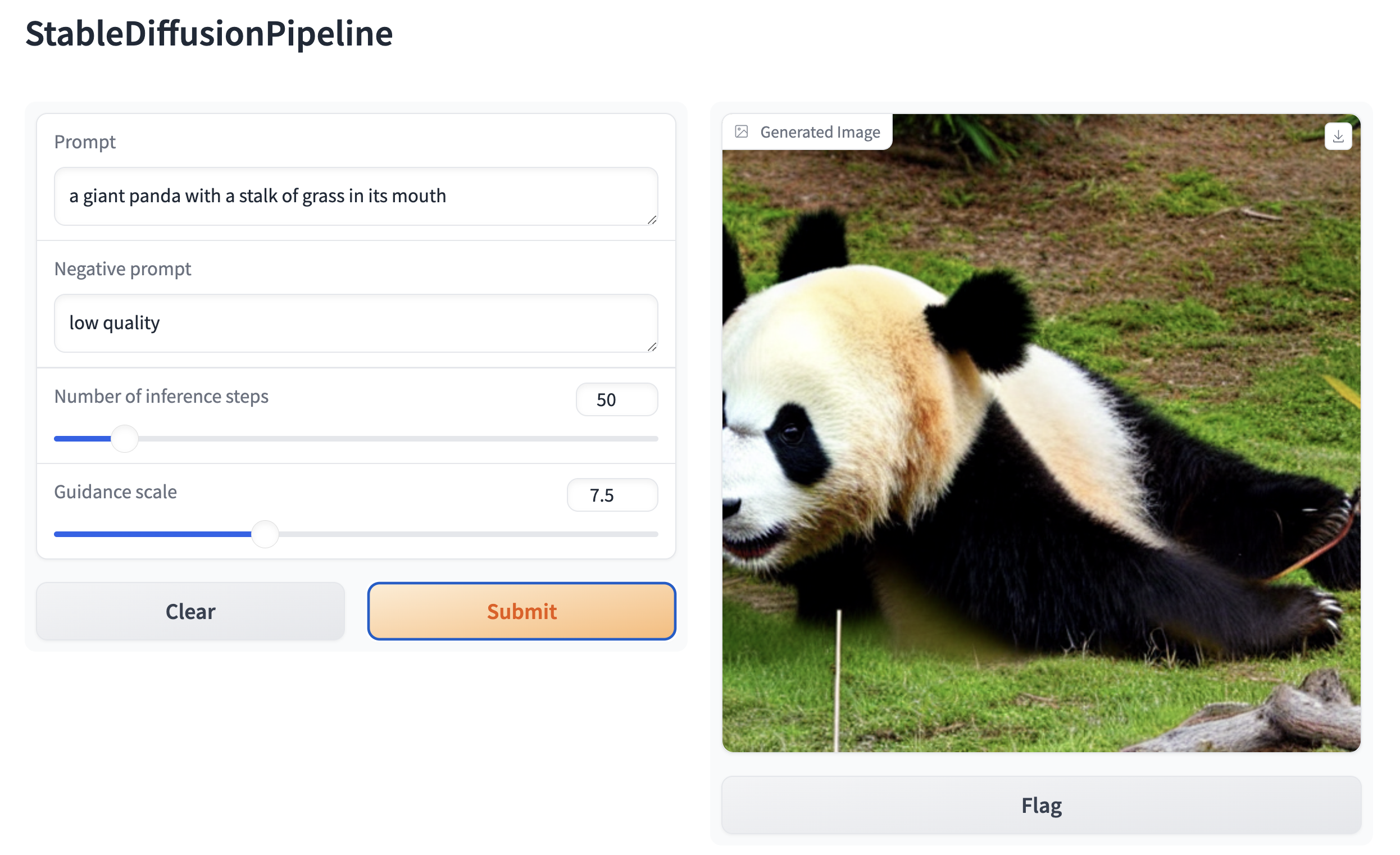
| 그 다음, Stable Diffusion 기반 파이프라인을 중심으로 웹 데모를 만듭니다. 예를 들어, Gradio의 [`Interface.from_pipeline`](https://www.gradio.app/docs/interface#interface-from-pipeline) 함수를 사용하면 한 줄의 코드로 이미지 생성 파이프라인을 만들 수 있습니다: | |
| ```py | |
| from diffusers import StableDiffusionPipeline | |
| import gradio as gr | |
| pipe = StableDiffusionPipeline.from_pretrained("CompVis/stable-diffusion-v1-4") | |
| gr.Interface.from_pipeline(pipe).launch() | |
| ``` | |
| 브라우저에서 직관적인 드래그 앤 드롭 인터페이스를 엽니다: | |
|  | |
| 마찬가지로, 다음을 사용하여 이미지-이미지 파이프라인 데모를 만들 수 있습니다: | |
| ```py | |
| from diffusers import StableDiffusionImg2ImgPipeline | |
| import gradio as gr | |
| pipe = StableDiffusionImg2ImgPipeline.from_pretrained("stable-diffusion-v1-5/stable-diffusion-v1-5") | |
| gr.Interface.from_pipeline(pipe).launch() | |
| ``` | |
| 기본적으로 웹 데모는 로컬 서버에서 실행됩니다. 다른 사람과 공유하려면 `launch()`에서 `share=True`를 설정하여 임시 공개 링크를 생성할 수 있습니다. 또는 [Hugging Face Spaces](https://huggingface.co/spaces)https://huggingface.co/spaces에 데모를 호스팅하여 영구 링크를 사용할 수 있습니다. | |
Xet Storage Details
- Size:
- 8.1 kB
- Xet hash:
- cb2e0bddb6a52a49d5f5dad684ba61f3af5ce8a61e95aad802241433e0022da1
·
Xet efficiently stores files, intelligently splitting them into unique chunks and accelerating uploads and downloads. More info.