
Buckets:


| # Stable Diffusion パイプライン | |
| Stable Diffusion は、[CompVis](https://github.com/CompVis)、[Stability AI](https://stability.ai/)、[LAION](https://laion.ai/) の研究者およびエンジニアによって開発された、テキストから画像を生成する潜在拡散モデルです。潜在拡散は、メモリと計算の複雑さを低減するために、低次元の潜在空間に対して拡散プロセスを適用します。この種の拡散モデルは、Robin Rombach、Andreas Blattmann、Dominik Lorenz、Patrick Esser、Björn Ommer によって [High-Resolution Image Synthesis with Latent Diffusion Models](https://huggingface.co/papers/2112.10752) で提案されました。 | |
| Stable Diffusion は、LAION-5B データセットの部分集合である 512x512 の画像で学習されています。このモデルは、テキストプロンプトによる条件付けのために、凍結された CLIP ViT-L/14 テキストエンコーダーを使用しています。860M パラメータの UNet と 123M パラメータのテキストエンコーダーを備えているため、モデルは比較的軽量であり、コンシューマー向け GPU でも実行できます。 | |
| Stable Diffusion の仕組みや、ベースとなる latent diffusion モデルとの違いについて詳しく知りたい場合は、Stability AI の [アナウンス](https://stability.ai/blog/stable-diffusion-announcement)や、より技術的な詳細を掲載した私たちの [ブログ記事](https://huggingface.co/blog/stable_diffusion#how-does-stable-diffusion-work)をご覧ください。 | |
| Stable Diffusion v1.0 の元のコードベースは [CompVis/stable-diffusion](https://github.com/CompVis/stable-diffusion) に、Stable Diffusion v2.0 のものは [Stability-AI/stablediffusion](https://github.com/Stability-AI/stablediffusion) にあり、それぞれさまざまなタスク用の元のスクリプトも含まれています。Stable Diffusion の異なるバージョンやタスク向けの追加の公式チェックポイントは、[CompVis](https://huggingface.co/CompVis) および [Stability AI](https://huggingface.co/stabilityai) の Hub 組織で確認できます。これらの組織を探索して、ご自身のユースケースに最適なチェックポイントを見つけてください。 | |
| 以下の表は、利用可能なStable Diffusionパイプライン、対応タスク、およびインタラクティブなデモをまとめています。 | |
| パイプライン | |
| サポートされているタスク | |
| 🤗 Space | |
| StableDiffusion | |
| テキストから画像 | |
| StableDiffusionImg2Img | |
| image-to-image | |
| StableDiffusionInpaint | |
| inpainting | |
| StableDiffusionDepth2Img | |
| 深度から画像 | |
| StableDiffusionImageVariation | |
| 画像のバリエーション | |
| StableDiffusionPipelineSafe (非推奨;ドキュメントページなし) | |
| フィルタリングされたテキストから画像 | |
| StableDiffusion2 | |
| テキストから画像へ、インペインティング、深度から画像へ、スーパーレゾリューション | |
| StableDiffusionXL | |
| テキストから画像へ、画像から画像へ | |
| StableDiffusionLatentUpscale | |
| 超解像 | |
| StableDiffusionUpscale | |
| 超解像 | |
| StableDiffusionLDM3D | |
| テキストからRGBへ、テキストから深度へ、テキストからパノラマへ | |
| StableDiffusionUpscaleLDM3D | |
| ldm3d 超解像 | |
| ## ヒント | |
| Stable Diffusionのパイプラインを最大限に活用できるよう、パフォーマンスと使いやすさを向上させるためのいくつかのヒントをご紹介します。これらのヒントは、すべてのStable Diffusionパイプラインに適用できます。 | |
| ### 速度と品質のトレードオフを探索する | |
| [StableDiffusionPipeline](/docs/diffusers/v0.43.0/ja/api/pipelines/stable_diffusion/text2img#diffusers.StableDiffusionPipeline) はデフォルトで [PNDMScheduler](/docs/diffusers/v0.43.0/ja/api/schedulers/pndm#diffusers.PNDMScheduler) を使用しますが、🤗 Diffusers には互換性のある他の多くのスケジューラ(より高速な場合や、より高品質な出力を得られる場合もあります)が用意されています。例えば、デフォルトではなく [EulerDiscreteScheduler](/docs/diffusers/v0.43.0/ja/api/schedulers/euler#diffusers.EulerDiscreteScheduler) を使用したい場合は、次のようにします。 | |
| ```py | |
| from diffusers import StableDiffusionPipeline, EulerDiscreteScheduler | |
| pipeline = StableDiffusionPipeline.from_pretrained("CompVis/stable-diffusion-v1-4") | |
| pipeline.scheduler = EulerDiscreteScheduler.from_config(pipeline.scheduler.config) | |
| # or | |
| euler_scheduler = EulerDiscreteScheduler.from_pretrained("CompVis/stable-diffusion-v1-4", subfolder="scheduler") | |
| pipeline = StableDiffusionPipeline.from_pretrained("CompVis/stable-diffusion-v1-4", scheduler=euler_scheduler) | |
| ``` | |
| ### パイプラインのコンポーネントを再利用してメモリを節約 | |
| メモリを節約し、複数のパイプラインで同じコンポーネントを再利用するには、`.components`メソッドを使用して、重みをRAMに複数回読み込むことを避けてください。 | |
| ```py | |
| from diffusers import ( | |
| StableDiffusionPipeline, | |
| StableDiffusionImg2ImgPipeline, | |
| StableDiffusionInpaintPipeline, | |
| ) | |
| text2img = StableDiffusionPipeline.from_pretrained("CompVis/stable-diffusion-v1-4") | |
| img2img = StableDiffusionImg2ImgPipeline(**text2img.components) | |
| inpaint = StableDiffusionInpaintPipeline(**text2img.components) | |
| # now you can use text2img(...), img2img(...), inpaint(...) just like the call methods of each respective pipeline | |
| ``` | |
| ### `gradio` を使用して Web デモを作成します | |
| Stable Diffusionのパイプラインは、Web上で美しく使いやすい機械学習アプリを簡単に作成できるライブラリである[Gradio](https://github.com/gradio-app/gradio/)で自動的にサポートされています。まず、Gradioがインストールされていることを確認してください。 | |
| ```sh | |
| pip install -U gradio | |
| ``` | |
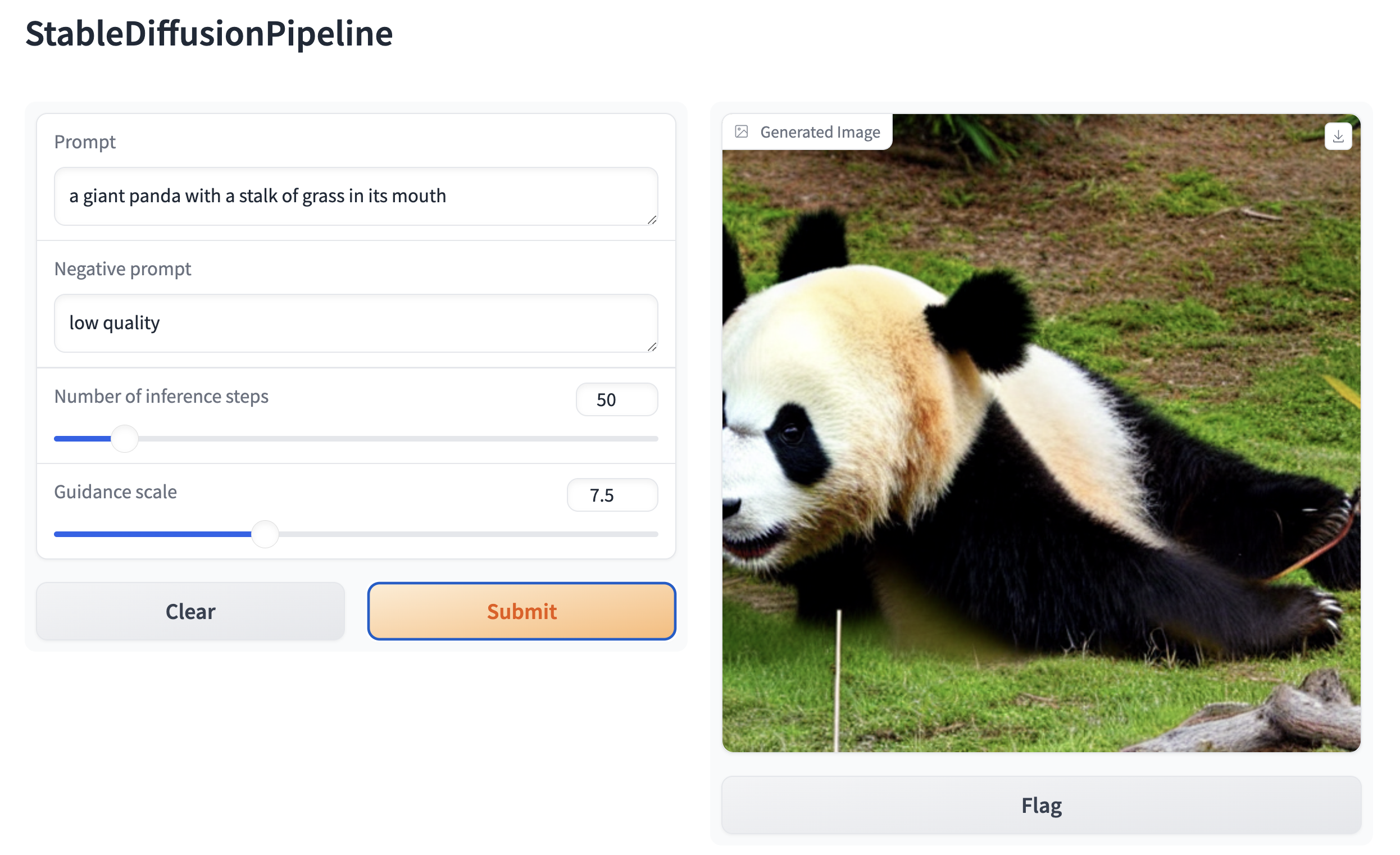
| 次に、Stable Diffusion ベースの任意のパイプラインの Web デモを作成します。例えば、Gradio の [`Interface.from_pipeline`](https://www.gradio.app/docs/interface#interface-from-pipeline) 関数を使用すると、1 行のコードで画像生成パイプラインを作成できます。 | |
| ```py | |
| from diffusers import StableDiffusionPipeline | |
| import gradio as gr | |
| pipe = StableDiffusionPipeline.from_pretrained("CompVis/stable-diffusion-v1-4") | |
| gr.Interface.from_pipeline(pipe).launch() | |
| ``` | |
| ブラウザで直感的なドラッグ&ドロップインターフェースを開きます: | |
|  | |
| 同様に、次のコードで画像から画像へのパイプラインのデモを作成できます。 | |
| ```py | |
| from diffusers import StableDiffusionImg2ImgPipeline | |
| import gradio as gr | |
| pipe = StableDiffusionImg2ImgPipeline.from_pretrained("stable-diffusion-v1-5/stable-diffusion-v1-5") | |
| gr.Interface.from_pipeline(pipe).launch() | |
| ``` | |
| デフォルトでは、Webデモはローカルサーバーで実行されます。他の人と共有したい場合は、`launch()`で`share=True`を設定することで、一時的なパブリックリンクを生成できます。また、[Hugging Face Spaces](https://huggingface.co/spaces)https://huggingface.co/spaces にデモをホスティングすることで、永続的なリンクを取得することもできます。 | |
Xet Storage Details
- Size:
- 8.84 kB
- Xet hash:
- c5d6a46e4fc601af30041dfb1b05e64869b5c4cd7e3fd305ace26acc22382458
·
Xet efficiently stores files, intelligently splitting them into unique chunks and accelerating uploads and downloads. More info.