
Buckets:


| # Stable Diffusion 流水线 | |
| Stable Diffusion 是由 [CompVis](https://github.com/CompVis)、[Stability AI](https://stability.ai/) 和 [LAION](https://laion.ai/) 的研究人员和工程师开发的文本到图像潜在扩散模型。潜在扩散在低维潜在空间中应用扩散过程,以降低内存和计算复杂度。这种特定类型的扩散模型由 Robin Rombach、Andreas Blattmann、Dominik Lorenz、Patrick Esser 和 Björn Ommer 在 [High-Resolution Image Synthesis with Latent Diffusion Models](https://huggingface.co/papers/2112.10752) 中提出。 | |
| Stable Diffusion 是在 LAION-5B 数据集的一个子集上的 512x512 图像上训练的。该模型使用冻结的 CLIP ViT-L/14 文本编码器,以文本提示作为条件来引导模型。凭借其 860M 参数的 UNet 和 123M 参数的文本编码器,该模型相对轻量,可以在消费级 GPU 上运行。 | |
| 如需了解更多关于 Stable Diffusion 的工作原理及其与基础潜在扩散模型的区别,请参阅 Stability AI 的[公告](https://stability.ai/blog/stable-diffusion-announcement)以及我们自己的[博客文章](https://huggingface.co/blog/stable_diffusion#how-does-stable-diffusion-work)以获取更详细的技术信息。 | |
| 您可以在 [CompVis/stable-diffusion](https://github.com/CompVis/stable-diffusion) 找到 Stable Diffusion v1.0 的原始代码库,在 [Stability-AI/stablediffusion](https://github.com/Stability-AI/stablediffusion) 找到 Stable Diffusion v2.0 的原始代码库,以及用于各种任务的原始脚本。不同 Stable Diffusion 版本和任务的额外官方检查点可以在 [CompVis](https://huggingface.co/CompVis) 和 [Stability AI](https://huggingface.co/stabilityai) Hub 组织中查找。请探索这些组织,以找到最适合您使用场景的检查点! | |
| 下表总结了可用的 Stable Diffusion 流水线、其支持的任务以及交互式演示: | |
| Pipeline | |
| 支持的任务 | |
| 🤗 Space | |
| StableDiffusion | |
| 文本到图像 | |
| StableDiffusionImg2Img | |
| 图像到图像 | |
| StableDiffusionInpaint | |
| inpainting | |
| StableDiffusionDepth2Img | |
| depth-to-image | |
| StableDiffusionImageVariation | |
| 图像变体 | |
| StableDiffusionPipelineSafe (已弃用;无文档页面) | |
| 过滤后的文本到图像 | |
| StableDiffusion2 | |
| 文本到图像、图像修复、深度到图像、超分辨率 | |
| StableDiffusionXL | |
| 文本到图像,图像到图像 | |
| StableDiffusionLatentUpscale | |
| 超分辨率 | |
| StableDiffusionUpscale | |
| 超分辨率 | |
| StableDiffusionLDM3D | |
| 文本到 RGB、文本到深度、文本到全景 | |
| StableDiffusionUpscaleLDM3D | |
| ldm3d 超分辨率 | |
| ## 提示 | |
| 为了帮助您充分利用 Stable Diffusion 流水线,这里提供了一些提升性能和易用性的技巧。这些技巧适用于所有 Stable Diffusion 流水线。 | |
| ### 探索速度与质量之间的权衡 | |
| [StableDiffusionPipeline](/docs/diffusers/v0.43.0/zh/api/pipelines/stable_diffusion/text2img#diffusers.StableDiffusionPipeline) 默认使用 [PNDMScheduler](/docs/diffusers/v0.43.0/zh/api/schedulers/pndm#diffusers.PNDMScheduler),但 🤗 Diffusers 提供了许多其他兼容的调度器(其中一些速度更快或输出质量更高)。例如,如果您想使用 [EulerDiscreteScheduler](/docs/diffusers/v0.43.0/zh/api/schedulers/euler#diffusers.EulerDiscreteScheduler) 而不是默认的调度器: | |
| ```py | |
| from diffusers import StableDiffusionPipeline, EulerDiscreteScheduler | |
| pipeline = StableDiffusionPipeline.from_pretrained("CompVis/stable-diffusion-v1-4") | |
| pipeline.scheduler = EulerDiscreteScheduler.from_config(pipeline.scheduler.config) | |
| # or | |
| euler_scheduler = EulerDiscreteScheduler.from_pretrained("CompVis/stable-diffusion-v1-4", subfolder="scheduler") | |
| pipeline = StableDiffusionPipeline.from_pretrained("CompVis/stable-diffusion-v1-4", scheduler=euler_scheduler) | |
| ``` | |
| ### 复用流水线组件以节省内存 | |
| 为了节省内存并在多个流水线中复用相同的组件,请使用 `.components` 方法,以避免将权重多次加载到 RAM 中。 | |
| ```py | |
| from diffusers import ( | |
| StableDiffusionPipeline, | |
| StableDiffusionImg2ImgPipeline, | |
| StableDiffusionInpaintPipeline, | |
| ) | |
| text2img = StableDiffusionPipeline.from_pretrained("CompVis/stable-diffusion-v1-4") | |
| img2img = StableDiffusionImg2ImgPipeline(**text2img.components) | |
| inpaint = StableDiffusionInpaintPipeline(**text2img.components) | |
| # now you can use text2img(...), img2img(...), inpaint(...) just like the call methods of each respective pipeline | |
| ``` | |
| ### 使用 `gradio` 创建 Web 演示 | |
| Stable Diffusion 流水线在 [Gradio](https://github.com/gradio-app/gradio/) 中受到自动支持。Gradio 是一个库,可轻松创建美观且用户友好的 Web 机器学习应用。首先,请确保已安装 Gradio: | |
| ```sh | |
| pip install -U gradio | |
| ``` | |
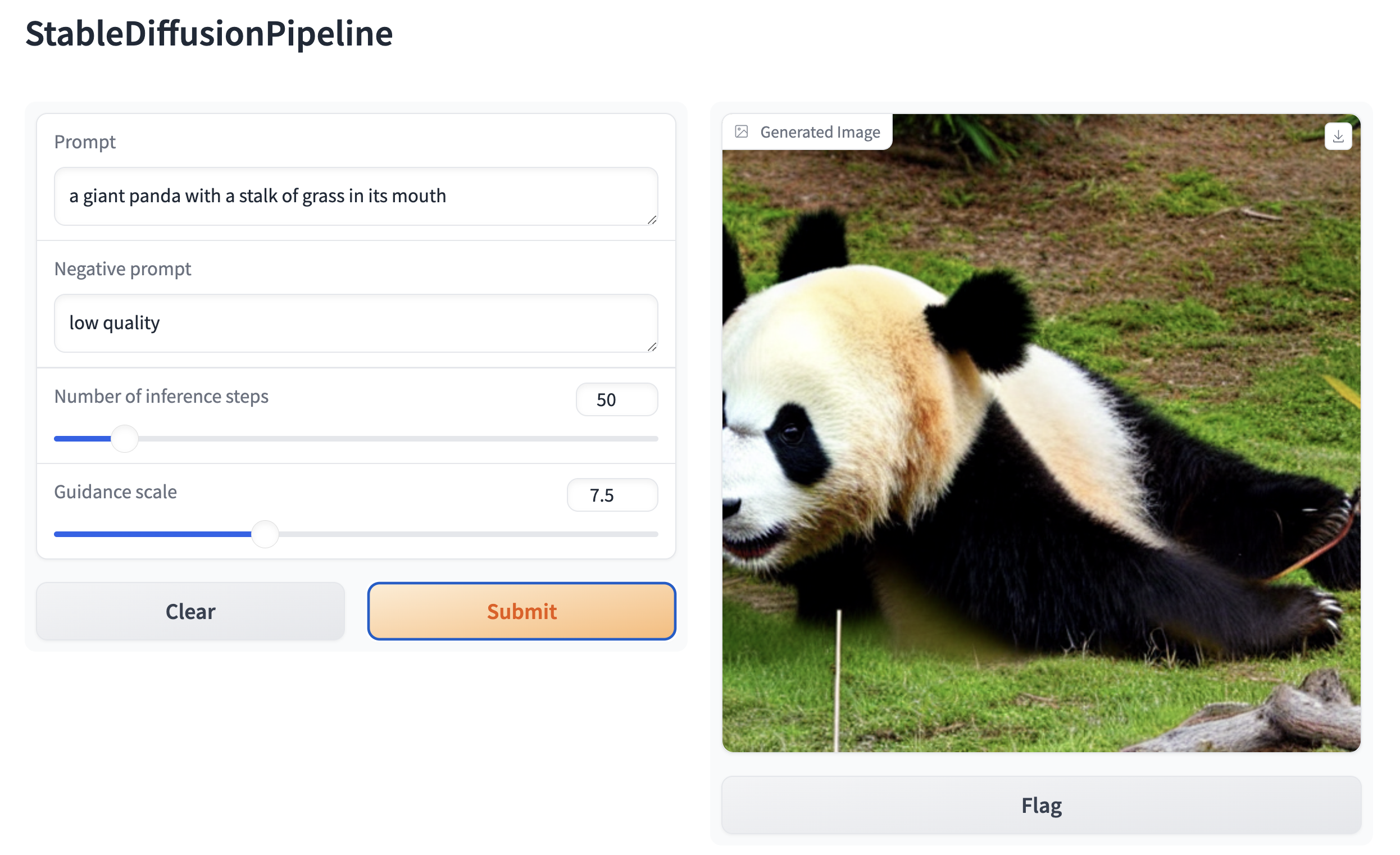
| 然后,围绕任意基于 Stable Diffusion 的流水线创建一个 Web 演示。例如,你可以使用 Gradio 的 [`Interface.from_pipeline`](https://www.gradio.app/docs/interface#interface-from-pipeline) 函数,仅用一行代码创建一个图像生成流水线: | |
| ```py | |
| from diffusers import StableDiffusionPipeline | |
| import gradio as gr | |
| pipe = StableDiffusionPipeline.from_pretrained("CompVis/stable-diffusion-v1-4") | |
| gr.Interface.from_pipeline(pipe).launch() | |
| ``` | |
| 它会在您的浏览器中打开一个直观的拖放界面: | |
|  | |
| 类似地,你可以使用以下方式为图像到图像流水线创建一个演示: | |
| ```py | |
| from diffusers import StableDiffusionImg2ImgPipeline | |
| import gradio as gr | |
| pipe = StableDiffusionImg2ImgPipeline.from_pretrained("stable-diffusion-v1-5/stable-diffusion-v1-5") | |
| gr.Interface.from_pipeline(pipe).launch() | |
| ``` | |
| 默认情况下,Web 演示在本地服务器上运行。如果您想与他人共享,可以在 `launch()` 中设置 `share=True` 来生成一个临时的公共链接。或者,您可以将演示托管在 [Hugging Face Spaces](https://huggingface.co/spaces)https://huggingface.co/spaces 上,以获取一个永久链接。 | |
Xet Storage Details
- Size:
- 7.29 kB
- Xet hash:
- 7bd4e09fcd2952c61e4b5e8290d3cf9dda14e2f7d52882e89b0498fb8319d161
·
Xet efficiently stores files, intelligently splitting them into unique chunks and accelerating uploads and downloads. More info.