

docling-project/DeskForge-Qwen3.5-4B
Image-Text-to-Text • 5B • Updated • 2
Error code:   DatasetGenerationError
Exception:    TypeError
Message:      int() argument must be a string, a bytes-like object or a real number, not 'NoneType'
Traceback:    Traceback (most recent call last):
                File "/usr/local/lib/python3.14/site-packages/datasets/builder.py", line 1531, in _prepare_split_single
                  for key, record in generator:
                                     ^^^^^^^^^
                File "/src/services/worker/src/worker/job_runners/config/parquet_and_info.py", line 613, in wrapped
                  for item in generator(*args, **kwargs):
                              ~~~~~~~~~^^^^^^^^^^^^^^^^^
                File "/usr/local/lib/python3.14/site-packages/datasets/packaged_modules/webdataset/webdataset.py", line 127, in _generate_examples
                  for example_idx, example in enumerate(self._get_pipeline_from_tar(tar_path, tar_iterator)):
                                              ~~~~~~~~~^^^^^^^^^^^^^^^^^^^^^^^^^^^^^^^^^^^^^^^^^^^^^^^^^^^^^
                File "/usr/local/lib/python3.14/site-packages/datasets/packaged_modules/webdataset/webdataset.py", line 32, in _get_pipeline_from_tar
                  for filename, f in tar_iterator:
                                     ^^^^^^^^^^^^
                File "/usr/local/lib/python3.14/site-packages/datasets/utils/track.py", line 49, in __iter__
                  for x in self.generator(*self.args):
                           ~~~~~~~~~~~~~~^^^^^^^^^^^^
                File "/usr/local/lib/python3.14/site-packages/datasets/utils/file_utils.py", line 1405, in _iter_from_urlpath
                  with xopen(urlpath, "rb", download_config=download_config, block_size=0) as f:
                       ~~~~~^^^^^^^^^^^^^^^^^^^^^^^^^^^^^^^^^^^^^^^^^^^^^^^^^^^^^^^^^^^^^^
                File "/usr/local/lib/python3.14/site-packages/datasets/utils/file_utils.py", line 982, in xopen
                  file_obj = fs.open(paths[0], mode)
                File "<string>", line 3, in open
                File "/usr/local/lib/python3.14/unittest/mock.py", line 1176, in __call__
                  return self._mock_call(*args, **kwargs)
                         ~~~~~~~~~~~~~~~^^^^^^^^^^^^^^^^^
                File "/usr/local/lib/python3.14/unittest/mock.py", line 1180, in _mock_call
                  return self._execute_mock_call(*args, **kwargs)
                         ~~~~~~~~~~~~~~~~~~~~~~~^^^^^^^^^^^^^^^^^
                File "/usr/local/lib/python3.14/unittest/mock.py", line 1247, in _execute_mock_call
                  result = effect(*args, **kwargs)
                File "/src/services/worker/src/worker/job_runners/config/parquet_and_info.py", line 786, in wrapped
                  tracker.files[urlpath] = {"read": 0, "size": int(f.size)}
                                                               ~~~^^^^^^^^
              TypeError: int() argument must be a string, a bytes-like object or a real number, not 'NoneType'

              The above exception was the direct cause of the following exception:

              Traceback (most recent call last):
                File "/src/services/worker/src/worker/job_runners/config/parquet_and_info.py", line 1369, in compute_config_parquet_and_info_response
                  parquet_operations, partial, estimated_dataset_info = stream_convert_to_parquet(
                                                                        ~~~~~~~~~~~~~~~~~~~~~~~~~^
                      builder, max_dataset_size_bytes=max_dataset_size_bytes
                      ^^^^^^^^^^^^^^^^^^^^^^^^^^^^^^^^^^^^^^^^^^^^^^^^^^^^^^
                  )
                  ^
                File "/src/services/worker/src/worker/job_runners/config/parquet_and_info.py", line 948, in stream_convert_to_parquet
                  builder._prepare_split(split_generator=splits_generators[split], file_format="parquet")
                  ~~~~~~~~~~~~~~~~~~~~~~^^^^^^^^^^^^^^^^^^^^^^^^^^^^^^^^^^^^^^^^^^^^^^^^^^^^^^^^^^^^^^^^^
                File "/usr/local/lib/python3.14/site-packages/datasets/builder.py", line 1393, in _prepare_split
                  for job_id, done, content in self._prepare_split_single(
                                               ~~~~~~~~~~~~~~~~~~~~~~~~~~^
                      gen_kwargs=gen_kwargs, job_id=job_id, **_prepare_split_args
                      ^^^^^^^^^^^^^^^^^^^^^^^^^^^^^^^^^^^^^^^^^^^^^^^^^^^^^^^^^^^
                  ):
                  ^
                File "/usr/local/lib/python3.14/site-packages/datasets/builder.py", line 1571, in _prepare_split_single
                  raise DatasetGenerationError("An error occurred while generating the dataset") from e
              datasets.exceptions.DatasetGenerationError: An error occurred while generating the dataset
Need help to make the dataset viewer work? Make sure to review how to configure the dataset viewer, and open a discussion for direct support.
png image | leaf.json list | screentag.txt string | record.json dict | __key__ string | __url__ string |
|---|---|---|---|---|---|
[{"_children_dom_indices":[],"_depth":4,"_dom_index":0,"_hierarchy_visibility_clipped":null,"_hierar(...TRUNCATED) | "<screentag><window><loc_28><loc_47><loc_332><loc_348><fragment><loc_28><loc_47><loc_332><loc_82></f(...TRUNCATED) | {"action_into_this_state":null,"apps":["chromium-browser","file-roller","gnome-logs","mousepad","qal(...TRUNCATED) | shard-0053__scene-00361938272d59d6-step00 | "hf://datasets/docling-project/DeskForge-1M@92b8a31b7b4052c0d5a1e3206e2b932b601a66b3/data/train/part(...TRUNCATED) | |
[{"_children_dom_indices":[1,2,3,4,5,6,7,8,9,10,11,12,13,14,15,16,17,18,19,20,21,22,23,24,25,26,27,2(...TRUNCATED) | "<screentag><window><loc_0><loc_10><loc_267><loc_273><fragment><loc_0><loc_10><loc_267><loc_55></fra(...TRUNCATED) | {"action_into_this_state":{"point_norm_1000":[93,618],"point_px":[179,742],"point_screentag_500":[47(...TRUNCATED) | shard-0068__scene-003027d38a1c3e33-step01 | "hf://datasets/docling-project/DeskForge-1M@92b8a31b7b4052c0d5a1e3206e2b932b601a66b3/data/train/part(...TRUNCATED) | |
[{"_children_dom_indices":[1,2,3,4,5,6,7,8,9,10,11,12,13,14,15,16,17,18,19,20,21,22,23,24,25,26,27,2(...TRUNCATED) | "<screentag><window><loc_8><loc_25><loc_242><loc_461><title>Extension: Python - analytics_service - (...TRUNCATED) | {"action_into_this_state":{"point_norm_1000":[446,884],"point_px":[1143,1273],"point_screentag_500":(...TRUNCATED) | shard-0008__scene-0000d2cdc0b65393-step02 | "hf://datasets/docling-project/DeskForge-1M@92b8a31b7b4052c0d5a1e3206e2b932b601a66b3/data/train/part(...TRUNCATED) | |
[{"_children_dom_indices":[],"_depth":3,"_dom_index":0,"_hierarchy_visibility_clipped":null,"_hierar(...TRUNCATED) | "<screentag><window><loc_43><loc_215><loc_259><loc_407><title>Calculator</title><toggles><loc_142><l(...TRUNCATED) | {"action_into_this_state":{"point_norm_1000":[124,788],"point_px":[478,1701],"point_screentag_500":[(...TRUNCATED) | shard-0219__scene-0012663a1e4d0733-step06 | "hf://datasets/docling-project/DeskForge-1M@92b8a31b7b4052c0d5a1e3206e2b932b601a66b3/data/train/part(...TRUNCATED) | |
[{"_children_dom_indices":[1,2,3,4,5,6,7,8,9,10,11,12,13,14,15,16,17,18,19,20,21,22],"_depth":1,"_do(...TRUNCATED) | "<screentag><window><loc_42><loc_48><loc_277><loc_431><title>https://www.google.com/search?q=philade(...TRUNCATED) | {"action_into_this_state":{"point_norm_1000":[319,773],"point_px":[436,594],"point_screentag_500":[1(...TRUNCATED) | shard-0056__scene-002bb689686af1a3-step01 | "hf://datasets/docling-project/DeskForge-1M@92b8a31b7b4052c0d5a1e3206e2b932b601a66b3/data/train/part(...TRUNCATED) | |
[{"_children_dom_indices":[1,2,3,4,5,6,7,8,9,10,11,12,13,14,15,16,17,18,19,20,21,22,23,24,25,26,27,2(...TRUNCATED) | "<screentag><window><loc_8><loc_36><loc_248><loc_455><title>Facebook - Chromium</title><button><l(...TRUNCATED) | {"action_into_this_state":{"point_norm_1000":[749,190],"point_px":[1198,171],"point_screentag_500":[(...TRUNCATED) | shard-0040__scene-002746475b6cb35f-step03 | "hf://datasets/docling-project/DeskForge-1M@92b8a31b7b4052c0d5a1e3206e2b932b601a66b3/data/train/part(...TRUNCATED) | |
[{"_children_dom_indices":[1,2,3,4,5,6,7,8,9,10,11,12,13,14,15,16,17,18,19,20,21,22,23,24,25,26,27,2(...TRUNCATED) | "<screentag><window><loc_8><loc_25><loc_281><loc_461><fragment><loc_8><loc_25><loc_281><loc_212></fr(...TRUNCATED) | {"action_into_this_state":{"point_norm_1000":[441,918],"point_px":[1694,1983],"point_screentag_500":(...TRUNCATED) | shard-0280__scene-0023837a8f3f69dd-step02 | "hf://datasets/docling-project/DeskForge-1M@92b8a31b7b4052c0d5a1e3206e2b932b601a66b3/data/train/part(...TRUNCATED) | |
[{"_children_dom_indices":[1,2,3,4,5,6,7,8,9,10,11,12,13,14,15,16,17,18,19,20,21,22,23,24,25,26,27,2(...TRUNCATED) | "<screentag><window><loc_49><loc_86><loc_273><loc_358><fragment><loc_49><loc_86><loc_273><loc_95></f(...TRUNCATED) | {"action_into_this_state":{"point_norm_1000":[484,727],"point_px":[929,785],"point_screentag_500":[2(...TRUNCATED) | shard-0156__scene-004d4ab68045870b-step07 | "hf://datasets/docling-project/DeskForge-1M@92b8a31b7b4052c0d5a1e3206e2b932b601a66b3/data/train/part(...TRUNCATED) | |
[{"_children_dom_indices":[],"_depth":13,"_dom_index":0,"_hierarchy_visibility_clipped":null,"_hiera(...TRUNCATED) | "<screentag><window><loc_9><loc_29><loc_493><loc_479><fragment><loc_12><loc_29><loc_405><loc_105></f(...TRUNCATED) | {"action_into_this_state":{"point_norm_1000":[12,163],"point_px":[24,196],"point_screentag_500":[6,8(...TRUNCATED) | shard-0232__scene-0028e35eedddf866-step07 | "hf://datasets/docling-project/DeskForge-1M@92b8a31b7b4052c0d5a1e3206e2b932b601a66b3/data/train/part(...TRUNCATED) | |
[{"_children_dom_indices":[1,2,3,4,5,6,7,8,9,10,11,12,13,14,15,16,17,18,19,20,21,22,23,24,25,26,27,2(...TRUNCATED) | "<screentag><window><loc_8><loc_25><loc_266><loc_473><fragment><loc_8><loc_25><loc_266><loc_36></fra(...TRUNCATED) | {"action_into_this_state":{"point_norm_1000":[707,856],"point_px":[1810,1232],"point_screentag_500":(...TRUNCATED) | shard-0060__scene-003d2ebaa88e2365-step02 | "hf://datasets/docling-project/DeskForge-1M@92b8a31b7b4052c0d5a1e3206e2b932b601a66b3/data/train/part(...TRUNCATED) |
DeskForge-1M is a corpus of 1.21M annotated desktop screenshots with 159.7M element instances and 917K recorded click transitions, generated with DeskForge, a controllable desktop environment that composes and explores real applications.
Project page · Code · Model · Paper (coming soon)
A. Said Gurbuz · Ahmed Nassar · Sunghwan Hong · Marc Pollefeys · Peter W. J. Staar
ETH Zurich · IBM Research Zurich · Microsoft
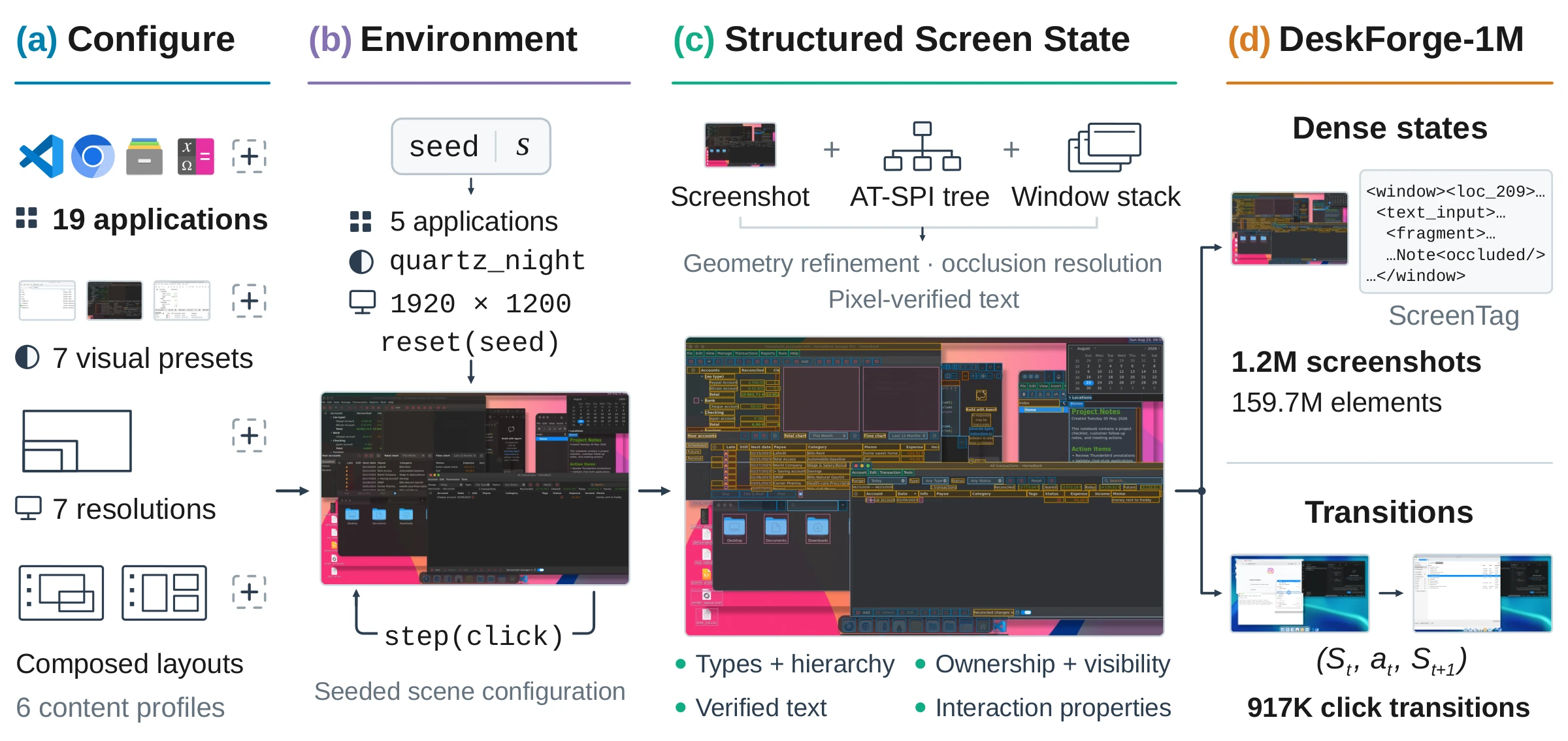
Every screenshot is annotated densely: not one target, but every visible element, with its type, text, geometry, interaction properties, hierarchy and owning window. Overlapping windows are resolved, so each element records both its full extent and the fragments that are actually visible. Scenes combine several real applications with varied content, window layouts, appearance presets and display resolutions, and short click explorations link each action to the screen before and after it.
| Observations | 1,207,368 screenshots in 323,731 scenes |
| Element instances | 159.7M (132 per screen on average) |
| Click transitions | 917,211, from 135,731 exploration episodes |
| Instructions | 663,635 clicks with natural-language instructions |
| Applications | 19 real Linux desktop applications, several per screen |
| Appearance | 7 presets, from classic Linux to Windows- and macOS-inspired styles |
| Resolutions | 7, from 1366×768 to 3840×2160 |
Splits are made per scene, so all frames of a scene stay together. Three test splits hold an attribute out of training entirely, which measures generalization to desktop configurations never seen in training.
| split | held out | observations | transitions | instructions |
|---|---|---|---|---|
train |
999,494 | 760,850 | 551,651 | |
val |
11,279 | 8,667 | 6,281 | |
test_id |
new scenes with seen attributes | 22,550 | 17,383 | 12,589 |
test_app |
GNOME System Monitor, Pluma, Xarchiver | 43,206 | 32,848 | 22,729 |
test_theme |
the Quartz Night Nord preset | 51,627 | 38,671 | 27,175 |
test_resolution |
2880×1800 | 79,212 | 58,792 | 43,210 |
A held-out application is excluded from every scene that contains it, in any
frame. See docs/splits.md for how each axis was chosen.
The default configuration streams the observations as WebDataset shards. Each observation is four members sharing one key:
| member | content |
|---|---|
png |
the screenshot |
leaf.json |
every visible element: type, role, name and visible text, rect and visible_fragments, interaction state, parent and reading order, owning application and window |
screentag.txt |
the screen serialized as ScreenTag markup, on a 0–500 grid normalized to the screenshot |
record.json |
scene metadata (applications, preset, resolution, window stack), eligibility flags, and the action that produced this state |
Alongside the shards, index/ holds Parquet tables for observations,
transitions, instructions, episodes and scenes:
index/transitions/<split>.parquet lists every recorded click with its before
and after observation keys, target element and effect, and
index/instructions/<split>.parquet gives the clicks their natural-language
instructions. demo/ holds browsing samples: stratified observations with
images inline (downscaled to 1024 px) and the transitions_preview shards
below. The field reference is in docs/schema.md.
The transitions_preview subset shows recorded clicks in the Dataset Viewer:
100 per split, each from a different episode, varied over applications, element
types, appearance presets and resolutions. A row reads as one step:
| member | content |
|---|---|
instruction.txt |
a natural-language instruction for the click |
before.png |
the screen the click was taken on |
target.png |
the clicked element, cropped from the before screen and outlined |
after.png |
the screen the click produced |
action.txt |
the click, its target element and application |
transition.json |
instruction variants, action and target geometry, effect, scene |
Screenshots are byte-identical copies of the corpus members. The subset is for
browsing; all transitions and instructions are in index/ and the shards.
663,635 recorded clicks come with natural-language instructions, synthesized
with Qwen3.6-27B from the click, its target and the screens before and after
it. An instruction states one coordinate-free goal that can be carried out from
the before screen, in a standard and a more detailed_contextual style;
primary_instruction is the standard one where it exists, and
referring_expression describes the target on the before screen. The 551,651
training instructions are the pool for grounding training, and the 105,703 in
the four test splits are the grounding evaluation examples.
from datasets import load_dataset

# Stream observations from any split.
ds = load_dataset("docling-project/DeskForge-1M", split="test_app", streaming=True)
sample = next(iter(ds))
sample["png"], sample["leaf.json"], sample["screentag.txt"], sample["record.json"]

# Browse recorded clicks: instruction, before, clicked element, after.
preview = load_dataset("docling-project/DeskForge-1M", "transitions_preview", split="val")

# Transitions: before/after keys, the clicked target and what changed.
transitions = load_dataset(
    "parquet",
    data_files="hf://datasets/docling-project/DeskForge-1M/index/transitions/val.parquet",
    split="train",
)

# Instructions: one row per click, joined to transitions by transition_id.
instructions = load_dataset(
    "parquet",
    data_files="hf://datasets/docling-project/DeskForge-1M/index/instructions/val.parquet",
    split="train",
)
For full passes, read the shards with webdataset;
the Parquet indexes select subsets before streaming, and give the byte offset of
every member for random access:
import webdataset as wds
ds = (wds.WebDataset("data/train/part-{00000..00903}.tar", shardshuffle=True)
        .decode("pil")
        .to_tuple("png", "leaf.json", "screentag.txt", "record.json"))

import pyarrow.parquet as pq
obs = pq.read_table("index/observations/test_id.parquet")
heavily_occluded = obs.filter(obs["occluded_ratio"] > 0.5)
examples/ contains runnable scripts for streaming states, pairing
transitions and fetching a single observation by key.
Recommended filters. state_train_eligible selects the still-image view
(excluding near-duplicate scenes and frames where a click changed nothing), and
transition_train_eligible selects the action view, which keeps no-op clicks as
supervision.
Annotations are generated automatically from the accessibility tree and reconciled with the screenshot and the window stack. Captures that fail the automated audits (element coverage against rendered pixels, blank-widget suppression, window ownership and fragment containment) are not included. A human audit finds 99.8% of sampled element annotations correct and 97.8% of sampled instructions sound.
All screenshots come from one Linux backend (Xfce): the Windows- and macOS-inspired presets reproduce the look of those systems rather than run them. Actions are clicks from undirected exploration, not goal-directed demonstrations; instructions are written for single clicks after the fact. Because annotations transcribe what is on screen, text drawn by applications (for example session paths or live web content in browser scenes) is part of the data.
The dataset is released under the MIT License. Application interfaces, themes, icons, wallpapers and web content visible in the screenshots remain the property of their respective owners.
@article{gurbuz2026deskforge,
  title   = {DeskForge: Dense Supervision from Desktop Environments
             for Computer-Use Agents},
  author  = {Gurbuz, A. Said and Nassar, Ahmed and Hong, Sunghwan and
             Pollefeys, Marc and Staar, Peter W. J.},
  journal = {arXiv preprint},
  year    = {2026}
}