
Datasets:


license: cc-by-nc-sa-4.0
pretty_name: Hand Keypoints
task_categories:
  - keypoint-detection
tags:
  - computer-vision
  - hand
  - person
  - face
  - glove
  - speaker
  - child
  - stop-sign
  - ant
  - watch
  - key
  - pose-estimation
  - keypoints
  - pictograph
annotations_creators:
  - machine-generated
size_categories:
  - 10K<n<100K
source_datasets:
  - original
configs:
  - config_name: default
    data_files:
      - split: train
        path: train/**/*
      - split: validation
        path: valid/**/*
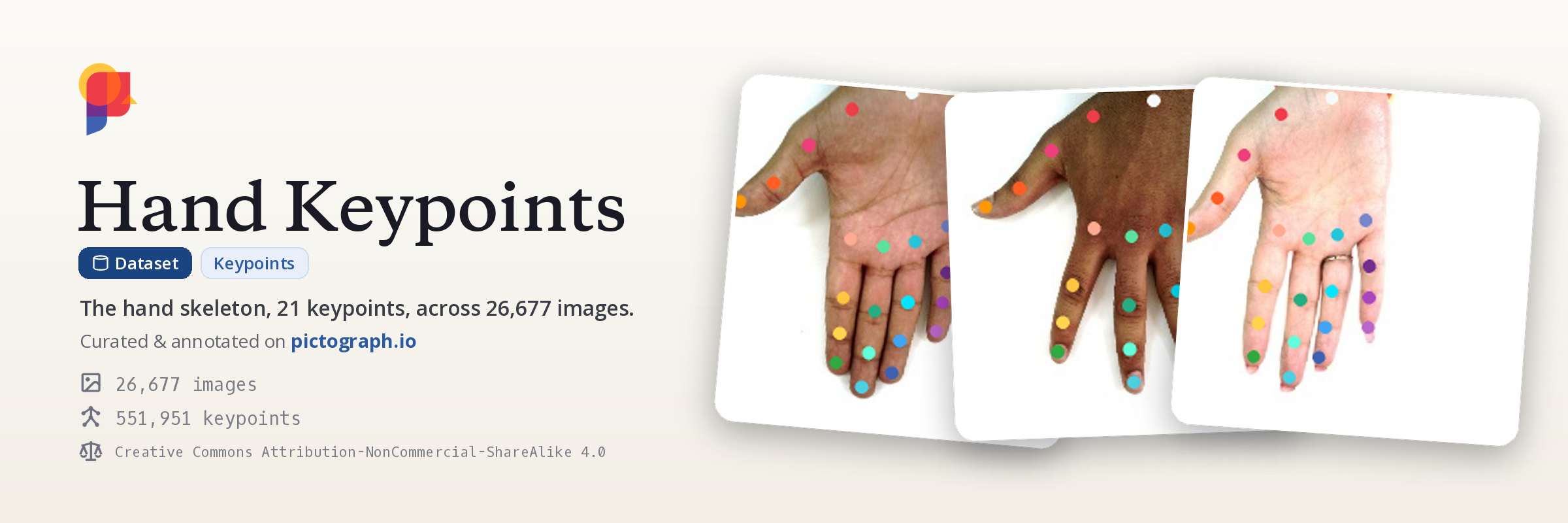




View on Pictograph · Pictograph Research · Creative Commons Attribution-NonCommercial-ShareAlike 4.0
About
Hand Keypoints is a computer-vision dataset from Hand Keypoints (Ultralytics), hosted on Pictograph. The most common detected objects are hand, person, face, glove, speaker, child. On Pictograph you can browse every annotated image, import it into your own workspace in one click, export it in a dozen formats, or train a model on it directly.
At a glance
| Metric | Value |
|---|---|
| Images | 26,677 |
| Keypoints | 551,951 |
| Skeleton | hand, 21 keypoints |
| Annotation types | keypoint |
| Splits | train, validation |
Quick start
Load it in one line with the datasets library, then read each record's COCO-pose keypoint instances:
from datasets import load_dataset

ds = load_dataset("pictograph/hand-keypoints", split="train")
example = ds[0]
image = example["image"]                  # a PIL image

# one entry per object instance (COCO-pose)
for inst in example["keypoints"]:
    names = inst["node_names"]            # e.g. ["wrist", "thumb_cmc", "thumb_mcp", ...]
    flat = inst["keypoints"]              # [x, y, v, x, y, v, ...] aligned to names
    joints = {
        names[i]: (flat[3 * i], flat[3 * i + 1], flat[3 * i + 2])
        for i in range(len(names))
    }
    print(inst["category"], joints)       # v: 0 unlabelled, 1 occluded, 2 visible
Prefer a full annotation editor, one-click import, multi-format export, and one-click training? Open this dataset on Pictograph.
Dataset structure
This dataset uses the Hugging Face imagefolder layout: each split directory holds the images plus a metadata.jsonl that links every image to its annotations by file_name.
| Field | Description |
|---|---|
file_name |
Path to the image within the split directory. |
objects.bbox |
Bounding boxes as [x, y, width, height] (pixels). |
objects.categories |
Integer class index per box (matches the class list below). |
objects.category_names |
Human class name per box. |
keypoints |
Keypoint instances (COCO-pose): object category plus a flat [x, y, v, ...] array aligned to node_names (the skeleton below); v is 0 unlabelled, 1 occluded, 2 visible. Each instance's box in objects encloses its keypoints. |
Data instance
One record (each keypoints entry is one object instance; keypoints is a flat [x, y, v, ...] array of 21 keypoints aligned to node_names, v: 0 unlabelled, 1 occluded, 2 visible):
{
  "image": <PIL.Image (RGB)>,
  "objects": {"bbox": [[172.0, 96.0, 140.0, 310.0]], "categories": [0], "category_names": ["hand"]},
  "keypoints": [
    {
      "category": "hand", "category_id": 0, "num_keypoints": 21,
      "node_names": ["wrist", "thumb_cmc", "thumb_mcp", ...],
      "keypoints": [201.0, 148.0, 2.0, 188.0, 146.0, 1.0, 0.0, 0.0, 0.0, ...]
    }
  ]
}
Classes
Class index matches objects.categories and each keypoint instance's category_id.
| # | Class | Keypoints |
|---|---|---|
| 0 | hand | 21 |
Skeleton
Each object is one instance: its keypoints share an instance_id and are named for their joint. A keypoint that is labelled but hidden carries occluded: true. The joints are in this order in every export (a COCO keypoint array follows it).
| # | Keypoint | Connects to |
|---|---|---|
| 0 | wrist | thumb_cmc, index_finger_mcp, pinky_mcp |
| 1 | thumb_cmc | wrist, thumb_mcp |
| 2 | thumb_mcp | thumb_cmc, thumb_ip |
| 3 | thumb_ip | thumb_mcp, thumb_tip |
| 4 | thumb_tip | thumb_ip |
| 5 | index_finger_mcp | wrist, index_finger_pip, middle_finger_mcp |
| 6 | index_finger_pip | index_finger_mcp, index_finger_dip |
| 7 | index_finger_dip | index_finger_pip, index_finger_tip |
| 8 | index_finger_tip | index_finger_dip |
| 9 | middle_finger_mcp | index_finger_mcp, middle_finger_pip, ring_finger_mcp |
| 10 | middle_finger_pip | middle_finger_mcp, middle_finger_dip |
| 11 | middle_finger_dip | middle_finger_pip, middle_finger_tip |
| 12 | middle_finger_tip | middle_finger_dip |
| 13 | ring_finger_mcp | middle_finger_mcp, ring_finger_pip, pinky_mcp |
| 14 | ring_finger_pip | ring_finger_mcp, ring_finger_dip |
| 15 | ring_finger_dip | ring_finger_pip, ring_finger_tip |
| 16 | ring_finger_tip | ring_finger_dip |
| 17 | pinky_mcp | ring_finger_mcp, wrist, pinky_pip |
| 18 | pinky_pip | pinky_mcp, pinky_dip |
| 19 | pinky_dip | pinky_pip, pinky_tip |
| 20 | pinky_tip | pinky_dip |
License
Released under Creative Commons Attribution-NonCommercial-ShareAlike 4.0. When you use this data, please credit Ultralytics (Rion Dsilva).
Source and attribution
The images and annotations come from Hand Keypoints (Ultralytics), created by Ultralytics (Rion Dsilva) and released under Creative Commons Attribution-NonCommercial-ShareAlike 4.0. We are grateful to the original authors. If you use this data, please cite the original source above.
Published from Pictograph - annotate, train, and deploy from one API.