
OpenEnv documentation
OpenApp Environment
OpenApp Environment
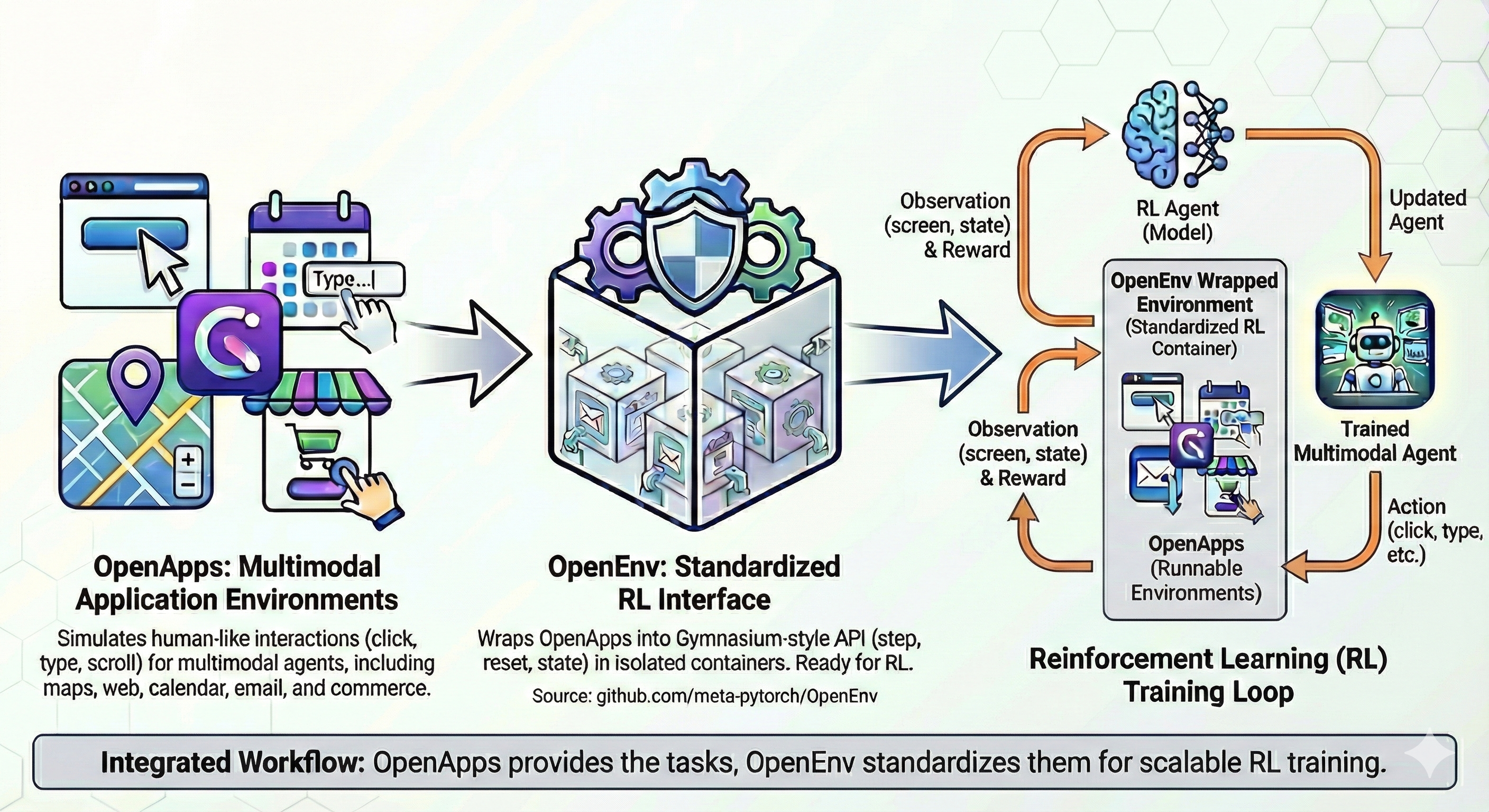
A web application simulation environment for OpenEnv that wraps the OpenApps framework and BrowserGym.
Overview
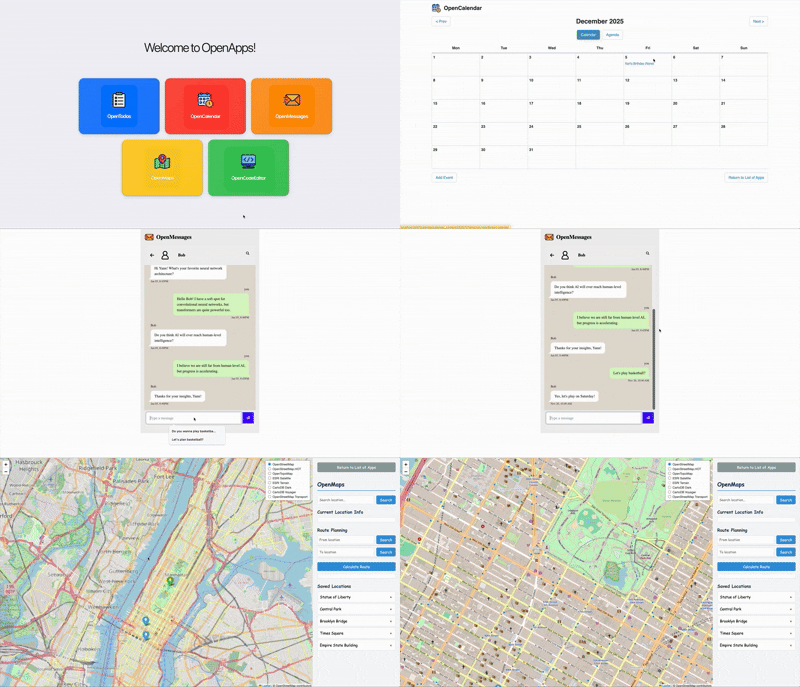
Agents interact with simulated web apps (calendar, todo list, messenger, maps) through BrowserGym browser actions: click, fill forms, navigate, scroll and type.
Quick Start
Build the image from envs/openapp_env/ (about 5.7 GB, it includes Chromium and OpenApps):
docker build -t openapp-env:latest -f server/Dockerfile .
The container runs two servers: OpenApps on port 5001 (internal) and the OpenEnv API on port 8000. You only talk to port 8000.
from openapp_env import OpenAppAction, OpenAppEnv

with OpenAppEnv.from_docker_image("openapp-env:latest").sync() as client:
    result = client.reset()
    print(f"Starting URL: {result.observation.url}")

    result = client.step(OpenAppAction(action_type="goto", url="http://localhost:5001/calendar"))
    result = client.step(OpenAppAction(action_type="click", bid="add-event-btn"))
    result = client.step(OpenAppAction(action_type="fill", bid="event-title-input", text="Team Meeting"))

    print(f"Reward: {result.reward}, Done: {result.done}")
Element IDs (bid) come from the observation’s axtree_txt. To use the async client, await OpenAppEnv.from_docker_image(...) instead of calling .sync().
A complete script is in examples/openapp_example.py:
python examples/openapp_example.py --mode docker --num-steps 20
With the container running (docker run -p 8000:8000 openapp-env:latest), the web UI is at http://localhost:8000/web and the API docs at http://localhost:8000/docs.
Environment Details
Action
OpenAppAction
action_type | Required fields |
|---|---|
click | bid (BrowserGym element ID) |
fill | bid, text |
select_option | bid, value |
goto | url |
scroll | direction ("up" or "down") |
send_keys | text |
noop | none |
Observation
OpenAppObservation
html: current page HTMLurl: current page URLopen_pages_urls,active_page_index: open tabs and the active oneaxtree_txt: accessibility tree, with the element IDs to act onscreenshot: base64-encoded screenshot (optional)app_state: state of the apps (calendar events, todos, messages, …)task_info:{"task_name": ...}when the server was started with a task namelast_action_error: error message if the last action failedmetadata["cumulative_reward"]: reward accumulated over the episode
Reward
The environment wraps OpenApps in a generic BrowserGym task that never scores or ends an episode by itself. Each step returns:
-0.1when the action fails oraction_typeis unknown- the BrowserGym task reward otherwise, which is
0.0with the generic task
The episode ends after max_steps steps (default 50). For task-specific rewards, score the episode yourself from app_state. See the OpenApps documentation for its tasks.
Configuration
The environment connects to an OpenApps server that is already running, at OPENAPPS_URL (the Docker image sets it to http://localhost:5001). It doesn’t launch one itself.
To change the other settings, construct OpenAppEnvironment (in server/openapp_environment.py) yourself:
| Parameter | Default | Description |
|---|---|---|
openapps_url | OPENAPPS_URL | URL of the OpenApps server. reset() fails if OPENAPPS_URL is not set |
headless | True | Run the browser headless |
task_name | None | Task name, reported in task_info |
apps_config | {} | App configuration |
max_steps | 50 | Steps per episode |
Running Without Docker
Install the environment and a browser, then start OpenApps from a clone of its repository (the pip package doesn’t ship launch.py and its Hydra configs):
pip install -e envs/openapp_env
playwright install chromium

git clone https://github.com/facebookresearch/OpenApps.git
cd OpenApps && uv sync
uv run launch.py                                      # headless
uv run launch.py browsergym_env_args.headless=False   # with a visible browser
In another terminal:
export OPENAPPS_URL=http://localhost:5001
python examples/openapp_example.py --mode local
The apps are also reachable in your browser at http://localhost:5001 (/calendar, /todo, /messages, /maps). The browser window is controlled by the OpenApps server, so start it with browsergym_env_args.headless=False to watch the agent.
Troubleshooting
Container did not become readybehind an HTTP proxy: setexport NO_PROXY=localhost,127.0.0.1and retry.- Container exits immediately: check
docker logs <container-id>. Usually OpenApps failed to start (port conflict) or a dependency is missing (rebuild with--no-cache). Connection refused to localhost:5001in local mode: start the OpenApps server first and setOPENAPPS_URL.- Slow container: it runs Chromium and the web apps. Give Docker 6 GB or more of memory and keep
headless=True.
Attribution
- OpenApps: web application simulation framework
- BrowserGym: browser automation environment
Citation
If you use this environment in your research, please cite both OpenEnv and OpenApps:
@article{ullrich2025openapps0,
  title   = {OpenApps: Simulating Environment Variations to Measure UI-Agent Reliability},
  author  = {Karen Ullrich and Jingtong Su and Claudia Shi and Arjun Subramonian and Amir Bar and Ivan Evtimov and Nikolaos Tsilivis and Randall Balestriero and Julia Kempe and Mark Ibrahim},
  year    = {2025},
  journal = {arXiv preprint arXiv: 2511.20766}
}