| --- |
| language: |
| - en |
| tags: |
| - stable-diffusion |
| - text-to-image |
| license: creativeml-openrail-m |
| --- |
| |
| # Neopian-Diffusion (wip, not done training the style isnt there yet) |
|
|
| Stable Diffusion models, starting with [runwayml/stable-diffusion-v1-5](https://huggingface.co/runwayml/stable-diffusion-v1-5), trained on images extracted from gifs from https://www.neopets.com/funimages.phtml. CLIP ViT-B/32 (OpenAI) was used to filter the best matching frame of the GIF for every given caption/GIF pair. The frame with the minimum spherical distance was chosen and saved for training. In total this amounts to 1950 images around 100x100px. The DreamBooth models were finetuned on a Colab T4 with the term "low-resolution" concatenated onto prompts at varying weights, to hopefully combat artifacting in the final results (see this link for a hypothesis from someone on Discord about using negative terms while training Textual Inversions https://cdn.discordapp.com/attachments/1008246088148463648/1041538692432527470/image.png). |
|
|
| Example chosen frame of GIF from CLIP |
| | Caption | Unprocessed GIF | Chosen Frame | |
| | --- | --- | --- | |
| | "yurble_baby_clap" | 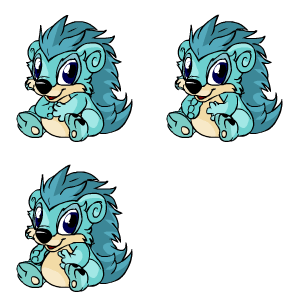 |  | |
|
|
| ## Training Details |
|
|
| Stage 1 (0-8k steps) The text encoder was trained along with the UNet at half precision for 15% of the total 8,000 steps (1,200 steps), and then the UNet was trained alone for the rest. I used a polynomial learning rate decay starting at 2e-6 (the default in fast-DreamBooth). "low quality" concatenated onto 1/3 of the prompts. Trained at 448x448 |
|
|
| Stage 2 (8k-16k) Text encoder trained 50% of steps, random choice "low quality" "lowres" "jpeg" concatenated onto 10% of prompts, starting at 1e-6 lr, trained at 384x384 |
|
|
| ## How to use with `diffusers` library (section from [openjourney](https://huggingface.co/openjourney/openjourney)) |
|
|
| ### Installing necessary libraries |
|
|
| _NOTE: This model currently works on a computer which has at least one NVIDIA GPU with CUDA support_. |
|
|
| ``` |
| pip install diffusers transformers ftfy scipy accelerate |
| ``` |
|
|
| ### Logging in |
|
|
| For logging in, you have to use `huggingface-cli login` command. |
|
|
| ### Importing necessary libraries |
|
|
| ```python |
| import torch |
| from torch import autocast |
| from diffusers.models import AutoencoderKL |
| from diffusers import StableDiffusionPipeline |
| ``` |
|
|
| ### Creating the pipeline |
|
|
| ```python |
| pipe = StableDiffusionPipeline.from_pretrained("doohickey/neopian-diffusion", use_auth_token=True) |
| pipe = pipe.to("cuda") |
| ``` |
|
|
| ### (Optional) Disabling NSFW Filter |
|
|
| _NOTE: Remember disabling this is not recommended, but since people had problems with some very basic prompts, we offer this. Remember AI art has a vast majority of users, so keep underage and sensitive users safe._ |
|
|
| ```python |
| def dummy(images, **kwargs): |
| return images, False |
| |
| pipe.safety_checker = dummy |
| ``` |
|
|
| ### Image Generation |
|
|
| ```python |
| prompt = "my prompt" |
| |
| with autocast("cuda"): |
| image = pipe(prompt=prompt, num_inference_steps=100, width=512, height=512, guidance_scale=15).images[0] |
| |
| image.save("image.png") |
| ``` |
|
|
| ## Neopets Copyright Notice |
| "Don't forget, if you use these images on a non-Neopets page, you need to include our Copyright Notice." https://www.neopets.com/terms.phtml |