Instructions to use fastino/GLiDE with libraries, inference providers, notebooks, and local apps. Follow these links to get started.
- Libraries
- Transformers
How to use fastino/GLiDE with Transformers:
# Use a pipeline as a high-level helper from transformers import pipeline pipe = pipeline("image-text-to-text", model="fastino/GLiDE") messages = [ { "role": "user", "content": [ {"type": "image", "url": "https://huggingface.co/datasets/huggingface/documentation-images/resolve/main/p-blog/candy.JPG"}, {"type": "text", "text": "What animal is on the candy?"} ] }, ] pipe(text=messages)# pip install -U transformers accelerate # Load model directly from transformers import AutoProcessor, AutoModelForMultimodalLM processor = AutoProcessor.from_pretrained("fastino/GLiDE") model = AutoModelForMultimodalLM.from_pretrained("fastino/GLiDE", device_map="auto") messages = [ { "role": "user", "content": [ {"type": "image", "url": "https://huggingface.co/datasets/huggingface/documentation-images/resolve/main/p-blog/candy.JPG"}, {"type": "text", "text": "What animal is on the candy?"} ] }, ] inputs = processor.apply_chat_template( messages, add_generation_prompt=True, tokenize=True, return_dict=True, return_tensors="pt", ).to(model.device) outputs = model.generate(**inputs, max_new_tokens=256) print(processor.decode(outputs[0][inputs["input_ids"].shape[-1]:])) - Notebooks
- Google Colab
- Kaggle
- Local Apps Settings
- vLLM
How to use fastino/GLiDE with vLLM:
Install from pip and serve model
# Install vLLM from pip: pip install vllm # Start the vLLM server: vllm serve "fastino/GLiDE" # Call the server using curl (OpenAI-compatible API): curl -X POST "http://localhost:8000/v1/chat/completions" \ -H "Content-Type: application/json" \ --data '{ "model": "fastino/GLiDE", "messages": [ { "role": "user", "content": [ { "type": "text", "text": "Describe this image in one sentence." }, { "type": "image_url", "image_url": { "url": "https://cdn.britannica.com/61/93061-050-99147DCE/Statue-of-Liberty-Island-New-York-Bay.jpg" } } ] } ] }'Use Docker
docker model run hf.co/fastino/GLiDE
- SGLang
How to use fastino/GLiDE with SGLang:
Install from pip and serve model
# Install SGLang from pip: pip install sglang # Start the SGLang server: python3 -m sglang.launch_server \ --model-path "fastino/GLiDE" \ --host 0.0.0.0 \ --port 30000 # Call the server using curl (OpenAI-compatible API): curl -X POST "http://localhost:30000/v1/chat/completions" \ -H "Content-Type: application/json" \ --data '{ "model": "fastino/GLiDE", "messages": [ { "role": "user", "content": [ { "type": "text", "text": "Describe this image in one sentence." }, { "type": "image_url", "image_url": { "url": "https://cdn.britannica.com/61/93061-050-99147DCE/Statue-of-Liberty-Island-New-York-Bay.jpg" } } ] } ] }'Use Docker images
docker run --gpus all \ --shm-size 32g \ -p 30000:30000 \ -v ~/.cache/huggingface:/root/.cache/huggingface \ --env "HF_TOKEN=<secret>" \ --ipc=host \ lmsysorg/sglang:latest \ python3 -m sglang.launch_server \ --model-path "fastino/GLiDE" \ --host 0.0.0.0 \ --port 30000 # Call the server using curl (OpenAI-compatible API): curl -X POST "http://localhost:30000/v1/chat/completions" \ -H "Content-Type: application/json" \ --data '{ "model": "fastino/GLiDE", "messages": [ { "role": "user", "content": [ { "type": "text", "text": "Describe this image in one sentence." }, { "type": "image_url", "image_url": { "url": "https://cdn.britannica.com/61/93061-050-99147DCE/Statue-of-Liberty-Island-New-York-Bay.jpg" } } ] } ] }' - Docker Model Runner
How to use fastino/GLiDE with Docker Model Runner:
docker model run hf.co/fastino/GLiDE
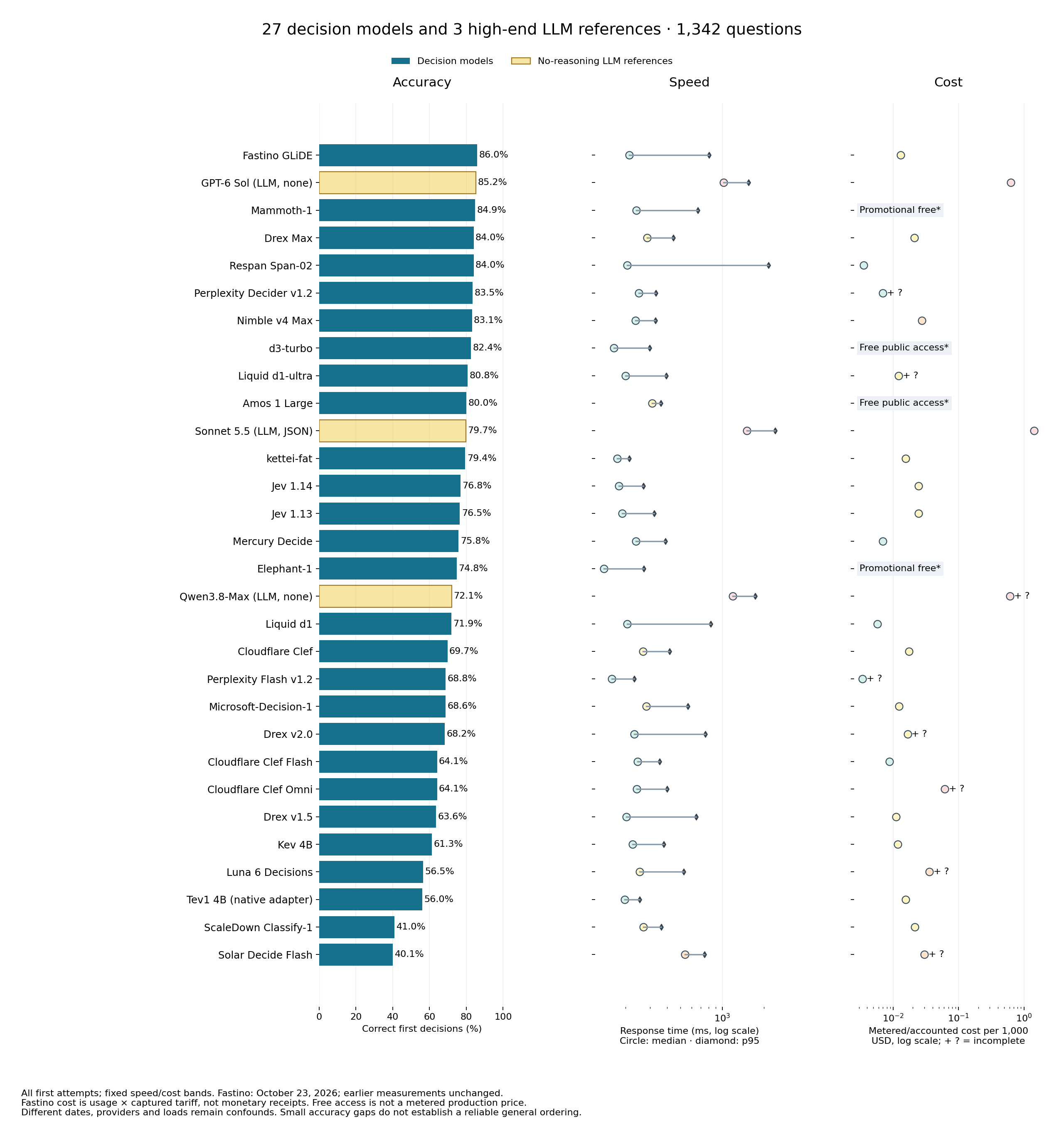
GLiDE leads my 1,342-question System 1 benchmark, ahead of GPT-6 Sol
GLiDE is the first specialized decision model in my benchmark to outscore GPT-6 Sol with reasoning disabled, the highest-scoring LLM reference I have tested here.
All models answer the same 1,342 supplied-fact, five-choice questions across 31 categories. No tools or iterative problem-solving.
| Model | Correct | Accuracy | Median response | Cost for all 1,342 |
|---|---|---|---|---|
| Fastino GLiDE | 1,154 | 86.0% | 213 ms | ~$0.0174* |
| GPT-6 Sol, reasoning off | 1,143 | 85.2% | 1,023 ms | $0.8483 |
| Mammoth-1 | 1,139 | 84.9% | 240 ms | Promotional free access |
GLiDE's measured median was 4.8 times shorter than Sol's, at about 1/49 of the run cost. The accuracy lead is 11 answers, or 0.82 percentage points. This is a developing benchmark, not evidence of universal intelligence superiority; dates, providers and server loads differ.
Some category results are particularly interesting:
- Truth-tellers and liars: 59/74, versus Sol's 38/74. These questions require finding which assignments of honest and dishonest speakers fit their statements.
- Rule violations: 52/52. Required conditions: 51/52.
- Ordered procedures: 18/48, versus Respan Span-02's 33/48. Applying successive edits to the current state remains difficult.
On the separate 200-question image benchmark, GLiDE scored 158/200 (79.0%), second to Amos at 159/200.
Tested October 23, 2026 through Fastino's hosted fastino/GLiDE alias; responses identified glide_v2. The live catalog described v2.2. This is not an exact-weight identification of the downloadable model. Sol's comparison run is from October 19.
*Fastino cost is calculated from reported input tokens at the captured $0.04/million-input-token tariff, not returned monetary receipts. Promotional free access is not a production tariff.
Full text report, category scores and methodology 路 Questions and reproducible evidence 路 Image report
Thank you so much, Sahibzada! I鈥檓 really impressed by GLiDE. Its combination of accuracy, speed and cost is remarkable, and the truth-teller results were especially striking in my tests. Congratulations to you and the Fastino team, and thank you for making it available for independent testing!