| --- |
| license: mit |
| --- |
| ## diffusion |
|
|
| image/video generation GUI for GGUF diffusion models, packaged for Python. |
| The GUI runs in your browser against a local server; generation is done by |
| the diffusion (c/c++) engine, compiled during `pip install` and bundled |
| with the package as a single binary. Model and image files are referenced |
| by filesystem path through a built-in file browser — nothing is uploaded |
| or copied to temp storage. |
|
|
| ## install via pip/pip3 |
|
|
| ```bash |
| pip install gguf-diffusion |
| ``` |
|
|
| ## build it from source code |
|
|
| CUDA (NVIDIA) |
| ```bash |
| $env:CMAKE_ARGS="-DSD_CUDA=ON" |
| pip install gguf_diffusion-x.x.x.tar.gz |
| ``` |
|
|
| ROCm/HIP (AMD) |
| ```bash |
| $env:CMAKE_ARGS="-DSD_HIPBLAS=ON" |
| pip install gguf_diffusion-x.x.x.tar.gz |
| ``` |
|
|
| macOS/Metal (Apple) |
| ```bash |
| pip install gguf_diffusion-x.x.x.tar.gz |
| ``` |
|
|
| ## usage |
|
|
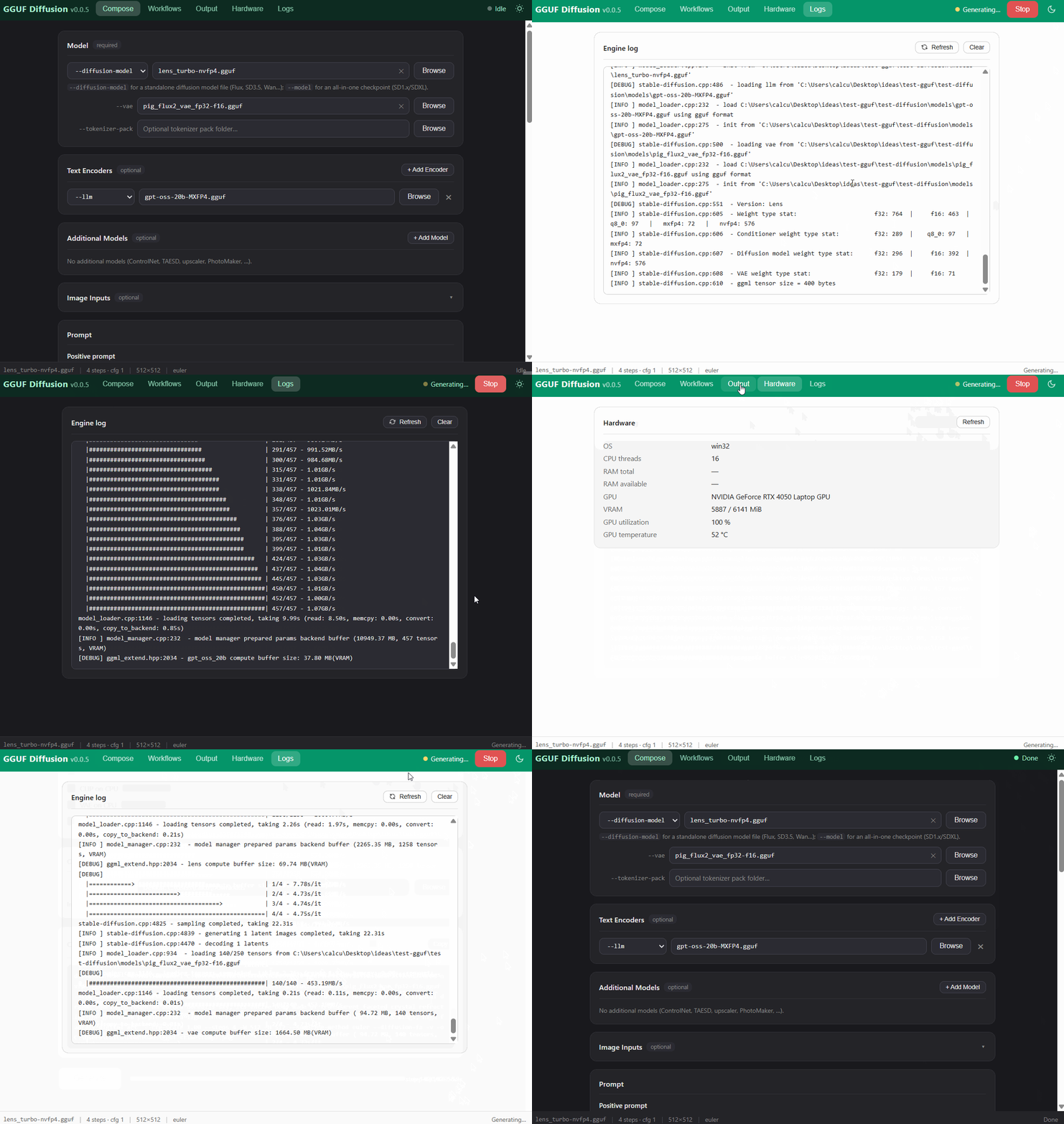
| enter GUI diffusion panel |
| ```bash |
| gguf-diffusion |
| ``` |
|
|
|  |
|
|
| GUI features (similar to the gguf desktop app's diffusion panel): |
|
|
| - txt2img with the full model stack: `--model` / `--diffusion-model`, VAE, |
| external text encoders (`--clip_l`, `--t5xxl`, `--llm`, …), additional |
| models (ControlNet, TAESD, upscaler, PhotoMaker, …), tokenizer packs |
| - image inputs: init image (img2img), mask (inpainting), end frame, |
| control image, reference images |
| - sampling controls: CFG scale, steps, size, seed, batch count, all engine |
| sampling methods and schedules, flash attention, low-VRAM flags |
| - live progress and engine log, output gallery, saved workflows |
| (localStorage + JSON export/import), copyable/editable CLI command |
|
|
| use CLI call the engine straight in terminal/console |
| ``` |
| gguf-diffusion engine -- --diffusion-model model.gguf --clip_l clip_l.gguf --clip_g clip_g.gguf --t5xxl t5xxl.gguf --vae vae.gguf -H 512 -W 512 -p 'a lovely cat holding a sign says GGUF' --steps 8 --cfg-scale 1 --sampling-method euler -v --clip-on-cpu -o out.png |
| ``` |
|
|
|
|
| ## how it works |
|
|
| - `pip install` compiles the diffusion.cpp engine (static libdiffusion + |
| static ggml linked into one CLI executable) via scikit-build-core and |
| installs it into the package's `bin/` directory. |
| - `gguf-diffusion` starts a stdlib HTTP server (default port 8643) serving |
| the static GUI and a small JSON API, and opens the browser. |
| - Each generation spawns one engine process; the server parses its progress |
| bars, streams the log to the GUI, and lists the produced images. |
| - File selection uses a server-side directory listing (`/api/browse`) so the |
| GUI gets real filesystem paths — no drag & drop uploads of multi-GB models. |
|
|
| or run it with `gguf-connector` |
| ``` |
| ggc fu |
| ``` |
|
|
|  |