Deep RL Course documentation
Play with Huggy
Unit 0. Welcome to the course
Unit 1. Introduction to Deep Reinforcement Learning
Bonus Unit 1. Introduction to Deep Reinforcement Learning with Huggy
Live 1. How the course work, Q&A, and playing with Huggy
Unit 2. Introduction to Q-Learning
Unit 3. Deep Q-Learning with Atari Games
Bonus Unit 2. Automatic Hyperparameter Tuning with Optuna
Unit 4. Policy Gradient with PyTorch
Unit 5. Introduction to Unity ML-Agents
Unit 6. Actor Critic methods with Robotics environments
Unit 7. Introduction to Multi-Agents and AI vs AI
Unit 8. Part 1 Proximal Policy Optimization (PPO)
Unit 8. Part 2 Proximal Policy Optimization (PPO) with Doom
Bonus Unit 3. Advanced Topics in Reinforcement Learning
Bonus Unit 5. Imitation Learning with Godot RL Agents
Certification and congratulations
Play with Huggy
Now that you’ve trained Huggy and pushed it to the Hub. You will be able to play with him ❤️
For this step it’s simple:
- Open the Huggy game in your browser: https://huggingface.co/spaces/ThomasSimonini/Huggy
- Click on Play with my Huggy model
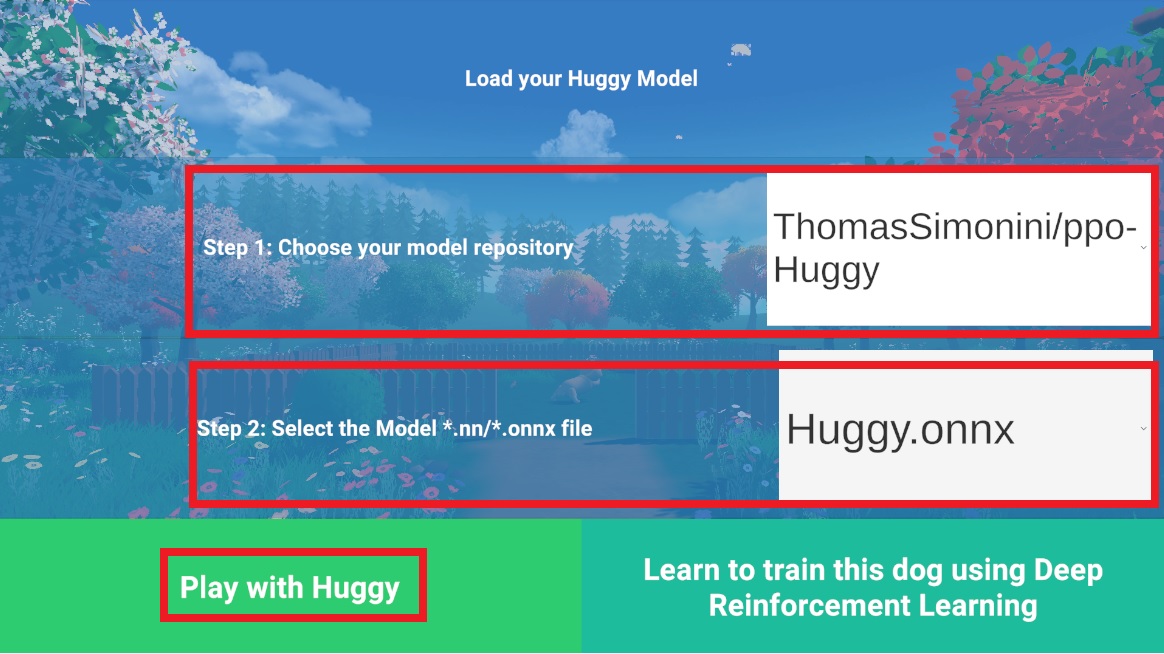
In step 1, choose your model repository which is the model id (in my case ThomasSimonini/ppo-Huggy).
In step 2, choose which model you want to replay:
- I have multiple ones, since we saved a model every 500000 timesteps.
- But if I want the most recent one I choose Huggy.onnx
👉 It’s good to try with different model checkpoints to see the improvement of the agent.
Update on GitHub