
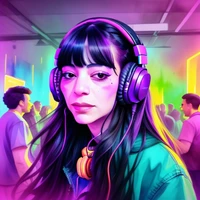
import torch
from diffusers import DiffusionPipeline

# switch to "mps" for apple devices
pipe = DiffusionPipeline.from_pretrained("MiniMaxAI/MiniMax-H3-Image", dtype=torch.bfloat16, device_map="cuda")
pipe.load_lora_weights("linoyts/MiniMax-H3-Image-pDMD-2steps")

prompt = "Astronaut in a jungle, cold color palette, muted colors, detailed, 8k"
image = pipe(prompt).images[0]MiniMax-H3-Image 2-step pDMD LoRA
A 2-step distillation LoRA for MiniMax-H3-Image, trained with pDMD (DMD2 with the pDMD projection, Distribution Matching Distillation). It turns the base model's 6-step sampling into 2 forward passes while keeping text-to-image and reference-image editing close to the full 6-step model, which makes it suitable for real-time and interactive pipelines.
- Base model: MiniMaxAI/MiniMax-H3-Image
- Method: pDMD (DMD2 with the pDMD projection), the base model's 6-step sampler as the teacher
- LoRA: rank 128, alpha 128, attention and feed-forward (
to_q,to_k,to_v,to_out.0,ff.net.0.proj,ff.net.2) - Inference: 2 steps,
sample_sigmas=[1.0, 12/13, 0.0], about 1 megapixel - Training: 1000 steps on a single H100, multi-aspect (1024x1024, 768x1344, 1344x768), on prompts expanded by MiniMax-H3-Image-PE
Usage
MiniMax-H3-Image is supported in diffusers 0.43.0 and later, as Modular Diffusers blocks (Python 3.11+):
pip install -U "diffusers>=0.43.0" transformers accelerate safetensors
The transformer and the text encoder are about 62 GB each in bfloat16, so this uses automatic offloading (about 140 GB of CPU RAM).
import torch
from diffusers import ComponentsManager, ModularPipeline
from huggingface_hub import hf_hub_download
from safetensors.torch import load_file

manager = ComponentsManager()
manager.enable_auto_cpu_offload(device="cuda")
pipe = ModularPipeline.from_pretrained("MiniMaxAI/MiniMax-H3-Image", components_manager=manager)
pipe.load_components(dtype=torch.bfloat16)


def fuse_lora(transformer, path, scale=1.0):
    """Merge a LoRA (rank 128, alpha 128) into the transformer weights."""
    state = load_file(path)
    params = dict(transformer.named_parameters())
    for key in state:
        if key.endswith(".lora_A.weight"):
            name = key.removeprefix("transformer.").removesuffix(".lora_A.weight")
            weight = params[name + ".weight"]
            delta = state[key.replace("lora_A", "lora_B")].float() @ state[key].float()
            weight.data += (scale * delta).to(weight.device, weight.dtype)


lora_path = hf_hub_download("linoyts/MiniMax-H3-Image-pDMD-2steps", "pytorch_lora_weights.safetensors")
fuse_lora(pipe.transformer, lora_path)
pipe.register_to_config(sample_sigmas=[1.0, 12 / 13, 0.0])  # 2 steps, one transformer head per step
Text to image
prompt = (
    "A cozy wooden cabin in a snowy pine forest at dusk, warm yellow light glowing from its small square "
    "windows, smoke curling from a stone chimney, deep blue sky with the first stars, fresh snow on the roof."
)
image = pipe(
    prompt=prompt,
    height=1024,
    width=1024,
    min_generation_area=1024,  # generate at the requested size instead of upscaling to 4 MP
    generator=torch.Generator().manual_seed(0),
    output="images",
)[0]
image.save("cabin.png")
Image editing
Pass reference images as image and refer to them as <Picture 1>, <Picture 2>, ... in the prompt:
from diffusers.utils import load_image

reference = load_image("https://huggingface.co/MiniMaxAI/MiniMax-H3-Image/resolve/main/examples/reference1.png")
image = pipe(
    prompt="Keep everything in <Picture 1> as it is, but remove the headphones and have the two hosts fist bump.",
    image=reference,
    height=1024,
    width=1024,
    min_generation_area=1024,
    generator=torch.Generator().manual_seed(1234),
    output="images",
)[0]
Notes
- Use long prompts. The LoRA was trained on prompts rewritten by MiniMax-H3-Image-PE, the format the base model expects. Short prompts work, and detailed descriptions (or prompts run through the PE model first) work best. The diffusers PE blocks run the expansion as a pipeline of its own.
- Resolution. The LoRA was trained around 1 megapixel (1024x1024, 768x1344, 1344x768). Pass
min_generation_area=1024so the pipeline generates at the size you ask for; by default it generates on a canvas of at least 4 megapixels, which this LoRA was not trained at. - Schedule.
[1.0, 12/13, 0.0]is the 2-step schedule the LoRA was trained on (a shift-12 midpoint). The transformer has one output head per step, and the pipeline uses the heads in order, so the first two heads are used. - No guidance. The base model is guidance-distilled, so there is no
guidance_scaleornegative_prompt.
License
This is a LoRA adapter for MiniMax-H3-Image and a Model Derivative of it, distributed under the MiniMax-H3-Image Community License Agreement (a copy is included in this repository). See NOTICE for what was modified.
Powered by MiniMax-H3-Image.
- Downloads last month
- 880