

ComfyUI node pack: score editor, MIDI and cover workflows, 9 ready templates

I've built a ComfyUI node pack for YuE2-3B: https://github.com/pytraveler/YuE2-ComfyUI
To install, search for YuE2 Music in ComfyUI-Manager, or clone the repo into custom_nodes. The only extra package it needs is tiktoken. It finds the weights on its own and downloads them if they aren't there yet (bf16 7.26 GB, or an INT8 build at 3.69 GB).
What it adds on top of plain style + lyrics -> song:
- The ABC score as something you work with. The node returns the score it sang from, and an editor on the node lets you change notes before the song is sung. You can also transpose it. Putting the key in the style line did nothing in my tests (0 of 18 songs), but a transposed score was sung in the new key every time.
- Sing a MIDI file (.mid/.kar). The lyrics are laid along the tune's phrases. Pasting the words next to a bare tune mostly got nonsense sung.
- Cover a song. SheetSage2 writes down a recording's melody, Qwen3-ASR gets the words, and YuE2 sings them again in a new style.
- Write Song. A small local LLM writes the style and lyrics from a single sentence.
- The run is also split into staged nodes: plan, several takes of one song, and decoding the same take with both decoders.
VRAM: about 5 GiB for a 40 s song and about 11.5 GiB for a four-minute one with offload on. A 75 s song took about 40 s on an RTX 5090. The same seed and settings give the same song byte for byte on one machine.
The pack ships 9 example workflows. You'll find them under Workflow -> Browse Templates once it's installed, and each has a "Read me first" note.
Bug reports and odd results are welcome on GitHub issues.
Note: the weights are CC BY-NC 4.0, so the licence on generated output is the same open question as in #5. The pack doesn't change that.


YuE2 for ComfyUI 0.7.0 — half the VRAM, and a switch for 4 GB cards
This release is about video memory. The nodes and what they output are the same,
apart from one new switch.
Two of the changes need nothing from you.
The acoustic stage was asking PyTorch for grouped-query attention, which the
memory-efficient kernel refuses outright — and flash isn't compiled into the
Windows wheels, so every call fell back to the kernel that builds the whole
attention matrix. Repeating the key heads and dropping the argument hands the
call to the fused kernel. It is the same attention: repeating the key heads is
what the refused argument does internally.
The other one: YuE2 writes its score out of the text vocabulary and its song out
of the codec one, and masks every other row away before it samples. Those rows no
longer have to sit on the card. While the song is being written, 32770 rows of
184704 are resident — 0.125 GiB instead of 0.705.
Four-minute song, RTX 5090, offload on: 10.72 GiB in 122 s → 4.50 GiB in 98 s.
Then low_vram, new and last in YuE2 Options, off by default. The 28 layers
stay on the card as INT8 rows and turn back into BF16 only for the multiply that
needs them, and the VAE decodes in 256-frame tiles instead of 1024.
| default | low_vram |
|
|---|---|---|
| 40-second song, peak | 4.43 GiB | 3.11 GiB |
| four-minute song, peak | 4.50 GiB | 3.14 GiB |
| tightest cap it still finished under | 4.75 GiB | 3.5 GiB |
The four-minute pair took 104 s and 110 s: the token loop is about twice as slow
per step, and the stage that moves weights onto the card gets faster because there
is half as much to move.
It is the one switch here that changes the song. An INT8 round trip is lossy —
measured across all 392 matrices of the released checkpoint, a cosine of 0.99990
or better and about one percent of relative error — so the same seed writes the
same score and a new performance of it. Both takes were read back with the pack's
own speech recognition: the four-minute one sang the lyric through, and 98.6% of
the words heard were words of the lyrics, which is what the BF16 take scored.
Upgrading: songs made before 0.7.0 don't come back byte for byte. The score and
the sung notes do — only the final render differs, about 30 dB below the song's
own level. From 0.7.0 on, the same seed gives the same song again.
Nodes: https://github.com/pytraveler/YuE2-ComfyUI · Model: m-a-p/YuE2-3B
YuE2-ComfyUI 0.7.2
A bug-fix release, mostly for 8 GB graphics cards.
- No more VRAM ceiling at the end of a song. On 8 GB cards, the last step (turning the song into audio) could fill the card to the top. Windows then quietly moved data into system RAM, and everything slowed down. The pack now makes room first and stays at about 4.5–5.4 GB. Your songs sound exactly the same, down to the last byte.
- Faster when the model moves between the card and RAM. Moving parts of the model onto the card is now up to three times faster, and moving them off is instant. On an RTX 3070 Ti these moves used to take about 12 seconds of a one-minute run.
- The legacy decoder no longer downloads 6.7 GB again. If you already have Comfy-Org's YuE2 checkpoint,
vae: legacynow fetches only the 0.49 GB decoder instead of the whole model a second time. - Fewer mix-ups with other models' files. If you use ACE-Step 1.5, its VAE in
models/vaeis no longer mistaken for YuE2's decoder. YUE2_MODELS_ROOTnow works for downloads too. When it is set, downloaded files go into that folder, so the next run finds them.- Clearer error messages. If the vocabulary file (
qwen.tiktoken) is damaged, the pack now names the file and tells you what to do. It used to say only "not enough values to unpack". - See where the time went. The log now shows how long each stage of a song took.
Update through ComfyUI Manager.

Thank you! This looks awesome! And this is exactly the stuff I was looking for and which is missing in my music production toolkit. So somehow bringing these features together in one tool would be a banger.
Thank you for your high assessment of my work! 🙏
I’m personally interested in developing the project.
Therefore, I will continue to improve it. And also add new functionality.
Stay tuned for updates!
YuE2-ComfyUI 0.8.0: a LoRA node for YuE2-3B.
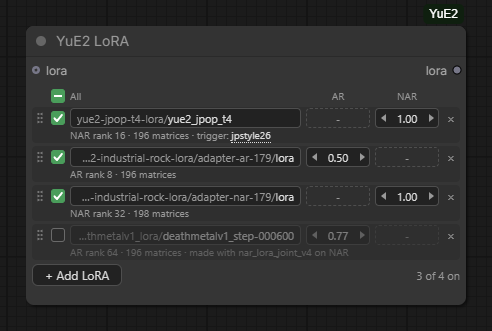
One row is one file, with its own strength for AR, which sings the performance, and NAR, which turns it into sound. Files in m-a-p's layout are read as well as files in ComfyUI's -- ComfyUI's own loader applies only the second kind and patches nothing on the first, saying so only in the console. Adapters are folded into the weights as each half arrives on the card, 0.12 to 0.47 seconds a half on an RTX 5090, and the fold matches core's calculate_weight to the bit.
https://github.com/pytraveler/YuE2-ComfyUI/releases/tag/v0.8.0
YuE2 Edit Track: change part of a finished song, keep the rest
New in YuE2-ComfyUI 0.9.0, a node pack for m-a-p's YuE2-3B. YuE2 Edit Track opens a song the pack has sung as a track (waveform, bars and sections of its score, the lyrics beside it) and changes one stretch of it. Everything outside the edit stays the old recording, sample for sample.
What it can do:
- retake a few bars and keep the best of several takes
- cut bars out
- sing a line with new words
- change notes in the score editor and re-sing only those bars
- carry the song on past its end, with new lines or a new ending
- drag a section to another place
- insert an instrumental break
A retake of a few bars in a four-minute song takes about 10 seconds on an RTX 5090; singing the whole song again takes about 100. Each take is a whole song you can switch to while it plays, and every song and edit stays in a list you can reopen after a restart without singing it again.
Upstream YuE2 has no local editing, and neither does ComfyUI core.
Also in 0.9.0: a faster attention backend that needs no extra packages, and a faster acoustic stage.


