


PaddleOCR-VL-1.6: Expanding the Frontier of Document Parsing with Under-Optimized Region Refinement and Progressive Post-Training
Paper • 2606.03264 • Published • 28
GGUF builds of PaddleOCR-VL-1.6, made by Moonbox for on-device use with llama.cpp
(Metal, CUDA, Vulkan, CPU). Every file is at the root of this repository: one model file per precision, plus the
mmproj-*.gguf file that holds the model's encoder (audio, vision or codec) when it has one. That file is shared by
every precision. Pick a precision by the memory you have.
The last column is the benchmark: the task score of each file on Moonbox's evaluation set for this kind of model (details under How to run), and how often it gives exactly the same output as the BF16 file. The BF16 file holds the original weights unchanged.
| Precision | File | Size | sha256 | Benchmark |
|---|---|---|---|---|
| all | mmproj-paddleocr-vl-1-6-F16.gguf |
880.4 MB | cdfde18b46c1 |
encoder file, used with every precision |
| F16 | paddleocr-vl-1-6-F16.gguf |
935.8 MB | 86242ced18c9 |
CER 0.0 % / 0.0 %; same text as BF16 on 6 + 6 of 12 pages; 0.18 s per page (CUDA) |
| BF16 | paddleocr-vl-1-6-BF16.gguf |
935.8 MB | 4997e62eb640 |
CER 0.0 % / 0.0 % (original 0.0 / 0.0); 0.19 s per page (CUDA) |
| Q8_0 | paddleocr-vl-1-6-Q8_0.gguf |
498.3 MB | 2429f6c00525 |
CER 0.0 % / 0.0 %; same text as BF16 on 6 + 6 of 12 pages; 0.17 s per page (CUDA) |
| Q6_K | paddleocr-vl-1-6-Q6_K.gguf |
385.3 MB | 57ffc2d2836b |
CER 0.0 % / 0.0 %; same text as BF16 on 6 + 6 of 12 pages; 0.17 s per page (CUDA) |
| Q5_K_M | paddleocr-vl-1-6-Q5_K_M.gguf |
341.5 MB | 808abf1a503e |
CER 0.0 % / 0.0 %; same text as BF16 on 6 + 6 of 12 pages; 0.17 s per page (CUDA) |
| Q4_K_M | paddleocr-vl-1-6-Q4_K_M.gguf |
300.2 MB | 90708a2e2984 |
CER 0.0 % / 0.0 %; same text as BF16 on 6 + 5 of 12 pages; 0.16 s per page (CUDA) |
The model file holds the ERNIE-4.5-0.3B decoder. mmproj-paddleocr-vl-1-6-F16.gguf holds the vision encoder and its
projector, kept in F16 for every precision. Both files are needed. With llama.cpp b12621 or newer:
llama-mtmd-cli -m paddleocr-vl-1-6-Q8_0.gguf --mmproj mmproj-paddleocr-vl-1-6-F16.gguf -ngl 99 \
    --image page.png -p "OCR:" --temp 0
llama-server with the same two files serves it through /v1/chat/completions: send the page as an image_url part,
followed by the text OCR:. Other task prompts of the original work the same way: Table Recognition:,
Formula Recognition:, Chart Recognition:.
The converter leaves out two parts that this model doesn't use for generation:
vision_model.head.*);Every other tensor of the original checkpoint is byte-identical in these files.
Benchmark.
OCR: with greedy decoding.llama-server /v1/chat/completions on CUDA (RTX 3080 Laptop).From PaddleOCR-VL-1.6 at revision 132c45f52c, with llama.cpp b12621:
convert_hf_to_gguf.py wrote the BF16 model file and the mmproj file.llama-quantize made the other precisions from the BF16 file, with its standard mixes.Before upload, every tensor of the original checkpoint was found with the same values in the BF16 model file and the
mmproj file. The sha256 column above is what the files must hash to.
apache-2.0. These files are a derivative of the original model and carry its license. The license is copied in this repository, and it governs your use of these files. The original model card follows unchanged.
PaddleOCR-VL-1.6: Expanding the Frontier of Document Parsing with Under-Optimized Region Refinement and Progressive Post-Training




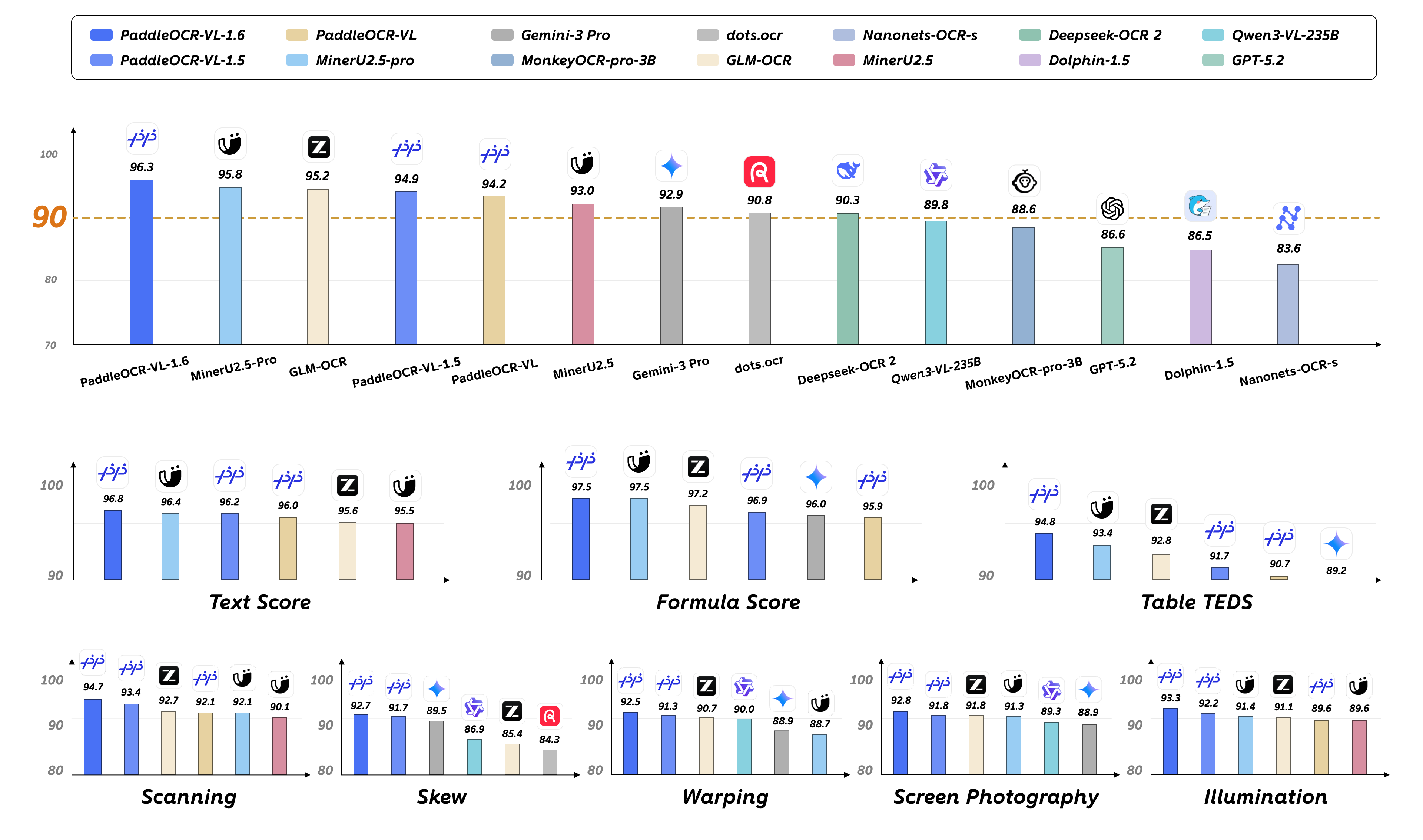
We introduce PaddleOCR-VL-1.6, an upgraded compact document parsing model built upon PaddleOCR-VL-1.5. PaddleOCR-VL-1.6 introduces a region-aware data optimization framework that identifies weak regions from the previous model, applies targeted enhancement to those regions, and improves the reliability of supervision signals. It further adopts a progressive post-training recipe based on curated data selection and reinforcement learning, pushing model performance to a higher level through staged optimization. PaddleOCR-VL-1.6 achieves a new state-of-the-art score of 96.33% on OmniDocBench v1.6, sets new records on OmniDocBench v1.5 and Real5-OmniDocBench as well, and demonstrates strong competitiveness against top-tier VLMs. The model architecture is fully compatible with PaddleOCR-VL-1.5, enabling zero-cost plug-and-play migration.
🚀 New SOTA Accuracy: OmniDocBench v1.6 achieves 96.33%, setting new state-of-the-art records on OmniDocBench v1.5 and Real5-OmniDocBench as well. It delivers comprehensive leading performance across text, formula, and table recognition, surpassing both open-source and closed-source solutions.
⚡ Fully Upgraded Capabilities: Significant improvements in table, Chinese ancient document, and Chinese rare character recognition, along with notable enhancements in seal/stamp recognition, text spotting, chart recognition, and more diverse scenarios.
🔄 Seamless Migration: The model architecture is fully compatible with PaddleOCR-VL-1.5 — zero adaptation cost, plug-and-play replacement.
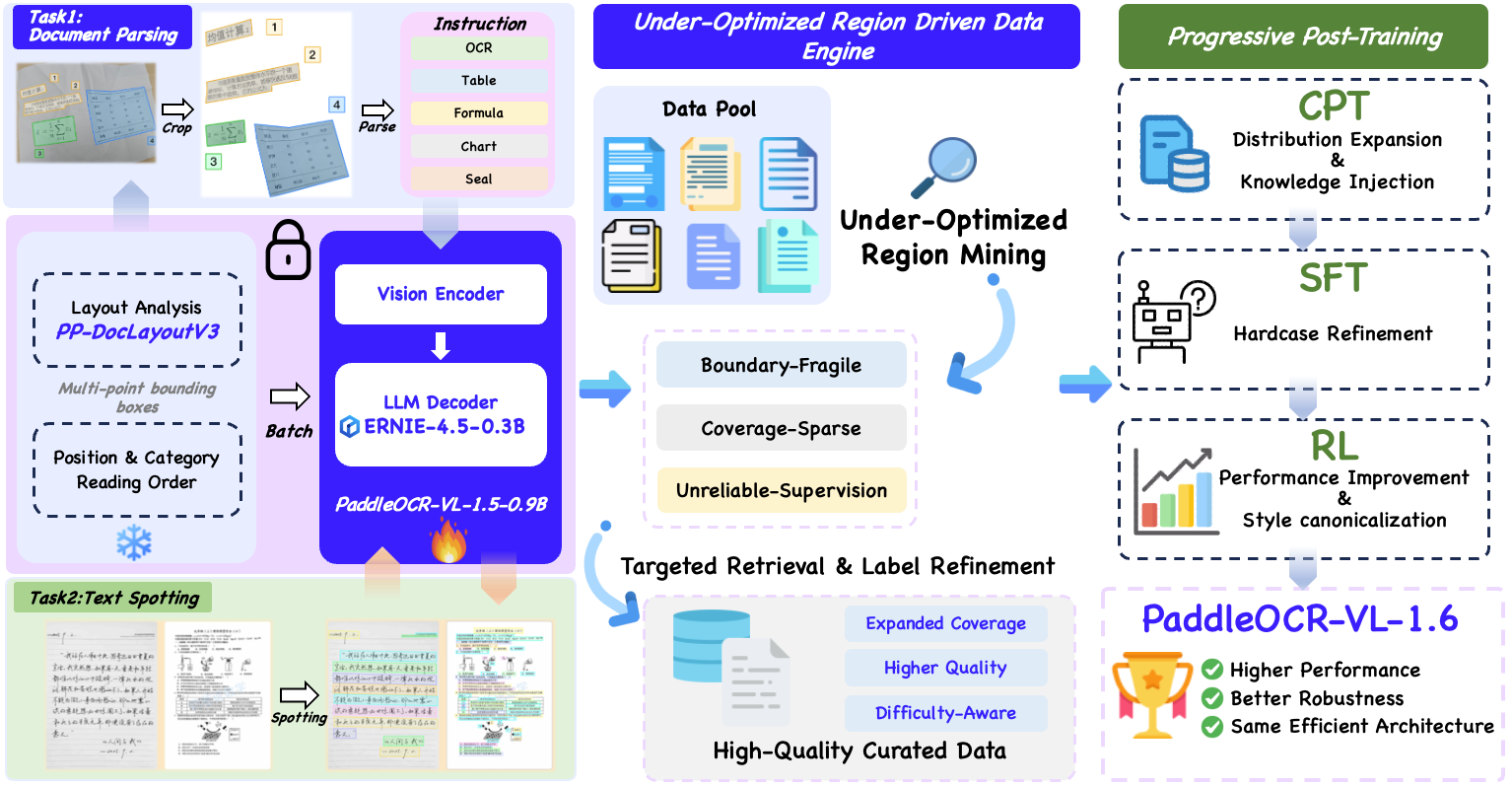
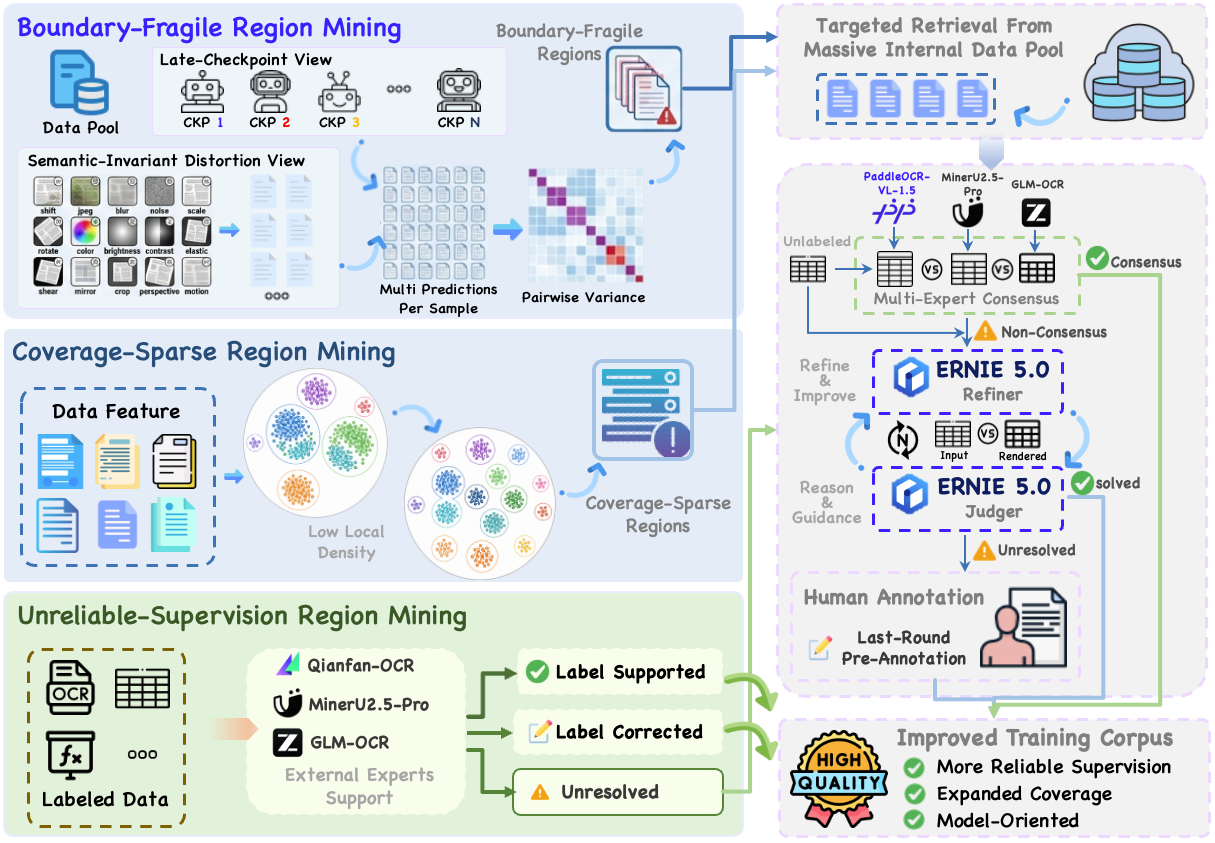
2026.06.03 🚀 We release PaddleOCR-VL-1.6 Technical Report.
2026.05.28 🚀 We release PaddleOCR-VL-1.6. PaddleOCR-VL-1.6 achieves a new state-of-the-art score of 96.33% on OmniDocBench v1.6, sets new records on OmniDocBench v1.5 and Real5-OmniDocBench as well, and demonstrates strong competitiveness against top-tier VLMs. The model architecture is fully compatible with PaddleOCR-VL-1.5, enabling zero-cost plug-and-play migration.
Install PaddlePaddle and PaddleOCR:
# The following command installs the PaddlePaddle version for CUDA 12.6. For other CUDA versions and the CPU version, please refer to https://www.paddlepaddle.org.cn/en/install/quick?docurl=/documentation/docs/en/develop/install/pip/linux-pip_en.html
python -m pip install paddlepaddle-gpu==3.2.1 -i https://www.paddlepaddle.org.cn/packages/stable/cu126/
python -m pip install -U "paddleocr[doc-parser]>=3.6.0"
Please ensure that you install PaddlePaddle framework version 3.2.1 or above, along with the special version of safetensors. For macOS users, please use Docker to set up the environment.
CLI usage:
paddleocr doc_parser -i https://paddle-model-ecology.bj.bcebos.com/paddlex/imgs/demo_image/paddleocr_vl_demo.png --pipeline_version v1.6
Python API usage:
from paddleocr import PaddleOCRVL
pipeline = PaddleOCRVL(pipeline_version="v1.6")
output = pipeline.predict("https://paddle-model-ecology.bj.bcebos.com/paddlex/imgs/demo_image/paddleocr_vl_demo.png")
for res in output:
    res.print()
    res.save_to_json(save_path="output")
    res.save_to_markdown(save_path="output")
Start the VLM inference server:
You can start the vLLM inference service using one of two methods:
Method 1: PaddleOCR method
docker run \
    --rm \
    --gpus all \
    --network host \
    ccr-2vdh3abv-pub.cnc.bj.baidubce.com/paddlepaddle/paddleocr-genai-vllm-server:latest-nvidia-gpu \
    paddleocr genai_server --model_name PaddleOCR-VL-1.6-0.9B --host 0.0.0.0 --port 8080 --backend vllm
Method 2: vLLM method
Call the PaddleOCR CLI or Python API:
paddleocr doc_parser \
    -i https://paddle-model-ecology.bj.bcebos.com/paddlex/imgs/demo_image/paddleocr_vl_demo.png \
    --pipeline_version v1.6 \
    --vl_rec_backend vllm-server \
    --vl_rec_server_url http://127.0.0.1:8080/v1
from paddleocr import PaddleOCRVL
pipeline = PaddleOCRVL(pipeline_version="v1.6", vl_rec_backend="vllm-server", vl_rec_server_url="http://127.0.0.1:8080/v1")
output = pipeline.predict("https://paddle-model-ecology.bj.bcebos.com/paddlex/imgs/demo_image/paddleocr_vl_demo.png")
for res in output:
    res.print()
    res.save_to_json(save_path="output")
    res.save_to_markdown(save_path="output")
For more usage details and parameter explanations, see the documentation.
Currently, the PaddleOCR-VL-1.6-0.9B model facilitates seamless inference via the transformers library, supporting comprehensive text spotting and the recognition of complex elements including formulas, tables, charts, and seals. Below is a simple script we provide to support inference using the PaddleOCR-VL-1.5-0.9B model with transformers.
Note: We currently recommend using the official method for inference, as it is faster and supports page-level document parsing. The example code below only supports element-level recognition and text spotting.
# ensure the transformers v5 is installed
python -m pip install "transformers>=5.0.0"
from PIL import Image
import torch
from transformers import AutoProcessor, AutoModelForImageTextToText

# ---- Settings ----
model_path = "PaddlePaddle/PaddleOCR-VL-1.6"
image_path = "test.png"
task = "ocr" # Options: 'ocr' | 'table' | 'chart' | 'formula' | 'spotting' | 'seal'
# ------------------

# ---- Image Preprocessing For Spotting ----
image = Image.open(image_path).convert("RGB")
orig_w, orig_h = image.size
spotting_upscale_threshold = 1500

if task == "spotting" and orig_w < spotting_upscale_threshold and orig_h < spotting_upscale_threshold:
    process_w, process_h = orig_w * 2, orig_h * 2
    try:
        resample_filter = Image.Resampling.LANCZOS
    except AttributeError:
        resample_filter = Image.LANCZOS
    image = image.resize((process_w, process_h), resample_filter)

# Set max_pixels: use 1605632 for spotting, otherwise use default ~1M pixels
max_pixels = 2048 * 28 * 28 if task == "spotting" else 1280 * 28 * 28
# ---------------------------

# -------- Inference --------
DEVICE = "cuda" if torch.cuda.is_available() else "cpu"
PROMPTS = {
    "ocr": "OCR:",
    "table": "Table Recognition:",
    "formula": "Formula Recognition:",
    "chart": "Chart Recognition:",
    "spotting": "Spotting:",
    "seal": "Seal Recognition:",
}

model = AutoModelForImageTextToText.from_pretrained(model_path, torch_dtype=torch.bfloat16).to(DEVICE).eval()
processor = AutoProcessor.from_pretrained(model_path)

messages = [
    {
        "role": "user",
        "content": [
            {"type": "image", "image": image},
            {"type": "text", "text": PROMPTS[task]},
        ]
    }
]
inputs = processor.apply_chat_template(
    messages,
    add_generation_prompt=True,
    tokenize=True,
    return_dict=True,
    return_tensors="pt",
    images_kwargs={"size": {"shortest_edge": processor.image_processor.min_pixels, "longest_edge": max_pixels}},
).to(model.device)

outputs = model.generate(**inputs, max_new_tokens=512)
result = processor.decode(outputs[0][inputs["input_ids"].shape[-1]:-1])
print(result)
# ---------------------------
# ensure the flash-attn2 is installed
pip install flash-attn --no-build-isolation
model = AutoModelForImageTextToText.from_pretrained(model_path, torch_dtype=torch.bfloat16, attn_implementation="flash_attention_2").to(DEVICE).eval()
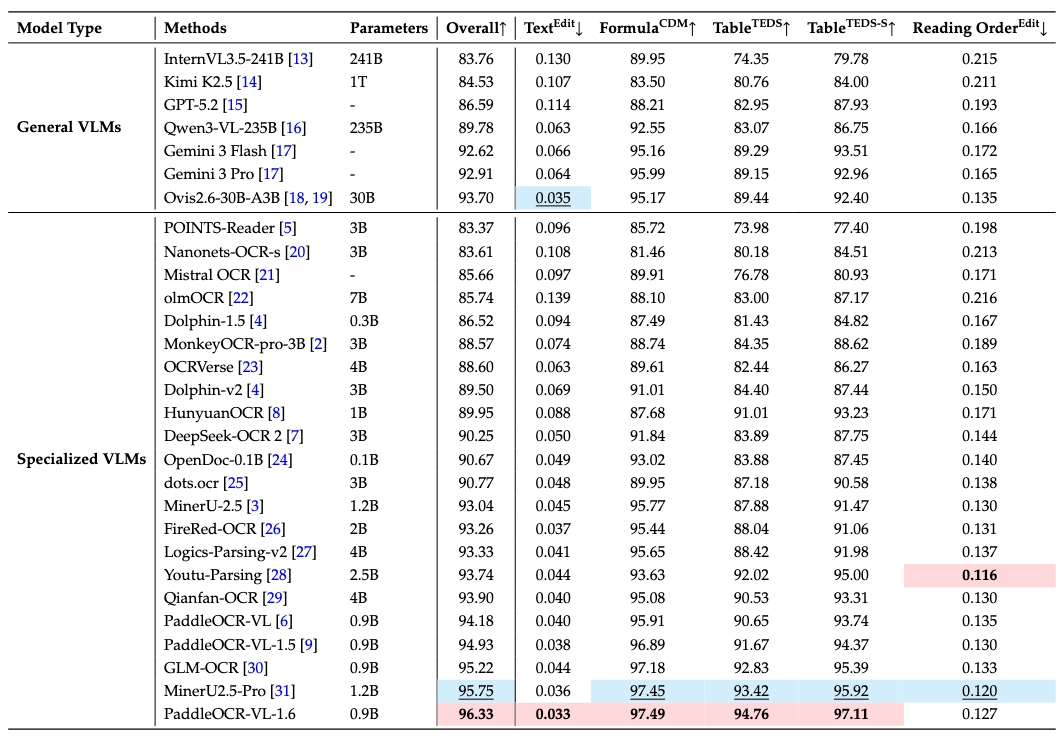
Notes:
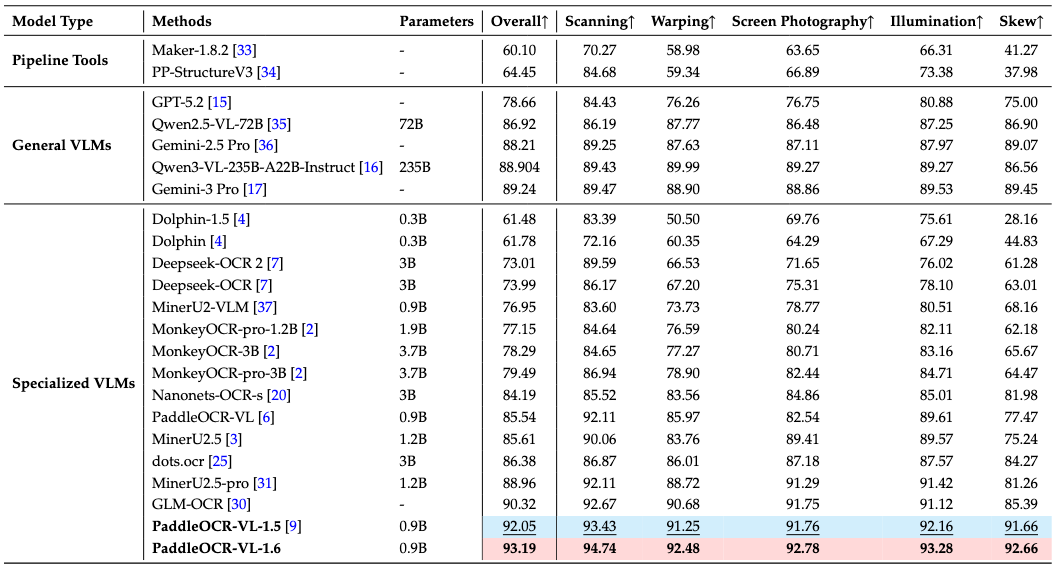
- Performance metrics are cited from the OmniDocBench official leaderboard, except for Gemini-3 Pro, Qwen3-VL-235B-A22B-Instruct and our model, which were evaluated independently.
Notes:
- Real5-OmniDocBench is a brand-new benchmark oriented toward real-world scenarios, which we constructed based on the OmniDocBench v1.5 dataset. The dataset comprises five distinct scenarios: Scanning, Warping, Screen-photography, Illumination, and Skew. For further details, please refer to Real5-OmniDocBench.
We would like to thank PaddleFormers, Keye, MinerU, OmniDocBench for providing valuable code, model weights and benchmarks. We also appreciate everyone's contribution to this open-source project!
If you find PaddleOCR-VL-1.6 helpful, feel free to give us a star and citation.
@misc{zhang2026paddleocrvl16expandingfrontierdocument,
      title={PaddleOCR-VL-1.6: Expanding the Frontier of Document Parsing with Under-Optimized Region Refinement and Progressive Post-Training},
      author={Zelun Zhang and Hongen Liu and Suyin Liang and Yubo Zhang and Yiqing Xiang and Jiaxuan Liu and Ting Sun and Manhui Lin and Yue Zhang and Changda Zhou and Tingquan Gao and Cheng Cui and Yi Liu and Dianhai Yu and Yanjun Ma},
      year={2026},
      eprint={2606.03264},
      archivePrefix={arXiv},
      primaryClass={cs.CV},
      url={https://arxiv.org/abs/2606.03264},
}
4-bit
5-bit
6-bit
8-bit
16-bit
Base model
PaddlePaddle/PaddleOCR-VL-1.6