| --- |
| sidebar_position: 2 |
| slug: /launch_ragflow_from_source |
| --- |
| |
| # Launch service from source |
|
|
| A guide explaining how to set up a RAGFlow service from its source code. By following this guide, you'll be able to debug using the source code. |
|
|
| ## Target audience |
|
|
| Developers who have added new features or modified existing code and wish to debug using the source code, *provided that* their machine has the target deployment environment set up. |
|
|
| ## Prerequisites |
|
|
| - CPU ≥ 4 cores |
| - RAM ≥ 16 GB |
| - Disk ≥ 50 GB |
| - Docker ≥ 24.0.0 & Docker Compose ≥ v2.26.1 |
|
|
| :::tip NOTE |
| If you have not installed Docker on your local machine (Windows, Mac, or Linux), see the [Install Docker Engine](https://docs.docker.com/engine/install/) guide. |
| ::: |
|
|
| ## Launch a service from source |
|
|
| To launch a RAGFlow service from source code: |
|
|
| ### Clone the RAGFlow repository |
|
|
| ```bash |
| git clone https://github.com/infiniflow/ragflow.git |
| cd ragflow/ |
| ``` |
|
|
| ### Install Python dependencies |
|
|
| 1. Install uv: |
| |
| ```bash |
| pipx install uv |
| ``` |
|
|
| 2. Install Python dependencies: |
| - slim: |
| ```bash |
| uv sync --python 3.10 # install RAGFlow dependent python modules |
| ``` |
| - full: |
| ```bash |
| uv sync --python 3.10 --all-extras # install RAGFlow dependent python modules |
| ``` |
| *A virtual environment named `.venv` is created, and all Python dependencies are installed into the new environment.* |
|
|
| ### Launch third-party services |
|
|
| The following command launches the 'base' services (MinIO, Elasticsearch, Redis, and MySQL) using Docker Compose: |
|
|
| ```bash |
| docker compose -f docker/docker-compose-base.yml up -d |
| ``` |
|
|
| ### Update `host` and `port` Settings for Third-party Services |
|
|
| 1. Add the following line to `/etc/hosts` to resolve all hosts specified in **docker/service_conf.yaml.template** to `127.0.0.1`: |
| |
| ``` |
| 127.0.0.1 es01 infinity mysql minio redis |
| ``` |
| |
| 2. In **docker/service_conf.yaml.template**, update mysql port to `5455` and es port to `1200`, as specified in **docker/.env**. |
|
|
| ### Launch the RAGFlow backend service |
|
|
| 1. Comment out the `nginx` line in **docker/entrypoint.sh**. |
|
|
| ``` |
| # /usr/sbin/nginx |
| ``` |
|
|
| 2. Activate the Python virtual environment: |
|
|
| ```bash |
| source .venv/bin/activate |
| export PYTHONPATH=$(pwd) |
| ``` |
|
|
| 3. **Optional:** If you cannot access HuggingFace, set the HF_ENDPOINT environment variable to use a mirror site: |
| |
| ```bash |
| export HF_ENDPOINT=https://hf-mirror.com |
| ``` |
| |
| 4. Run the **entrypoint.sh** script to launch the backend service: |
| |
| ``` |
| bash docker/entrypoint.sh |
| ``` |
| |
| ### Launch the RAGFlow frontend service |
| |
| 1. Navigate to the `web` directory and install the frontend dependencies: |
| |
| ```bash |
| cd web |
| npm install |
| ``` |
| |
| 2. Update `proxy.target` in **.umirc.ts** to `http://127.0.0.1:9380`: |
| |
| ```bash |
| vim .umirc.ts |
| ``` |
| |
| 3. Start up the RAGFlow frontend service: |
| |
| ```bash |
| npm run dev |
| ``` |
| |
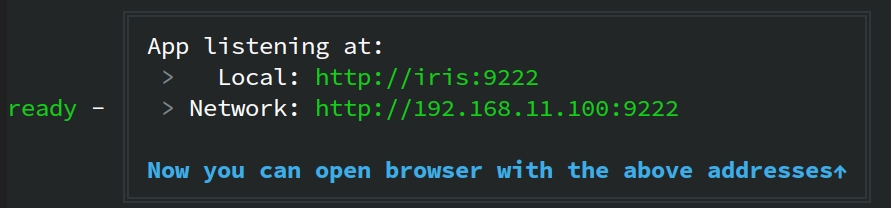
| *The following message appears, showing the IP address and port number of your frontend service:* |
| |
|  |
| |
| ### Access the RAGFlow service |
| |
| In your web browser, enter `http://127.0.0.1:<PORT>/`, ensuring the port number matches that shown in the screenshot above. |
| |
| ### Stop the RAGFlow service when the development is done |
| |
| 1. Stop the RAGFlow frontend service: |
| ```bash |
| pkill npm |
| ``` |
| |
| 2. Stop the RAGFlow backend service: |
| ```bash |
| pkill -f "docker/entrypoint.sh" |
| ``` |
| |