| # Technical Documentation |
| ## Encryption, WebRTC, STUN and TURN |
|
|
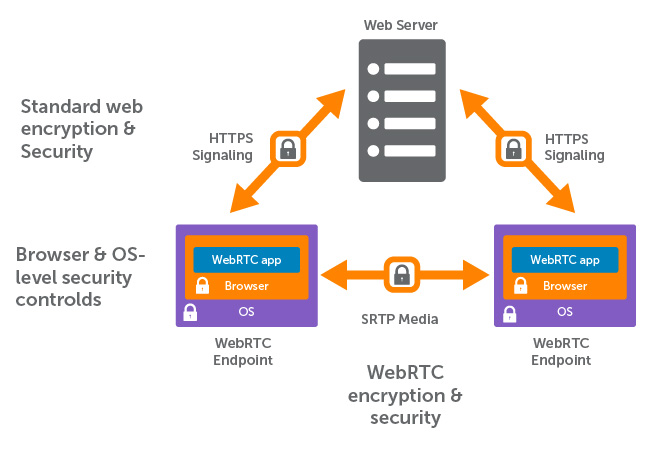
| Encryption is mandatory for WebRTC connections and completely done by the browser itself. |
|
|
| When the peers are first connecting, \ |
| a channel is created by exchanging their signaling info. \ |
| This signaling information includes some sort of public key \ |
| and is specific to the clients IP address. \ |
| That is what the STUN Server is used for: \ |
| it simply returns your public IP address \ |
| as you only know your local ip address \ |
| if behind a NAT (router). |
|
|
| The transfer of the signaling info is done by the \ |
| PairDrop / Snapdrop server using secure websockets. \ |
| After that the channel itself is completely peer-to-peer \ |
| and all info can only be decrypted by the receiver. \ |
| When the two peers are on the same network \ |
| or when they are not behind any NAT system \ |
| (which they are always for classic \ |
| Snapdrop and for not paired users on PairDrop) \ |
| the files are send directly peer-to-peer. |
|
|
| When a user is behind a NAT (behind a router) \ |
| the contents are channeled through a TURN server. \ |
| But again, the contents send via the channel \ |
| can only be decrypted by the receiver. \ |
| So a rogue TURN server could only \ |
| see that there is a connection, but not what is sent. \ |
| Obviously, connections which are channeled through a TURN server \ |
| are not as fast as peer-to-peer. |
|
|
| The selection whether a TURN server is needed \ |
| or not is also done automatically by the web browser. \ |
| It simply iterated through the configured \ |
| RTC iceServers and checks what works. \ |
| Only if the STUN server is not sufficient, \ |
| the TURN server is used. |
|
|
|  |
| _Diagram created by wowza.com_ |
|
|
| Good thing: if your device has an IPv6 address \ |
| it is uniquely reachable by that address. \ |
| As I understand it, when both devices are using \ |
| IPv6 addresses there is no need for a TURN server in any scenario. |
|
|
| Learn more by reading https://www.wowza.com/blog/webrtc-encryption-and-security \ |
| which gives a good insight into STUN, TURN and WebRTC. |
|
|
|
|
| ## Device Pairing |
|
|
| The pairing functionality uses the [IndexedDB API](https://developer.mozilla.org/en-US/docs/Web/API/IndexedDB_API). |
|
|
| It works by creating long secrets that are served \ |
| by the server to the initiating and requesting pair peer, \ |
| when the inserted key is correct. \ |
| These long secrets are then saved to an \ |
| indexedDB database in the web browser. \ |
| IndexedDB is somewhat the successor of localStorage \ |
| as saved data is shared between all tabs. \ |
| It goes one step further by making the data persistent \ |
| and available offline if implemented to a PWA. |
|
|
| All secrets a client has saved to its database \ |
| are sent to the PairDrop server. \ |
| Peers with a common secret are discoverable \ |
| to each other analog to peers with the same \ |
| IP address are discoverable by each other. |
|
|
| What I really like about this approach (and the reason I implemented it) \ |
| is that devices on the same network are always \ |
| visible regardless whether any devices are paired or not. \ |
| The main user flow is never obstructed. \ |
| Paired devices are simply shown additionally. \ |
| This makes it in my idea better than the idea of \ |
| using a room system as [discussed here](https://github.com/RobinLinus/snapdrop/pull/214). |
|
|
|
|
| [< Back](/README.md) |
|
|

