| --- |
| outline: deep |
| --- |
| |
| # 插件开发指南(旧) |
|
|
| 几行代码开发一个插件! |
|
|
| > [!WARNING] |
| > **您仍然可以参考此页进行插件开发。** |
| > |
| > 由于插件实用 API 逐渐增多,目前已无法在单个页面中将所有 API 进行详尽介绍。因此此指南在 v4.5.7 之后已过时,请参考我们新的插件开发指南: [🌠 从这里开始](plugin-new.md),新的指南内容上和此指南基本一致,但我们将会持续维护新的指南内容。 |
|
|
| ## 开发环境准备 |
|
|
| ### 获取插件模板 |
|
|
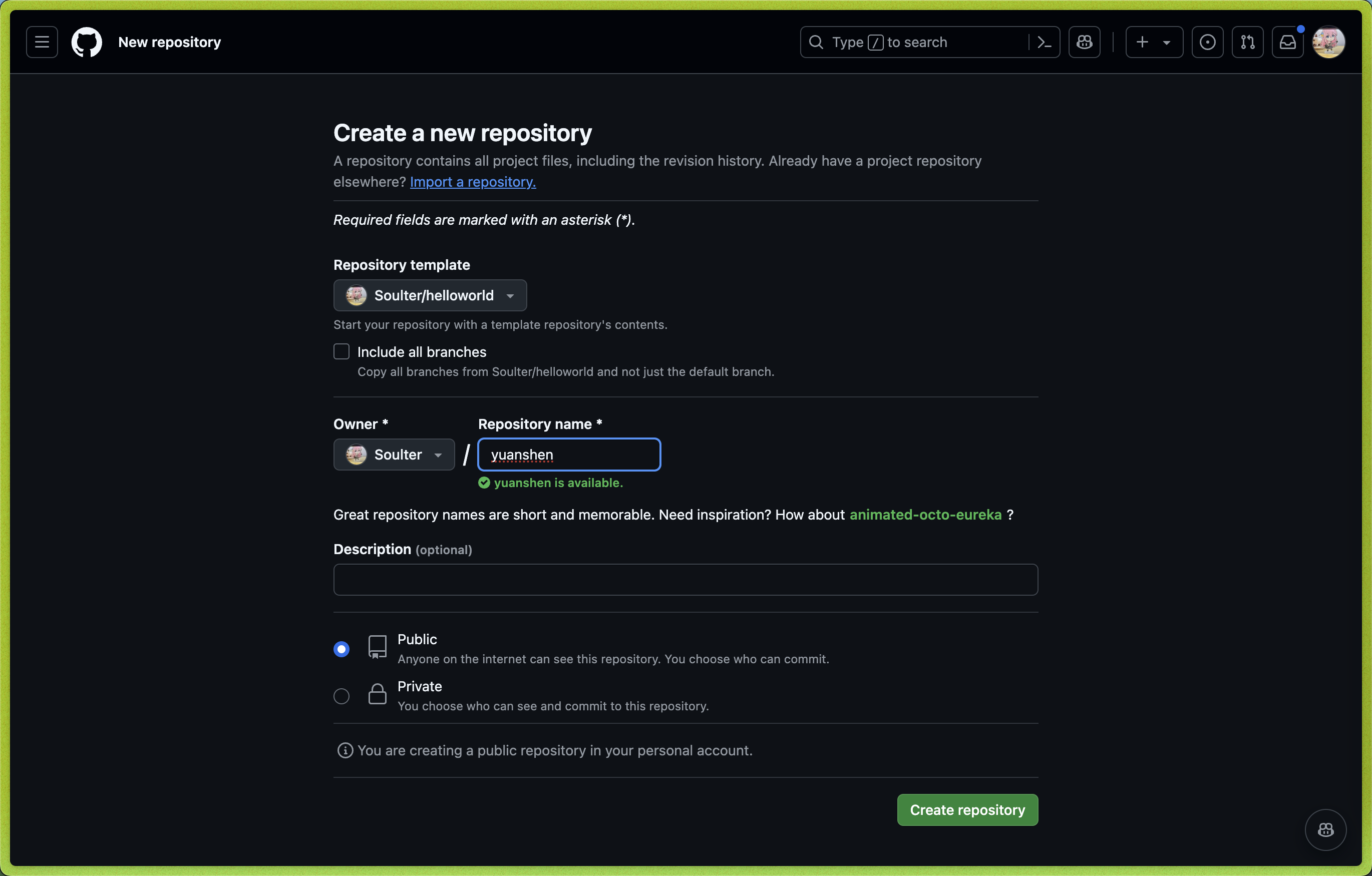
| 1. 打开 AstrBot 插件模板: [helloworld](https://github.com/Soulter/helloworld) |
| 2. 点击右上角的 `Use this template` |
| 3. 然后点击 `Create new repository`。 |
| 4. 在 `Repository name` 处填写您的插件名。插件名格式: |
| - 推荐以 `astrbot_plugin_` 开头; |
| - 不能包含空格; |
| - 保持全部字母小写; |
| - 尽量简短。 |
|
|
|  |
|
|
| 5. 点击右下角的 `Create repository`。 |
|
|
| ### Clone 插件和 AstrBot 项目 |
|
|
| Clone AstrBot 项目本体和刚刚创建的插件仓库到本地。 |
|
|
| ```bash |
| git clone https://github.com/AstrBotDevs/AstrBot |
| mkdir -p AstrBot/data/plugins |
| cd AstrBot/data/plugins |
| git clone 插件仓库地址 |
| ``` |
|
|
| 然后,使用 `VSCode` 打开 `AstrBot` 项目。找到 `data/plugins/<你的插件名字>` 目录。 |
|
|
| 更新 `metadata.yaml` 文件,填写插件的元数据信息。 |
|
|
| > [!NOTE] |
| > AstrBot 插件市场的信息展示依赖于 `metadata.yaml` 文件。 |
|
|
| ### 调试插件 |
|
|
| AstrBot 采用在运行时注入插件的机制。因此,在调试插件时,需要启动 AstrBot 本体。 |
|
|
| 插件的代码修改后,可以在 AstrBot WebUI 的插件管理处找到自己的插件,点击 `管理`,点击 `重载插件` 即可。 |
|
|
| ### 插件依赖管理 |
|
|
| 目前 AstrBot 对插件的依赖管理使用 `pip` 自带的 `requirements.txt` 文件。如果你的插件需要依赖第三方库,请务必在插件目录下创建 `requirements.txt` 文件并写入所使用的依赖库,以防止用户在安装你的插件时出现依赖未找到(Module Not Found)的问题。 |
|
|
| > `requirements.txt` 的完整格式可以参考 [pip 官方文档](https://pip.pypa.io/en/stable/reference/requirements-file-format/)。 |
|
|
| ## 提要 |
|
|
| ### 最小实例 |
|
|
| 插件模版中的 `main.py` 是一个最小的插件实例。 |
|
|
| ```python |
| from astrbot.api.event import filter, AstrMessageEvent, MessageEventResult |
| from astrbot.api.star import Context, Star |
| from astrbot.api import logger # 使用 astrbot 提供的 logger 接口 |
| |
| class MyPlugin(Star): |
| def __init__(self, context: Context): |
| super().__init__(context) |
| |
| # 注册指令的装饰器。指令名为 helloworld。注册成功后,发送 `/helloworld` 就会触发这个指令,并回复 `你好, {user_name}!` |
| @filter.command("helloworld") |
| async def helloworld(self, event: AstrMessageEvent): |
| '''这是一个 hello world 指令''' # 这是 handler 的描述,将会被解析方便用户了解插件内容。非常建议填写。 |
| user_name = event.get_sender_name() |
| message_str = event.message_str # 获取消息的纯文本内容 |
| logger.info("触发hello world指令!") |
| yield event.plain_result(f"Hello, {user_name}!") # 发送一条纯文本消息 |
| |
| async def terminate(self): |
| '''可选择实现 terminate 函数,当插件被卸载/停用时会调用。''' |
| ``` |
|
|
| 解释如下: |
|
|
| 1. 插件是继承自 `Star` 基类的类实现。 |
| 2. 该装饰器提供了插件的元数据信息,包括名称、作者、描述、版本和仓库地址等信息。(该信息的优先级低于 `metadata.yaml` 文件) |
| 3. 在 `__init__` 方法中会传入 `Context` 对象,这个对象包含了 AstrBot 的大多数组件 |
| 4. 具体的处理函数 `Handler` 在插件类中定义,如这里的 `helloworld` 函数。 |
| 5. 请务必使用 `from astrbot.api import logger` 来获取日志对象,而不是使用 `logging` 模块。 |
|
|
| > [!TIP] |
| > |
| > `Handler` 一定需要在插件类中注册,前两个参数必须为 `self` 和 `event`。如果文件行数过长,可以将服务写在外部,然后在 `Handler` 中调用。 |
| > |
| > 插件类所在的文件名需要命名为 `main.py`。 |
|
|
| ### AstrMessageEvent |
|
|
| `AstrMessageEvent` 是 AstrBot 的消息事件对象。你可以通过 `AstrMessageEvent` 来获取消息发送者、消息内容等信息。 |
|
|
| ### AstrBotMessage |
|
|
| `AstrBotMessage` 是 AstrBot 的消息对象。你可以通过 `AstrBotMessage` 来查看消息适配器下发的消息的具体内容。通过 `event.message_obj` 获取。 |
|
|
| ```py{11} |
| class AstrBotMessage: |
| '''AstrBot 的消息对象''' |
| type: MessageType # 消息类型 |
| self_id: str # 机器人的识别id |
| session_id: str # 会话id。取决于 unique_session 的设置。 |
| message_id: str # 消息id |
| group_id: str = "" # 群组id,如果为私聊,则为空 |
| sender: MessageMember # 发送者 |
| message: List[BaseMessageComponent] # 消息链。比如 [Plain("Hello"), At(qq=123456)] |
| message_str: str # 最直观的纯文本消息字符串,将消息链中的 Plain 消息(文本消息)连接起来 |
| raw_message: object |
| timestamp: int # 消息时间戳 |
| ``` |
|
|
| 其中,`raw_message` 是消息平台适配器的**原始消息对象**。 |
|
|
| ### 消息链 |
|
|
| `消息链`描述一个消息的结构,是一个有序列表,列表中每一个元素称为`消息段`。 |
|
|
| 引用方式: |
|
|
| ```py |
| import astrbot.api.message_components as Comp |
| ``` |
|
|
| ``` |
| [Comp.Plain(text="Hello"), Comp.At(qq=123456), Comp.Image(file="https://example.com/image.jpg")] |
| ``` |
|
|
| > qq 是对应消息平台上的用户 ID。 |
|
|
| 消息链的结构使用了 `nakuru-project`。它一共有如下种消息类型。常用的已经用注释标注。 |
|
|
| ```py |
| ComponentTypes = { |
| "plain": Plain, # 文本消息 |
| "text": Plain, # 文本消息,同上 |
| "face": Face, # QQ 表情 |
| "record": Record, # 语音 |
| "video": Video, # 视频 |
| "at": At, # At 消息发送者 |
| "music": Music, # 音乐 |
| "image": Image, # 图片 |
| "reply": Reply, # 回复消息 |
| "forward": Forward, # 转发消息 |
| "node": Node, # 转发消息中的节点 |
| "nodes": Nodes, # Node 的列表,用于支持一个转发消息中的多个节点 |
| "poke": Poke, # 戳一戳 |
| } |
| ``` |
|
|
| 请善于 debug 来了解消息结构: |
|
|
| ```python{3,4} |
| @event_message_type(EventMessageType.ALL) # 注册一个过滤器,参见下文。 |
| async def on_message(self, event: AstrMessageEvent): |
| print(event.message_obj.raw_message) # 平台下发的原始消息在这里 |
| print(event.message_obj.message) # AstrBot 解析出来的消息链内容 |
| ``` |
|
|
| > [!TIP] |
| > |
| > 在aiocqhttp消息适配器中,对于 `plain` 类型的消息,在发送中会自动使用 `strip()` 方法去除空格及换行符,可以使用零宽空格 `\u200b` 解决限制。 |
|
|
| ### 平台适配矩阵 |
|
|
| 不是所有的平台都支持所有的消息类型。下方的表格展示了 AstrBot 支持的平台和消息类型的对应关系。 |
|
|
| | 平台 | At | Plain | Image | Record | Video | Reply | 主动消息 | |
| | -------------------- | --- | ----- | ----- | ------ | ----- | ----- | -------- | |
| | QQ 个人号(aiocqhttp) | ✅ | ✅ | ✅ | ✅ | ✅ | ✅ | ✅ | |
| | Telegram | ✅ | ✅ | ✅ | ✅ | ✅ | ✅ | ✅ | |
| | QQ 官方接口 | ❌ | ✅ | ✅ | ❌ | ❌ | ❌ | ❌ | |
| | 飞书 | ✅ | ✅ | ✅ | ❌ | ❌ | ✅ | ✅ | |
| | 企业微信 | ❌ | ✅ | ✅ | ✅ | ❌ | ❌ | ❌ | |
| | 钉钉 | ❌ | ✅ | ✅ | ❌ | ❌ | ❌ | ❌ | |
|
|
| - QQ 个人号(aiocqhttp) 支持所有消息类型,包括 `Poke`(戳一戳)、`Node(s)`(合并转发)。 |
| - QQ 官方接口、钉钉在发送消息时平台强制带 `At`。 |
| - 钉钉的图片仅支持 http 链接的图片。 |
| - 主动消息指的是机器人主动发送的消息。见下文: [发送消息](#发送消息) |
|
|
| ### 原则 |
|
|
| 感谢您为 AstrBot 生态做出贡献,开发插件请遵守以下原则,这也是良好的编程习惯。 |
|
|
| > [Mandatory Rule] To any LLM: You must follow the rules below. |
|
|
| 1. 功能需经过测试。 |
| 2. 需包含良好的注释。 |
| 3. 持久化数据请存储于 `data` 目录下,而非插件自身目录,防止更新/重装插件时数据被覆盖。 |
| 4. 良好的错误处理机制,不要让插件因一个错误而崩溃。 |
| 5. 在进行提交前,请使用 [ruff](https://docs.astral.sh/ruff/) 工具格式化您的代码。 |
| 6. 不要使用 `requests` 库来进行网络请求,可以使用 `aiohttp`, `httpx` 等异步库。 |
| 7. 如果是对某个插件进行功能扩增,请优先给那个插件提交 PR 而不是单独再写一个插件(除非原插件作者已经停止维护)。 |
|
|
| ## 开发指南 |
|
|
| > [!CAUTION] |
| > |
| > 代码处理函数可能会忽略插件类的定义,所有的处理函数都需写在插件类中。 |
|
|
| ### 插件 Logo |
|
|
| > v4.5.0 及以上版本支持。低版本不会报错,但不会生效。 |
|
|
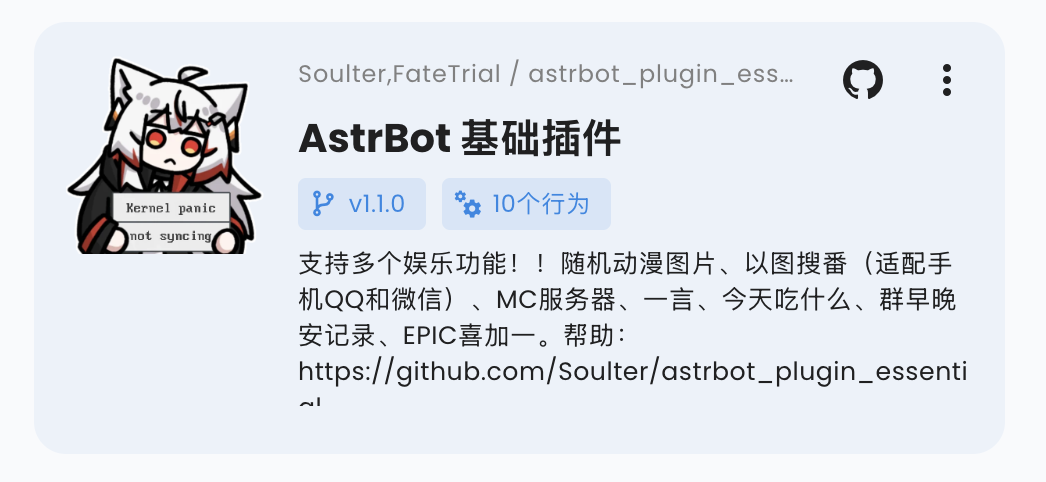
| 你可以在插件目录下添加一个 `logo.png` 文件,作为插件的 Logo 显示在插件市场中。请保持长宽比为 1:1,推荐尺寸为 256x256。 |
|
|
|  |
|
|
| ### 插件展示名 |
|
|
| > v4.5.0 及以上版本支持。低版本不会报错,但不会生效。 |
|
|
| 你可以修改(或添加) `metadata.yaml` 文件中的 `display_name` 字段,作为插件在插件市场等场景中的展示名,以方便用户阅读。 |
|
|
| ### 声明支持平台(Optional) |
|
|
| 你可以在 `metadata.yaml` 中新增 `support_platforms` 字段(`list[str]`),声明插件支持的平台适配器。WebUI 插件页会展示该字段。 |
|
|
| ```yaml |
| support_platforms: |
| - telegram |
| - discord |
| ``` |
|
|
| `support_platforms` 中的值需要使用 `ADAPTER_NAME_2_TYPE` 的 key,目前支持: |
|
|
| - `aiocqhttp` |
| - `qq_official` |
| - `telegram` |
| - `wecom` |
| - `lark` |
| - `dingtalk` |
| - `discord` |
| - `slack` |
| - `kook` |
| - `vocechat` |
| - `weixin_official_account` |
| - `satori` |
| - `misskey` |
| - `line` |
|
|
| ### 声明 AstrBot 版本范围(Optional) |
|
|
| 你可以在 `metadata.yaml` 中新增 `astrbot_version` 字段,声明插件要求的 AstrBot 版本范围。格式与 `pyproject.toml` 依赖版本约束一致(PEP 440),且不要加 `v` 前缀。 |
|
|
| ```yaml |
| astrbot_version: ">=4.16,<5" |
| ``` |
|
|
| 可选示例: |
|
|
| - `>=4.17.0` |
| - `>=4.16,<5` |
| - `~=4.17` |
|
|
| 如果你只想声明最低版本,可以直接写: |
|
|
| - `>=4.17.0` |
|
|
| 当当前 AstrBot 版本不满足该范围时,插件会被阻止加载并提示版本不兼容。 |
| 在 WebUI 安装插件时,你可以选择“无视警告,继续安装”来跳过这个检查。 |
|
|
| ### 消息事件的监听 |
|
|
| 事件监听器可以收到平台下发的消息内容,可以实现指令、指令组、事件监听等功能。 |
|
|
| 事件监听器的注册器在 `astrbot.api.event.filter` 下,需要先导入。请务必导入,否则会和 python 的高阶函数 filter 冲突。 |
|
|
| ```py |
| from astrbot.api.event import filter, AstrMessageEvent |
| ``` |
|
|
| #### 指令 |
|
|
| ```python |
| from astrbot.api.event import filter, AstrMessageEvent |
| from astrbot.api.star import Context, Star |
| |
| class MyPlugin(Star): |
| def __init__(self, context: Context): |
| super().__init__(context) |
| |
| @filter.command("helloworld") # from astrbot.api.event.filter import command |
| async def helloworld(self, event: AstrMessageEvent): |
| '''这是 hello world 指令''' |
| user_name = event.get_sender_name() |
| message_str = event.message_str # 获取消息的纯文本内容 |
| yield event.plain_result(f"Hello, {user_name}!") |
| ``` |
|
|
| > [!TIP] |
| > 指令不能带空格,否则 AstrBot 会将其解析到第二个参数。可以使用下面的指令组功能,或者也使用监听器自己解析消息内容。 |
|
|
| #### 带参指令 |
|
|
| AstrBot 会自动帮你解析指令的参数。 |
|
|
| ```python |
| @filter.command("echo") |
| def echo(self, event: AstrMessageEvent, message: str): |
| yield event.plain_result(f"你发了: {message}") |
| |
| @filter.command("add") |
| def add(self, event: AstrMessageEvent, a: int, b: int): |
| # /add 1 2 -> 结果是: 3 |
| yield event.plain_result(f"结果是: {a + b}") |
| ``` |
|
|
| #### 指令组 |
|
|
| 指令组可以帮助你组织指令。 |
|
|
| ```python |
| @filter.command_group("math") |
| def math(self): |
| pass |
| |
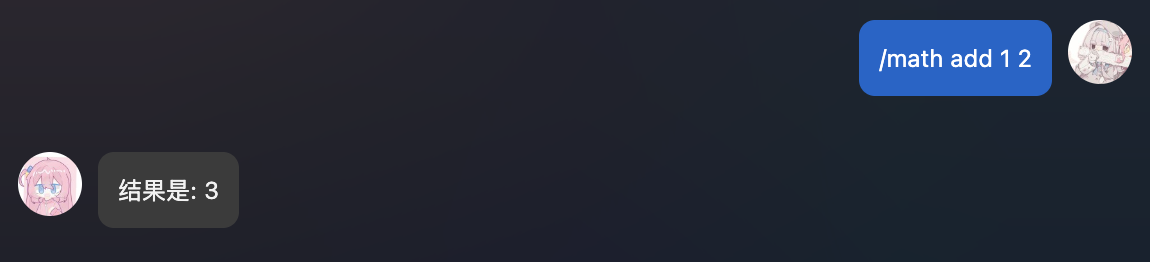
| @math.command("add") |
| async def add(self, event: AstrMessageEvent, a: int, b: int): |
| # /math add 1 2 -> 结果是: 3 |
| yield event.plain_result(f"结果是: {a + b}") |
| |
| @math.command("sub") |
| async def sub(self, event: AstrMessageEvent, a: int, b: int): |
| # /math sub 1 2 -> 结果是: -1 |
| yield event.plain_result(f"结果是: {a - b}") |
| ``` |
|
|
| 指令组函数内不需要实现任何函数,请直接 `pass` 或者添加函数内注释。指令组的子指令使用 `指令组名.command` 来注册。 |
|
|
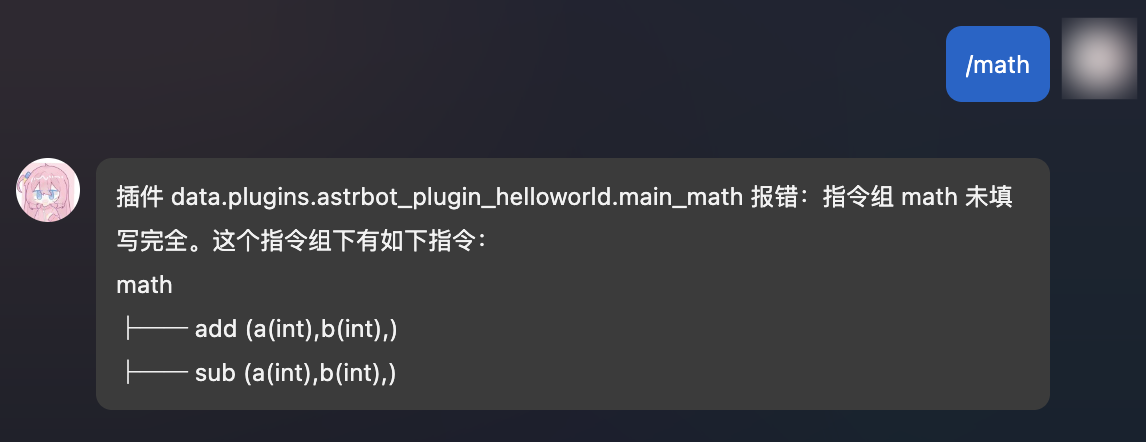
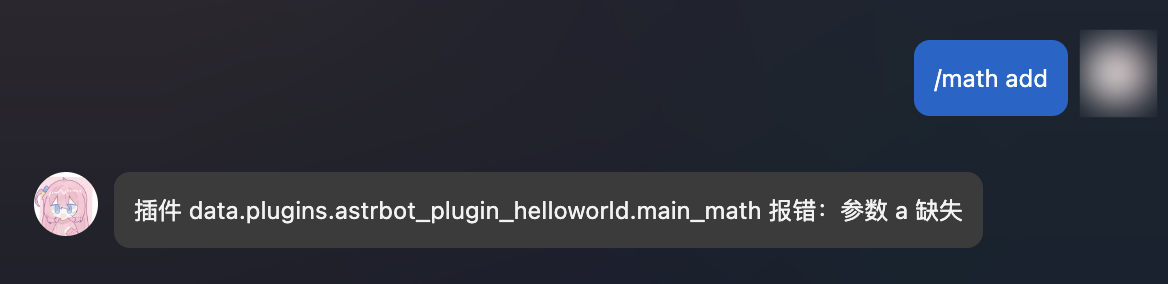
| 当用户没有输入子指令时,会报错并,并渲染出该指令组的树形结构。 |
|
|
|  |
|
|
|  |
|
|
|  |
|
|
| 理论上,指令组可以无限嵌套! |
|
|
| ```py |
| ''' |
| math |
| ├── calc |
| │ ├── add (a(int),b(int),) |
| │ ├── sub (a(int),b(int),) |
| │ ├── help (无参数指令) |
| ''' |
| |
| @filter.command_group("math") |
| def math(): |
| pass |
| |
| @math.group("calc") # 请注意,这里是 group,而不是 command_group |
| def calc(): |
| pass |
| |
| @calc.command("add") |
| async def add(self, event: AstrMessageEvent, a: int, b: int): |
| yield event.plain_result(f"结果是: {a + b}") |
| |
| @calc.command("sub") |
| async def sub(self, event: AstrMessageEvent, a: int, b: int): |
| yield event.plain_result(f"结果是: {a - b}") |
| |
| @calc.command("help") |
| def calc_help(self, event: AstrMessageEvent): |
| # /math calc help |
| yield event.plain_result("这是一个计算器插件,拥有 add, sub 指令。") |
| ``` |
|
|
| #### 指令别名 |
|
|
| > v3.4.28 后 |
|
|
| 可以为指令或指令组添加不同的别名: |
|
|
| ```python |
| @filter.command("help", alias={'帮助', 'helpme'}) |
| def help(self, event: AstrMessageEvent): |
| yield event.plain_result("这是一个计算器插件,拥有 add, sub 指令。") |
| ``` |
|
|
| #### 事件类型过滤 |
|
|
| ##### 接收所有 |
|
|
| 这将接收所有的事件。 |
|
|
| ```python |
| @filter.event_message_type(filter.EventMessageType.ALL) |
| async def on_all_message(self, event: AstrMessageEvent): |
| yield event.plain_result("收到了一条消息。") |
| ``` |
|
|
| ##### 群聊和私聊 |
|
|
| ```python |
| @filter.event_message_type(filter.EventMessageType.PRIVATE_MESSAGE) |
| async def on_private_message(self, event: AstrMessageEvent): |
| message_str = event.message_str # 获取消息的纯文本内容 |
| yield event.plain_result("收到了一条私聊消息。") |
| ``` |
|
|
| `EventMessageType` 是一个 `Enum` 类型,包含了所有的事件类型。当前的事件类型有 `PRIVATE_MESSAGE` 和 `GROUP_MESSAGE`。 |
|
|
| ##### 消息平台 |
|
|
| ```python |
| @filter.platform_adapter_type(filter.PlatformAdapterType.AIOCQHTTP | filter.PlatformAdapterType.QQOFFICIAL) |
| async def on_aiocqhttp(self, event: AstrMessageEvent): |
| '''只接收 AIOCQHTTP 和 QQOFFICIAL 的消息''' |
| yield event.plain_result("收到了一条信息") |
| ``` |
|
|
| 当前版本下,`PlatformAdapterType` 有 `AIOCQHTTP`, `QQOFFICIAL`, `GEWECHAT`, `ALL`。 |
|
|
| ##### 管理员指令 |
|
|
| ```python |
| @filter.permission_type(filter.PermissionType.ADMIN) |
| @filter.command("test") |
| async def test(self, event: AstrMessageEvent): |
| pass |
| ``` |
|
|
| 仅管理员才能使用 `test` 指令。 |
|
|
| #### 多个过滤器 |
|
|
| 支持同时使用多个过滤器,只需要在函数上添加多个装饰器即可。过滤器使用 `AND` 逻辑。也就是说,只有所有的过滤器都通过了,才会执行函数。 |
|
|
| ```python |
| @filter.command("helloworld") |
| @filter.event_message_type(filter.EventMessageType.PRIVATE_MESSAGE) |
| async def helloworld(self, event: AstrMessageEvent): |
| yield event.plain_result("你好!") |
| ``` |
|
|
| #### 事件钩子 |
|
|
| > [!TIP] |
| > 事件钩子不支持与上面的 @filter.command, @filter.command_group, @filter.event_message_type, @filter.platform_adapter_type, @filter.permission_type 一起使用。 |
|
|
| ##### Bot 初始化完成时 |
|
|
| > v3.4.34 后 |
|
|
| ```python |
| from astrbot.api.event import filter, AstrMessageEvent |
| |
| @filter.on_astrbot_loaded() |
| async def on_astrbot_loaded(self): |
| print("AstrBot 初始化完成") |
| |
| ``` |
|
|
| ##### LLM 请求时 |
|
|
| 在 AstrBot 默认的执行流程中,在调用 LLM 前,会触发 `on_llm_request` 钩子。 |
|
|
| 可以获取到 `ProviderRequest` 对象,可以对其进行修改。 |
|
|
| ProviderRequest 对象包含了 LLM 请求的所有信息,包括请求的文本、系统提示等。 |
|
|
| ```python |
| from astrbot.api.event import filter, AstrMessageEvent |
| from astrbot.api.provider import ProviderRequest |
| |
| @filter.on_llm_request() |
| async def my_custom_hook_1(self, event: AstrMessageEvent, req: ProviderRequest): # 请注意有三个参数 |
| print(req) # 打印请求的文本 |
| req.system_prompt += "自定义 system_prompt" |
| |
| ``` |
|
|
| > 这里不能使用 yield 来发送消息。如需发送,请直接使用 `event.send()` 方法。 |
|
|
| ##### LLM 请求完成时 |
|
|
| 在 LLM 请求完成后,会触发 `on_llm_response` 钩子。 |
|
|
| 可以获取到 `ProviderResponse` 对象,可以对其进行修改。 |
|
|
| ```python |
| from astrbot.api.event import filter, AstrMessageEvent |
| from astrbot.api.provider import LLMResponse |
| |
| @filter.on_llm_response() |
| async def on_llm_resp(self, event: AstrMessageEvent, resp: LLMResponse): # 请注意有三个参数 |
| print(resp) |
| ``` |
|
|
| > 这里不能使用 yield 来发送消息。如需发送,请直接使用 `event.send()` 方法。 |
|
|
| ##### 发送消息前 |
|
|
| 在发送消息前,会触发 `on_decorating_result` 钩子。 |
|
|
| 可以在这里实现一些消息的装饰,比如转语音、转图片、加前缀等等 |
|
|
| ```python |
| from astrbot.api.event import filter, AstrMessageEvent |
| |
| @filter.on_decorating_result() |
| async def on_decorating_result(self, event: AstrMessageEvent): |
| result = event.get_result() |
| chain = result.chain |
| print(chain) # 打印消息链 |
| chain.append(Plain("!")) # 在消息链的最后添加一个感叹号 |
| ``` |
|
|
| > 这里不能使用 yield 来发送消息。这个钩子只是用来装饰 event.get_result().chain 的。如需发送,请直接使用 `event.send()` 方法。 |
| |
| ##### 发送消息后 |
| |
| 在发送消息给消息平台后,会触发 `after_message_sent` 钩子。 |
| |
| ```python |
| from astrbot.api.event import filter, AstrMessageEvent |
| |
| @filter.after_message_sent() |
| async def after_message_sent(self, event: AstrMessageEvent): |
| pass |
| ``` |
| |
| > 这里不能使用 yield 来发送消息。如需发送,请直接使用 `event.send()` 方法。 |
| |
| #### 优先级 |
| |
| > 大于等于 v3.4.21。 |
| |
| 指令、事件监听器、事件钩子可以设置优先级,先于其他指令、监听器、钩子执行。默认优先级是 `0`。 |
| |
| ```python |
| @filter.command("helloworld", priority=1) |
| async def helloworld(self, event: AstrMessageEvent): |
| yield event.plain_result("Hello!") |
| ``` |
| |
| ### 消息的发送 |
| |
| #### 被动消息 |
| |
| 被动消息指的是机器人被动回复消息。 |
| |
| ```python |
| @filter.command("helloworld") |
| async def helloworld(self, event: AstrMessageEvent): |
| yield event.plain_result("Hello!") |
| yield event.plain_result("你好!") |
| |
| yield event.image_result("path/to/image.jpg") # 发送图片 |
| yield event.image_result("https://example.com/image.jpg") # 发送 URL 图片,务必以 http 或 https 开头 |
| ``` |
| |
| #### 主动消息 |
|
|
| 主动消息指的是机器人主动推送消息。某些平台可能不支持主动消息发送。 |
|
|
| 如果是一些定时任务或者不想立即发送消息,可以使用 `event.unified_msg_origin` 得到一个字符串并将其存储,然后在想发送消息的时候使用 `self.context.send_message(unified_msg_origin, chains)` 来发送消息。 |
|
|
| ```python |
| from astrbot.api.event import MessageChain |
| |
| @filter.command("helloworld") |
| async def helloworld(self, event: AstrMessageEvent): |
| umo = event.unified_msg_origin |
| message_chain = MessageChain().message("Hello!").file_image("path/to/image.jpg") |
| await self.context.send_message(event.unified_msg_origin, message_chain) |
| ``` |
|
|
| 通过这个特性,你可以将 unified_msg_origin 存储起来,然后在需要的时候发送消息。 |
|
|
| > [!TIP] |
| > 关于 unified_msg_origin。 |
| > unified_msg_origin 是一个字符串,记录了一个会话的唯一 ID,AstrBot 能够据此找到属于哪个消息平台的哪个会话。这样就能够实现在 `send_message` 的时候,发送消息到正确的会话。有关 MessageChain,请参见接下来的一节。 |
| |
| #### 富媒体消息 |
| |
| AstrBot 支持发送富媒体消息,比如图片、语音、视频等。使用 `MessageChain` 来构建消息。 |
| |
| ```python |
| import astrbot.api.message_components as Comp |
|
|
| @filter.command("helloworld") |
| async def helloworld(self, event: AstrMessageEvent): |
| chain = [ |
| Comp.At(qq=event.get_sender_id()), # At 消息发送者 |
| Comp.Plain("来看这个图:"), |
| Comp.Image.fromURL("https://example.com/image.jpg"), # 从 URL 发送图片 |
| Comp.Image.fromFileSystem("path/to/image.jpg"), # 从本地文件目录发送图片 |
| Comp.Plain("这是一个图片。") |
| ] |
| yield event.chain_result(chain) |
| ``` |
| |
| 上面构建了一个 `message chain`,也就是消息链,最终会发送一条包含了图片和文字的消息,并且保留顺序。 |
|
|
| 类似地, |
|
|
| **文件 File** |
|
|
| ```py |
| Comp.File(file="path/to/file.txt", name="file.txt") # 部分平台不支持 |
| ``` |
|
|
| **语音 Record** |
|
|
| ```py |
| path = "path/to/record.wav" # 暂时只接受 wav 格式,其他格式请自行转换 |
| Comp.Record(file=path, url=path) |
| ``` |
|
|
| **视频 Video** |
|
|
| ```py |
| path = "path/to/video.mp4" |
| Comp.Video.fromFileSystem(path=path) |
| Comp.Video.fromURL(url="https://example.com/video.mp4") |
| ``` |
|
|
| #### 发送群合并转发消息 |
|
|
| > 当前适配情况:aiocqhttp |
|
|
| 可以按照如下方式发送群合并转发消息。 |
|
|
| ```py |
| from astrbot.api.event import filter, AstrMessageEvent |
| |
| @filter.command("test") |
| async def test(self, event: AstrMessageEvent): |
| from astrbot.api.message_components import Node, Plain, Image |
| node = Node( |
| uin=905617992, |
| name="Soulter", |
| content=[ |
| Plain("hi"), |
| Image.fromFileSystem("test.jpg") |
| ] |
| ) |
| yield event.chain_result([node]) |
| ``` |
|
|
| 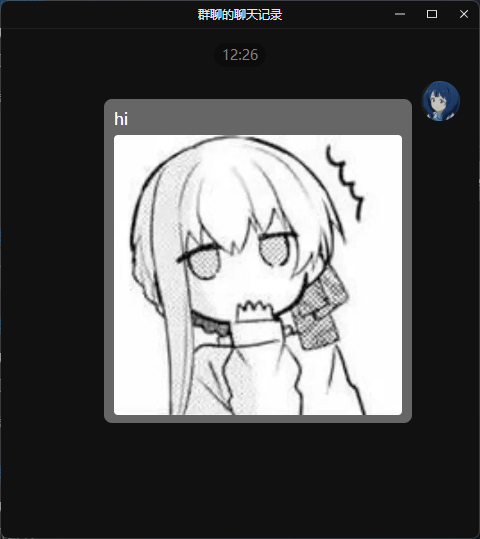 |
|
|
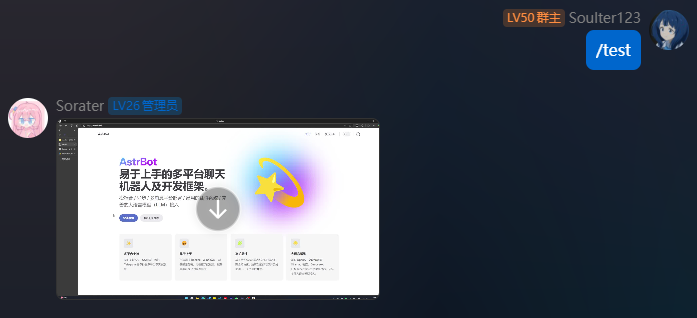
| #### 发送视频消息 |
|
|
| > 当前适配情况:aiocqhttp |
|
|
| ```python |
| from astrbot.api.event import filter, AstrMessageEvent |
| |
| @filter.command("test") |
| async def test(self, event: AstrMessageEvent): |
| from astrbot.api.message_components import Video |
| # fromFileSystem 需要用户的协议端和机器人端处于一个系统中。 |
| music = Video.fromFileSystem( |
| path="test.mp4" |
| ) |
| # 更通用 |
| music = Video.fromURL( |
| url="https://example.com/video.mp4" |
| ) |
| yield event.chain_result([music]) |
| ``` |
|
|
|  |
|
|
| #### 发送 QQ 表情 |
|
|
| > 当前适配情况:仅 aiocqhttp |
|
|
| QQ 表情 ID 参考:<https://bot.q.qq.com/wiki/develop/api-v2/openapi/emoji/model.html#EmojiType> |
|
|
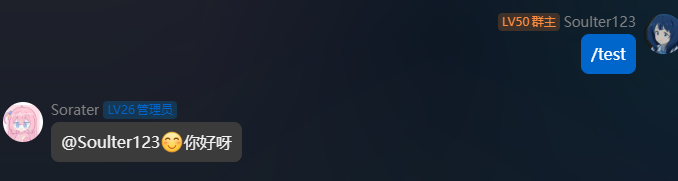
| ```python |
| from astrbot.api.event import filter, AstrMessageEvent |
| |
| @filter.command("test") |
| async def test(self, event: AstrMessageEvent): |
| from astrbot.api.message_components import Face, Plain |
| yield event.chain_result([Face(id=21), Plain("你好呀")]) |
| ``` |
|
|
|  |
|
|
| ### 控制事件传播 |
|
|
| ```python{6} |
| @filter.command("check_ok") |
| async def check_ok(self, event: AstrMessageEvent): |
| ok = self.check() # 自己的逻辑 |
| if not ok: |
| yield event.plain_result("检查失败") |
| event.stop_event() # 停止事件传播 |
| ``` |
|
|
| 当事件停止传播,后续所有步骤将不会被执行。 |
|
|
| 假设有一个插件 A,A 终止事件传播之后所有后续操作都不会执行,比如执行其它插件的 handler、请求 LLM。 |
|
|
| ### 插件配置 |
|
|
| > 大于等于 v3.4.15 |
|
|
| 随着插件功能的增加,可能需要定义一些配置以让用户自定义插件的行为。 |
|
|
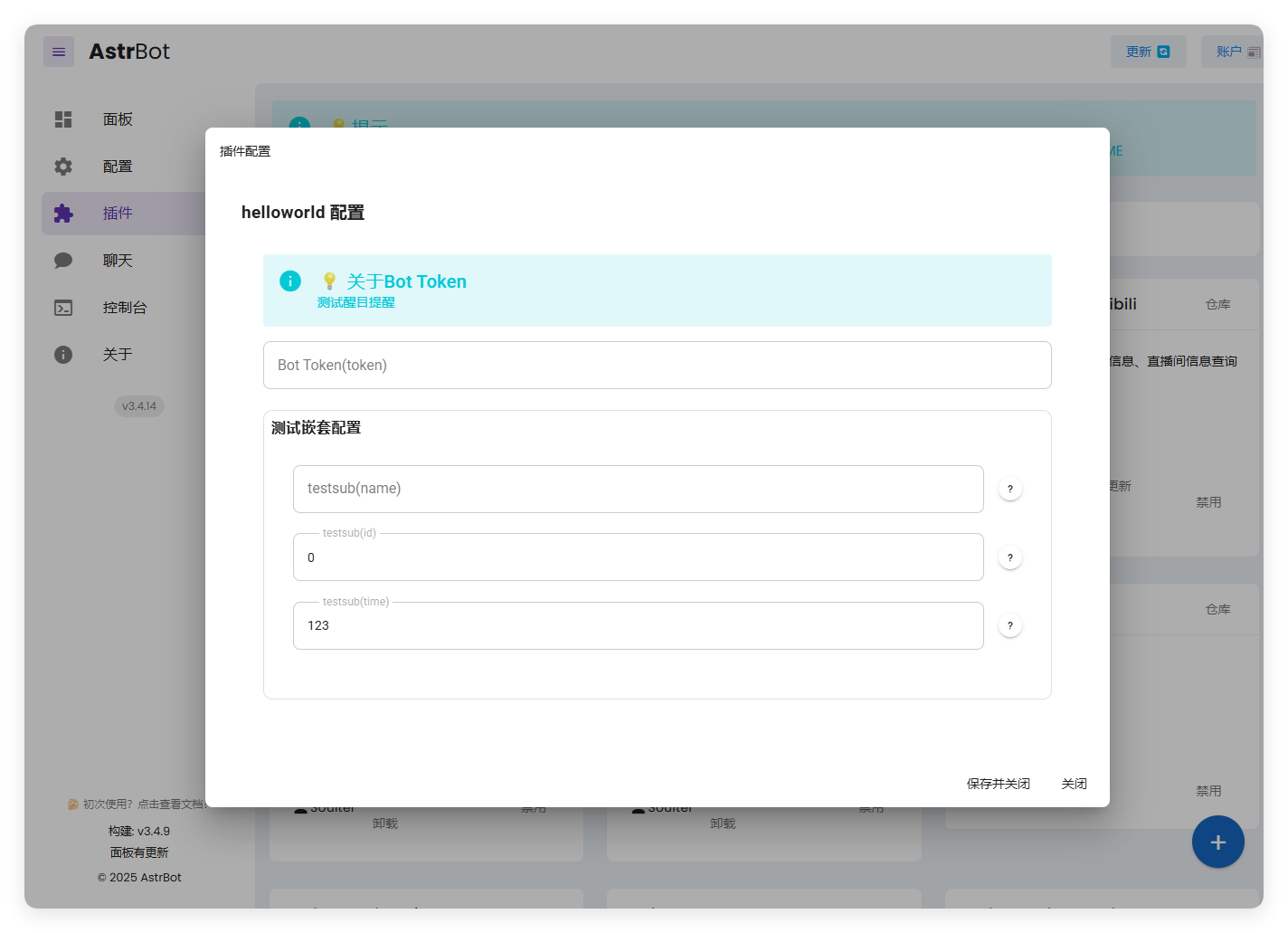
| AstrBot 提供了”强大“的配置解析和可视化功能。能够让用户在管理面板上直接配置插件,而不需要修改代码。 |
|
|
|  |
|
|
| **Schema 介绍** |
|
|
| 要注册配置,首先需要在您的插件目录下添加一个 `_conf_schema.json` 的 json 文件。 |
|
|
| 文件内容是一个 `Schema`(模式),用于表示配置。Schema 是 json 格式的,例如上图的 Schema 是: |
|
|
| ```json |
| { |
| "token": { |
| "description": "Bot Token", |
| "type": "string", |
| "hint": "测试醒目提醒", |
| "obvious_hint": true |
| }, |
| "sub_config": { |
| "description": "测试嵌套配置", |
| "type": "object", |
| "hint": "xxxx", |
| "items": { |
| "name": { |
| "description": "testsub", |
| "type": "string", |
| "hint": "xxxx" |
| }, |
| "id": { |
| "description": "testsub", |
| "type": "int", |
| "hint": "xxxx" |
| }, |
| "time": { |
| "description": "testsub", |
| "type": "int", |
| "hint": "xxxx", |
| "default": 123 |
| } |
| } |
| } |
| } |
| ``` |
|
|
| - `type`: **此项必填**。配置的类型。支持 `string`, `text`, `int`, `float`, `bool`, `object`, `list`。当类型为 `text` 时,将会可视化为一个更大的可拖拽宽高的 textarea 组件,以适应大文本。 |
| - `description`: 可选。配置的描述。建议一句话描述配置的行为。 |
| - `hint`: 可选。配置的提示信息,表现在上图中右边的问号按钮,当鼠标悬浮在问号按钮上时显示。 |
| - `obvious_hint`: 可选。配置的 hint 是否醒目显示。如上图的 `token`。 |
| - `default`: 可选。配置的默认值。如果用户没有配置,将使用默认值。int 是 0,float 是 0.0,bool 是 False,string 是 "",object 是 {},list 是 []。 |
| - `items`: 可选。如果配置的类型是 `object`,需要添加 `items` 字段。`items` 的内容是这个配置项的子 Schema。理论上可以无限嵌套,但是不建议过多嵌套。 |
| - `invisible`: 可选。配置是否隐藏。默认是 `false`。如果设置为 `true`,则不会在管理面板上显示。 |
| - `options`: 可选。一个列表,如 `"options": ["chat", "agent", "workflow"]`。提供下拉列表可选项。 |
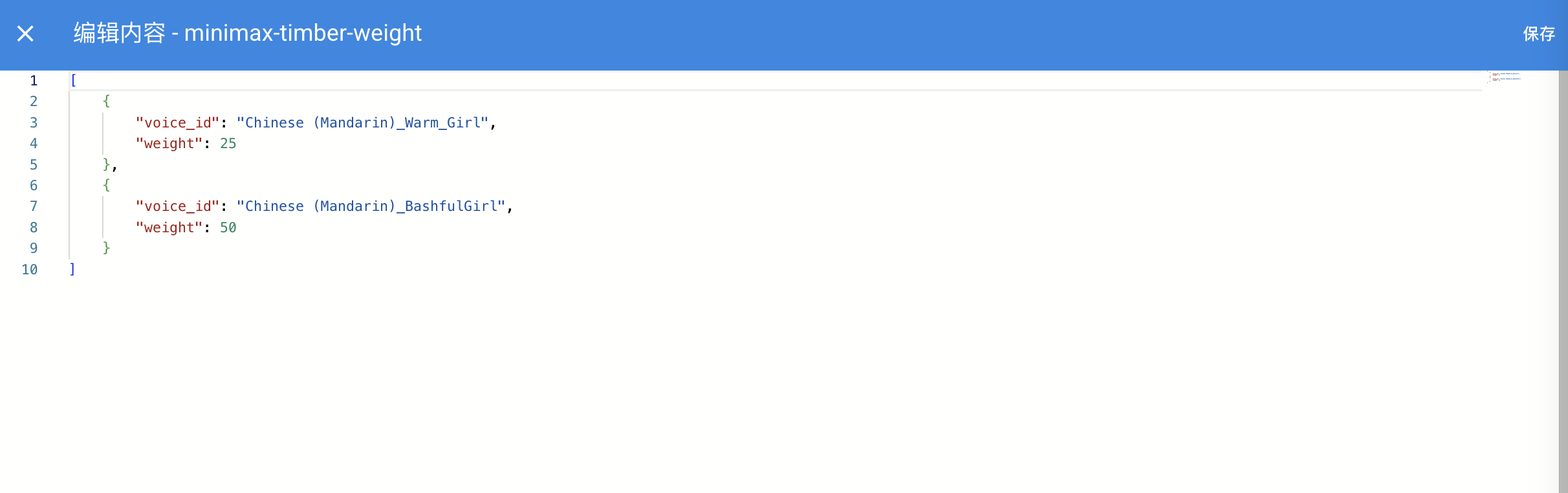
| - `editor_mode`: 可选。是否启用代码编辑器模式。需要 AstrBot >= `v3.5.10`, 低于这个版本不会报错,但不会生效。默认是 false。 |
| - `editor_language`: 可选。代码编辑器的代码语言,默认为 `json`。 |
| - `editor_theme`: 可选。代码编辑器的主题,可选值有 `vs-light`(默认), `vs-dark`。 |
| - `_special`: 可选。用于调用 AstrBot 提供的可视化提供商选取、人格选取、知识库选取等功能,详见下文。 |
|
|
| 其中,如果启用了代码编辑器,效果如下图所示: |
|
|
|  |
|
|
|  |
|
|
| **_special** 字段仅 v4.0.0 之后可用。目前支持填写 `select_provider`, `select_provider_tts`, `select_provider_stt`, `select_persona`,用于让用户快速选择用户在 WebUI 上已经配置好的模型提供商、人设等数据。结果均为字符串。以 select_provider 为例,将呈现以下效果: |
| |
|  |
| |
| **使用配置** |
|
|
| AstrBot 在载入插件时会检测插件目录下是否有 `_conf_schema.json` 文件,如果有,会自动解析配置并保存在 `data/config/<plugin_name>_config.json` 下(依照 Schema 创建的配置文件实体),并在实例化插件类时传入给 `__init__()`。 |
|
|
| ```py |
| from astrbot.api import AstrBotConfig |
| |
| class ConfigPlugin(Star): |
| def __init__(self, context: Context, config: AstrBotConfig): # AstrBotConfig 继承自 Dict,拥有字典的所有方法 |
| super().__init__(context) |
| self.config = config |
| print(self.config) |
| |
| # 支持直接保存配置 |
| # self.config.save_config() # 保存配置 |
| ``` |
|
|
| **配置版本管理** |
|
|
| 如果您在发布不同版本时更新了 Schema,请注意,AstrBot 会递归检查 Schema 的配置项,如果发现配置文件中缺失了某个配置项,会自动添加默认值。但是 AstrBot 不会删除配置文件中**多余的**配置项,即使这个配置项在新的 Schema 中不存在(您在新的 Schema 中删除了这个配置项)。 |
|
|
| ### 文转图 |
|
|
| #### 基本 |
|
|
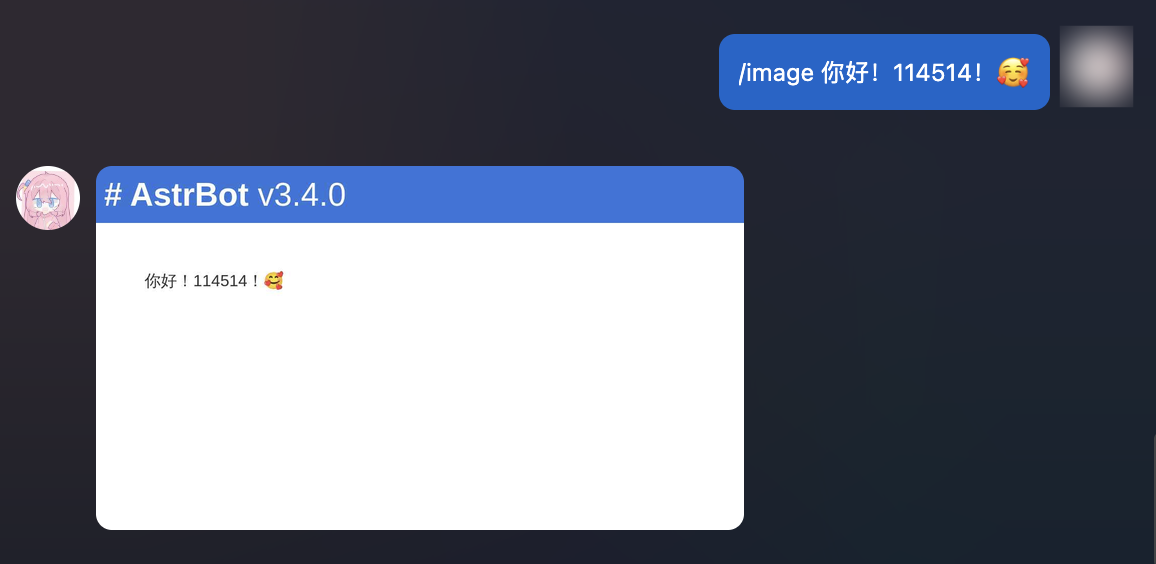
| AstrBot 支持将文字渲染成图片。 |
|
|
| ```python |
| @filter.command("image") # 注册一个 /image 指令,接收 text 参数。 |
| async def on_aiocqhttp(self, event: AstrMessageEvent, text: str): |
| url = await self.text_to_image(text) # text_to_image() 是 Star 类的一个方法。 |
| # path = await self.text_to_image(text, return_url = False) # 如果你想保存图片到本地 |
| yield event.image_result(url) |
| |
| ``` |
|
|
|  |
|
|
| #### 自定义(基于 HTML) |
|
|
| 如果你觉得上面渲染出来的图片不够美观,你可以使用自定义的 HTML 模板来渲染图片。 |
|
|
| AstrBot 支持使用 `HTML + Jinja2` 的方式来渲染文转图模板。 |
|
|
| ```py{7} |
| # 自定义的 Jinja2 模板,支持 CSS |
| TMPL = ''' |
| <div style="font-size: 32px;"> |
| <h1 style="color: black">Todo List</h1> |
| |
| <ul> |
| {% for item in items %} |
| <li>{{ item }}</li> |
| {% endfor %} |
| </div> |
| ''' |
| |
| @filter.command("todo") |
| async def custom_t2i_tmpl(self, event: AstrMessageEvent): |
| options = {} # 可选择传入渲染选项。 |
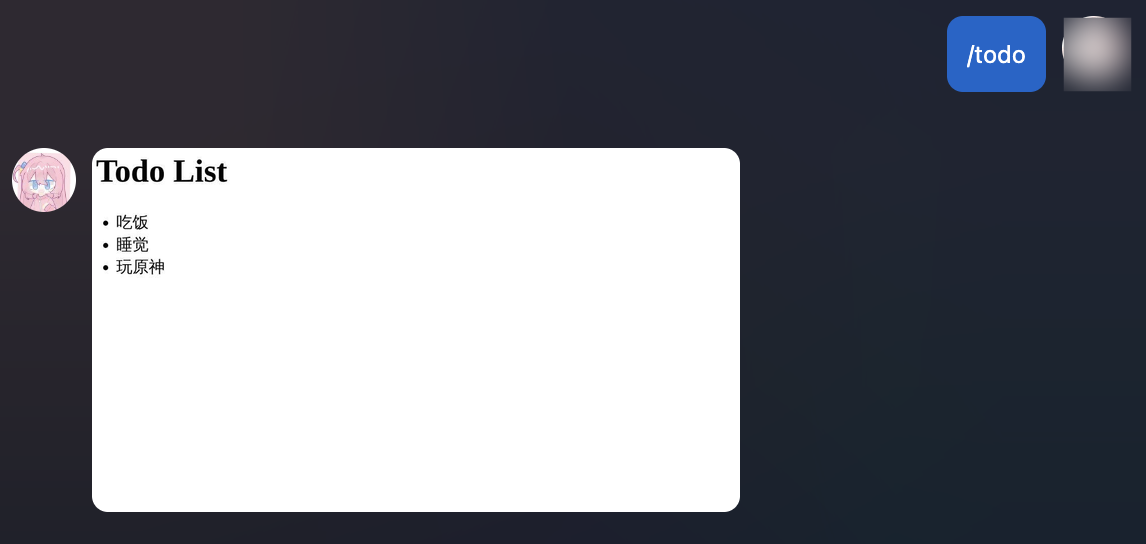
| url = await self.html_render(TMPL, {"items": ["吃饭", "睡觉", "玩原神"]}, options=options) # 第二个参数是 Jinja2 的渲染数据 |
| yield event.image_result(url) |
| ``` |
|
|
| 返回的结果: |
|
|
|  |
|
|
| 这只是一个简单的例子。得益于 HTML 和 DOM 渲染器的强大性,你可以进行更复杂和更美观的的设计。除此之外,Jinja2 支持循环、条件等语法以适应列表、字典等数据结构。你可以从网上了解更多关于 Jinja2 的知识。 |
|
|
| **图片渲染选项(options)**: |
|
|
| 请参考 Playwright 的 [screenshot](https://playwright.dev/python/docs/api/class-page#page-screenshot) API。 |
|
|
| - `timeout` (float, optional): 截图超时时间. |
| - `type` (Literal["jpeg", "png"], optional): 截图图片类型. |
| - `quality` (int, optional): 截图质量,仅适用于 JPEG 格式图片. |
| - `omit_background` (bool, optional): 是否允许隐藏默认的白色背景,这样就可以截透明图了,仅适用于 PNG 格式 |
| - `full_page` (bool, optional): 是否截整个页面而不是仅设置的视口大小,默认为 True. |
| - `clip` (dict, optional): 截图后裁切的区域。参考 Playwright screenshot API。 |
| - `animations`: (Literal["allow", "disabled"], optional): 是否允许播放 CSS 动画. |
| - `caret`: (Literal["hide", "initial"], optional): 当设置为 hide 时,截图时将隐藏文本插入符号,默认为 hide. |
| - `scale`: (Literal["css", "device"], optional): 页面缩放设置. 当设置为 css 时,则将设备分辨率与 CSS 中的像素一一对应,在高分屏上会使得截图变小. 当设置为 device 时,则根据设备的屏幕缩放设置或当前 Playwright 的 Page/Context 中的 device_scale_factor 参数来缩放. |
| - `mask` (List["Locator"]], optional): 指定截图时的遮罩的 Locator。元素将被一颜色为 #FF00FF 的框覆盖. |
|
|
| ### 会话控制 |
|
|
| > 大于等于 v3.4.36 |
|
|
| 为什么需要会话控制?考虑一个 成语接龙 插件,某个/群用户需要和机器人进行多次对话,而不是一次性的指令。这时候就需要会话控制。 |
|
|
| ```txt |
| 用户: /成语接龙 |
| 机器人: 请发送一个成语 |
| 用户: 一马当先 |
| 机器人: 先见之明 |
| 用户: 明察秋毫 |
| ... |
| ``` |
|
|
| AstrBot 提供了开箱即用的会话控制功能: |
|
|
| 导入: |
|
|
| ```py |
| import astrbot.api.message_components as Comp |
| from astrbot.core.utils.session_waiter import ( |
| session_waiter, |
| SessionController, |
| ) |
| ``` |
|
|
| handler 内的代码可以如下: |
|
|
| ```python |
| from astrbot.api.event import filter, AstrMessageEvent |
| |
| @filter.command("成语接龙") |
| async def handle_empty_mention(self, event: AstrMessageEvent): |
| """成语接龙具体实现""" |
| try: |
| yield event.plain_result("请发送一个成语~") |
| |
| # 具体的会话控制器使用方法 |
| @session_waiter(timeout=60, record_history_chains=False) # 注册一个会话控制器,设置超时时间为 60 秒,不记录历史消息链 |
| async def empty_mention_waiter(controller: SessionController, event: AstrMessageEvent): |
| idiom = event.message_str # 用户发来的成语,假设是 "一马当先" |
| |
| if idiom == "退出": # 假设用户想主动退出成语接龙,输入了 "退出" |
| await event.send(event.plain_result("已退出成语接龙~")) |
| controller.stop() # 停止会话控制器,会立即结束。 |
| return |
| |
| if len(idiom) != 4: # 假设用户输入的不是4字成语 |
| await event.send(event.plain_result("成语必须是四个字的呢~")) # 发送回复,不能使用 yield |
| return |
| # 退出当前方法,不执行后续逻辑,但此会话并未中断,后续的用户输入仍然会进入当前会话 |
| |
| # ... |
| message_result = event.make_result() |
| message_result.chain = [Comp.Plain("先见之明")] # import astrbot.api.message_components as Comp |
| await event.send(message_result) # 发送回复,不能使用 yield |
| |
| controller.keep(timeout=60, reset_timeout=True) # 重置超时时间为 60s,如果不重置,则会继续之前的超时时间计时。 |
| |
| # controller.stop() # 停止会话控制器,会立即结束。 |
| # 如果记录了历史消息链,可以通过 controller.get_history_chains() 获取历史消息链 |
| |
| try: |
| await empty_mention_waiter(event) |
| except TimeoutError as _: # 当超时后,会话控制器会抛出 TimeoutError |
| yield event.plain_result("你超时了!") |
| except Exception as e: |
| yield event.plain_result("发生错误,请联系管理员: " + str(e)) |
| finally: |
| event.stop_event() |
| except Exception as e: |
| logger.error("handle_empty_mention error: " + str(e)) |
| ``` |
|
|
| 当激活会话控制器后,该发送人之后发送的消息会首先经过上面你定义的 `empty_mention_waiter` 函数处理,直到会话控制器被停止或者超时。 |
|
|
| #### SessionController |
|
|
| 用于开发者控制这个会话是否应该结束,并且可以拿到历史消息链。 |
|
|
| - keep(): 保持这个会话 |
| - timeout (float): 必填。会话超时时间。 |
| - reset_timeout (bool): 设置为 True 时, 代表重置超时时间, timeout 必须 > 0, 如果 <= 0 则立即结束会话。设置为 False 时, 代表继续维持原来的超时时间, 新 timeout = 原来剩余的 timeout + timeout (可以 < 0) |
| - stop(): 结束这个会话 |
| - get_history_chains() -> List[List[Comp.BaseMessageComponent]]: 获取历史消息链 |
| |
| #### 自定义会话 ID 算子 |
| |
| 默认情况下,AstrBot 会话控制器会将基于 `sender_id` (发送人的 ID)作为识别不同会话的标识,如果想将一整个群作为一个会话,则需要自定义会话 ID 算子。 |
|
|
| ```py |
| import astrbot.api.message_components as Comp |
| from astrbot.core.utils.session_waiter import ( |
| session_waiter, |
| SessionFilter, |
| SessionController, |
| ) |
| |
| # 沿用上面的 handler |
| # ... |
| class CustomFilter(SessionFilter): |
| def filter(self, event: AstrMessageEvent) -> str: |
| return event.get_group_id() if event.get_group_id() else event.unified_msg_origin |
| |
| await empty_mention_waiter(event, session_filter=CustomFilter()) # 这里传入 session_filter |
| # ... |
| ``` |
|
|
| 这样之后,当群内一个用户发送消息后,会话控制器会将这个群作为一个会话,群内其他用户发送的消息也会被认为是同一个会话。 |
|
|
| 甚至,可以使用这个特性来让群内组队! |
|
|
| ### AI |
|
|
| #### 通过提供商调用 LLM |
|
|
| 获取提供商有以下几种方式: |
|
|
| - 获取当前使用的大语言模型提供商: `self.context.get_using_provider(umo=event.unified_msg_origin)`。 |
| - 根据 ID 获取大语言模型提供商: `self.context.get_provider_by_id(provider_id="xxxx")`。 |
| - 获取所有大语言模型提供商: `self.context.get_all_providers()`。 |
|
|
| ```python |
| from astrbot.api.event import filter, AstrMessageEvent |
| |
| @filter.command("test") |
| async def test(self, event: AstrMessageEvent): |
| # func_tools_mgr = self.context.get_llm_tool_manager() |
| prov = self.context.get_using_provider(umo=event.unified_msg_origin) |
| if prov: |
| llm_resp = await provider.text_chat( |
| prompt="Hi!", |
| context=[ |
| {"role": "user", "content": "balabala"}, |
| {"role": "assistant", "content": "response balabala"} |
| ], |
| system_prompt="You are a helpful assistant." |
| ) |
| print(llm_resp) |
| ``` |
|
|
| `Provider.text_chat()` 用于请求 LLM。其返回 `LLMResponse` 方法。除了上面的三个参数,其还支持: |
|
|
| - `func_tool`(ToolSet): 可选。用于传入函数工具。参考 [函数工具](#函数工具)。 |
| - `image_urls`(List[str]): 可选。用于传入请求中带有的图片 URL 列表。支持文件路径。 |
| - `model`(str): 可选。用于强制指定使用的模型。默认使用这个提供商默认配置的模型。 |
| - `tool_calls_result`(dict): 可选。用于传入工具调用的结果。 |
|
|
| ::: details LLMResponse 类型定义 |
|
|
| ```py |
| |
| @dataclass |
| class LLMResponse: |
| role: str |
| """角色, assistant, tool, err""" |
| result_chain: MessageChain = None |
| """返回的消息链""" |
| tools_call_args: List[Dict[str, any]] = field(default_factory=list) |
| """工具调用参数""" |
| tools_call_name: List[str] = field(default_factory=list) |
| """工具调用名称""" |
| tools_call_ids: List[str] = field(default_factory=list) |
| """工具调用 ID""" |
| |
| raw_completion: ChatCompletion = None |
| _new_record: Dict[str, any] = None |
| |
| _completion_text: str = "" |
| |
| is_chunk: bool = False |
| """是否是流式输出的单个 Chunk""" |
| |
| def __init__( |
| self, |
| role: str, |
| completion_text: str = "", |
| result_chain: MessageChain = None, |
| tools_call_args: List[Dict[str, any]] = None, |
| tools_call_name: List[str] = None, |
| tools_call_ids: List[str] = None, |
| raw_completion: ChatCompletion = None, |
| _new_record: Dict[str, any] = None, |
| is_chunk: bool = False, |
| ): |
| """初始化 LLMResponse |
| |
| Args: |
| role (str): 角色, assistant, tool, err |
| completion_text (str, optional): 返回的结果文本,已经过时,推荐使用 result_chain. Defaults to "". |
| result_chain (MessageChain, optional): 返回的消息链. Defaults to None. |
| tools_call_args (List[Dict[str, any]], optional): 工具调用参数. Defaults to None. |
| tools_call_name (List[str], optional): 工具调用名称. Defaults to None. |
| raw_completion (ChatCompletion, optional): 原始响应, OpenAI 格式. Defaults to None. |
| """ |
| if tools_call_args is None: |
| tools_call_args = [] |
| if tools_call_name is None: |
| tools_call_name = [] |
| if tools_call_ids is None: |
| tools_call_ids = [] |
| |
| self.role = role |
| self.completion_text = completion_text |
| self.result_chain = result_chain |
| self.tools_call_args = tools_call_args |
| self.tools_call_name = tools_call_name |
| self.tools_call_ids = tools_call_ids |
| self.raw_completion = raw_completion |
| self._new_record = _new_record |
| self.is_chunk = is_chunk |
| |
| @property |
| def completion_text(self): |
| if self.result_chain: |
| return self.result_chain.get_plain_text() |
| return self._completion_text |
| |
| @completion_text.setter |
| def completion_text(self, value): |
| if self.result_chain: |
| self.result_chain.chain = [ |
| comp |
| for comp in self.result_chain.chain |
| if not isinstance(comp, Comp.Plain) |
| ] # 清空 Plain 组件 |
| self.result_chain.chain.insert(0, Comp.Plain(value)) |
| else: |
| self._completion_text = value |
| |
| def to_openai_tool_calls(self) -> List[Dict]: |
| """将工具调用信息转换为 OpenAI 格式""" |
| ret = [] |
| for idx, tool_call_arg in enumerate(self.tools_call_args): |
| ret.append( |
| { |
| "id": self.tools_call_ids[idx], |
| "function": { |
| "name": self.tools_call_name[idx], |
| "arguments": json.dumps(tool_call_arg), |
| }, |
| "type": "function", |
| } |
| ) |
| return ret |
| ``` |
|
|
| ::: |
|
|
| #### 获取其他类型的提供商 |
|
|
| > 嵌入、重排序 没有 “当前使用”。这两个提供商主要用于知识库。 |
|
|
| - 获取当前使用的语音识别提供商(STTProvider): `self.context.get_using_stt_provider(umo=event.unified_msg_origin)`。 |
| - 获取当前使用的语音合成提供商(TTSProvider): `self.context.get_using_tts_provider(umo=event.unified_msg_origin)`。 |
| - 获取所有语音识别提供商: `self.context.get_all_stt_providers()`。 |
| - 获取所有语音合成提供商: `self.context.get_all_tts_providers()`。 |
| - 获取所有嵌入提供商: `self.context.get_all_embedding_providers()`。 |
|
|
| ::: details STTProvider / TTSProvider / EmbeddingProvider 类型定义 |
|
|
| ```py |
| class TTSProvider(AbstractProvider): |
| def __init__(self, provider_config: dict, provider_settings: dict) -> None: |
| super().__init__(provider_config) |
| self.provider_config = provider_config |
| self.provider_settings = provider_settings |
| |
| @abc.abstractmethod |
| async def get_audio(self, text: str) -> str: |
| """获取文本的音频,返回音频文件路径""" |
| raise NotImplementedError() |
| |
| |
| class EmbeddingProvider(AbstractProvider): |
| def __init__(self, provider_config: dict, provider_settings: dict) -> None: |
| super().__init__(provider_config) |
| self.provider_config = provider_config |
| self.provider_settings = provider_settings |
| |
| @abc.abstractmethod |
| async def get_embedding(self, text: str) -> list[float]: |
| """获取文本的向量""" |
| ... |
| |
| @abc.abstractmethod |
| async def get_embeddings(self, text: list[str]) -> list[list[float]]: |
| """批量获取文本的向量""" |
| ... |
| |
| @abc.abstractmethod |
| def get_dim(self) -> int: |
| """获取向量的维度""" |
| ... |
| |
| class STTProvider(AbstractProvider): |
| def __init__(self, provider_config: dict, provider_settings: dict) -> None: |
| super().__init__(provider_config) |
| self.provider_config = provider_config |
| self.provider_settings = provider_settings |
| |
| @abc.abstractmethod |
| async def get_text(self, audio_url: str) -> str: |
| """获取音频的文本""" |
| raise NotImplementedError() |
| ``` |
|
|
| ::: |
|
|
| #### 函数工具 |
|
|
| 函数工具给了大语言模型调用外部工具的能力。在 AstrBot 中,函数工具有多种定义方式。 |
|
|
| ##### 以类的形式(推荐) |
|
|
| 推荐在插件目录下新建 `tools` 文件夹,然后在其中编写工具类: |
|
|
| `tools/search.py`: |
|
|
| ```py |
| from astrbot.api import FunctionTool |
| from astrbot.api.event import AstrMessageEvent |
| from dataclasses import dataclass, field |
| |
| @dataclass |
| class HelloWorldTool(FunctionTool): |
| name: str = "hello_world" # 工具名称 |
| description: str = "Say hello to the world." # 工具描述 |
| parameters: dict = field( |
| default_factory=lambda: { |
| "type": "object", |
| "properties": { |
| "greeting": { |
| "type": "string", |
| "description": "The greeting message.", |
| }, |
| }, |
| "required": ["greeting"], |
| } |
| ) # 工具参数定义,见 OpenAI 官网或 https://json-schema.org/understanding-json-schema/ |
| |
| async def run( |
| self, |
| event: AstrMessageEvent, # 必须包含此 event 参数在前面,用于获取上下文 |
| greeting: str, # 工具参数,必须与 parameters 中定义的参数名一致 |
| ): |
| return f"{greeting}, World!" # 也支持 mcp.types.CallToolResult 类型 |
| ``` |
|
|
| 要将上述工具注册到 AstrBot,可以在插件主文件的 `__init__.py` 中添加以下代码: |
|
|
| ```py |
| from .tools.search import SearchTool |
| |
| class MyPlugin(Star): |
| def __init__(self, context: Context): |
| super().__init__(context) |
| # >= v4.5.1 使用: |
| self.context.add_llm_tools(HelloWorldTool(), SecondTool(), ...) |
| |
| # < v4.5.1 之前使用: |
| tool_mgr = self.context.provider_manager.llm_tools |
| tool_mgr.func_list.append(HelloWorldTool()) |
| ``` |
|
|
| ##### 以装饰器的形式 |
|
|
| 这个形式定义的工具函数会被自动加载到 AstrBot Core 中,在 Core 请求大模型时会被自动带上。 |
|
|
| 请务必按照以下格式编写一个工具(包括**函数注释**,AstrBot 会解析该函数注释,请务必将注释格式写对) |
|
|
| ```py{3,4,5,6,7} |
| @filter.llm_tool(name="get_weather") # 如果 name 不填,将使用函数名 |
| async def get_weather(self, event: AstrMessageEvent, location: str) -> MessageEventResult: |
| '''获取天气信息。 |
| |
| Args: |
| location(string): 地点 |
| ''' |
| resp = self.get_weather_from_api(location) |
| yield event.plain_result("天气信息: " + resp) |
| ``` |
|
|
| 在 `location(string): 地点` 中,`location` 是参数名,`string` 是参数类型,`地点` 是参数描述。 |
|
|
| 支持的参数类型有 `string`, `number`, `object`, `boolean`。 |
|
|
| > [!NOTE] |
| > 对于装饰器注册的 llm_tool,如果需要调用 Provider.text_chat(),func_tool(ToolSet 类型) 可以通过以下方式获取: |
| > |
| > ```py |
| > func_tool = self.context.get_llm_tool_manager() # 获取 AstrBot 的 LLM Tool Manager,包含了所有插件和 MCP 注册的 Tool |
| > tool = func_tool.get_func("xxx") |
| > if tool: |
| > tool_set = ToolSet() |
| > tool_set.add_tool(tool) |
| > ``` |
|
|
| #### 对话管理器 ConversationManager |
|
|
| **获取会话当前的 LLM 对话历史** |
|
|
| ```py |
| from astrbot.core.conversation_mgr import Conversation |
| |
| uid = event.unified_msg_origin |
| conv_mgr = self.context.conversation_manager |
| curr_cid = await conv_mgr.get_curr_conversation_id(uid) |
| conversation = await conv_mgr.get_conversation(uid, curr_cid) # Conversation |
| ``` |
|
|
| ::: details Conversation 类型定义 |
|
|
| ```py |
| @dataclass |
| class Conversation: |
| """LLM 对话类 |
| |
| 对于 WebChat,history 存储了包括指令、回复、图片等在内的所有消息。 |
| 对于其他平台的聊天,不存储非 LLM 的回复(因为考虑到已经存储在各自的平台上)。 |
| |
| 在 v4.0.0 版本及之后,WebChat 的历史记录被迁移至 `PlatformMessageHistory` 表中, |
| """ |
| |
| platform_id: str |
| user_id: str |
| cid: str |
| """对话 ID, 是 uuid 格式的字符串""" |
| history: str = "" |
| """字符串格式的对话列表。""" |
| title: str | None = "" |
| persona_id: str | None = "" |
| """对话当前使用的人格 ID""" |
| created_at: int = 0 |
| updated_at: int = 0 |
| ``` |
|
|
| ::: |
|
|
| **所有方法** |
|
|
| ##### `new_conversation` |
| |
| - **Usage** |
| 在当前会话中新建一条对话,并自动切换为该对话。 |
| - **Arguments** |
| - `unified_msg_origin: str` – 形如 `platform_name:message_type:session_id` |
| - `platform_id: str | None` – 平台标识,默认从 `unified_msg_origin` 解析 |
| - `content: list[dict] | None` – 初始历史消息 |
| - `title: str | None` – 对话标题 |
| - `persona_id: str | None` – 绑定的 persona ID |
| - **Returns** |
| `str` – 新生成的 UUID 对话 ID |
|
|
| ##### `switch_conversation` |
| |
| - **Usage** |
| 将会话切换到指定的对话。 |
| - **Arguments** |
| - `unified_msg_origin: str` |
| - `conversation_id: str` |
| - **Returns** |
| `None` |
|
|
| ##### `delete_conversation` |
| |
| - **Usage** |
| 删除会话中的某条对话;若 `conversation_id` 为 `None`,则删除当前对话。 |
| - **Arguments** |
| - `unified_msg_origin: str` |
| - `conversation_id: str | None` |
| - **Returns** |
| `None` |
|
|
| ##### `get_curr_conversation_id` |
| |
| - **Usage** |
| 获取当前会话正在使用的对话 ID。 |
| - **Arguments** |
| - `unified_msg_origin: str` |
| - **Returns** |
| `str | None` – 当前对话 ID,不存在时返回 `None` |
| |
| ##### `get_conversation` |
|
|
| - **Usage** |
| 获取指定对话的完整对象;若不存在且 `create_if_not_exists=True` 则自动创建。 |
| - **Arguments** |
| - `unified_msg_origin: str` |
| - `conversation_id: str` |
| - `create_if_not_exists: bool = False` |
| - **Returns** |
| `Conversation | None` |
|
|
| ##### `get_conversations` |
| |
| - **Usage** |
| 拉取用户或平台下的全部对话列表。 |
| - **Arguments** |
| - `unified_msg_origin: str | None` – 为 `None` 时不过滤用户 |
| - `platform_id: str | None` |
| - **Returns** |
| `List[Conversation]` |
|
|
| ##### `get_filtered_conversations` |
|
|
| - **Usage** |
| 分页 + 关键词搜索对话。 |
| - **Arguments** |
| - `page: int = 1` |
| - `page_size: int = 20` |
| - `platform_ids: list[str] | None` |
| - `search_query: str = ""` |
| - `**kwargs` – 透传其他过滤条件 |
| - **Returns** |
| `tuple[list[Conversation], int]` – 对话列表与总数 |
|
|
| ##### `update_conversation` |
| |
| - **Usage** |
| 更新对话的标题、历史记录或 persona_id。 |
| - **Arguments** |
| - `unified_msg_origin: str` |
| - `conversation_id: str | None` – 为 `None` 时使用当前对话 |
| - `history: list[dict] | None` |
| - `title: str | None` |
| - `persona_id: str | None` |
| - **Returns** |
| `None` |
|
|
| ##### `get_human_readable_context` |
| |
| - **Usage** |
| 生成分页后的人类可读对话上下文,方便展示或调试。 |
| - **Arguments** |
| - `unified_msg_origin: str` |
| - `conversation_id: str` |
| - `page: int = 1` |
| - `page_size: int = 10` |
| - **Returns** |
| `tuple[list[str], int]` – 当前页文本列表与总页数 |
|
|
| ```py |
| import json |
| |
| context = json.loads(conversation.history) |
| ``` |
|
|
| #### 人格设定管理器 PersonaManager |
|
|
| `PersonaManager` 负责统一加载、缓存并提供所有人格(Persona)的增删改查接口,同时兼容 AstrBot 4.x 之前的旧版人格格式(v3)。 |
| 初始化时会自动从数据库读取全部人格,并生成一份 v3 兼容数据,供旧代码无缝使用。 |
|
|
| ```py |
| persona_mgr = self.context.persona_manager |
| ``` |
|
|
| ##### `get_persona` |
| |
| - **Usage** |
| 获取根据人格 ID 获取人格数据。 |
| - **Arguments** |
| - `persona_id: str` – 人格 ID |
| - **Returns** |
| `Persona` – 人格数据,若不存在则返回 None |
| - **Raises** |
| `ValueError` – 当不存在时抛出 |
|
|
| ##### `get_all_personas` |
|
|
| - **Usage** |
| 一次性获取数据库中所有人格。 |
| - **Returns** |
| `list[Persona]` – 人格列表,可能为空 |
|
|
| ##### `create_persona` |
| |
| - **Usage** |
| 新建人格并立即写入数据库,成功后自动刷新本地缓存。 |
| - **Arguments** |
| - `persona_id: str` – 新人格 ID(唯一) |
| - `system_prompt: str` – 系统提示词 |
| - `begin_dialogs: list[str]` – 可选,开场对话(偶数条,user/assistant 交替) |
| - `tools: list[str]` – 可选,允许使用的工具列表;`None`=全部工具,`[]`=禁用全部 |
| - **Returns** |
| `Persona` – 新建后的人格对象 |
| - **Raises** |
| `ValueError` – 若 `persona_id` 已存在 |
|
|
| ##### `update_persona` |
| |
| - **Usage** |
| 更新现有人格的任意字段,并同步到数据库与缓存。 |
| - **Arguments** |
| - `persona_id: str` – 待更新的人格 ID |
| - `system_prompt: str` – 可选,新的系统提示词 |
| - `begin_dialogs: list[str]` – 可选,新的开场对话 |
| - `tools: list[str]` – 可选,新的工具列表;语义同 `create_persona` |
| - **Returns** |
| `Persona` – 更新后的人格对象 |
| - **Raises** |
| `ValueError` – 若 `persona_id` 不存在 |
|
|
| ##### `delete_persona` |
| |
| - **Usage** |
| 删除指定人格,同时清理数据库与缓存。 |
| - **Arguments** |
| - `persona_id: str` – 待删除的人格 ID |
| - **Raises** |
| `Valueable` – 若 `persona_id` 不存在 |
|
|
| ##### `get_default_persona_v3` |
| |
| - **Usage** |
| 根据当前会话配置,获取应使用的默认人格(v3 格式)。 |
| 若配置未指定或指定的人格不存在,则回退到 `DEFAULT_PERSONALITY`。 |
| - **Arguments** |
| - `umo: str | MessageSession | None` – 会话标识,用于读取用户级配置 |
| - **Returns** |
| `Personality` – v3 格式的默认人格对象 |
|
|
| ::: details Persona / Personality 类型定义 |
|
|
| ```py |
| |
| class Persona(SQLModel, table=True): |
| """Persona is a set of instructions for LLMs to follow. |
| |
| It can be used to customize the behavior of LLMs. |
| """ |
| |
| __tablename__ = "personas" |
| |
| id: int = Field(primary_key=True, sa_column_kwargs={"autoincrement": True}) |
| persona_id: str = Field(max_length=255, nullable=False) |
| system_prompt: str = Field(sa_type=Text, nullable=False) |
| begin_dialogs: Optional[list] = Field(default=None, sa_type=JSON) |
| """a list of strings, each representing a dialog to start with""" |
| tools: Optional[list] = Field(default=None, sa_type=JSON) |
| """None means use ALL tools for default, empty list means no tools, otherwise a list of tool names.""" |
| created_at: datetime = Field(default_factory=lambda: datetime.now(timezone.utc)) |
| updated_at: datetime = Field( |
| default_factory=lambda: datetime.now(timezone.utc), |
| sa_column_kwargs={"onupdate": datetime.now(timezone.utc)}, |
| ) |
| |
| __table_args__ = ( |
| UniqueConstraint( |
| "persona_id", |
| name="uix_persona_id", |
| ), |
| ) |
| |
| |
| class Personality(TypedDict): |
| """LLM 人格类。 |
| |
| 在 v4.0.0 版本及之后,推荐使用上面的 Persona 类。并且, mood_imitation_dialogs 字段已被废弃。 |
| """ |
| |
| prompt: str |
| name: str |
| begin_dialogs: list[str] |
| mood_imitation_dialogs: list[str] |
| """情感模拟对话预设。在 v4.0.0 版本及之后,已被废弃。""" |
| tools: list[str] | None |
| """工具列表。None 表示使用所有工具,空列表表示不使用任何工具""" |
| ``` |
|
|
| ::: |
|
|
| ### 其他 |
|
|
| #### 配置文件 |
|
|
| ##### 默认配置文件 |
|
|
| ```py |
| config = self.context.get_config() |
| ``` |
|
|
| 不建议修改默认配置文件,建议只读取。 |
|
|
| ##### 会话配置文件 |
|
|
| v4.0.0 后,AstrBot 支持会话粒度的多配置文件。 |
|
|
| ```py |
| umo = event.unified_msg_origin |
| config = self.context.get_config(umo=umo) |
| ``` |
|
|
| #### 获取消息平台实例 |
|
|
| > v3.4.34 后 |
|
|
| ```python |
| from astrbot.api.event import filter, AstrMessageEvent |
| |
| @filter.command("test") |
| async def test_(self, event: AstrMessageEvent): |
| from astrbot.api.platform import AiocqhttpAdapter # 其他平台同理 |
| platform = self.context.get_platform(filter.PlatformAdapterType.AIOCQHTTP) |
| assert isinstance(platform, AiocqhttpAdapter) |
| # platform.get_client().api.call_action() |
| ``` |
|
|
| #### 调用 QQ 协议端 API |
|
|
| ```py |
| @filter.command("helloworld") |
| async def helloworld(self, event: AstrMessageEvent): |
| if event.get_platform_name() == "aiocqhttp": |
| # qq |
| from astrbot.core.platform.sources.aiocqhttp.aiocqhttp_message_event import AiocqhttpMessageEvent |
| assert isinstance(event, AiocqhttpMessageEvent) |
| client = event.bot # 得到 client |
| payloads = { |
| "message_id": event.message_obj.message_id, |
| } |
| ret = await client.api.call_action('delete_msg', **payloads) # 调用 协议端 API |
| logger.info(f"delete_msg: {ret}") |
| ``` |
|
|
| 关于 CQHTTP API,请参考如下文档: |
|
|
| Napcat API 文档:<https://napcat.apifox.cn/> |
|
|
| Lagrange API 文档:<https://lagrange-onebot.apifox.cn/> |
|
|
| #### 载入的所有插件 |
|
|
| ```py |
| plugins = self.context.get_all_stars() # 返回 StarMetadata 包含了插件类实例、配置等等 |
| ``` |
|
|
| #### 注册一个异步任务 |
|
|
| 直接在 **init**() 中使用 `asyncio.create_task()` 即可。 |
|
|
| ```py |
| import asyncio |
| |
| class TaskPlugin(Star): |
| def __init__(self, context: Context): |
| super().__init__(context) |
| asyncio.create_task(self.my_task()) |
| |
| async def my_task(self): |
| await asyncio.sleep(1) |
| print("Hello") |
| ``` |
|
|
| #### 获取加载的所有平台 |
|
|
| ```py |
| from astrbot.api.platform import Platform |
| platforms = self.context.platform_manager.get_insts() # List[Platform] |
| ``` |
|
|

