
Spaces:
Sleeping

A newer version of the Gradio SDK is available: 6.22.0
title: Pystackreg Web App
emoji: 🧠
colorFrom: indigo
colorTo: blue
sdk: gradio
sdk_version: 5.49.1
app_file: app.py
pinned: false
tags:
  - image-processing
  - registration
  - pystackreg
🧠 Stack Image Registration Web App
A web-based application for image stack registration powered by Gradio and pystackreg.
This tool allows users to align and stabilize multi-frame TIFF images using a variety of transformation models.
🚀 Try the App
The application is running on Hugging Face, try it using this link!
🛠️ Installation
We recommend performing the installation in a clean Python environment.
This app requires python>=3.10. To install dependencies, run:
pip install -r requirements.txt
▶️ Usage
To run the app locally:
python app.py
Then open your browser and go to: http://localhost:7860
🔍 About Stack Registration
This app uses the pystackreg library, a Python port of the TurboReg/StackReg algorithms.
It supports several transformation models for alignment:
- Translation
- Rigid Body
- Scaled Rotation
- Affine
- Bilinear
📂 Features
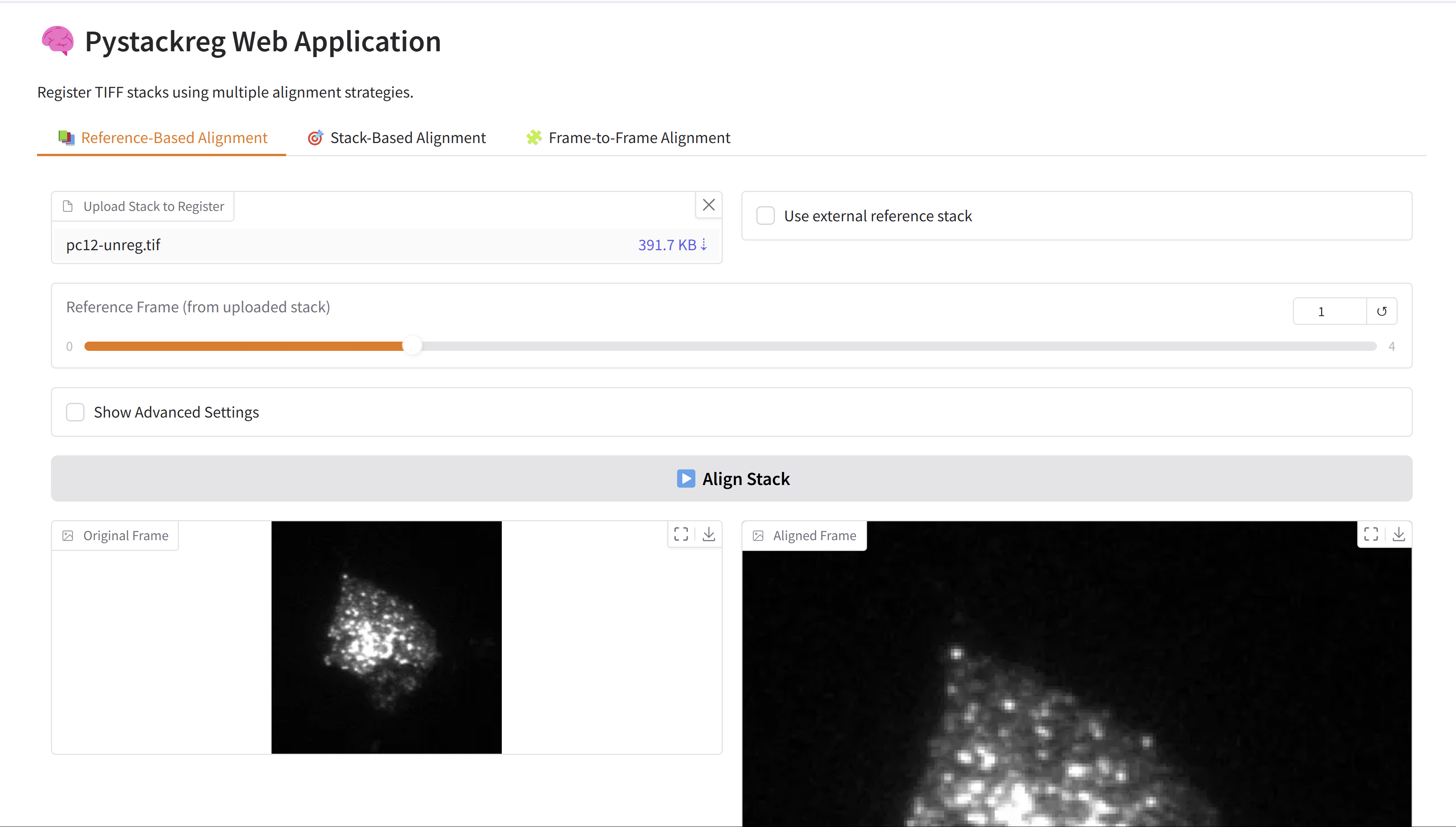
This application provides three core registration modes:
📚 Reference-Based Alignment
Align all frames within a stack to a selected reference frame — either from the same stack or an external 3D image.🎯 Stack-Based Alignment
Align every frame in one stack to the first frame of another reference stack.🧩 Frame-to-Frame Alignment
Align a single frame to another frame within the same stack.
By default, the app uses the Rigid Body transformation mode for all alignment tasks.
If needed, users can enable Advanced Settings in each tab to select from other transformation models, such as Translation, Affine, or Bilinear.
Each mode offers:
- 🔍 Interactive image preview
- 🧭 Frame-by-frame navigation
- 💾 Downloadable aligned results
- ⚙️ Customizable transformation models via advanced options
📂 Examples in the App
You can try the application directly using preloaded examples from the pystackreg repository.
Each mode includes interactive buttons that load demo TIFF stacks automatically:
📚 Reference-Based Alignment:
Loads a stack of PC12 microscopy frames.🎯 Stack-Based Alignment:
Loads both an unregistered and a translation-aligned stack.🧩 Frame-to-Frame Alignment:
Uses the same unregistered stack for aligning specific frames.
No need to upload your own files — just click and experiment!
🌐 URL Parameter Support
The app supports loading image stacks from external URLs using query parameters.
▶️ Load a single stack (for Reference-Based or Frame-to-Frame):
https://huggingface.co/spaces/qchapp/pystackreg-app?file_url=https://github.com/glichtner/pystackreg/raw/master/examples/data/pc12-unreg.tif
▶️ Load two stacks (for Stack-Based Alignment):
https://huggingface.co/spaces/qchapp/pystackreg-app?file_url_1=https://github.com/glichtner/pystackreg/raw/master/examples/data/pc12-unreg.tif&file_url_2=https://github.com/glichtner/pystackreg/raw/master/examples/data/pc12-reg-translation.tif
💡 The app will automatically load and preview the provided stack(s) in the appropriate tabs.
🤖 MCP Server
This app doubles as a Model Context Protocol (MCP) server, exposing the three core registration workflows as callable MCP tools that any MCP-compatible client (e.g. Claude Desktop, GitHub Copilot in VS Code) can invoke programmatically.
Running the app as an MCP server
python app.py
The human-facing Gradio UI is available at http://localhost:7860 as usual.
The MCP endpoint is available at:
- MCP server:
http://localhost:7860/gradio_api/mcp/sse - MCP schema:
http://localhost:7860/gradio_api/mcp/schema
Available MCP tools
1. align_stack_to_reference
Align every frame in a TIFF stack to a chosen reference frame (intra-stack alignment).
| Argument | Type | Default | Description |
|---|---|---|---|
stack_file |
str |
— | Path to the input TIFF stack |
reference_index |
int |
0 |
Zero-based index of the reference frame inside the stack |
mode |
str |
"RIGID_BODY" |
Transformation mode (see below) |
external_reference_file |
str | None |
None |
Optional path to an external reference TIFF stack |
external_reference_index |
int |
0 |
Frame index inside the external reference stack |
Returns: path to the aligned output TIFF file.
Example arguments:
{
  "stack_file": "/data/pc12-unreg.tif",
  "reference_index": 0,
  "mode": "RIGID_BODY"
}
2. align_stack_to_stack
Align every frame in a moving TIFF stack to the first frame of a reference TIFF stack.
| Argument | Type | Default | Description |
|---|---|---|---|
reference_stack_file |
str |
— | Path to the reference TIFF stack |
moving_stack_file |
str |
— | Path to the moving TIFF stack |
mode |
str |
"RIGID_BODY" |
Transformation mode (see below) |
Returns: path to the aligned output TIFF file.
Example arguments:
{
  "reference_stack_file": "/data/pc12-unreg.tif",
  "moving_stack_file": "/data/pc12-reg-translation.tif",
  "mode": "TRANSLATION"
}
3. align_frame_to_frame
Align a single moving frame to a reference frame within the same TIFF stack.
| Argument | Type | Default | Description |
|---|---|---|---|
stack_file |
str |
— | Path to the TIFF stack containing both frames |
reference_index |
int |
— | Zero-based index of the reference frame |
moving_index |
int |
— | Zero-based index of the frame to align |
mode |
str |
"RIGID_BODY" |
Transformation mode (see below) |
Returns: path to the aligned single-frame output TIFF file.
Example arguments:
{
  "stack_file": "/data/pc12-unreg.tif",
  "reference_index": 0,
  "moving_index": 5,
  "mode": "AFFINE"
}
Supported transformation modes
| Mode | Description |
|---|---|
TRANSLATION |
Translation only (x/y shift) |
RIGID_BODY |
Translation + rotation (default) |
SCALED_ROTATION |
Translation + rotation + uniform scaling |
AFFINE |
Full affine transformation |
BILINEAR |
Bilinear (non-linear) transformation |
📚 Credits
App Author: Quentin Chappuis
Developed the Gradio-based web interface and integratedpystackregfor image stack registration.Core Registration Library: pystackreg
A Python port of the StackReg plugin, written by Gregor Lichtenberg.Original Algorithm Author: Philippe Thévenaz (EPFL)
The core algorithm was originally developed by Philippe Thévenaz and is described in the following publication:P. Thévenaz, U.E. Ruttimann, M. Unser.
A Pyramid Approach to Subpixel Registration Based on Intensity.
IEEE Transactions on Image Processing, vol. 7, no. 1, pp. 27–41, January 1998.
View paperFor more information, visit the Biomedical Imaging Group at EPFL.