| --- |
| dataset_info: |
| features: |
| - name: name |
| dtype: string |
| - name: canopy |
| sequence: int8 |
| - name: density |
| sequence: float32 |
| - name: slope |
| sequence: int8 |
| - name: shape |
| sequence: int16 |
| length: 2 |
| splits: |
| - name: train |
| num_bytes: 27490487 |
| num_examples: 6 |
| download_size: 7175919 |
| dataset_size: 27490487 |
| configs: |
| - config_name: default |
| data_files: |
| - split: train |
| path: data/train-* |
| license: cc |
| task_categories: |
| - feature-extraction |
| tags: |
| - climate |
| - geology |
| size_categories: |
| - n<1K |
| --- |
| |
| # WildfireSimMaps |
|
|
| ## Description |
|
|
| This is a dataset containing real-world map data for wildfire simulations. |
| The data is in the form of 2D maps with the following features: |
|
|
| - `name`: The name of the map data. |
| - `shape`: The shape of the area, in pixels. |
| - `canopy`: The canopy cover in the area, in percentage. |
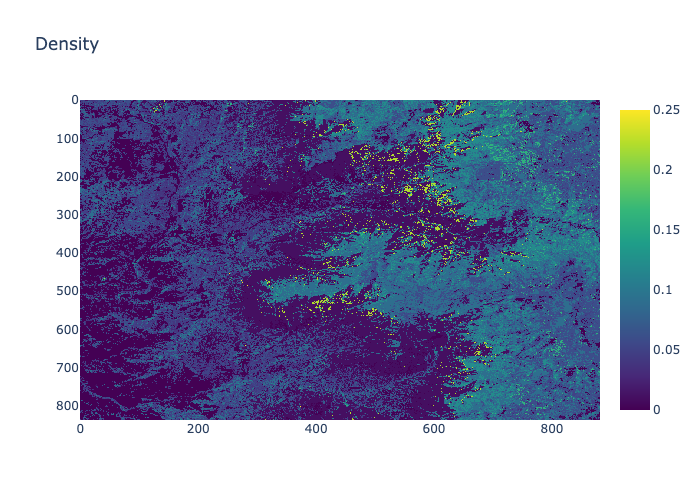
| - `density`: The density of the area, in percentage. |
| - `slope`: The slope of the area, in degrees. |
|
|
| ## Quick Start |
|
|
| Install the package using pip: |
|
|
| ```bash |
| pip install datasets |
| ``` |
|
|
| Then you can use the dataset as follows with **NumPy**: |
|
|
| ```python |
| import numpy as np |
| from datasets import load_dataset |
| |
| # Load the dataset |
| ds = load_dataset("xiazeyu/WildfireSimMaps", split="train") |
| ds = ds.with_format("numpy") |
| |
| def preprocess_function(examples): |
| # Reshape arrays based on the 'shape' field |
| examples['density'] = [d.reshape(sh) for d, sh in zip(examples['density'], examples['shape'])] |
| examples['slope'] = [s.reshape(sh) for s, sh in zip(examples['slope'], examples['shape'])] |
| examples['canopy'] = [c.reshape(sh) for c, sh in zip(examples['canopy'], examples['shape'])] |
| |
| return examples |
| |
| ds = ds.map(preprocess_function, batched=True, batch_size=None) # Adjust batch_size as needed |
| |
| print(ds[0]) |
| ``` |
|
|
| To use the dataset with **PyTorch**, you can use the following code: |
|
|
| ```python |
| import torch |
| from datasets import load_dataset |
| |
| device = torch.device("cuda" if torch.cuda.is_available() else "cpu") |
| |
| # Load the dataset |
| ds = load_dataset("xiazeyu/WildfireSimMaps", split="train") |
| ds = ds.with_format("torch", device=device) |
| |
| def preprocess_function(examples): |
| # Reshape arrays based on the 'shape' field |
| examples['density'] = [d.reshape(sh.tolist()) for d, sh in zip(examples['density'], examples['shape'])] |
| examples['slope'] = [s.reshape(sh.tolist()) for s, sh in zip(examples['slope'], examples['shape'])] |
| examples['canopy'] = [c.reshape(sh.tolist()) for c, sh in zip(examples['canopy'], examples['shape'])] |
| |
| return examples |
| |
| ds = ds.map(preprocess_function, batched=True, batch_size=None) # Adjust batch_size as needed |
| |
| print(ds[0]) |
| ``` |
|
|
| ## Next Steps |
|
|
| In order to make practical use of this dataset, you may perform the following tasks: |
|
|
| - scale or normalize the data to fit your model's requirements |
| - reshape the data to fit your model's input shape |
| - stack the data into a single tensor if needed |
| - perform data augmentation if needed |
| - split the data into training, validation, and test sets |
|
|
| In general, you can use the dataset as you would use any other dataset in your pipeline. |
|
|
| And the most important thing is to have fun and learn from the data! |
|
|
| ## Visualization |
|
|
| Density |
|
|
|  |
|
|
| Canopy |
|
|
|  |
|
|
| Slope |
|
|
|  |
|
|
| ## License |
|
|
| The dataset is licensed under the CC BY-NC 4.0 License. |
|
|
| ## Contact |
|
|
| - Zeyu Xia - yxn7cj@virginia.edu |
| - Sibo Cheng - sibo.cheng@imperial.ac.uk |
|
|