| --- |
| base_model: PramaLLC/BEN2 |
| base_model_relation: quantized |
| license: mit |
| pipeline_tag: image-segmentation |
| library_name: mlx |
| tags: |
| - mlx |
| - moonbox |
| - ben2 |
| - background-removal |
| - image-matting |
| --- |
| |
| # BEN2 Base MLX |
|
|
| MLX builds of [BEN2 Base](https://huggingface.co/PramaLLC/BEN2), made by Moonbox for Apple Silicon Macs. Each precision is a folder; keep a folder's |
| files together. Only the parts listed below are converted: the rest of the pipeline comes from the original |
| repository unless the section below says otherwise. |
|
|
| ## Files |
|
|
| The last column is how far each build is from the original PyTorch model on the same inputs (see the section below |
| for what was measured). |
|
|
| | Precision | File | Size | sha256 | Checked against the original | |
| |---|---|---|---|---| |
| | bf16 | [`bf16/config.json`](https://huggingface.co/moonbox-ai/BEN2-MLX/blob/main/bf16/config.json) | 0.2 kB | `1832ec222caf` | MAE <= 0.0002, mask IoU >= 0.9987 | |
| | bf16 | [`bf16/mlx_model.py`](https://huggingface.co/moonbox-ai/BEN2-MLX/blob/main/bf16/mlx_model.py) | 20.5 kB | `eff7a4afb5ad` | MAE <= 0.0002, mask IoU >= 0.9987 | |
| | bf16 | [`bf16/model.safetensors`](https://huggingface.co/moonbox-ai/BEN2-MLX/blob/main/bf16/model.safetensors) | 188.3 MB | `5b8344c88ff8` | MAE <= 0.0002, mask IoU >= 0.9987 | |
| | fp16 | [`fp16/config.json`](https://huggingface.co/moonbox-ai/BEN2-MLX/blob/main/fp16/config.json) | 0.2 kB | `cdad08ebd797` | MAE <= 0.00003, mask IoU >= 0.9996 | |
| | fp16 | [`fp16/mlx_model.py`](https://huggingface.co/moonbox-ai/BEN2-MLX/blob/main/fp16/mlx_model.py) | 20.5 kB | `eff7a4afb5ad` | MAE <= 0.00003, mask IoU >= 0.9996 | |
| | fp16 | [`fp16/model.safetensors`](https://huggingface.co/moonbox-ai/BEN2-MLX/blob/main/fp16/model.safetensors) | 188.3 MB | `5c446d204f3f` | MAE <= 0.00003, mask IoU >= 0.9996 | |
| | 8bit | [`8bit/config.json`](https://huggingface.co/moonbox-ai/BEN2-MLX/blob/main/8bit/config.json) | 0.3 kB | `8e36d767bc3b` | MAE <= 0.0003, mask IoU >= 0.9983 | |
| | 8bit | [`8bit/mlx_model.py`](https://huggingface.co/moonbox-ai/BEN2-MLX/blob/main/8bit/mlx_model.py) | 20.5 kB | `eff7a4afb5ad` | MAE <= 0.0003, mask IoU >= 0.9983 | |
| | 8bit | [`8bit/model.safetensors`](https://huggingface.co/moonbox-ai/BEN2-MLX/blob/main/8bit/model.safetensors) | 105.6 MB | `c4a4142ef47b` | MAE <= 0.0003, mask IoU >= 0.9983 | |
| | 6bit | [`6bit/config.json`](https://huggingface.co/moonbox-ai/BEN2-MLX/blob/main/6bit/config.json) | 0.3 kB | `9c6f176e545f` | MAE <= 0.0004, mask IoU >= 0.9966 | |
| | 6bit | [`6bit/mlx_model.py`](https://huggingface.co/moonbox-ai/BEN2-MLX/blob/main/6bit/mlx_model.py) | 20.5 kB | `eff7a4afb5ad` | MAE <= 0.0004, mask IoU >= 0.9966 | |
| | 6bit | [`6bit/model.safetensors`](https://huggingface.co/moonbox-ai/BEN2-MLX/blob/main/6bit/model.safetensors) | 83.5 MB | `5f055f598925` | MAE <= 0.0004, mask IoU >= 0.9966 | |
| | 4bit | [`4bit/config.json`](https://huggingface.co/moonbox-ai/BEN2-MLX/blob/main/4bit/config.json) | 0.3 kB | `0fa35f574f4a` | MAE <= 0.0012, mask IoU >= 0.9923 | |
| | 4bit | [`4bit/mlx_model.py`](https://huggingface.co/moonbox-ai/BEN2-MLX/blob/main/4bit/mlx_model.py) | 20.5 kB | `eff7a4afb5ad` | MAE <= 0.0012, mask IoU >= 0.9923 | |
| | 4bit | [`4bit/model.safetensors`](https://huggingface.co/moonbox-ai/BEN2-MLX/blob/main/4bit/model.safetensors) | 61.4 MB | `ada7dec10880` | MAE <= 0.0012, mask IoU >= 0.9923 | |
|
|
| ## How to run |
|
|
| BEN2 Base ported to MLX. Each folder holds `model.safetensors`, `config.json` and `mlx_model.py`, the port (only |
| `mlx`, `numpy` and `pillow` needed): |
|
|
| ```python |
| import numpy as np, mlx_model |
| from PIL import Image |
| model = mlx_model.load("fp16") |
| rgb = np.array(Image.open("in.jpg").convert("RGB")) |
| alpha = mlx_model.matte(model, rgb) # HxW uint8, as BEN2.py's inference() (1024x1024 internally) |
| Image.fromarray(np.dstack([rgb, alpha])).save("cutout.png") |
| ``` |
|
|
| The port runs `BEN_Base` as released (Swin-B on four 512 px crops plus the whole image, MCLM / MCRM decoder). The |
| quantized folders quantize the linear layers (Swin, attention, feed-forward; group size 64); the convolutions stay |
| bf16. The original's optional `refine_foreground` colour decontamination isn't ported. |
|
|
| | Precision | Size | MAE vs PyTorch fp32 (worst image) | Mask IoU (worst) | |
| |---|---|---|---| |
| | `fp16/` | 188 MB | 0.00003 | 0.9996 | |
| | `bf16/` | 188 MB | 0.0002 | 0.9987 | |
| | `8bit/` | 106 MB | 0.0003 | 0.9983 | |
| | `6bit/` | 84 MB | 0.0004 | 0.9966 | |
| | `4bit/` | 62 MB | 0.0012 | 0.9923 | |
|
|
| About 0.7 s per image on an Apple M5 at every precision. |
|
|
| ## How these were made |
|
|
| From [BEN2 Base](https://huggingface.co/PramaLLC/BEN2) at revision `e48a20765f`: the original weights loaded in MLX and stored as bf16 or fp16, or |
| quantized with MLX's affine quantization (`8bit`, `6bit`, `4bit`, group size 64; layers MLX can't quantize, such as |
| convolutions and norms, stay bf16). Every build was checked against the original before upload; the `sha256` column |
| above is what the files must hash to. |
|
|
| ## License |
|
|
| MIT. These files are a derivative of the original model and carry its license: it is copied in this |
| repository, and it governs your use of these files. The original model card follows unchanged. |
|
|
| --- |
|
|
| # Original model card |
|
|
| # BEN2: Background Erase Network |
|
|
| [](https://arxiv.org/abs/2501.06230) |
| [](https://github.com/PramaLLC/BEN2/) |
| [](https://backgrounderase.net) |
|
|
| ## Overview |
| BEN2 (Background Erase Network) introduces a novel approach to foreground segmentation through its innovative Confidence Guided Matting (CGM) pipeline. The architecture employs a refiner network that targets and processes pixels where the base model exhibits lower confidence levels, resulting in more precise and reliable matting results. This model is built on BEN: |
| [](https://paperswithcode.com/sota/dichotomous-image-segmentation-on-dis-vd?p=ben-using-confidence-guided-matting-for) |
|
|
|
|
|
|
|
|
| ## BEN2 access |
| BEN2 was trained on the DIS5k and our 22K proprietary segmentation dataset. Our enhanced model delivers superior performance in hair matting, 4K processing, object segmentation, and edge refinement. Our Base model is open source. To try the full model through our free web demo or integrate BEN2 into your project with our API: |
| - 🌐 [backgrounderase.com](https://backgrounderase.com) |
|
|
|
|
| ## Contact us |
| - For access to our commercial model email us at sales@backgrounderase.com |
| - Our website: https://backgrounderase.com/ |
| - Follow us on X: https://x.com/PramaResearch/ |
|
|
|
|
| ## Installation |
|
|
| ``` |
| pip install -e "git+https://github.com/PramaLLC/BEN2.git#egg=ben2" |
| ``` |
|
|
| ## Quick start code |
|
|
| ```python |
| from ben2 import BEN_Base |
| from PIL import Image |
| import torch |
| |
| |
| device = torch.device('cuda' if torch.cuda.is_available() else 'cpu') |
| |
| file = "./image.png" # input image |
| |
| model = BEN_Base.from_pretrained("PramaLLC/BEN2") |
| model.to(device).eval() |
| |
| image = Image.open(file) |
| foreground = model.inference(image, refine_foreground=False,) #Refine foreground is an extract postprocessing step that increases inference time but can improve matting edges. The default value is False. |
| |
| foreground.save("./foreground.png") |
| |
| ``` |
|
|
|
|
| ## Batch image processing |
|
|
| ```python |
| from ben2 import BEN_Base |
| from PIL import Image |
| import torch |
| |
| |
| device = torch.device('cuda' if torch.cuda.is_available() else 'cpu') |
| |
| |
| |
| model = BEN_Base.from_pretrained("PramaLLC/BEN2") |
| model.to(device).eval() |
| |
| |
| file1 = "./image1.png" # input image1 |
| file2 = "./image2.png" # input image2 |
| image1 = Image.open(file1) |
| image2 = Image.open(file2) |
| |
| |
| |
| foregrounds = model.inference([image1, image2]) # We recommend that the batch size not exceed 3 for consumer GPUs as there are minimal inference gains due to our custom batch processing for the MVANet decoding steps. |
| foregrounds[0].save("./foreground1.png") |
| foregrounds[1].save("./foreground2.png") |
| |
| ``` |
|
|
|
|
|
|
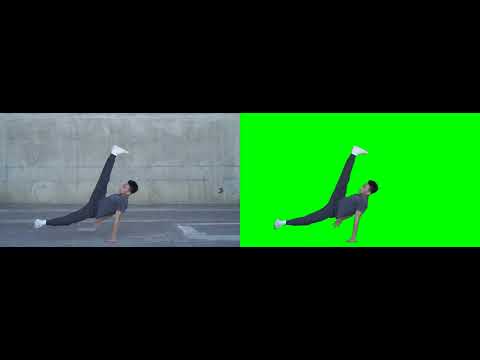
| # BEN2 video segmentation |
| [](https://www.youtube.com/watch?v=skEXiIHQcys) |
|
|
| ## Video Segmentation |
|
|
| ```bash |
| sudo apt update |
| sudo apt install ffmpeg |
| ``` |
|
|
| ```python |
| from ben2 import BEN_Base |
| from PIL import Image |
| import torch |
| |
| |
| device = torch.device('cuda' if torch.cuda.is_available() else 'cpu') |
| |
| video_path = "/path_to_your_video.mp4"# input video |
| |
| model = BEN_Base.from_pretrained("PramaLLC/BEN2") |
| model.to(device).eval() |
| |
| |
| model.segment_video( |
| video_path= video_path, |
| output_path="./", # Outputs will be saved as foreground.webm or foreground.mp4. The default value is "./" |
| fps=0, # If this is set to 0 CV2 will detect the fps in the original video. The default value is 0. |
| refine_foreground=False, #refine foreground is an extract postprocessing step that increases inference time but can improve matting edges. The default value is False. |
| batch=1, # We recommended that batch size not exceed 3 for consumer GPUs as there are minimal inference gains. The default value is 1. |
| print_frames_processed=True, #Informs you what frame is being processed. The default value is True. |
| webm = False, # This will output an alpha layer video but this defaults to mp4 when webm is false. The default value is False. |
| rgb_value= (0, 255, 0) # If you do not use webm this will be the RGB value of the resulting background only when webm is False. The default value is a green background (0,255,0). |
| ) |
| |
| |
| ``` |
|
|
|
|
|
|
| **# BEN2 evaluation** |
|  |
|
|
| RMBG 2.0 did not preserve the DIS 5k validation dataset |
|
|
|  |
|  |
|  |
|  |
|  |
|
|


