| --- |
| license: other |
| license_name: s-lab-license-1.0 |
| pipeline_tag: image-to-video |
| library_name: onnx |
| tags: |
| - onnx |
| - moonbox |
| - onnxruntime |
| - propainter |
| - video-inpainting |
| - object-removal |
| - optical-flow |
| - raft |
| --- |
| |
| # ProPainter ONNX |
|
|
| ONNX builds of [ProPainter](https://github.com/sczhou/ProPainter), made by Moonbox for on-device use with ONNX Runtime (CPU, CUDA, DirectML). Each |
| precision is one folder holding the graphs and a small Python `pipeline.py` that does the rest (image preprocessing, |
| the frame loop, mask handling); what the graphs take and return is under *How to run*. |
|
|
| ## Files |
|
|
| The last column is the benchmark against the original PyTorch model (details under *How to run*): how closely each |
| output frame matches the original's on the same clips and masks. |
|
|
| | Precision | File | Size | sha256 | Benchmark | |
| |---|---|---|---|---| |
| | fp16 | [`fp16/fc_decoder.onnx`](https://huggingface.co/moonbox-dev/ProPainter-ONNX/blob/main/fp16/fc_decoder.onnx) | 0.6 MB | `48750e6e2291` | inpainted-region PSNR vs the original: mean 52.8 / 54.4 dB, worst frame 43.6 dB; 20.9 / 17.1 s per clip (CUDA; original 39 / 30 s) | |
| | fp16 | [`fp16/fc_encoder.onnx`](https://huggingface.co/moonbox-dev/ProPainter-ONNX/blob/main/fp16/fc_encoder.onnx) | 1.3 MB | `269ee000d9d5` | inpainted-region PSNR vs the original: mean 52.8 / 54.4 dB, worst frame 43.6 dB; 20.9 / 17.1 s per clip (CUDA; original 39 / 30 s) | |
| | fp16 | [`fp16/fc_step_backward.onnx`](https://huggingface.co/moonbox-dev/ProPainter-ONNX/blob/main/fp16/fc_step_backward.onnx) | 7.9 MB | `cf55f6d4fa1d` | inpainted-region PSNR vs the original: mean 52.8 / 54.4 dB, worst frame 43.6 dB; 20.9 / 17.1 s per clip (CUDA; original 39 / 30 s) | |
| | fp16 | [`fp16/fc_step_forward.onnx`](https://huggingface.co/moonbox-dev/ProPainter-ONNX/blob/main/fp16/fc_step_forward.onnx) | 8.5 MB | `338b54350aac` | inpainted-region PSNR vs the original: mean 52.8 / 54.4 dB, worst frame 43.6 dB; 20.9 / 17.1 s per clip (CUDA; original 39 / 30 s) | |
| | fp16 | [`fp16/gen_encoder.onnx`](https://huggingface.co/moonbox-dev/ProPainter-ONNX/blob/main/fp16/gen_encoder.onnx) | 8.4 MB | `29bcde1a374d` | inpainted-region PSNR vs the original: mean 52.8 / 54.4 dB, worst frame 43.6 dB; 20.9 / 17.1 s per clip (CUDA; original 39 / 30 s) | |
| | fp16 | [`fp16/gen_step_backward.onnx`](https://huggingface.co/moonbox-dev/ProPainter-ONNX/blob/main/fp16/gen_step_backward.onnx) | 6.8 MB | `a3e60860c293` | inpainted-region PSNR vs the original: mean 52.8 / 54.4 dB, worst frame 43.6 dB; 20.9 / 17.1 s per clip (CUDA; original 39 / 30 s) | |
| | fp16 | [`fp16/gen_step_forward.onnx`](https://huggingface.co/moonbox-dev/ProPainter-ONNX/blob/main/fp16/gen_step_forward.onnx) | 6.8 MB | `f33655516654` | inpainted-region PSNR vs the original: mean 52.8 / 54.4 dB, worst frame 43.6 dB; 20.9 / 17.1 s per clip (CUDA; original 39 / 30 s) | |
| | fp16 | [`fp16/gen_transformer.onnx`](https://huggingface.co/moonbox-dev/ProPainter-ONNX/blob/main/fp16/gen_transformer.onnx) | 66.6 MB | `e4d7aec32f7f` | inpainted-region PSNR vs the original: mean 52.8 / 54.4 dB, worst frame 43.6 dB; 20.9 / 17.1 s per clip (CUDA; original 39 / 30 s) | |
| | fp16 | [`fp16/img_step.onnx`](https://huggingface.co/moonbox-dev/ProPainter-ONNX/blob/main/fp16/img_step.onnx) | 17.8 kB | `49973fad918f` | inpainted-region PSNR vs the original: mean 52.8 / 54.4 dB, worst frame 43.6 dB; 20.9 / 17.1 s per clip (CUDA; original 39 / 30 s) | |
| | fp16 | [`fp16/pipeline.py`](https://huggingface.co/moonbox-dev/ProPainter-ONNX/blob/main/fp16/pipeline.py) | 13.3 kB | `608ba7424349` | inpainted-region PSNR vs the original: mean 52.8 / 54.4 dB, worst frame 43.6 dB; 20.9 / 17.1 s per clip (CUDA; original 39 / 30 s) | |
| | fp16 | [`fp16/raft.onnx`](https://huggingface.co/moonbox-dev/ProPainter-ONNX/blob/main/fp16/raft.onnx) | 21.6 MB | `2b8b0cb0b202` | inpainted-region PSNR vs the original: mean 52.8 / 54.4 dB, worst frame 43.6 dB; 20.9 / 17.1 s per clip (CUDA; original 39 / 30 s) | |
| | int8 | [`int8/fc_decoder.onnx`](https://huggingface.co/moonbox-dev/ProPainter-ONNX/blob/main/int8/fc_decoder.onnx) | 0.3 MB | `d1053b01b442` | weight-only int8: inpainted-region PSNR mean 42.2 / 43.5 dB, worst frame 35.8 dB; 23.7 / 20.5 s per clip (CUDA) | |
| | int8 | [`int8/fc_encoder.onnx`](https://huggingface.co/moonbox-dev/ProPainter-ONNX/blob/main/int8/fc_encoder.onnx) | 0.7 MB | `949766e8c135` | weight-only int8: inpainted-region PSNR mean 42.2 / 43.5 dB, worst frame 35.8 dB; 23.7 / 20.5 s per clip (CUDA) | |
| | int8 | [`int8/fc_step_backward.onnx`](https://huggingface.co/moonbox-dev/ProPainter-ONNX/blob/main/int8/fc_step_backward.onnx) | 2.9 MB | `c8f887385659` | weight-only int8: inpainted-region PSNR mean 42.2 / 43.5 dB, worst frame 35.8 dB; 23.7 / 20.5 s per clip (CUDA) | |
| | int8 | [`int8/fc_step_forward.onnx`](https://huggingface.co/moonbox-dev/ProPainter-ONNX/blob/main/int8/fc_step_forward.onnx) | 3.0 MB | `73071dbb750b` | weight-only int8: inpainted-region PSNR mean 42.2 / 43.5 dB, worst frame 35.8 dB; 23.7 / 20.5 s per clip (CUDA) | |
| | int8 | [`int8/gen_encoder.onnx`](https://huggingface.co/moonbox-dev/ProPainter-ONNX/blob/main/int8/gen_encoder.onnx) | 4.2 MB | `e69ecdc695b2` | weight-only int8: inpainted-region PSNR mean 42.2 / 43.5 dB, worst frame 35.8 dB; 23.7 / 20.5 s per clip (CUDA) | |
| | int8 | [`int8/gen_step_backward.onnx`](https://huggingface.co/moonbox-dev/ProPainter-ONNX/blob/main/int8/gen_step_backward.onnx) | 2.2 MB | `dc50acb1ea89` | weight-only int8: inpainted-region PSNR mean 42.2 / 43.5 dB, worst frame 35.8 dB; 23.7 / 20.5 s per clip (CUDA) | |
| | int8 | [`int8/gen_step_forward.onnx`](https://huggingface.co/moonbox-dev/ProPainter-ONNX/blob/main/int8/gen_step_forward.onnx) | 2.2 MB | `d17994ba880e` | weight-only int8: inpainted-region PSNR mean 42.2 / 43.5 dB, worst frame 35.8 dB; 23.7 / 20.5 s per clip (CUDA) | |
| | int8 | [`int8/gen_transformer.onnx`](https://huggingface.co/moonbox-dev/ProPainter-ONNX/blob/main/int8/gen_transformer.onnx) | 34.8 MB | `551d2cedd7d8` | weight-only int8: inpainted-region PSNR mean 42.2 / 43.5 dB, worst frame 35.8 dB; 23.7 / 20.5 s per clip (CUDA) | |
| | int8 | [`int8/img_step.onnx`](https://huggingface.co/moonbox-dev/ProPainter-ONNX/blob/main/int8/img_step.onnx) | 17.8 kB | `49973fad918f` | weight-only int8: inpainted-region PSNR mean 42.2 / 43.5 dB, worst frame 35.8 dB; 23.7 / 20.5 s per clip (CUDA) | |
| | int8 | [`int8/pipeline.py`](https://huggingface.co/moonbox-dev/ProPainter-ONNX/blob/main/int8/pipeline.py) | 13.3 kB | `608ba7424349` | weight-only int8: inpainted-region PSNR mean 42.2 / 43.5 dB, worst frame 35.8 dB; 23.7 / 20.5 s per clip (CUDA) | |
| | int8 | [`int8/raft.onnx`](https://huggingface.co/moonbox-dev/ProPainter-ONNX/blob/main/int8/raft.onnx) | 5.9 MB | `1ab239cd357d` | weight-only int8: inpainted-region PSNR mean 42.2 / 43.5 dB, worst frame 35.8 dB; 23.7 / 20.5 s per clip (CUDA) | |
|
|
| ## How to run |
|
|
| ProPainter (S-Lab, NTU: video inpainting and object removal from per-frame masks) as ten ONNX graphs plus |
| `pipeline.py`, a numpy runtime that reproduces the repository's `inference_propainter.py` (video inpainting mode, its |
| defaults) around them. **Non-commercial use only** (S-Lab License 1.0, below). |
|
|
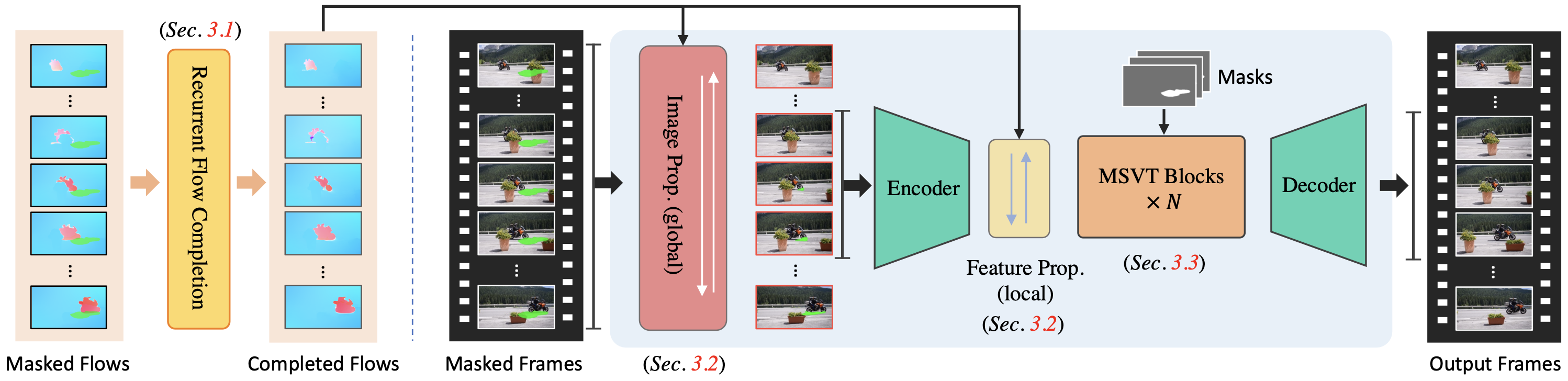
| ProPainter works in three stages: optical flow between frames (RAFT), flow completion inside the masked regions, |
| then a generator that propagates pixels and features along the completed flow and fills the rest with a temporal |
| sparse transformer. The recurrent passes over frames are exported one step per graph; `pipeline.py` runs the loops. |
|
|
| - `raft.onnx`: `image1`, `image2` [N, 3, H, W] in [-1, 1] -> `flow` [N, 2, H, W] (20 refinement iterations). |
| - Flow completion: |
| - `fc_encoder.onnx`: masked `flows` [1, T, 2, H, W] and `masks` [1, T, 1, H, W] -> features at 1/8 and 1/4 scale. |
| - `fc_step_backward.onnx` / `fc_step_forward.onnx`: one frame of its second-order deformable propagation. |
| - `fc_decoder.onnx`: fusion and decoder -> completed flow [T, 2, H, W]. |
| - `img_step.onnx`: one frame of the image propagation (flow warping with a forward-backward consistency check; no |
| learned weights). |
| - Generator: |
| - `gen_encoder.onnx`: frames, masks and updated masks [t, ...] -> features [t, 128, H/4, W/4]. |
| - `gen_step_backward.onnx` / `gen_step_forward.onnx`: one frame of its deformable feature propagation. |
| - `gen_transformer.onnx`: fusion, the temporal sparse transformer and the decoder -> frames [l_t, 3, H, W]. |
| |
| All graphs take any frame size that is a multiple of 8. `pipeline.py` resizes other sizes down to the nearest one, |
| as the original does. |
| |
| `pipeline.py` reproduces the original's steps: |
| - **Masks:** dilated by 4 pixels, for flow and for inpainting. |
| - **Flow:** RAFT in short clips (12 frames up to 640 px wide). Flow completion in sub-videos of 80. |
| - **Propagation:** image propagation in sub-videos of 100. |
| - **Generator:** windows of 11 neighbouring frames plus reference frames every 10th frame; overlapping windows are |
| averaged. |
| - **Output:** inpainted pixels composited back into the input frames. |
| |
| It needs numpy, scipy, onnxruntime (or onnxruntime-gpu) and Pillow: |
| |
| ```python |
| import sys |
| from PIL import Image |
| from pathlib import Path |
| sys.path.insert(0, "fp16") |
| import pipeline |
| pp = pipeline.ProPainter("fp16", "cuda") |
| frames = [Image.open(p).convert("RGB") for p in sorted(Path("clip").iterdir())] |
| masks = [Image.open(p) for p in sorted(Path("clip_mask").iterdir())] # white = remove; or a single mask image |
| out = pp(frames, masks) # list of uint8 RGB frames |
| ``` |
| |
| Or from the command line: `python fp16/pipeline.py clip_frames/ clip_masks/ out/ --cuda`. The repository's video |
| outpainting mode isn't ported. On Windows, give CUDA sessions the run option `memory.enable_memory_arena_shrinkage` = |
| `gpu:0`, as `pipeline.py` does. |
| |
| **How the graphs differ from the PyTorch modules (same arithmetic).** |
| - Deformable convolutions are written as GridSample per kernel tap plus a MatMul. ONNX Runtime 1.23 has no DeformConv |
| kernel. This form matches torchvision's to 3e-6. |
| - The sparse transformer picks attention per window with a data-dependent loop. In the graph, both attention kinds |
| are computed for every window and selected with the window mask. |
| - Its fold step is a grouped transposed convolution. |
| - Sizes are computed from the input shape, so any frame size works. |
| |
| Running the exported loop with the original PyTorch modules reproduces the original's frames to 81 dB PSNR. |
| |
| **Precisions.** |
| - `fp16/`: the encoders, decoders and the transformer in fp16 math (fp32 inputs / outputs). RAFT and the per-frame |
| step graphs stay fp32: their weights are small, and ONNX Runtime's CUDA provider runs fp16 GridSample on the CPU |
| (RAFT took 1.1 s per call instead of 79 ms). |
| - `int8/`: weight-only int8 (per output channel) on every network's convolutions and matmuls. |
| - `img_step` has no weights and stays fp32 in both. |
| - No bf16 (fp16 passes) and no int4: this is a convolutional network, and 4-bit MatMulNBits would cover only the |
| transformer. |
| |
| **Benchmark.** |
| - **Clips:** the repository's two sample clips with their masks (object removal): bmx-trees (80 frames) and tennis |
| (70 frames), 432 x 240. |
| - **Original:** `inference_propainter.py` in fp32 on CUDA with its defaults. |
| - **Score:** PSNR of every output frame against the original's, over the dilated mask, i.e. the inpainted pixels |
| (outside it both copy the input). Mean over frames, and the worst frame. |
| - **Pass mark:** at least 30 dB on every frame. |
| - **Timing:** seconds per clip on an RTX 3080 Laptop GPU (16 GB), whole pipeline including RAFT. |
| |
| | | inpainted region, bmx-trees: mean / worst | tennis: mean / worst | seconds per clip | |
| |---|---|---|---| |
| | original (PyTorch fp32, CUDA) | - | - | 39 / 30 | |
| | ONNX graphs in fp32 (not published) | 58.2 / 49.0 dB | 58.7 / 50.4 dB | 25 / 21 | |
| | `fp16/` (CUDA) | 52.8 / 43.6 dB | 54.4 / 49.5 dB | 21 / 17 | |
| | `int8/` (CUDA) | 42.2 / 35.8 dB | 43.5 / 39.1 dB | 24 / 21 | |
| |
| Both builds remove the objects the same way the original does. Side by side, the int8 frames are indistinguishable |
| from the original's. |
| |
| Before the benchmark, each graph was checked against its PyTorch module (largest absolute difference, float32), at a |
| frame size and frame count other than those it was exported at: |
| - The flow completion and generator graphs: at most 7e-5. |
| - The image propagation step: exact. |
| - RAFT: 2e-4 to 1e-3 on flows of about 3 pixels. |
| |
| ## How these were made |
| |
| From [ProPainter](https://github.com/sczhou/ProPainter) at revision `326782529a`. The graphs were exported from the original PyTorch modules with |
| torch.onnx (opset 17 / 18) and checked against them. Weight-only quantization: int8 is a per-output-channel int8 |
| weight behind DequantizeLinear, int4 is ONNX Runtime's MatMulNBits (block 32). Each card above says which precision |
| every graph uses. Every precision was benchmarked against the original before upload (the pass mark is under *How to run*), and the |
| `sha256` column above is what the files must hash to. |
| |
| ## License |
| |
| S-Lab License 1.0 (non-commercial). These files are a derivative of the original model and carry its license: it is copied in this |
| repository, and it governs your use of these files. The original model card follows unchanged. |
| |
| --- |
| |
| # Original model card |
| |
| <div align="center"> |
| |
| <div class="logo"> |
| <a href="https://shangchenzhou.com/projects/ProPainter/"> |
| <img src="https://raw.githubusercontent.com/sczhou/ProPainter/326782529a63d997cab80ab21439b92ed422b3d3/assets/propainter_logo1_glow.png" style="width: 180px"> |
| </a> |
| </div> |
| |
| <h1>ProPainter: Improving Propagation and Transformer for Video Inpainting</h1> |
| |
| <div> |
| <a href='https://shangchenzhou.com/' target='_blank'>Shangchen Zhou</a>  |
| <a href='https://li-chongyi.github.io/' target='_blank'>Chongyi Li</a>  |
| <a href='https://ckkelvinchan.github.io/' target='_blank'>Kelvin C.K. Chan</a>  |
| <a href='https://www.mmlab-ntu.com/person/ccloy/' target='_blank'>Chen Change Loy</a> |
| </div> |
| <div> |
| S-Lab, Nanyang Technological University  |
| </div> |
| |
| <div> |
| <strong>ICCV 2023</strong> |
| </div> |
| |
| <div> |
| <h4 align="center"> |
| <a href="https://shangchenzhou.com/projects/ProPainter" target='_blank'> |
| <img src="https://img.shields.io/badge/🐳-Project%20Page-blue"> |
| </a> |
| <a href="https://arxiv.org/abs/2309.03897" target='_blank'> |
| <img src="https://img.shields.io/badge/arXiv-2309.03897-b31b1b.svg"> |
| </a> |
| <a href="https://youtu.be/92EHfgCO5-Q" target='_blank'> |
| <img src="https://img.shields.io/badge/Demo%20Video-%23FF0000.svg?logo=YouTube&logoColor=white"> |
| </a> |
| <a href="https://huggingface.co/spaces/sczhou/ProPainter" target='_blank'> |
| <img src="https://img.shields.io/badge/Demo-%F0%9F%A4%97%20Hugging%20Face-blue"> |
| </a> |
| <a href="https://openxlab.org.cn/apps/detail/ShangchenZhou/ProPainter" target='_blank'> |
| <img src="https://img.shields.io/badge/Demo-%F0%9F%91%A8%E2%80%8D%F0%9F%8E%A8%20OpenXLab-blue"> |
| </a> |
| <img src="https://api.infinitescript.com/badgen/count?name=sczhou/ProPainter"> |
| </h4> |
| </div> |
| |
| ⭐ If ProPainter is helpful to your projects, please help star this repo. Thanks! 🤗 |
| |
| :open_book: For more visual results, go checkout our <a href="https://shangchenzhou.com/projects/ProPainter/" target="_blank">project page</a> |
| |
| |
| --- |
| |
| </div> |
| |
| |
| ## Update |
| - **2026.10.27**: Our [Hugging Face demo](https://huggingface.co/spaces/sczhou/ProPainter) now supports SAM 2.1 for interactive video segmentation. Try the updated demo! 🤗 |
| - **2023.11.09**: Integrated to :man_artist: [OpenXLab](https://openxlab.org.cn/apps). Try out online demo! [](https://openxlab.org.cn/apps/detail/ShangchenZhou/ProPainter) |
| - **2023.11.09**: Integrated to :hugs: [Hugging Face](https://huggingface.co/spaces). Try out online demo! [](https://huggingface.co/spaces/sczhou/ProPainter) |
| - **2023.09.24**: We remove the watermark removal demos officially to prevent the misuse of our work for unethical purposes. |
| - **2023.09.21**: Add features for memory-efficient inference. Check our [GPU memory](https://github.com/sczhou/ProPainter#-memory-efficient-inference) requirements. 🚀 |
| - **2023.09.07**: Our code and model are publicly available. 🐳 |
| - **2023.09.01**: This repo is created. |
| |
| |
| ### TODO |
| - [ ] Make a Colab demo. |
| - [x] ~~Make a interactive Gradio demo.~~ |
| - [x] ~~Update features for memory-efficient inference.~~ |
| |
| ## Results |
| |
| #### 👨🏻🎨 Object Removal |
| <table> |
| <tr> |
| <td> |
| <img src="https://raw.githubusercontent.com/sczhou/ProPainter/326782529a63d997cab80ab21439b92ed422b3d3/assets/object_removal1.gif"> |
| </td> |
| <td> |
| <img src="https://raw.githubusercontent.com/sczhou/ProPainter/326782529a63d997cab80ab21439b92ed422b3d3/assets/object_removal2.gif"> |
| </td> |
| </tr> |
| </table> |
| |
| #### 🎨 Video Completion |
| <table> |
| <tr> |
| <td> |
| <img src="https://raw.githubusercontent.com/sczhou/ProPainter/326782529a63d997cab80ab21439b92ed422b3d3/assets/video_completion1.gif"> |
| </td> |
| <td> |
| <img src="https://raw.githubusercontent.com/sczhou/ProPainter/326782529a63d997cab80ab21439b92ed422b3d3/assets/video_completion2.gif"> |
| </td> |
| </tr> |
| <tr> |
| <td> |
| <img src="https://raw.githubusercontent.com/sczhou/ProPainter/326782529a63d997cab80ab21439b92ed422b3d3/assets/video_completion3.gif"> |
| </td> |
| <td> |
| <img src="https://raw.githubusercontent.com/sczhou/ProPainter/326782529a63d997cab80ab21439b92ed422b3d3/assets/video_completion4.gif"> |
| </td> |
| </tr> |
| </table> |
| |
| |
| |
| ## Overview |
|  |
| |
| |
| ## Dependencies and Installation |
| |
| 1. Clone Repo |
| |
| ```bash |
| git clone https://github.com/sczhou/ProPainter.git |
| ``` |
| |
| 2. Create Conda Environment and Install Dependencies |
| |
| ```bash |
| # create new anaconda env |
| conda create -n propainter python=3.8 -y |
| conda activate propainter |
|
|
| # install python dependencies |
| pip3 install -r requirements.txt |
| ``` |
| |
| - CUDA >= 9.2 |
| - PyTorch >= 1.7.1 |
| - Torchvision >= 0.8.2 |
| - Other required packages in `requirements.txt` |
| |
| ## Get Started |
| ### Prepare pretrained models |
| Download our pretrained models from [Releases V0.1.0](https://github.com/sczhou/ProPainter/releases/tag/v0.1.0) to the `weights` folder. (All pretrained models can also be automatically downloaded during the first inference.) |
| |
| The directory structure will be arranged as: |
| ``` |
| weights |
| |- ProPainter.pth |
| |- recurrent_flow_completion.pth |
| |- raft-things.pth |
| |- i3d_rgb_imagenet.pt (for evaluating VFID metric) |
| |- README.md |
| ``` |
| |
| ### 🏂 Quick test |
| We provide some examples in the [`inputs`](https://raw.githubusercontent.com/sczhou/ProPainter/326782529a63d997cab80ab21439b92ed422b3d3/inputs) folder. |
| Run the following commands to try it out: |
| ```shell |
| # The first example (object removal) |
| python inference_propainter.py --video inputs/object_removal/bmx-trees --mask inputs/object_removal/bmx-trees_mask |
| # The second example (video completion) |
| python inference_propainter.py --video inputs/video_completion/running_car.mp4 --mask inputs/video_completion/mask_square.png --height 240 --width 432 |
| ``` |
| |
| The results will be saved in the `results` folder. |
| To test your own videos, please prepare the input `mp4 video` (or `split frames`) and `frame-wise mask(s)`. |
| |
| If you want to specify the video resolution for processing or avoid running out of memory, you can set the video size of `--width` and `--height`: |
| ```shell |
| # process a 576x320 video; set --fp16 to use fp16 (half precision) during inference. |
| python inference_propainter.py --video inputs/video_completion/running_car.mp4 --mask inputs/video_completion/mask_square.png --height 320 --width 576 --fp16 |
| ``` |
| |
| #### 💃🏻 Interactive Demo |
| |
| We also provide an interactive demo for object removal, allowing users to select any object they wish to remove from a video. You can try the demo on [Hugging Face](https://huggingface.co/spaces/sczhou/ProPainter) or run it [locally](https://github.com/sczhou/ProPainter/tree/main/web-demos/hugging_face). |
| |
| <div align="center"> |
| <img src="https://raw.githubusercontent.com/sczhou/ProPainter/326782529a63d997cab80ab21439b92ed422b3d3/web-demos/hugging_face/assets/demo.gif" alt="Demo GIF" style="max-width: 512px; height: auto;"> |
| </div> |
| |
| *Please note that the demo's interface and usage may differ from the GIF animation above. For detailed instructions, refer to the [user guide](https://github.com/sczhou/ProPainter/blob/main/web-demos/hugging_face/README.md).* |
| |
| ### 🚀 Memory-efficient inference |
| |
| Video inpainting typically requires a significant amount of GPU memory. Here, we offer various features that facilitate memory-efficient inference, effectively avoiding the Out-Of-Memory (OOM) error. You can use the following options to reduce memory usage further: |
| |
| - Reduce the number of local neighbors through decreasing the `--neighbor_length` (default 10). |
| - Reduce the number of global references by increasing the `--ref_stride` (default 10). |
| - Set the `--resize_ratio` (default 1.0) to resize the processing video. |
| - Set a smaller video size via specifying the `--width` and `--height`. |
| - Set `--fp16` to use fp16 (half precision) during inference. |
| - Reduce the frames of sub-videos `--subvideo_length` (default 80), which effectively decouples GPU memory costs and video length. |
| |
| Blow shows the estimated GPU memory requirements for different sub-video lengths with fp32/fp16 precision: |
| |
| | Resolution | 50 frames | 80 frames | |
| | :--- | :----: | :----: | |
| | 1280 x 720 | 28G / 19G | OOM / 25G | |
| | 720 x 480 | 11G / 7G | 13G / 8G | |
| | 640 x 480 | 10G / 6G | 12G / 7G | |
| | 320 x 240 | 3G / 2G | 4G / 3G | |
| |
| |
| ## Dataset preparation |
| <table> |
| <thead> |
| <tr> |
| <th>Dataset</th> |
| <th>YouTube-VOS</th> |
| <th>DAVIS</th> |
| </tr> |
| </thead> |
| <tbody> |
| <tr> |
| <td>Description</td> |
| <td>For training (3,471) and evaluation (508)</td> |
| <td>For evaluation (50 in 90)</td> |
| <tr> |
| <td>Images</td> |
| <td> [<a href="https://competitions.codalab.org/competitions/19544#participate-get-data">Official Link</a>] (Download train and test all frames) </td> |
| <td> [<a href="https://data.vision.ee.ethz.ch/csergi/share/davis/DAVIS-2017-trainval-480p.zip">Official Link</a>] (2017, 480p, TrainVal) </td> |
| </tr> |
| <tr> |
| <td>Masks</td> |
| <td colspan="2"> [<a href="https://drive.google.com/file/d/1dFTneS_zaJAHjglxU10gYzr1-xALgHa4/view?usp=sharing">Google Drive</a>] [<a href="https://pan.baidu.com/s/1JC-UKmlQfjhVtD81196cxA?pwd=87e3">Baidu Disk</a>] (For reproducing paper results; provided in <a href="https://arxiv.org/abs/2309.03897">ProPainter</a> paper) </td> |
| </tr> |
| </tbody> |
| </table> |
| |
| The training and test split files are provided in `datasets/<dataset_name>`. For each dataset, you should place `JPEGImages` to `datasets/<dataset_name>`. Resize all video frames to size `432x240` for training. Unzip downloaded mask files to `datasets`. |
| |
| The `datasets` directory structure will be arranged as: (**Note**: please check it carefully) |
| ``` |
| datasets |
| |- davis |
| |- JPEGImages_432_240 |
| |- <video_name> |
| |- 00000.jpg |
| |- 00001.jpg |
| |- test_masks |
| |- <video_name> |
| |- 00000.png |
| |- 00001.png |
| |- train.json |
| |- test.json |
| |- youtube-vos |
| |- JPEGImages_432_240 |
| |- <video_name> |
| |- 00000.jpg |
| |- 00001.jpg |
| |- test_masks |
| |- <video_name> |
| |- 00000.png |
| |- 00001.png |
| |- train.json |
| |- test.json |
| ``` |
| |
| ## Training |
| Our training configures are provided in [`train_flowcomp.json`](https://raw.githubusercontent.com/sczhou/ProPainter/326782529a63d997cab80ab21439b92ed422b3d3/configs/train_flowcomp.json) (for Recurrent Flow Completion Network) and [`train_propainter.json`](https://raw.githubusercontent.com/sczhou/ProPainter/326782529a63d997cab80ab21439b92ed422b3d3/configs/train_propainter.json) (for ProPainter). |
|
|
| Run one of the following commands for training: |
| ```shell |
| # For training Recurrent Flow Completion Network |
| python train.py -c configs/train_flowcomp.json |
| # For training ProPainter |
| python train.py -c configs/train_propainter.json |
| ``` |
| You can run the **same command** to **resume** your training. |
|
|
| To speed up the training process, you can precompute optical flow for the training dataset using the following command: |
| ```shell |
| # Compute optical flow for training dataset |
| python scripts/compute_flow.py --root_path <dataset_root> --save_path <save_flow_root> --height 240 --width 432 |
| ``` |
|
|
| ## Evaluation |
| Run one of the following commands for evaluation: |
| ```shell |
| # For evaluating flow completion model |
| python scripts/evaluate_flow_completion.py --dataset <dataset_name> --video_root <video_root> --mask_root <mask_root> --save_results |
| # For evaluating ProPainter model |
| python scripts/evaluate_propainter.py --dataset <dataset_name> --video_root <video_root> --mask_root <mask_root> --save_results |
| ``` |
|
|
| The scores and results will also be saved in the `results_eval` folder. |
| Please `--save_results` for further [evaluating temporal warping error](https://github.com/phoenix104104/fast_blind_video_consistency#evaluation). |
|
|
|
|
|
|
| ## Citation |
|
|
| If you find our repo useful for your research, please consider citing our paper: |
|
|
| ```bibtex |
| @inproceedings{zhou2023propainter, |
| title={{ProPainter}: Improving Propagation and Transformer for Video Inpainting}, |
| author={Zhou, Shangchen and Li, Chongyi and Chan, Kelvin C.K and Loy, Chen Change}, |
| booktitle={Proceedings of IEEE International Conference on Computer Vision (ICCV)}, |
| year={2023} |
| } |
| ``` |
|
|
|
|
| ## License |
|
|
| #### Non-Commercial Use Only Declaration |
| The ProPainter is made available for use, reproduction, and distribution strictly for non-commercial purposes. The code and models are licensed under <a rel="license" href="./LICENSE">NTU S-Lab License 1.0</a>. Redistribution and use should follow this license. |
|
|
| For inquiries or to obtain permission for commercial use, please consult Dr. Shangchen Zhou (shangchenzhou@gmail.com). |
|
|
|
|
| ## Projects that use ProPainter |
|
|
| If you develop or use ProPainter in your projects, feel free to let me know. Also, please include this [ProPainter](https://github.com/sczhou/ProPainter) repo link, authorship information, and our [S-Lab license](https://github.com/sczhou/ProPainter/blob/main/LICENSE) (with link). |
|
|
| #### Projects/Applications from the Community |
|
|
| - Streaming ProPainter: https://github.com/osmr/propainter |
| - Faster ProPainter: https://github.com/halfzm/faster-propainter |
| - ProPainter WebUI: https://github.com/halfzm/ProPainter-Webui |
| - ProPainter ComfyUI: https://github.com/daniabib/ComfyUI_ProPainter_Nodes |
| - Cutie (video segmentation): https://github.com/hkchengrex/Cutie |
| - Cinetransfer (character transfer): https://virtualfilmstudio.github.io/projects/cinetransfer |
| - Motionshop (character transfer): https://aigc3d.github.io/motionshop |
|
|
|
|
|
|
| #### PyPI |
| - propainter: https://pypi.org/project/propainter |
| - pytorchcv: https://pypi.org/project/pytorchcv |
|
|
| ## Contact |
| If you have any questions, please feel free to reach me out at shangchenzhou@gmail.com. |
|
|
| ## Acknowledgement |
|
|
| This code is based on [E<sup>2</sup>FGVI](https://github.com/MCG-NKU/E2FGVI) and [STTN](https://github.com/researchmm/STTN). Some code are brought from [BasicVSR++](https://github.com/ckkelvinchan/BasicVSR_PlusPlus). Thanks for their awesome works. |
|
|
| Special thanks to [Yihang Luo](https://github.com/Luo-Yihang) for his valuable contributions to build and maintain the Gradio demos for ProPainter. |
|
|


