

Anima ControlNet-LLLite
Lightweight ControlNet adapters trained on Anima Base 1.0 (anima-base-v1.0.safetensors). Use Anima Base 1.0 as the base model with these adapters. See the official Anima repository for the base model, text encoder and VAE. Choose a model by its control type; each model has a separate document with its training and evaluation details.
Models and control types
| Model | Control type | Detailed documentation |
|---|---|---|
| anima_regional_4335.safetensors | RGB region control for subject layout, silhouettes, poses, and object placement | Model details and training parameters |
| anima_3dpose_6200.safetensors | 3D pose control from shaded RGB body meshes, including fingers | Model details and training parameters |
anima_regional_4335 uses a 3-channel RGB instance-color map: distinct solid colors identify regions, and black marks unassigned pixels. Colors are not fixed semantic labels. This is a region-conditioning adapter, not a black/white-mask inpainting model.
anima_3dpose_6200 uses colored, shaded 3D body meshes on black to guide body layout and pose. The final adapter completed 6,200 updates (4,335 + 1,865 full-state resumed updates). It uses the same Anima LLLite v2 format; pose and hand accuracy can still vary.
Combining 3D pose and regional control
For multi-person scenes, using the 3D pose and regional adapters together can help achieve more stable separation and placement of individual characters. The pose adapter guides body posture, while the regional adapter defines distinct spatial regions for people. The two forms of guidance complement each other; the combined setup has not been quantitatively evaluated in this release.
Regional control example

Image (left) and colored region overlay (right). Distinct colors show separate subject and object regions.
Regional control example workflow and sample input

Sample RGB region map (768 × 1152):
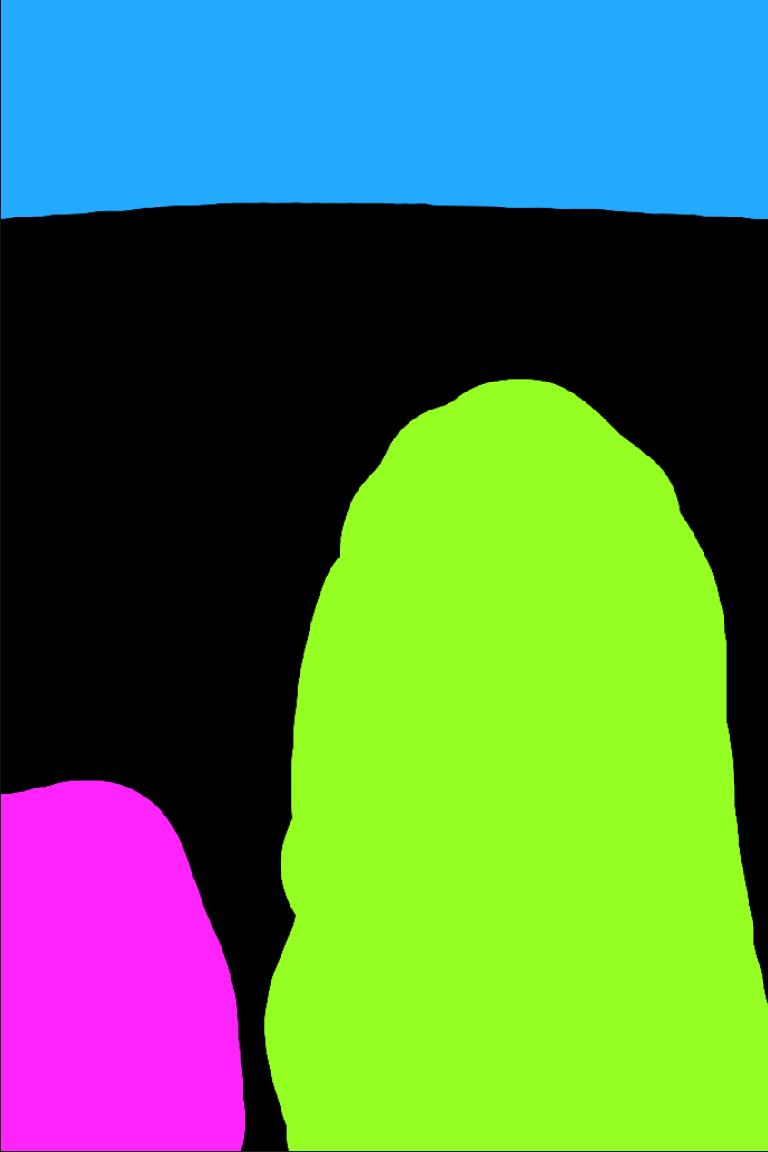
Download the example workflow JSON and sample region map PNG, or browse the example_workflow folder and instructions. Import the JSON into ComfyUI, upload regional_example.png in Load Image, and select your installed model files. The example uses the 4,335-step adapter, 30 sampling steps, CFG 4 and strength 1.0.

3D pose control example

User-provided ComfyUI example: condition (left), generated image (right). Embedded workflow metadata is removed. See the 3D pose document for training and evaluation limits.
3D pose example workflow and sample input

Sample pose condition (768 × 1152):

Download the example workflow JSON and sample pose PNG, or browse the example_workflow folder and instructions. Import the JSON into ComfyUI, upload 3dpose_example.png in Load Image, and select your installed model files. The example uses the 6,200-step adapter, 30 sampling steps, CFG 4 and strength 1.0.

Advanced workflow: 3D pose + regional control

Download the advanced workflow JSON. This example uses ComfyUI_toyxyz_test_nodes for 3D Pose Editor, ComfyCouple Region painter, and ComfyCouple Mask, together with ComfyUI-Anima-LLLite. It combines anima_3dpose_6200 and anima_regional_4335 on Anima Base 1.0, with per-person prompts and editable region masks.
Keep the regional ControlNet's end_percent low (the supplied example uses 0.3) to end its influence earlier in sampling. Alternatively, paint additional mask areas in ComfyCouple Region painter to expand or refine each person's region. Adjust these areas to cover the intended character, including clothing beyond the body silhouette. The pose adapter uses end_percent = 1.0, and both adapters have preserve_wrapper = true so their controls can be combined. These are example settings; adjust them to the scene.
See the advanced workflow instructions for setup and saved settings.
How to use
- Use an Anima-compatible ComfyUI setup with ComfyUI-Anima-LLLite.
- Download the adapter and place it in the
controlnetmodel search path (ComfyUI/models/controlnet/, or an external directory configured forcontrolnet). - Load Anima Base 1.0, its compatible text encoder and VAE. In Apply Anima ControlNet-LLLite (sd-scripts) (
AnimaLLLiteApply_sdscripts), select the adapter and connect the model and RGB control image. - Connect the patched model to the sampler and use your usual positive/negative prompts. Keep the control image's aspect ratio aligned with the output canvas.
For anima_regional_4335, start with strength 1.0, start/end 0.0/1.0, 30 sampling steps, and CFG 4. Use the same seed when comparing results.
For anima_3dpose_6200, use a shaded RGB 3D-mesh condition. Native evaluation used strength/multiplier 1.0, 30 sampling steps, CFG 4 and flow shift 3; see model-specific usage.
Dataset
anima_regional_4335 was trained on toyxyz/booruregion_10k: paired target images, RGB region maps, and captions. The training split contains 10,000 pairs (3,834 Danbooru originals and 6,166 Anima-generated images), with 120 validation and 120 test pairs.
Full dataset provenance, measured training time, steps, batch size, architecture, parameters, file hashes, evaluation limits, and source terms are recorded in the model-specific document and its training JSON.
anima_3dpose_6200 was trained on toyxyz/booru3dpose_10k: 10,080 training pairs (6,220 Anima-generated and 3,860 Danbooru originals), with 10 validation and 10 test pairs, both generated-only. Details, measured timings, full-state continuation, file SHA256 and limitations are in its document and training JSON.
Acknowledgements
We sincerely thank Kohya S. for the ControlNet-LLLite training and inference implementations, publicly released weights, and detailed technical documentation. These adapters were trained with sd-scripts and use ComfyUI-Anima-LLLite for the shared ComfyUI examples.
We also thank CircleStone Labs and Comfy Org for releasing the Anima base model.
License
These weights are derivatives of Anima and are subject to the CircleStone Labs Non-Commercial License. Please refer to the linked upstream license for the full terms.
Model tree for toyxyz/Anima_ControlNet-LLLite
Base model
nvidia/Cosmos-Predict2-2B-Text2Image