

Anima example workflows
Examples for the 3D pose and RGB regional adapters.
3D pose example workflow
Files:
- 3dpose_example.json: importable ComfyUI workflow.
- 3dpose_example.png: sample RGB 3D-mesh pose condition (768 × 1152).
- 3dpose_example_workflow.png: workflow screenshot showing the condition, node connections and generated preview.

Use
- Install ComfyUI-Anima-LLLite in an Anima-compatible ComfyUI setup.
- Import
3dpose_example.jsonand upload3dpose_example.pngin Load Image. - Select the compatible models in the loader nodes:
anima-base-v1.0.safetensors,qwen_3_06b_base.safetensors,qwen_image_vae.safetensors, and anima_3dpose_6200.safetensors. Obtain the base components from circlestone-labs/Anima. - Generate using the workflow's existing prompt and sampler settings. The node is Apply Anima ControlNet-LLLite (sd-scripts) (
AnimaLLLiteApply_sdscripts).
The supplied settings are 768 × 1152, batch 1, 30 steps, CFG 4, er_sde / simple, denoise 1.0, LLLite strength 1.0, active window 0.0–1.0, and preserve wrapper enabled. The saved seed is 85793728931883, with randomize enabled; choose fixed seed handling for repeatable comparisons.
The shared JSON uses portable published model filenames and the included sample filename. The original screenshot shows model dropdowns with subfolder prefixes; adjust the dropdowns to your own installed model filenames. Node links, layout, prompts and sampling settings are preserved. PNG workflow/text/EXIF metadata is removed while visible pixels are unchanged; import the separate JSON to load the workflow.
This is a user-supplied standalone 3D-pose example. It was inspected and packaged here; no new generation or quantitative evaluation was performed for this upload.
Preview


Regional control example workflow
Files:
- regional_example.json: importable ComfyUI workflow.
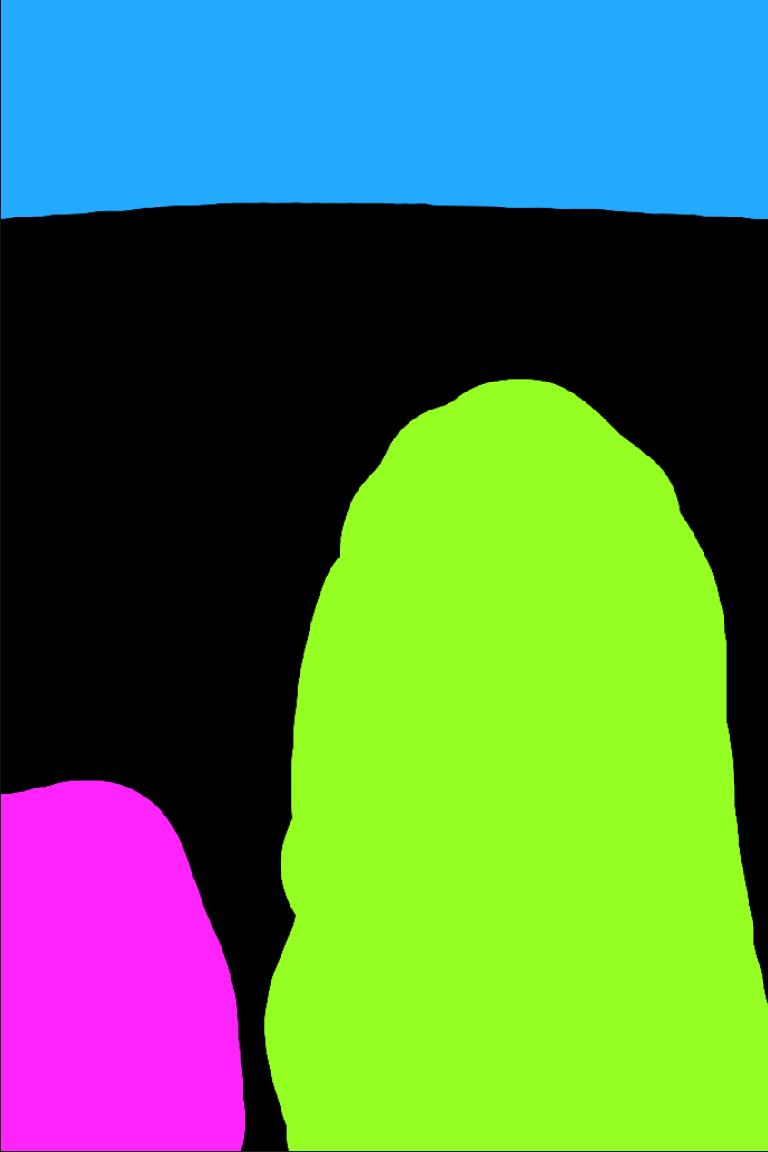
- regional_example.png: sample RGB instance-color region map (768 × 1152).
- regional_example_workflow.png: workflow screenshot showing the condition, node connections and generated preview.

Use
- Install ComfyUI-Anima-LLLite in an Anima-compatible ComfyUI setup.
- Import
regional_example.jsonand uploadregional_example.pngin Load Image. - Select the compatible models in the loader nodes:
anima-base-v1.0.safetensors,qwen_3_06b_base.safetensors,qwen_image_vae.safetensors, and anima_regional_4335.safetensors. Obtain the base components from circlestone-labs/Anima. - Generate using the workflow's existing prompt and sampler settings. The node is Apply Anima ControlNet-LLLite (sd-scripts) (
AnimaLLLiteApply_sdscripts).
The sample region map and output canvas are 768 × 1152, batch 1, 30 steps, CFG 4, er_sde / simple, denoise 1.0, LLLite strength 1.0, active window 0.0–1.0, and preserve wrapper enabled. The saved seed is 965383411713769, with randomize enabled; choose fixed seed handling for repeatable comparisons.
Colors are region identifiers, not fixed semantic classes; black marks unassigned space. The sample map was resized to 768 × 1152 with nearest-neighbor resampling to preserve the flat region colors and boundaries. The control node resizes the supplied region map to the output canvas.
The shared JSON uses portable published model filenames and the included sample filename. The original screenshot shows model dropdowns with subfolder prefixes; adjust the dropdowns to your own installed model filenames. Node links, layout, prompts and sampling settings are preserved. PNG workflow/text/EXIF metadata is removed. The workflow screenshot is unchanged; the sample map is resized as noted above. Import the separate JSON to load the workflow.
This is a user-supplied standalone regional-control example. It was inspected and packaged here; no new generation or quantitative evaluation was performed for this upload.
Preview

Advanced workflow: 3D pose + regional control
Files: advanced_region_3dpose_example.json and workflow screenshot.
Install ComfyUI_toyxyz_test_nodes for 3D Pose Editor (ToyxyzPose3DEditor), ComfyCouple Region painter (ComfyCoupleRegionPainter), and ComfyCouple Mask (ComfyCoupleMask). Install ComfyUI-Anima-LLLite for the two Apply Anima ControlNet-LLLite (sd-scripts) nodes. Import the JSON and select your installed Anima Base 1.0, qwen_3_06b_base.safetensors, qwen_image_vae.safetensors, anima_3dpose_6200.safetensors, and anima_regional_4335.safetensors.
The saved workflow includes two editable bodies, their pose/camera/lighting state, painter masks, and per-person prompts. It applies the 3D pose adapter first, then the regional adapter, then ComfyCouple Mask regional prompting. Both adapters use strength 1.0, start 0.0, and preserve_wrapper = true. The pose adapter ends at 1.0; the regional adapter ends at 0.3.
Keep the regional ControlNet's end_percent low, using 0.3 as the supplied example, to release regional guidance earlier. Alternatively, paint additional mask areas in ComfyCouple Region painter to expand or refine each character's region, including areas for clothing outside the body silhouette. Choose the corresponding character layer when editing its mask and prompt.
Saved sampling settings: 768 × 1152, batch 1, 30 steps, CFG 4, er_sde / simple, denoise 1.0, seed 43365297866659 with randomize enabled. The editor and painter are saved at 768 × 1024; these original settings are preserved. Align their dimensions with the output canvas if you want matching aspect ratios. Choose fixed seed handling for repeatable comparisons.
The published JSON uses portable model filenames. Pose state, embedded masks, prompts, node positions, connections, and generation settings are preserved. The screenshot shows the original model subfolders; select the equivalent installed files. Screenshot metadata is removed without changing its visible pixels. Import the separate JSON to load the workflow.
This is a user-provided combined-control example; no new generation or quantitative evaluation was performed for this upload.
