
Transformers documentation
TVP
このモデルは2023年3月9日にHF papersで公開され、2023年11月22日にHugging Face Transformersに貢献されました。
TVP
概要
テキストビジュアルプロンプティング(TVP)フレームワークは、Yimeng Zhang、Xin Chen、Jinghan Jia、Sijia Liu、Ke Ding による論文 Text-Visual Prompting for Efficient 2D Temporal Video Grounding で提案されました。
論文の抄録は以下の通りです。
本論文では、長いトリムされていない動画内のテキスト文で記述された瞬間の開始/終了時刻を予測することを目的とする、時間的ビデオグラウンディング(TVG)の問題を研究する。細粒度の3D視覚特徴の恩恵により、TVG技術は近年目覚ましい進歩を遂げている。しかし、3D畳み込みニューラルネットワーク(CNN)の高い複雑性により、高密度な3D視覚特徴の抽出には時間がかかり、大量のメモリと計算リソースを必要とする。効率的なTVGに向けて、我々は新しいテキスト・ビジュアルプロンプティング(TVP)フレームワークを提案する。このフレームワークでは、最適化された摂動パターン(我々はこれを「プロンプト」と呼ぶ)を、TVGモデルの視覚入力とテキスト特徴の両方に組み込む。3D CNNとは対照的に、TVPを用いることで、2D TVGモデルにおいて視覚エンコーダと言語エンコーダを効果的に共同学習でき、低複雑性のスパースな2D視覚特徴のみを用いてクロスモーダル特徴融合の性能を向上させることを示す。さらに、TVGの効率的な学習のために、Temporal-Distance IoU(TDIoU)損失を提案する。Charades-STAとActivityNet Captionsという2つのベンチマークデータセットでの実験により、提案するTVPが2D TVGの性能を大幅に向上させること(例えば、Charades-STAでは9.79%の改善、ActivityNet Captionsでは30.77%の改善)と、3D視覚特徴を用いたTVGと比較して5倍の推論高速化を実現することが実証された。
本研究では、テキスト文で記述された特定のイベントの開始時刻と終了時刻を長尺動画内で特定するプロセスである、時間的ビデオグラウンディング(TVG)に焦点を当てています。TVGを強化するために、テキスト・ビジュアルプロンプティング(TVP)が提案されています。TVPでは、TVGモデルのビジュアル(画像ベース)およびテキスト(単語ベース)の入力コンポーネントの両方に、特別に設計されたパターンである「プロンプト」を統合します。これらのプロンプトは追加の空間・時間的文脈を提供し、モデルが動画内のイベントのタイミングを正確に特定する能力を向上させます。このアプローチでは、3D入力ではなく2Dビジュアル入力を使用します。3D入力はより詳細な空間・時間的情報を提供しますが、処理に時間がかかるという欠点があります。プロンプティング手法と2D入力の組み合わせにより、より効率的に同レベルの文脈と精度を提供することを目的としています。
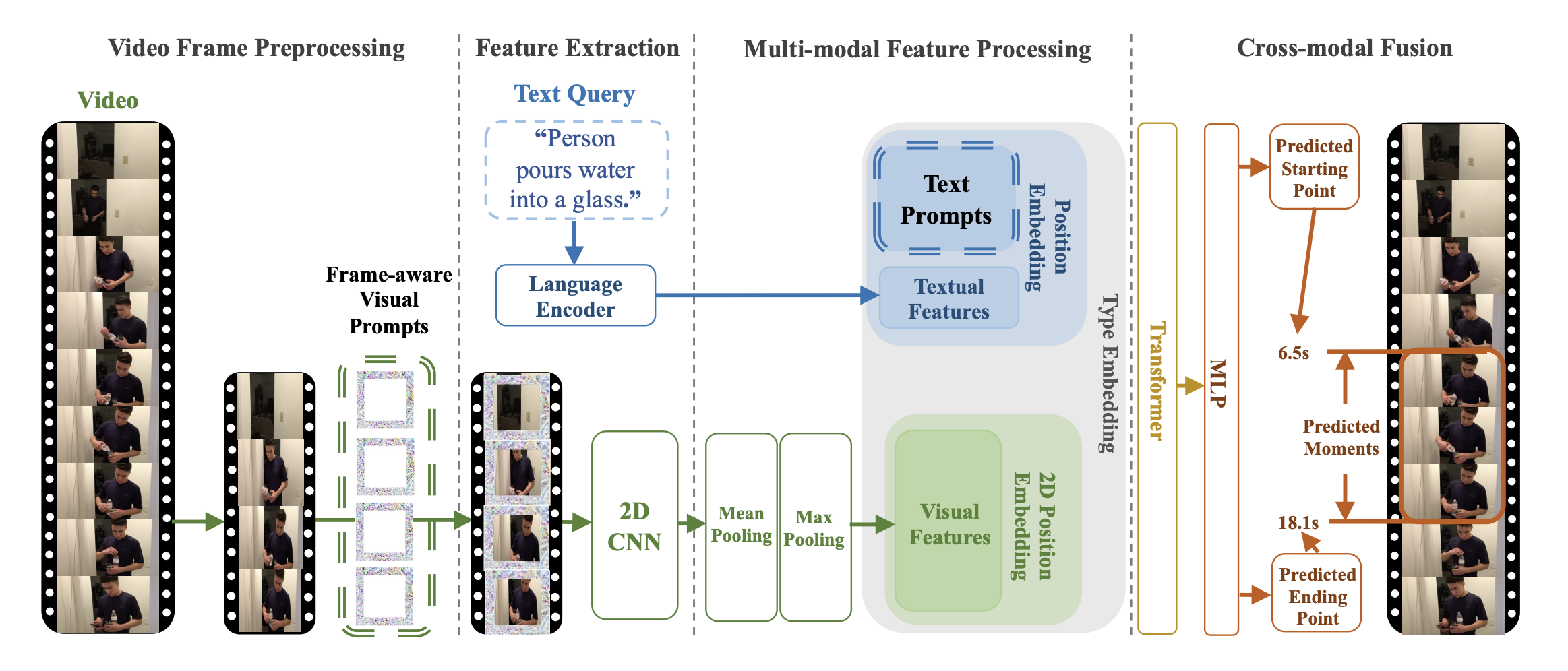 TVP architecture. Taken from the original paper.
このモデルはJiqing Feng氏によって提供されました。元のコードはこちらで確認できます。
使用のコツと例
プロンプトは、最適化された摂動パターンであり、入力される動画フレームやテキスト特徴量に追加されます。ユニバーサルセットとは、いかなる入力に対しても同一のプロンプトセットを使用することを指し、入力の内容に関わらず、これらのプロンプトがすべての動画フレームとテキスト特徴量に一貫して追加されることを意味します。
TVPは、ビジュアルエンコーダーとクロスモーダルエンコーダーで構成されています。それぞれサンプリングされた動画フレームとテキスト特徴に統合される、ユニバーサルなビジュアルプロンプトとテキストプロンプトのセットです。特に、1つのトリムされていない動画から均等にサンプリングされたフレームに対して、異なるビジュアルプロンプトのセットが順番に適用されます。
このモデルの目的は、学習可能なプロンプトを視覚入力とテキスト特徴の両方に組み込み、時間的ビデオグラウンディング(TVG)問題に対応することです。 原理的には、提案されたアーキテクチャには、任意の視覚エンコーダーやクロスモーダルエンコーダーを適用できます。
TvpProcessor は BertTokenizer と TvpImageProcessor を単一のインスタンスにラップし、それぞれテキストのエンコードと画像の準備を行います。
次の例では、TvpProcessorとTvpForVideoGroundingを使用して、時間的ビデオグラウンディングを実行する方法を示します。
import av
import cv2
import numpy as np
from huggingface_hub import hf_hub_download

from transformers import AutoProcessor, TvpForVideoGrounding


def pyav_decode(container, sampling_rate, num_frames, clip_idx, num_clips, target_fps):
    '''
    Convert the video from its original fps to the target_fps and decode the video with PyAV decoder.
    Args:
        container (container): pyav container.
        sampling_rate (int): frame sampling rate (interval between two sampled frames).
        num_frames (int): number of frames to sample.
        clip_idx (int): if clip_idx is -1, perform random temporal sampling.
            If clip_idx is larger than -1, uniformly split the video to num_clips
            clips, and select the clip_idx-th video clip.
        num_clips (int): overall number of clips to uniformly sample from the given video.
        target_fps (int): the input video may have different fps, convert it to
            the target video fps before frame sampling.
    Returns:
        frames (tensor): decoded frames from the video. Return None if the no
            video stream was found.
        fps (float): the number of frames per second of the video.
    '''
    video = container.streams.video[0]
    fps = float(video.average_rate)
    clip_size = sampling_rate * num_frames / target_fps * fps
    delta = max(num_frames - clip_size, 0)
    start_idx = delta * clip_idx / num_clips
    end_idx = start_idx + clip_size - 1
    timebase = video.duration / num_frames
    video_start_pts = int(start_idx * timebase)
    video_end_pts = int(end_idx * timebase)
    seek_offset = max(video_start_pts - 1024, 0)
    container.seek(seek_offset, any_frame=False, backward=True, stream=video)
    frames = {}
    for frame in container.decode(video=0):
        if frame.pts < video_start_pts:
            continue
        frames[frame.pts] = frame
        if frame.pts > video_end_pts:
            break
    frames = [frames[pts] for pts in sorted(frames)]
    return frames, fps


def decode(container, sampling_rate, num_frames, clip_idx, num_clips, target_fps):
    '''
    Decode the video and perform temporal sampling.
    Args:
        container (container): pyav container.
        sampling_rate (int): frame sampling rate (interval between two sampled frames).
        num_frames (int): number of frames to sample.
        clip_idx (int): if clip_idx is -1, perform random temporal sampling.
            If clip_idx is larger than -1, uniformly split the video to num_clips
            clips, and select the clip_idx-th video clip.
        num_clips (int): overall number of clips to uniformly sample from the given video.
        target_fps (int): the input video may have different fps, convert it to
            the target video fps before frame sampling.
    Returns:
        frames (tensor): decoded frames from the video.
    '''
    assert clip_idx >= -2, f"Not a valid clip_idx {clip_idx}"
    frames, fps = pyav_decode(container, sampling_rate, num_frames, clip_idx, num_clips, target_fps)
    clip_size = sampling_rate * num_frames / target_fps * fps
    index = np.linspace(0, clip_size - 1, num_frames)
    index = np.clip(index, 0, len(frames) - 1).astype(np.int64)
    frames = np.array([frames[idx].to_rgb().to_ndarray() for idx in index])
    frames = frames.transpose(0, 3, 1, 2)
    return frames


file = hf_hub_download(repo_id="Intel/tvp_demo", filename="AK2KG.mp4", repo_type="dataset")
model = TvpForVideoGrounding.from_pretrained("Intel/tvp-base", device_map="auto")

decoder_kwargs = dict(
    container=av.open(file, metadata_errors="ignore"),
    sampling_rate=1,
    num_frames=model.config.num_frames,
    clip_idx=0,
    num_clips=1,
    target_fps=3,
)
raw_sampled_frms = decode(**decoder_kwargs)

text = "a person is sitting on a bed."
processor = AutoProcessor.from_pretrained("Intel/tvp-base")
model_inputs = processor(
    text=[text], videos=list(raw_sampled_frms), return_tensors="pt", max_text_length=100#, size=size
)

model_inputs["pixel_values"] = model_inputs["pixel_values"].to(model.dtype)
output = model(**model_inputs)

def get_video_duration(filename):
    cap = cv2.VideoCapture(filename)
    if cap.isOpened():
        rate = cap.get(5)
        frame_num = cap.get(7)
        duration = frame_num/rate
        return duration
    return -1

duration = get_video_duration(file)
start, end = processor.post_process_video_grounding(output.logits, duration)

print(f"The time slot of the video corresponding to the text \"{text}\" is from {start}s to {end}s")
ヒント:
- この TVP の実装では、BertTokenizer を使用してテキスト埋め込みを生成し、Resnet-50 モデルを使用して視覚埋め込みを計算します。
- 事前学習済みtvp-baseのチェックポイントがリリースされました。
- TVPのTemporal Video Groundingタスクにおける性能については、Table 2を参照してください。
TvpConfig
クラス transformers.TvpConfig
< source >( transformers_version: str | None = Nonearchitectures: list[str] | None = Noneoutput_hidden_states: bool | None = Falsereturn_dict: bool | None = Truedtype: str | torch.dtype | None = Nonechunk_size_feed_forward: int = 0is_encoder_decoder: bool = Falseid2label: dict[int, str] | dict[str, str] | None = Nonelabel2id: dict[str, int] | dict[str, str] | None = Noneproblem_type: Literal['regression', 'single_label_classification', 'multi_label_classification'] | None = Nonebackbone_config: dict | transformers.configuration_utils.PreTrainedConfig | None = Nonedistance_loss_weight: float = 1.0duration_loss_weight: float = 0.1visual_prompter_type: str = 'framepad'visual_prompter_apply: str = 'replace'visual_prompt_size: int = 96max_img_size: int = 448num_frames: int = 48vocab_size: int = 30522type_vocab_size: int = 2hidden_size: int = 768intermediate_size: int = 3072num_hidden_layers: int = 12num_attention_heads: int = 12max_position_embeddings: int = 512max_grid_col_position_embeddings: int = 100max_grid_row_position_embeddings: int = 100hidden_dropout_prob: float | int = 0.1hidden_act: str = 'gelu'layer_norm_eps: float = 1e-12initializer_range: float = 0.02attention_probs_dropout_prob: float | int = 0.1pad_token_id: int | None = None )
パラメータ
- backbone_config (
Union[dict, ~configuration_utils.PreTrainedConfig], 任意) — バックボーンモデルの設定です。 - distance_loss_weight (
float、任意、デフォルト値は 1.0) — 距離損失の重みです。 - duration_loss_weight (
float、任意、デフォルト値は 0.1) — duration loss の重みです。 - visual_prompter_type (
str、任意、デフォルトは"framepad") — ビジュアルプロンプトの種類。パディングの種類です。Framepad は各フレームへのパディングを意味します。“framepad” または “framedownpad” のいずれかである必要があります。 - visual_prompter_apply (
str、optional、デフォルトは"replace") — ビジュアルプロンプトを適用する方法です。Replace は、プロンプトの値を使用してビジュアル入力内の元の値を変更することを意味します。“replace”、“add”、“remove” のいずれかである必要があります。 - visual_prompt_size (
int、任意、デフォルトは 96)— ビジュアルプロンプトのサイズです。 - max_img_size (
int、任意、デフォルト値は 448) — フレームの最大サイズ。 - num_frames (
int, 任意、デフォルトは 48) — 動画から抽出するフレーム数。 - vocab_size (
int、任意、デフォルトは30522) — モデルの語彙サイズ。input_idsで表現できるトークンの種類数を定義します。 - type_vocab_size (
int、任意、デフォルトは2) —token_type_idsの語彙サイズです。 - hidden_size (
int、任意、デフォルトは768) — 隠れ表現の次元数。 - intermediate_size (
int、任意、デフォルトは3072) — MLP 表現の次元数。 - num_hidden_layers (
int、任意、デフォルトは12) — Transformer デコーダーの隠れ層の数。 - num_attention_heads (
int、任意、デフォルトは12) — Transformerデコーダーの各アテンション層におけるアテンションヘッドの数。 - max_position_embeddings (
int、任意、デフォルト値は 512) — このモデルが使用される可能性のある最大シーケンス長です。念のため、大きな値に設定するのが一般的です(例: 512、1024、2048 など)。 - max_grid_col_position_embeddings (
int、任意、デフォルト値は 100) — 動画フレームにおける水平方向のパッチの最大数です。 - max_grid_row_position_embeddings (
int、任意、デフォルト値は 100)— 動画フレームにおける縦方向のパッチの最大数です。 - hidden_dropout_prob (
Union[float, int]、任意、デフォルト値は0.1) — embeddings、encoder、pooler 内のすべての全結合層における dropout 確率です。 - hidden_act (
str、任意、デフォルトはgelu) — デコーダーで使用する非線形活性化関数(関数または文字列)。例えば、"gelu"、"relu"、"silu"など。 - layer_norm_eps (
float、任意、デフォルトは1e-12) — レイヤーノーマル層で使用する epsilon です。 - initializer_range (
float、任意、デフォルトは0.02) — すべての重み行列を初期化するための truncated_normal_initializer の標準偏差です。 - attention_probs_dropout_prob (
Union[float, int]、任意、デフォルトは0.1) — アテンション確率のドロップアウト率です。 - pad_token_id (
int, 任意) — 語彙内でパディングに使用されるトークン ID。
これは TvpModel の設定を保存するための設定クラスです。指定された引数に基づいて Tvp モデルをインスタンス化し、モデルのアーキテクチャを定義するために使用されます。デフォルト値で設定をインスタンス化すると、Intel/tvp-base と同様の設定が得られます。
設定オブジェクトはPreTrainedConfigを継承し、モデルの出力を制御するために使用できます。詳細については、PreTrainedConfigのドキュメントを参照してください。
TvpImageProcessor
クラス transformers.TvpImageProcessor
< source >( **kwargs: *<class 'transformers.models.tvp.image_processing_tvp.TvpImageProcessorKwargs'> )
パラメータ
- do_convert_rgb (
bool、kwargs、任意) — 画像を RGB に変換するかどうかを指定します。 - do_resize (
bool、kwargs、任意、デフォルトはTrue) — 画像をリサイズするかどうか。 - size (
Annotated[int | list[int] | tuple[int, ...] | dict[str, int] | None, None], kwargs, デフォルトは{'longest_edge' -- 448}): モデルへの最大入力サイズを指定します。 - default_to_square (
bool、kwargs、任意、デフォルトはFalse) — size が整数の場合、リサイズ時に正方形の画像をデフォルトとするかどうか。 - crop_size (
Annotated[int | list[int] | tuple[int, ...] | dict[str, int] | None, None], kwargs、デフォルトは{'height' -- 448, 'width': 448}):center_cropを適用した後の出力画像のサイズ。 - resample (
Annotated[Union[int, PILImageResampling, NoneType], None], kwargs, デフォルトは2) — 画像のリサイズ時に使用するリサンプリングフィルタです。PILImageResamplingの列挙型のいずれかを使用できます。do_resizeがTrueに設定されている場合のみ、効果が現れます。 - do_rescale (
bool、kwargs、任意、デフォルトはTrue) — 画像をリスケールするかどうかを指定します。 - rescale_factor (
float、kwargs、任意、デフォルト値は0.00392156862745098) —do_rescaleがTrueに設定されている場合、画像をリスケールするための係数です。 - do_normalize (
bool、kwargs、optional、デフォルトはTrue) — 画像を正規化するかどうかを指定します。 - image_mean (
Union[float, list[float], tuple[float, ...]]、kwargs、任意、デフォルトは[0.5, 0.5, 0.5]) — 正規化に使用する画像の平均値。do_normalizeがTrueに設定されている場合のみ有効です。 - image_std (
Union[float, list[float], tuple[float, ...]]、kwargs、optional、デフォルト値は[0.5, 0.5, 0.5]) — 正規化に使用する画像の標準偏差。do_normalizeがTrueに設定されている場合のみ有効です。 - do_pad (
bool、kwargs、optional、デフォルトはTrue) — 画像をパディングするかどうか。パディングは、バッチ内の最大サイズに合わせるか、画像ごとに固定の正方形サイズに合わせるかのいずれかで行われます。具体的なパディング戦略はモデルによって異なります。 - pad_size (
Annotated[int | list[int] | tuple[int, ...] | dict[str, int] | None, None], kwargs, defaults to{'height' -- 448, 'width': 448}): The size in{"height": int, "width" int}to pad the images to. Must be larger than any image size provided for preprocessing. Ifpad_sizeis not provided, images will be padded to the largest height and width in the batch. Applied only whendo_pad=True. - do_center_crop (
bool、kwargs、optional、デフォルトはTrue) — 画像を中央クロップするかどうか。 - data_format (
Union[str, ~image_utils.ChannelDimension]、kwargs、任意) — サポートされているのはChannelDimension.FIRSTのみです。slow processors との互換性のために追加されました。 - input_data_format (
Union[str, ~image_utils.ChannelDimension], kwargs, 省略可) — 入力画像のチャネル次元の形式です。設定されていない場合、入力画像からチャネル次元の形式が推測されます。次のいずれかになります:"channels_first"またはChannelDimension.FIRST: (num_channels, height, width) 形式の画像。"channels_last"またはChannelDimension.LAST: (高さ, 幅, チャネル数) 形式の画像。"none"またはChannelDimension.NONE: (height, width) 形式の画像。
- device (
Annotated[Union[str, torch.device, NoneType], None], kwargs) — 動画を処理するデバイスです。未設定の場合、入力動画からデバイスが推論されます。 - return_tensors (
Annotated[str | ~utils.generic.TensorType | None, None], kwargs) —'pt'に設定されている場合はスタックされたテンソルを返し、それ以外の場合はテンソルのリストを返します。 - disable_grouping (
bool、kwargs、任意) — サイズごとに画像をグループ化してバッチ処理するのではなく、個別に処理するためにグループ化を無効にするかどうか。None の場合、画像が CPU にある場合は True、それ以外の場合は False に設定されます。この選択は、https://github.com/huggingface/transformers/pull/38157 に詳しく記載されている経験則に基づいています。 - image_seq_length (
int、kwargs、任意) — 入力内の各画像に使用される画像トークンの数です。 後方互換性のために追加されましたが、将来のモデルではプロセッサの属性として設定されるべきです。 - do_flip_channel_order (
bool、kwargs、任意、デフォルトはself.do_flip_channel_order) — 画像のチャネル順序を RGB から BGR に反転するかどうかを指定します。 - constant_values (
float、kwargs、またはList[float]、任意、デフォルトはself.constant_values) —pad_modeが'constant'の場合に、パディング領域を埋めるために使用される値。 - pad_mode (
str、kwargs、任意、デフォルトはself.pad_mode) — 使用するパディングモード —'constant'、'edge'、'reflect'、または'symmetric'。
TvpImageProcessor 画像プロセッサを構築します。
preprocess
< source >( videos: typing.Union[ForwardRef('PIL.Image.Image'), numpy.ndarray, ForwardRef('torch.Tensor'), list['PIL.Image.Image'], list[numpy.ndarray], list['torch.Tensor'], list[typing.Union[ForwardRef('PIL.Image.Image'), numpy.ndarray, ForwardRef('torch.Tensor'), list['PIL.Image.Image'], list[numpy.ndarray], list['torch.Tensor']]], list[list[typing.Union[ForwardRef('PIL.Image.Image'), numpy.ndarray, ForwardRef('torch.Tensor'), list['PIL.Image.Image'], list[numpy.ndarray], list['torch.Tensor']]]]]**kwargs: *<class 'transformers.models.tvp.image_processing_tvp.TvpImageProcessorKwargs'> ) → ~image_processing_base.BatchFeature
パラメータ
- videos (
ImageInputまたはlist[ImageInput]またはlist[list[ImageInput]]) — 前処理を行うフレームです。 - do_convert_rgb (
bool、kwargs、任意) — 画像を RGB に変換するかどうかを指定します。 - do_resize (
bool、kwargs、optional) — 画像をリサイズするかどうか。 - size (
Annotated[int | list[int] | tuple[int, ...] | dict[str, int] | None, None], kwargs) — モデルへの最大入力次元を記述します。 - default_to_square (
bool、kwargs、任意) — サイズが整数の場合、リサイズ時に正方形の画像をデフォルトとするかどうか。 - crop_size (
Annotated[int | list[int] | tuple[int, ...] | dict[str, int] | None, None], kwargs) —center_cropを適用した後の出力画像のサイズ。 - resample (
Annotated[Union[int, PILImageResampling, NoneType], None], kwargs) — 画像のリサイズ時に使用するリサンプリングフィルタ。PILImageResamplingの列挙型のいずれかを使用できます。do_resizeがTrueに設定されている場合のみ有効です。 - do_rescale (
bool、kwargs、optional) — 画像をリスケールするかどうかを指定します。 - rescale_factor (
float、kwargs、任意) —do_rescaleがTrueに設定されている場合、画像をリスケールするための係数。 - do_normalize (
bool, kwargs, optional) — 画像を正規化するかどうかを指定します。 - image_mean (
Union[float, list[float], tuple[float, ...]]、kwargs、optional) — 正規化に使用する画像の平均値。do_normalizeがTrueに設定されている場合のみ有効です。 - image_std (
Union[float, list[float], tuple[float, ...]], kwargs, optional) — 正規化に使用する画像の標準偏差。do_normalizeがTrueに設定されている場合のみ有効です。 - do_pad (
bool, kwargs, optional) — 画像をパディングするかどうかを指定します。パディングは、バッチ内の最大サイズに合わせるか、画像ごとに固定の正方形サイズに合わせるかのいずれかで行われます。具体的なパディング戦略はモデルによって異なります。 - pad_size (
Annotated[int | list[int] | tuple[int, ...] | dict[str, int] | None, None], kwargs) — 画像をパディングする{"height": int, "width" int}のサイズです。前処理に提供されるすべての画像サイズより大きくなければなりません。pad_sizeが指定されない場合、バッチ内の最大の幅と高さにパディングされます。do_pad=True.の場合のみ適用されます。 - do_center_crop (
bool, kwargs, optional) — 画像を中央クロップするかどうかを指定します。 - data_format (
Union[str, ~image_utils.ChannelDimension]、kwargs、任意) — サポートされているのはChannelDimension.FIRSTのみです。slow processors との互換性のために追加されました。 - input_data_format (
Union[str, ~image_utils.ChannelDimension], kwargs, 省略可) — 入力画像のチャネル次元の形式です。設定されていない場合、入力画像からチャネル次元の形式が推測されます。次のいずれかになります:"channels_first"またはChannelDimension.FIRST: (num_channels, height, width) 形式の画像。"channels_last"またはChannelDimension.LAST: (高さ, 幅, チャネル数) 形式の画像。"none"またはChannelDimension.NONE: (height, width) 形式の画像。
- device (
Annotated[Union[str, torch.device, NoneType], None], kwargs) — 動画を処理するデバイスです。未設定の場合、入力動画からデバイスが推論されます。 - return_tensors (
Annotated[str | ~utils.generic.TensorType | None, None], kwargs) —'pt'に設定されている場合はスタックされたテンソルを返し、それ以外の場合はテンソルのリストを返します。 - disable_grouping (
bool、kwargs、任意) — サイズごとに画像をグループ化してバッチ処理するのではなく、個別に処理するためにグループ化を無効にするかどうか。None の場合、画像が CPU にある場合は True、それ以外の場合は False に設定されます。この選択は、https://github.com/huggingface/transformers/pull/38157 に詳しく記載されている経験則に基づいています。 - image_seq_length (
int、kwargs、任意) — 入力内の各画像に使用される画像トークンの数です。 後方互換性のために追加されましたが、将来のモデルではプロセッサの属性として設定されるべきです。 - do_flip_channel_order (
bool、kwargs、任意、デフォルトはself.do_flip_channel_order) — 画像のチャネル順序を RGB から BGR に反転するかどうかを指定します。 - constant_values (
float、kwargs、またはList[float]、任意、デフォルトはself.constant_values) —pad_modeが'constant'の場合に、パディング領域を埋めるために使用される値。 - pad_mode (
str、kwargs、任意、デフォルトはself.pad_mode) — 使用するパディングモード —'constant'、'edge'、'reflect'、または'symmetric'。
戻り値
~image_processing_base.BatchFeature
- data (
dict) — call メソッド(‘pixel_values’ など)によって返される、リスト/配列/テンソルの辞書。 - tensor_type (
Union[None, str, TensorType]、省略可) — 初期化時に PyTorch/Numpy の Tensor 内の整数リストを変換するために、ここで tensor_type を指定できます。
TvpImageProcessorPil
クラス transformers.TvpImageProcessorPil
< source >( **kwargs: *<class 'transformers.models.tvp.image_processing_pil_tvp.TvpImageProcessorKwargs'> )
パラメータ
- do_convert_rgb (
bool、kwargs、任意) — 画像を RGB に変換するかどうかを指定します。 - do_resize (
bool、kwargs、任意、デフォルトはTrue) — 画像をリサイズするかどうか。 - size (
Annotated[int | list[int] | tuple[int, ...] | dict[str, int] | None, None], kwargs, デフォルトは{'longest_edge' -- 448}): モデルへの最大入力サイズを指定します。 - default_to_square (
bool、kwargs、任意、デフォルトはFalse) — size が整数の場合、リサイズ時に正方形の画像をデフォルトとするかどうか。 - crop_size (
Annotated[int | list[int] | tuple[int, ...] | dict[str, int] | None, None], kwargs、デフォルトは{'height' -- 448, 'width': 448}):center_cropを適用した後の出力画像のサイズ。 - resample (
Annotated[Union[int, PILImageResampling, NoneType], None], kwargs, デフォルトは2) — 画像のリサイズ時に使用するリサンプリングフィルタです。PILImageResamplingの列挙型のいずれかを使用できます。do_resizeがTrueに設定されている場合のみ、効果が現れます。 - do_rescale (
bool、kwargs、任意、デフォルトはTrue) — 画像をリスケールするかどうかを指定します。 - rescale_factor (
float、kwargs、任意、デフォルト値は0.00392156862745098) —do_rescaleがTrueに設定されている場合、画像をリスケールするための係数です。 - do_normalize (
bool、kwargs、optional、デフォルトはTrue) — 画像を正規化するかどうかを指定します。 - image_mean (
Union[float, list[float], tuple[float, ...]]、kwargs、任意、デフォルトは[0.5, 0.5, 0.5]) — 正規化に使用する画像の平均値。do_normalizeがTrueに設定されている場合のみ有効です。 - image_std (
Union[float, list[float], tuple[float, ...]]、kwargs、optional、デフォルト値は[0.5, 0.5, 0.5]) — 正規化に使用する画像の標準偏差。do_normalizeがTrueに設定されている場合のみ有効です。 - do_pad (
bool、kwargs、optional、デフォルトはTrue) — 画像をパディングするかどうか。パディングは、バッチ内の最大サイズに合わせるか、画像ごとに固定の正方形サイズに合わせるかのいずれかで行われます。具体的なパディング戦略はモデルによって異なります。 - pad_size (
Annotated[int | list[int] | tuple[int, ...] | dict[str, int] | None, None], kwargs, defaults to{'height' -- 448, 'width': 448}): The size in{"height": int, "width" int}to pad the images to. Must be larger than any image size provided for preprocessing. Ifpad_sizeis not provided, images will be padded to the largest height and width in the batch. Applied only whendo_pad=True. - do_center_crop (
bool、kwargs、optional、デフォルトはTrue) — 画像を中央クロップするかどうか。 - data_format (
Union[str, ~image_utils.ChannelDimension]、kwargs、任意) — サポートされているのはChannelDimension.FIRSTのみです。slow processors との互換性のために追加されました。 - input_data_format (
Union[str, ~image_utils.ChannelDimension], kwargs, 省略可) — 入力画像のチャネル次元の形式です。設定されていない場合、入力画像からチャネル次元の形式が推測されます。次のいずれかになります:"channels_first"またはChannelDimension.FIRST: (num_channels, height, width) 形式の画像。"channels_last"またはChannelDimension.LAST: (高さ, 幅, チャネル数) 形式の画像。"none"またはChannelDimension.NONE: (height, width) 形式の画像。
- device (
Annotated[Union[str, torch.device, NoneType], None], kwargs) — 動画を処理するデバイスです。未設定の場合、入力動画からデバイスが推論されます。 - return_tensors (
Annotated[str | ~utils.generic.TensorType | None, None], kwargs) —'pt'に設定されている場合はスタックされたテンソルを返し、それ以外の場合はテンソルのリストを返します。 - disable_grouping (
bool、kwargs、任意) — サイズごとに画像をグループ化してバッチ処理するのではなく、個別に処理するためにグループ化を無効にするかどうか。None の場合、画像が CPU にある場合は True、それ以外の場合は False に設定されます。この選択は、https://github.com/huggingface/transformers/pull/38157 に詳しく記載されている経験則に基づいています。 - image_seq_length (
int、kwargs、任意) — 入力内の各画像に使用される画像トークンの数です。 後方互換性のために追加されましたが、将来のモデルではプロセッサの属性として設定されるべきです。 - do_flip_channel_order (
bool、kwargs、任意、デフォルトはself.do_flip_channel_order) — 画像のチャネル順序を RGB から BGR に反転するかどうかを指定します。 - constant_values (
float、kwargs、またはList[float]、任意、デフォルトはself.constant_values) —pad_modeが'constant'の場合に、パディング領域を埋めるために使用される値。 - pad_mode (
str、kwargs、任意、デフォルトはself.pad_mode) — 使用するパディングモード —'constant'、'edge'、'reflect'、または'symmetric'。
TvpImageProcessor 画像プロセッサを構築します。
preprocess
< source >( videos: typing.Union[ForwardRef('PIL.Image.Image'), numpy.ndarray, ForwardRef('torch.Tensor'), list['PIL.Image.Image'], list[numpy.ndarray], list['torch.Tensor'], list[typing.Union[ForwardRef('PIL.Image.Image'), numpy.ndarray, ForwardRef('torch.Tensor'), list['PIL.Image.Image'], list[numpy.ndarray], list['torch.Tensor']]], list[list[typing.Union[ForwardRef('PIL.Image.Image'), numpy.ndarray, ForwardRef('torch.Tensor'), list['PIL.Image.Image'], list[numpy.ndarray], list['torch.Tensor']]]]]**kwargs: *<class 'transformers.models.tvp.image_processing_pil_tvp.TvpImageProcessorKwargs'> ) → ~image_processing_base.BatchFeature
パラメータ
- videos (
ImageInputまたはlist[ImageInput]またはlist[list[ImageInput]]) — 前処理を行うフレームです。 - do_convert_rgb (
bool、kwargs、任意) — 画像を RGB に変換するかどうかを指定します。 - do_resize (
bool、kwargs、optional) — 画像をリサイズするかどうか。 - size (
Annotated[int | list[int] | tuple[int, ...] | dict[str, int] | None, None], kwargs) — モデルへの最大入力次元を記述します。 - default_to_square (
bool、kwargs、任意) — サイズが整数の場合、リサイズ時に正方形の画像をデフォルトとするかどうか。 - crop_size (
Annotated[int | list[int] | tuple[int, ...] | dict[str, int] | None, None], kwargs) —center_cropを適用した後の出力画像のサイズ。 - resample (
Annotated[Union[int, PILImageResampling, NoneType], None], kwargs) — 画像のリサイズ時に使用するリサンプリングフィルタ。PILImageResamplingの列挙型のいずれかを使用できます。do_resizeがTrueに設定されている場合のみ有効です。 - do_rescale (
bool、kwargs、optional) — 画像をリスケールするかどうかを指定します。 - rescale_factor (
float、kwargs、任意) —do_rescaleがTrueに設定されている場合、画像をリスケールするための係数。 - do_normalize (
bool, kwargs, optional) — 画像を正規化するかどうかを指定します。 - image_mean (
Union[float, list[float], tuple[float, ...]]、kwargs、optional) — 正規化に使用する画像の平均値。do_normalizeがTrueに設定されている場合のみ有効です。 - image_std (
Union[float, list[float], tuple[float, ...]], kwargs, optional) — 正規化に使用する画像の標準偏差。do_normalizeがTrueに設定されている場合のみ有効です。 - do_pad (
bool, kwargs, optional) — 画像をパディングするかどうかを指定します。パディングは、バッチ内の最大サイズに合わせるか、画像ごとに固定の正方形サイズに合わせるかのいずれかで行われます。具体的なパディング戦略はモデルによって異なります。 - pad_size (
Annotated[int | list[int] | tuple[int, ...] | dict[str, int] | None, None], kwargs) — 画像をパディングする{"height": int, "width" int}のサイズです。前処理に提供されるすべての画像サイズより大きくなければなりません。pad_sizeが指定されない場合、バッチ内の最大の幅と高さにパディングされます。do_pad=True.の場合のみ適用されます。 - do_center_crop (
bool, kwargs, optional) — 画像を中央クロップするかどうかを指定します。 - data_format (
Union[str, ~image_utils.ChannelDimension]、kwargs、任意) — サポートされているのはChannelDimension.FIRSTのみです。slow processors との互換性のために追加されました。 - input_data_format (
Union[str, ~image_utils.ChannelDimension], kwargs, 省略可) — 入力画像のチャネル次元の形式です。設定されていない場合、入力画像からチャネル次元の形式が推測されます。次のいずれかになります:"channels_first"またはChannelDimension.FIRST: (num_channels, height, width) 形式の画像。"channels_last"またはChannelDimension.LAST: (高さ, 幅, チャネル数) 形式の画像。"none"またはChannelDimension.NONE: (height, width) 形式の画像。
- device (
Annotated[Union[str, torch.device, NoneType], None], kwargs) — 動画を処理するデバイスです。未設定の場合、入力動画からデバイスが推論されます。 - return_tensors (
Annotated[str | ~utils.generic.TensorType | None, None], kwargs) —'pt'に設定されている場合はスタックされたテンソルを返し、それ以外の場合はテンソルのリストを返します。 - disable_grouping (
bool、kwargs、任意) — サイズごとに画像をグループ化してバッチ処理するのではなく、個別に処理するためにグループ化を無効にするかどうか。None の場合、画像が CPU にある場合は True、それ以外の場合は False に設定されます。この選択は、https://github.com/huggingface/transformers/pull/38157 に詳しく記載されている経験則に基づいています。 - image_seq_length (
int、kwargs、任意) — 入力内の各画像に使用される画像トークンの数です。 後方互換性のために追加されましたが、将来のモデルではプロセッサの属性として設定されるべきです。 - do_flip_channel_order (
bool、kwargs、任意、デフォルトはself.do_flip_channel_order) — 画像のチャネル順序を RGB から BGR に反転するかどうかを指定します。 - constant_values (
float、kwargs、またはList[float]、任意、デフォルトはself.constant_values) —pad_modeが'constant'の場合に、パディング領域を埋めるために使用される値。 - pad_mode (
str、kwargs、任意、デフォルトはself.pad_mode) — 使用するパディングモード —'constant'、'edge'、'reflect'、または'symmetric'。
戻り値
~image_processing_base.BatchFeature
- data (
dict) — call メソッド(‘pixel_values’ など)によって返される、リスト/配列/テンソルの辞書。 - tensor_type (
Union[None, str, TensorType]、省略可) — 初期化時に PyTorch/Numpy の Tensor 内の整数リストを変換するために、ここで tensor_type を指定できます。
TvpProcessor
クラス transformers.TvpProcessor
< source >( image_processor = Nonetokenizer = None**kwargs )
画像プロセッサとトークナイザーを単一のプロセッサにラップするTvpProcessorを構築します。
TvpProcessor は、TvpImageProcessor と BertTokenizer のすべての機能を提供します。詳細については、~TvpImageProcessor および ~BertTokenizer を参照してください。
__call__
< source >( images: typing.Union[ForwardRef('PIL.Image.Image'), numpy.ndarray, ForwardRef('torch.Tensor'), list['PIL.Image.Image'], list[numpy.ndarray], list['torch.Tensor'], NoneType] = Nonetext: str | list[str] | list[list[str]] | None = Nonevideos: typing.Union[list['PIL.Image.Image'], numpy.ndarray, ForwardRef('torch.Tensor'), list[numpy.ndarray], list['torch.Tensor'], list[list['PIL.Image.Image']], list[list[numpy.ndarray]], list[list['torch.Tensor']], transformers.video_utils.URL, list[transformers.video_utils.URL], list[list[transformers.video_utils.URL]], transformers.video_utils.Path, list[transformers.video_utils.Path], list[list[transformers.video_utils.Path]], NoneType] = Noneaudio: typing.Union[numpy.ndarray, ForwardRef('torch.Tensor'), collections.abc.Sequence[numpy.ndarray], collections.abc.Sequence['torch.Tensor'], NoneType] = None**kwargs: *<class 'transformers.processing_utils.ProcessingKwargs'> )
パラメータ
- images (
Union[PIL.Image.Image, numpy.ndarray, torch.Tensor, list[PIL.Image.Image], list[numpy.ndarray], list[torch.Tensor]], 任意) — 前処理対象の画像です。ピクセル値が 0 から 255 の範囲にある単一の画像またはバッチを想定しています。ピクセル値が 0 から 1 の範囲にある画像を渡す場合は、do_rescale=Falseを設定してください。 - text (
Union[str, list[str], list[list[str]]]、省略可) — エンコード対象のシーケンスまたはシーケンスのバッチです。各シーケンスは文字列、または文字列のリスト(事前トークン化済み文字列)であることができます。事前トークン化済みの入力を渡す場合は、バッチ入力との曖昧さを避けるためにis_split_into_words=Trueを設定してください。 - videos (
Union[list[PIL.Image.Image], numpy.ndarray, torch.Tensor, list[numpy.ndarray], list[torch.Tensor], list[list[PIL.Image.Image]], list[list[numpy.ndarray]], list[list[torch.Tensor]], ~video_utils.URL, list[~video_utils.URL], list[list[~video_utils.URL]], ~video_utils.Path, list[~video_utils.Path], list[list[~video_utils.Path]]], 任意) — 前処理を行う動画です。ピクセル値が 0 から 255 の範囲にある、単一の動画またはバッチの動画を想定しています。ピクセル値が 0 から 1 の範囲にある動画を渡す場合は、do_rescale=Falseを設定してください。 - audio (
Union[numpy.ndarray, torch.Tensor, collections.abc.Sequence[numpy.ndarray], collections.abc.Sequence[torch.Tensor]], 任意) — 準備対象のオーディオまたはオーディオのバッチです。各オーディオは NumPy 配列または PyTorch テンソルであることができます。 NumPy 配列/PyTorch テンソルの場合、各オーディオの形状は (C, T) である必要があります。ここで C はチャネル数、T はオーディオのサンプル長です。 - return_tensors (
strまたは TensorType, 省略可) — 設定すると、特定のフレームワークのテンソルを返します。使用可能な値は以下の通りです:'pt': PyTorchのtorch.Tensorオブジェクトを返します。'np': NumPyのnp.ndarrayオブジェクトを返します。
- **kwargs (ProcessingKwargs、任意) — 各モダリティ(テキスト、画像、動画、音声)の追加処理オプション。モデル固有のパラメータは上記にリストされています。サポートされている引数の完全なリストについては、TypedDictクラスを参照してください。
TvpModel
クラス transformers.TvpModel
< source >( config: TvpConfig )
パラメータ
- config (TvpConfig) — モデルのパラメータをすべて含むモデル設定クラスです。設定ファイルで初期化しても、モデルに関連する重みは読み込まれず、設定のみが読み込まれます。モデルの重みをロードするには、from_pretrained() メソッドを参照してください。
Modelは、特定のヘッドを付加せずに、BaseModelOutputWithPoolingオブジェクトを出力する素のTransformerです。
このモデルは PreTrainedModel を継承しています。すべてのモデルに実装されている汎用的なメソッド(ダウンロードや保存、入力埋め込みのリサイズ、ヘッドのプルーニングなど)については、スーパークラスのドキュメントを参照してください。
このモデルは、PyTorchのtorch.nn.Moduleのサブクラスでもあります。 通常のPyTorch Moduleとして使用し、一般的な使用方法や動作に関する詳細については、PyTorchのドキュメントを参照してください。
forward
< source >( input_ids: typing.Optional[torch.LongTensor] = Nonepixel_values: typing.Optional[torch.FloatTensor] = Noneattention_mask: typing.Optional[torch.LongTensor] = Noneoutput_attentions: bool | None = Noneoutput_hidden_states: bool | None = Nonereturn_dict: bool | None = Noneinterpolate_pos_encoding: bool = False**kwargs ) → BaseModelOutputWithPooling or tuple(torch.FloatTensor)
パラメータ
- input_ids (
torch.LongTensorの形状(batch_size, sequence_length), 、省略可) — 語彙における入力シーケンスのトークンインデックスです。デフォルトではパディングは無視されます。インデックスはAutoTokenizerを使用して取得できます。詳細については、PreTrainedTokenizer.encode()およびPreTrainedTokenizer.call()を参照してください。
- pixel_values (
torch.FloatTensor、形状(batch_size, num_channels, image_size, image_size)、任意) — 入力画像に対応するテンソルです。ピクセル値は TvpImageProcessor を使用して取得できます。詳細については TvpImageProcessor.call() を参照してください(TvpProcessor は画像の処理に TvpImageProcessor を使用します)。 - attention_mask (
torch.LongTensorの形状(batch_size, sequence_length), 、任意) — パディングトークンのインデックスに対するアテンションを回避するためのマスク。[0, 1]:- マスクされていないトークンに対して1
- マスクされたトークンに対しては 0 です。
- output_attentions (
bool, 省略可) — すべてのアテンション層のアテンションテンソルを返すかどうかを指定します。詳細は、返されるテンソルのattentionsを参照してください。 - output_hidden_states (
bool, 省略可) — すべての層の hidden states を返すかどうかを指定します。詳細は、返されるテンソルのhidden_statesを参照してください。 - return_dict (
bool, 任意) — プレーンなタプルではなく ModelOutput を返すかどうか。 - interpolate_pos_encoding (
bool、省略可、デフォルトはFalse) — 事前学習済みの位置エンコーディングを補間するかどうかを指定します。
戻り値
BaseModelOutputWithPooling または tuple(torch.FloatTensor)
torch.FloatTensor のタプル、または BaseModelOutputWithPooling(return_dict=False が渡された場合、または config.return_dict=False の場合)。設定(TvpConfig)や入力に応じて、さまざまな要素で構成されます。
TvpModelのforwardメソッドは、__call__特殊メソッドをオーバーライドします。
この関数内でフォワードパスの手順を定義する必要がありますが、その後、この関数ではなく
Moduleインスタンスを呼び出すべきです。前者は前処理と後処理の実行を適切に処理するのに対し、後者はそれらを黙って無視するためです。
last_hidden_state (
torch.FloatTensor、shape(batch_size, sequence_length, hidden_size)) — モデルの最終層の出力における隠れ状態のシーケンス。pooler_output (
torch.FloatTensor、shape(batch_size, hidden_size)) — 補助事前学習タスクに使用される層をさらに通して処理された後、シーケンスの最初のトークン(分類トークン)の最終層の隠れ状態。例えば、BERT 系のモデルでは、線形層と tanh 活性化関数を経て処理された後の分類トークンを返します。この線形層の重みは、事前学習中の次文予測(分類)目的から学習されます。hidden_states (
tuple(torch.FloatTensor)、optional、output_hidden_states=Trueが渡された場合またはconfig.output_hidden_states=Trueの場合に返されます)—torch.FloatTensorのタプル(埋め込み層を持つモデルの場合、埋め込みの出力が 1 つ、各層の出力がそれぞれ 1 つずつ)で、形状は(batch_size, sequence_length, hidden_size)です。各層の出力におけるモデルのHidden-states、および任意の初期埋め込み出力。
attentions (
tuple(torch.FloatTensor)、optional、output_attentions=Trueが渡された場合またはconfig.output_attentions=Trueの場合に返されます)—torch.FloatTensorのタプル(各レイヤーごとに1つ)、形状は(batch_size, num_heads, sequence_length, sequence_length)。アテンションのsoftmax後のアテンション重み。自己アテンションヘッド内で加重平均を計算するために使用されます。
例:
>>> import torch
>>> from transformers import AutoConfig, AutoTokenizer, TvpModel

>>> model = TvpModel.from_pretrained("Jiqing/tiny-random-tvp")

>>> tokenizer = AutoTokenizer.from_pretrained("Jiqing/tiny-random-tvp")

>>> pixel_values = torch.rand(1, 1, 3, 448, 448)
>>> text_inputs = tokenizer("This is an example input", return_tensors="pt")
>>> output = model(text_inputs.input_ids, pixel_values, text_inputs.attention_mask)
TvpForVideoGrounding
class transformers.TvpForVideoGrounding
< source >( config: TvpConfig )
パラメータ
- config (TvpConfig) — モデルのパラメータをすべて含むモデル設定クラスです。設定ファイルで初期化しても、モデルに関連する重みは読み込まれず、設定のみが読み込まれます。モデルの重みをロードするには、from_pretrained() メソッドを参照してください。
IoU、距離、および期間の損失を計算する、動画グラウンディングヘッドを上部に備えたTvpモデル。
このモデルは PreTrainedModel を継承しています。すべてのモデルに実装されている汎用的なメソッド(ダウンロードや保存、入力埋め込みのリサイズ、ヘッドのプルーニングなど)については、スーパークラスのドキュメントを参照してください。
このモデルは、PyTorchのtorch.nn.Moduleのサブクラスでもあります。 通常のPyTorch Moduleとして使用し、一般的な使用方法や動作に関する詳細については、PyTorchのドキュメントを参照してください。
forward
< source >( input_ids: typing.Optional[torch.LongTensor] = Nonepixel_values: typing.Optional[torch.FloatTensor] = Noneattention_mask: typing.Optional[torch.LongTensor] = Nonelabels: tuple[torch.Tensor] | None = Noneoutput_attentions: bool | None = Noneoutput_hidden_states: bool | None = Nonereturn_dict: bool | None = Noneinterpolate_pos_encoding: bool = False**kwargs ) → TvpVideoGroundingOutput or tuple(torch.FloatTensor)
パラメータ
- input_ids (
torch.LongTensorの形状(batch_size, sequence_length), 、省略可) — 語彙における入力シーケンスのトークンインデックスです。デフォルトではパディングは無視されます。インデックスはAutoTokenizerを使用して取得できます。詳細については、PreTrainedTokenizer.encode()およびPreTrainedTokenizer.call()を参照してください。
- pixel_values (
torch.FloatTensor、形状(batch_size, num_channels, image_size, image_size)、任意) — 入力画像に対応するテンソルです。ピクセル値は TvpImageProcessor を使用して取得できます。詳細については TvpImageProcessor.call() を参照してください(TvpProcessor は画像の処理に TvpImageProcessor を使用します)。 - attention_mask (
torch.LongTensorの形状(batch_size, sequence_length), 、任意) — パディングトークンのインデックスに対するアテンションを回避するためのマスク。[0, 1]:- マスクされていないトークンに対して1
- マスクされたトークンに対しては 0 です。
- labels (
torch.FloatTensor、shape(batch_size, 3)、任意) — テキストに対応する動画の長さ、開始時刻、終了時刻を含むラベルです。 - output_attentions (
bool, 省略可) — すべてのアテンション層のアテンションテンソルを返すかどうかを指定します。詳細は、返されるテンソルのattentionsを参照してください。 - output_hidden_states (
bool, 省略可) — すべての層の hidden states を返すかどうかを指定します。詳細は、返されるテンソルのhidden_statesを参照してください。 - return_dict (
bool, 任意) — プレーンなタプルではなく ModelOutput を返すかどうか。 - interpolate_pos_encoding (
bool、省略可、デフォルトはFalse) — 事前学習済みの位置エンコーディングを補間するかどうかを指定します。
戻り値
TvpVideoGroundingOutput または tuple(torch.FloatTensor)
TvpVideoGroundingOutput、またはtorch.FloatTensorのタプル(return_dict=Falseが渡された場合、またはconfig.return_dict=Falseの場合)。設定(TvpConfig)や入力に応じて、さまざまな要素で構成されます。
TvpForVideoGroundingのforwardメソッドは、__call__特殊メソッドをオーバーライドします。
この関数内でフォワードパスの手順を定義する必要がありますが、その後、この関数ではなく
Moduleインスタンスを呼び出すべきです。前者は前処理と後処理の実行を適切に処理するのに対し、後者はそれらを黙って無視するためです。
loss (
torch.FloatTensor、shape(1,)、optional、return_lossがTrueの場合のみ返されます)— 動画グラウンディング用の Temporal-Distance IoU loss。logits (
torch.FloatTensor、shape(batch_size, 2)) — start_time/duration と end_time/duration を含みます。入力テキストに対応する動画の時間スロットです。hidden_states (
tuple[torch.FloatTensor, ...]、optional、output_hidden_states=Trueが渡された場合またはconfig.output_hidden_states=Trueの場合に返されます) —torch.FloatTensorのタプル(埋め込み層を持つモデルの場合、埋め込みの出力が 1 つ、各層の出力がそれぞれ 1 つずつ)で、形状は(batch_size, sequence_length, hidden_size)です。各層の出力におけるモデルのHidden-states、および任意の初期埋め込み出力。
attentions (
tuple(torch.FloatTensor)、optional、output_attentions=Trueが渡された場合またはconfig.output_attentions=Trueの場合に返されます)—torch.FloatTensorのタプル(各レイヤーごとに1つ)、形状は(batch_size, num_heads, sequence_length, sequence_length)。
例:
>>> import torch
>>> from transformers import AutoConfig, AutoTokenizer, TvpForVideoGrounding

>>> model = TvpForVideoGrounding.from_pretrained("Jiqing/tiny-random-tvp")

>>> tokenizer = AutoTokenizer.from_pretrained("Jiqing/tiny-random-tvp")

>>> pixel_values = torch.rand(1, 1, 3, 448, 448)
>>> text_inputs = tokenizer("This is an example input", return_tensors="pt")
>>> output = model(text_inputs.input_ids, pixel_values, text_inputs.attention_mask)