
Transformers documentation
YOLOS
このモデルは2021年6月1日にHF papersで公開され、2022年5月2日にHugging Face Transformersに貢献されました。


YOLOS
YOLOSは、Vision Transformer (ViT)を最小限の変更とリージョン・プライオリティを用いて物体検出に適用します。2D空間構造に関する知識を持つことで、専用の物体検出モデルやフレームワークと同等の性能を達成できます。
YOLOSのすべてのオリジナルチェックポイントは、HUST Vision Lab組織の下で確認できます。
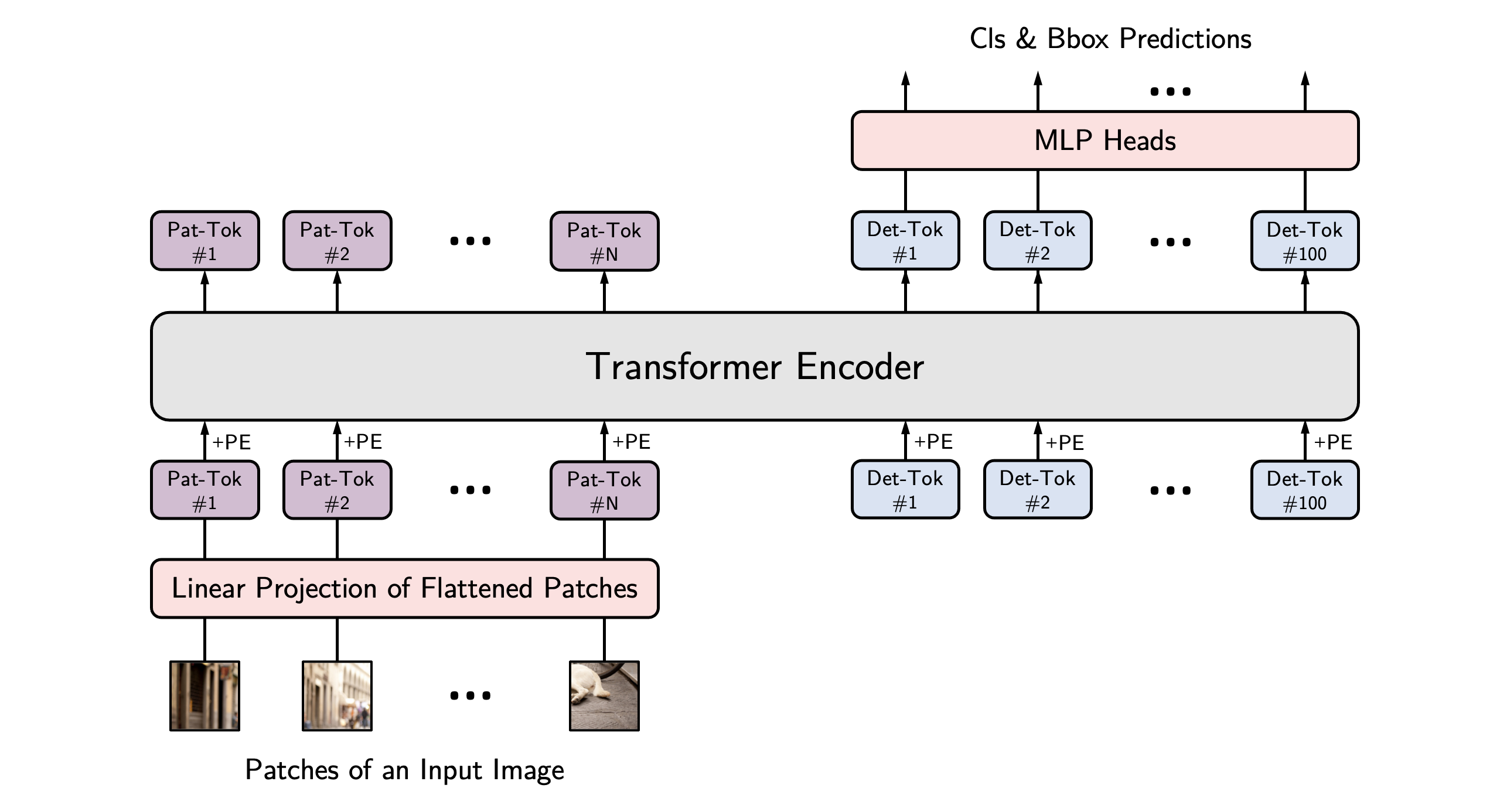 YOLOS architecture. Taken from the original paper.
このモデルは nielsr によって提供されました。 YOLOS をさまざまな物体検出タスクに適用する方法の例については、右側のサイドバーにある YOLOS モデルをクリックしてください。
以下の例では、PipelineまたはAutoModelクラスを使用してオブジェクトを検出する方法を示しています。
from transformers import pipeline


detector = pipeline(
    task="object-detection",
    model="hustvl/yolos-base",
    device=0
)
detector("https://huggingface.co/datasets/Narsil/image_dummy/raw/main/parrots.png")import requests
import torch
from PIL import Image
from transformers import AutoImageProcessor, AutoModelForObjectDetection
processor = AutoImageProcessor.from_pretrained("hustvl/yolos-base")
model = AutoModelForObjectDetection.from_pretrained("hustvl/yolos-base", attn_implementation="sdpa", device_map="auto")
url = "https://huggingface.co/datasets/Narsil/image_dummy/raw/main/parrots.png"
image = Image.open(requests.get(url, stream=True).raw).convert("RGB")
inputs = processor(images=image, return_tensors="pt").to(model.device)
with torch.no_grad():
outputs = model(**inputs)
logits = outputs.logits.softmax(-1)
scores, labels = logits[..., :-1].max(-1)
boxes = outputs.pred_boxes
threshold = 0.3
keep = scores[0] > threshold
filtered_scores = scores[0][keep]
filtered_labels = labels[0][keep]
filtered_boxes = boxes[0][keep]
width, height = image.size
pixel_boxes = filtered_boxes * torch.tensor([width, height, width, height], device=boxes.device)
for score, label, box in zip(filtered_scores, filtered_labels, pixel_boxes):
x0, y0, x1, y1 = box.tolist()
print(f"Label {model.config.id2label[label.item()]}: {score:.2f} at [{x0:.0f}, {y0:.0f}, {x1:.0f}, {y1:.0f}]")注記
- モデル用の画像(および任意のターゲット)の準備には YolosImageProcessor を使用します。DETR とは異なり、YOLOS は
pixel_maskを必要としません。
リソース
- カスタムデータセットでのYolosForObjectDetectionによる推論とファインチューニングについては、これらのノートブックを参照してください。
YolosConfig
クラス transformers.YolosConfig
< source >( transformers_version: str | None = Nonearchitectures: list[str] | None = Noneoutput_hidden_states: bool | None = Falsereturn_dict: bool | None = Truedtype: str | torch.dtype | None = Nonechunk_size_feed_forward: int = 0is_encoder_decoder: bool = Falseid2label: dict[int, str] | dict[str, str] | None = Nonelabel2id: dict[str, int] | dict[str, str] | None = Noneproblem_type: Literal['regression', 'single_label_classification', 'multi_label_classification'] | None = Nonehidden_size: int = 768num_hidden_layers: int = 12num_attention_heads: int = 12intermediate_size: int = 3072hidden_act: str = 'gelu'hidden_dropout_prob: float | int = 0.0attention_probs_dropout_prob: float | int = 0.0initializer_range: float = 0.02layer_norm_eps: float = 1e-12image_size: list[int] | tuple[int, ...] = (512, 864)patch_size: int | list[int] | tuple[int, int] = 16num_channels: int = 3qkv_bias: bool = Truenum_detection_tokens: int = 100use_mid_position_embeddings: bool = Trueauxiliary_loss: bool = Falseclass_cost: int = 1bbox_cost: int = 5giou_cost: int = 2bbox_loss_coefficient: int = 5giou_loss_coefficient: int = 2eos_coefficient: float = 0.1 )
パラメータ
- hidden_size (
int、任意、デフォルトは768) — 隠れ表現の次元数。 - num_hidden_layers (
int、任意、デフォルトは12) — Transformer デコーダーの隠れ層の数。 - num_attention_heads (
int、任意、デフォルトは12) — Transformerデコーダーの各アテンション層におけるアテンションヘッドの数。 - intermediate_size (
int、任意、デフォルトは3072) — MLP 表現の次元数。 - hidden_act (
str、任意、デフォルトはgelu) — デコーダーで使用する非線形活性化関数(関数または文字列)。例えば、"gelu"、"relu"、"silu"など。 - hidden_dropout_prob (
Union[float, int]、任意、デフォルト値は0.0) — embeddings、encoder、pooler 内のすべての全結合層における dropout 確率です。 - attention_probs_dropout_prob (
Union[float, int]、任意、デフォルトは0.0) — アテンション確率のドロップアウト率です。 - initializer_range (
float、任意、デフォルトは0.02) — すべての重み行列を初期化するための truncated_normal_initializer の標準偏差です。 - layer_norm_eps (
float、任意、デフォルトは1e-12) — レイヤーノーマル層で使用する epsilon です。 - image_size (
Union[list[int], tuple[int, ...]]、任意、デフォルトは(512, 864)) — 各画像のサイズ(解像度)です。 - patch_size (
Union[int, list[int], tuple[int, int]]、任意、デフォルトは16) — 各パッチのサイズ(解像度)です。 - num_channels (
int、任意、デフォルトは3) — 入力チャネル数。 - qkv_bias (
bool、省略可、デフォルトはTrue) — クエリ、キー、バリューにバイアスを追加するかどうか。 - num_detection_tokens (
int、任意、デフォルト値は 100) — 検出トークンの数です。 - use_mid_position_embeddings (
bool、任意、デフォルトはTrue) — ミッドレイヤーの位置エンコーディングを使用するかどうか。 - auxiliary_loss (
bool、任意、デフォルトはFalse) — 補助デコーディング損失(各デコーダ層での損失)を使用するかどうかを指定します。 - class_cost (
int、省略可能、デフォルトは1) — ハンガリー法によるマッチングコストにおける、分類誤差の相対的な重み。 - bbox_cost (
int、任意、デフォルトは5) — ハンガリー法によるマッチングコストにおける、L1バウンディングボックス誤差の相対的な重みです。 - giou_cost (
int、任意、デフォルト値は2) — ハンガリー法によるマッチングコストにおける、汎化 IoU ロスの相対的な重み。 - bbox_loss_coefficient (
int、任意、デフォルトは5) — パノプティックセグメンテーション損失における L1 バウンディングボックス損失の相対的な重み。 - giou_loss_coefficient (
int、任意、デフォルトは2) — パノラミックセグメンテーション損失における汎化 IoU 損失の相対的な重み。 - eos_coefficient (
float、任意、デフォルトは0.1) — オブジェクト検出の損失における「no-object」クラスの相対的な分類重み。
これは YolosModel の設定を保存するための設定クラスです。指定された引数に基づいて Yolos モデルをインスタンス化し、モデルのアーキテクチャを定義するために使用されます。デフォルト値で設定をインスタンス化すると、hustvl/yolos-base と同様の設定が得られます。
設定オブジェクトはPreTrainedConfigを継承し、モデルの出力を制御するために使用できます。詳細については、PreTrainedConfigのドキュメントを参照してください。
例:
>>> from transformers import YolosConfig, YolosModel

>>> # Initializing a YOLOS hustvl/yolos-base style configuration
>>> configuration = YolosConfig()

>>> # Initializing a model (with random weights) from the hustvl/yolos-base style configuration
>>> model = YolosModel(configuration)

>>> # Accessing the model configuration
>>> configuration = model.config
YolosImageProcessor
class transformers.YolosImageProcessor
< source >( **kwargs: *<class 'transformers.models.yolos.image_processing_yolos.YolosImageProcessorKwargs'> )
パラメータ
- do_convert_rgb (
bool、kwargs、任意) — 画像を RGB に変換するかどうかを指定します。 - do_resize (
bool、kwargs、任意、デフォルトはTrue) — 画像をリサイズするかどうか。 - size (
Annotated[int | list[int] | tuple[int, ...] | dict[str, int] | None, None], kwargs、デフォルトは{'shortest_edge' -- 800, 'longest_edge': 1333}): モデルへの最大入力サイズを指定します。 - default_to_square (
bool、kwargs、任意、デフォルトはFalse) — size が整数の場合、リサイズ時に正方形の画像をデフォルトとするかどうか。 - crop_size (
Annotated[int | list[int] | tuple[int, ...] | dict[str, int] | None, None], kwargs) —center_cropを適用した後の出力画像のサイズ。 - resample (
Annotated[Union[int, PILImageResampling, NoneType], None], kwargs, デフォルトは2) — 画像のリサイズ時に使用するリサンプリングフィルタです。PILImageResamplingの列挙型のいずれかを使用できます。do_resizeがTrueに設定されている場合のみ、効果が現れます。 - do_rescale (
bool、kwargs、任意、デフォルトはTrue) — 画像をリスケールするかどうかを指定します。 - rescale_factor (
float、kwargs、任意、デフォルト値は0.00392156862745098) —do_rescaleがTrueに設定されている場合、画像をリスケールするための係数です。 - do_normalize (
bool、kwargs、optional、デフォルトはTrue) — 画像を正規化するかどうかを指定します。 - image_mean (
Union[float, list[float], tuple[float, ...]]、kwargs、optional、デフォルト値は[0.485, 0.456, 0.406]) — 正規化に使用する画像の平均値。do_normalizeがTrueに設定されている場合のみ有効です。 - image_std (
Union[float, list[float], tuple[float, ...]]、kwargs、optional、デフォルト値は[0.229, 0.224, 0.225]) — 正規化に使用する画像の標準偏差。do_normalizeがTrueに設定されている場合のみ有効です。 - do_pad (
bool、kwargs、optional、デフォルトはTrue) — 画像をパディングするかどうか。パディングは、バッチ内の最大サイズに合わせるか、画像ごとに固定の正方形サイズに合わせるかのいずれかで行われます。具体的なパディング戦略はモデルによって異なります。 - pad_size (
Annotated[int | list[int] | tuple[int, ...] | dict[str, int] | None, None], kwargs) — 画像をパディングする{"height": int, "width" int}のサイズです。前処理に提供されるすべての画像サイズより大きくなければなりません。pad_sizeが指定されない場合、バッチ内の最大の幅と高さにパディングされます。do_pad=True.の場合のみ適用されます。 - do_center_crop (
bool, kwargs, optional) — 画像を中央クロップするかどうかを指定します。 - data_format (
Union[str, ~image_utils.ChannelDimension]、kwargs、任意) — サポートされているのはChannelDimension.FIRSTのみです。slow processors との互換性のために追加されました。 - input_data_format (
Union[str, ~image_utils.ChannelDimension], kwargs, 省略可) — 入力画像のチャネル次元の形式です。設定されていない場合、入力画像からチャネル次元の形式が推測されます。次のいずれかになります:"channels_first"またはChannelDimension.FIRST: (num_channels, height, width) 形式の画像。"channels_last"またはChannelDimension.LAST: (高さ, 幅, チャネル数) 形式の画像。"none"またはChannelDimension.NONE: (height, width) 形式の画像。
- device (
Annotated[Union[str, torch.device, NoneType], None], kwargs) — 動画を処理するデバイスです。未設定の場合、入力動画からデバイスが推論されます。 - return_tensors (
Annotated[str | ~utils.generic.TensorType | None, None], kwargs) —'pt'に設定されている場合はスタックされたテンソルを返し、それ以外の場合はテンソルのリストを返します。 - disable_grouping (
bool、kwargs、任意) — サイズごとに画像をグループ化してバッチ処理するのではなく、個別に処理するためにグループ化を無効にするかどうか。None の場合、画像が CPU にある場合は True、それ以外の場合は False に設定されます。この選択は、https://github.com/huggingface/transformers/pull/38157 に詳しく記載されている経験則に基づいています。 - image_seq_length (
int、kwargs、任意) — 入力内の各画像に使用される画像トークンの数です。 後方互換性のために追加されましたが、将来のモデルではプロセッサの属性として設定されるべきです。 - format (
str, kwargs, optional, デフォルトはAnnotationFormat.COCO_DETECTION) — アノテーションのデータ形式。“coco_detection” または “coco_panoptic” のいずれかです。 - do_convert_annotations (
bool、kwargs、optional、デフォルトはTrue) — YOLOSモデルが期待する形式にアノテーションを変換するかどうかを制御します。バウンディングボックスを(center_x, center_y, width, height)の形式に変換し、値の範囲を[0, 1]にします。preprocessメソッドのdo_convert_annotationsパラメータによって上書きできます。
YolosImageProcessor イメージプロセッサを構築します。
preprocess
< source >( images: typing.Union[ForwardRef('PIL.Image.Image'), numpy.ndarray, ForwardRef('torch.Tensor'), list['PIL.Image.Image'], list[numpy.ndarray], list['torch.Tensor']]annotations: dict[str, int | str | list[dict]] | list[dict[str, int | str | list[dict]]] | None = Nonereturn_segmentation_masks: bool | None = Nonemasks_path: str | pathlib.Path | None = None**kwargs: *<class 'transformers.models.yolos.image_processing_yolos.YolosImageProcessorKwargs'> ) → ~image_processing_base.BatchFeature
パラメータ
- images (
Union[PIL.Image.Image, numpy.ndarray, torch.Tensor, list[PIL.Image.Image], list[numpy.ndarray], list[torch.Tensor]]) — 前処理対象の画像です。ピクセル値が 0 から 255 の範囲にある単一の画像またはバッチを想定しています。ピクセル値が 0 から 1 の範囲にある画像を渡す場合は、do_rescale=Falseを設定してください。 - annotations (
AnnotationTypeまたはlist[AnnotationType]、省略可) — 画像に適用されるパディングに従って変換するアノテーション。 - return_segmentation_masks (
bool、省略可、デフォルトはself.return_segmentation_masks) — セグメンテーションマスクを返すかどうかを指定します。 - masks_path (
strまたはpathlib.Path、省略可) — セグメンテーションマスクを含むディレクトリへのパス。 - do_convert_rgb (
bool、kwargs、任意) — 画像を RGB に変換するかどうかを指定します。 - do_resize (
bool、kwargs、optional) — 画像をリサイズするかどうか。 - size (
Annotated[int | list[int] | tuple[int, ...] | dict[str, int] | None, None], kwargs) — モデルへの最大入力次元を記述します。 - default_to_square (
bool、kwargs、任意) — サイズが整数の場合、リサイズ時に正方形の画像をデフォルトとするかどうか。 - crop_size (
Annotated[int | list[int] | tuple[int, ...] | dict[str, int] | None, None], kwargs) —center_cropを適用した後の出力画像のサイズ。 - resample (
Annotated[Union[int, PILImageResampling, NoneType], None], kwargs) — 画像のリサイズ時に使用するリサンプリングフィルタ。PILImageResamplingの列挙型のいずれかを使用できます。do_resizeがTrueに設定されている場合のみ有効です。 - do_rescale (
bool、kwargs、optional) — 画像をリスケールするかどうかを指定します。 - rescale_factor (
float、kwargs、任意) —do_rescaleがTrueに設定されている場合、画像をリスケールするための係数。 - do_normalize (
bool, kwargs, optional) — 画像を正規化するかどうかを指定します。 - image_mean (
Union[float, list[float], tuple[float, ...]]、kwargs、optional) — 正規化に使用する画像の平均値。do_normalizeがTrueに設定されている場合のみ有効です。 - image_std (
Union[float, list[float], tuple[float, ...]], kwargs, optional) — 正規化に使用する画像の標準偏差。do_normalizeがTrueに設定されている場合のみ有効です。 - do_pad (
bool, kwargs, optional) — 画像をパディングするかどうかを指定します。パディングは、バッチ内の最大サイズに合わせるか、画像ごとに固定の正方形サイズに合わせるかのいずれかで行われます。具体的なパディング戦略はモデルによって異なります。 - pad_size (
Annotated[int | list[int] | tuple[int, ...] | dict[str, int] | None, None], kwargs) — 画像をパディングする{"height": int, "width" int}のサイズです。前処理に提供されるすべての画像サイズより大きくなければなりません。pad_sizeが指定されない場合、バッチ内の最大の幅と高さにパディングされます。do_pad=True.の場合のみ適用されます。 - do_center_crop (
bool, kwargs, optional) — 画像を中央クロップするかどうかを指定します。 - data_format (
Union[str, ~image_utils.ChannelDimension]、kwargs、任意) — サポートされているのはChannelDimension.FIRSTのみです。slow processors との互換性のために追加されました。 - input_data_format (
Union[str, ~image_utils.ChannelDimension], kwargs, 省略可) — 入力画像のチャネル次元の形式です。設定されていない場合、入力画像からチャネル次元の形式が推測されます。次のいずれかになります:"channels_first"またはChannelDimension.FIRST: (num_channels, height, width) 形式の画像。"channels_last"またはChannelDimension.LAST: (高さ, 幅, チャネル数) 形式の画像。"none"またはChannelDimension.NONE: (height, width) 形式の画像。
- device (
Annotated[Union[str, torch.device, NoneType], None], kwargs) — 動画を処理するデバイスです。未設定の場合、入力動画からデバイスが推論されます。 - return_tensors (
Annotated[str | ~utils.generic.TensorType | None, None], kwargs) —'pt'に設定されている場合はスタックされたテンソルを返し、それ以外の場合はテンソルのリストを返します。 - disable_grouping (
bool、kwargs、任意) — サイズごとに画像をグループ化してバッチ処理するのではなく、個別に処理するためにグループ化を無効にするかどうか。None の場合、画像が CPU にある場合は True、それ以外の場合は False に設定されます。この選択は、https://github.com/huggingface/transformers/pull/38157 に詳しく記載されている経験則に基づいています。 - image_seq_length (
int、kwargs、任意) — 入力内の各画像に使用される画像トークンの数です。 後方互換性のために追加されましたが、将来のモデルではプロセッサの属性として設定されるべきです。 - format (
str, kwargs, optional, デフォルトはAnnotationFormat.COCO_DETECTION) — アノテーションのデータ形式。“coco_detection” または “coco_panoptic” のいずれかです。 - do_convert_annotations (
bool、kwargs、optional、デフォルトはTrue) — YOLOSモデルが期待する形式にアノテーションを変換するかどうかを制御します。バウンディングボックスを(center_x, center_y, width, height)の形式に変換し、範囲を[0, 1]にします。preprocessメソッドのdo_convert_annotationsパラメータによって上書きできます。
戻り値
~image_processing_base.BatchFeature
- data (
dict) — call メソッド(‘pixel_values’ など)によって返される、リスト/配列/テンソルの辞書。 - tensor_type (
Union[None, str, TensorType]、省略可) — 初期化時に PyTorch/Numpy の Tensor 内の整数リストを変換するために、ここで tensor_type を指定できます。
YolosImageProcessorPil
class transformers.YolosImageProcessorPil
< source >( **kwargs: *<class 'transformers.models.yolos.image_processing_pil_yolos.YolosImageProcessorKwargs'> )
パラメータ
- do_convert_rgb (
bool、kwargs、任意) — 画像を RGB に変換するかどうかを指定します。 - do_resize (
bool、kwargs、任意、デフォルトはTrue) — 画像をリサイズするかどうか。 - size (
Annotated[int | list[int] | tuple[int, ...] | dict[str, int] | None, None], kwargs、デフォルトは{'shortest_edge' -- 800, 'longest_edge': 1333}): モデルへの最大入力サイズを指定します。 - default_to_square (
bool、kwargs、任意、デフォルトはFalse) — size が整数の場合、リサイズ時に正方形の画像をデフォルトとするかどうか。 - crop_size (
Annotated[int | list[int] | tuple[int, ...] | dict[str, int] | None, None], kwargs) —center_cropを適用した後の出力画像のサイズ。 - resample (
Annotated[Union[int, PILImageResampling, NoneType], None], kwargs, デフォルトは2) — 画像のリサイズ時に使用するリサンプリングフィルタです。PILImageResamplingの列挙型のいずれかを使用できます。do_resizeがTrueに設定されている場合のみ、効果が現れます。 - do_rescale (
bool、kwargs、任意、デフォルトはTrue) — 画像をリスケールするかどうかを指定します。 - rescale_factor (
float、kwargs、任意、デフォルト値は0.00392156862745098) —do_rescaleがTrueに設定されている場合、画像をリスケールするための係数です。 - do_normalize (
bool、kwargs、optional、デフォルトはTrue) — 画像を正規化するかどうかを指定します。 - image_mean (
Union[float, list[float], tuple[float, ...]]、kwargs、optional、デフォルト値は[0.485, 0.456, 0.406]) — 正規化に使用する画像の平均値。do_normalizeがTrueに設定されている場合のみ有効です。 - image_std (
Union[float, list[float], tuple[float, ...]]、kwargs、optional、デフォルト値は[0.229, 0.224, 0.225]) — 正規化に使用する画像の標準偏差。do_normalizeがTrueに設定されている場合のみ有効です。 - do_pad (
bool、kwargs、optional、デフォルトはTrue) — 画像をパディングするかどうか。パディングは、バッチ内の最大サイズに合わせるか、画像ごとに固定の正方形サイズに合わせるかのいずれかで行われます。具体的なパディング戦略はモデルによって異なります。 - pad_size (
Annotated[int | list[int] | tuple[int, ...] | dict[str, int] | None, None], kwargs) — 画像をパディングする{"height": int, "width" int}のサイズです。前処理に提供されるすべての画像サイズより大きくなければなりません。pad_sizeが指定されない場合、バッチ内の最大の幅と高さにパディングされます。do_pad=True.の場合のみ適用されます。 - do_center_crop (
bool, kwargs, optional) — 画像を中央クロップするかどうかを指定します。 - data_format (
Union[str, ~image_utils.ChannelDimension]、kwargs、任意) — サポートされているのはChannelDimension.FIRSTのみです。slow processors との互換性のために追加されました。 - input_data_format (
Union[str, ~image_utils.ChannelDimension], kwargs, 省略可) — 入力画像のチャネル次元の形式です。設定されていない場合、入力画像からチャネル次元の形式が推測されます。次のいずれかになります:"channels_first"またはChannelDimension.FIRST: (num_channels, height, width) 形式の画像。"channels_last"またはChannelDimension.LAST: (高さ, 幅, チャネル数) 形式の画像。"none"またはChannelDimension.NONE: (height, width) 形式の画像。
- device (
Annotated[Union[str, torch.device, NoneType], None], kwargs) — 動画を処理するデバイスです。未設定の場合、入力動画からデバイスが推論されます。 - return_tensors (
Annotated[str | ~utils.generic.TensorType | None, None], kwargs) —'pt'に設定されている場合はスタックされたテンソルを返し、それ以外の場合はテンソルのリストを返します。 - disable_grouping (
bool、kwargs、任意) — サイズごとに画像をグループ化してバッチ処理するのではなく、個別に処理するためにグループ化を無効にするかどうか。None の場合、画像が CPU にある場合は True、それ以外の場合は False に設定されます。この選択は、https://github.com/huggingface/transformers/pull/38157 に詳しく記載されている経験則に基づいています。 - image_seq_length (
int、kwargs、任意) — 入力内の各画像に使用される画像トークンの数です。 後方互換性のために追加されましたが、将来のモデルではプロセッサの属性として設定されるべきです。 - format (
str, kwargs, optional, デフォルトはAnnotationFormat.COCO_DETECTION) — アノテーションのデータ形式。“coco_detection” または “coco_panoptic” のいずれかです。 - do_convert_annotations (
bool、kwargs、optional、デフォルトはTrue) — YOLOS モデルが期待する形式にアノテーションを変換するかどうかを制御します。バウンディングボックスを(center_x, center_y, width, height)の形式に変換し、値の範囲を[0, 1]にします。preprocessメソッドのdo_convert_annotationsパラメータによって上書きできます。
YolosImageProcessor イメージプロセッサを構築します。
preprocess
< source >( images: typing.Union[ForwardRef('PIL.Image.Image'), numpy.ndarray, ForwardRef('torch.Tensor'), list['PIL.Image.Image'], list[numpy.ndarray], list['torch.Tensor']]annotations: dict[str, int | str | list[dict]] | list[dict[str, int | str | list[dict]]] | None = Nonereturn_segmentation_masks: bool | None = Nonemasks_path: str | pathlib.Path | None = None**kwargs: *<class 'transformers.models.yolos.image_processing_pil_yolos.YolosImageProcessorKwargs'> ) → ~image_processing_base.BatchFeature
パラメータ
- images (
Union[PIL.Image.Image, numpy.ndarray, torch.Tensor, list[PIL.Image.Image], list[numpy.ndarray], list[torch.Tensor]]) — 前処理対象の画像です。ピクセル値が 0 から 255 の範囲にある単一の画像またはバッチを想定しています。ピクセル値が 0 から 1 の範囲にある画像を渡す場合は、do_rescale=Falseを設定してください。 - annotations (
AnnotationTypeまたはlist[AnnotationType]、省略可) — 画像に適用されるパディングに従って変換するアノテーション。 - return_segmentation_masks (
bool、省略可、デフォルトはself.return_segmentation_masks) — セグメンテーションマスクを返すかどうかを指定します。 - masks_path (
strまたはpathlib.Path、省略可) — セグメンテーションマスクを含むディレクトリへのパス。 - do_convert_rgb (
bool、kwargs、任意) — 画像を RGB に変換するかどうかを指定します。 - do_resize (
bool、kwargs、optional) — 画像をリサイズするかどうか。 - size (
Annotated[int | list[int] | tuple[int, ...] | dict[str, int] | None, None], kwargs) — モデルへの最大入力次元を記述します。 - default_to_square (
bool、kwargs、任意) — サイズが整数の場合、リサイズ時に正方形の画像をデフォルトとするかどうか。 - crop_size (
Annotated[int | list[int] | tuple[int, ...] | dict[str, int] | None, None], kwargs) —center_cropを適用した後の出力画像のサイズ。 - resample (
Annotated[Union[int, PILImageResampling, NoneType], None], kwargs) — 画像のリサイズ時に使用するリサンプリングフィルタ。PILImageResamplingの列挙型のいずれかを使用できます。do_resizeがTrueに設定されている場合のみ有効です。 - do_rescale (
bool、kwargs、optional) — 画像をリスケールするかどうかを指定します。 - rescale_factor (
float、kwargs、任意) —do_rescaleがTrueに設定されている場合、画像をリスケールするための係数。 - do_normalize (
bool, kwargs, optional) — 画像を正規化するかどうかを指定します。 - image_mean (
Union[float, list[float], tuple[float, ...]]、kwargs、optional) — 正規化に使用する画像の平均値。do_normalizeがTrueに設定されている場合のみ有効です。 - image_std (
Union[float, list[float], tuple[float, ...]], kwargs, optional) — 正規化に使用する画像の標準偏差。do_normalizeがTrueに設定されている場合のみ有効です。 - do_pad (
bool, kwargs, optional) — 画像をパディングするかどうかを指定します。パディングは、バッチ内の最大サイズに合わせるか、画像ごとに固定の正方形サイズに合わせるかのいずれかで行われます。具体的なパディング戦略はモデルによって異なります。 - pad_size (
Annotated[int | list[int] | tuple[int, ...] | dict[str, int] | None, None], kwargs) — 画像をパディングする{"height": int, "width" int}のサイズです。前処理に提供されるすべての画像サイズより大きくなければなりません。pad_sizeが指定されない場合、バッチ内の最大の幅と高さにパディングされます。do_pad=True.の場合のみ適用されます。 - do_center_crop (
bool, kwargs, optional) — 画像を中央クロップするかどうかを指定します。 - data_format (
Union[str, ~image_utils.ChannelDimension]、kwargs、任意) — サポートされているのはChannelDimension.FIRSTのみです。slow processors との互換性のために追加されました。 - input_data_format (
Union[str, ~image_utils.ChannelDimension], kwargs, 省略可) — 入力画像のチャネル次元の形式です。設定されていない場合、入力画像からチャネル次元の形式が推測されます。次のいずれかになります:"channels_first"またはChannelDimension.FIRST: (num_channels, height, width) 形式の画像。"channels_last"またはChannelDimension.LAST: (高さ, 幅, チャネル数) 形式の画像。"none"またはChannelDimension.NONE: (height, width) 形式の画像。
- device (
Annotated[Union[str, torch.device, NoneType], None], kwargs) — 動画を処理するデバイスです。未設定の場合、入力動画からデバイスが推論されます。 - return_tensors (
Annotated[str | ~utils.generic.TensorType | None, None], kwargs) —'pt'に設定されている場合はスタックされたテンソルを返し、それ以外の場合はテンソルのリストを返します。 - disable_grouping (
bool、kwargs、任意) — サイズごとに画像をグループ化してバッチ処理するのではなく、個別に処理するためにグループ化を無効にするかどうか。None の場合、画像が CPU にある場合は True、それ以外の場合は False に設定されます。この選択は、https://github.com/huggingface/transformers/pull/38157 に詳しく記載されている経験則に基づいています。 - image_seq_length (
int、kwargs、任意) — 入力内の各画像に使用される画像トークンの数です。 後方互換性のために追加されましたが、将来のモデルではプロセッサの属性として設定されるべきです。 - format (
str, kwargs, optional, デフォルトはAnnotationFormat.COCO_DETECTION) — アノテーションのデータ形式。“coco_detection” または “coco_panoptic” のいずれかです。 - do_convert_annotations (
bool、kwargs、optional、デフォルトはTrue) — YOLOSモデルが期待する形式にアノテーションを変換するかどうかを制御します。バウンディングボックスを(center_x, center_y, width, height)の形式に変換し、値の範囲を[0, 1]にします。preprocessメソッドのdo_convert_annotationsパラメータによって上書きできます。
戻り値
~image_processing_base.BatchFeature
- data (
dict) — call メソッド(‘pixel_values’ など)によって返される、リスト/配列/テンソルの辞書。 - tensor_type (
Union[None, str, TensorType]、省略可) — 初期化時に PyTorch/Numpy の Tensor 内の整数リストを変換するために、ここで tensor_type を指定できます。
pad
< source >( image: ndarraypadded_size: tupleannotation: dict[str, typing.Any] | None = Noneupdate_bboxes: bool = Truefill: int = 0 )
post_process_object_detection
< source >( outputsthreshold: float = 0.5target_sizes: transformers.utils.generic.TensorType | list[tuple] = None ) → list[Dict]
パラメータ
- outputs (
YolosObjectDetectionOutput) — モデルの生出力です。 - threshold (
float, 任意) — オブジェクト検出の予測を保持するためのスコアしきい値。 - target_sizes (
torch.Tensorまたはlist[tuple[int, int]]、任意) —(batch_size, 2)の形状を持つ Tensor、または各画像のターゲットサイズ(height, width)を含むタプルのリスト (tuple[int, int])。 未設定の場合、予測結果はリサイズされません。
戻り値
list[Dict]
モデルが予測したバッチ内の各画像のスコア、ラベル、ボックスを含む辞書のリスト
YolosForObjectDetectionの生出力を、(top_left_x, top_left_y, bottom_right_x, bottom_right_y)形式の最終的なバウンディングボックスに変換します。PyTorchのみサポートしています。
YolosModel
クラス transformers.YolosModel
< source >( config: YolosConfigadd_pooling_layer: bool = True )
パラメータ
- config (YolosConfig) — モデルのすべてのパラメータを含むモデル設定クラスです。設定ファイルで初期化しても、モデルに関連付けられた重みは読み込まれず、設定のみが読み込まれます。モデルの重みをロードするには、from_pretrained() メソッドを参照してください。
- add_pooling_layer (
bool、省略可、デフォルトはTrue) — プーリング層を追加するかどうか
Yolosのベースモデル。特定のヘッドを付加せず、生のhidden-statesを出力します。
このモデルは PreTrainedModel を継承しています。すべてのモデルに実装されている汎用的なメソッド(ダウンロードや保存、入力埋め込みのリサイズ、ヘッドのプルーニングなど)については、スーパークラスのドキュメントを参照してください。
このモデルは、PyTorchのtorch.nn.Moduleのサブクラスでもあります。 通常のPyTorch Moduleとして使用し、一般的な使用方法や動作に関する詳細については、PyTorchのドキュメントを参照してください。
forward
< source >( pixel_values: typing.Optional[torch.Tensor] = None**kwargs: *<class 'transformers.utils.generic.TransformersKwargs'> ) → BaseModelOutputWithPooling or tuple(torch.FloatTensor)
パラメータ
- pixel_values (
torch.Tensor、形状(batch_size, num_channels, image_size, image_size)、任意) — 入力画像に対応するテンソルです。ピクセル値は YolosImageProcessor を使用して取得できます。詳細については YolosImageProcessor.call() を参照してください(processor_classは画像の処理に YolosImageProcessor を使用します)。
戻り値
BaseModelOutputWithPooling または tuple(torch.FloatTensor)
torch.FloatTensor のタプル(return_dict=False が渡された場合、または config.return_dict=False の場合)、または BaseModelOutputWithPooling。設定(YolosConfig)や入力に応じて、さまざまな要素で構成されます。
YolosModelのforwardメソッドは、__call__特殊メソッドをオーバーライドします。
この関数内でフォワードパスの手順を定義する必要がありますが、その後、この関数ではなく
Moduleインスタンスを呼び出すべきです。前者は前処理と後処理の実行を適切に処理するのに対し、後者はそれらを黙って無視するためです。
last_hidden_state (
torch.FloatTensor、shape(batch_size, sequence_length, hidden_size)) — モデルの最終層の出力における隠れ状態のシーケンス。pooler_output (
torch.FloatTensor、shape(batch_size, hidden_size)) — 補助事前学習タスクに使用される層をさらに通して処理された後、シーケンスの最初のトークン(分類トークン)の最終層の隠れ状態。例えば、BERT 系のモデルでは、線形層と tanh 活性化関数を経て処理された後の分類トークンを返します。この線形層の重みは、事前学習中の次文予測(分類)目的から学習されます。hidden_states (
tuple(torch.FloatTensor)、optional、output_hidden_states=Trueが渡された場合またはconfig.output_hidden_states=Trueの場合に返されます)—torch.FloatTensorのタプル(埋め込み層を持つモデルの場合、埋め込みの出力が 1 つ、各層の出力がそれぞれ 1 つずつ)で、形状は(batch_size, sequence_length, hidden_size)です。各層の出力におけるモデルのHidden-states、および任意の初期埋め込み出力。
attentions (
tuple(torch.FloatTensor)、optional、output_attentions=Trueが渡された場合またはconfig.output_attentions=Trueの場合に返されます)—torch.FloatTensorのタプル(各レイヤーごとに1つ)、形状は(batch_size, num_heads, sequence_length, sequence_length)。アテンションのsoftmax後のアテンション重み。自己アテンションヘッド内で加重平均を計算するために使用されます。
YolosForObjectDetection
クラス transformers.YolosForObjectDetection
< source >( config: YolosConfig )
パラメータ
- config (YolosConfig) — モデルのパラメータをすべて含むモデル設定クラスです。設定ファイルで初期化しても、モデルに関連する重みは読み込まれず、設定のみが読み込まれます。モデルの重みをロードするには、from_pretrained() メソッドを参照してください。
YOLOSモデル(ViTエンコーダーで構成)の上部にオブジェクト検出ヘッドを備え、COCO検出などのタスクに対応します。
このモデルは PreTrainedModel を継承しています。すべてのモデルに実装されている汎用的なメソッド(ダウンロードや保存、入力埋め込みのリサイズ、ヘッドのプルーニングなど)については、スーパークラスのドキュメントを参照してください。
このモデルは、PyTorchのtorch.nn.Moduleのサブクラスでもあります。 通常のPyTorch Moduleとして使用し、一般的な使用方法や動作に関する詳細については、PyTorchのドキュメントを参照してください。
forward
< source >( pixel_values: FloatTensorlabels: list[dict] | None = None**kwargs: *<class 'transformers.utils.generic.TransformersKwargs'> ) → YolosObjectDetectionOutput or tuple(torch.FloatTensor)
パラメータ
- pixel_values (
torch.FloatTensor、shape(batch_size, num_channels, image_size, image_size)) — 入力画像に対応するテンソルです。ピクセル値は YolosImageProcessor を使用して取得できます。詳細は YolosImageProcessor.call() を参照してください(processor_classは画像の処理に YolosImageProcessor を使用します)。 - labels (
list[Dict]、長さ(batch_size,)、任意) — 二部マッチング損失を計算するためのラベルです。辞書のリストで、各辞書には少なくとも以下の 2 つのキーが含まれます: ‘class_labels’ と ‘boxes’ (それぞれバッチ内の画像のクラスラベルとバウンディングボックスです)。クラスラベル自体は長さ(number of bounding boxes in the image,)のtorch.LongTensorであり、ボックスは形状(number of bounding boxes in the image, 4)のtorch.FloatTensorである必要があります。
戻り値
YolosObjectDetectionOutput または tuple(torch.FloatTensor)
YolosObjectDetectionOutput、またはtorch.FloatTensorのタプル(return_dict=Falseが渡された場合、またはconfig.return_dict=Falseの場合)。設定(YolosConfig)や入力に応じて、さまざまな要素で構成されます。
YolosForObjectDetectionのforwardメソッドは、__call__特殊メソッドをオーバーライドします。
この関数内でフォワードパスの手順を定義する必要がありますが、その後、この関数ではなく
Moduleインスタンスを呼び出すべきです。前者は前処理と後処理の実行を適切に処理するのに対し、後者はそれらを黙って無視するためです。
loss (
torch.FloatTensor、shape(1,)、optional、labelsが提供された場合に返されます) — クラス予測の負の対数尤度(クロスエントロピー)とバウンディングボックス損失の線形結合による総損失です。後者は、L1損失と汎用スケール不変IoU損失の線形結合として定義されます。loss_dict (
Dict, 任意) — 個別の損失を含む辞書です。ログ出力に便利です。logits (
torch.FloatTensor、shape(batch_size, num_queries, num_classes + 1)) — すべてのクエリに対する分類 logits(no-object を含む)。pred_boxes (
torch.FloatTensor、shape(batch_size, num_queries, 4)) — すべてのクエリに対する正規化されたボックス座標で、(center_x, center_y, width, height) として表されます。これらの値は、バッチ内の各画像のサイズに対して [0, 1] の範囲で正規化されています(パディングは考慮されません)。正規化されていないバウンディングボックスを取得するには、~YolosImageProcessor.post_processを使用できます。auxiliary_outputs (
list[Dict]、optional) — オプション。補助損失が有効化されている場合(つまりconfig.auxiliary_lossがTrueに設定されている場合)かつラベルが提供されている場合にのみ返されます。各デコーダ層について、上記の2つのキー(logitsとpred_boxes)を含む辞書のリストです。last_hidden_state (
torch.FloatTensor、shape(batch_size, sequence_length, hidden_size)、optional) — モデルのデコーダーの最終層の出力における、隠れ状態のシーケンス。hidden_states (
tuple[torch.FloatTensor]、optional、output_hidden_states=Trueが渡された場合またはconfig.output_hidden_states=Trueの場合に返される) —torch.FloatTensorのタプル(埋め込み層を持つモデルの場合、埋め込みの出力用が 1 つ、各層の出力用が 1 つずつ)で、形状は(batch_size, sequence_length, hidden_size)です。各層の出力におけるモデルのHidden-states、および任意の初期埋め込み出力。
attentions (
tuple[torch.FloatTensor]、optional、output_attentions=Trueが渡された場合またはconfig.output_attentions=Trueの場合に返されます) —torch.FloatTensorのタプル(各レイヤーごとに1つ)、形状は(batch_size, num_heads, sequence_length, sequence_length)。アテンションのsoftmax後のアテンション重み。自己アテンションヘッド内で加重平均を計算するために使用されます。
例:
>>> from transformers import AutoImageProcessor, AutoModelForObjectDetection
>>> import torch
>>> from PIL import Image
>>> from huggingface_hub.utils import httpx
>>> from io import BytesIO

>>> url = "http://images.cocodataset.org/val2017/000000039769.jpg"
>>> with httpx.stream("GET", url) as response:
...     image = Image.open(BytesIO(response.read()))

>>> image_processor = AutoImageProcessor.from_pretrained("hustvl/yolos-tiny")
>>> model = AutoModelForObjectDetection.from_pretrained("hustvl/yolos-tiny")

>>> inputs = image_processor(images=image, return_tensors="pt")
>>> outputs = model(**inputs)

>>> # convert outputs (bounding boxes and class logits) to Pascal VOC format (xmin, ymin, xmax, ymax)
>>> target_sizes = torch.tensor([image.size[::-1]])
>>> results = image_processor.post_process_object_detection(outputs, threshold=0.9, target_sizes=target_sizes)[
...     0
... ]

>>> for score, label, box in zip(results["scores"], results["labels"], results["boxes"]):
...     box = [round(i, 2) for i in box.tolist()]
...     print(
...         f"Detected {model.config.id2label[label.item()]} with confidence "
...         f"{round(score.item(), 3)} at location {box}"
...     )
Detected remote with confidence 0.991 at location [46.48, 72.78, 178.98, 119.3]
Detected remote with confidence 0.908 at location [336.48, 79.27, 368.23, 192.36]
Detected cat with confidence 0.934 at location [337.18, 18.06, 638.14, 373.09]
Detected cat with confidence 0.979 at location [10.93, 53.74, 313.41, 470.67]
Detected remote with confidence 0.974 at location [41.63, 72.23, 178.09, 119.99]